2021 FORD TRANSIT light
[x] Cancel search: lightPage 321 of 509
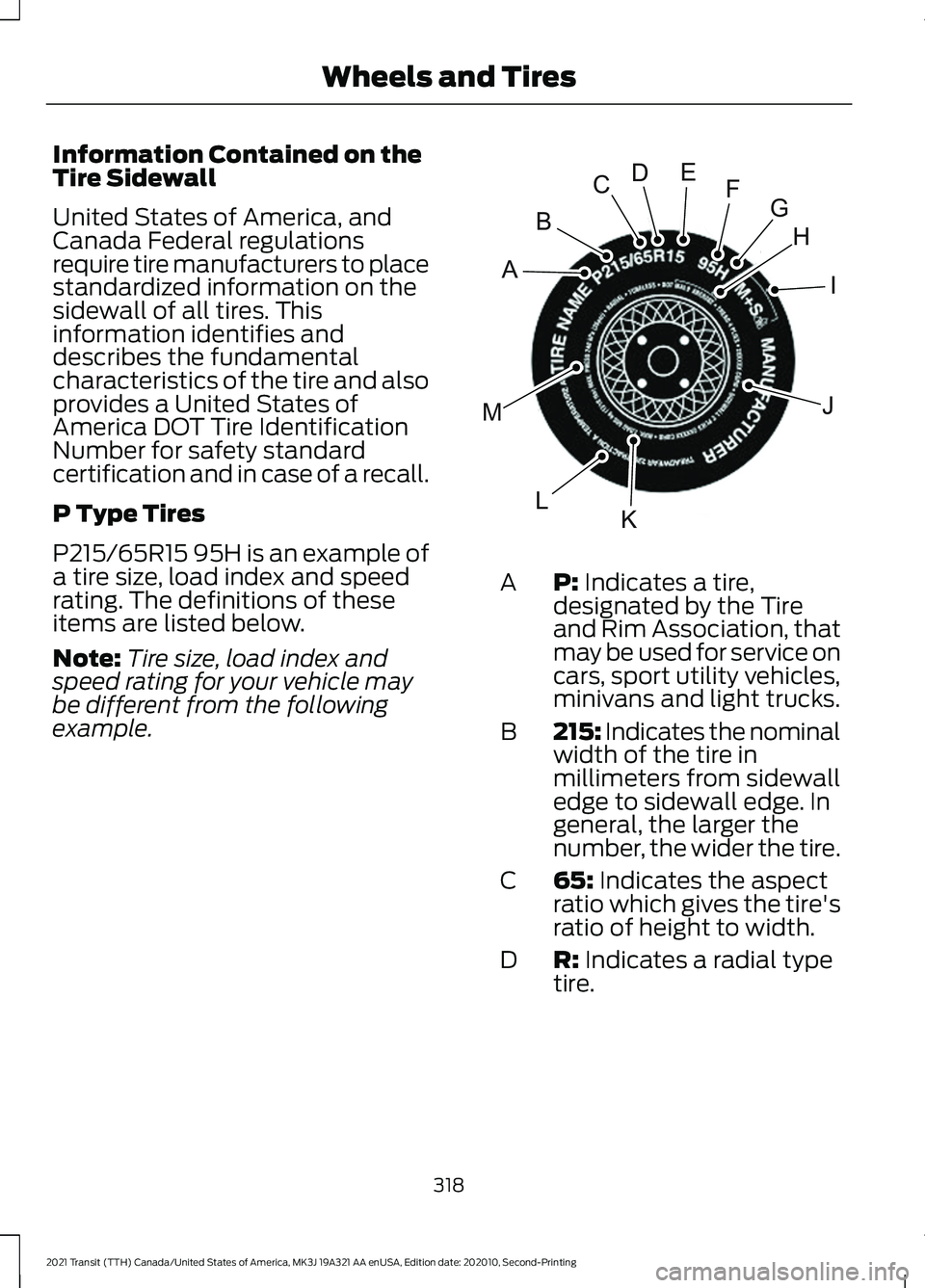
Information Contained on the
Tire Sidewall
United States of America, and
Canada Federal regulations
require tire manufacturers to place
standardized information on the
sidewall of all tires. This
information identifies and
describes the fundamental
characteristics of the tire and also
provides a United States of
America DOT Tire Identification
Number for safety standard
certification and in case of a recall.
P Type Tires
P215/65R15 95H is an example of
a tire size, load index and speed
rating. The definitions of these
items are listed below.
Note:
Tire size, load index and
speed rating for your vehicle may
be different from the following
example. P: Indicates a tire,
designated by the Tire
and Rim Association, that
may be used for service on
cars, sport utility vehicles,
minivans and light trucks.
A
215: Indicates the nominal
width of the tire in
millimeters from sidewall
edge to sidewall edge. In
general, the larger the
number, the wider the tire.
B
65:
Indicates the aspect
ratio which gives the tire's
ratio of height to width.
C
R:
Indicates a radial type
tire.
D
318
2021 Transit (TTH) Canada/United States of America, MK3J 19A321 AA enUSA, Edition date: 202010, Second-Printing Wheels and TiresH
I
J
KL
M
A
B
CDEFGE142543
Page 325 of 509

T: Indicates a type of tire,
designated by the Tire
and Rim Association, that
is intended for temporary
service on cars,
sport-utility vehicles,
minivans and light trucks.
A
145:
Indicates the
nominal width of the tire
in millimeters from
sidewall edge to sidewall
edge. In general, the larger
the number, the wider the
tire.
B 80:
Indicates the aspect
ratio which gives the tire's
ratio of height to width.
Numbers of 70 or lower
indicate a short sidewall.
C
D:
Indicates a diagonal
type tire. R: Indicates a
radial type tire.
D
16:
Indicates the wheel or
rim diameter in inches. If
you change the wheel
size, you will have to
purchase new tires to
match the new wheel
diameter.
E
Additional Information for LT
Type Tires
LT235/85 R16 is an example of a
tire size. LT type tires have some
additional information beyond
those of P type tires. The
definitions of these items are
listed below.
Note: Tire Quality Grades do not
apply to this type of tire.
322
2021 Transit (TTH) Canada/United States of America, MK3J 19A321 AA enUSA, Edition date: 202010, Second-Printing Wheels and TiresA
BCDEE142545
Page 326 of 509

LT: Indicates a tire,
designated by the Tire
and Rim Association
(T&RA), that is intended
for service on light trucks.
A
Load Range and Load
Inflation Limits:
Indicates the tire's
load-carrying capabilities
and its inflation limits.
B Maximum Load Dual lb
(kg) at psi (kPa) cold:
Indicates the maximum
load and tire pressure
when the tire is used as a
dual, defined as four tires
on the rear axle (a total of
six or more tires on the
vehicle).
C
Maximum Load Single
lb (kg) at psi (kPa)
cold:
Indicates the
maximum load and tire
pressure when the tire is
used as a single, defined
as two tires (total) on the
rear axle.
D
Additional Information for
ETRTO Euro-Metric
Commercial Vehicle Tires
Euro-metric commercial vehicle
tires end in the letter "C" (for
example, 235/65R16
C). The "C"
does not signify the tire's Load
Range like the T&RA LT tire
dimension (for example,
LT245/75R17
E).
Tire Load Capacities are identified
by the Single/Dual Load indexes
that follow the tire size on the
tire's sidewall (for example,
235/65R16C
121/119).
Note: Tire Quality Grades do not
apply to this type of tire.
323
2021 Transit (TTH) Canada/United States of America, MK3J 19A321 AA enUSA, Edition date: 202010, Second-Printing Wheels and TiresA
BC
BDE142544
Page 341 of 509

Action
Description
Warning lamp
1. Make sure tires are at the correctpressure. See Wheels and Tires
(page 311). The tire pressures are also
on the tire inflation pressure label
(located on the edge of driver door
or the B-Pillar).
2. After inflating the tires to the correct
pressure you must carry out the tire
pressure monitoring system reset
procedure.
Tire(s) under-inflated.
Solid warning lamp.
Repair the damaged road wheel and tire
and refit the repaired road wheel and tire
assembly to your vehicle to restore the
correct operation of the system.
Spare tire in use.
If the tires are correctly inflated and the
spare tire is not in use but the light
remains on, the system has detected a
fault that requires service.
Tire pressure monitoring
system malfunction.
Repair the damaged road wheel and tire
and refit the repaired road wheel and tire
assembly to your vehicle to restore the
correct operation of the system.
Spare tire in use.
Solid warning lamp
initially followed by
a flashing warning
lamp.
If the tires are correctly inflated and the
spare tire is not in use but the light
remains on, the system has detected a
fault that requires service.
Tire pressure monitoring
system malfunction.
338
2021 Transit (TTH) Canada/United States of America, MK3J 19A321 AA enUSA, Edition date: 202010, Second-Printing Wheels and Tires
Page 342 of 509

Tire Pressure Monitoring System
Reset Procedure
Overview
WARNING: To determine the
required pressure(s) for your vehicle, see
the Safety Compliance Certification
Label (on the door hinge pillar,
door-latch post or the door edge that
meets the door-latch post, next to the
driver seat) or the Tire Label on the
B-Pillar or the edge of the driver door.
You must carry out the system reset
procedure after each tire replacement or
adjustment of the tire pressures. To maintain your vehicle load carrying
capability, your vehicle requires different
tire pressures in the front tires compared
to the rear tires.
The system illuminates the warning lamp
at different pressures for the front and rear
tires.
If the tires are rotated, the Tire Pressure
Monitoring System needs to be reset to
relearn the new tire pressures. It does not
know which sensor is where and assumes
you have set the pressures correctly.
Carrying Out the System Reset
Procedure
Switch the ignition on. Using the
information display control select: Action
Message
Press the
OK button.
Settings
Press the
OK button.
Driver assist
Press and hold the
OK button until a confirmation message
appears in the information display. Alternatively, if your
vehicle has a tire pressure monitoring system reset button,
press and hold the button until a confirmation message
appears in the information display.
Tire Monitor
CHANGING A ROAD WHEEL WARNING:
If the tire pressure
monitor sensor becomes damaged it
may not function.
Note: : The use of tire sealants can damage
the tire pressure monitoring system. Note:
The tire pressure monitoring system
indicator light will illuminate when the spare
tire is in use. To restore the full function of
the monitoring system, all road wheels
equipped with tire pressure monitoring
sensors must be mounted on this vehicle.
If you get a flat tire while driving, do not
apply the brake heavily. Instead, gradually
decrease your speed. Hold the steering
wheel firmly and slowly move to a safe
place on the side of the road.
339
2021 Transit (TTH) Canada/United States of America, MK3J 19A321 AA enUSA, Edition date: 202010, Second-Printing Wheels and Tires
Page 416 of 509

HD Radio technology is the digital
evolution of analog AM/FM radio. Your
system has a special receiver that allows
it to receive digital broadcasts (where
available) in addition to the analog
broadcasts, it already receives. Digital
broadcasts provide a better sound quality
than analog broadcasts with free,
crystal-clear audio and no static or
distortion. For more information, and a
guide to available stations and
programming, please visit:
Website
www.hdradio.com
When HD Radio is on and you tune to a
station broadcasting HD Radio technology,
you may notice the following indicators on
your screen: The HD logo is grey when acquiring a digital
station, and then changes to orange when
digital audio is playing. When this logo is
available, you may also see Title and Artist
fields on-screen.
The multicast indicator appears in FM
mode (only) if the current station is
broadcasting multiple digital broadcasts.
The highlighted numbers signify available
digital channels where new or different
content is available. HD1 signifies the main
programming status and is available in
analog and digital broadcasts. Other
multicast stations (HD2 through HD7) are
only available digitally.
Note:
There is also an additional feature
for stations that have more than 1 HD
multicast (For example, HD1 or HD2). The
HD logo and Radio text appears as a button.
Pressing this button allows you to cycle
through all of the HD stations on that
specific frequency. For example, if you are
on 101.1 and it has HD1, HD2, HD3, pressing
the button repeatedly causes the radio to
cycle through the HD stations in a cyclic
increasing order.
When HD Radio broadcasts are active, you can access the following functions: Action and Description
Message
Allows you to save an active channel as a memory preset.
Touch and hold a memory preset slot until the sound returns.
There is a brief mute while the radio saves the station. Sound
returns when the channel saves. When switching to an HD2
or HD3 memory preset, the sound mutes before the digital
audio plays, because the system has to reacquire the digital
signal.
Presets
Note: As with any station you save, you cannot access the saved station if your vehicle is
outside the station ’s reception area.
413
2021 Transit (TTH) Canada/United States of America, MK3J 19A321 AA enUSA, Edition date: 202010, Second-Printing SYNC™ 3E142616
Page 417 of 509

HD Radio Reception and Station Troubleshooting
Potential Reception Issues
If you are listening to a multicast station and you are on the
fringe of the reception area, the station may mute due to
weak signal strength.
Reception area
If you are listening to HD1, the system changes back to the
analog broadcast until the digital broadcast is available again.
However, if you are listening to any of the possible HD2-HD7
multicast channels, the station mutes and stays muted unless
it is able to connect to the digital signal again.
When the system first receives a station (aside from HD2-
HD7 multicast stations), it first plays the station in the analog
version. Once the receiver verifies the station is an HD Radio
station, it shifts to the digital version. Depending on the station
quality, you may hear a slight sound change when the station
changes from analog to digital. Blending is the shift from
analog to digital sound or digital back to analog sound.
Station blending
In order to provide the best possible
experience, use the contact form to report
any station issues found while listening to
a station broadcasting with HD Radio
technology. Independent entities own and
operate each station. These stations are
responsible for ensuring all audio streams
and data fields are accurate. Potential Station Issues
Action
Cause
Issues
No action required. This is a
broadcast issue.
This is poor time alignment by
the radio broadcaster.
Echo, stutter, skip or
repeat in audio.
Increase or decrease in
audio volume.
No action required. The recep-
tion issue may clear up as you
continue to drive.
The radio is shifting between
analog and digital audio.
Sound fading or
blending in and out.
No action required. This is
normal behavior. Wait until the
audio is available.
The digital multicast is not
available until the HD Radio
broadcast is decoded. Once
decoded, the audio is available.
There is an audio mute
delay when selecting
HD2 or HD3, multicast
preset or Direct Tune.
414
2021 Transit (TTH) Canada/United States of America, MK3J 19A321 AA enUSA, Edition date: 202010, Second-Printing SYNC™ 3
Page 419 of 509

Function
Button
For MP3 CDs, this button allows you to toggle through repeat
off, repeat one track (a small number one displays), and repeat
current folder (a small folder displays).
Select the shuffle symbol to have the audio on the disk play
in random order.
Shuffle
You can use the forward, reverse, pause or
play buttons to control the audio playback. Bluetooth® Stereo or USB
Bluetooth®
Stereo and USB allow you to
access media that you store on your
Bluetooth®
device or USB device such as
music, audio books or podcasts.
The following buttons are available for
Bluetooth® and USB: Function
Button
Pressing the repeat button toggles the repeat setting through
three modes: repeat off (button not highlighted), repeat all
(button highlighted) and repeat track (button highlighted with
a small number one).
Repeat
Play the tracks in random order.
Shuffle
You can use the forward, reverse, pause or
play buttons to control the audio playback.
To get more information about the
currently playing track, press the cover art
or Info button. For some devices, SYNC 3 is able to
provide 30-second skip buttons when you
listen to audio books or podcasts. These
buttons allow you to skip forward or
backward within a track.
While playing audio from a USB device you
can look for certain music by selecting the
following: Function
Button
If available, displays the list of tracks in the
Now Playing playlist.
Browse
This option, which is available under
browse, allows you to play all tracks or to
filter the available media into one of the
below categories.
New Search
Play All
416
2021 Transit (TTH) Canada/United States of America, MK3J 19A321 AA enUSA, Edition date: 202010, Second-Printing SYNC™ 3