2021 FORD SUPER DUTY audio
[x] Cancel search: audioPage 550 of 666
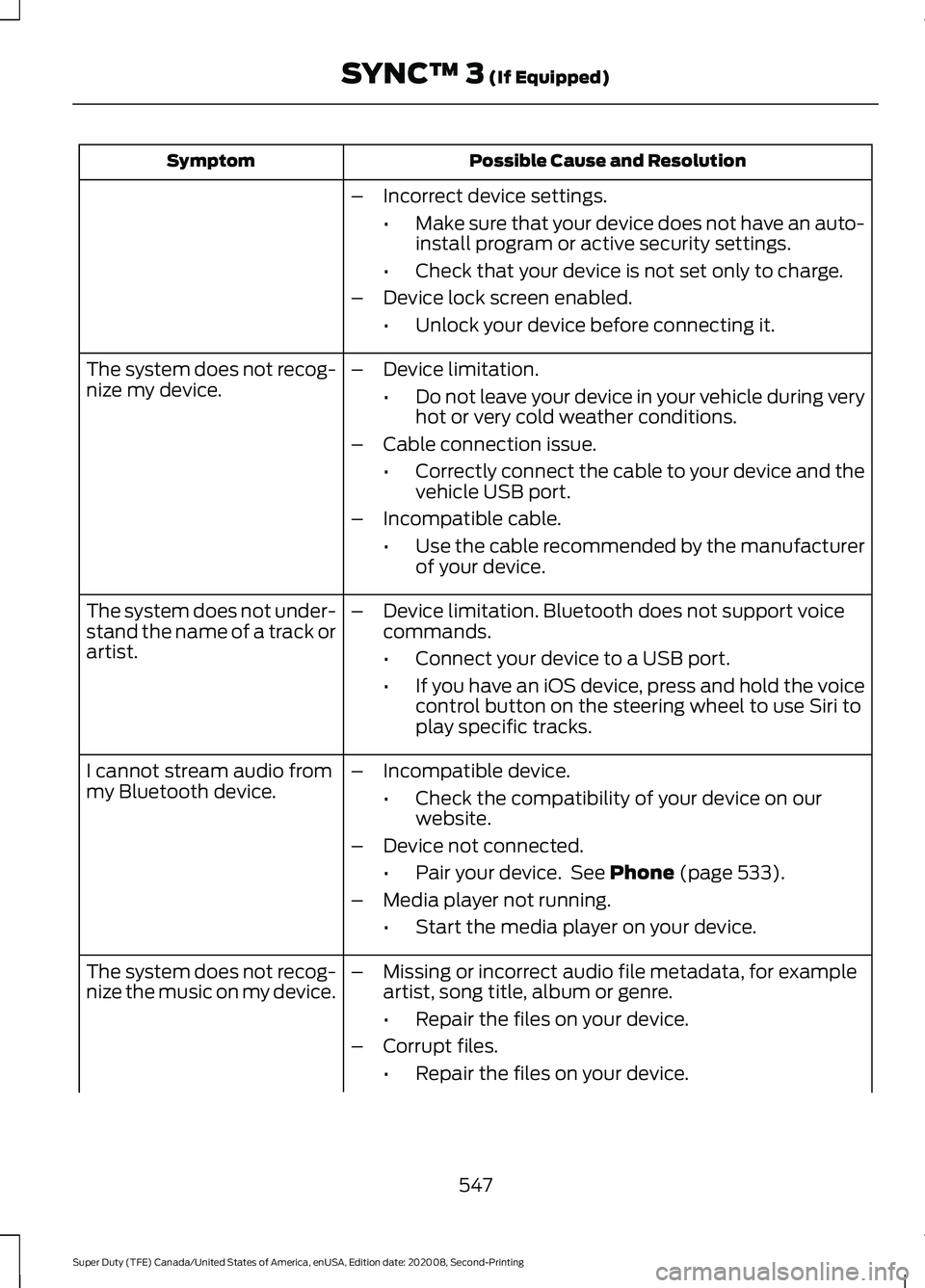
Possible Cause and Resolution
Symptom
–Incorrect device settings.
•Make sure that your device does not have an auto-
install program or active security settings.
• Check that your device is not set only to charge.
– Device lock screen enabled.
•Unlock your device before connecting it.
The system does not recog-
nize my device. –
Device limitation.
•Do not leave your device in your vehicle during very
hot or very cold weather conditions.
– Cable connection issue.
•Correctly connect the cable to your device and the
vehicle USB port.
– Incompatible cable.
•Use the cable recommended by the manufacturer
of your device.
The system does not under-
stand the name of a track or
artist. –
Device limitation. Bluetooth does not support voice
commands.
•Connect your device to a USB port.
• If you have an iOS device, press and hold the voice
control button on the steering wheel to use Siri to
play specific tracks.
I cannot stream audio from
my Bluetooth device. –
Incompatible device.
•Check the compatibility of your device on our
website.
– Device not connected.
•Pair your device. See Phone (page 533).
– Media player not running.
•Start the media player on your device.
The system does not recog-
nize the music on my device. –
Missing or incorrect audio file metadata, for example
artist, song title, album or genre.
•Repair the files on your device.
– Corrupt files.
•Repair the files on your device.
547
Super Duty (TFE) Canada/United States of America, enUSA, Edition date: 202008, Second-Printing SYNC™ 3
(If Equipped)
Page 551 of 666
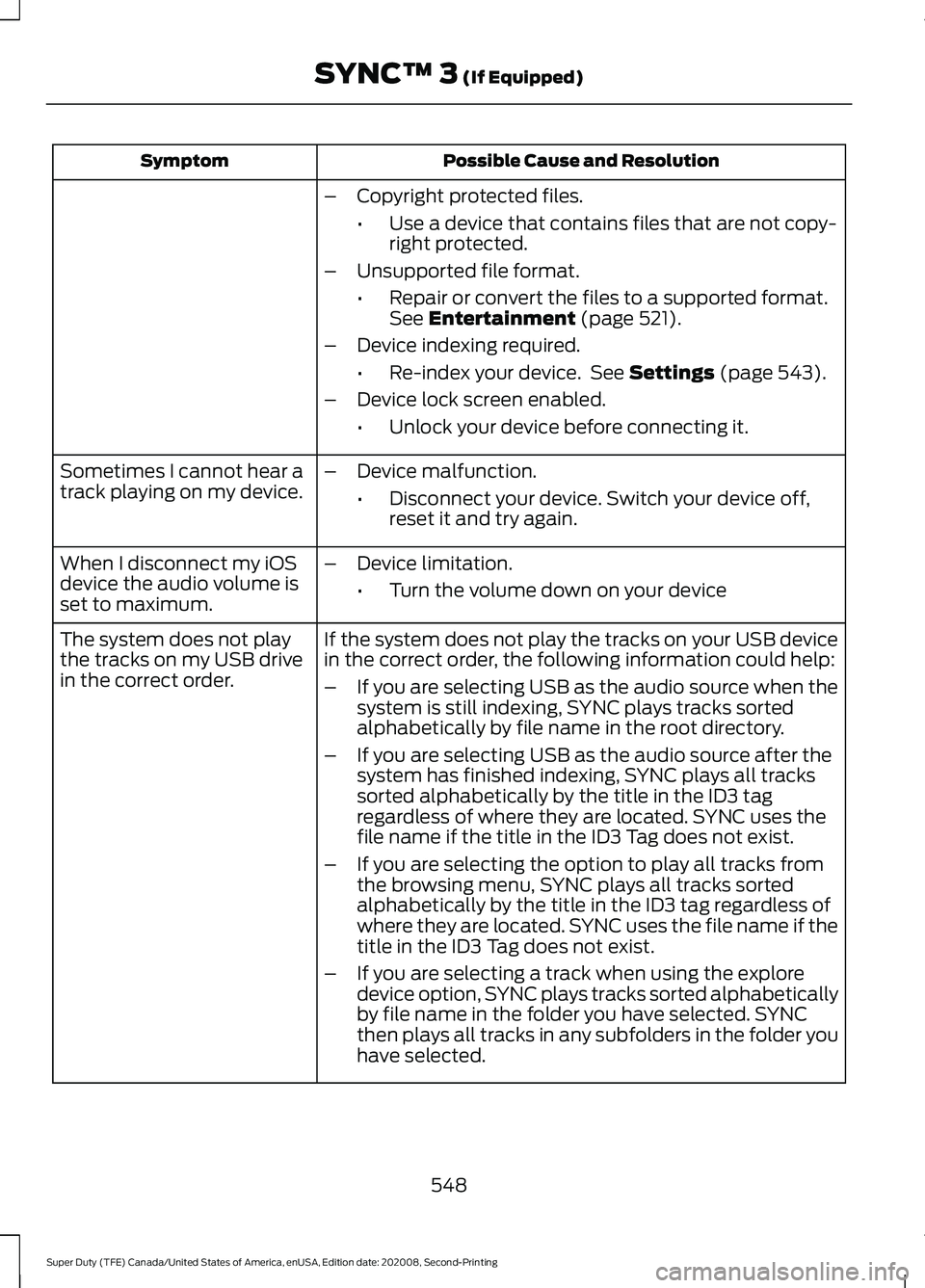
Possible Cause and Resolution
Symptom
–Copyright protected files.
•Use a device that contains files that are not copy-
right protected.
– Unsupported file format.
•Repair or convert the files to a supported format.
See Entertainment (page 521).
– Device indexing required.
•Re-index your device. See
Settings (page 543).
– Device lock screen enabled.
•Unlock your device before connecting it.
Sometimes I cannot hear a
track playing on my device. –
Device malfunction.
•Disconnect your device. Switch your device off,
reset it and try again.
When I disconnect my iOS
device the audio volume is
set to maximum. –
Device limitation.
•Turn the volume down on your device
If the system does not play the tracks on your USB device
in the correct order, the following information could help:
The system does not play
the tracks on my USB drive
in the correct order.
–If you are selecting USB as the audio source when the
system is still indexing, SYNC plays tracks sorted
alphabetically by file name in the root directory.
– If you are selecting USB as the audio source after the
system has finished indexing, SYNC plays all tracks
sorted alphabetically by the title in the ID3 tag
regardless of where they are located. SYNC uses the
file name if the title in the ID3 Tag does not exist.
– If you are selecting the option to play all tracks from
the browsing menu, SYNC plays all tracks sorted
alphabetically by the title in the ID3 tag regardless of
where they are located. SYNC uses the file name if the
title in the ID3 Tag does not exist.
– If you are selecting a track when using the explore
device option, SYNC plays tracks sorted alphabetically
by file name in the folder you have selected. SYNC
then plays all tracks in any subfolders in the folder you
have selected.
548
Super Duty (TFE) Canada/United States of America, enUSA, Edition date: 202008, Second-Printing SYNC™ 3
(If Equipped)
Page 552 of 666
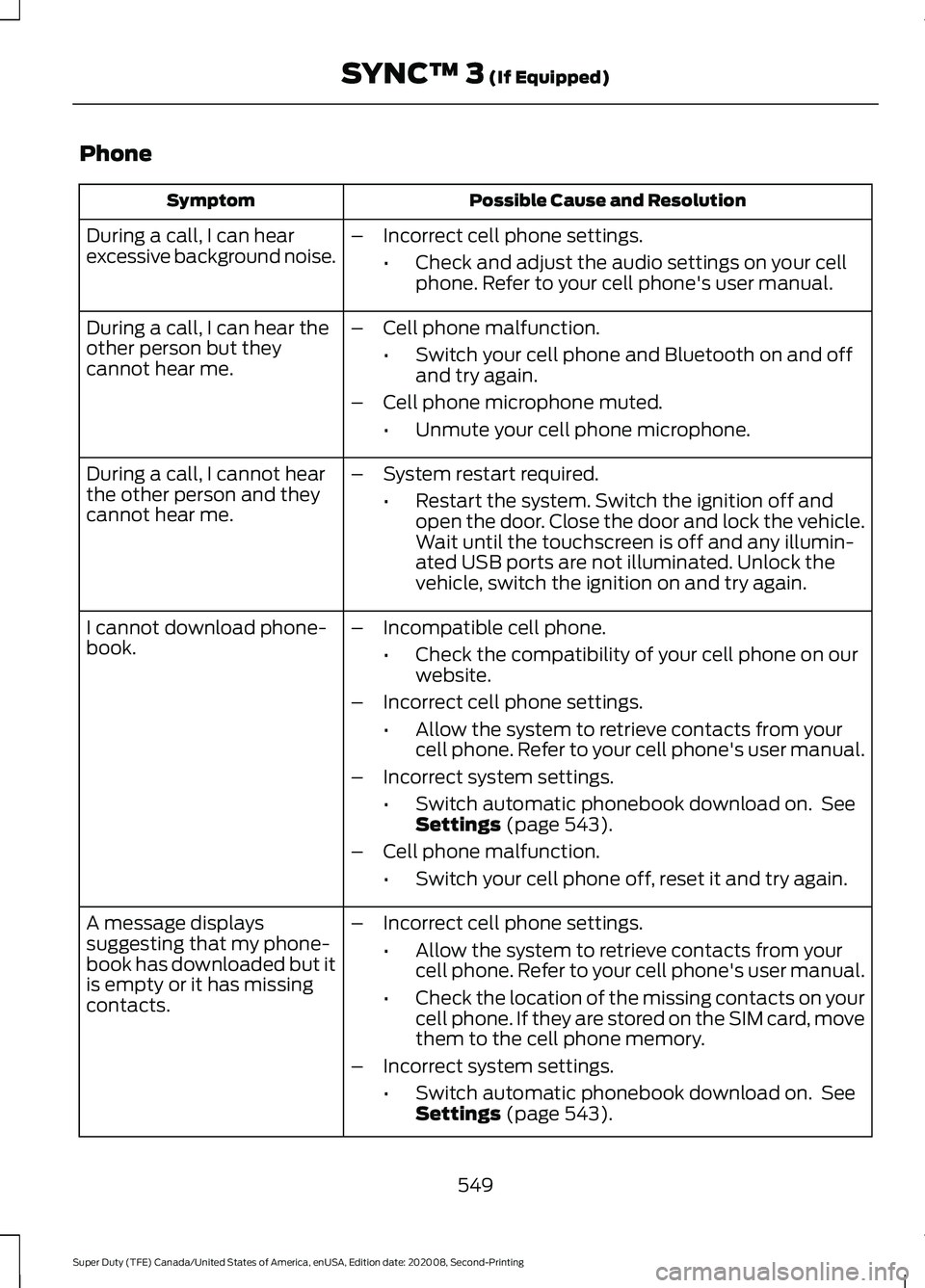
Phone
Possible Cause and Resolution
Symptom
During a call, I can hear
excessive background noise. –
Incorrect cell phone settings.
•Check and adjust the audio settings on your cell
phone. Refer to your cell phone's user manual.
– Cell phone malfunction.
•Switch your cell phone and Bluetooth on and off
and try again.
– Cell phone microphone muted.
•Unmute your cell phone microphone.
During a call, I can hear the
other person but they
cannot hear me.
During a call, I cannot hear
the other person and they
cannot hear me.
–
System restart required.
•Restart the system. Switch the ignition off and
open the door. Close the door and lock the vehicle.
Wait until the touchscreen is off and any illumin-
ated USB ports are not illuminated. Unlock the
vehicle, switch the ignition on and try again.
I cannot download phone-
book. –
Incompatible cell phone.
•Check the compatibility of your cell phone on our
website.
– Incorrect cell phone settings.
•Allow the system to retrieve contacts from your
cell phone. Refer to your cell phone's user manual.
– Incorrect system settings.
•Switch automatic phonebook download on. See
Settings (page 543).
– Cell phone malfunction.
•Switch your cell phone off, reset it and try again.
– Incorrect cell phone settings.
•Allow the system to retrieve contacts from your
cell phone. Refer to your cell phone's user manual.
• Check the location of the missing contacts on your
cell phone. If they are stored on the SIM card, move
them to the cell phone memory.
– Incorrect system settings.
•Switch automatic phonebook download on. See
Settings
(page 543).
A message displays
suggesting that my phone-
book has downloaded but it
is empty or it has missing
contacts.
549
Super Duty (TFE) Canada/United States of America, enUSA, Edition date: 202008, Second-Printing SYNC™ 3
(If Equipped)
Page 560 of 666
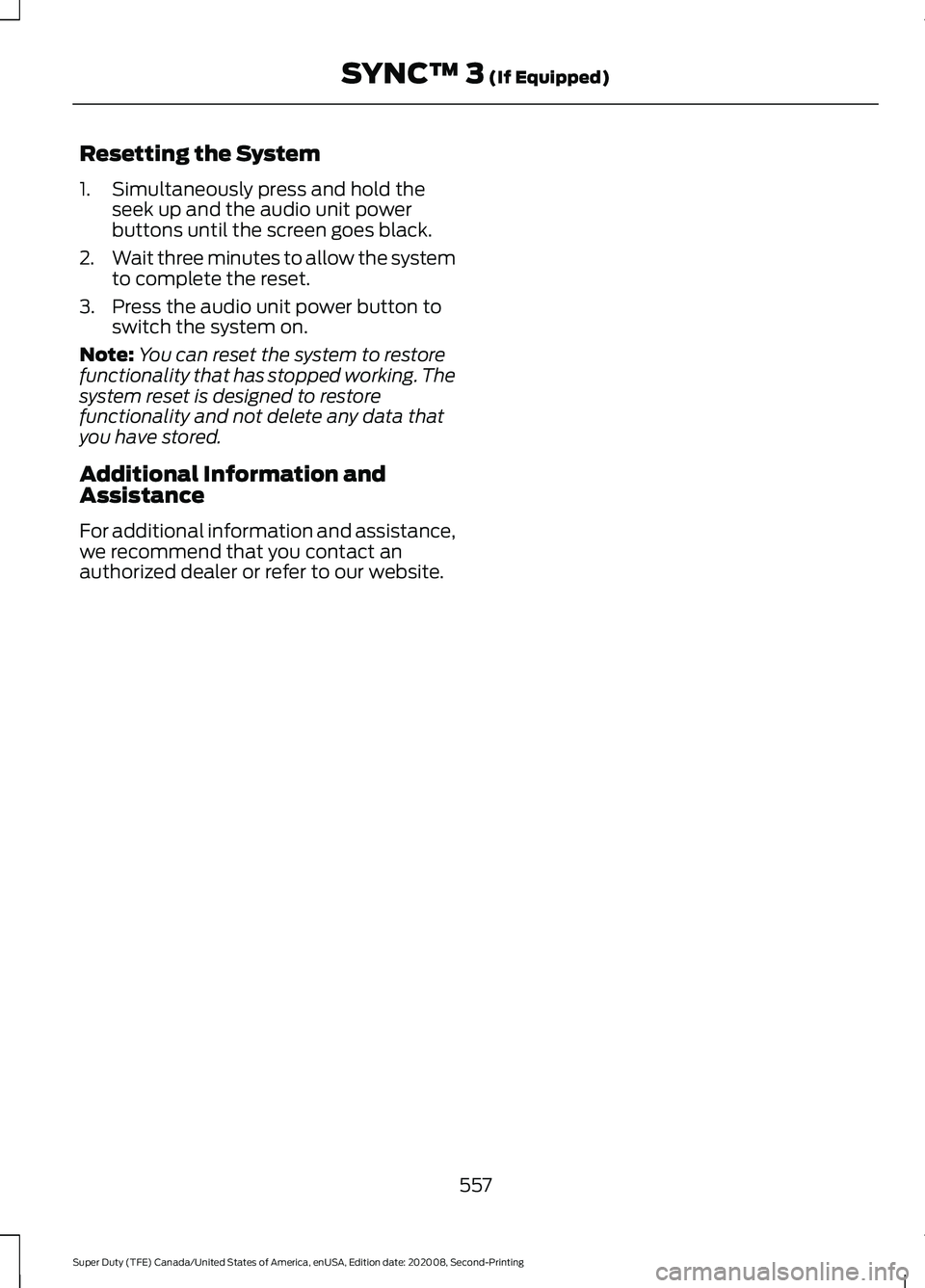
Resetting the System
1. Simultaneously press and hold the
seek up and the audio unit power
buttons until the screen goes black.
2. Wait three minutes to allow the system
to complete the reset.
3. Press the audio unit power button to switch the system on.
Note: You can reset the system to restore
functionality that has stopped working. The
system reset is designed to restore
functionality and not delete any data that
you have stored.
Additional Information and
Assistance
For additional information and assistance,
we recommend that you contact an
authorized dealer or refer to our website.
557
Super Duty (TFE) Canada/United States of America, enUSA, Edition date: 202008, Second-Printing SYNC™ 3 (If Equipped)
Page 626 of 666
•
Links to Third Party Sites: The
SOFTWARE may provide you with the
ability to link to third party sites. The
third party sites are not under the
control of FORD MOTOR COMPANY,
its affiliates and/or its designated
agent. Neither FORD MOTOR
COMPANY nor its affiliates nor its
designated agent are responsible for
(I) the contents of any third party sites,
any links contained in third party sites,
or any changes or updates to third
party sites, or (ii) webcasting or any
other form of transmission received
from any third party sites. If the
SOFTWARE provides links to third
party sites, those links are provided to
you only as a convenience, and the
inclusion of any link does not imply an
endorsement of the third party site by
FORD MOTOR COMPANY, its affiliates
and/or its designated agent.
• Obligation to Drive Responsibly:
You recognize your obligation to drive
responsibly and keep attention on the
road. You will read and abide with the
DEVICES operating instructions
particularly as they pertain to safety
and you agree to assume any risk
associated with the use of the
DEVICES.
UPGRADES AND RECOVERY MEDIA:
If the SOFTWARE is provided by FORD
MOTOR COMPANY separate from the
DEVICES on media such as a ROM chip,
CD ROM disk(s) or via web download or
other means, and is labeled "For Upgrade
Purposes Only" or "For Recovery Purposes
Only" you may install one (1) copy of such
SOFTWARE onto the DEVICES as a
replacement copy for the existing
SOFTWARE, and use it in accordance with
this EULA, including any additional EULA
terms accompanying the upgrade
SOFTWARE. INTELLECTUAL PROPERTY RIGHTS:
All title and intellectual property rights in
and to the SOFTWARE (including but not
limited to any images, photographs,
animations, video, audio, music, text and
"applets" incorporated into the
SOFTWARE), the accompanying printed
materials, and any copies of the
SOFTWARE, are owned by FORD MOTOR
COMPANY, or its affiliates or suppliers. The
SOFTWARE is licensed, not sold. You may
not copy the printed materials
accompanying the SOFTWARE. All title
and intellectual property rights in and to
the content which may be accessed
through use of the SOFTWARE is the
property of the respective content owner
and may be protected by applicable
copyright or other intellectual property
laws and treaties. This EULA grants you no
rights to use such content outside its
intended use. All rights not specifically
granted under this EULA are reserved by
FORD MOTOR COMPANY, its affiliates,
and third party software and service
providers and suppliers. Use of any on-line
services which may be accessed through
the SOFTWARE may be governed by the
respective terms of use relating to such
services. If this SOFTWARE contains
documentation that is provided only in
electronic form, you may print one copy of
such electronic documentation.
EXPORT RESTRICTIONS:
You
acknowledge that the SOFTWARE is
subject to U.S. and European Union export
jurisdiction. You agree to comply with all
applicable international and national laws
that apply to the SOFTWARE, including
the U.S. Export Administration Regulations,
as well as end-user, end-use and
destination restrictions issued by U.S. and
other governments.
623
Super Duty (TFE) Canada/United States of America, enUSA, Edition date: 202008, Second-Printing Appendices
Page 632 of 666
1. Safe and Lawful Use
You acknowledge that devoting attention
to the TeleNav Software may pose a risk
of injury or death to you and others in
situations that otherwise require your
undivided attention, and you therefore
agree to comply with the following when
using the TeleNav Software:
(a) observe all traffic laws and otherwise
drive safely;
(b) use your own personal judgment while
driving. If you feel that a route suggested
by the TeleNav Software instructs you to
perform an unsafe or illegal maneuver,
places you in an unsafe situation, or directs
you into an area that you consider to be
unsafe, do not follow such instructions;
(c) do not input destinations, or otherwise
manipulate the TeleNav Software, unless
your vehicle is stationary and parked;
(d) do not use the TeleNav Software for
any illegal, unauthorized, unintended,
unsafe, hazardous, or unlawful purposes,
or in any manner inconsistent with this
Agreement;
(e) arrange all GPS and wireless devices
and cables necessary for use of the
TeleNav Software in a secure manner in
your vehicle so that they will not interfere
with your driving and will not prevent the
operation of any safety device (such as an
airbag).
You agree to indemnify and hold TeleNav
harmless against all claims resulting from
any dangerous or otherwise inappropriate
use of the TeleNav Software in any moving
vehicle, including as a result of your failure
to comply with the directions above.
2. Account Information
You agree: (a) when registering the
TeleNav Software, to provide TeleNav with
true, accurate, current, and complete
information about yourself, and (b) to
inform TeleNav promptly of any changes
to such information, and to keep it true,
accurate, current and complete.
3. Software License
•
Subject to your compliance with the
terms of this Agreement, TeleNav
hereby grants to you a personal,
non-exclusive, non-transferable license
(except as expressly permitted below
in connection with your permanent
transfer of the TeleNav Software
license), without the right to
sublicense, to use the TeleNav
Software (in object code form only) in
order to access and use the TeleNav
Software. This license shall terminate
upon any termination or expiration of
this Agreement. You agree that you will
use the TeleNav Software only for your
personal business or leisure purposes,
and not to provide commercial
navigation services to other parties.
3.1 License Limitations
• (a) reverse engineer, decompile,
disassemble, translate, modify, alter
or otherwise change the TeleNav
Software or any part thereof;
(b)
attempt to derive the source code,
audio library or structure of the
TeleNav Software without the prior
express written consent of TeleNav;
(c)
remove from the TeleNav
Software, or alter, any of TeleNav's or
its suppliers' trademarks, trade names,
logos, patent or copyright notices, or
other notices or markings;
(d)
629
Super Duty (TFE) Canada/United States of America, enUSA, Edition date: 202008, Second-Printing Appendices
Page 650 of 666
3
360 Degree Camera...................................238
Advanced Camera Views............................... 238
Auxiliary Camera................................................. 241
Bed View Camera.............................................. 240
Camera Views..................................................... 238
Front Camera...................................................... 239
Keep Out Zone.................................................... 239
Side Camera........................................................ 240
4
4WD See: Four-Wheel Drive...................................... 213
A
A/C See: Climate Control - Vehicles With:
Automatic Temperature Control.............143
See: Climate Control - Vehicles With: Manual Temperature Control.................................... 147
About This Manual...........................................9
ABS See: Brakes........................................................... 223
ABS driving hints See: Hints on Driving With Anti-Lock
Brakes................................................................ 225
Accessories....................................................558
Accessories See: Replacement Parts
Recommendation............................................ 16
ACC See: Using Adaptive Cruise Control............243
Adjustable Pedals.........................................84
Adjusting the Headlamps.........................381 Horizontal Aim Adjustment........................... 382
Vertical Aim Adjustment................................. 381
Adjusting the Pedals....................................84
Adjusting the Steering Wheel - Vehicles With: Manual Adjustable Steering
Column...........................................................80
Adjusting the Steering Wheel - Vehicles With: Power Adjustable Steering
Column...........................................................80
End of Travel Position.......................................... 81
Memory Feature.................................................... 81Airbag Disposal...............................................54
Air Conditioning
See: Climate Control - Vehicles With:
Automatic Temperature Control.............143
See: Climate Control - Vehicles With: Manual Temperature Control.................................... 147
Air Conditioning System Capacity and Specification - 6.2L..................................459
Air Conditioning System Capacity and Specification - 6.7L Diesel....................460
Air Conditioning System Capacity and Specification - 7.3L...................................461
Air Filter See: Changing the Engine Air Filter -
6.2L
..................................................................... 357
See: Changing the Engine Air Filter - 6.7L Diesel ................................................................. 358
See: Changing the Engine Air Filter - 7.3L..................................................................... 360
Alarm See: Anti-Theft Alarm........................................ 76
Ambient Lighting
.............................................91
Adjusting the Brightness.................................... 91
Switching Ambient Lighting Off...................... 91
Switching Ambient Lighting On....................... 91
Anti-Theft Alarm
............................................76
Arming the Alarm.................................................. 77
Disarming the Alarm............................................ 77
Using the System................................................. 76
Appendices.....................................................618
Apps.................................................................540 SiriusXM Traffic and Travel Link................... 542
Using Apps on an Android Device................541
Using Apps on an iOS Device......................... 541
Using Mobile Navigation on an Android Device................................................................. 541
At a Glance.......................................................20
Audible Warnings and Indicators...........109 Headlamps On Warning Chime.................... 109
Key in Ignition Warning Chime...................... 109
Keyless Warning Alert....................................... 109
Parking Brake On Warning Chime...............109
Audio Control
...................................................81
You can operate the following functions
with the control:............................................... 81
Audio System
................................................479
General Information......................................... 479
647
Super Duty (TFE) Canada/United States of America, enUSA, Edition date: 202008, Second-Printing Index
Page 651 of 666
Audio Unit.......................................................479
Accessing the Apps Menu............................. 480
Accessing the Clock Settings....................... 480
Accessing the Media Source Menu............480
Accessing the Phone Features.................... 480
Accessing the Settings Menu....................... 480
Accessing the Sound Settings..................... 480
Adjusting the Volume...................................... 480
Changing Radio Stations............................... 480
Listening to the Radio....................................... 481
Playing or Pausing Media................................ 481
Selecting the Audio Modes........................... 489
Setting a Memory Preset............................... 489
Switching Radio Text On and Off.................481
Switching Repeat Mode On and Off...........481
Switching Shuffle Mode On and Off...........481
Switching the Audio Unit On and Off.........481
Switching the Display On and Off...............481
Using Seek, Fast Forward and Reverse.............................................................. 481
Using the Display Control................................ 481
Using the Number Block.................................. 481
Autolamps........................................................88 Windshield Wiper Activated
Headlamps........................................................ 88
Automatic High Beam Control..................93
Automatic High Beam Control Indicators........................................................93
Automatic Transmission...........................207
Brake-Shift Interlock......................................... 210
If Your Vehicle Gets Stuck in Mud or Snow.................................................................... 211
Neutral Idle with F350, F450, F550 and F600 Chassis Cab Vehicles....................... 210
Understanding the Shift Positions of Your Automatic Transmission............................ 207
Understanding Your SelectShift Automatic ™ Transmission....................... 208
Automatic Transmission Fluid Capacity and Specification - Diesel.....................463
Automatic Transmission Fluid Capacity and Specification - Gasoline
................463
Six-Speed Automatic Transmission..........463
Ten-Speed Automatic Transmission.........464
Automatic Transmission Fluid Check.............................................................376
Auto Mode
.......................................................145
Auto Mode Indicators........................................ 145Switching Auto Mode On and Off................145
Switching Dual Mode On and Off ...............146
Autowipers.......................................................85
Auxiliary Power Points...............................168 400 Watt AC Power Point.............................. 168
DC Power Point................................................... 168
Locations............................................................... 169
Auxiliary Switches
.......................................559
Upfitter Interface Module............................... 562
B
Battery See: Changing the 12V Battery...................... 379
Bed Extender....................................................73 Grocery mode........................................................ 75
Tailgate mode........................................................ 74
Blind Spot Information System
.............254
Blind Spot Information System with Trailer
Tow..................................................................... 256
Switching the System Off and On..............258
System Errors...................................................... 258
Using the System............................................... 255
BLIS See: Blind Spot Information System..........254
Bonnet Lock See: Opening and Closing the Hood..........348
Booster Seats..................................................33 Types of Booster Seats...................................... 34
Brake Fluid Check.........................................377 Brake Fluid Service Interval............................ 378
Brake Fluid Specification..........................465
Brakes...............................................................223 General Information.......................................... 223
Breaking-In.....................................................320
Bulb Specification Chart...........................447
C
Calculating Payload
....................................274
Calculating the Load Limit.......................274
Helpful examples for calculating the
available amount of cargo and luggage
load capacity.................................................. 275
Canceling the Set Speed...........................231
Capacities and Specifications
.................441
Cargo Lamps....................................................91
648
Super Duty (TFE) Canada/United States of America, enUSA, Edition date: 202008, Second-Printing Index