2021 FORD MUSTANG battery
[x] Cancel search: batteryPage 170 of 530
In sport (S) mode, SelectShift does not
automatically upshift, even if the engine is
approaching the RPM limit.
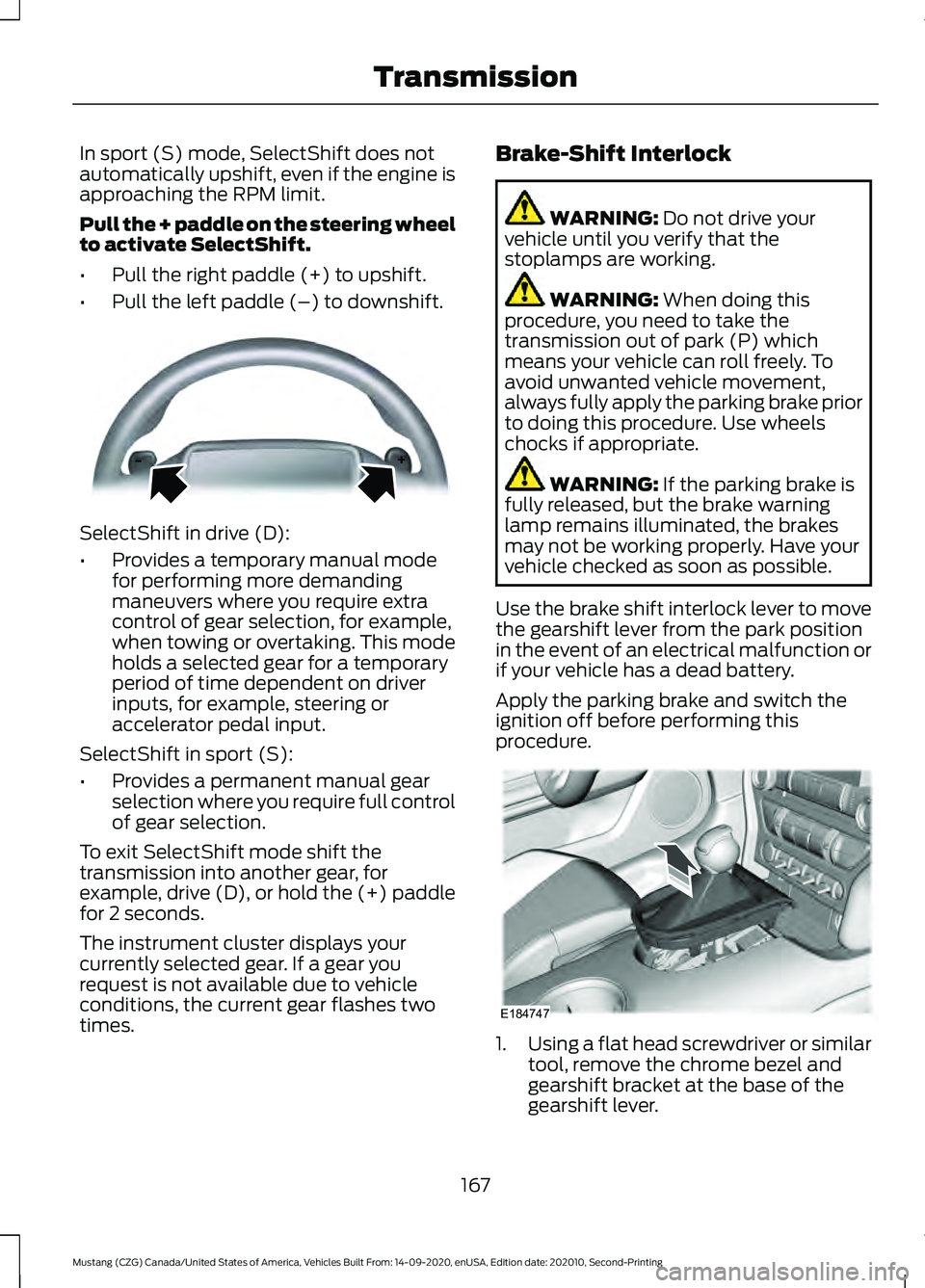
Pull the + paddle on the steering wheel
to activate SelectShift.
•
Pull the right paddle (+) to upshift.
• Pull the left paddle (–) to downshift. SelectShift in drive (D):
•
Provides a temporary manual mode
for performing more demanding
maneuvers where you require extra
control of gear selection, for example,
when towing or overtaking. This mode
holds a selected gear for a temporary
period of time dependent on driver
inputs, for example, steering or
accelerator pedal input.
SelectShift in sport (S):
• Provides a permanent manual gear
selection where you require full control
of gear selection.
To exit SelectShift mode shift the
transmission into another gear, for
example, drive (D), or hold the (+) paddle
for 2 seconds.
The instrument cluster displays your
currently selected gear. If a gear you
request is not available due to vehicle
conditions, the current gear flashes two
times. Brake-Shift Interlock WARNING: Do not drive your
vehicle until you verify that the
stoplamps are working. WARNING:
When doing this
procedure, you need to take the
transmission out of park (P) which
means your vehicle can roll freely. To
avoid unwanted vehicle movement,
always fully apply the parking brake prior
to doing this procedure. Use wheels
chocks if appropriate. WARNING:
If the parking brake is
fully released, but the brake warning
lamp remains illuminated, the brakes
may not be working properly. Have your
vehicle checked as soon as possible.
Use the brake shift interlock lever to move
the gearshift lever from the park position
in the event of an electrical malfunction or
if your vehicle has a dead battery.
Apply the parking brake and switch the
ignition off before performing this
procedure. 1.
Using a flat head screwdriver or similar
tool, remove the chrome bezel and
gearshift bracket at the base of the
gearshift lever.
167
Mustang (CZG) Canada/United States of America, Vehicles Built From: 14-09-2020, enUSA, Edition date: 202010, Second-Printing TransmissionE144821 E184747
Page 184 of 530
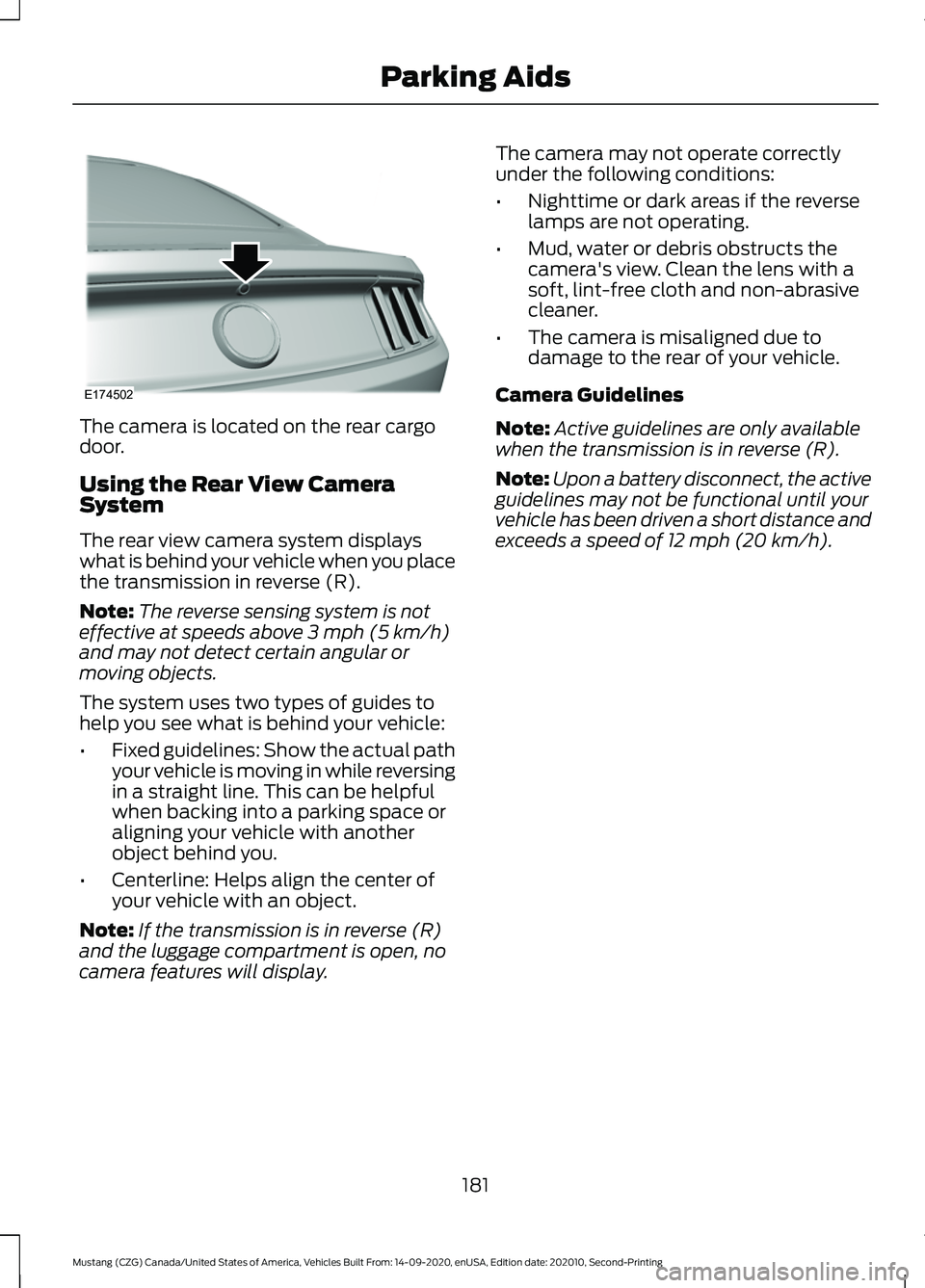
The camera is located on the rear cargo
door.
Using the Rear View Camera
System
The rear view camera system displays
what is behind your vehicle when you place
the transmission in reverse (R).
Note:
The reverse sensing system is not
effective at speeds above 3 mph (5 km/h)
and may not detect certain angular or
moving objects.
The system uses two types of guides to
help you see what is behind your vehicle:
• Fixed guidelines: Show the actual path
your vehicle is moving in while reversing
in a straight line. This can be helpful
when backing into a parking space or
aligning your vehicle with another
object behind you.
• Centerline: Helps align the center of
your vehicle with an object.
Note: If the transmission is in reverse (R)
and the luggage compartment is open, no
camera features will display. The camera may not operate correctly
under the following conditions:
•
Nighttime or dark areas if the reverse
lamps are not operating.
• Mud, water or debris obstructs the
camera's view. Clean the lens with a
soft, lint-free cloth and non-abrasive
cleaner.
• The camera is misaligned due to
damage to the rear of your vehicle.
Camera Guidelines
Note: Active guidelines are only available
when the transmission is in reverse (R).
Note: Upon a battery disconnect, the active
guidelines may not be functional until your
vehicle has been driven a short distance and
exceeds a speed of
12 mph (20 km/h).
181
Mustang (CZG) Canada/United States of America, Vehicles Built From: 14-09-2020, enUSA, Edition date: 202010, Second-Printing Parking AidsE174502
Page 205 of 530

If your vehicle loses electrical power while
you are driving, electric power steering
assistance is lost. The steering system still
operates and you can steer your vehicle
manually. Manually steering your vehicle
requires more effort.
Extreme continuous steering may increase
the effort required for you to steer your
vehicle, this increased effort prevents
overheating and permanent damage to
the steering system. You do not lose the
ability to steer your vehicle manually.
Typical steering and driving maneuvers
allow the system to cool and return to
normal operation.
Steering Tips
If the steering wanders or pulls, check for:
•
Correct tire pressures.
• Uneven tire wear.
• Loose or worn suspension
components.
• Loose or worn steering components.
• Improper vehicle alignment.
Note: A high crown in the road or high
crosswinds may also make the steering
seem to wander or pull.
Adaptive Learning (If Equipped)
The electronic power steering system
adaptive learning helps correct road
irregularities and improves overall handling
and steering feel. It communicates with
the brake system to help operate
advanced stability control and accident
avoidance systems. Additionally, whenever
the battery is disconnected or a new
battery installed, you must drive your
vehicle a short distance before the system
relearns the strategy and reactivates all
systems. PRE-COLLISION ASSIST
(IF
EQUIPPED) WARNING:
You must remain in
your vehicle when the system turns on.
At all times, you are responsible for
controlling your vehicle, supervising the
system and intervening, if required.
Failure to take care may result in the loss
of control of your vehicle, serious
personal injury or death. WARNING:
The system does not
detect vehicles that are driving in a
different direction, cyclists or animals.
Apply the brakes when necessary. Failure
to follow this instruction could result in
the loss of control of your vehicle,
personal injury or death. WARNING:
The system does not
operate during hard acceleration or
steering. Failure to take care may lead
to a crash or personal injury. WARNING: The system may fail or
operate with reduced function during
cold and severe weather conditions.
Snow, ice, rain, spray and fog can
adversely affect the system. Keep the
front camera and radar free of snow and
ice. Failure to take care may result in the
loss of control of your vehicle, serious
personal injury or death. WARNING:
Some situations and
objects prevent hazard detection. For
example low or direct sunlight, inclement
weather, unconventional vehicle types,
and pedestrians. Apply the brakes when
necessary. Failure to follow this
instruction could result in the loss of
control of your vehicle, personal injury or
death.
202
Mustang (CZG) Canada/United States of America, Vehicles Built From: 14-09-2020, enUSA, Edition date: 202010, Second-Printing Driving Aids
Page 211 of 530

To create or save MyMode, press the
button on the steering wheel and access
the menu. See General Information
(page 99). The available systems display.
Choose your desired settings using the
appropriate buttons and menus. Press and
hold OK to save your settings. MyMode is
added to the drive mode list and can be
selected the next time you drive your
vehicle.
Note: The system has diagnostic checks
that continuously monitor the system to
make sure it properly operates. If a mode is
unavailable due to a system fault or change
in gear position, the selected mode defaults
to normal.
Note: Pre-Collision Assist is automatically
disabled when track mode is selected.
See
Pre-Collision Assist (page 202).
Note: If your vehicle has adaptive dampers,
the steering setting is optimized to work with
each drive mode. Other steering settings
may not be available.
Selectable Steering Press the steering button on the
instrument panel to change the
steering feel. The first press
illuminates the selected mode. Each time
you press the button, it changes the mode.
Modes:
• Normal - Default factory setting.
• Sport - Slightly higher effort required
for steering with more road force felt
through the steering wheel.
• Comfort - Slightly less effort required
for steering with less road force felt
through the steering wheel.
Note: A soft feedback bump in the steering
wheel may be felt after you make a
selection. Note:
The steering setting defaults to
normal if the battery is disconnected or
removed.
Active Exhaust
(If Equipped) Use the information display to
adjust the tone of the exhaust.
Active Exhaust modes:
• Quiet - Lowers the noise of the exhaust.
• Normal - Default factory setting.
• Sport - Raises the noise of the exhaust.
• Track - Tunes the exhaust for track
performance.
Note: The track exhaust mode setting is
only for use at tracks and not for use on
public roadways. Use of this setting results
in increased exterior noise, which may not
meet state and local laws and regulations.
It is the obligation of the driver to operate
the vehicle in a manner that complies with
state and local requirements. Only use the
track exhaust mode setting at a competition
track or an off-road course where elevated
exterior vehicle noise is acceptable.
Rev Match
(If Equipped)
This feature provides a smoother driving
experience, particularly during a downshift
event. This is accomplished by a shift
position prediction that commands a quick
engine RPM match to the selected gear.
You can switch this feature on and off
through the information display. See
General Information
(page 99).
Note: The system remembers your last
selection through ignition cycles.
Note: Rev match is only available with a
manual transmission.
208
Mustang (CZG) Canada/United States of America, Vehicles Built From: 14-09-2020, enUSA, Edition date: 202010, Second-Printing Driving AidsE174705 E287122
Page 214 of 530
To create or save MyMode, press the
button on the steering wheel and access
the menu. See General Information
(page 99). The available systems display.
Select your desired settings using the
appropriate buttons and menus. Press and
hold OK to save your settings. MyMode is
added to the drive mode list and can be
selected the next time you drive your
vehicle.
Note: The system has diagnostic checks
that continuously monitor the system to
make sure it properly operates. If a mode is
unavailable due to a system fault or change
in gear position, the selected mode defaults
to normal.
Note: Pre-Collision Assist is automatically
disabled when track mode is selected.
See
Pre-Collision Assist (page 202).
Note: If your vehicle has adaptive dampers,
the steering setting is optimized to work with
each drive mode. Other steering settings
may not be available.
Selectable Steering
Note: The steering setting defaults to
normal if the battery is disconnected or
removed. Press the steering button on the
instrument panel to change the
steering feel. The first press
illuminates the selected mode. Each time
you press the button, it changes the mode.
Modes:
• Normal - Default factory setting.
• Sport - Slightly higher effort required
for steering with more road force felt
through the steering wheel.
• Comfort - Slightly less effort required
for steering with less road force felt
through the steering wheel. Note:
A soft feedback bump in the steering
wheel may be felt after you make a
selection.
Adaptive Dampers
(If Equipped) Press the button on the steering
wheel to adjust the suspension.
The first press illuminates the
current mode. Each time you press the
button, it changes the mode.
Adaptive damper modes:
• Normal — Available in normal and
sport drive modes.
• Sport — Available in normal, sport and
track drive modes.
• Track — Available only in track drive
mode.
• Drag Strip — Available only in drag strip
drive mode.
Active Exhaust
(If Equipped) Press the button on the
instrument panel under the
display to adjust the tone of the
exhaust.
Active Exhaust modes:
• Quiet - Lowers the noise of the exhaust.
• Normal - Default factory setting.
• Sport - Raises the noise of the exhaust.
• Track - Tunes the exhaust for track
performance.
Note: The track exhaust mode setting is
only for use at tracks and not for use on
public roadways. Use of this setting results
in increased exterior noise, which may not
meet state and local laws and regulations.
It is the obligation of the driver to operate
the vehicle in a manner that complies with
state and local requirements. Only use the
track exhaust mode setting at a competition
track or an off-road course where elevated
exterior vehicle noise is acceptable.
211
Mustang (CZG) Canada/United States of America, Vehicles Built From: 14-09-2020, enUSA, Edition date: 202010, Second-Printing Driving AidsE174705 E282723 E287122
Page 229 of 530
OPENING THE CONVERTIBLE
TOP
When you use the top, you must first
unlatch it from the windshield and then
use the convertible top control.
Note:
The convertible top does not operate
unless the vehicle is stationary or traveling
under 3 mph (5 km/h). A chime sounds and
a warning message appears in the
instrument panel. When you slow down, the
top operates.
Note: When you latch or unlatch the
convertible top, the audio system mutes
briefly. This allows the vehicle to optimize
the cabin ’s sound quality depending on the
position of the convertible top.
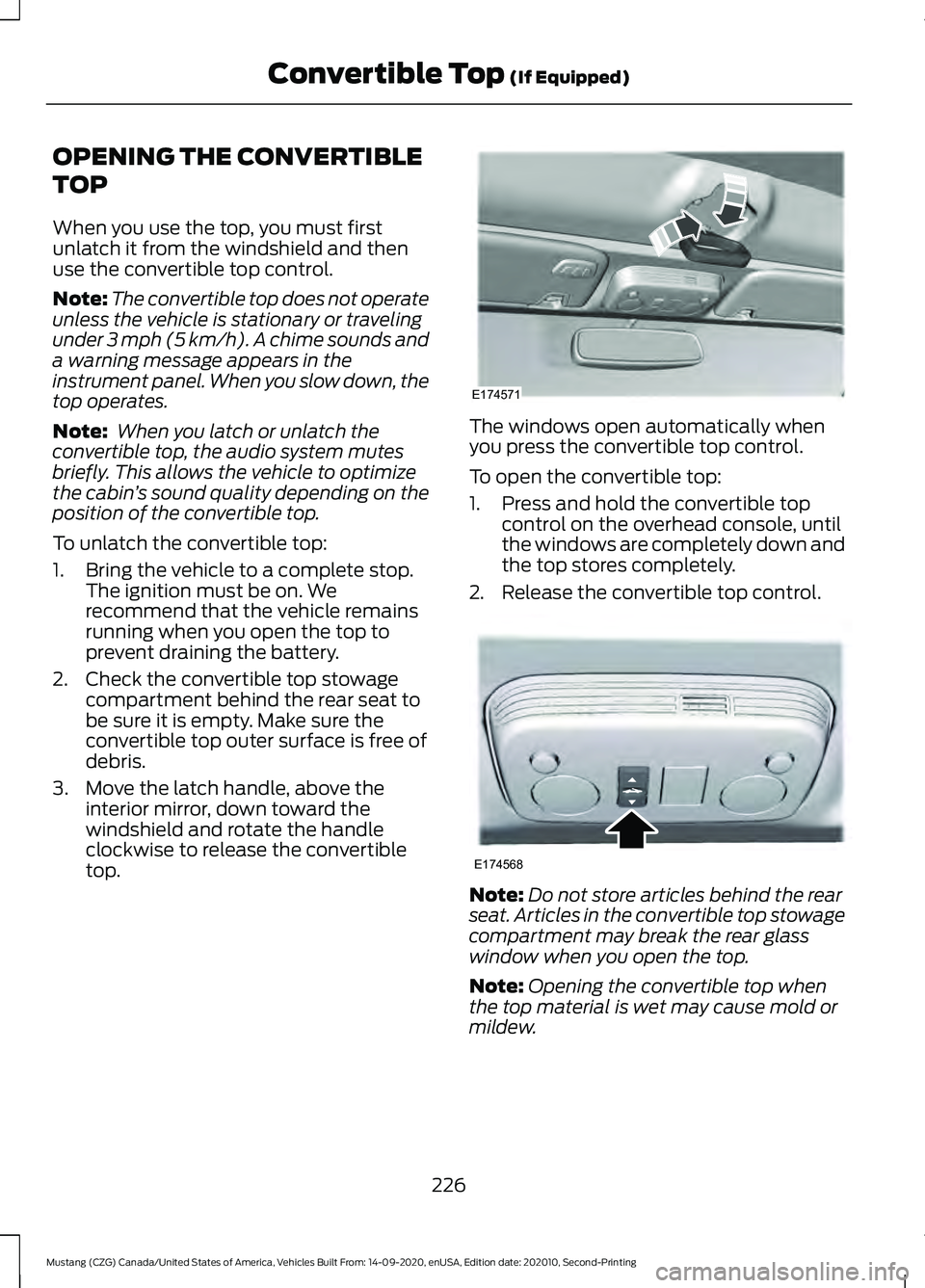
To unlatch the convertible top:
1. Bring the vehicle to a complete stop. The ignition must be on. We
recommend that the vehicle remains
running when you open the top to
prevent draining the battery.
2. Check the convertible top stowage compartment behind the rear seat to
be sure it is empty. Make sure the
convertible top outer surface is free of
debris.
3. Move the latch handle, above the interior mirror, down toward the
windshield and rotate the handle
clockwise to release the convertible
top. The windows open automatically when
you press the convertible top control.
To open the convertible top:
1. Press and hold the convertible top
control on the overhead console, until
the windows are completely down and
the top stores completely.
2. Release the convertible top control. Note:
Do not store articles behind the rear
seat. Articles in the convertible top stowage
compartment may break the rear glass
window when you open the top.
Note: Opening the convertible top when
the top material is wet may cause mold or
mildew.
226
Mustang (CZG) Canada/United States of America, Vehicles Built From: 14-09-2020, enUSA, Edition date: 202010, Second-Printing Convertible Top
(If Equipped)E174571 E174568
Page 231 of 530
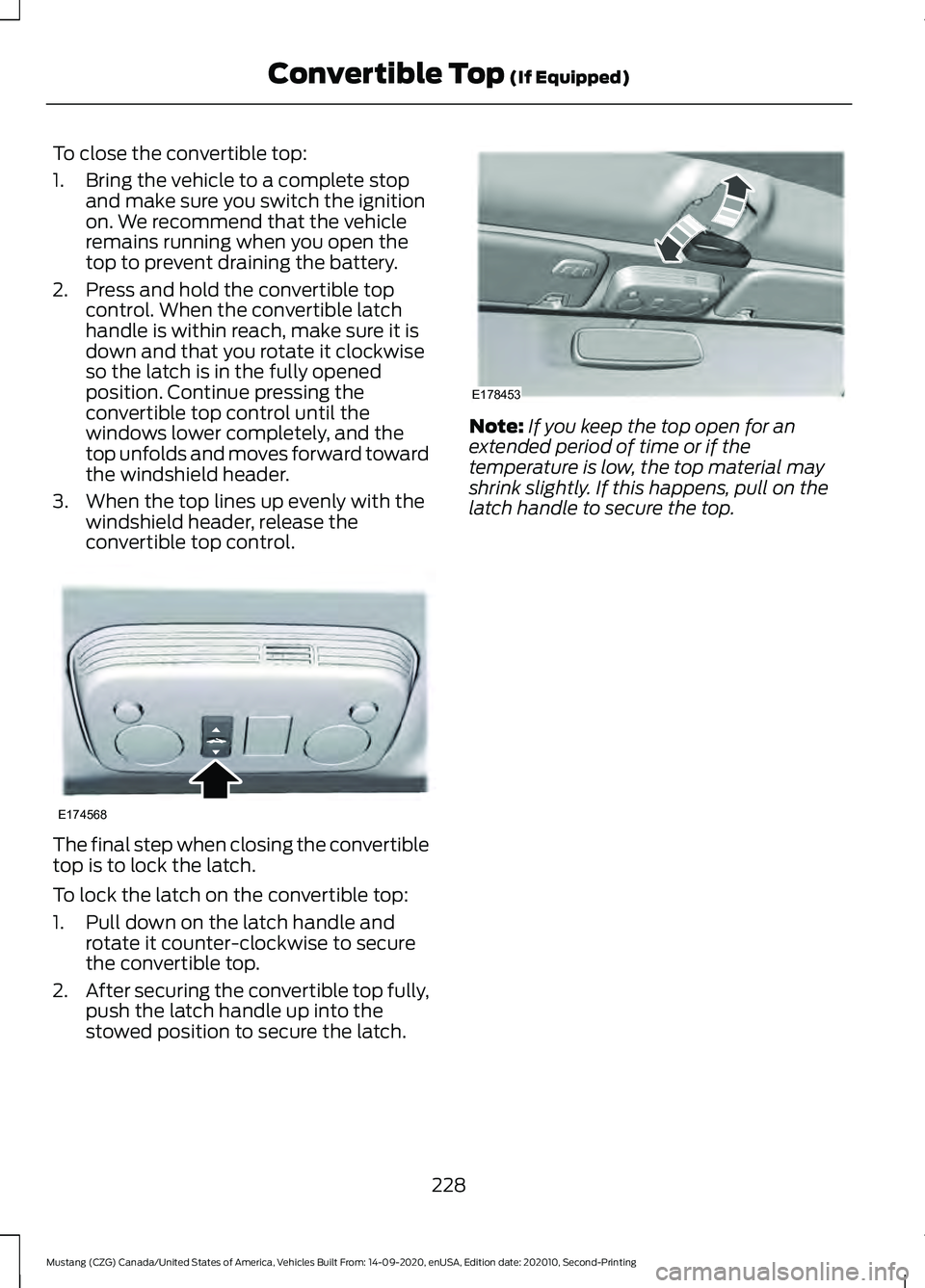
To close the convertible top:
1. Bring the vehicle to a complete stop
and make sure you switch the ignition
on. We recommend that the vehicle
remains running when you open the
top to prevent draining the battery.
2. Press and hold the convertible top control. When the convertible latch
handle is within reach, make sure it is
down and that you rotate it clockwise
so the latch is in the fully opened
position. Continue pressing the
convertible top control until the
windows lower completely, and the
top unfolds and moves forward toward
the windshield header.
3. When the top lines up evenly with the windshield header, release the
convertible top control. The final step when closing the convertible
top is to lock the latch.
To lock the latch on the convertible top:
1. Pull down on the latch handle and
rotate it counter-clockwise to secure
the convertible top.
2. After securing the convertible top fully,
push the latch handle up into the
stowed position to secure the latch. Note:
If you keep the top open for an
extended period of time or if the
temperature is low, the top material may
shrink slightly. If this happens, pull on the
latch handle to secure the top.
228
Mustang (CZG) Canada/United States of America, Vehicles Built From: 14-09-2020, enUSA, Edition date: 202010, Second-Printing Convertible Top (If Equipped)E174568 E178453
Page 235 of 530
ROADSIDE ASSISTANCE
Vehicles Sold in the United States:
Getting Roadside Assistance
To fully assist you should you have a
vehicle concern, Ford Motor Company
offers a complimentary roadside
assistance program. This program is
separate from the New Vehicle Limited
Warranty.
The service is available:
•
24 hours a day, seven days a week.
• For the coverage period supplied with
your vehicle.
Roadside Assistance covers:
• A flat tire change with a good spare
(except vehicles supplied with a tire
inflation kit).
• Battery jump start.
• Lock-out assistance (key replacement
cost is the customer's responsibility).
• Fuel delivery — independent service
contractors, if not prohibited by state,
local or municipal law, shall deliver up
to 2 gal (8 L) of gasoline or 5 gal (20 L)
of diesel fuel to a disabled vehicle.
Roadside Assistance limits fuel delivery
service to two no-charge occurrences
within a 12-month period.
• Winch out — available within 100 ft
(30 m) of a paved or county
maintained road, no recoveries. •
Towing — independent service
contractors, if not prohibited by state,
local or municipal law, shall tow Ford
eligible vehicles to an authorized dealer
within
35 mi (56 km) of the
disablement location or to the nearest
authorized dealer. If a member
requests a tow to an authorized dealer
that is more than
35 mi (56 km) from
the disablement location, the member
shall be responsible for any mileage
costs in excess of
35 mi (56 km).
• Roadside Assistance includes up to
$200 for a towed trailer if the disabled
eligible vehicle requires service at the
nearest authorized dealer. If the towing
vehicle is operational but the trailer is
not, then the trailer does not qualify for
any roadside services.
Vehicles Sold in the United States:
Using Roadside Assistance
Complete the roadside assistance
identification card and place it in your
wallet for quick reference. This card is in
the Owner's Manual kit.
United States vehicle customers who
require Roadside Assistance, call
1-800-241-3673.
If you need to arrange roadside assistance
for yourself, Ford Motor Company
reimburses a reasonable amount for
towing to the nearest dealership within
35 mi (56 km)
. To obtain reimbursement
information, United States vehicle
customers call 1-800-241-3673.
Customers need to submit their original
receipts.
232
Mustang (CZG) Canada/United States of America, Vehicles Built From: 14-09-2020, enUSA, Edition date: 202010, Second-Printing Roadside Emergencies