2021 FORD MUSTANG instrument cluster
[x] Cancel search: instrument clusterPage 169 of 530
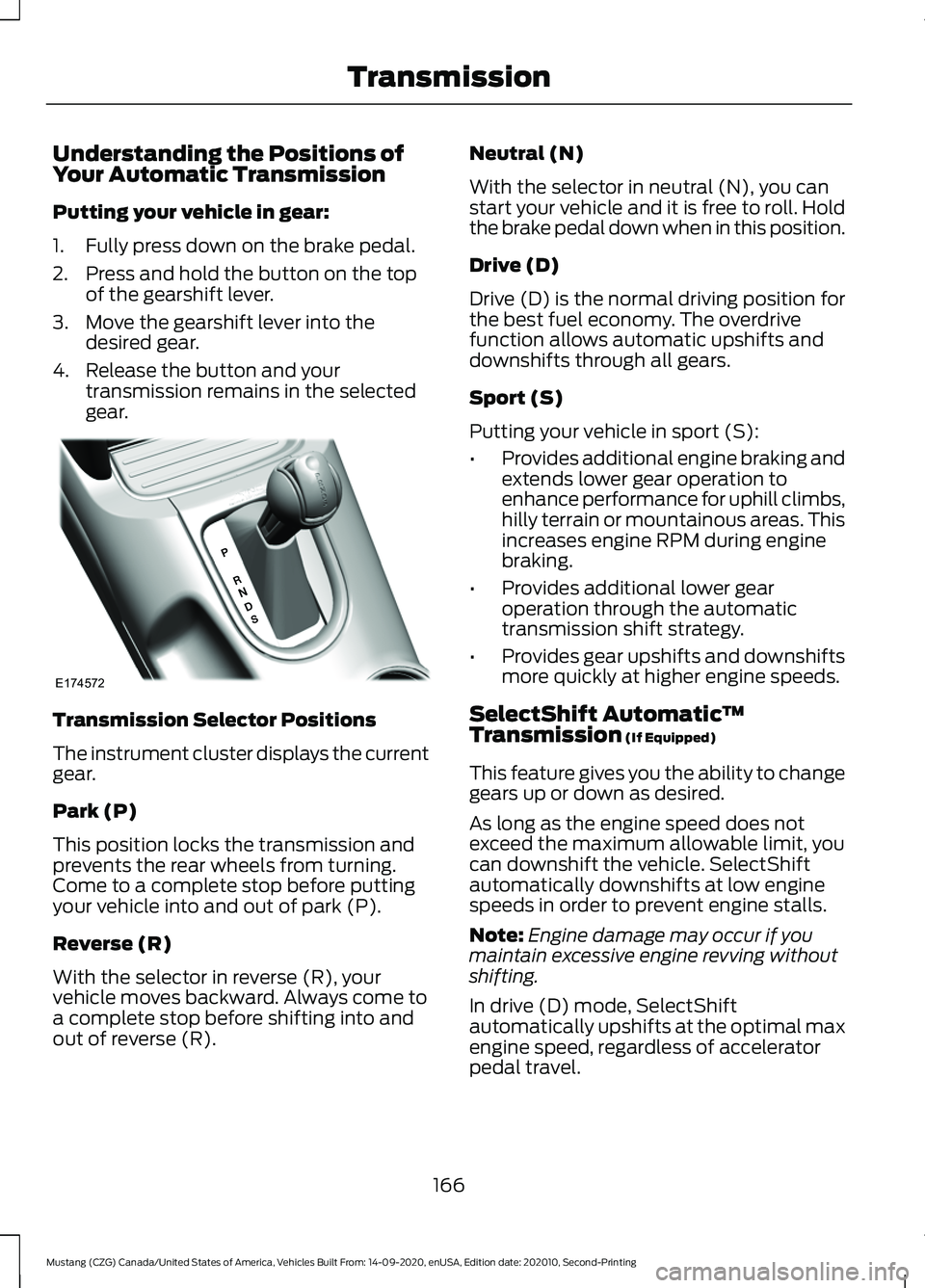
Understanding the Positions of
Your Automatic Transmission
Putting your vehicle in gear:
1. Fully press down on the brake pedal.
2. Press and hold the button on the top
of the gearshift lever.
3. Move the gearshift lever into the desired gear.
4. Release the button and your transmission remains in the selected
gear. Transmission Selector Positions
The instrument cluster displays the current
gear.
Park (P)
This position locks the transmission and
prevents the rear wheels from turning.
Come to a complete stop before putting
your vehicle into and out of park (P).
Reverse (R)
With the selector in reverse (R), your
vehicle moves backward. Always come to
a complete stop before shifting into and
out of reverse (R). Neutral (N)
With the selector in neutral (N), you can
start your vehicle and it is free to roll. Hold
the brake pedal down when in this position.
Drive (D)
Drive (D) is the normal driving position for
the best fuel economy. The overdrive
function allows automatic upshifts and
downshifts through all gears.
Sport (S)
Putting your vehicle in sport (S):
•
Provides additional engine braking and
extends lower gear operation to
enhance performance for uphill climbs,
hilly terrain or mountainous areas. This
increases engine RPM during engine
braking.
• Provides additional lower gear
operation through the automatic
transmission shift strategy.
• Provides gear upshifts and downshifts
more quickly at higher engine speeds.
SelectShift Automatic ™
Transmission (If Equipped)
This feature gives you the ability to change
gears up or down as desired.
As long as the engine speed does not
exceed the maximum allowable limit, you
can downshift the vehicle. SelectShift
automatically downshifts at low engine
speeds in order to prevent engine stalls.
Note: Engine damage may occur if you
maintain excessive engine revving without
shifting.
In drive (D) mode, SelectShift
automatically upshifts at the optimal max
engine speed, regardless of accelerator
pedal travel.
166
Mustang (CZG) Canada/United States of America, Vehicles Built From: 14-09-2020, enUSA, Edition date: 202010, Second-Printing TransmissionE174572
Page 170 of 530
In sport (S) mode, SelectShift does not
automatically upshift, even if the engine is
approaching the RPM limit.
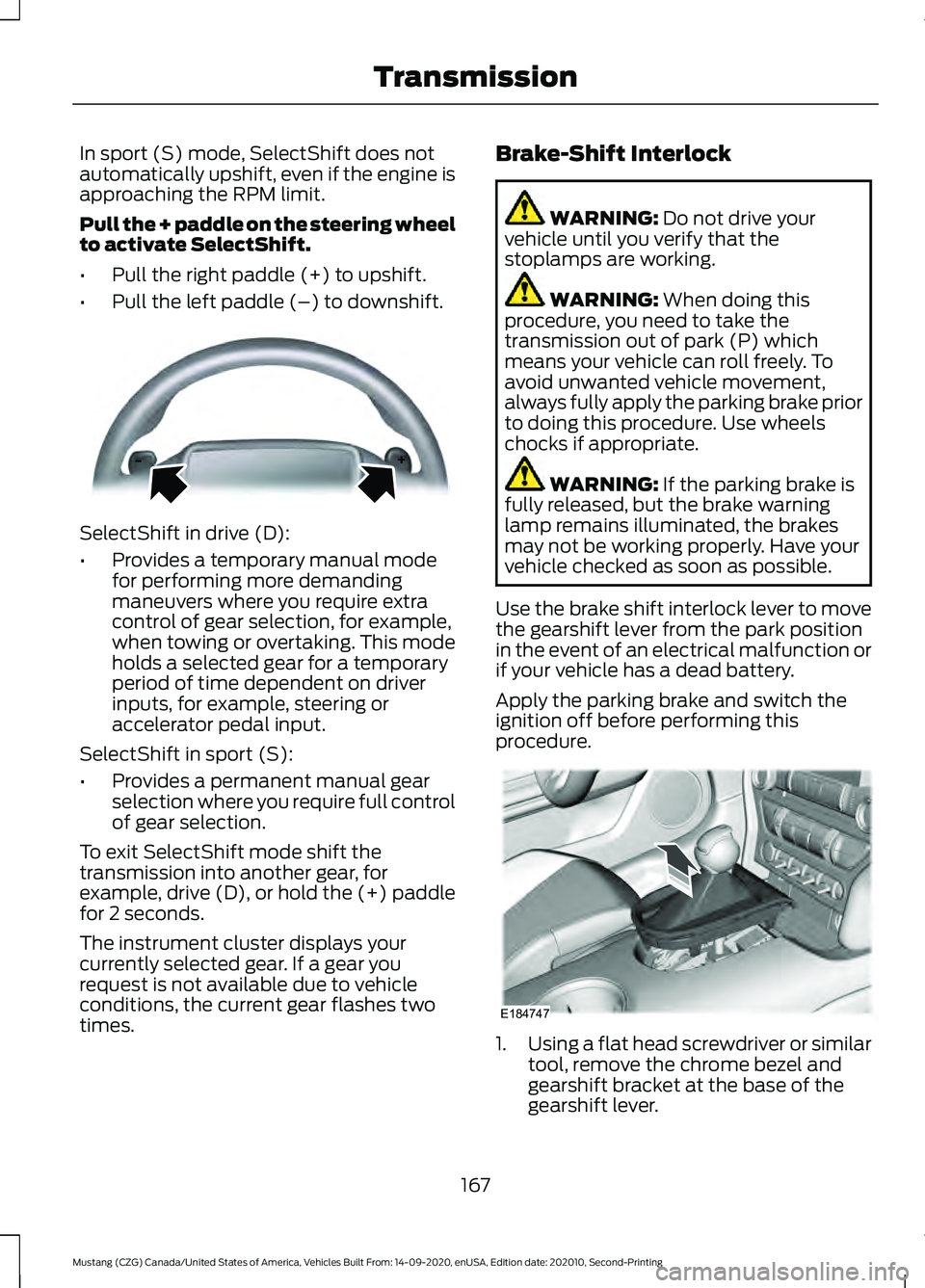
Pull the + paddle on the steering wheel
to activate SelectShift.
•
Pull the right paddle (+) to upshift.
• Pull the left paddle (–) to downshift. SelectShift in drive (D):
•
Provides a temporary manual mode
for performing more demanding
maneuvers where you require extra
control of gear selection, for example,
when towing or overtaking. This mode
holds a selected gear for a temporary
period of time dependent on driver
inputs, for example, steering or
accelerator pedal input.
SelectShift in sport (S):
• Provides a permanent manual gear
selection where you require full control
of gear selection.
To exit SelectShift mode shift the
transmission into another gear, for
example, drive (D), or hold the (+) paddle
for 2 seconds.
The instrument cluster displays your
currently selected gear. If a gear you
request is not available due to vehicle
conditions, the current gear flashes two
times. Brake-Shift Interlock WARNING: Do not drive your
vehicle until you verify that the
stoplamps are working. WARNING:
When doing this
procedure, you need to take the
transmission out of park (P) which
means your vehicle can roll freely. To
avoid unwanted vehicle movement,
always fully apply the parking brake prior
to doing this procedure. Use wheels
chocks if appropriate. WARNING:
If the parking brake is
fully released, but the brake warning
lamp remains illuminated, the brakes
may not be working properly. Have your
vehicle checked as soon as possible.
Use the brake shift interlock lever to move
the gearshift lever from the park position
in the event of an electrical malfunction or
if your vehicle has a dead battery.
Apply the parking brake and switch the
ignition off before performing this
procedure. 1.
Using a flat head screwdriver or similar
tool, remove the chrome bezel and
gearshift bracket at the base of the
gearshift lever.
167
Mustang (CZG) Canada/United States of America, Vehicles Built From: 14-09-2020, enUSA, Edition date: 202010, Second-Printing TransmissionE144821 E184747
Page 177 of 530
PRINCIPLE OF OPERATION
The traction control system helps avoid
drive wheel spin and loss of traction.
If your vehicle begins to slide, the system
applies the brakes to individual wheels
and, when needed, reduces engine power
at the same time. If the wheels spin when
accelerating on slippery or loose surfaces,
the system reduces engine power in order
to increase traction.
USING TRACTION CONTROL
WARNING: The stability and
traction control light illuminates steadily
if the system detects a failure. Make sure
you did not manually disable the traction
control system using the information
display controls or the switch. If the
stability control and traction control light
is still illuminating steadily, have the
system serviced by an authorized dealer
immediately. Operating your vehicle with
the traction control disabled could lead
to an increased risk of loss of vehicle
control, vehicle rollover, personal injury
and death.
The system automatically turns on each
time you switch the ignition on.
If your vehicle is stuck in mud or snow,
switching traction control off may be
beneficial as this allows the wheels to spin.
Note: When you switch traction control off,
stability control remains fully active.
Switching the System Off When you switch the system off,
a message and an illuminated
icon appear on the instrument
cluster. Use the switch again to return the traction
control system to normal operation.
The switch for the stability and traction
control system is on the instrument panel.
Your vehicle may have MyKey restrictions
regarding this feature. See
What Is
MyKey (page 63).
System Indicator Lights and
Messages The stability and traction control
light temporarily illuminates on
engine start-up and flashes:
• When a driving condition activates
either of the systems.
• If a problem occurs in either of the
systems. The stability and traction control
off light temporarily illuminates
on engine start-up and stays on:
• When you switch the traction control
system off.
• When you select an alternative stability
control mode.
174
Mustang (CZG) Canada/United States of America, Vehicles Built From: 14-09-2020, enUSA, Edition date: 202010, Second-Printing Traction ControlE130458 E138639 E130458
Page 189 of 530

The adaptive cruise controls are on the
steering wheel.
Switching Adaptive Cruise Control
On
Press ON.
The indicator, current gap setting
and set speed appear in the
information display.
Setting the Adaptive Cruise Speed
Note:
When adaptive cruise control is
active, the speedometer may vary slightly
from the set speed displayed in the
information display.
1. Drive to desired speed.
2. Press
SET+ or SET-.
3. A green indicator light, the current gap
setting and your set speed appear in
the information display.
4. Take your foot off the accelerator pedal. 5. A vehicle image illuminates if the
system detects a vehicle in front of you.
Following a Vehicle WARNING:
When following a
vehicle that is braking, your vehicle does
not always decelerate quickly enough to
avoid a crash without driver intervention.
Apply the brakes when necessary. Failure
to follow this instruction could result in
personal injury or death. WARNING:
The system only warns
of vehicles detected by the radar sensor.
In some cases there may be no warning
or a delayed warning. Apply the brakes
when necessary. Failure to follow this
instruction could result in personal injury
or death.
Note: When you are following a vehicle and
you switch on a direction indicator, adaptive
cruise control may provide a small
temporary acceleration to help you pass.
Note: The brakes may emit noise when
applied by the system.
When a vehicle ahead of you enters the
same lane or a slower vehicle is ahead in
the same lane, the vehicle speed adjusts
to maintain a preset gap distance. A
vehicle graphic illuminates in the
instrument cluster.
186
Mustang (CZG) Canada/United States of America, Vehicles Built From: 14-09-2020, enUSA, Edition date: 202010, Second-Printing Cruise ControlE177068 E144529 E164805 E164805
Page 197 of 530
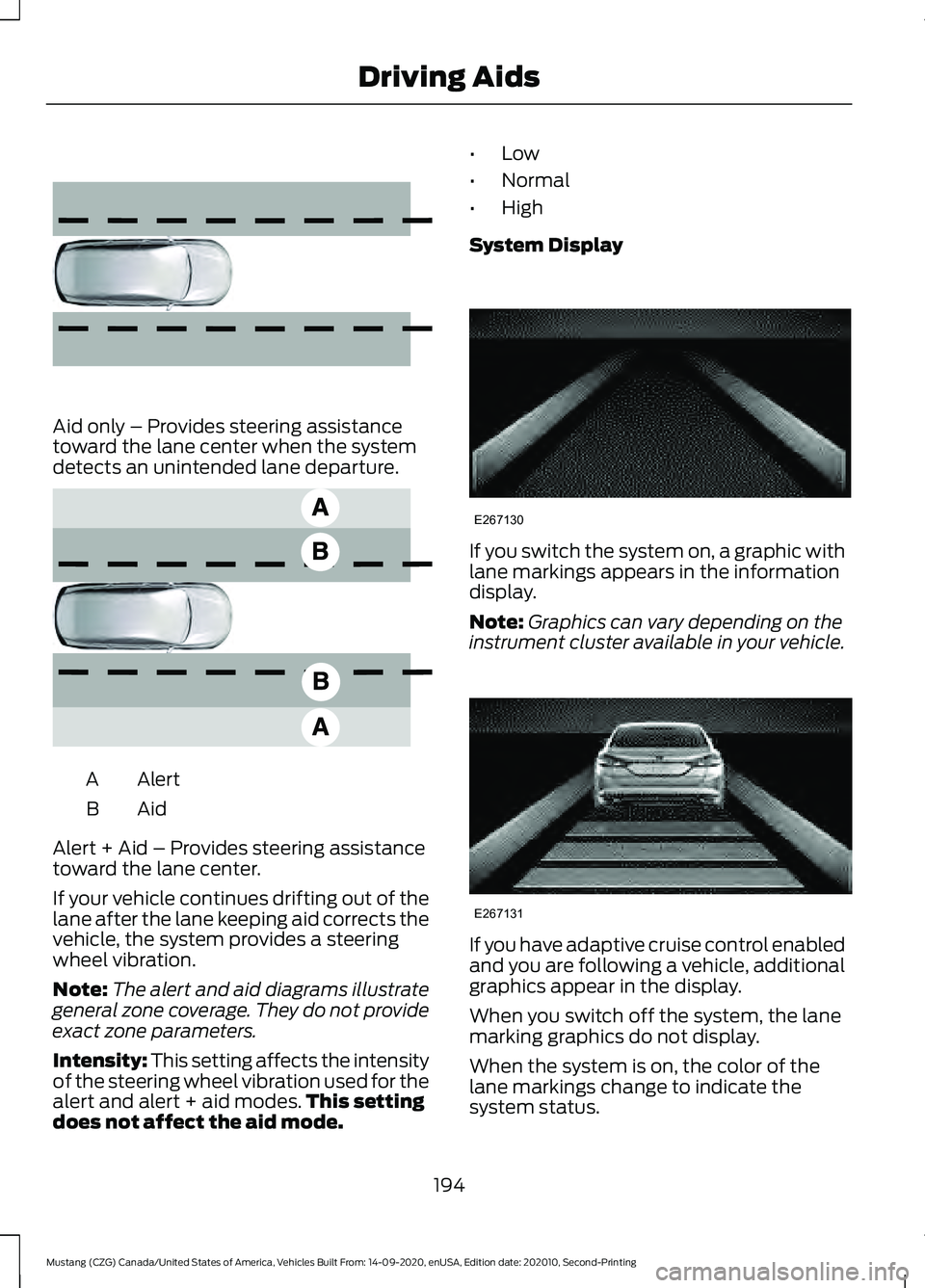
Aid only – Provides steering assistance
toward the lane center when the system
detects an unintended lane departure.
Alert
A
AidB
Alert + Aid – Provides steering assistance
toward the lane center.
If your vehicle continues drifting out of the
lane after the lane keeping aid corrects the
vehicle, the system provides a steering
wheel vibration.
Note: The alert and aid diagrams illustrate
general zone coverage. They do not provide
exact zone parameters.
Intensity: This setting affects the intensity
of the steering wheel vibration used for the
alert and alert + aid modes. This setting
does not affect the aid mode. •
Low
• Normal
• High
System Display If you switch the system on, a graphic with
lane markings appears in the information
display.
Note:
Graphics can vary depending on the
instrument cluster available in your vehicle. If you have adaptive cruise control enabled
and you are following a vehicle, additional
graphics appear in the display.
When you switch off the system, the lane
marking graphics do not display.
When the system is on, the color of the
lane markings change to indicate the
system status.
194
Mustang (CZG) Canada/United States of America, Vehicles Built From: 14-09-2020, enUSA, Edition date: 202010, Second-Printing Driving Aids E165516 E165517 E267130 E267131
Page 204 of 530

Cross Traffic Alert Indicator
When the system detects an
approaching vehicle, a tone
sounds, a warning lamp
illuminates in the relevant exterior mirror
and arrows appear in the information
display to show which side the
approaching vehicle is coming from.
Note: If arrows do not display, a message
appears in the information display. If the system malfunctions, a warning lamp
illuminates in the instrument cluster and
a message appears in the information
display. Have your vehicle checked as soon
as possible.
Note:
In exceptional conditions, the system
could alert you, even when there is nothing
in the detection zone, for example a vehicle
passing further away from your vehicle.
Cross Traffic Alert Information Messages Action
Message
Displays instead of indication arrows when the system
detects a vehicle. Check for approaching traffic.
Cross Traffic Alert
Indicates blocked cross traffic alert system sensors. Clean
the sensors. If the message continues to appear, have your
vehicle checked as soon as possible.
Cross Traffic Not Avail-
able Sensor Blocked See
Manual
The system has malfunctioned. Have your vehicle checked
as soon as possible.
Cross Traffic System
Fault
Displays if you attach a trailer to your vehicle.
Cross Traffic Alert Deac-
tivated Trailer Attached
STEERING
Electric Power Steering WARNING: The electric power
steering system has diagnostic checks
that continuously monitor the system. If
a fault is detected, a message displays
in the information display. Stop your
vehicle as soon as it is safe to do so.
Switch the ignition off. After at least 10 seconds, switch the ignition on and
watch the information display for a
steering system warning message. If a
steering system warning message
returns, have the system checked as
soon as possible.
WARNING: If the system detects
an error, you may not feel a difference in
the steering, however a serious condition
may exist. Have your vehicle checked as
soon as possible. Failure to do so may
result in loss of steering control.
Your vehicle has an electric power steering
system, there is no fluid reservoir, no
maintenance is required.
201
Mustang (CZG) Canada/United States of America, Vehicles Built From: 14-09-2020, enUSA, Edition date: 202010, Second-Printing Driving AidsE268294
Page 256 of 530

Protected Component
Fuse Rating
Fuse or Relay
Number
Telematic control unit - modem.
5A
8
Not used.
5A
9
Not used.
—
10
Not used.
—
11
Electronic control panel.
7.5A
12
Gateway module.
Gear shift module (GT500).
Steering column control module.
7.5A
13
Instrument cluster.
Not used.
15A
14
SYNC.
15A
15
Gauges.
Not used.
—
16
Headlamp leveling switch (base).
7.5A
17
Not used (GT500).
—
Not used.
7.5A
18
Not used.
5A
19
Intrusion sensor module.
5A
20
In-vehicle temperature and humidity
sensor.
5A
21
Auxiliary body module.
5A
22
Amplifier.
30A
23
Vehicle dynamics module.
30A
24
Ambient lighting module (base).
20A
25
Auxiliary body module.
Right-hand front-window motor (power
distribution module).
30A
26
Passenger door control unit.
Left-hand rear-window power (base).
30A
27
Not used (GT500).
—
253
Mustang (CZG) Canada/United States of America, Vehicles Built From: 14-09-2020, enUSA, Edition date: 202010, Second-Printing Fuses
Page 265 of 530

From the main menu scroll to:
Action and description
Message
Press the right arrow button,
then from this menu scroll
to the following message.
Settings
Press OK
Advanced
Settings
Press the right arrow button,
then from this menu scroll
to the following message.
Vehicle
Press the right arrow button,
then from this menu scroll
to the following message.
Oil Life
Press and hold the OK
button until the instrument
cluster displays the
following message.
Hold OK to
Reset
Reset Successful
When the oil change indic-
ator resets the instrument
cluster displays 100%.
Remaining Life
{00}%
If the instrument cluster
displays one of the following
messages, repeat the
process.
Not Reset
Reset Cancelled CHANGING THE ENGINE AIR
FILTER - 5.0L, MACH 1 WARNING:
To reduce the risk of
vehicle damage and personal burn
injuries, do not start your engine with the
air cleaner removed and do not remove
it while the engine is running.
See the scheduled maintenance
information for the appropriate intervals
for changing the air filter element.
When changing the air filter element, use
only the Motorcraft™ air filter element
listed. See the Motorcraft part numbers in
the Capacities and Specifications chapter. 262
Mustang (CZG) Canada/United States of America, Vehicles Built From: 14-09-2020, enUSA, Edition date: 202010, Second-Printing MaintenanceE272660 E272661