2021 FORD MUSTANG audio
[x] Cancel search: audioPage 105 of 530
Pony
Create MyColor
Change with Drive Mode
Cluster
Appear-
ance Normal
Sport
Track
1 See Track Use (page 276).
Note: Quiet start allows you to schedule when the exhaust mode turns on the quiet setting.
The time window can be from 1 to 24 hours.
Note: Depending on your vehicle
configuration, some features such as
Exhaust Mode and Line Lock may be if
equipped.
Note: The menu options for Performance
Shift Indicator, Launch Control, and Rev
Match are for manual transmissions only.
Phone
See
General Information (page 392). Audio
See
General Information (page 392).
Navigation
(If Equipped)
See
General Information (page 392).
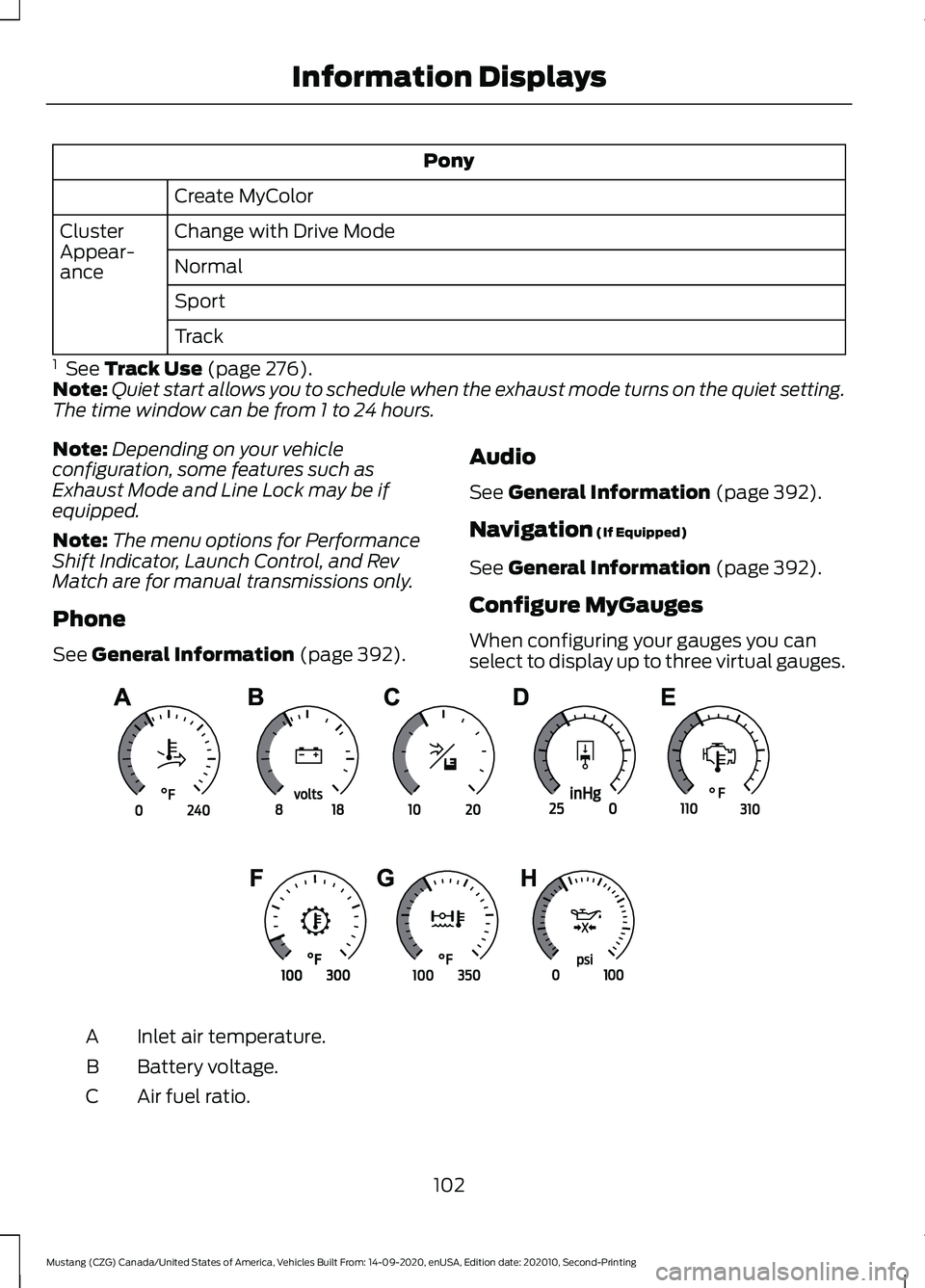
Configure MyGauges
When configuring your gauges you can
select to display up to three virtual gauges. Inlet air temperature.
A
Battery voltage.
B
Air fuel ratio.
C
102
Mustang (CZG) Canada/United States of America, Vehicles Built From: 14-09-2020, enUSA, Edition date: 202010, Second-Printing Information DisplaysE339879
Page 113 of 530
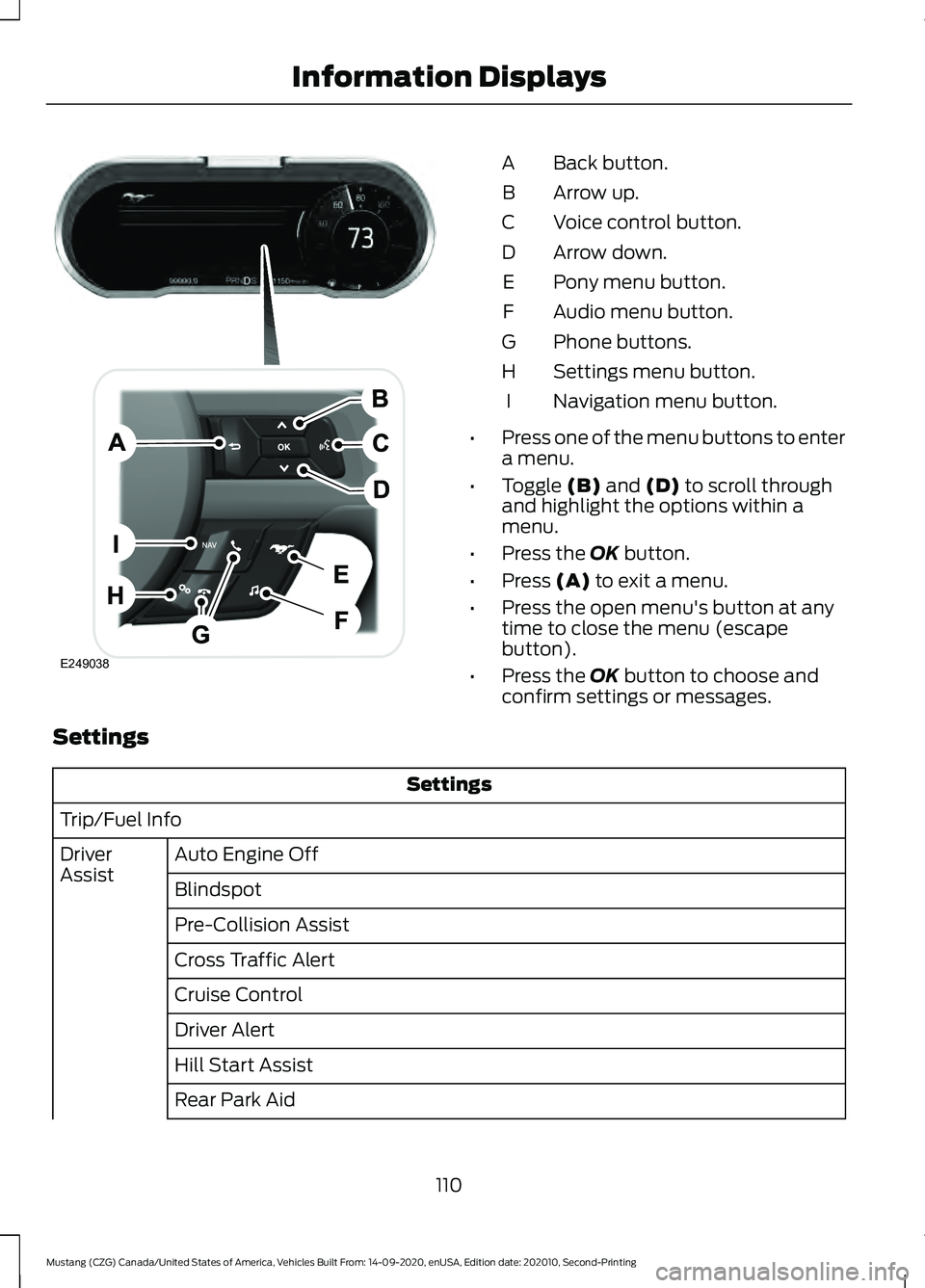
Back button.
A
Arrow up.
B
Voice control button.
C
Arrow down.
D
Pony menu button.
E
Audio menu button.
F
Phone buttons.
G
Settings menu button.
H
Navigation menu button.
I
• Press one of the menu buttons to enter
a menu.
• Toggle (B) and (D) to scroll through
and highlight the options within a
menu.
• Press the
OK button.
• Press
(A) to exit a menu.
• Press the open menu's button at any
time to close the menu (escape
button).
• Press the
OK button to choose and
confirm settings or messages.
Settings Settings
Trip/Fuel Info Auto Engine Off
Driver
Assist
Blindspot
Pre-Collision Assist
Cross Traffic Alert
Cruise Control
Driver Alert
Hill Start Assist
Rear Park Aid
110
Mustang (CZG) Canada/United States of America, Vehicles Built From: 14-09-2020, enUSA, Edition date: 202010, Second-Printing Information DisplaysE249038
Page 115 of 530
Pony
Lap Timer
Start Option
Shift Point
Perform-
ance Shift
Indicator Shift Tone
Shift Light Mode
Launch Control
Launch
Control
RPM
Rev Match Show Gauges
Gauges
Configure MyGauges
Primary Color
MyColor
Secondary Color
Ambient Light
Create MyColor
Change with Drive Mode
Cluster
Appear-
ance Normal
Sport
Track
1 See Track Use (page 276).
Note: Quiet start allows you to schedule when the exhaust mode turns on the quiet setting.
The time window can be from 1 to 24 hours.
Note: Depending on your vehicle
configuration, some features such as
Exhaust Mode and Line Lock may be if
equipped.
Note: The menu options for Performance
Shift Indicator, Launch Control, and Rev
Match are for manual transmissions only.
Phone
See
General Information (page 392). Audio
See
General Information (page 392).
Navigation
(If Equipped)
See
General Information (page 392).
112
Mustang (CZG) Canada/United States of America, Vehicles Built From: 14-09-2020, enUSA, Edition date: 202010, Second-Printing Information Displays
Page 122 of 530
MyKey
Action
Message
You cannot program a MyKey.
MyKey not Created
MyKey is active.
MyKey Active Drive
Safely
When switching on your vehicle and MyKey is in use, displays that the MyKey speed limit is on.
Speed Limited to
XX MPH/km/h
MyKey is in use and the MyKey speed limit is on and the vehiclespeed is approaching 80 mph (130 km/h).
Near Vehicle Top
Speed
You have reached the speed limit set for your MyKey.
Vehicle at Top
Speed of MyKey Setting
You have an active MyKey with a programmed set speed limit.
Check Speed Drive
Safely
Belt-Minder turns on with a MyKey in use.
Buckle Up to
Unmute Audio
With a MyKey in use, AdvanceTrac turns on.
AdvanceTrac On -
MyKey Setting
With a MyKey in use, traction control turns on.
Traction Control
On - MyKeySetting
With a MyKey in use, park aid is always on.
MyKey Park Aid
Cannot be Deactiv- ated
Park Aid Action
Message
Displays when the system requires service, have the system checkedas soon as possible. See
Rear Parking Aid (page 179).
Check Rear Park
Aid
Displays the park aid status.
Rear Park Aid On
Off
119
Mustang (CZG) Canada/United States of America, Vehicles Built From: 14-09-2020, enUSA, Edition date: 202010, Second-Printing Information Displays
Page 182 of 530

REAR PARKING AID (IF EQUIPPED)
WARNING:
The system may not
detect objects with surfaces that absorb
reflection. Always drive with due care
and attention. Failure to take care may
result in a crash. WARNING:
The system may not
detect small or moving objects,
particularly those close to the ground. WARNING:
To help avoid personal
injury, always use caution when in
reverse (R) and when using the sensing
system. WARNING:
The parking aid system
can only assist you to detect objects
when your vehicle is moving at parking
speeds. To help avoid personal injury you
must take care when using the parking
aid system.
Note: Keep the sensors free from snow, ice
and large accumulations of dirt.
Note: Do not cover up the sensors.
Note: Do not clean the sensors with sharp
objects.
Note: If your vehicle sustains damage
leaving the sensors misaligned, this may
cause inaccurate measurements or false
alerts.
Note: Some accessories, for example large
trailer hitches or bike or surfboard racks can
cause reduced performance or false alerts.
The sensors are on the rear bumper.
The sensors are active when the
transmission is in reverse (R) and the
vehicle speed is less than 3 mph (5 km/h).
When the parking aid system sounds a
tone, the audio system may reduce the set
volume. A warning tone sounds when your vehicle
approaches an object. As your vehicle
moves closer to an object, the rate of the
tone increases. The warning tone
continuously sounds when an object is 12 in
(30 cm)
or less from the center of the rear
bumper.
Note: There is a decreased coverage area
at the outer corners. The sensor coverage area is up to
70 in
(180 cm) from the rear bumper.
If the system detects a fault, a warning
message appears in the information
display.
The system detects large objects when
you shift into reverse (R) and any of the
following occur:
• Your vehicle is moving backward at low
speed.
• Your vehicle is stationary but an object
is approaching the rear of your vehicle
at low speed.
• Your vehicle is moving backward at low
speed and an object is moving toward
your vehicle, for example another
vehicle at low speed.
179
Mustang (CZG) Canada/United States of America, Vehicles Built From: 14-09-2020, enUSA, Edition date: 202010, Second-Printing Parking AidsE130178
Page 229 of 530
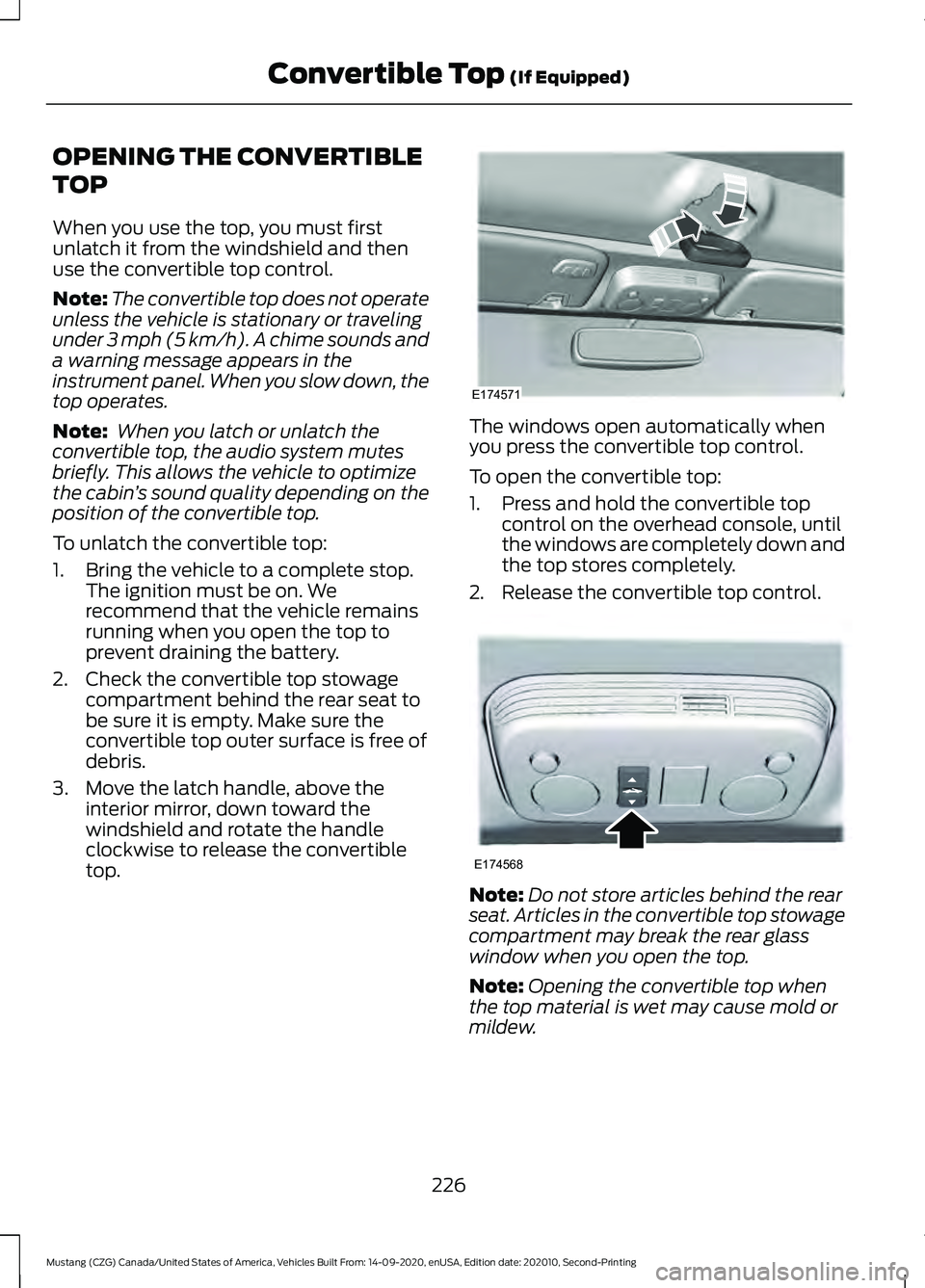
OPENING THE CONVERTIBLE
TOP
When you use the top, you must first
unlatch it from the windshield and then
use the convertible top control.
Note:
The convertible top does not operate
unless the vehicle is stationary or traveling
under 3 mph (5 km/h). A chime sounds and
a warning message appears in the
instrument panel. When you slow down, the
top operates.
Note: When you latch or unlatch the
convertible top, the audio system mutes
briefly. This allows the vehicle to optimize
the cabin ’s sound quality depending on the
position of the convertible top.
To unlatch the convertible top:
1. Bring the vehicle to a complete stop. The ignition must be on. We
recommend that the vehicle remains
running when you open the top to
prevent draining the battery.
2. Check the convertible top stowage compartment behind the rear seat to
be sure it is empty. Make sure the
convertible top outer surface is free of
debris.
3. Move the latch handle, above the interior mirror, down toward the
windshield and rotate the handle
clockwise to release the convertible
top. The windows open automatically when
you press the convertible top control.
To open the convertible top:
1. Press and hold the convertible top
control on the overhead console, until
the windows are completely down and
the top stores completely.
2. Release the convertible top control. Note:
Do not store articles behind the rear
seat. Articles in the convertible top stowage
compartment may break the rear glass
window when you open the top.
Note: Opening the convertible top when
the top material is wet may cause mold or
mildew.
226
Mustang (CZG) Canada/United States of America, Vehicles Built From: 14-09-2020, enUSA, Edition date: 202010, Second-Printing Convertible Top
(If Equipped)E174571 E174568
Page 230 of 530
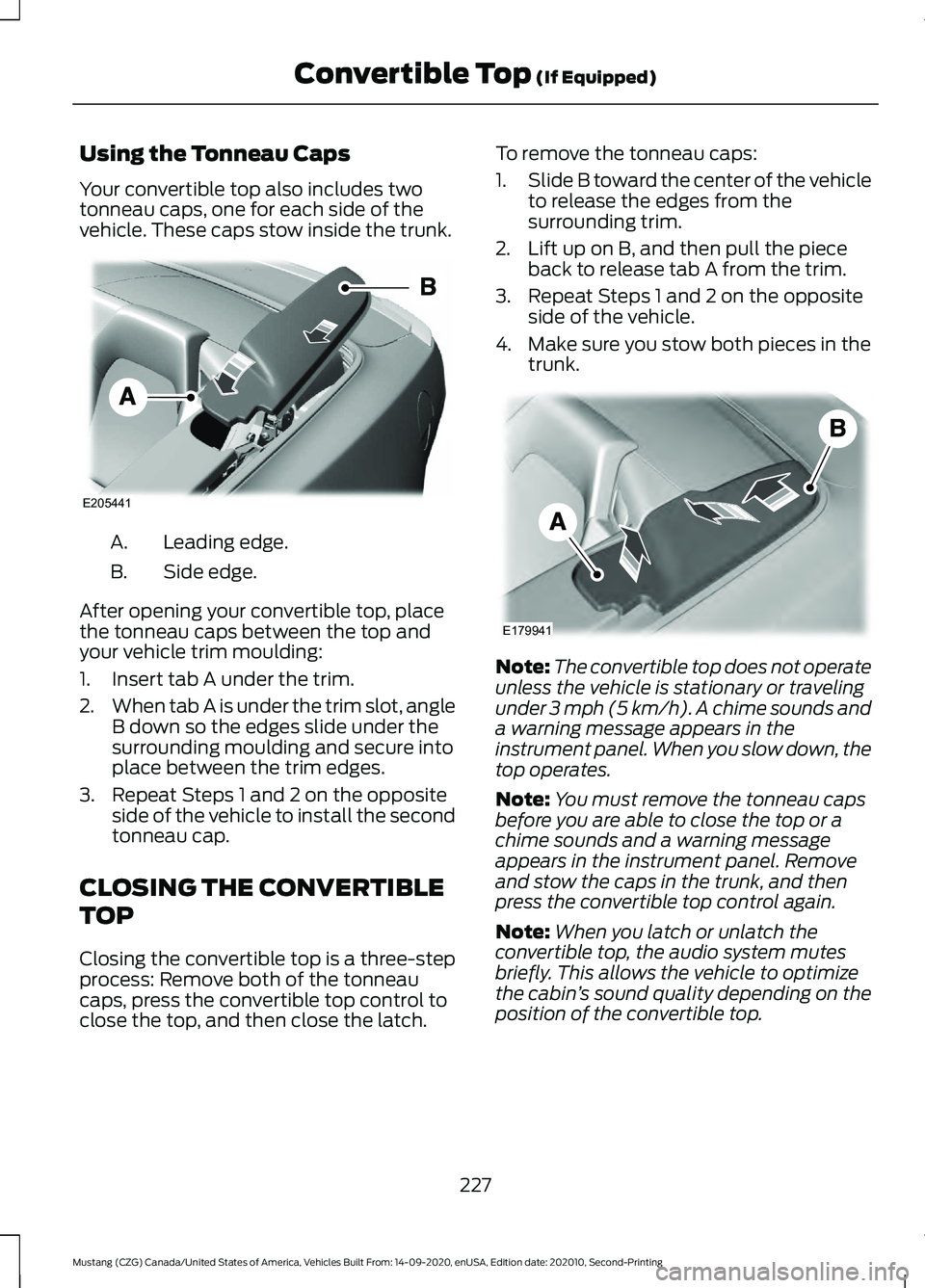
Using the Tonneau Caps
Your convertible top also includes two
tonneau caps, one for each side of the
vehicle. These caps stow inside the trunk.
Leading edge.
A.
Side edge.
B.
After opening your convertible top, place
the tonneau caps between the top and
your vehicle trim moulding:
1. Insert tab A under the trim.
2. When tab A is under the trim slot, angle
B down so the edges slide under the
surrounding moulding and secure into
place between the trim edges.
3. Repeat Steps 1 and 2 on the opposite side of the vehicle to install the second
tonneau cap.
CLOSING THE CONVERTIBLE
TOP
Closing the convertible top is a three-step
process: Remove both of the tonneau
caps, press the convertible top control to
close the top, and then close the latch. To remove the tonneau caps:
1.
Slide B toward the center of the vehicle
to release the edges from the
surrounding trim.
2. Lift up on B, and then pull the piece back to release tab A from the trim.
3. Repeat Steps 1 and 2 on the opposite side of the vehicle.
4. Make sure you stow both pieces in the trunk. Note:
The convertible top does not operate
unless the vehicle is stationary or traveling
under 3 mph (5 km/h). A chime sounds and
a warning message appears in the
instrument panel. When you slow down, the
top operates.
Note: You must remove the tonneau caps
before you are able to close the top or a
chime sounds and a warning message
appears in the instrument panel. Remove
and stow the caps in the trunk, and then
press the convertible top control again.
Note: When you latch or unlatch the
convertible top, the audio system mutes
briefly. This allows the vehicle to optimize
the cabin ’s sound quality depending on the
position of the convertible top.
227
Mustang (CZG) Canada/United States of America, Vehicles Built From: 14-09-2020, enUSA, Edition date: 202010, Second-Printing Convertible Top
(If Equipped)E205441 E179941
Page 257 of 530

Protected Component
Fuse Rating
Fuse or Relay
Number
Right-hand rear-window power (base).
30A
28
Not used (GT500).
—
Gateway module (base).
15A
29
Not used (spare) (GT500).
Not used (spare)
5A
30
Remote keyless entry.
10A
31
Audio unit.
20A
32
Not used.
—
33
Run/start bus.
30A
34
Power distribution box run/start relay
(base).
5A
35
Not used (GT500).
—
Front camera (base).
15A
36
Not used (GT500).
—
Heated steering wheel module (base).
20A
37
Not used (GT500).
—
Note: Spare fuse amperage may vary.
CHANGING A FUSE
Fuses WARNING: Always replace a fuse
with one that has the specified
amperage rating. Using a fuse with a
higher amperage rating can cause severe
wire damage and could start a fire. If electrical components in the vehicle are
not working, a fuse may have blown. Blown
fuses are identified by a broken wire within
the fuse. Check the appropriate fuses
before replacing any electrical
components.
254
Mustang (CZG) Canada/United States of America, Vehicles Built From: 14-09-2020, enUSA, Edition date: 202010, Second-Printing FusesE217331