2021 FORD F-150 automatic transmission
[x] Cancel search: automatic transmissionPage 294 of 796
5. Return the manual park release cable
lever to the stowed position and install
the access cover.
6. With your foot fully applied on the brake pedal, start your vehicle. Confirm
that your vehicle is in the park (P)
position and that the instrument
cluster indicates park (P).
Note: If the instrument cluster is not
displaying the park (P) position or the
instrument cluster displays an error
message, apply the parking brake before
exiting your vehicle.
7. Close the access cover.
290
F-150 (TFD) Canada/United States of America, enUSA, Edition date: 202104, Second-Printing Automatic Transmission
Page 299 of 796
To select a four-wheel drive mode, press
the four-wheel drive mode control button
of the desired mode. You can select
two-wheel drive high (2H), four-wheel
drive high (4H), or if your vehicle has
four-wheel drive auto (4A) at a stop or
while driving. Once the shift is complete,
the information display will then display
the selected four-wheel drive mode. While
shifts are in progress, the lights on the
four-wheel drive control switch can flash
and you could see messages in the
information display indicating that a shift
is in progress or to release the accelerator
pedal to improve shift performance.
Note:
Do not perform this operation if the
rear wheels are slipping or while applying
the accelerator pedal.
Note: You could hear some noise as the
system shifts or engages which is normal.
If the system detects a fault, a warning
message appears in the information
display. See Four-Wheel Drive –
Information Messages (page 299).
Shifting to or from Four-Wheel
Drive Low (4L)
To select or exit four-wheel drive low (4L):
1. Bring your vehicle to a speed of
3 mph
(5 km/h) or less.
2. Place the transmission in neutral (N)
3. Press the desired four-wheel drive button on the four-wheel drive mode
control switch.
The information display will display a
message indicating a four-wheel drive shift
is in progress. If any of the above shift
conditions are not present, the shift will
not occur and the information display will
display information guiding the driver
through the proper shifting procedures. If
there is a transfer case tooth blockage a
message will display in the information display. To alleviate this condition, place
the transmission in a forward gear, move
your vehicle forward approximately
5 ft
(1.5 m), and shift the transmission back to
neutral (N) to allow the transfer case to
complete the range shift.
Note: You could hear some noise as the
system shifts or engages which is normal.
If the system detects a fault, a warning
message appears in the information
display.
See Four-Wheel Drive –
Information Messages (page 299).
FOUR-WHEEL DRIVE MODES
TWO-WHEEL DRIVE HIGH
Two-wheel drive high is for general
on-road driving. Power is sent to the rear
wheels only.
Note: Two-wheel drive high can turn on or
off based on Drive Mode selection See Drive
Mode Control
(page 371).
FOUR-WHEEL DRIVE AUTO
(If
Equipped)
Four-wheel drive auto provides
electronically controlled four-wheel drive
power to both the front and rear wheels,
as required, for increased traction in varying
on-road conditions. The four-wheel drive
auto tuning varies based on selected Drive
Mode.
See Selecting a Drive Mode (page
373).
Note: Four-wheel drive auto can turn on or
off automatically based on Drive Mode
selection.
See Selecting a Drive Mode
(page 373).
295
F-150 (TFD) Canada/United States of America, enUSA, Edition date: 202104, Second-Printing Four-Wheel Drive
(If Equipped)
Page 302 of 796
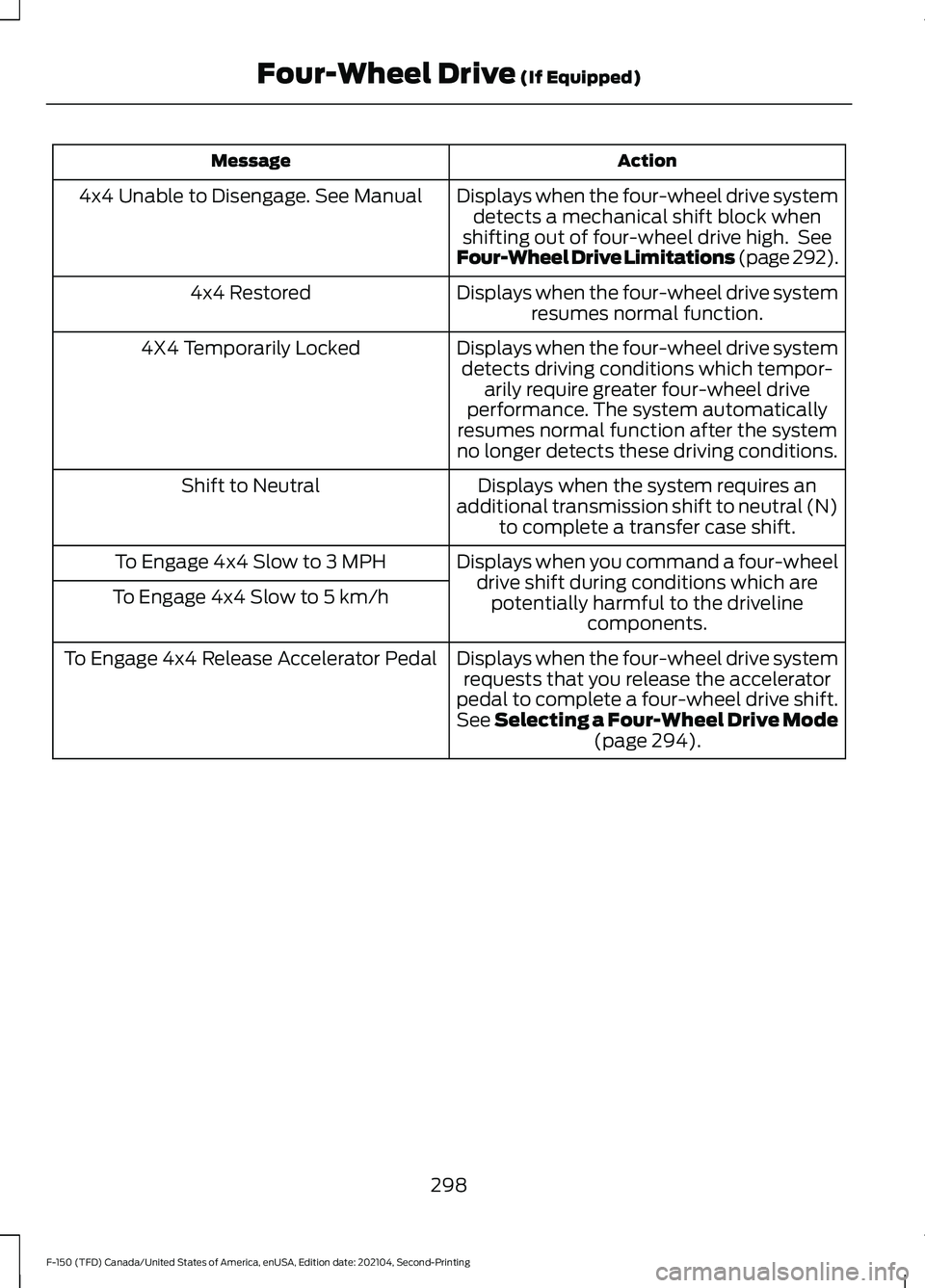
Action
Message
Displays when the four-wheel drive systemdetects a mechanical shift block when
shifting out of four-wheel drive high. See
Four-Wheel Drive Limitations (page 292).
4x4 Unable to Disengage. See Manual
Displays when the four-wheel drive systemresumes normal function.
4x4 Restored
Displays when the four-wheel drive systemdetects driving conditions which tempor- arily require greater four-wheel drive
performance. The system automatically
resumes normal function after the system
no longer detects these driving conditions.
4X4 Temporarily Locked
Displays when the system requires an
additional transmission shift to neutral (N) to complete a transfer case shift.
Shift to Neutral
Displays when you command a four-wheeldrive shift during conditions which arepotentially harmful to the driveline components.
To Engage 4x4 Slow to 3 MPH
To Engage 4x4 Slow to 5 km/h
Displays when the four-wheel drive systemrequests that you release the accelerator
pedal to complete a four-wheel drive shift.
See Selecting a Four-Wheel Drive Mode (page 294).
To Engage 4x4 Release Accelerator Pedal
298
F-150 (TFD) Canada/United States of America, enUSA, Edition date: 202104, Second-Printing Four-Wheel Drive
(If Equipped)
Page 303 of 796
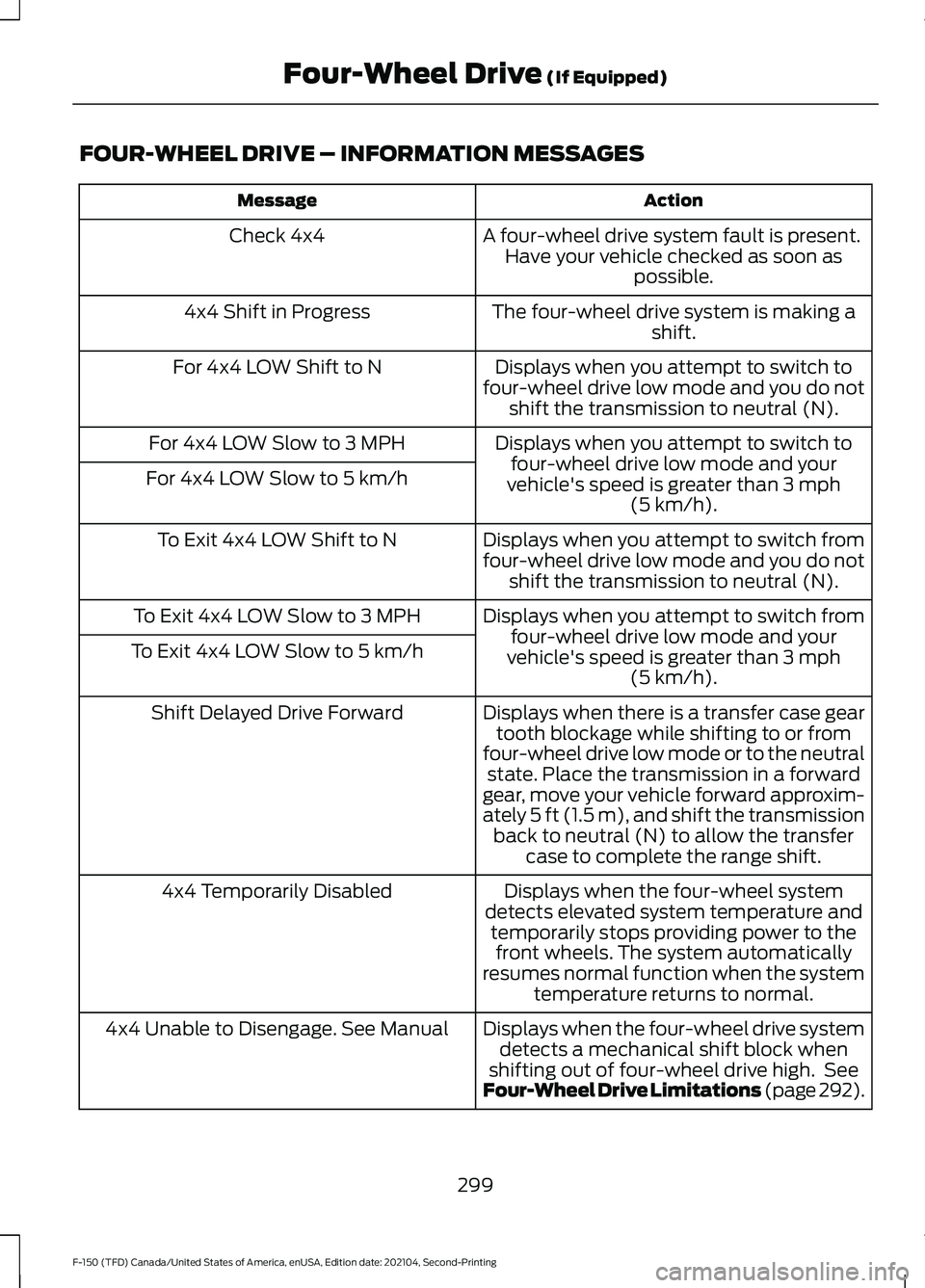
FOUR-WHEEL DRIVE – INFORMATION MESSAGES
Action
Message
A four-wheel drive system fault is present.Have your vehicle checked as soon as possible.
Check 4x4
The four-wheel drive system is making ashift.
4x4 Shift in Progress
Displays when you attempt to switch to
four-wheel drive low mode and you do not shift the transmission to neutral (N).
For 4x4 LOW Shift to N
Displays when you attempt to switch tofour-wheel drive low mode and your
vehicle's speed is greater than 3 mph
(5 km/h).
For 4x4 LOW Slow to 3 MPH
For 4x4 LOW Slow to 5 km/h
Displays when you attempt to switch from
four-wheel drive low mode and you do notshift the transmission to neutral (N).
To Exit 4x4 LOW Shift to N
Displays when you attempt to switch fromfour-wheel drive low mode and your
vehicle's speed is greater than
3 mph
(5 km/h).
To Exit 4x4 LOW Slow to 3 MPH
To Exit 4x4 LOW Slow to 5 km/h
Displays when there is a transfer case geartooth blockage while shifting to or from
four-wheel drive low mode or to the neutral state. Place the transmission in a forward
gear, move your vehicle forward approxim-
ately
5 ft (1.5 m), and shift the transmission
back to neutral (N) to allow the transfer case to complete the range shift.
Shift Delayed Drive Forward
Displays when the four-wheel system
detects elevated system temperature and temporarily stops providing power to thefront wheels. The system automatically
resumes normal function when the system temperature returns to normal.
4x4 Temporarily Disabled
Displays when the four-wheel drive systemdetects a mechanical shift block when
shifting out of four-wheel drive high. See
Four-Wheel Drive Limitations (page 292).
4x4 Unable to Disengage. See Manual
299
F-150 (TFD) Canada/United States of America, enUSA, Edition date: 202104, Second-Printing Four-Wheel Drive
(If Equipped)
Page 304 of 796
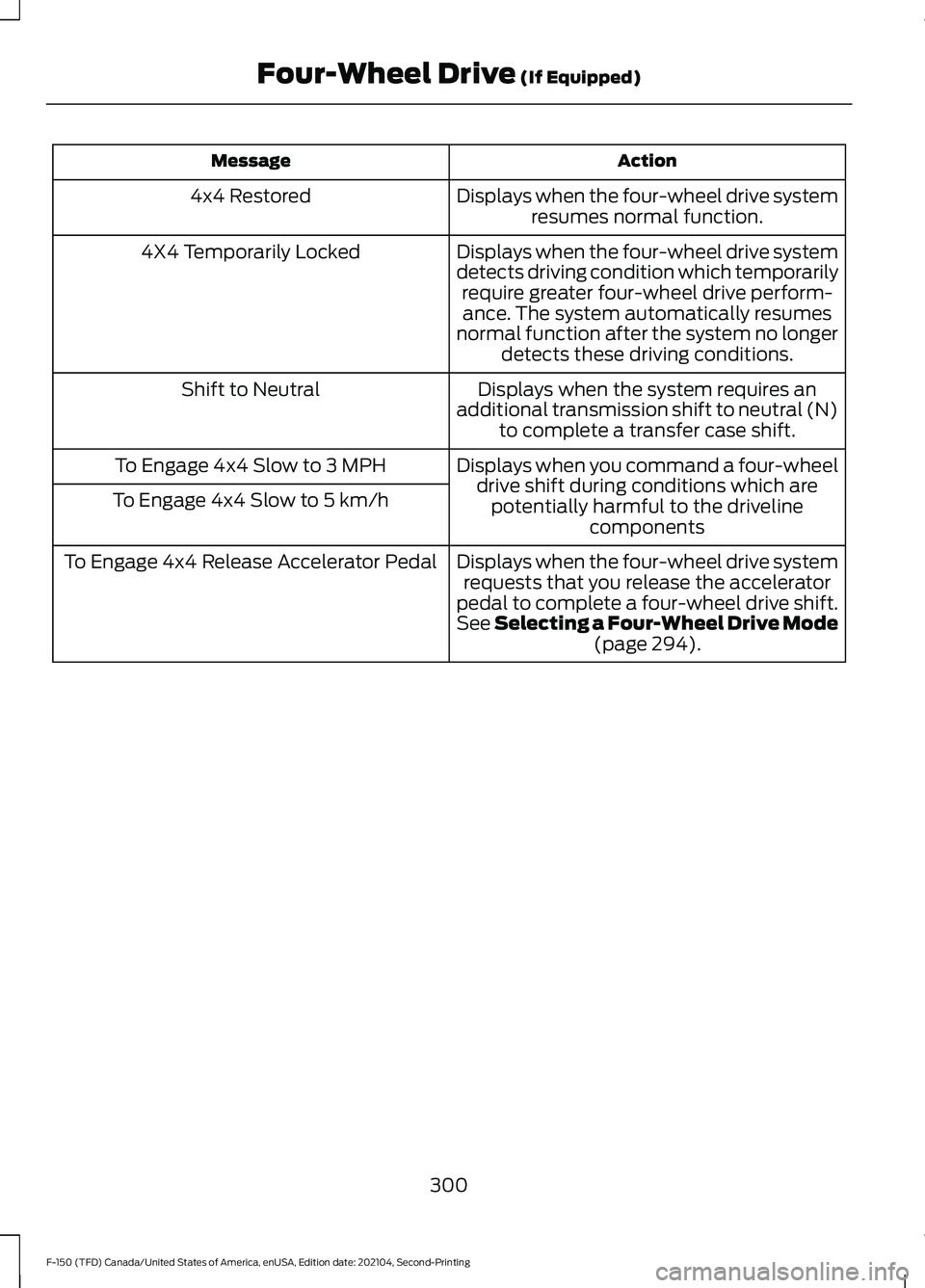
Action
Message
Displays when the four-wheel drive systemresumes normal function.
4x4 Restored
Displays when the four-wheel drive system
detects driving condition which temporarilyrequire greater four-wheel drive perform-ance. The system automatically resumes
normal function after the system no longer detects these driving conditions.
4X4 Temporarily Locked
Displays when the system requires an
additional transmission shift to neutral (N) to complete a transfer case shift.
Shift to Neutral
Displays when you command a four-wheeldrive shift during conditions which arepotentially harmful to the driveline components
To Engage 4x4 Slow to 3 MPH
To Engage 4x4 Slow to 5 km/h
Displays when the four-wheel drive systemrequests that you release the accelerator
pedal to complete a four-wheel drive shift.
See Selecting a Four-Wheel Drive Mode (page 294).
To Engage 4x4 Release Accelerator Pedal
300
F-150 (TFD) Canada/United States of America, enUSA, Edition date: 202104, Second-Printing Four-Wheel Drive
(If Equipped)
Page 329 of 796
TRAIL CONTROL INDICATORS
- RAPTOR
TRAIL ONE PEDAL DRIVE (IF
EQUIPPED)
WHAT IS TRAIL ONE PEDAL DRIVE
Trail one pedal drive allows you to
accelerate and brake using only the
accelerator pedal. The system assists
when driving through difficult off-road
terrain. Pressing the accelerator pedal
down accelerates your vehicle and
releasing pressure on the accelerator
pedal, with your foot still on the pedal,
slows your vehicle down. Releasing the
accelerator pedal may allow your vehicle
to come to a complete stop, some
situations may require you to press the
brake pedal to come to a complete stop.
TRAIL ONE PEDAL DRIVE
PRECAUTIONS WARNING:
This system is an extra
driving aid. It does not replace your
attention and judgment, or the need to
apply the brakes. This system does NOT
automatically brake your vehicle. If you
fail to press the brake pedal when
necessary, you may collide with another
vehicle.
Shifting into drive (D) or reverse (R) does
not cause the vehicle to move.
You can press the brake pedal to increase
braking. This does not turn the system off. Trail one pedal drive could apply the
parking brake when your vehicle is not
moving and not in park (P).
Note:
Always check the transmission
selection before accelerating.
Note: Only use trail one pedal drive on
slippery or loose surfaces. Using trail one
pedal drive on dry, hard surfaces could
produce some vibration, driveline bind up
and potential excessive tire and vehicle
wear.
TRAIL ONE PEDAL DRIVE
LIMITATIONS
Trail one pedal drive is unavailable when
any of the following occur:
• Your vehicle is not in four-wheel drive
high (4H) or four-wheel drive low (4L)
modes.
• Using cruise control.
• Using trail control.
• You exceed
30 mph (48 km/h).
Releasing the accelerator pedal may allow
your vehicle to come to a complete stop,
some situations may require you to press
the brake pedal to come to a complete
stop.
SWITCHING TRAIL ONE PEDAL
DRIVE ON AND OFF
Switching Trail One Pedal Drive On Press the trail features button
when in four-wheel drive high or
four-wheel drive low to activate
trail one pedal drive.
Switching Trail One Pedal Drive
Off
Press the trail features button again to
switch trail one pedal drive off.
325
F-150 (TFD) Canada/United States of America, enUSA, Edition date: 202104, Second-Printing Trail ControlE272858 E332910
Page 334 of 796
WHAT IS HILL DESCENT
CONTROL
Hill descent control allows the driver to set
and maintain vehicle speed while
descending steep slopes in various surface
conditions.
HOW DOES HILL DESCENT
CONTROL WORK
Hill descent control can maintain vehicle
speeds on downhill slopes between
2
– 20 mph (3– 32 km/h). Above 20 mph
(32 km/h), the system remains on but the
descent speed cannot be set or
maintained.
Note: The system does not function below
2 mph (3 km/h)
.
The system requires a cool down interval
after a period of sustained use. Hill descent
control provides a warning in the message
center and a tone sounds when the system
is about to disengage for cooling. At this
time, manually apply the brakes as needed
to maintain descent speed.
Note: The amount of time that the system
can remain active before cooling varies with
conditions.
HILL DESCENT CONTROL
PRECAUTIONS WARNING:
The system does not
control speed in low traction conditions
or extremely steep slopes. The system
is designed to be an aid and does not
relieve you of your responsibility to drive
with due care and attention. Failure to
follow this instruction could result in
personal injury. WARNING:
Hill descent control
cannot control descent in all surface
conditions and circumstances, such as
ice or extremely steep grades. Hill
descent control is a driver assist system
and cannot substitute for good judgment
by the driver. Failure to do so may result
in loss of vehicle control, crash or serious
injury. WARNING:
The system does not
replace the parking brake. When you
leave your vehicle, always apply the
parking brake and shift the transmission
into park (P) for automatic transmission
or first gear for manual transmission.
SWITCHING HILL DESCENT
CONTROL ON AND OFF Press the button on the
instrument panel. A light
illuminates and a tone sounds
when the system is active.
SETTING THE HILL DESCENT
SPEED
To increase or decrease the descent speed,
press the accelerator or brake pedal, or use
the SET
+ and SET - buttons on the
steering wheel. Once you reach the
preferred speed remove your feet from the
pedals.
HILL DESCENT CONTROL
INDICATOR Illuminates when you switch hill
descent control on.
330
F-150 (TFD) Canada/United States of America, enUSA, Edition date: 202104, Second-Printing Hill Descent Control
(If Equipped)E163171 E163171
Page 375 of 796
WHAT IS DRIVE MODE
CONTROL
Your vehicle has various drive modes that
you can select for different driving
conditions. Depending on the drive mode
that you select, the system adjusts various
vehicle settings.
HOW DOES DRIVE MODE
CONTROL WORK - RAPTOR
Selectable drive modes change various
electronic and mechanical settings within
your vehicle to tailor its performance and
driving characteristics to on-road or
off-road driving conditions. Steering feel
and effort, traction control, stability
control, chassis controls, powertrain
response, transmission shift points,
four-wheel driveline settings, exhaust noise
level and suspension dampening are
automatically altered to a pre-determined
setting depending upon the drive mode
that you select.
Note:
Your vehicle has diagnostic checks
that continuously monitor all systems for
proper operation. If a drive mode is
unavailable due to a system fault, your
vehicle defaults to normal mode and the
driveline remains in the four-wheel drive
setting that you last selected prior to the
system fault. Note:
Your vehicle reverts to normal mode
each time you start it. If you shut your
vehicle off in a drive mode other than
normal mode, at startup the instrument
cluster screen displays a pop-up asking if
you would like to return to your last used
drive mode. If you select yes to the pop-up,
your vehicle returns to the last selected drive
mode and the default four-wheel driveline
setting associated with that drive mode. If
you select no, your vehicle remains in normal
mode and the default four-wheel driveline
setting associated with that drive mode. If
you do not select yes or no, the pop-up
message times out, your vehicle remains in
normal mode, and the four-wheel driveline
setting remains in its last used setting.
Note: Do not use the electronic locking
differential on dry, hard surfaces. Doing so
produces excessive noise, vibration and
increases tire wear. See Electronic Locking
Differential (page 301).
HOW DOES DRIVE MODE
CONTROL WORK
Selectable drive modes change various
electronic and mechanical settings within
your vehicle to tailor its performance and
driving characteristics to on-road or
off-road driving conditions. Steering feel
and effort, traction control, stability
control, chassis controls, powertrain
response, transmissions shift points,
four-wheel driveline setting, exhaust noise
level and suspension dampening are
automatically altered to a pre-determined
setting depending upon the drive mode
that is selected.
371
F-150 (TFD) Canada/United States of America, enUSA, Edition date: 202104, Second-Printing Drive Mode Control