2021 FORD ESCAPE turn signal
[x] Cancel search: turn signalPage 246 of 589

WHAT IS ACTIVE PARK
ASSIST
Assists you with parking in and out of
parking spaces.
HOW DOES ACTIVE PARK
ASSIST WORK
Active park assist uses sensors to detect
parking spaces. Active park assist controls
steering, acceleration, braking and shifting
as required to maneuver into or out of a
parking space when activate.
ACTIVE PARK ASSIST
PRECAUTIONS
WARNING: You must remain in
your vehicle when the system turns on.
At all times, you are responsible for
controlling your vehicle, supervising the
system and intervening, if required.
Failure to take care may result in the loss
of control of your vehicle, serious
personal injury or death. WARNING:
The sensors may not
detect objects in heavy rain or other
conditions that cause interference. WARNING: You are responsible for
controlling your vehicle at all times. The
system is designed to be an aid and does
not relieve you of your responsibility to
drive with due care and attention. Failure
to follow this instruction could result in
the loss of control of your vehicle,
personal injury or death. WARNING:
Do not use the system
with accessories that extend beyond the
front or rear of your vehicle, for example
a trailer hitch or bike rack. The system is
not able to make corrections for the
additional length of the accessories.
SWITCHING ACTIVE PARK
ASSIST ON AND OFF Press the active park assist
button to bring up full screen
notifications.
Press the soft keys on the touchscreen to
switch between parallel park in,
perpendicular park in or parallel park out
parking modes.
Cancelling Active Park Assist
To cancel parking assistance at any time:
• Press the active park assist button
during operation.
• Grab the steering wheel during
operation.
• Drive above
22 mph (35 km/h) for a
short period of time when searching for
a parking space.
• Drive above
6 mph (9 km/h) during
operation.
• Switch traction control off.
ENTERING A PARALLEL
PARKING SPACE
1. Press the active park assist button.
Note: The system detects other vehicles
and curbs to find a parking space.
2. Use the turn signal lever to search for a parking space on the driver or
passenger side of your vehicle.
243
Escape (CTC) Canada/United States of America, Vehicles Built From: 02-11-2020, enUSA, Edition date: 202011, First-Printing Active Park Assist
(If Equipped)E146186
Page 247 of 589

Note:
If you do not use the turn signal lever,
the system searches for a parking space on
the passenger side of your vehicle.
3. Drive your vehicle approximately 3 ft
(1 m) away from and parallel to the
other parked vehicles when searching
for a parking space.
Note: A tone sounds and a message
appears in the information and
entertainment display when active park
assist finds a suitable parking space.
4. Press and hold the brake pedal.
5. Release the steering wheel and shift into neutral (N).
6. Press and hold the active park assist button.
7. Release the brake pedal to allow your vehicle to park.
Note: You can slow down your vehicle at
any time by pressing the brake pedal.
Note: When parallel parking between
objects, the system parks closer to the
object in front of your vehicle to allow easier
access to the luggage compartment.
Note: When parking is complete, your
vehicle shifts into park (P).
ENTERING A PERPENDICULAR
PARKING SPACE
1. Press the active park assist button.
Note: Active park assist does not recognize
parking space lines and centers your vehicle
between objects.
2. Press the active park assist icon on the
touchscreen.
3. Select perpendicular parking.
4. Use the turn signal lever to search for a parking space on the driver or
passenger side of your vehicle. Note:
If you do not use the turn signal lever,
the system searches for a parking space on
the passenger side of your vehicle.
5. Drive your vehicle approximately 3 ft
(1 m) away from and perpendicular to
the other parked vehicles when
searching for a parking space.
Note: A tone sounds and a message
appears in the information and
entertainment display when active park
assist finds a parking space.
6. Press and hold the brake pedal.
7. Release the steering wheel and shift into neutral (N).
8. Press and hold the active park assist button.
9. Release the brake pedal to allow the vehicle to park.
Note: Active park assist backs your vehicle
into parking spaces.
Note: Active park assist aligns the front end
of your vehicle with the lane side of the
object next to it.
Note: When the system detects only one
object, it allows enough distance to open
the door on either side.
Note: You can slow down your vehicle at
any time by pressing the brake pedal.
Note: When parking is complete, your
vehicle shifts into park (P).
EXITING A PARKING SPACE
Active park assist only assists leaving
parallel parking spaces.
1. Press the active park assist button.
2. Press the active park assist icon on the
touchscreen.
3. Select parallel park exit.
4. Use the turn signal to choose the direction to exit the parking space.
244
Escape (CTC) Canada/United States of America, Vehicles Built From: 02-11-2020, enUSA, Edition date: 202011, First-Printing Active Park Assist
(If Equipped)
Page 257 of 589

Following a Vehicle
When a vehicle ahead of you enters the
same lane or a slower vehicle is ahead in
the same lane, the vehicle speed adjusts
to maintain the gap setting.
Note:
When you are following a vehicle and
you switch on a turn signal lamp, adaptive
cruise control may provide a small,
temporary acceleration to help you pass.
Your vehicle maintains a consistent gap
from the vehicle ahead until:
• The vehicle in front of you accelerates
to a speed above the set speed.
• The vehicle in front of you moves out
of the lane you are in.
• You set a new gap distance.
The system applies the brakes to slow
down your vehicle to maintain a safe gap
distance from the vehicle in front of you.
The system only applies limited braking.
You can override the system by applying
the brakes.
Note: The brakes may emit noise when
applied by the system.
If the system determines that its maximum
braking level is not sufficient, an audible
warning sounds, a message appears in the
instrument cluster display and an indicator
flashes when the system continues to
brake. Take immediate action.
CANCELING THE SET SPEED Press the button or tap the brake
pedal.
The set speed does not erase.
RESUMING THE SET SPEED Press the button. Your vehicle speed returns to the
previously set speed and gap setting. The
set speed displays continuously in the
information display when the system is
active.
Note:
Only use resume if you are aware of
the set speed and intend to return to it.
Resuming the Set Speed from a
Complete Stop
If your vehicle follows a vehicle to a
complete stop and remains stationary for
less than three seconds, your vehicle
accelerates from a stationary position to
follow the vehicle ahead. If your vehicle follows a vehicle
to a complete stop and remains
stationary for more than three
seconds, press and release the button or
press the accelerator pedal to follow the
vehicle ahead.
OVERRIDING THE SET SPEED WARNING: If you override the
system by pressing the accelerator
pedal, it does not automatically apply
the brakes to maintain a gap from any
vehicle ahead.
When you press the accelerator pedal, you
override the set speed and gap distance.
Use the accelerator pedal to intentionally
exceed the set speed limit.
When you override the system, the green
indicator illuminates and the vehicle icon
does not appear in the instrument cluster
display.
The system resumes operation when you
release the accelerator pedal. The vehicle
speed decreases to the set speed, or a
lower speed if following a slower vehicle.
254
Escape (CTC) Canada/United States of America, Vehicles Built From: 02-11-2020, enUSA, Edition date: 202011, First-Printing Adaptive Cruise Control
(If Equipped)E280804
Page 269 of 589

WHAT IS THE LANE KEEPING
SYSTEM
The lane keeping system alerts you by
providing temporary steering assistance
or steering wheel vibration when it detects
an unintended lane departure.
HOW DOES THE LANE
KEEPING SYSTEM WORK
The lane keeping system uses a forward
looking camera mounted on the windshield
to monitor vehicle movement within the
travel lane.
When the camera detects a drift out of the
travel lane, the lane keeping system alerts
the driver by vibrating the steering wheel,
or aids the driver by providing a small
steering input to move the vehicle back
into the travel lane.
The driver can select one of three modes:
•
Alert (If Equipped)
• Aid
• Alert + Aid
LANE KEEPING SYSTEM
PRECAUTIONS WARNING: You are responsible for
controlling your vehicle at all times. The
system is designed to be an aid and does
not relieve you of your responsibility to
drive with due care and attention. Failure
to follow this instruction could result in
the loss of control of your vehicle,
personal injury or death. WARNING: The system will not
operate if the sensor cannot track the
road lane markings. WARNING:
The sensor may
incorrectly track lane markings as other
structures or objects. This can result in
a false or missed warning. WARNING:
In cold and severe
weather conditions the system may not
function. Rain, snow and spray can all
limit sensor performance. WARNING:
The system may not
operate properly if the sensor is blocked.
Keep the windshield free from
obstruction. WARNING:
If damage occurs in the
immediate area surrounding the sensor,
have your vehicle checked as soon as
possible. WARNING:
The system may not
correctly operate if your vehicle is fitted
with a suspension kit not approved by
us. WARNING:
Large contrasts in
outside lighting can limit sensor
performance.
LANE KEEPING SYSTEM
LIMITATIONS
The lane keeping system only operates
when the vehicle speed is greater than
40 mph (64 km/h)
.
The system works when the camera can
detect at least one lane marking.
The lane keeping system may not correctly
operate in any of the following conditions:
• The lane keeping system does not
detect at least one lane marking.
• You switch the turn signal on.
266
Escape (CTC) Canada/United States of America, Vehicles Built From: 02-11-2020, enUSA, Edition date: 202011, First-Printing Lane Keeping System
Page 277 of 589

When you switch blind spot information
system off, a warning lamp illuminates and
a message displays. When you switch the
system on or off, the alert indicators flash
twice.
Note:
The system remembers the last
setting when you start your vehicle.
To permanently switch the system off,
contact an authorized dealer.
LOCATING THE BLIND SPOT
INFORMATION SYSTEM
SENSORS The sensors are behind the rear bumper
on both sides of your vehicle.
Note:
Keep the sensors free from snow, ice
and large accumulations of dirt.
Note: Do not cover the sensors with bumper
stickers, repair compound or other objects. Note:
Blocked sensors may affect system
accuracy.
If the sensors become blocked, a message
may appear in the information display. The
alert indicators remain illuminated but the
system does not alert you.
BLIND SPOT INFORMATION
SYSTEM INDICATORS When blind spot information
system detects a vehicle, an
alert indicator illuminates in the
exterior mirror on the side the approaching
vehicle is coming from. If you turn the turn
signal on for that side of your vehicle, the
alert indicator flashes.
274
Escape (CTC) Canada/United States of America, Vehicles Built From: 02-11-2020, enUSA, Edition date: 202011, First-Printing Blind Spot Information SystemE205199 E309137 E249861E249861
Page 304 of 589
CONNECTING A TRAILER
PRECAUTIONS
WARNING: Do not adjust the spring
bars so that your vehicle's rear bumper
is higher than before attaching the trailer.
Doing so will defeat the function of the
weight-distributing hitch, which may
cause unpredictable handling, and could
result in serious personal injury.
Do not tow a trailer until you drive your
vehicle at least 1,000 mi (1,600 km).
Do not use a hitch that either clamps onto
the bumper or attaches to the axle. You
must distribute the load in your trailer so
that 10-15% of the total weight of the
trailer is on the trailer coupler.
Consult your local motor vehicle laws for
towing a trailer.
See the instructions included with towing
accessories for the proper installation and
adjustment specifications.
Service your vehicle more frequently if you
tow a trailer. See
Normal Scheduled
Maintenance (page 490).
If you use a rental trailer, follow the
instructions the rental agency gives you.
When attaching the trailer wiring connector
to your vehicle, only use a proper fitting
connector that works with the vehicle and
trailer functions.
Account for the trailer coupler weight as
part of your vehicle load when calculating
the total vehicle weight.
Do not exceed the load limits. See
Calculating the Load Limit
(page 295). CONNECTING A TRAILER
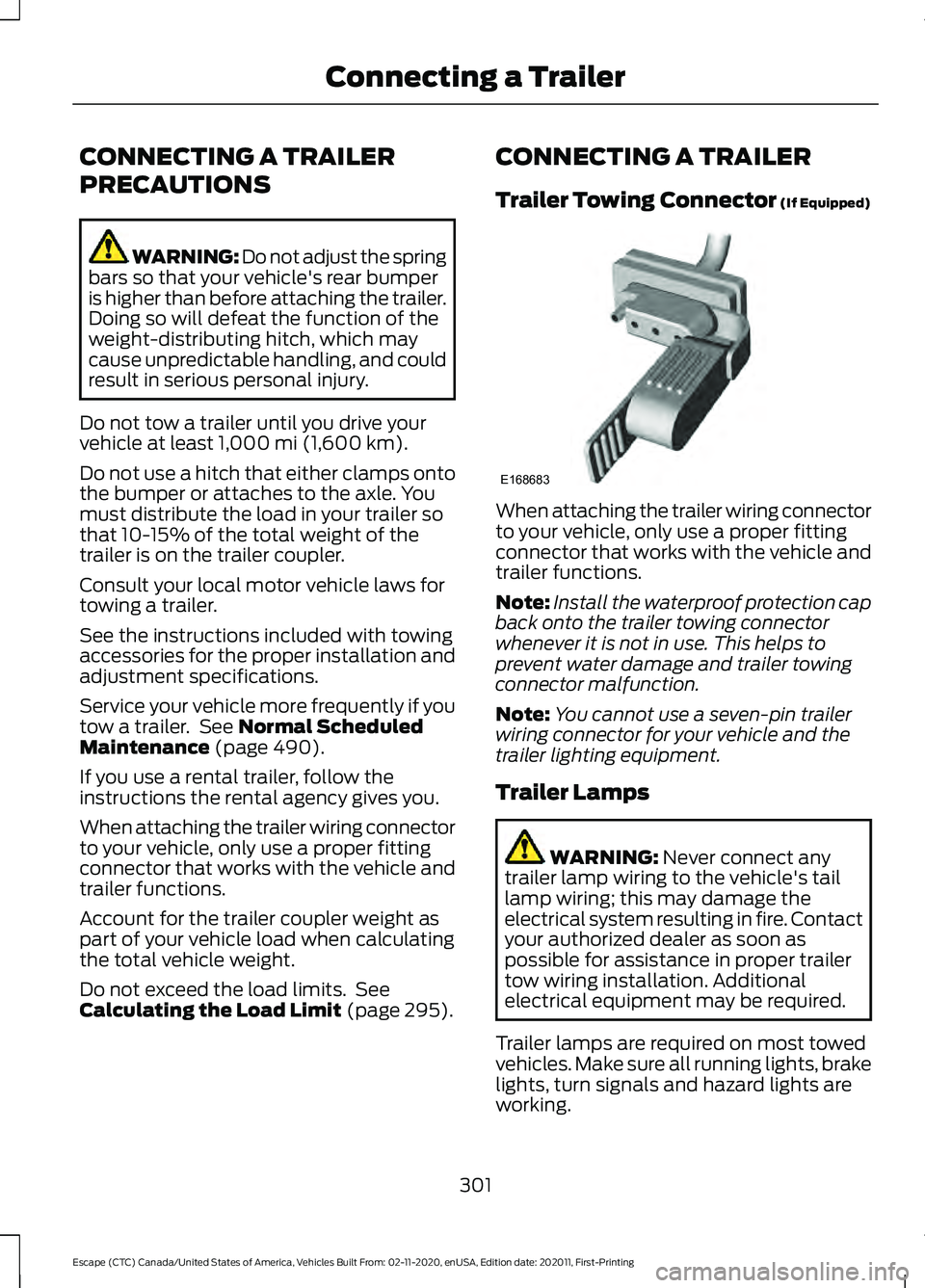
Trailer Towing Connector
(If Equipped)
When attaching the trailer wiring connector
to your vehicle, only use a proper fitting
connector that works with the vehicle and
trailer functions.
Note:
Install the waterproof protection cap
back onto the trailer towing connector
whenever it is not in use. This helps to
prevent water damage and trailer towing
connector malfunction.
Note: You cannot use a seven-pin trailer
wiring connector for your vehicle and the
trailer lighting equipment.
Trailer Lamps WARNING:
Never connect any
trailer lamp wiring to the vehicle's tail
lamp wiring; this may damage the
electrical system resulting in fire. Contact
your authorized dealer as soon as
possible for assistance in proper trailer
tow wiring installation. Additional
electrical equipment may be required.
Trailer lamps are required on most towed
vehicles. Make sure all running lights, brake
lights, turn signals and hazard lights are
working.
301
Escape (CTC) Canada/United States of America, Vehicles Built From: 02-11-2020, enUSA, Edition date: 202011, First-Printing Connecting a TrailerE168683
Page 353 of 589

High beam headlamp
1. Remove service cap.
2. Remove the bulb from the headlamp
assembly by turning it
counterclockwise, then pull it straight
out.
3. Disconnect the electrical connector.
4. To install, reverse the removal procedure.
Low beam headlamp 1. Remove service cap.
2. Disconnect the electrical connector.
3. Remove the bulb from the headlamp
assembly by turning it
counterclockwise, then pull it straight
out. 4. To install, reverse the removal
procedure.
Changing a Front Turn Signal Lamp
Bulb
Headlamp Park/Turn lamp
A
High beam headlamp
B
Low beam headlamp
C
Park/Turn lamp 1. Remove service cap, if applicable.
2. Remove bulb from the headlamp
assembly by turning it
counterclockwise, then pull it straight
out.
350
Escape (CTC) Canada/United States of America, Vehicles Built From: 02-11-2020, enUSA, Edition date: 202011, First-Printing MaintenanceE307882 E307883 E307881 E307884
Page 386 of 589

Your vehicle has also been equipped with
a TPMS malfunction indicator to indicate
when the system is not operating properly.
The TPMS malfunction indicator is
combined with the low tire pressure
telltale. When the system detects a
malfunction, the telltale will flash for
approximately one minute and then remain
continuously illuminated. This sequence
will continue upon subsequent vehicle
start-ups as long as the malfunction exists.
When the malfunction indicator is
illuminated, the system may not be able
to detect or signal low tire pressure as
intended. TPMS malfunctions may occur
for a variety of reasons, including the
installation of replacement or alternate
tires or wheels on the vehicle that prevent
the TPMS from functioning properly.
Always check the TPMS malfunction
telltale after replacing one or more tires or
wheels on your vehicle to ensure that the
replacement or alternate tires and wheels
allow the TPMS to continue to function
properly.
WARNING: Changes or
modifications not expressively approved
by the party responsible for compliance
could void the user's authority to operate
the equipment. The term "IC:" before the
radio certification number only signifies
that Industry Canada technical
specifications were met.
This device complies with Part 15 of the
FCC Rules and with License exempt RSS
Standards of Industry Canada. Operation
is subject to the following two conditions:
1. This device may not cause harmful interference, and
2. This device must accept any interference received, including
interference that may cause undesired
operation. TIRE PRESSURE MONITORING
SYSTEM PRECAUTIONS WARNING:
The tire pressure
monitoring system is not a substitute for
manually checking tire pressures. You
should periodically check tire pressures
using a pressure gauge. Failure to
correctly maintain tire pressures could
increase the risk of tire failure, loss of
control, vehicle rollover and personal
injury. WARNING:
Do not use the tire
pressure displayed in the information
display as a tire pressure gauge. Failure
to follow this instruction could result in
personal injury or death.
Note: The use of tire sealants can damage
the tire pressure monitoring system.
TIRE PRESSURE MONITORING
SYSTEM LIMITATIONS
When the outside temperature drops
significantly, the tire pressure could
decrease and activate the low tire pressure
warning lamp.
The warning lamp could also illuminate
when you use a spare wheel, or tire sealant
from the inflator kit.
Note: Regularly checking the vehicle tire
pressures can reduce the possibility for the
warning lamp to illuminate due to outside
air temperature changes.
Note: After you inflate the tires to the
recommended pressure it could take up to
two minutes of driving over
20 mph
(32 km/h) for the warning indicator to turn
off.
383
Escape (CTC) Canada/United States of America, Vehicles Built From: 02-11-2020, enUSA, Edition date: 202011, First-Printing Tire Pressure Monitoring System