2021 FORD BRONCO SPORT battery
[x] Cancel search: batteryPage 157 of 471
•
Your vehicle is moving.
• The interior compartment does not
meet customer comfort when air
conditioning or heat is on.
• Fogging of the windows could occur
and the air conditioning is on.
• The battery is not within optimal
operating conditions.
• You exceed the maximum engine off
time.
• You press the Auto-Start-Stop button
while the engine is stopped.
• The heated windshield is turned on.
Any of the following conditions could result
in an automatic restart of the engine if:
• The blower fan speed increases or the
climate control temperature changes.
• You plug in or switch on an electrical
accessory.
Disabling Auto-Start-Stop
Press the Auto-Start-Stop button on the
instrument panel to switch the system off.
The button illuminates. The system
deactivates for the current ignition cycle
only. Press the button again to restore the
Auto-Start-Stop function.
If your vehicle is in an Auto-Start-Stop
state and you shift the transmission to
reverse without pressing the brake, a
message appears telling you to press the
brake. Press the brake pedal within 60
seconds, or shift into park (P) and
manually restart your vehicle.
Note: If the Shift to P, Restart Engine
message appears and the amber
Auto-Start-Stop indicator light is flashing,
automatic restart is not available. Manually
restart your vehicle. See Information
Displays (page 99).
154
Bronco Sport (CHD) Canada/United States of America, enUSA, Edition date: 202007, Second-Printing Unique Driving Characteristics
Page 168 of 471
Your vehicle may not pass the I/M test if
the service engine soon indicator is on or
not working properly (bulb is burned out),
or if the OBD-II system has determined
that some of the emission control systems
have not been properly checked. In this
case, the vehicle is not ready for I/M
testing.
If the vehicle
’s engine or transmission has
just been serviced, or the battery has
recently run down or been replaced, the
OBD-II system may indicate that the
vehicle is not ready for I/M testing. To
determine if the vehicle is ready for I/M
testing, turn the ignition key to the on
position for 15 seconds without cranking
the engine. If the service engine soon
indicator blinks eight times, it means that
the vehicle is not ready for I/M testing; if
the service engine soon indicator stays on
solid, it means that your vehicle is ready
for I/M testing.
The OBD-II system checks the emission
control system during normal driving. A
complete check may take several days.
If the vehicle is not ready for I/M testing,
you can perform the following driving cycle
consisting of mixed city and highway
driving:
1. 15 minutes of steady driving on an expressway or highway followed by 20
minutes of stop-and-go driving with at
least four 30-second idle periods.
2. Allow your vehicle to sit for at least eight hours with the ignition off. Then,
start the vehicle and complete the
above driving cycle. The vehicle must
warm up to its normal operating
temperature. Once started, do not turn
off the vehicle until the above driving
cycle is complete.
If the vehicle is still not ready for I/M
testing, you need to repeat the above
driving cycle.
165
Bronco Sport (CHD) Canada/United States of America, enUSA, Edition date: 202007, Second-Printing Engine Emission Control
Page 171 of 471
In manual (M), press the manual (M)
button to switch the feature off and return
to drive (D).
Note:
The shift schedule can change with
drive modes. Using drive modes could
change when you can shift into the
requested gear. See Drive Mode Control
(page 223).
Automatic Return to Park
Note: This feature does not operate when
your vehicle is in stay in neutral (N).
Your vehicle has a feature that shifts your
vehicle into park (P) when any of the
following conditions occur:
• You switch the vehicle off.
• You open the driver door with your
seatbelt unlatched.
• You unlatch your seatbelt when the
driver door is open.
If you switch your vehicle off when moving,
the vehicle first shifts into neutral (N) until
it slows down enough to shift into park (P).
Note: If you have waited for more than two
minutes before starting your vehicle,
unlatching your seatbelt causes this feature
to activate, even with the driver door closed.
Note: This feature may not work properly
if the door ajar switch is malfunctioning. If
your door ajar indicator does not illuminate
when you open the driver door or the
indicator illuminates with the driver door
closed, see your authorized dealer.
Stay in Neutral Mode
Stay in neutral mode allows your vehicle
to stay in neutral when you exit your
vehicle. Your vehicle must be stationary to
enter this mode.
Do not tow your vehicle in this mode. Note:
Stay in neutral is a temporary vehicle
state with the ignition off. Once in this
mode, sufficient battery voltage must be
maintained or your vehicle returns to park.
Not maintaining sufficient battery voltage
could damage the battery which the vehicle
warranty would not cover.
Note: When entering an automatic car
wash, always shift to neutral (N). If you are
exiting the vehicle before the car wash, stay
in neutral mode is available.
To enter stay in neutral mode
1. Bring your vehicle to a complete stop.
2. With the key ON and the engine running, press and hold the brake
pedal.
3. Shift in neutral (N).
Note: When in neutral (N), a message
appears in the display screen informing you
how to access stay in neutral mode.
4. Press the manual (M), or low (L) button in the middle of the
transmission selector to enter stay in
neutral mode.
Note: A message appears in the display
screen confirming your vehicle is in stay in
neutral mode. The neutral (N) indicator light
on the transmission selector slowly flashes.
5. Release the brake pedal.
6. Switch the ignition off.
To exit stay in neutral mode, place your
foot on the brake pedal and shift into park
(P), or start the engine and shift into drive
(D) or reverse (R).
168
Bronco Sport (CHD) Canada/United States of America, enUSA, Edition date: 202007, Second-Printing Transmission
Page 172 of 471
Manual Park Release
WARNING: When doing this
procedure, you need to take the
transmission out of park (P) which
means your vehicle can roll freely. To
avoid unwanted vehicle movement,
always fully apply the parking brake prior
to doing this procedure. Use wheel
chocks if appropriate. WARNING:
If the parking brake is
fully released, but the brake warning
lamp remains illuminated, the brakes
may not be working properly. Have your
vehicle checked as soon as possible. WARNING:
Do not drive your
vehicle until you verify that the
stoplamps are working.
Use the manual park release to move your
transmission from the park (P) position in
the event of an electrical malfunction or
emergency.
Activating the Manual Park Release
Cable
1. Apply the parking brake. See Electric
Parking Brake
(page 177).
Note: If the vehicle battery is dead, for
example, no electrical power is available,
you could use an external power source to
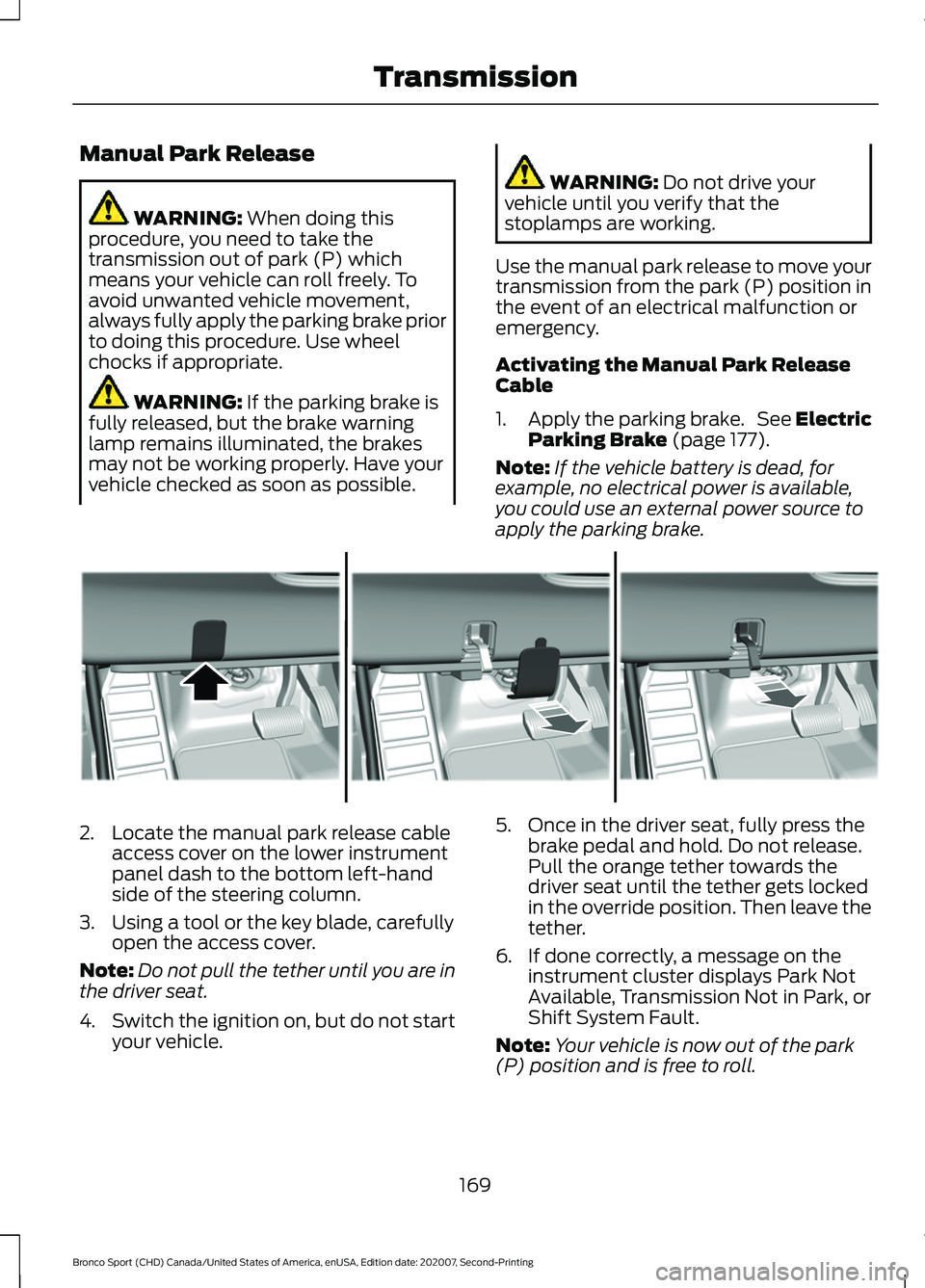
apply the parking brake. 2. Locate the manual park release cable
access cover on the lower instrument
panel dash to the bottom left-hand
side of the steering column.
3. Using a tool or the key blade, carefully open the access cover.
Note: Do not pull the tether until you are in
the driver seat.
4. Switch the ignition on, but do not start
your vehicle. 5. Once in the driver seat, fully press the
brake pedal and hold. Do not release.
Pull the orange tether towards the
driver seat until the tether gets locked
in the override position. Then leave the
tether.
6. If done correctly, a message on the instrument cluster displays Park Not
Available, Transmission Not in Park, or
Shift System Fault.
Note: Your vehicle is now out of the park
(P) position and is free to roll.
169
Bronco Sport (CHD) Canada/United States of America, enUSA, Edition date: 202007, Second-Printing TransmissionE307867
Page 173 of 471

7.
With your foot still fully applied on the
brake pedal, disengage the parking
brake. See Electric Parking Brake
(page 177).
8. Your vehicle remains in neutral (N) for emergency towing purposes.
9. Switch off the ignition.
10. Once it is safe to do so and there is no risk that your vehicle will roll,
disconnect the negative, black
battery cable from the battery. If the
vehicle rolls before disconnecting the
battery, the electric parking brake
could apply. You may need to release
the parking brake again. See Electric
Parking Brake
(page 177).
Returning Your Vehicle to Normal
Mode
1. Once it is safe to do so, reconnect the negative, black battery cable to the
battery.
2. Apply the parking brake. See Electric
Parking Brake
(page 177). Note:
If the vehicle battery is dead, for
example, no electrical power is available,
you could use an external power source to
apply the parking brake.
3. Fully apply the brake pedal and hold. Do not release. Pull the orange tether
outward toward the driver seat to
release it from the override position.
4. The cable releases and retracts back to its original rest position.
5. Stow the manual park release cable tether back inside the instrument panel
dash hole, install the access cover by
pressing it back in position.
6. With your foot fully applied on the brake pedal, start your vehicle. Confirm
that your vehicle is in the park (P)
position and that the instrument
cluster indicates park (P).
7. If the instrument cluster is not displaying the park (P) position or a
message displays on the instrument
cluster screen, make sure you apply the
parking brake before exiting your
vehicle. Contact an authorized dealer
for service.
Information Messages Details
Message
The system detects a fault that requires
service. Have your vehicle checked as soon as possible.
Transmission Malfunction Service Now
Displays when you shift into neutral (N).
Select M To Confirm Stay In Neutral Mode
Displays when you shift into neutral (N).
Select L to Confirm Stay in Neutral Mode
Displays to confirm that your vehicle hasentered Stay in Neutral mode.
Stay in Neutral Mode Engaged
170
Bronco Sport (CHD) Canada/United States of America, enUSA, Edition date: 202007, Second-Printing Transmission
Page 180 of 471

ELECTRIC PARKING BRAKE
WARNING: Always fully apply the
parking brake and make sure you shift
into park (P). Failure to follow this
instruction could result in personal injury
or death. WARNING:
If you drive extended
distances with the parking brake applied,
you could cause damage to the brake
system. WARNING:
The electric parking
brake does not operate if the vehicle
battery is running out of charge.
Your vehicle has an electric parking brake.
You operate it with a switch instead of a
lever. The switch is on the center console
or to the left-hand side of the steering
wheel, on the lower part of the instrument
panel.
Note: The electric parking brake makes
noises during operation. This is normal.
Applying the Electric Parking
Brake Pull the switch upward.
The red warning lamp flashes
during operation and illuminates
when the parking brake is
applied. Note:
It remains illuminated for a short
period of time after you switch the ignition
off. If it continues to flash or does not
illuminate, the system has malfunctioned.
Have your vehicle checked as soon as
possible.
Note:
You can apply the electric parking
brake when the ignition is off.
Note: The electric parking brake could
automatically apply when you shift into park
(P). See
Transmission (page 166).
Applying the Electric Parking Brake in
an Emergency
Note: Do not apply the electric parking
brake when your vehicle is moving, except
in an emergency. If you repeatedly use the
electric parking brake to slow or stop your
vehicle, you could cause damage to the
brake system.
You can use the electric parking brake to
slow or stop your vehicle in an emergency. Pull the switch upward and hold
it.
The red warning lamp
illuminates, a tone sounds and
the stoplamps turn on.
The electric parking brake continues to
slow your vehicle down unless you release
the switch.
Manually Releasing the Electric
Parking Brake
Switch the ignition on.
Press and hold the brake pedal.
Push the switch downward.
The red warning lamp turns off.
177
Bronco Sport (CHD) Canada/United States of America, enUSA, Edition date: 202007, Second-Printing BrakesE267156 E270480 E267156 E270480 E267156 E270480
Page 181 of 471
If it remains illuminated or flashes, the
system has malfunctioned. Have your
vehicle checked as soon as possible.
Pulling Away on a Hill When Towing a
Trailer
Press and hold the brake pedal.
Pull the switch upward and hold
it.
Shift into gear.
Press the accelerator pedal until engine
has developed sufficient torque to prevent
your vehicle from rolling down the hill. Release the switch and pull
away in a normal manner.
Automatically Releasing the
Electric Parking Brake
Close the driver door.
Shift into gear.
Press the accelerator pedal and pull away
in a normal manner. The red warning lamp turns off.
If it remains illuminated or flashes, the
electric parking brake has not released.
Manually release the parking brake. Releasing the Electric Parking
Brake if the Vehicle Battery is
Running Out of Charge
Connect a booster battery to the vehicle
battery to release the electric parking brake
if the vehicle battery is running out of
charge. See Jump Starting the Vehicle
(page 252).
HILL START ASSIST WARNING:
The system does not
replace the parking brake. When you
leave your vehicle, always apply the
parking brake. WARNING:
You must remain in
your vehicle when the system turns on.
At all times, you are responsible for
controlling your vehicle, supervising the
system and intervening, if required.
Failure to take care may result in the loss
of control of your vehicle, serious
personal injury or death. WARNING:
The system will turn
off if a malfunction is apparent or if you
rev the engine excessively. Failure to take
care may result in the loss of control of
your vehicle, serious personal injury or
death.
The system makes it easier to pull away
when your vehicle is on a slope without the
need to use the parking brake.
When the system is active, your vehicle
remains stationary on the slope for two to
three seconds after you release the brake
pedal. This allows time to move your foot
from the brake to the accelerator pedal.
The system releases the brakes
automatically once the engine has
178
Bronco Sport (CHD) Canada/United States of America, enUSA, Edition date: 202007, Second-Printing Brakes E267156 E267156 E270480
Page 193 of 471
Camera Guidelines
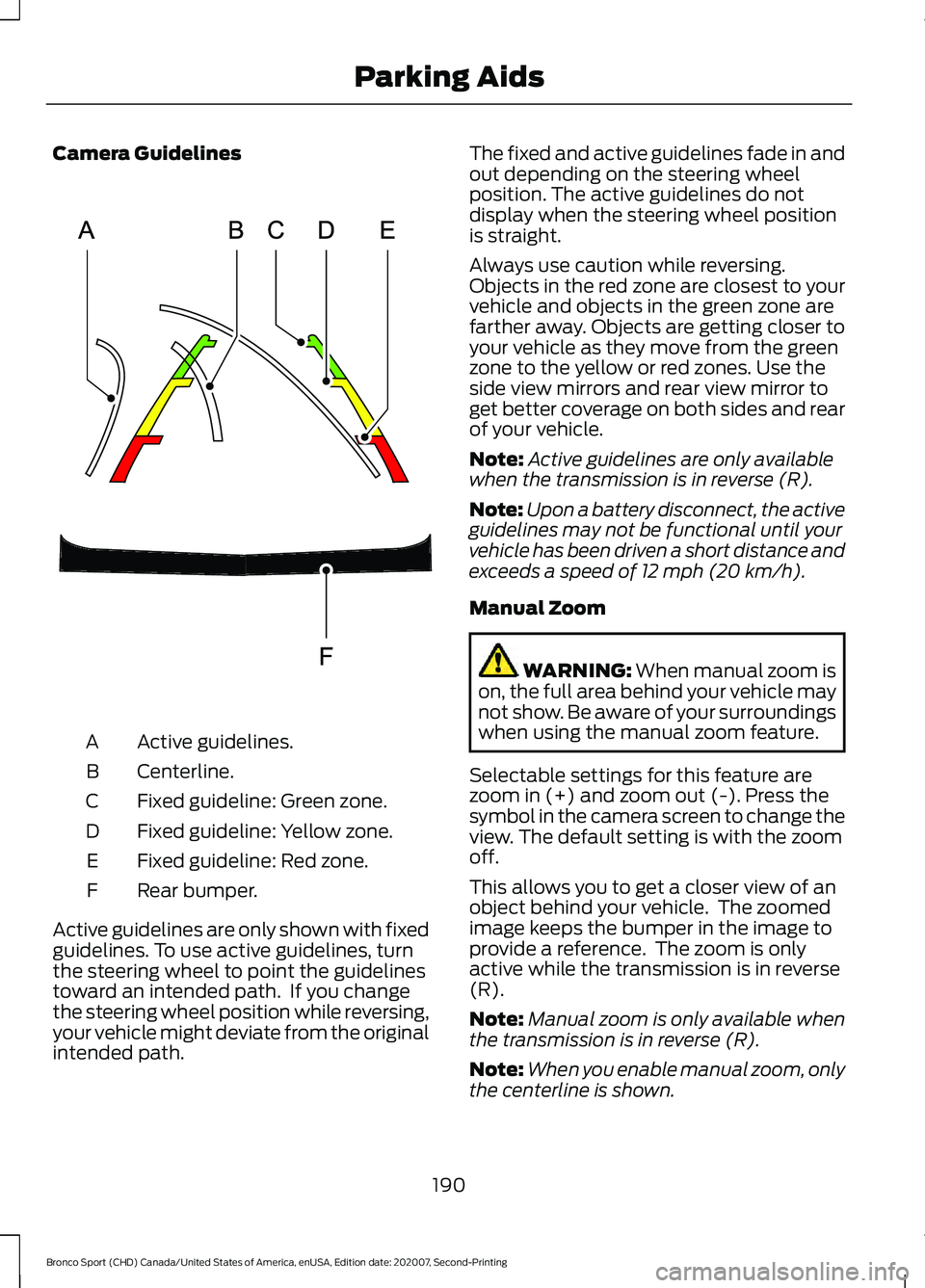
Active guidelines.
A
Centerline.
B
Fixed guideline: Green zone.
C
Fixed guideline: Yellow zone.
D
Fixed guideline: Red zone.
E
Rear bumper.
F
Active guidelines are only shown with fixed
guidelines. To use active guidelines, turn
the steering wheel to point the guidelines
toward an intended path. If you change
the steering wheel position while reversing,
your vehicle might deviate from the original
intended path. The fixed and active guidelines fade in and
out depending on the steering wheel
position. The active guidelines do not
display when the steering wheel position
is straight.
Always use caution while reversing.
Objects in the red zone are closest to your
vehicle and objects in the green zone are
farther away. Objects are getting closer to
your vehicle as they move from the green
zone to the yellow or red zones. Use the
side view mirrors and rear view mirror to
get better coverage on both sides and rear
of your vehicle.
Note:
Active guidelines are only available
when the transmission is in reverse (R).
Note: Upon a battery disconnect, the active
guidelines may not be functional until your
vehicle has been driven a short distance and
exceeds a speed of 12 mph (20 km/h).
Manual Zoom WARNING:
When manual zoom is
on, the full area behind your vehicle may
not show. Be aware of your surroundings
when using the manual zoom feature.
Selectable settings for this feature are
zoom in (+) and zoom out (-). Press the
symbol in the camera screen to change the
view. The default setting is with the zoom
off.
This allows you to get a closer view of an
object behind your vehicle. The zoomed
image keeps the bumper in the image to
provide a reference. The zoom is only
active while the transmission is in reverse
(R).
Note: Manual zoom is only available when
the transmission is in reverse (R).
Note: When you enable manual zoom, only
the centerline is shown.
190
Bronco Sport (CHD) Canada/United States of America, enUSA, Edition date: 202007, Second-Printing Parking AidsE306774