2021 FORD BRONCO SPORT navigation system
[x] Cancel search: navigation systemPage 389 of 471
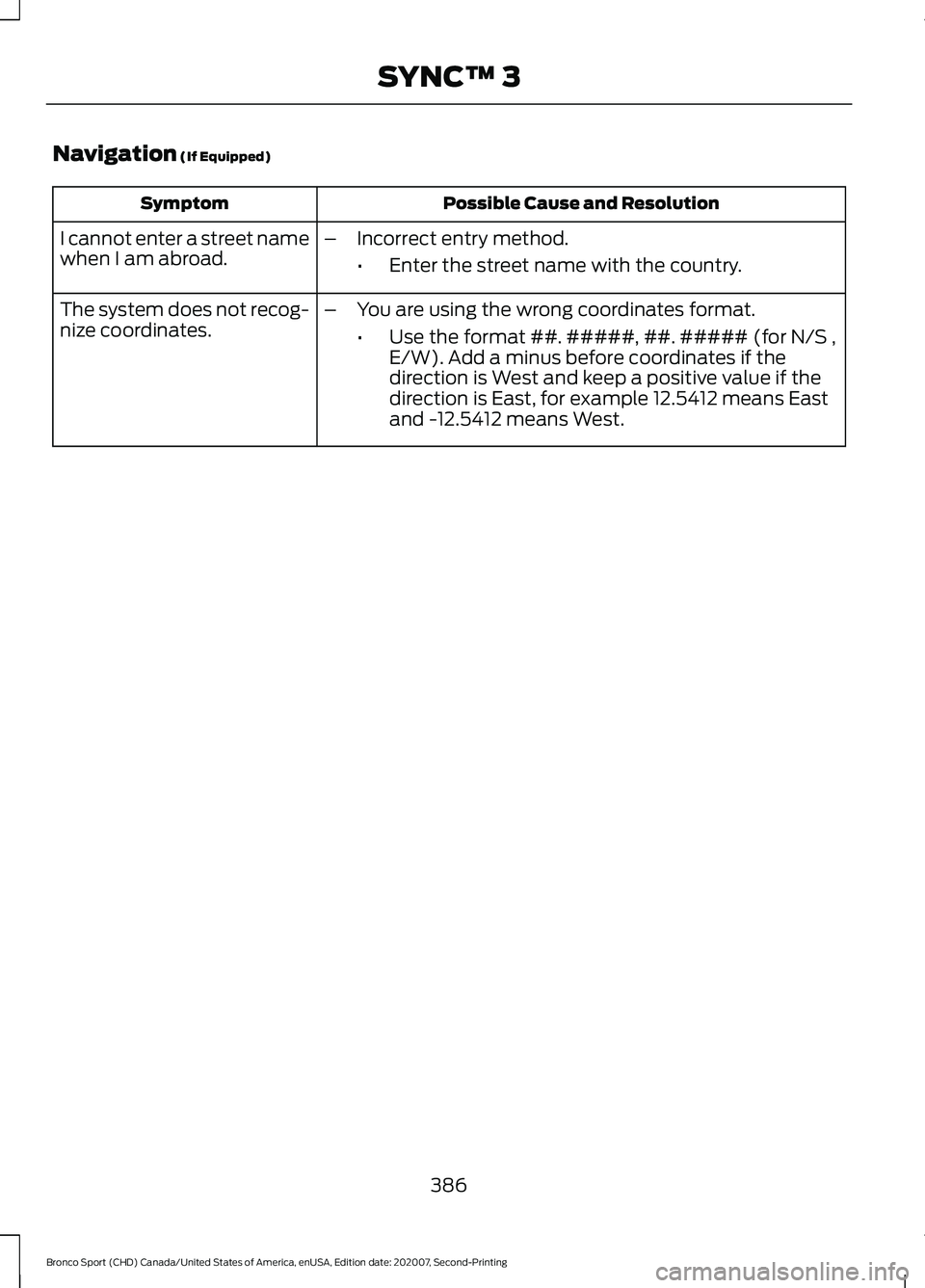
Navigation (If Equipped)
Possible Cause and Resolution
Symptom
I cannot enter a street name
when I am abroad. –
Incorrect entry method.
•Enter the street name with the country.
The system does not recog-
nize coordinates. –
You are using the wrong coordinates format.
•Use the format ##. #####, ##. ##### (for N/S ,
E/W). Add a minus before coordinates if the
direction is West and keep a positive value if the
direction is East, for example 12.5412 means East
and -12.5412 means West.
386
Bronco Sport (CHD) Canada/United States of America, enUSA, Edition date: 202007, Second-Printing SYNC™ 3
Page 408 of 471
ELECTROMAGNETIC
COMPATIBILITY
WARNING: Do not place objects
or mount equipment on or near the
airbag cover, on the side of the front or
rear seatbacks, or in areas that may
come into contact with a deploying
airbag. Failure to follow these
instructions may increase the risk of
personal injury in the event of a crash. WARNING: Do not fasten antenna
cables to vehicle wiring, fuel pipes and
brake pipes. WARNING:
Keep antenna and
power cables at least 4 in (10 cm) from
any electronic modules and airbags. Note:
We test and certify your vehicle to
meet electromagnetic compatibility
legislation. It is your responsibility to make
sure that any equipment an authorized
dealer installs on your vehicle complies with
applicable local legislation and other
requirements. Installation of some
aftermarket electronic devices could
degrade the performance of vehicle
functions, which use radio frequency signals
such as broadcast radio receiver, tire
pressure monitoring system, push button
start, Bluetooth®
connectivity or satellite
navigation.
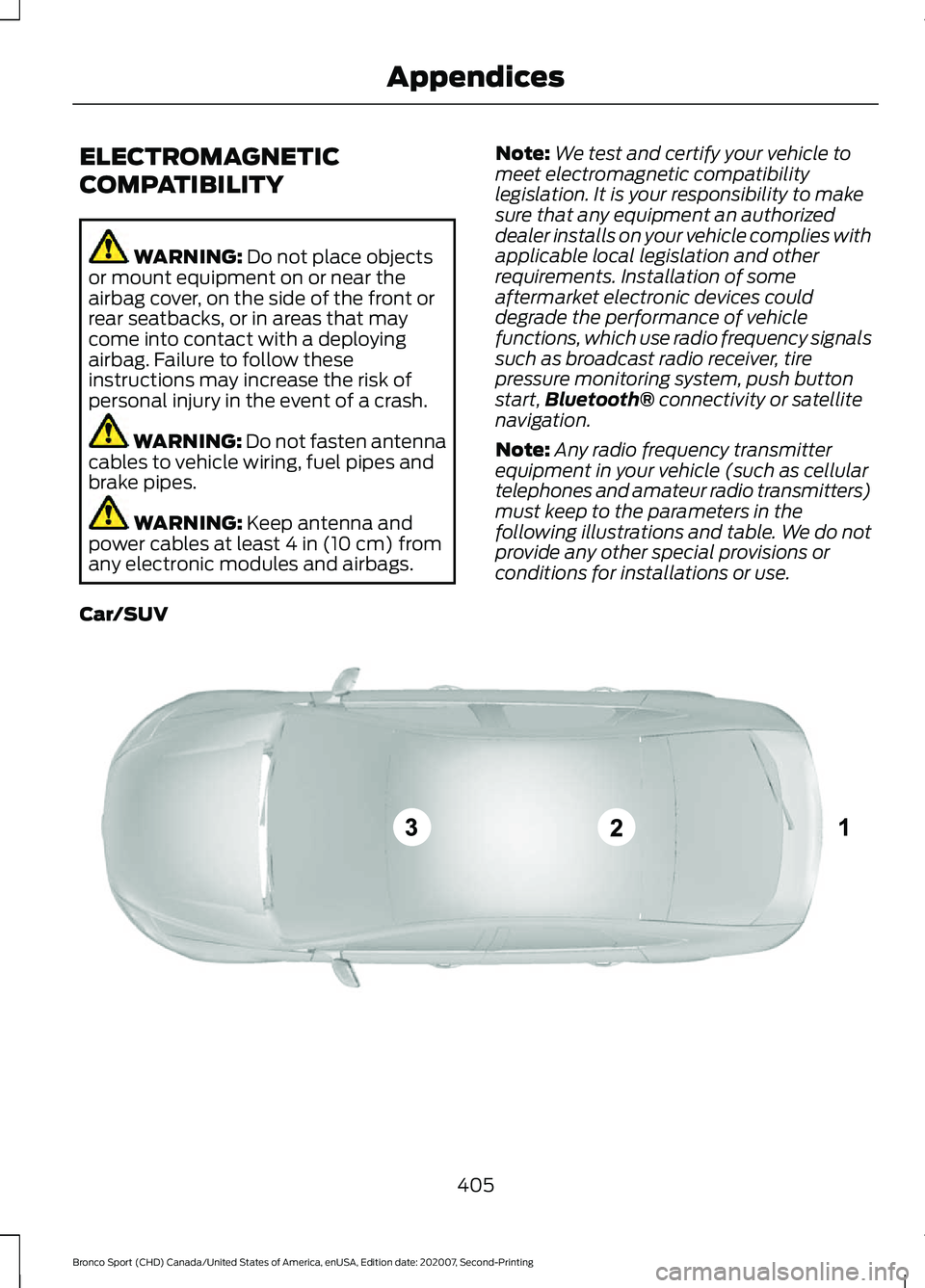
Note: Any radio frequency transmitter
equipment in your vehicle (such as cellular
telephones and amateur radio transmitters)
must keep to the parameters in the
following illustrations and table. We do not
provide any other special provisions or
conditions for installations or use.
Car/SUV 405
Bronco Sport (CHD) Canada/United States of America, enUSA, Edition date: 202007, Second-Printing AppendicesE239120
Page 414 of 471
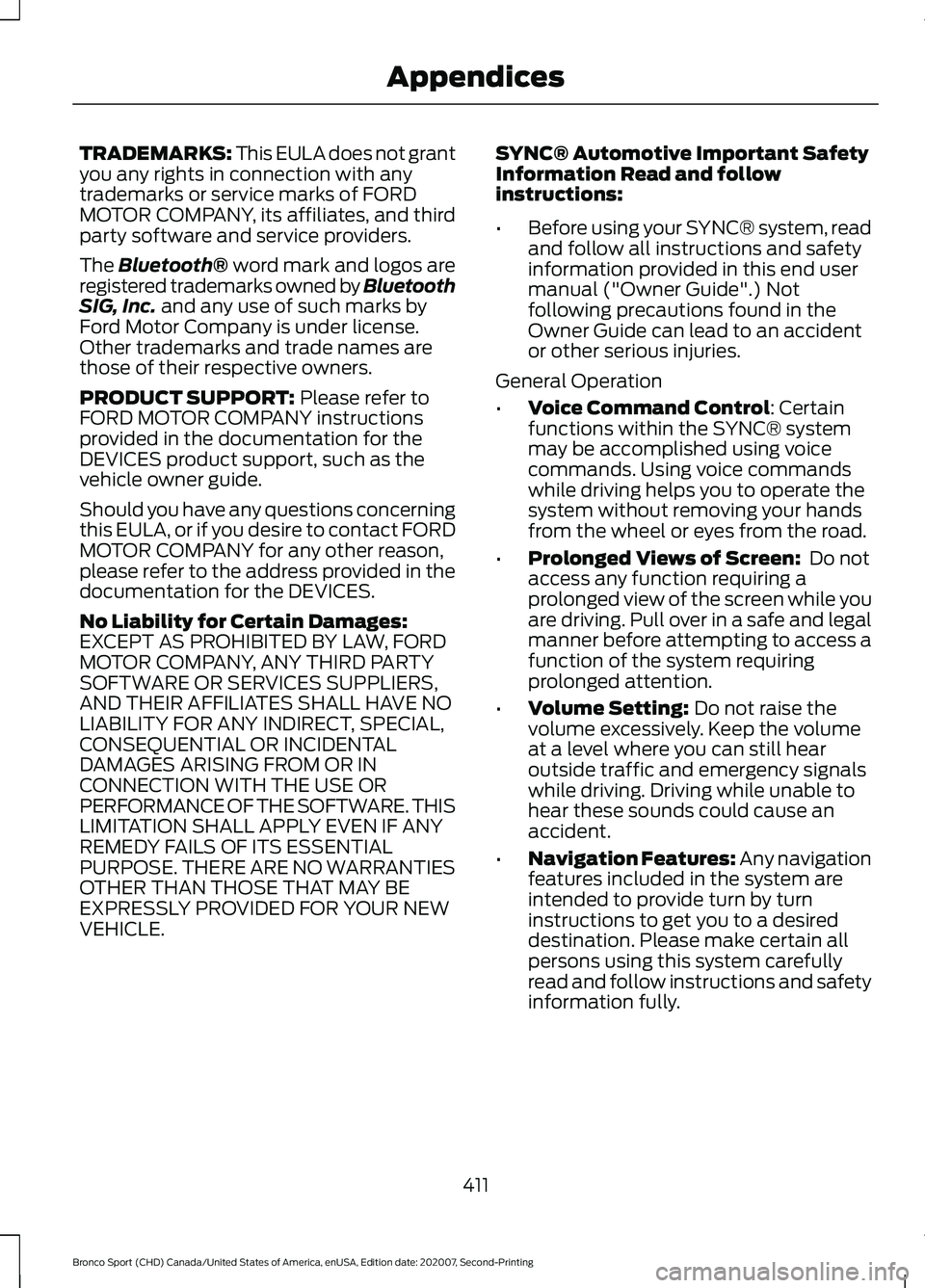
TRADEMARKS: This EULA does not grant
you any rights in connection with any
trademarks or service marks of FORD
MOTOR COMPANY, its affiliates, and third
party software and service providers.
The Bluetooth® word mark and logos are
registered trademarks owned by Bluetooth
SIG, Inc. and any use of such marks by
Ford Motor Company is under license.
Other trademarks and trade names are
those of their respective owners.
PRODUCT SUPPORT:
Please refer to
FORD MOTOR COMPANY instructions
provided in the documentation for the
DEVICES product support, such as the
vehicle owner guide.
Should you have any questions concerning
this EULA, or if you desire to contact FORD
MOTOR COMPANY for any other reason,
please refer to the address provided in the
documentation for the DEVICES.
No Liability for Certain Damages:
EXCEPT AS PROHIBITED BY LAW, FORD
MOTOR COMPANY, ANY THIRD PARTY
SOFTWARE OR SERVICES SUPPLIERS,
AND THEIR AFFILIATES SHALL HAVE NO
LIABILITY FOR ANY INDIRECT, SPECIAL,
CONSEQUENTIAL OR INCIDENTAL
DAMAGES ARISING FROM OR IN
CONNECTION WITH THE USE OR
PERFORMANCE OF THE SOFTWARE. THIS
LIMITATION SHALL APPLY EVEN IF ANY
REMEDY FAILS OF ITS ESSENTIAL
PURPOSE. THERE ARE NO WARRANTIES
OTHER THAN THOSE THAT MAY BE
EXPRESSLY PROVIDED FOR YOUR NEW
VEHICLE. SYNC® Automotive Important Safety
Information Read and follow
instructions:
•
Before using your SYNC® system, read
and follow all instructions and safety
information provided in this end user
manual ("Owner Guide".) Not
following precautions found in the
Owner Guide can lead to an accident
or other serious injuries.
General Operation
• Voice Command Control: Certain
functions within the SYNC® system
may be accomplished using voice
commands. Using voice commands
while driving helps you to operate the
system without removing your hands
from the wheel or eyes from the road.
• Prolonged Views of Screen:
Do not
access any function requiring a
prolonged view of the screen while you
are driving. Pull over in a safe and legal
manner before attempting to access a
function of the system requiring
prolonged attention.
• Volume Setting:
Do not raise the
volume excessively. Keep the volume
at a level where you can still hear
outside traffic and emergency signals
while driving. Driving while unable to
hear these sounds could cause an
accident.
• Navigation Features:
Any navigation
features included in the system are
intended to provide turn by turn
instructions to get you to a desired
destination. Please make certain all
persons using this system carefully
read and follow instructions and safety
information fully.
411
Bronco Sport (CHD) Canada/United States of America, enUSA, Edition date: 202007, Second-Printing Appendices
Page 415 of 471
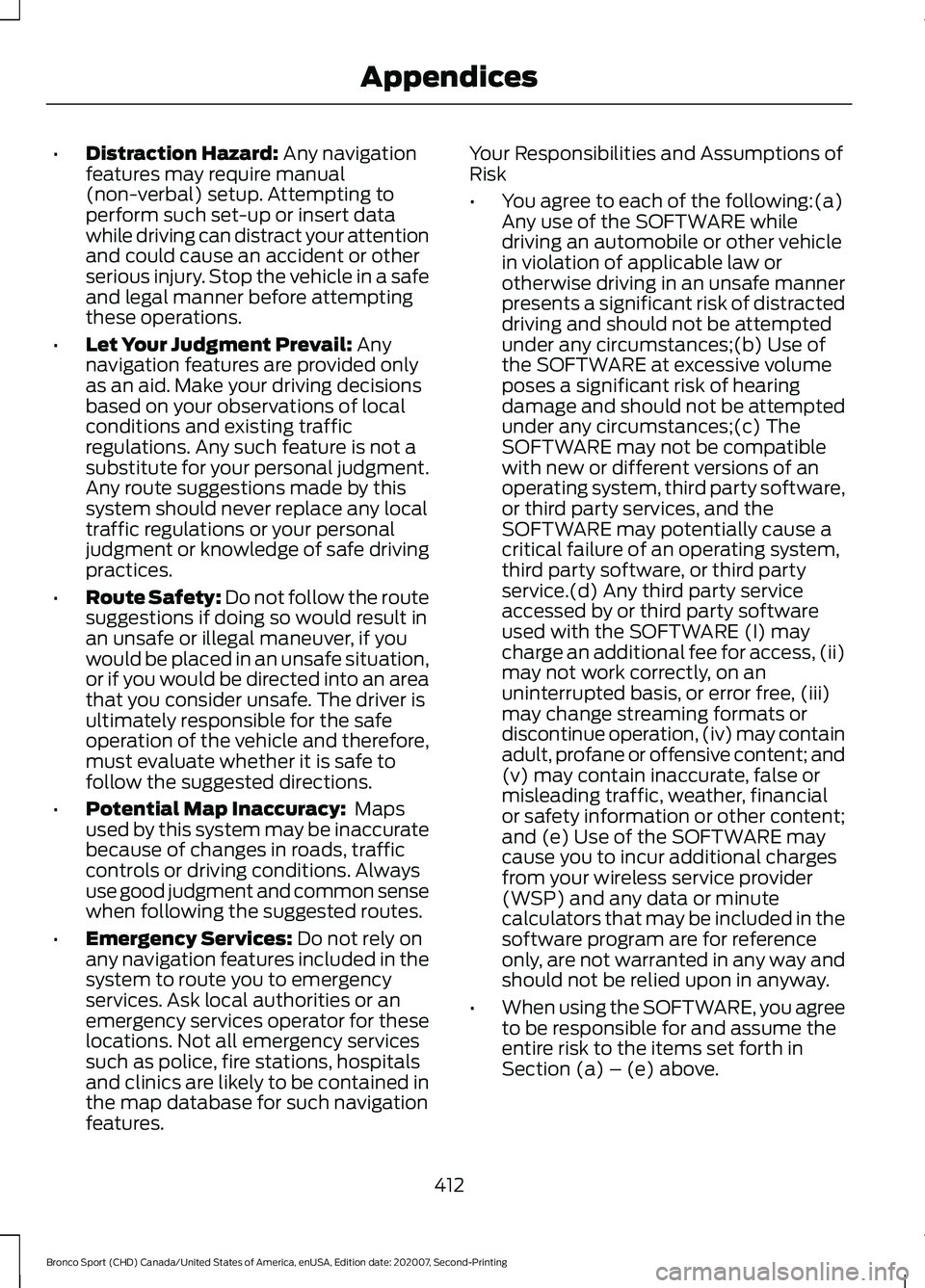
•
Distraction Hazard: Any navigation
features may require manual
(non-verbal) setup. Attempting to
perform such set-up or insert data
while driving can distract your attention
and could cause an accident or other
serious injury. Stop the vehicle in a safe
and legal manner before attempting
these operations.
• Let Your Judgment Prevail:
Any
navigation features are provided only
as an aid. Make your driving decisions
based on your observations of local
conditions and existing traffic
regulations. Any such feature is not a
substitute for your personal judgment.
Any route suggestions made by this
system should never replace any local
traffic regulations or your personal
judgment or knowledge of safe driving
practices.
• Route Safety: Do not follow the route
suggestions if doing so would result in
an unsafe or illegal maneuver, if you
would be placed in an unsafe situation,
or if you would be directed into an area
that you consider unsafe. The driver is
ultimately responsible for the safe
operation of the vehicle and therefore,
must evaluate whether it is safe to
follow the suggested directions.
• Potential Map Inaccuracy:
Maps
used by this system may be inaccurate
because of changes in roads, traffic
controls or driving conditions. Always
use good judgment and common sense
when following the suggested routes.
• Emergency Services:
Do not rely on
any navigation features included in the
system to route you to emergency
services. Ask local authorities or an
emergency services operator for these
locations. Not all emergency services
such as police, fire stations, hospitals
and clinics are likely to be contained in
the map database for such navigation
features. Your Responsibilities and Assumptions of
Risk
•
You agree to each of the following:(a)
Any use of the SOFTWARE while
driving an automobile or other vehicle
in violation of applicable law or
otherwise driving in an unsafe manner
presents a significant risk of distracted
driving and should not be attempted
under any circumstances;(b) Use of
the SOFTWARE at excessive volume
poses a significant risk of hearing
damage and should not be attempted
under any circumstances;(c) The
SOFTWARE may not be compatible
with new or different versions of an
operating system, third party software,
or third party services, and the
SOFTWARE may potentially cause a
critical failure of an operating system,
third party software, or third party
service.(d) Any third party service
accessed by or third party software
used with the SOFTWARE (I) may
charge an additional fee for access, (ii)
may not work correctly, on an
uninterrupted basis, or error free, (iii)
may change streaming formats or
discontinue operation, (iv) may contain
adult, profane or offensive content; and
(v) may contain inaccurate, false or
misleading traffic, weather, financial
or safety information or other content;
and (e) Use of the SOFTWARE may
cause you to incur additional charges
from your wireless service provider
(WSP) and any data or minute
calculators that may be included in the
software program are for reference
only, are not warranted in any way and
should not be relied upon in anyway.
• When using the SOFTWARE, you agree
to be responsible for and assume the
entire risk to the items set forth in
Section (a) – (e) above.
412
Bronco Sport (CHD) Canada/United States of America, enUSA, Edition date: 202007, Second-Printing Appendices
Page 423 of 471
HERE holds a non-exclusive license from
the United States Postal Service® to
publish and sell ZIP+4® information.
©United States Postal Service® 2014.
Prices are not established, controlled or
approved by the United States Postal
Service®. The following trademarks and
registrations are owned by the USPS:
United States Postal Service, USPS, and
ZIP+4
The Data for Mexico includes certain data
from Instituto Nacional de Estadística y
Geografía.
9.2 End User Terms Required by NAV2
(Shanghai) Co., Ltd
The data (“Data
”) is provided for your
personal, internal use only and not for
resale. It is protected by copyright, and is
subject to the following terms and
conditions which are agreed to by you, on
the one hand, and NAV2 (Shanghai) Co.,
Ltd (“NAV2”) and its licensors (including
their licensors and suppliers) on the other
hand. 20xx. All rights reserved
Terms and Conditions
Permitted Use. You agree to use this Data
together with the Telenav Software solely
for the internal business and personal
purposes for which you were licensed, and
not for service bureau, time-sharing or
other similar purposes. Accordingly, but
subject to the restrictions set forth in the
following paragraphs, you agree not to
otherwise reproduce, copy, modify,
decompile, disassemble, create any
derivative works of, or reverse engineer any
portion of this Data, and may not transfer
or distribute it in any form, for any purpose,
except to the extent permitted by
mandatory laws. Restrictions. Except where you have been
specifically licensed to do so by Telenav,
and without limiting the preceding
paragraph, you may not use this Data (a)
with any products, systems, or applications
installed or otherwise connected to or in
communication with vehicles, capable of
vehicle navigation, positioning, dispatch,
real time route guidance, fleet
management or similar applications; or (b)
with or in communication with any
positioning devices or any mobile or
wireless-connected electronic or computer
devices, including without limitation
cellular phones, palmtop and handheld
computers, pagers, and personal digital
assistants or PDAs.
Warning. The Data may contain
inaccurate or incomplete information due
to the passage of time, changing
circumstances, sources used and the
nature of collecting comprehensive
geographic data, any of which may lead to
incorrect results.
No Warranty.
This Data is provided to you
“ as is, ” and you agree to use it at your own
risk. Telenav and its licensors (and their
licensors and suppliers) make no
guarantees, representations or warranties
of any kind, express or implied, arising by
law or otherwise, including but not limited
to, content, quality, accuracy,
completeness, effectiveness, reliability,
fitness for a particular purpose, usefulness,
use or results to be obtained from this
Data, or that the Data or server will be
uninterrupted or error-free.
Disclaimer of Warranty:
TELENAV AND
ITS LICENSORS (INCLUDING THEIR
LICENSORS AND SUPPLIERS) DISCLAIM
ANY WARRANTIES, EXPRESS OR IMPLIED,
OF QUALITY, PERFORMANCE,
MERCHANTABILITY, FITNESS FOR A
420
Bronco Sport (CHD) Canada/United States of America, enUSA, Edition date: 202007, Second-Printing Appendices
Page 431 of 471
MAKES NO WARRANTY, EXPRESS OR
IMPLIED, OF MERCHANTABILITY OR
FITNESS FOR A PARTICULAR PURPOSE,
SUITABILITY, OR PERFORMANCE
REGARDING ANY SERVICES OR GOODS,
AND IN NO EVENT SHALL AT&T BE
LIABLE, WHETHER OR NOT DUE TO ITS
OWN NEGLIGENCE, FOR ANY: (A) ACT OR
OMISSION OF A THIRD PARTY; (B)
MISTAKES, OMISSIONS, INTERRUPTIONS,
ERRORS, FAILURES TO TRANSMIT,
DELAYS, OR DEFECTS IN THE SERVICE
PROVIDED BY OR THROUGH THE
UNDERLYING CARRIER; (C) DAMAGE OR
INJURY CAUSED BY SUSPENSION OR
TERMINATION BY THE UNDERLYING
CARRIER; OR (D) DAMAGE OR INJURY
CAUSED BY A FAILURE OR DELAY IN
CONNECTING A CALL TO ANY ENTITY,
INCLUDING 911 OR ANY OTHER
EMERGENCY SERVICE. TO THE FULL
EXTENT ALLOWED BY LAW, THE END
USER RELEASES, INDEMNIFIES AND
HOLDS THE UNDERLYING CARRIER
HARMLESS FROM AND AGAINST ANY
AND ALL CLAIMS OF ANY PERSON OR
ENTITY FOR DAMAGES OF ANY NATURE
ARISING IN ANY WAY FROM OR RELATING
TO, DIRECTLY OR INDIRECTLY, SERVICES
PROVIDED BY THE UNDERLYING CARRIER
OR ANY PERSON’
S USE THEREOF,
INCLUDING CLAIMS ARISING IN WHOLE
OR IN PART FROM THE ALLEGED
NEGLIGENCE OF THE UNDERLYING
CARRIER.
VII. China Territory
Personal Use Only
You agree to use this Data together with
[insert name of Client Application] for the
solely personal, non-commercial purposes
for which you were licensed, and not for
service bureau, time-sharing or other
similar purposes. Accordingly, but subject
to the restrictions set forth in the following
paragraphs, you may copy this Data only
as necessary for your personal use to (i) view it, and (ii) save it, provided that you
do not remove any copyright notices that
appear and do not modify the Data in any
way. You agree not to otherwise reproduce,
copy, modify, decompile, disassemble or
reverse engineer any portion of this Data,
and may not transfer or distribute it in any
form, for any purpose, except to the extent
permitted by mandatory laws.
Restrictions
Except where you have been specifically
licensed to do so by NAV2 , and without
limiting the preceding paragraph, you may
not (a) use this Data with any products,
systems, or applications installed or
otherwise connected to or in
communication with vehicles, capable of
vehicle navigation, positioning, dispatch,
real time route guidance, fleet
management or similar applications; or (b)
with or in communication with any
positioning devices or any mobile or
wireless-connected electronic or computer
devices, including without limitation
cellular phones, palmtop and handheld
computers, pagers, and personal digital
assistants or PDAs. You agree to cease
using this Data if you fail to comply with
these terms and conditions.
Limited Warranty
NAV2 warrants that (a) the Data will
perform substantially in accordance with
the accompanying written materials for a
period of ninety (90) days from the date
of receipt, and (b) any support services
provided by NAV2 shall be substantially as
described in applicable written materials
provided to you by NAV2, and NAV2’
s
support engineers will make commercially
reasonable efforts to solve any problem
issues.
428
Bronco Sport (CHD) Canada/United States of America, enUSA, Edition date: 202007, Second-Printing Appendices
Page 457 of 471
Disarming the Alarm...........................................
73
Appendices...................................................405
Apps..................................................................376 SiriusXM Traffic and Travel Link.................... 377
Using Apps on an Android Device................377
Using Apps on an iOS Device........................ 376
Using Mobile Navigation on an Android Device................................................................. 377
At a Glance.......................................................20
Audible Warnings and Indicators.............98
Headlamps On Warning Chime..................... 98
Key in Ignition Warning Chime........................ 98
Keyless Warning Alert........................................ 98
Parking Brake On Warning Chime.................98
Audio Control
...................................................74
You can operate the following functions
with the control:............................................... 74
Audio System
................................................342
General Information......................................... 342
Audio Unit.......................................................342 Adjusting the Volume....................................... 343
Changing Radio Stations................................ 343
Muting the Audio............................................... 343
Pausing or Playing Media............................... 343
Switching the Audio Unit On and Off........343
Switching the Display On and Off...............343
Using Seek, Fast Forward and Reverse............................................................. 343
Auto Hold
.........................................................179
Auto Hold Indicator........................................... 180
Switching Auto Hold On and Off.................. 179
Using Auto Hold.................................................. 180
Autolamps
.........................................................81
Windshield Wiper Activated
Headlamps......................................................... 81
Automatic High Beam Control.................86
Automatic High Beam Control Indicators.......................................................86
Automatic Transmission
...........................166
Automatic Return to Park............................... 168
Drive (D)................................................................. 167
If Your Vehicle Gets Stuck in Mud or Snow.................................................................... 171
Low(L)..................................................................... 167
Manual (M)........................................................... 167
Manual Park Release........................................ 169
Neutral (N)............................................................ 167
Park (P).................................................................. 167Reverse (R)............................................................
167
SelectShift............................................................. 167
Stay in Neutral Mode........................................ 168
Understanding the Shift Positions of Your Automatic Transmission............................ 166
Automatic Transmission Fluid Check.............................................................281
Auto Mode.......................................................123 Auto Mode Indicators........................................ 123
Switching Auto Mode On and Off................123
Switching Dual Mode On and Off................124
Auto-Start-Stop............................................153 Disabling Auto-Start-Stop............................. 154
Enabling Auto-Start-Stop............................... 153
Autowipers........................................................77 Autowipers Settings............................................ 78
B
Battery See: Changing the 12V Battery..................... 282
Blind Spot Information System................211 Blind Spot Information System
Indicator............................................................. 212
Blind Spot Information System Information Messages.......................................................... 213
Blind Spot Information System Sensors.............................................................. 212
Switching the Blind Spot Information System On and Off........................................ 212
Using the Blind Spot Information System............................................................... 212
BLIS See: Blind Spot Information System............211
Bonnet Lock See: Opening and Closing the Hood............271
Booster Seats..................................................28 Types of Booster Seats...................................... 29
Brake Fluid Check.........................................281 Brake Fluid Service Interval............................ 282
Brake Fluid Specification..........................335
Brakes................................................................176 General Information........................................... 176
Breaking-In.....................................................248 Brakes and Clutch............................................. 248
Tires........................................................................\
248
Bulb Specification Chart...........................326
454
Bronco Sport (CHD) Canada/United States of America, enUSA, Edition date: 202007, Second-Printing Index
Page 463 of 471
To Start the Engine............................................
253
K
Keyless Entry....................................................67
SECURICODE™ KEYLESS ENTRY
KEYPAD............................................................... 67
Keyless Starting
............................................148
Ignition Modes..................................................... 149
Keys and Remote Controls.........................53
L
Lane Keeping System................................207 Switching the System On and Off..............208
Liftgate...............................................................70 Closing the Liftgate............................................. 70
Opening the Liftgate........................................... 70
Lighting Control
..............................................80
Flashing High Beam Headlamps..................... 81
Lighting Control Selections............................. 80
Switching High Beam Headlamps On and Off........................................................................\
80
Lighting
..............................................................80
General Information........................................... 80
Load Carriers See: Roof Racks and Load Carriers.............227
Load Carrying.................................................227
Load Limit.......................................................227 Special Loading Instructions for Owners of
Pick-up Trucks and Utility-type
Vehicles.............................................................. 231
Vehicle Loading - with and without a Trailer................................................................. 227
Locating the Cabin Air Filter......................132
Locating the Power Outlet........................142
Locating the Wireless Accessory Charger..........................................................144
Locking and Unlocking
................................64
Activating Intelligent Access............................ 65
Autolock.................................................................. 66
Battery Saver.......................................................... 67
Illuminated Entry.................................................. 66
Illuminated Exit..................................................... 66
Opening a Rear Door from the Inside...........64
Power Door Locks................................................ 64
Remote Control.................................................... 64Smart Unlocks for Integrated Keyhead
Transmitter........................................................ 65
Smart Unlocks for Passive keys..................... 66
Luggage Compartment.............................233
Lug Nuts See: Changing a Road Wheel........................ 316
M
Maintenance...................................................271 General Information........................................... 271
Manual Seats
.................................................136
Adjusting the Seat Backrest........................... 136
Adjusting the Seat Height............................... 136
Moving the Seat Backward and Forward............................................................. 136
Map Pocket
.....................................................146
Locating the Map Pocket................................ 146
Message Center See: Information Displays................................. 99
Mirrors See: Windows and Mirrors............................... 88
Mobile Communications Equipment.......17
Moonroof............................................................91 Bounce-Back.......................................................... 91
Opening and Closing the Moonroof...............91
Motorcraft Parts - 1.5L EcoBoost™.................................................325
Motorcraft Parts - 2.0L EcoBoost™.................................................325
MyKey – Troubleshooting...........................62
MyKey ™
.............................................................59
Principle of Operation........................................ 59
N
Navigation......................................................370 Changing the Format of the Map.................372
cityseeker.............................................................. 374
Michelin Travel Guide....................................... 375
Navigation Map Accuracy and Updates............................................................ 376
Route Guidance.................................................. 373
Setting a Destination......................................... 371
SiriusXM Traffic and Travel Link................... 375
Zoom....................................................................... 372
Normal Scheduled Maintenance..........399 Intelligent Oil-Life Monitor™........................ 399
460
Bronco Sport (CHD) Canada/United States of America, enUSA, Edition date: 202007, Second-Printing Index