2021 FORD BRONCO SPORT ECU
[x] Cancel search: ECUPage 74 of 471
WARNING: Make sure that you fully
close the liftgate to prevent exhaust
fumes from entering your vehicle. If you
are unable to fully close the liftgate,
open the air vents or the windows to
allow fresh air to enter your vehicle.
Failure to follow this instruction could
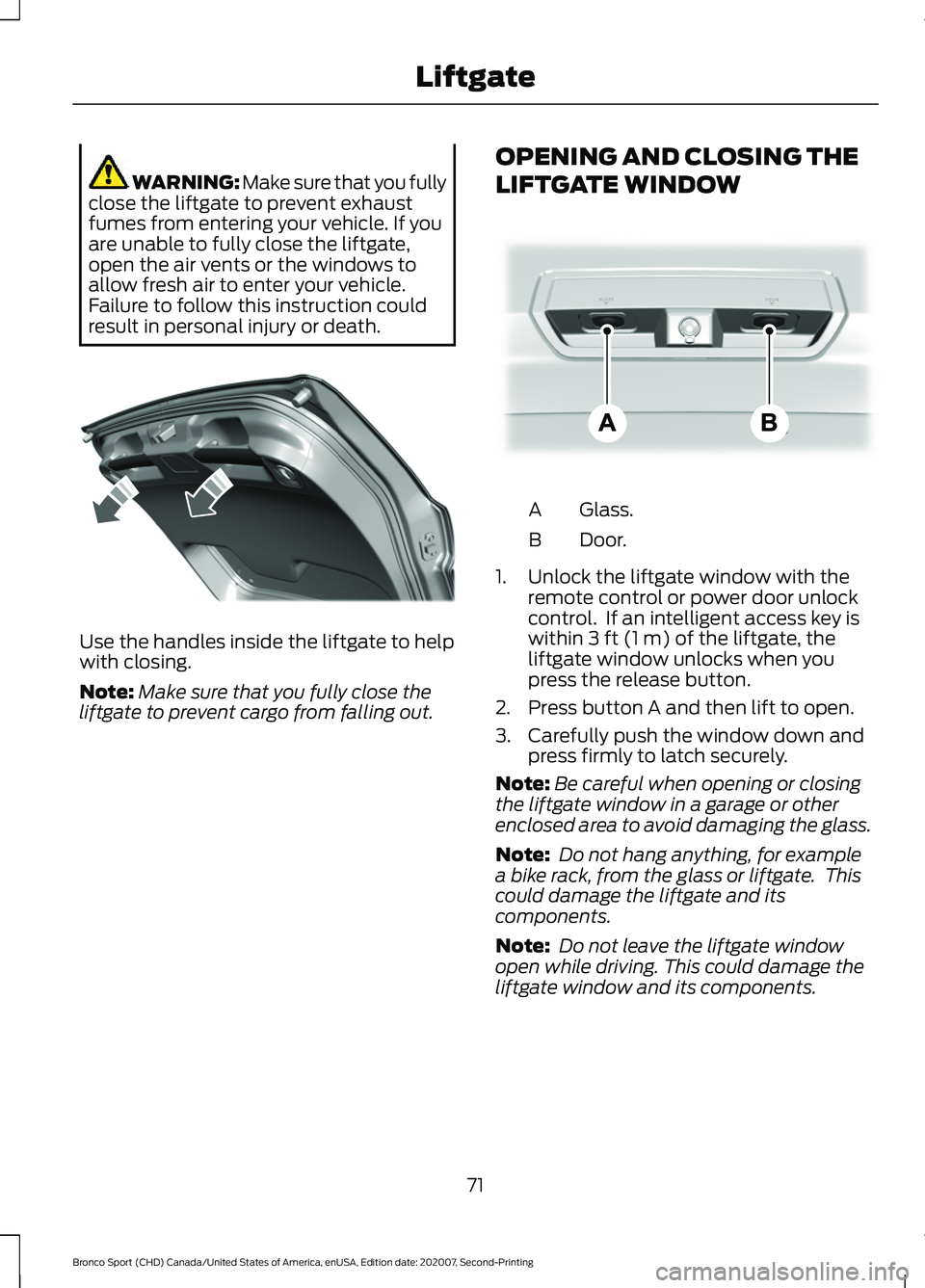
result in personal injury or death. Use the handles inside the liftgate to help
with closing.
Note:
Make sure that you fully close the
liftgate to prevent cargo from falling out. OPENING AND CLOSING THE
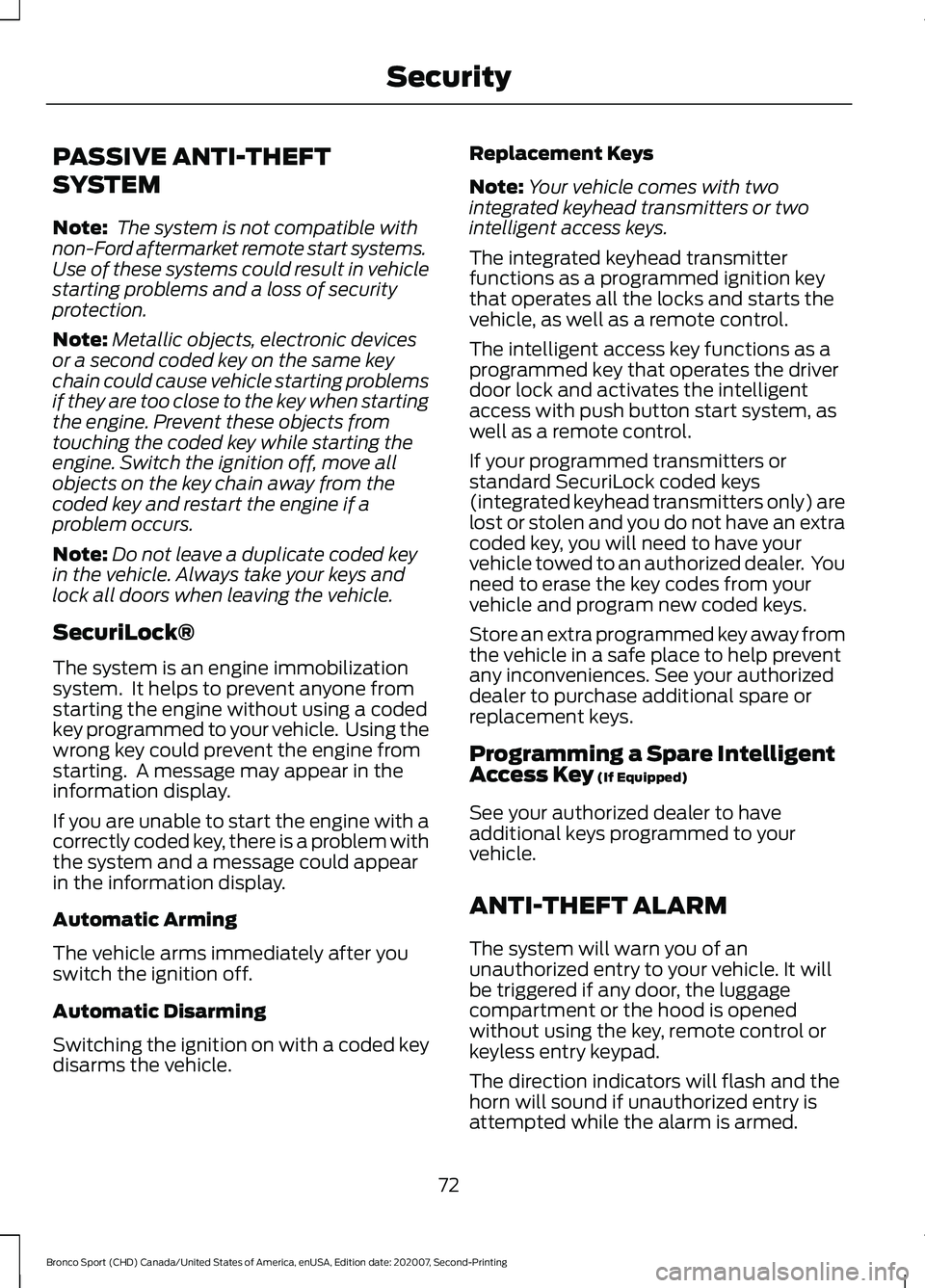
LIFTGATE WINDOW Glass.
A
Door.
B
1. Unlock the liftgate window with the remote control or power door unlock
control. If an intelligent access key is
within
3 ft (1 m) of the liftgate, the
liftgate window unlocks when you
press the release button.
2. Press button A and then lift to open.
3. Carefully push the window down and press firmly to latch securely.
Note: Be careful when opening or closing
the liftgate window in a garage or other
enclosed area to avoid damaging the glass.
Note: Do not hang anything, for example
a bike rack, from the glass or liftgate. This
could damage the liftgate and its
components.
Note: Do not leave the liftgate window
open while driving. This could damage the
liftgate window and its components.
71
Bronco Sport (CHD) Canada/United States of America, enUSA, Edition date: 202007, Second-Printing LiftgateE327259 E323752
Page 75 of 471
PASSIVE ANTI-THEFT
SYSTEM
Note:
The system is not compatible with
non-Ford aftermarket remote start systems.
Use of these systems could result in vehicle
starting problems and a loss of security
protection.
Note: Metallic objects, electronic devices
or a second coded key on the same key
chain could cause vehicle starting problems
if they are too close to the key when starting
the engine. Prevent these objects from
touching the coded key while starting the
engine. Switch the ignition off, move all
objects on the key chain away from the
coded key and restart the engine if a
problem occurs.
Note: Do not leave a duplicate coded key
in the vehicle. Always take your keys and
lock all doors when leaving the vehicle.
SecuriLock®
The system is an engine immobilization
system. It helps to prevent anyone from
starting the engine without using a coded
key programmed to your vehicle. Using the
wrong key could prevent the engine from
starting. A message may appear in the
information display.
If you are unable to start the engine with a
correctly coded key, there is a problem with
the system and a message could appear
in the information display.
Automatic Arming
The vehicle arms immediately after you
switch the ignition off.
Automatic Disarming
Switching the ignition on with a coded key
disarms the vehicle. Replacement Keys
Note:
Your vehicle comes with two
integrated keyhead transmitters or two
intelligent access keys.
The integrated keyhead transmitter
functions as a programmed ignition key
that operates all the locks and starts the
vehicle, as well as a remote control.
The intelligent access key functions as a
programmed key that operates the driver
door lock and activates the intelligent
access with push button start system, as
well as a remote control.
If your programmed transmitters or
standard SecuriLock coded keys
(integrated keyhead transmitters only) are
lost or stolen and you do not have an extra
coded key, you will need to have your
vehicle towed to an authorized dealer. You
need to erase the key codes from your
vehicle and program new coded keys.
Store an extra programmed key away from
the vehicle in a safe place to help prevent
any inconveniences. See your authorized
dealer to purchase additional spare or
replacement keys.
Programming a Spare Intelligent
Access Key (If Equipped)
See your authorized dealer to have
additional keys programmed to your
vehicle.
ANTI-THEFT ALARM
The system will warn you of an
unauthorized entry to your vehicle. It will
be triggered if any door, the luggage
compartment or the hood is opened
without using the key, remote control or
keyless entry keypad.
The direction indicators will flash and the
horn will sound if unauthorized entry is
attempted while the alarm is armed.
72
Bronco Sport (CHD) Canada/United States of America, enUSA, Edition date: 202007, Second-Printing Security
Page 76 of 471
Take all remote controls to an authorized
dealer if there is any potential alarm
problem with your vehicle.
Arming the Alarm
The alarm is ready to arm when there is
not a key in the ignition. Electronically lock
the vehicle to arm the alarm.
The message indicator flashes
when theft protection is active.
Disarming the Alarm
Disarm the alarm by any of the following
actions:
• Unlock the doors or luggage
compartment with the remote control
or keyless entry keypad.
• Switch the ignition on or start the
vehicle.
• Use a key in the driver ’s door to unlock
the vehicle, then switch the ignition on
within 12 seconds.
Note: Pressing the panic button on the
remote control will stop the horn and signal
indicators, but will not disarm the system.
73
Bronco Sport (CHD) Canada/United States of America, enUSA, Edition date: 202007, Second-Printing Security
Page 121 of 471
WHAT IS REMOTE START
The system allows you to remotely start
your vehicle and to adjust the interior
temperature according to the settings that
you chose.
REMOTE START
PRECAUTIONS
WARNING: Do not start the engine
in a closed garage or in other enclosed
areas. Exhaust fumes are toxic. Always
open the garage door before you start
the engine. Failure to follow this
instruction could result in personal injury
or death.
REMOTE START LIMITATIONS
Remote start does not work under the
following conditions:
• The alarm horn is sounding.
• The hood is open.
• The transmission is not in park (P).
• The ignition is on.
• The battery voltage is below the
minimum operating voltage.
Note: Do not use remote start if your fuel
level is low.
Note: You can use remote start with
FordPass. See Connecting the Vehicle to
a Wi-Fi Network (page 337).
ENABLING REMOTE START
1. Press
Settings on the touchscreen.
2. Press
Vehicle.
3. Press
Remote Start Setup.
4. Switch
System on. Note:
To use remote start, make sure that
the modem is enabled.
See Connected
Vehicle (page 337).
REMOTELY STARTING AND
STOPPING THE VEHICLE
Remotely Starting the Vehicle Press the button on the remote
control.
Within three seconds, press the
button on the remote control.
Within three seconds, press the
button again.
Note: You can also use FordPass to start
the vehicle.
Note: The turn signal lamps flash twice.
Note: The parking lamps turn on when the
vehicle is running.
Note: The horn sounds if the system fails
to start.
Note: All other vehicle systems remain off
when you have remotely started the vehicle.
Note: The vehicle remains secured when
you have remotely started the vehicle. A
valid key must be inside your vehicle to
switch the ignition on and drive your vehicle.
Remotely Stopping the Vehicle Within three seconds, press the
button on the remote control.
Within three seconds, press the
button again.
EXTENDING THE REMOTE
START DURATION
To extend the remote start duration during
remote start, do the following:
118
Bronco Sport (CHD) Canada/United States of America, enUSA, Edition date: 202007, Second-Printing Remote Start
(If Equipped)E138623 E138625 E138625
Page 230 of 471
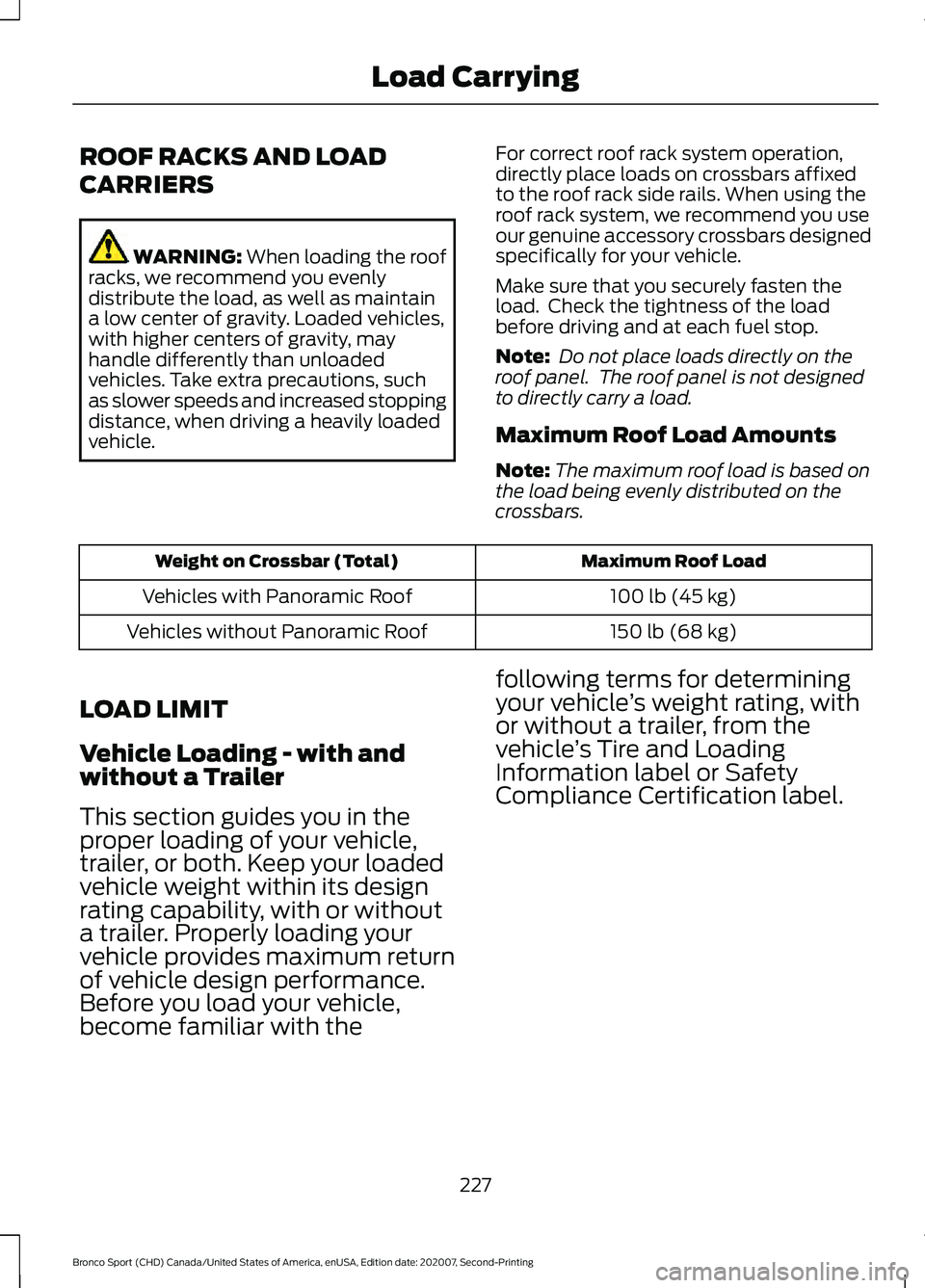
ROOF RACKS AND LOAD
CARRIERS
WARNING: When loading the roof
racks, we recommend you evenly
distribute the load, as well as maintain
a low center of gravity. Loaded vehicles,
with higher centers of gravity, may
handle differently than unloaded
vehicles. Take extra precautions, such
as slower speeds and increased stopping
distance, when driving a heavily loaded
vehicle. For correct roof rack system operation,
directly place loads on crossbars affixed
to the roof rack side rails. When using the
roof rack system, we recommend you use
our genuine accessory crossbars designed
specifically for your vehicle.
Make sure that you securely fasten the
load. Check the tightness of the load
before driving and at each fuel stop.
Note:
Do not place loads directly on the
roof panel. The roof panel is not designed
to directly carry a load.
Maximum Roof Load Amounts
Note: The maximum roof load is based on
the load being evenly distributed on the
crossbars. Maximum Roof Load
Weight on Crossbar (Total)
100 lb (45 kg)
Vehicles with Panoramic Roof
150 lb (68 kg)
Vehicles without Panoramic Roof
LOAD LIMIT
Vehicle Loading - with and
without a Trailer
This section guides you in the
proper loading of your vehicle,
trailer, or both. Keep your loaded
vehicle weight within its design
rating capability, with or without
a trailer. Properly loading your
vehicle provides maximum return
of vehicle design performance.
Before you load your vehicle,
become familiar with the following terms for determining
your vehicle
’s weight rating, with
or without a trailer, from the
vehicle ’s Tire and Loading
Information label or Safety
Compliance Certification label.
227
Bronco Sport (CHD) Canada/United States of America, enUSA, Edition date: 202007, Second-Printing Load Carrying
Page 246 of 471
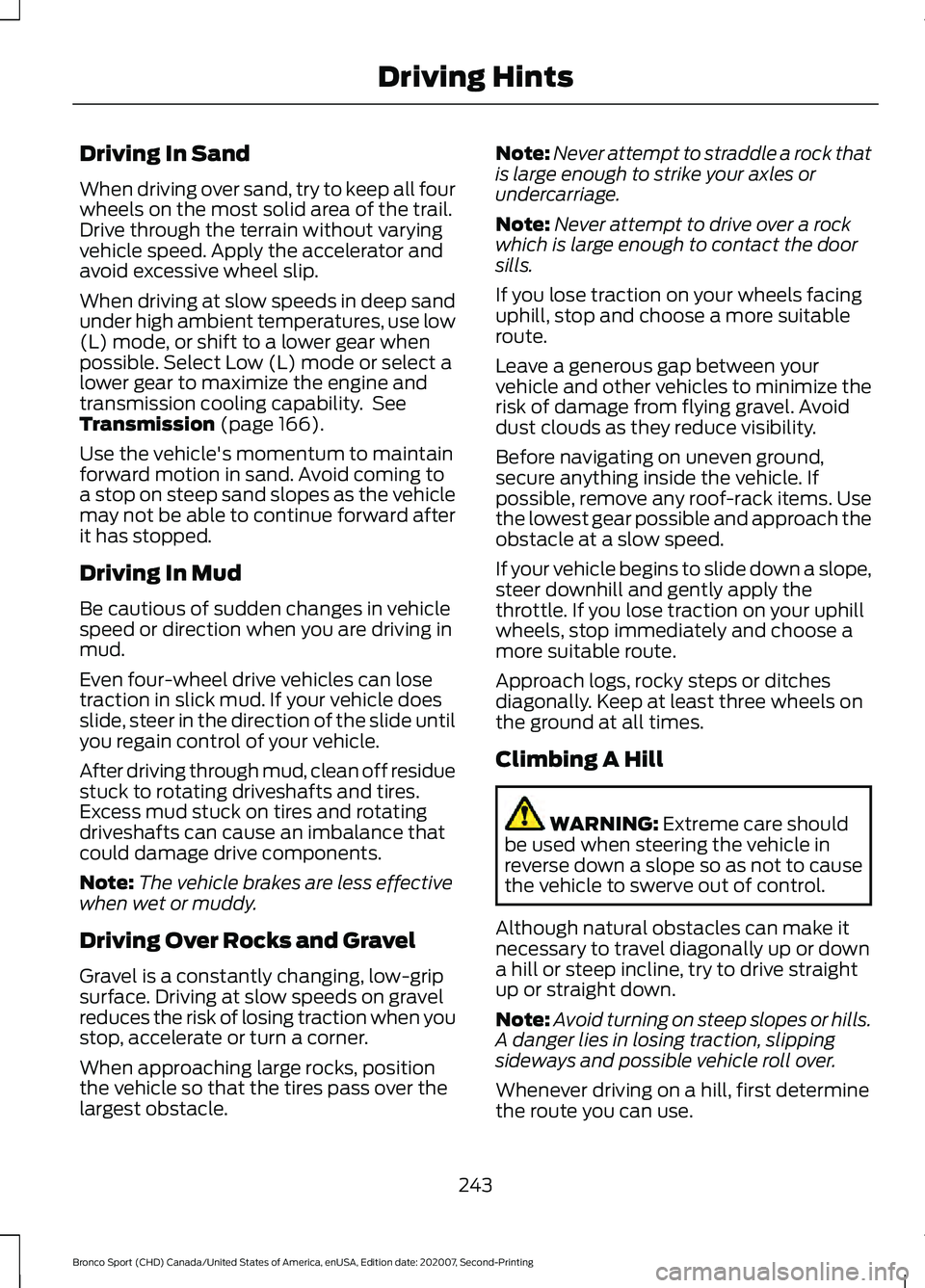
Driving In Sand
When driving over sand, try to keep all four
wheels on the most solid area of the trail.
Drive through the terrain without varying
vehicle speed. Apply the accelerator and
avoid excessive wheel slip.
When driving at slow speeds in deep sand
under high ambient temperatures, use low
(L) mode, or shift to a lower gear when
possible. Select Low (L) mode or select a
lower gear to maximize the engine and
transmission cooling capability. See
Transmission (page 166).
Use the vehicle's momentum to maintain
forward motion in sand. Avoid coming to
a stop on steep sand slopes as the vehicle
may not be able to continue forward after
it has stopped.
Driving In Mud
Be cautious of sudden changes in vehicle
speed or direction when you are driving in
mud.
Even four-wheel drive vehicles can lose
traction in slick mud. If your vehicle does
slide, steer in the direction of the slide until
you regain control of your vehicle.
After driving through mud, clean off residue
stuck to rotating driveshafts and tires.
Excess mud stuck on tires and rotating
driveshafts can cause an imbalance that
could damage drive components.
Note: The vehicle brakes are less effective
when wet or muddy.
Driving Over Rocks and Gravel
Gravel is a constantly changing, low-grip
surface. Driving at slow speeds on gravel
reduces the risk of losing traction when you
stop, accelerate or turn a corner.
When approaching large rocks, position
the vehicle so that the tires pass over the
largest obstacle. Note:
Never attempt to straddle a rock that
is large enough to strike your axles or
undercarriage.
Note: Never attempt to drive over a rock
which is large enough to contact the door
sills.
If you lose traction on your wheels facing
uphill, stop and choose a more suitable
route.
Leave a generous gap between your
vehicle and other vehicles to minimize the
risk of damage from flying gravel. Avoid
dust clouds as they reduce visibility.
Before navigating on uneven ground,
secure anything inside the vehicle. If
possible, remove any roof-rack items. Use
the lowest gear possible and approach the
obstacle at a slow speed.
If your vehicle begins to slide down a slope,
steer downhill and gently apply the
throttle. If you lose traction on your uphill
wheels, stop immediately and choose a
more suitable route.
Approach logs, rocky steps or ditches
diagonally. Keep at least three wheels on
the ground at all times.
Climbing A Hill WARNING:
Extreme care should
be used when steering the vehicle in
reverse down a slope so as not to cause
the vehicle to swerve out of control.
Although natural obstacles can make it
necessary to travel diagonally up or down
a hill or steep incline, try to drive straight
up or straight down.
Note: Avoid turning on steep slopes or hills.
A danger lies in losing traction, slipping
sideways and possible vehicle roll over.
Whenever driving on a hill, first determine
the route you can use.
243
Bronco Sport (CHD) Canada/United States of America, enUSA, Edition date: 202007, Second-Printing Driving Hints
Page 251 of 471
Inspect undercarriage fasteners. If any are
loose or damaged, tighten or replace
ensuring that the proper torque
specification is used.
Inspect for torn or punctured boots on ball
joints, half shafts, steering gears.
Refit the front license plate if removed
previously.
BREAKING-IN
Tires
You need to break in new tires for
approximately 300 mi (480 km). During
this time, your vehicle may exhibit some
unusual driving characteristics.
Brakes and Clutch
Avoid heavy use of the brakes and clutch
if possible for the first
100 mi (160 km) in
town and for the first 1,000 mi (1,600 km)
on freeways.
DRIVING ECONOMICALLY
The following helps to improve fuel
consumption:
• Drive smoothly, accelerate gently and
anticipate the road ahead to avoid
heavy braking.
• Regularly check your tire pressures and
make sure that they are inflated to the
correct pressure.
• Follow the recommended maintenance
schedule and carry out the
recommended checks.
• Plan your journey and check the traffic
before you set off. It is more efficient
to combine errands into a single trip
whenever possible. •
Avoid idling the engine in cold weather
or for extended periods. Start the
engine only when you are ready to set
off.
• Do not carry unnecessary weight in your
vehicle as extra weight wastes fuel.
• Do not add unnecessary accessories
to the exterior of your vehicle, for
example running boards. If you use a
roof rack, remember to fold it down or
remove it when not in use.
• Do not shift into neutral when you are
braking or when your vehicle is slowing
down.
• Shut all windows when driving at high
speeds.
• Switch off all electric systems when
not in use, for example air conditioning.
Make sure that you unplug any
accessories from the auxiliary power
points when not in use.
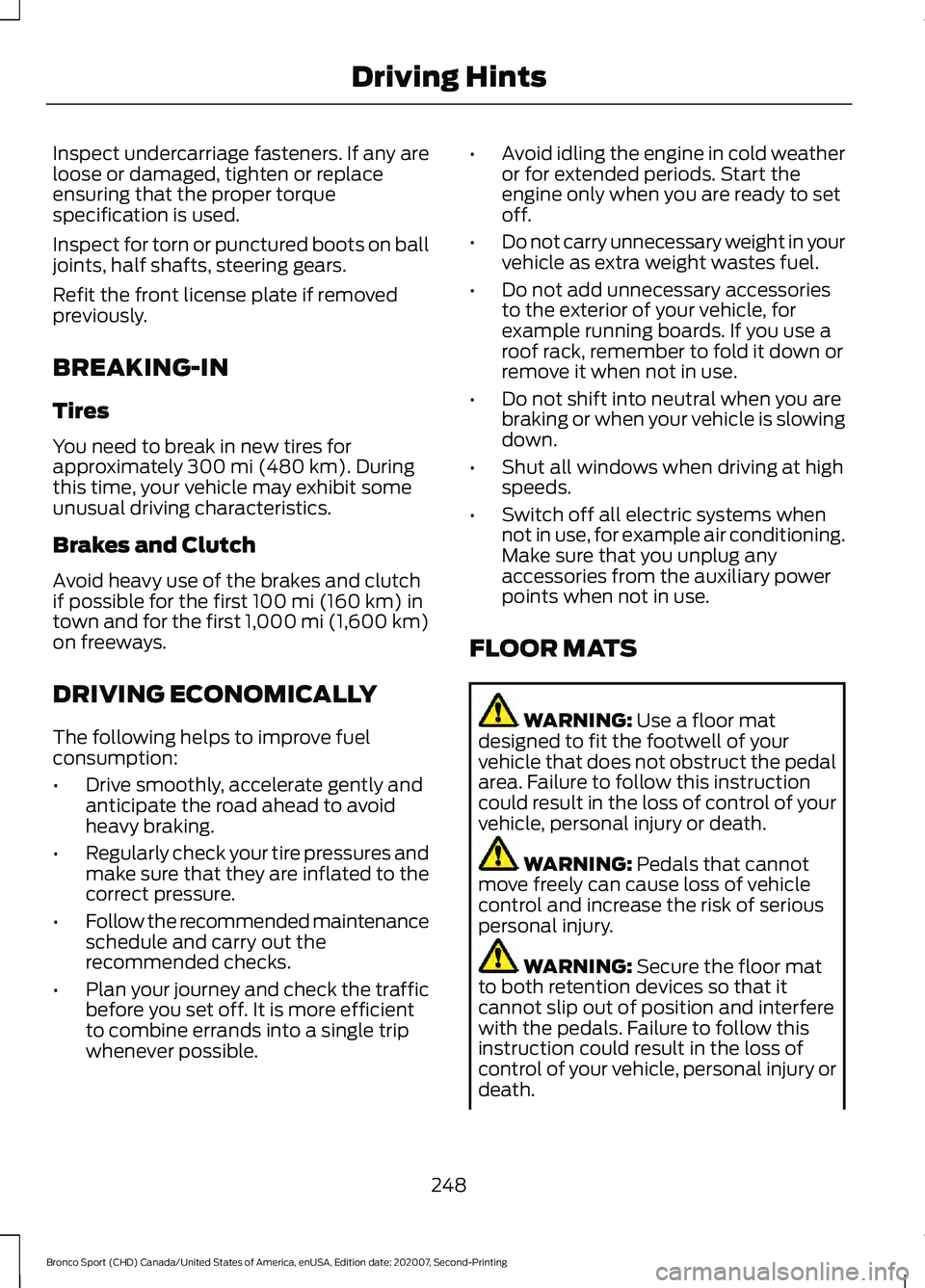
FLOOR MATS WARNING:
Use a floor mat
designed to fit the footwell of your
vehicle that does not obstruct the pedal
area. Failure to follow this instruction
could result in the loss of control of your
vehicle, personal injury or death. WARNING:
Pedals that cannot
move freely can cause loss of vehicle
control and increase the risk of serious
personal injury. WARNING:
Secure the floor mat
to both retention devices so that it
cannot slip out of position and interfere
with the pedals. Failure to follow this
instruction could result in the loss of
control of your vehicle, personal injury or
death.
248
Bronco Sport (CHD) Canada/United States of America, enUSA, Edition date: 202007, Second-Printing Driving Hints
Page 252 of 471
WARNING: Do not place additional
floor mats or any other covering on top
of the original floor mats. This could
result in the floor mat interfering with the
operation of the pedals. Failure to follow
this instruction could result in the loss of
control of your vehicle, personal injury or
death. WARNING: Always make sure that
objects cannot fall into the driver foot
well while your vehicle is moving. Objects
that are loose can become trapped
under the pedals causing a loss of
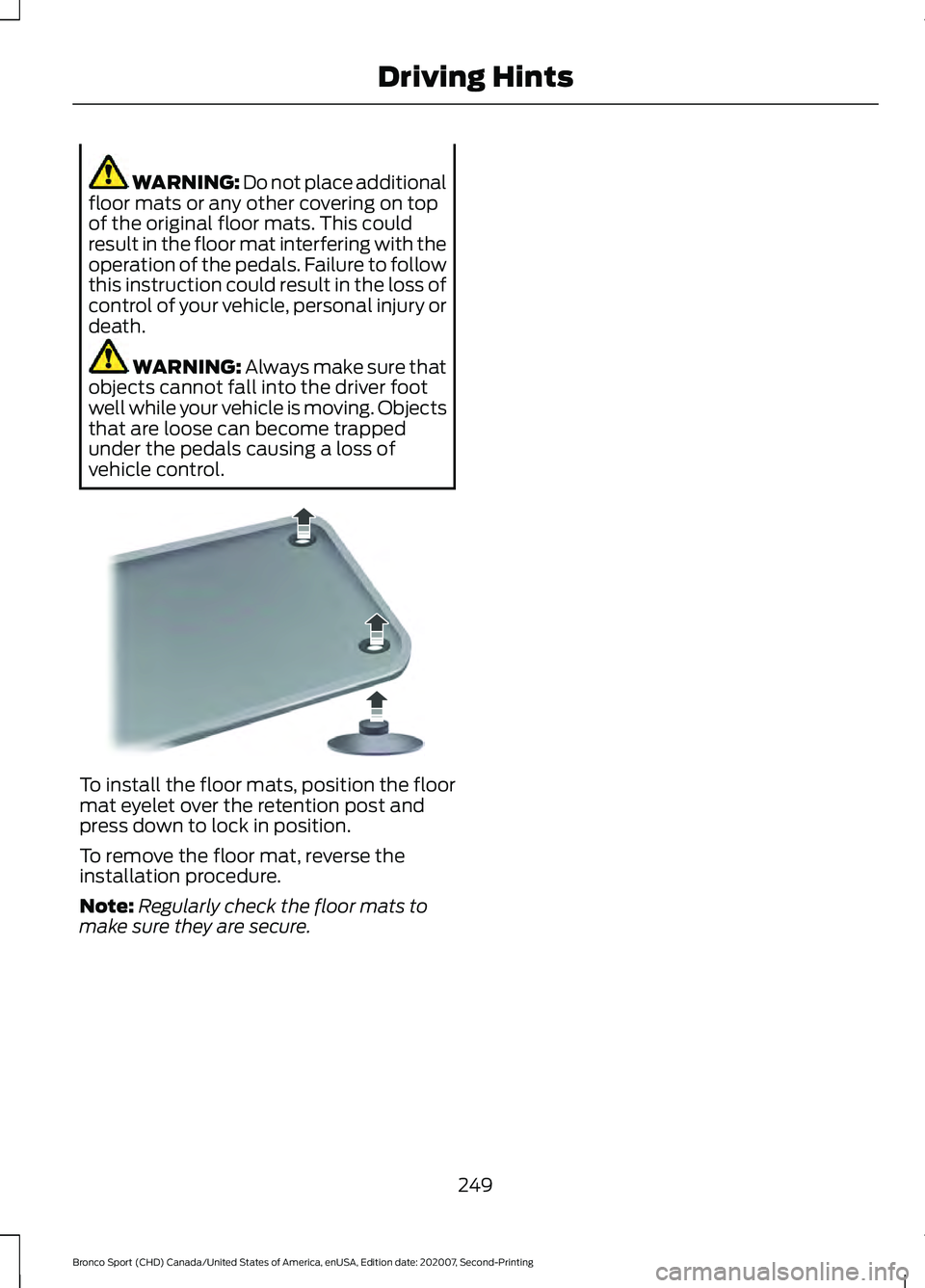
vehicle control. To install the floor mats, position the floor
mat eyelet over the retention post and
press down to lock in position.
To remove the floor mat, reverse the
installation procedure.
Note:
Regularly check the floor mats to
make sure they are secure.
249
Bronco Sport (CHD) Canada/United States of America, enUSA, Edition date: 202007, Second-Printing Driving HintsE142666