Page 69 of 450
67
B618_en_Chap02_ouvertures_ed01-2016
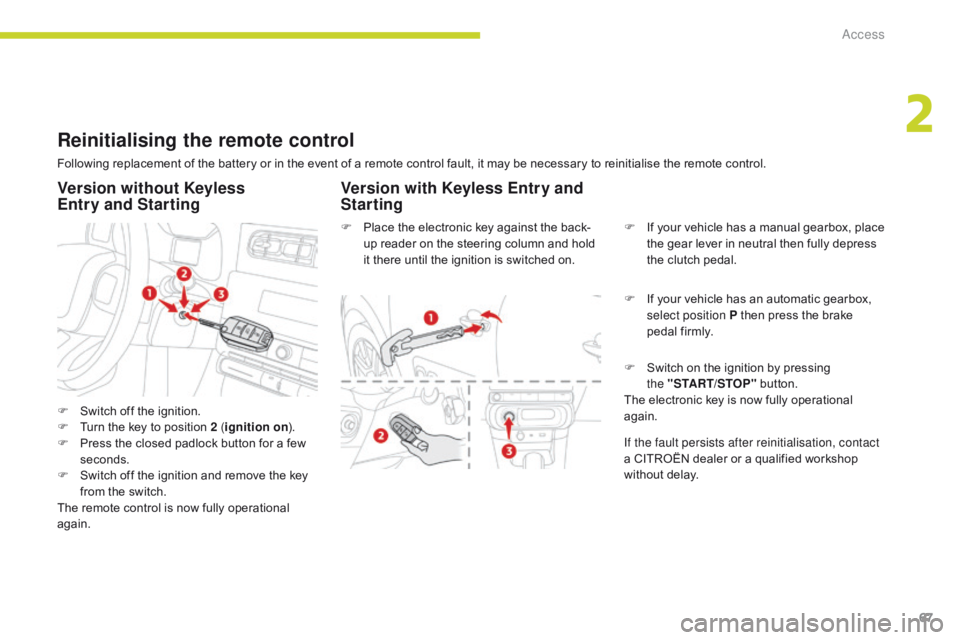
Reinitialising the remote control
Following replacement of the battery or in the event of a remote control fault, it may be necessary to reinitialise the remote control.
F
S
witch off the ignition.
F
T
urn the key to position 2 ( ignition on).
F
P
ress the closed padlock button for a few
seconds.
F
S
witch off the ignition and remove the key
from the switch.
The remote control is now fully operational
again. F
P
lace the electronic key against the back-
up reader on the steering column and hold
it there until the ignition is switched on. F
I
f your vehicle has a manual gearbox, place
the gear lever in neutral then fully depress
the clutch pedal.
F
I
f your vehicle has an automatic gearbox,
select position P then press the brake
pedal firmly.
Version without Keyless
Entry and Starting Version with Keyless Entry and
Starting
F Switch on the ignition by pressing
the "START/STOP" button.
The electronic key is now fully operational
again.
If the fault persists after reinitialisation, contact
a CITROËN dealer or a qualified workshop
without delay.
2
Access
Page 75 of 450

73
B618_en_Chap02_ouvertures_ed01-2016
Triggering of the alarm
This is indicated by sounding of the siren
and flashing of the direction indicators for
30 seconds.
The monitoring functions remain active until
the alarm has been triggered eleven times in
succession.
When the vehicle is unlocked using the remote
control or the Keyless Entry and Starting
system, rapid flashing of the indicator lamp in
the locking button informs you that the alarm
was triggered during your absence. When the
ignition is switched on, this flashing stops.
Failure of the remote control
F unlock the vehicle using the key (integral to the remote control) in the driver's door lock,
F
o
pen the door; the alarm is triggered,
F
s
witch on the ignition; the alarm stops; the
indicator lamp in the button goes off. When the ignition is switched on, and for
10
seconds, the flashing of the indicator lamp
in the locking button indicates a fault with the
system.
Have it checked by a CITROËN dealer or a
qualified workshop.
Locking the vehicle without
activating the alarm
To deactivate the monitoring functions:
F
L
ock or deadlock the vehicle using the
key (integral to the remote control) in the
driver's door lock.
Operating fault
2
Access
Page 76 of 450

74
B618_en_Chap02_ouvertures_ed01-2016
Electric windows
1. Left-hand front electric window.
2. R ight-hand front electric window.
3.
R
ight-hand rear electric window.
4.
L
eft-hand rear electric window.
5.
D
eactivating the rear electric window
switches .
Manual operation
To open or close the window, press or pull the
switch gently. The window stops as soon as the
switch is released.
The electric window switches remain
operational for approximately one
minute after the key has been removed.
Once this time has elapsed, the electric
windows will not operate. To reactivate
them, switch the ignition on again.
Automatic one-touch
operation
(depending on version)
To open or close the window, press or pull
the switch fully: the window opens or closes
completely when the switch is released.
Pressing the switch again stops the movement
of the window.
Safety anti-pinch
(depending on version)
When the window rises and meets an obstacle,
it stops and immediately partially lowers again.
In the event of unwanted opening of the window
when closing automatically, press the switch
until the window opens completely, then pull
the switch immediately until the window closes.
Continue to hold the switch for approximately
one second after the window has closed.
The safety anti-pinch function is not active
during this operation.
Access
Page 86 of 450

84
B618_en_Chap03_Ergonomie-et-confort_ed01-2016
In order for these systems to be fully effective, follow the operation and maintenance
guidelines below:
F
T
o obtain an even air distribution, take care not to obstruct the exterior air intake grilles
located at the base of the windscreen, the nozzles, the vents and the air outlets, as well
as the air extractor located in the boot.
F
D
o not cover the sunshine sensor, located on the dashboard; this is used for regulation
of the air conditioning system.
F
O
perate the air conditioning system for at least 5 to 10 minutes, once or twice a month
to keep it in per fect working order.
F
E
nsure that the passenger compartment filter is in good condition and have the filter
elements replaced regularly.
W
e recommend the use of a combined passenger compartment filter. Thanks to its
special active additive, it contributes to the purification of the air breathed by the
occupants and the cleanliness of the passenger compartment (reduction of allergic
symptoms, bad odours and greasy deposits).
F
T
o ensure correct operation of the air conditioning system, you are also advised to have
it checked regularly as recommended in the maintenance and warranty guide.
F
I
f the system does not produce cold air, switch it off and contact a CITROËN dealer or a
qualified workshop.
Recommendations for ventilation and air conditioning
If after an extended stop in sunshine,
the interior temperature is very high, first
ventilate the passenger compartment for
a few moments.
Put the air flow control at a setting high
enough to quickly change the air in the
passenger compartment.
The condensation created by the air
conditioning results in a discharge
of water under the vehicle which is
per fectly normal.
When towing the maximum load on a steep gradient in high temperatures, switching off the
air conditioning increases the available engine power and so improves the towing ability.
Stop & Start
The heating and air conditioning
systems only work when the engine is
running.
To maintain a comfortable temperature
in the passenger compartment, you can
temporarily deactivate the Stop & Start
system.
For more information on Stop & Star t ,
refer to the corresponding section.
Ease of use and comfort
Page 92 of 450

90
B618_en_Chap03_Ergonomie-et-confort_ed01-2016
Resuming manual control
You can manually adjust the air flow and
distribution.
As soon as you modify a setting, the automatic
comfort programme is deactivated.F
P
ress the AUTO button to
activate the automatic comfort
programme again.Air flow adjustment
F Press one of these buttons to increase or decrease the air flow.
The symbol for air flow (a fan) fills progressively
according to the air flow setting made.
By reducing the air flow to minimum, you are
stopping ventilation.
" OFF " is displayed alongside the fan.
Avoid driving for too long with the
ventilation off (risk of misting and
deterioration of air quality).
Air distribution adjustment
You can vary the distribution of air in the
passenger compartment using these three
buttons. Windscreen.
Central and side vents.
Footwells.
The three buttons can be activated
simultaneously. In this case, the flows
of air from the central and side vents
and the footwell vents are favoured.
Each press on a button activates or deactivates
the function.
Ease of use and comfort
Page 94 of 450

92
B618_en_Chap03_Ergonomie-et-confort_ed01-2016
Front demist - defrost
With control panel on the
centre console
With Stop & Start, when demisting has
been activated, the STOP mode is not
available.
On
F Put the temperature and air flow controls to the dedicated marked position.
F
P
ut the air distribution control to the
"Windscreen" position.
Off
F Put the air flow control to the fan position.
These markings on the control panels indicate the control positions for rapid demisting or
defrosting of the windscreen and side windows.
During the winter period, direct the side air vents towards the side glasses to optimise
their demisting and defrosting.
With touch screen
On
Off
F Press this button again to switch it off. T
he indicator lamp in the button goes off.F
P
ress this button.
T
he indicator lamp in the button
comes on.
The system automatically controls the air
conditioning, the air flow and the air intake and
provides optimum distribution of the ventilation
to the windscreen and side windows.
Ease of use and comfort
Page 95 of 450
93
B618_en_Chap03_Ergonomie-et-confort_ed01-2016
Rear screen demist - defrost
Switching on
Switching off
F Press this button to demist /defrost the rear screen and
(depending on version) the door
mirrors. The indicator lamp in the
button comes on.
The demisting/defrosting switches off automatically
to prevent an excessive consumption of current.
The rear screen demist - defrost
can only operate when the engine is
running.
Switch off the heating of the rear screen
and door mirrors as soon as you judge it
possible, as reducing the consumption
of electrical current reduces fuel
consumption.
F
I
t is possible to stop the demisting/
defrosting operation before it is switched
off automatically by pressing this button
again. The indicator lamp in the button
goes off.
3
Ease of use and comfort
Page 104 of 450
102
B618_en_Chap03_Ergonomie-et-confort_ed01-2016
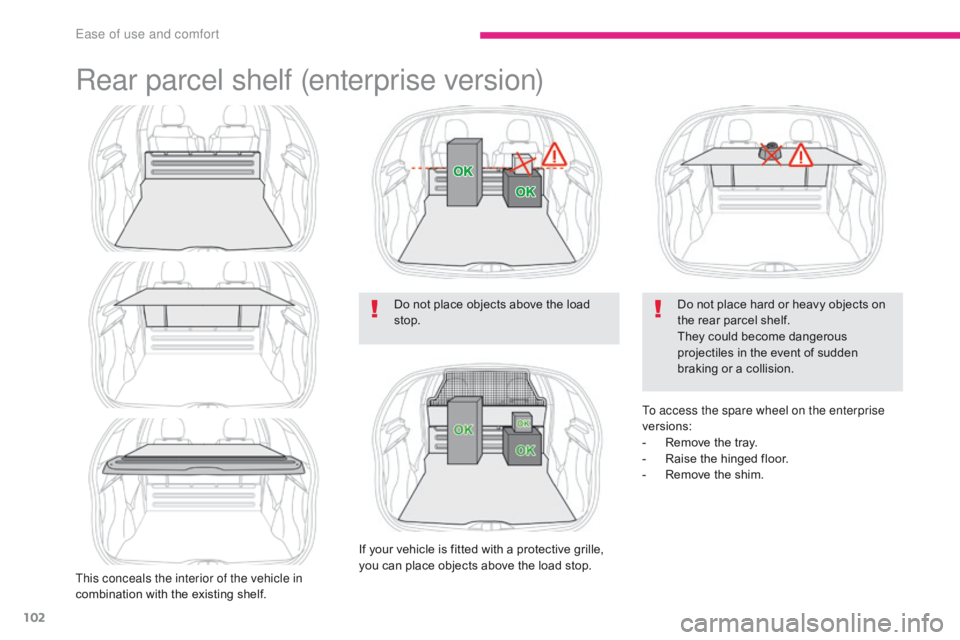
Rear parcel shelf (enterprise version)
This conceals the interior of the vehicle in
combination with the existing shelf.Do not place objects above the load
stop.
If your vehicle is fitted with a protective grille,
you can place objects above the load stop. Do not place hard or heavy objects on
the rear parcel shelf.
They could become dangerous
projectiles in the event of sudden
braking or a collision.
To access the spare wheel on the enterprise
versions:
-
R
emove the tray.
-
R
aise the hinged floor.
-
R
emove the shim.
Ease of use and comfort