2021 CITROEN AMI vin
[x] Cancel search: vinPage 4 of 44
2
Contents
■
Overview
■
Eco-driving
1Dashboard instrumentsInstrument panel with monochrome display screen 6
Warning and indicator lamps 6
Charge level 7
Distance recorder 7
2AccessDoors 9
Windows 9
3Ease of use and comfortDriver's seat 10
Door mirrors 10
Ventilation/Heating/Demisting 10
Interior fittings 11
Available accessories 12
4Lighting and visibilityExterior lighting 13
Direction indicators 13
Wipers/Screenwash 13
Changing a wiper blade 14
5SafetySafety - General recommendations 15
Hazard warning lamps 15
Horn 15
Seat belts 15
Child seats 16
6DrivingDriving recommendations 18
Parking brake 18
Drive selector 19
Starting/Stopping the vehicle 19
7Practical informationCharging the traction battery 21
Electric motor 23
Checking levels 23
Checks 24
Free-wheeling 25
Advice on care and maintenance 25
8In the event of a breakdownChanging a wheel 27
Changing a bulb 27
Changing a fuse 28
12 V battery 29
Towing the vehicle 33
9Technical dataElectric motor 34
Dimensions 34
Identification markings 35
■
Alphabetical index
Page 6 of 44

4
Overview
3.Panoramic glass sunroof
4. 48 V traction battery
5. Electric motor
6. Integrated towing eye
7.12 V battery
8. Charging cable
Instruments and controls
1.Instrument panel with monochrome display
screen
2. Multifunction control stalk:
–
Wipers/Screenwash
– Direction indicators
– Horn
3. Smartphone rest
4. Switch panel:
–
Heating/Demisting
– V
entilation
–
Hazard warning lamps
USB socket
5. Motor start/stop switch
6. Drive selector
7. Parking brake
CARGO version
The CARGO version is an electric mobility
solution for professional use.
The passenger seat is replaced by a modular
load space bounded by:
–
a fixed vertical partition, separating the driver
and the entire load.
–
an upper movable shelf, leaving the right door
mirror visible.
The loading (e.g. mail, parcels, tools) is always
accessible from the outside as well as from the
inside by raising the upper movable shelf.
An additional closed storage compartment (e.g.
smartphone, pens, glasses) is located at the
back of the upper movable shelf.
Page 7 of 44

5
Eco-driving
Eco-driving
Eco-driving is a range of everyday practices
that enable you to optimise your vehicle's
consumption of electrical energy.
Optimising driving range
How much electrical energy your vehicle
consumes depends on your speed, driving style,
vehicle load and route.
Apply pressure gradually to the accelerator pedal
and maintain safe distances between vehicles.
Anticipate the need to slow down well in advance
and, where possible, brake smoothly or slow
the vehicle using engine braking with the
regenerative braking function.
Control the use of electrical equipment
Before setting off, if the passenger compartment
is too warm, cool it down by opening the
windows in order to reduce the use of the
ventilation system.
In the event of a frost, remove the ice from all
glass surfaces using a scraper in order to reduce
the use of the heating/demister function.
Comply with the servicing instructions
Check tyre pressures regularly when the tyres
are cold, referring to the label affixed to the base
of the passenger seat.
Perform this check particularly at each change of
season and after the vehicle has been stationary
for a long period.If the tyres need to be replaced, you must fit
tyres which are identical to the original ones
(size, load/speed rating, type and structure).
Ensure the vehicle is serviced regularly and
observe the schedule of service checks indicated
in the Manufacturer's service schedule.
Page 8 of 44

6
Dashboard instruments
Instrument panel with
monochrome display
screen
1.Traction battery charge level
2. Driving range or remaining charging time
3. Speedometer
4. Drive selector position
5. Distance recorder
Warning and indicator
lamps
Displayed as warning lamps on the sides of the
instrument panel and symbols on the display
screen, the indicator lamps inform you of a fault
or when a system is in operation.
Certain lamps may come on in one of two
modes: fixed (continuous) or flashing.
An active lamp may be accompanied by an
audible signal.
When the ignition is switched on
The red or orange warning lamps come on for a
few seconds. These warning lamps should go off
as soon as the motor is switched on.
If a lamp remains lit
If a warning lamp remains lit (red or orange), this
indicates the presence of a fault which needs
further investigation.
For more information on a system or a function,
refer to the corresponding section.
List of warning and
indicator lamps
Red warning/indicator lamps
STOP
Fixed, accompanied by an audible signal
(3 beeps).
A serious fault has been detected.
You must stop the vehicle.
Stop as soon as it is safe to do so and switch off
the ignition.
Call a dealer or qualified workshop.
Parking brakeFixed.
The parking brake is still applied or not
properly released.
To move off, release the parking brake fully.
Flashing, along with the fixed
cable connected indicator lamp, dashes instead of the charging time and an
audible signal (repeated beeps).
The charging cable is connected and the parking
brake is released.
Charging will only be possible after applying the
parking brake.
The vehicle cannot be started while the charging
cable is connected.
BrakingFixed, accompanied by an audible signal
(3 beeps).
The brake fluid level has dropped significantly.
You must stop the vehicle.
Stop as soon as it is safe to do so and switch off
the ignition.
Check for the presence of a leak.
Call a dealer or qualified workshop.
Orange warning/indicator lamps
Service
Fixed, accompanied by an audible signal
(1 beep).
One or more major faults, for which there is/are
no specific warning lamp(s), have been detected.
Call a dealer or qualified workshop.
Fixed, combined with another warning
lamp.
Refer to the explanation for the corresponding
lamp.
Page 9 of 44

7
Dashboard instruments
1Minimum traction battery charge levelFixed, combined with the last bar on the
charge meter showing and an audible
signal (1 beep).
The traction battery has reached the first alert
threshold.
Put the vehicle on charge as soon as possible.
Fixed, combined with the flashing
vehicle driving range warning lamp
and an audible signal (1 beep).
The traction battery has reached the second
alert threshold.
The motor's power decreases rapidly.
You must put the vehicle on charge.
Limited powerFixed, accompanied by an audible signal
(1 beep).
A drop in performance in the drive train due to a
low battery temperature.
The decrease in motor power temporarily affects
the vehicle's performance.
Maximum traction battery temperature
Fixed, combined with the STOP
warning lamp and an audible
signal (1 beep).
The traction battery's temperature is too high.
You must stop the vehicle.
Stop as soon as it is safe to do so and switch off
the ignition.
Call a dealer or qualified workshop.
Green warning/indicator lamps
Direction indicators
Flashing left or right indicator with audible
signal.
The left or right direction indicator lamps are on.
Flashing left and right indicators with
audible signal.
The hazard warning lamps are on.
White indicator lamps
Foot on the brake
Flashing.
Insufficient pressure or no pressure
detected on the brake pedal for changing the
direction of travel.
Depress the brake pedal to select or change the
direction of travel.
Vehicle ready to driveFixed.
The vehicle is switched on.
The warning lamp remains on while driving.
The lamp will go out when you switch off the
motor and exit the vehicle.
Fixed, accompanied by an audible signal
(1 beep).
A drive position is selected without any pressure
on the pedals for 5 seconds.
Press D or R on the drive selector, then
accelerate or brake.
Vehicle driving rangeFixed.
The remaining driving range is displayed.
Cable connectedFixed, combined with the remaining
charging time.
The charging cable is connected to the charging
socket.
The traction battery is being charged.
Charge level
This indicates traction battery charge level,
showing up to 8 bars.
With the ignition switched on and the vehicle
moving, this is permanently displayed below the
remaining driving range (miles/kilometres).
When the vehicle is being charged, dashes
are displayed for the first 3 minutes, then the
time (hours/minutes) remaining until charging is
complete.
For more information about the Warning lamps,
refer to the corresponding section.
Distance recorder
This measures the total distance travelled by the
vehicle since its initial registration.
Page 11 of 44
9
Access
2Doors
The vehicle has two doors which open in
opposite directions.
Do not open the door when moving.
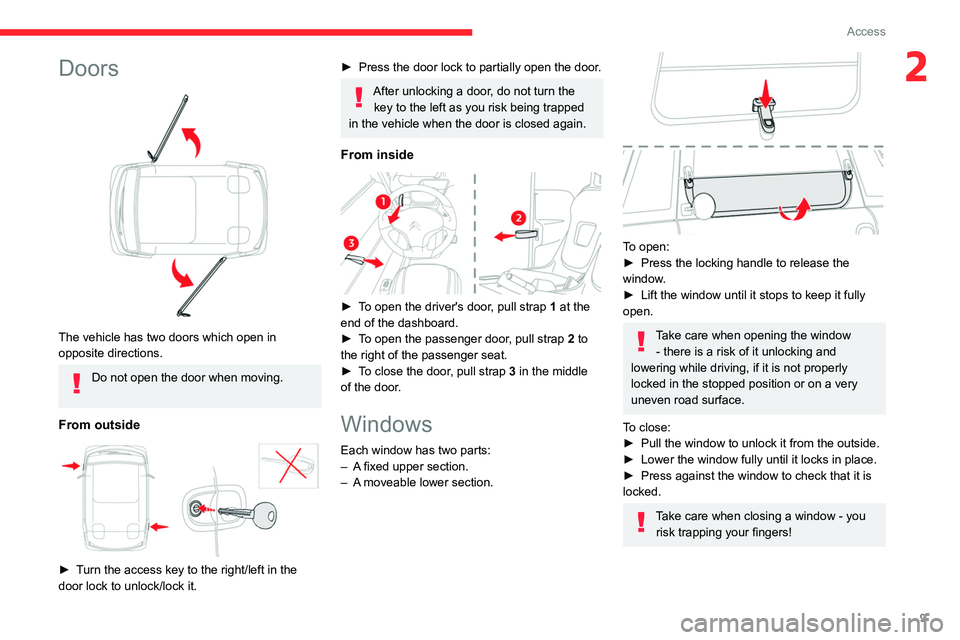
From outside
► Turn the access key to the right/left in the
door lock to unlock/lock it.
► Press the door lock to partially open the door.
After unlocking a door, do not turn the key to the left as you risk being trapped
in the vehicle when the door is closed again.
From inside
► To open the driver's door, pull strap 1 at the
end of the dashboard.
►
To open the passenger door
, pull strap 2 to
the right of the passenger seat.
►
To close the door
, pull strap 3 in the middle
of the door.
Windows
Each window has two parts:
– A fixed upper section.
– A moveable lower section.
To open:
► Press the locking handle to release the
window.
►
Lift the window until it stops to keep it fully
open.
Take care when opening the window - there is a risk of it unlocking and
lowering while driving, if it is not properly
locked in the stopped position or on a very
uneven road surface.
To close:
►
Pull the window to unlock it from the outside.
► Lower the window fully until it locks in place.
► Press against the window to check that it is
locked.
Take care when closing a window - you risk trapping your fingers!
Page 16 of 44

14
Lighting and visibility
– Replace them at the first signs of wear.
Changing a wiper blade
Removing/refitting
Take care not to hold the arms at the jet locations.
Do not touch the wiper blades. Risk of
irreparable damage.
Do not release them while moving them. Risk
of damaging the windscreen!
►
Clean the windscreen using screenwash
fluid.
►
Grasp the wiper blade by its rigid part and
pull it towards you as far as it will go.
►
While keeping the wiper arm raised, unclip
the worn blade and remove it.
►
While keeping the wiper arm raised, install
the new blade and clip it into place.
►
Lower the arm carefully and support it until it
reaches the windscreen.
Page 20 of 44
18
Driving
Driving recommendations
General information
► Observe the driving regulations and remain
vigilant whatever the traffic conditions.
►
Monitor your environment and keep your
hands on the wheel to be able to react to
anything that may happen any time.
►
Drive smoothly, anticipate the need for
braking and maintain a longer safety distance,
especially in bad weather
.
►
Stop the vehicle to carry out operations that
require close attention (such as adjustments).
Never drive with the parking brake
applied . Risk of overheating and
damaging the braking system!
Never leave a vehicle running unattended.
If the driver must leave the vehicle, the
parking brake must be applied and N mode
selected using the drive selector.
On flooded roads
We strongly advise against driving on flooded
roads, as this could seriously damage your
vehicle's motor and electrical systems.
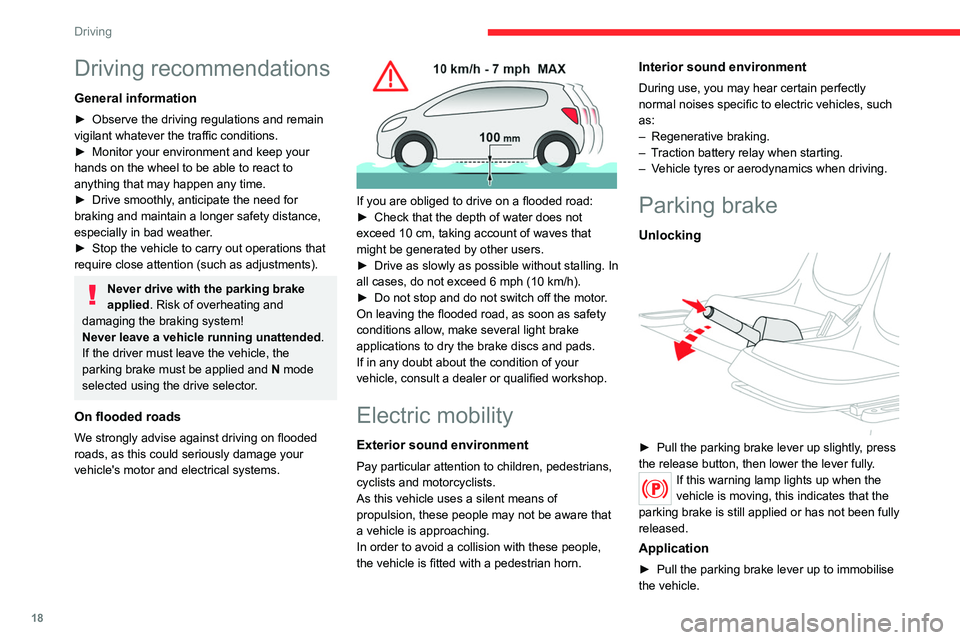
If you are obliged to drive on a flooded road:
► Check that the depth of water does not
exceed 10 cm, taking account of waves that
might be generated by other users.
►
Drive as slowly as possible without stalling. In
all cases, do not exceed 6 mph (10 km/h).
► Do not stop and do not switch off the motor.
On leaving the flooded road, as soon as safety
conditions allow
, make several light brake
applications to dry the brake discs and pads.
If in any doubt about the condition of your
vehicle, consult a dealer or qualified workshop.
Electric mobility
Exterior sound environment
Pay particular attention to children, pedestrians,
cyclists and motorcyclists.
As this vehicle uses a silent means of
propulsion, these people may not be aware that
a vehicle is approaching.
In order to avoid a collision with these people,
the vehicle is fitted with a pedestrian horn.
Interior sound environment
During use, you may hear certain perfectly
normal noises specific to electric vehicles, such
as:
–
Regenerative braking.
– Traction battery relay when starting.
– Vehicle tyres or aerodynamics when driving.
Parking brake
Unlocking
► Pull the parking brake lever up slightly, press
the release button, then lower the lever fully .
If this warning lamp lights up when the
vehicle is moving, this indicates that the
parking brake is still applied or has not been fully
released.
Application
► Pull the parking brake lever up to immobilise
the vehicle.