2021 CHRYSLER VOYAGER display
[x] Cancel search: displayPage 49 of 348

GETTING TO KNOW YOUR VEHICLE47
UCONNECT VOICE RECOGNITION
INTRODUCING VOICE RECOGNITION
Start using Uconnect Voice Recognition with these
helpful quick tips. It provides the key Voice
Commands and tips you need to know to control
your vehicle’s Voice Recognition (VR) system.
Uconnect 4 With 7-inch Display
BASIC VOICE COMMANDS
The basic Voice Commands below can be given at
any point while using your Uconnect system. Push the VR button . After the beep, say:
“
Cancel ” to stop a current voice session.
“Help ” to hear a list of suggested Voice
Commands.
“ Repeat ” to listen to the system prompts again.
Notice the visual cues that inform you of your Voice
Recognition system’s status.
GET STARTED
The VR button is used to activate /deactivate
your Voice Recognition system.
Helpful hints for using Voice Recognition:
Reduce background noise. Wind noise and
passenger conversations are examples of noise
that may impact recognition.
Speak clearly at a normal pace and volume
while facing straight ahead.
Each time you give a Voice Command, first push
the VR button, wait until after the beep, then say
your Voice Command.
You can interrupt the help message or system
prompts by pushing the VR button and saying a
Voice Command from the current category.
Uconnect Voice Command Buttons
ADDITIONAL INFORMATION
© 2021 FCA US LLC. All rights reserved. Mopar and
Uconnect are registered trademarks and Mopar
Owner Connect is a trademark of FCA US LLC.
Android™ is a trademark of Google Inc. SiriusXM®
and all related marks and logos are trademarks of
SiriusXM® Radio Inc.
Úpage 331.
For Uconnect system support, call
1-877-855-8400 (24 hours a day 7 days a week)
or visit
DriveUconnect.com (US) or DriveUconnect.ca (Canada).
1 — Push To Start Or Answer A Phone Call And
Send Or Receive A Text
2 — Push The Voice Recognition Button To Begin
Radio, Media, And Climate Functions
2
21_RUV_OM_EN_USC_t.book Page 47
Page 57 of 348

GETTING TO KNOW YOUR VEHICLE55
Fog Light Switch
TURN SIGNALS
Move the multifunction lever up or down to
activate the turn signals. The arrows on each side
of the instrument cluster flash to show proper
operation.
NOTE:If either light remains on and does not flash, or
there is a very fast flash rate, check for a defective
outside light bulb.
Turn Signal Warning
If the vehicle electronics sense that the vehicle has
traveled for about 1 mile (1.6 km) with the turn signals on, a chime will sound and a message will
display in the cluster to alert the driver.
LANE CHANGE ASSIST — IF EQUIPPED
Tap the multifunction lever up or down once,
without moving beyond the detent, and the turn
signal (right or left) will flash three times then
automatically turn off.
BATTERY PROTECTION
This feature provides battery protection to avoid
wearing down the battery if the headlights or
parking lights are left on for extended periods of
time when the ignition is in the OFF position. After
eight minutes of the ignition being in the OFF
position and the headlight switch in any position
other than OFF or AUTO, the lights will turn off
automatically until the next cycle of the ignition or
headlight switch.
The battery protection feature will be disabled if
the ignition is placed in any position other than OFF
during the eight minute delay.
INTERIOR LIGHTS
INTERIOR COURTESY LIGHTS
The courtesy light switches are used to turn the
courtesy lights on/off.
Courtesy Light Switches
To operate the courtesy lights, push either the
driver or passenger light switch.
NOTE:
Before exiting the vehicle, make sure that the
interior lights are turned off. This will prevent the
battery from discharging once the doors are
closed.
If a light is left on, it will automatically be turned
off approximately 10 minutes after the ignition
is in the OFF position.
2
21_RUV_OM_EN_USC_t.book Page 55
Page 58 of 348

56GETTING TO KNOW YOUR VEHICLE
Rear Courtesy/Reading Lights —
If Equipped
Located above the rear passengers are
courtesy/reading lights. The lights turn on when a
front door, a sliding door or the liftgate is opened.
If your vehicle is equipped with Remote Keyless
Entry (RKE) the lights will also turn on when the
unlock button on the key fob is pushed.
The courtesy lights also function as reading lights.
Push the lens to turn these lights on while inside
the vehicle. Push the lens a second time to turn
each light off.
Ambient Light Control — If Equipped
Rotate the ambient dimmer control upward or
downward to increase or decrease the brightness
of the ambient light located in the door handle
lights, under instrument panel lights, door map
pocket lights, and cubby bin lights.
Ambient Light/Door Handle Light Dimmer
Interior Lighting Off
Rotate the dimmer control on the right to the off
position (extreme bottom). The interior lights will
remain off when the doors or liftgate are open.
Instrument Panel Dimmer Control
The instrument panel dimmer control is part of the
headlight switch, and is located on the driver’s side
of the instrument panel.
With the parking lights or headlights on, rotate the
instrument panel dimmer control upward or
downward to increase or decrease the brightness
of the instrument panel. At the top detent of the
instrument panel dimmer, all the interior lights will
also illuminate. At the bottom most setting
(extreme bottom) interior lights are turned off
(dome off), and the cluster, radio and instrument
lighting go to their lowest dimmable setting.Rotate the instrument panel dimmer control
upward to the first detent. This feature brightens
all text displays such as the odometer, instrument
cluster display, and radio when the position lights
or headlights are on.
Instrument Panel Dimmer
WINDSHIELD WIPER AND WASHERS
The windshield wiper/washer controls are located
on the right side of the steering column. The front
wipers are operated by rotating a switch, located
on the end of the lever.
21_RUV_OM_EN_USC_t.book Page 56
Page 60 of 348

58GETTING TO KNOW YOUR VEHICLE
Mist
Push the lever upward to the MIST position and
release for a single wiping cycle.
NOTE:The Mist feature does not activate the washer
pump; therefore, no washer fluid will be sprayed on
the windshield. The wash function must be used in
order to spray the windshield with washer fluid.
For information on wiper care and replacement,
see
Úpage 282.
REAR WIPER AND WASHER
Rear Window Wiper Operation
Rotate the windshield wiper lever center ring
upwards to operate one of two modes for the rear
window wiper:
First detent — intermittent mode.
Second detent — continuous mode.
Rear Window Washer Operation
Pushing the windshield wiper lever forward
activates the rear window washer. If the lever is
pushed while on the intermittent setting, the
wipers will turn on and operate for several wipe
cycles after the lever is released, and then resume
the intermittent interval previously selected. If the
lever is pushed while the wipers are in the off
position, the wipers will operate several wipe
cycles, then turn off.
CLIMATE CONTROLS
AUTOMATIC CLIMATE CONTROL
D
ESCRIPTIONS AND FUNCTIONS
Uconnect 4 With 7–inch Display Automatic Temperature
Controls
MAX A/C Button
Press and release the MAX A/C button on
the touchscreen to change the current
setting to the coldest output of air.
The MAX A/C indicator illuminates when
MAX A/C is on. Pressing the button again will cause
the MAX A/C operation to exit.
NOTE:The MAX A/C setting is only available on the touch -
screen.
A/C Button
Press and release the button on the
touchscreen, or push the button on the
faceplate to change the current setting.
The indicator illuminates when A/C is on.
NOTE:
If the system is in Mix or Defrost mode, the A/C
can be turned off, but the A/C system shall
remain active to prevent fogging of the windows.
If not operating in AUTO mode, the system will
not automatically sense the presence of fog,
mist or ice on the windshield. Defrost Mode
must be manually selected to clear the wind -
shield and side glass.
If fog or mist appears on the windshield or side
glass, select Defrost mode and adjust blower
speed if needed.
21_RUV_OM_EN_USC_t.book Page 58
Page 63 of 348

GETTING TO KNOW YOUR VEHICLE61
Mix Mode
Air is directed through the floor, defrost,
and side window demister outlets. This
setting works best in cold or snowy
conditions that require extra heat to the
windshield. This setting is good for maintaining
comfort while reducing moisture on the
windshield.
Climate Control OFF Button
Press and release this button on the
touchscreen, or push the button on the
faceplate to turn the Climate Control
ON/OFF.
Controlling The Rear Climate Controls
From The Front ATC Panel—If Equipped
The Three-Zone Automatic Temperature Control
(ATC) system allows for adjustment of the rear
climate controls from the front ATC panel.
To change the rear system settings:
Press the "Rear Climate" button on the touch -
screen to display the rear climate controls. The
control functions now operate the rear system.
Press the "Front Climate" button on the touch -
screen to return to the front climate controls.
Uconnect 4 Front ATC Panel Rear Control Display
REAR CLIMATE CONTROL BUTTON
Press and release the Rear Climate
button to access the rear climate
controls. The indicator will illuminate
when the rear climate controls are on.
REAR AUTO BUTTON
Press and release this button on the
touchscreen to change the current
setting. The REAR AUTO indicator will
illuminate when REAR AUTO is on. This
feature automatically controls the rear interior
cabin temperature by adjusting airflow distribution
and amount. Toggling this function will cause the
rear system to switch between manual mode and
automatic modes.
Úpage 69.
REAR LOCK BUTTON
Press and release this button to lock out
the rear manual temperature controls
from adjusting the rear temperature and
blower settings.
NOTE:The Rear Lock button is only available on the
touchscreen.
FRONT CLIMATE BUTTON
Press and release this button to change
the display on the Uconnect system back
to the Front Climate Controls.
REAR TEMPERATURE CONTROL
These buttons provide the front occupants with the
ability to control the rear temperature.
Push the up arrow button on the
touchscreen to increase the
temperature.
Push the down arrow button on the
touchscreen to decrease the
temperature.
NOTE:When the SYNC feature is active, the passenger’s
temperature will move up and down with the
driver’s temperature.
2
21_RUV_OM_EN_USC_t.book Page 61
Page 65 of 348

GETTING TO KNOW YOUR VEHICLE63
Rear Automatic Climate Controls
1. Adjust the rear blower, rear temperature and the rear modes to suit your comfort needs.
2. ATC is selected by pushing the AUTO button.
Once the desired temperature is displayed, the
ATC System will automatically achieve and
maintain that comfort level. When the system is
set up for your comfort level, it is not necessary to
change the settings. You will experience the
greatest efficiency by simply allowing the system to
function automatically.
NOTE:It is not necessary to move the temperature
settings. The system automatically adjusts the
temperature, mode and fan speed to provide
comfort as quickly as possible.
AUTO BUTTON
The AUTO button automatically controls
the interior cabin temperature by
adjusting distribution and amount of
airflow. Performing this function will
cause the system to switch between manual mode
and automatic modes
Úpage 69.
REAR TEMPERATURE CONTROL
To change the temperature in the rear of
the vehicle, push temperature control up
button to raise the temperature. The rear
temperature settings are displayed in
control head.
To change the temperature in the rear of
the vehicle, push temperature control
down button to lower the temperature.
The rear temperature settings are
displayed in control head.
REAR BLOWER CONTROL
The rear blower control can be manually
set to off, or any fixed blower speed by
pushing the blower control buttons. This
allows the rear seat occupants to control
the volume of air circulated in the rear of the
vehicle. The larger of the two icons increases
blower speed, whereas the smaller of the two icons
decreases the blower speed.
REAR MODE CONTROL
Push this button on the Rear Climate
Controls to change the air distribution
mode for the rear passengers.
PANEL MODE
Air comes from the outlets in the
headliner. Each of these outlets can be
individually adjusted to direct the flow of
air. Moving the air vanes of the outlets to
one side will shut off the airflow.
BI-LEVEL MODE
Air comes from both the headliner outlets
and the floor outlets.
NOTE:In many temperature positions, the Bi-Level mode
is designed to provide cooler air out of the head -
liner outlets and warmer air from the floor outlets.
2
21_RUV_OM_EN_USC_t.book Page 63
Page 66 of 348
64GETTING TO KNOW YOUR VEHICLE
FLOOR MODE
Air comes from the floor outlets.
REAR CLIMATE CONTROL/BLOWER OFF
To manually set the rear blower controls
to off, press the Rear Climate Control/
Blower Off button.
MANUAL CLIMATE CONTROL
D
ESCRIPTIONS AND FUNCTIONS
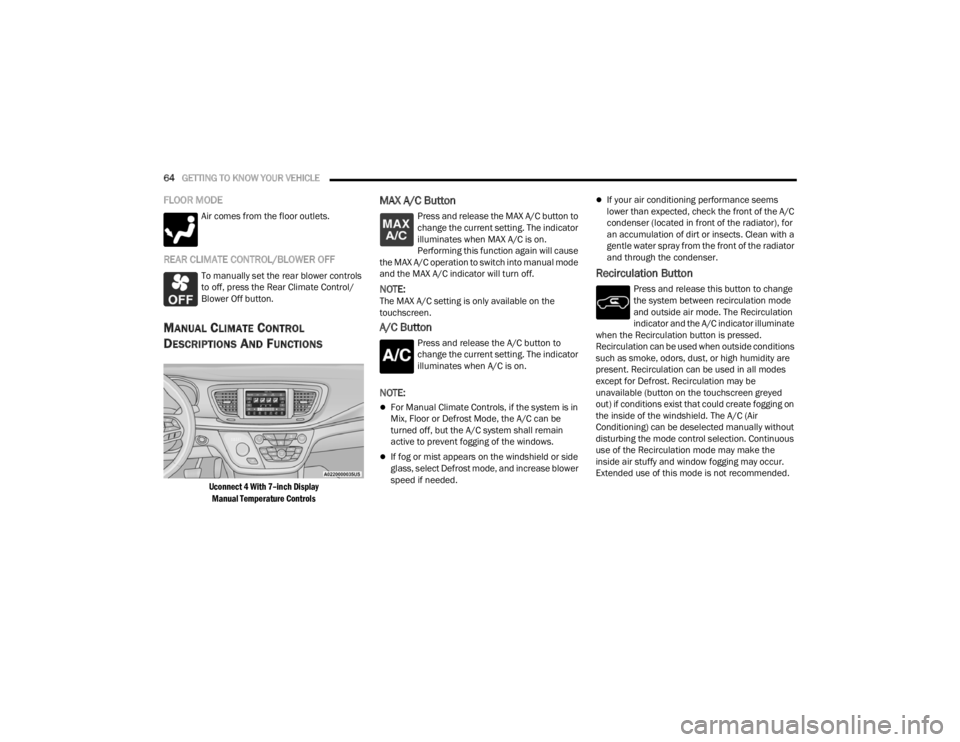
Uconnect 4 With 7–inch Display
Manual Temperature Controls
MAX A/C Button
Press and release the MAX A/C button to
change the current setting. The indicator
illuminates when MAX A/C is on.
Performing this function again will cause
the MAX A/C operation to switch into manual mode
and the MAX A/C indicator will turn off.
NOTE:The MAX A/C setting is only available on the
touchscreen.
A/C Button
Press and release the A/C button to
change the current setting. The indicator
illuminates when A/C is on.
NOTE:
For Manual Climate Controls, if the system is in
Mix, Floor or Defrost Mode, the A/C can be
turned off, but the A/C system shall remain
active to prevent fogging of the windows.
If fog or mist appears on the windshield or side
glass, select Defrost mode, and increase blower
speed if needed.
If your air conditioning performance seems
lower than expected, check the front of the A/C
condenser (located in front of the radiator), for
an accumulation of dirt or insects. Clean with a
gentle water spray from the front of the radiator
and through the condenser.
Recirculation Button
Press and release this button to change
the system between recirculation mode
and outside air mode. The Recirculation
indicator and the A/C indicator illuminate
when the Recirculation button is pressed.
Recirculation can be used when outside conditions
such as smoke, odors, dust, or high humidity are
present. Recirculation can be used in all modes
except for Defrost. Recirculation may be
unavailable (button on the touchscreen greyed
out) if conditions exist that could create fogging on
the inside of the windshield. The A/C (Air
Conditioning) can be deselected manually without
disturbing the mode control selection. Continuous
use of the Recirculation mode may make the
inside air stuffy and window fogging may occur.
Extended use of this mode is not recommended.
21_RUV_OM_EN_USC_t.book Page 64
Page 68 of 348

66GETTING TO KNOW YOUR VEHICLE
Blower Control
Blower Control is used to regulate the
amount of air forced through the Climate
Control system. There are seven blower
speeds available. The speeds can be
selected using either the blower control knob on
the faceplate or the buttons on the touchscreen.
Faceplate: The blower speed increases as you
turn the blower control knob clockwise from the
lowest blower setting. The blower speed
decreases as you turn the blower control knob
counterclockwise.
Touchscreen: Use the small blower icon to
reduce the blower setting and the large blower
icon to increase the blower setting. Blower
speed can also be selected by pressing the
blower bar area between the icons.
Mode Control
The airflow distribution mode can be
adjusted so air comes from the
instrument panel outlets, floor outlets,
defrost outlets and demist outlets.
Faceplate: Push the button in the center of the
knob to change the airflow distribution mode.
Touchscreen: Select Mode by pressing one of the
Mode Buttons on the touchscreen.
Panel Mode
Air comes from the outlets in the
instrument panel. Each of these outlets
can be individually adjusted to direct the
flow of air. The air vanes of the center
outlets and outboard outlets can be moved up and
down or side to side to regulate airflow direction.
There is a shut off wheel located below the air
vanes to shut off or adjust the amount of airflow
from these outlets.
Bi-Level Mode
Air comes from the instrument panel
outlets and floor outlets. A slight amount
of air is directed through the defrost and
side window demister outlets.
NOTE:Bi-Level mode is designed under comfort condi -
tions to provide cooler air out of the panel outlets
and warmer air from the floor outlets.
Floor Mode
Air comes from the floor outlets. A slight
amount of air is directed through the
defrost and side window demister
outlets.
Mix Mode
Air is directed through the floor, defrost,
and side window demister outlets. This
setting works best in cold or snowy
conditions that require extra heat to the
windshield. This setting is good for maintaining
comfort while reducing moisture on the
windshield.
Climate Control OFF Button
Press and release this button to turn the
Climate Control ON/OFF.
Controlling The Rear Climate Controls
From The Front MTC Display/Touchscreen
The Three-Zone Manual Temperature Control
(MTC) system allows for adjustment of the rear
climate controls from the front MTC display/
touchscreen.
21_RUV_OM_EN_USC_t.book Page 66