2021 CHEVROLET MALIBU tow
[x] Cancel search: towPage 106 of 351

Chevrolet Malibu Owner Manual (GMNA-Localizing-U.S./Canada-
14584249) - 2021 - CRC - 11/9/20
Lighting 105
To enable the IntelliBeam system, press
bon the turn signal lever when the
exterior lamp control is in the AUTO or
5
position.
Driving with IntelliBeam
The system only activates the high beams
when driving over 40 km/h (25 mph).
The blue high-beam on light appears on the
instrument cluster when the high beams
are on.
There is a sensor near the top center of the
windshield that automatically controls the
system. Keep this area of the windshield
clear of debris to allow for best system
performance.
The high-beam headlamps remain on, under
the automatic control, until one of the
following situations occurs:
.The system detects an approaching
vehicle's headlamps.
.The system detects a preceding vehicle's
taillamps.
.The outside light is bright enough that
high-beam headlamps are not required.
.The vehicle's speed drops below 20 km/h
(12 mph).
.The IntelliBeam system is disabled by the
button on the turn signal lever. If this
happens, press
bon the turn signal
lever when the exterior lamp control is in
the AUTO or
5position. The instrument
cluster light will come on to indicate the
IntelliBeam system is reactivated.
The high beams may not turn off
automatically if the system cannot detect
another vehicle's lamps because of any of
the following:
.The other vehicle's lamps are missing,
damaged, obstructed from view,
or otherwise undetected.
.The other vehicle's lamps are covered
with dirt, snow, and/or road spray.
.The other vehicle's lamps cannot be
detected due to dense exhaust, smoke,
fog, snow, road spray, mist, or other
airborne obstructions.
.The vehicle's windshield is dirty, cracked,
or obstructed by something that blocks
the view of the light sensor.
.The vehicle is loaded such that the front
end points upward, causing the light
sensor to aim high and not detect
headlamps and taillamps.
.Driving on winding or hilly roads. The IntelliBeam system may need to be
disabled if any of the above conditions exist.
Exterior Lamps Off Reminder
A warning chime sounds if the driver door is
opened while the ignition is off and the
exterior lamps are on.
Headlamp High/Low-Beam
Changer
3:
Push the turn signal lever away from
you and release, to turn the high beams on.
To return to low beams, push the lever
again or pull it toward you and release.
This indicator light turns on in the
instrument cluster when the high-beam
headlamps are on.
Flash-to-Pass
To flash the high beams, pull the turn signal
lever toward you, and release.
Page 113 of 351
Chevrolet Malibu Owner Manual (GMNA-Localizing-U.S./Canada-
14584249) - 2021 - CRC - 11/9/20
112 Infotainment System
.USB/Bluetooth: Press to seek to
the beginning of the current or
previous track. Press and hold to
quickly reverse through a track.
Release to return to playing speed.
SeeUSB Port 0120 or
Bluetooth Audio 0123.
3.O(Power)
.Press to turn the power on.
.Press and hold to turn the
power off.
.Press to mute/unmute the system
when on.
.When the power is on and the
system is not muted, a quick
status pane will display when
Ois
pressed. Pressing
Owill mute the
system and trigger this pane to
show a long press is required to
actually power down the system.
.Turn to decrease or increase the
volume.
4.6
.Radio: Press and release to go to
the next station or channel. Press
and hold to fast seek the next
strongest station or channel.
.USB/Bluetooth: Press to seek the
next track. Press and hold to fast
forward through a track. Release to
return to playing speed. See USB
Port 0120 or
Bluetooth Audio 0123.
5.SBACK
.PressSBACK to return to the
previous display in a menu.
Home Page
The Home Page is where vehicle application
icons are accessed. Some applications are
disabled when the vehicle is moving.
Swipe left or right across the display to
access the pages of icons.
Managing Home Page Icons 1. Touch and hold any of the Home Page icons to enter edit mode.
2. Continue holding the icon and drag it to the desired position.
3. Release your finger to drop the icon in the desired position.
4. To move an application to another page, drag the icon to the edge of the display
toward the desired page. 5. Continue dragging and dropping
application icons as desired.
Steering Wheel Controls
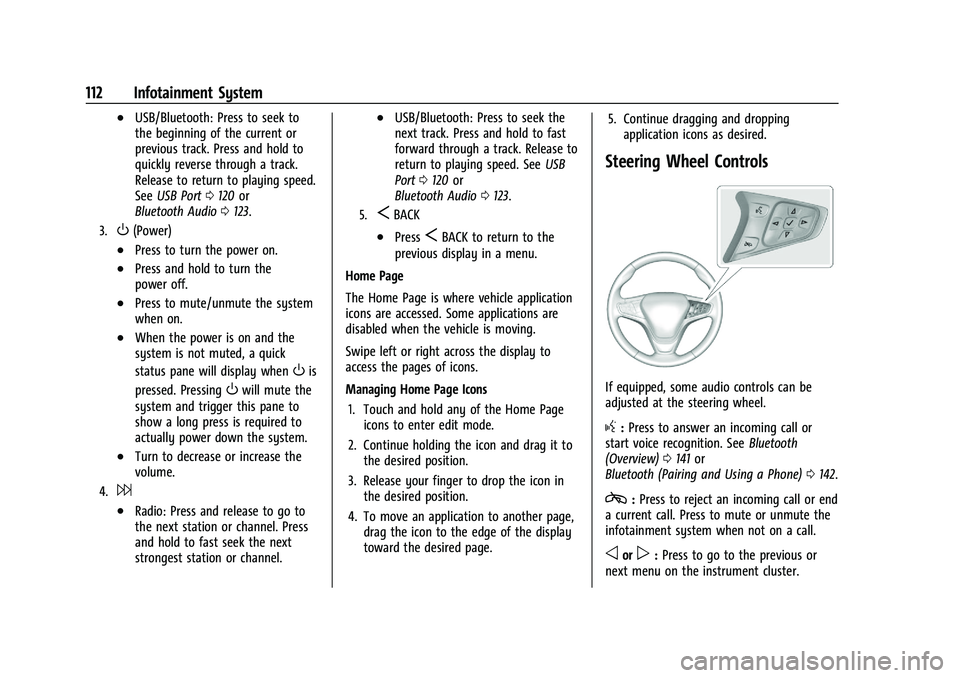
If equipped, some audio controls can be
adjusted at the steering wheel.
g:Press to answer an incoming call or
start voice recognition. See Bluetooth
(Overview) 0141 or
Bluetooth (Pairing and Using a Phone) 0142.
c:Press to reject an incoming call or end
a current call. Press to mute or unmute the
infotainment system when not on a call.
oorp: Press to go to the previous or
next menu on the instrument cluster.
Page 120 of 351
Chevrolet Malibu Owner Manual (GMNA-Localizing-U.S./Canada-
14584249) - 2021 - CRC - 11/9/20
Infotainment System 119
SiriusXM with 360L
SiriusXM with 360L interface has enhanced
in-vehicle listening experience for
subscribers. The experience now offers more
categories and system learned
recommendations toward discovering more
personalized content.
To use the full SiriusXM 360L program,
including streaming content and listening
recommendations, OnStar Connected Access
is required. Connected vehicle services vary
by model and require a complete working
electrical system, cell reception, and GPS
signal. An active connected plan is required.
Reference the SiriusXM user guide for use
and subscription information.
Radio Reception
Unplug electronic devices from the accessory
power outlets if there is interference or
static in the radio.
FM
FM signals only reach about 16 to 65 km (10
to 40 mi). Although the radio has a built-in
electronic circuit that automatically works toreduce interference, some static can occur,
especially around tall buildings or hills,
causing the sound to fade in and out.
AM
The range for most AM stations is greater
than for FM, especially at night. The longer
range can cause station frequencies to
interfere with each other. Static can also
occur when things like storms and power
lines interfere with radio reception. When
this happens, try reducing the treble on the
radio.
SiriusXM Satellite Radio Service
If equipped, SiriusXM Satellite Radio Service
provides digital radio reception. Tall
buildings or hills can interfere with satellite
radio signals, causing the sound to fade in
and out. In addition, traveling or standing
under heavy foliage, bridges, garages,
or tunnels may cause loss of the SiriusXM
signal for a period of time. Some cellular
services may interfere with SXM reception
causing loss of signal.
Mobile Device Usage
Mobile device usage, such as making or
receiving calls, charging, or just having the
mobile device on may cause static
interference in the radio. Unplug the mobile
device or turn it off if this happens.
Backglass Antenna
The AM-FM antenna is integrated with the
rear window defogger in the rear window.
Do not scratch the inside surface or damage
the lines in the glass. If the inside surface is
damaged, it could interfere with radio
reception. For proper radio reception, the
antenna connector needs to be properly
attached to the post on the glass.
Caution
Using a razor blade or sharp object to
clear the inside rear window can damage
the rear window antenna and/or the rear
window defogger. Repairs would not be
covered by the vehicle warranty. Do not
clear the inside rear window with sharp
objects.
Page 156 of 351
Chevrolet Malibu Owner Manual (GMNA-Localizing-U.S./Canada-
14584249) - 2021 - CRC - 11/9/20
Infotainment System 155
.The gap setting for the Forward Collision
Alert and Adaptive Cruise Control,
if equipped, cannot be changed.
.When trying to change a safety feature
that is not configurable in Teen Driver,
the DIC displays a message indicating
that Teen Driver is active and the action
is not available.
.Super Cruise, if equipped, is not available.
.Enhanced Low Fuel Warning (if equipped)
–When the vehicle is low on fuel, the
low fuel light on the instrument cluster
flashes and the DIC low fuel warning
cannot be dismissed.
.Do not tow a trailer.
Report Card
The vehicle owner must secure the driver’s
consent to record certain vehicle data when
the vehicle is driven with a registered Teen
Driver key. There is one Report Card per
vehicle. Data is only recorded when a
registered Teen Driver key is used to
operate the vehicle.
The Report Card data is collected from the
time Teen Driver is activated or the last
time the Report Card was reset. The
following items may be recorded:
.Distance Driven –the total distance
driven.
.Maximum Speed –the maximum vehicle
speed detected.
.Overspeed Warnings –the number of
times the speed warning setting was
exceeded.
.Wide Open Throttle –the number of
times the accelerator pedal was pressed
nearly all the way down.
.Forward Collision Alerts –the number of
times the driver was notified when
approaching a vehicle ahead too quickly
and at potential risk for a crash.
.Forward Automatic Braking, also called
Automatic Emergency Braking (if
equipped) –the number of times the
vehicle detected that a forward collision
was imminent and applied the brakes.
.Reverse Automatic Braking (if equipped) –
the number of times the vehicle detected
that a rearward collision was imminent
and applied the brakes.
.Traction Control –the number of times
the Traction Control System activated to
reduce wheel spin or loss of traction.
.Stability Control –the number of events
which required the use of electronic
stability control.
.Antilock Braking System Active –The
number of Antilock Brake System
activations.
.Tailgating Alerts –the number of times
the driver was alerted for following a
vehicle ahead too closely.
Report Card Data
Cumulative Data is saved for all trips until
the Report Card is reset or until the
maximum count is exceeded. If the
maximum count is exceeded for a Report
Card line item, that item will no longer be
updated in the Report Card until it is reset.
Each item will report a maximum of
1,000 counts. The distance driven will report
a maximum of 64,374 km (40,000 mi).
To delete Report Card data, do one of the
following:
.From the Report Card display, touch
Reset.
.Touch Clear All Teen Keys and PIN from
the Teen Driver menu. This will also
unregister any Teen Driver keys and
delete the PIN.
Forgotten PIN
See your dealer to reset the PIN.
Page 173 of 351
Chevrolet Malibu Owner Manual (GMNA-Localizing-U.S./Canada-
14584249) - 2021 - CRC - 11/9/20
172 Driving and Operating
Driving and Operating
Driving Information
Driving for Better Fuel Economy . . . . . . . 173
Distracted Driving . . . . . . . . . . . . . . . . . . . . . . 173
Defensive Driving . . . . . . . . . . . . . . . . . . . . . . 173
Impaired Driving . . . . . . . . . . . . . . . . . . . . . . . 174
Control of a Vehicle . . . . . . . . . . . . . . . . . . . 174
Braking . . . . . . . . . . . . . . . . . . . . . . . . . . . . . . . . 174
Steering . . . . . . . . . . . . . . . . . . . . . . . . . . . . . . . 174
Off-Road Recovery . . . . . . . . . . . . . . . . . . . . . 175
Loss of Control . . . . . . . . . . . . . . . . . . . . . . . . 176
Driving on Wet Roads . . . . . . . . . . . . . . . . . 176
Hill and Mountain Roads . . . . . . . . . . . . . . . 177
Winter Driving . . . . . . . . . . . . . . . . . . . . . . . . . 177
If the Vehicle Is Stuck . . . . . . . . . . . . . . . . . 178
Vehicle Load Limits . . . . . . . . . . . . . . . . . . . . 179
Starting and Operating
New Vehicle Break-In . . . . . . . . . . . . . . . . . . 182
Ignition Positions . . . . . . . . . . . . . . . . . . . . . . 182
Starting the Engine . . . . . . . . . . . . . . . . . . . . 183
Stop/Start System . . . . . . . . . . . . . . . . . . . . . 184
Engine Heater . . . . . . . . . . . . . . . . . . . . . . . . . 185
Retained Accessory Power (RAP) . . . . . . . 186
Shifting Into Park . . . . . . . . . . . . . . . . . . . . . . 186
Shifting out of Park . . . . . . . . . . . . . . . . . . . . 187
Parking over Things That Burn . . . . . . . . . 187
Extended Parking . . . . . . . . . . . . . . . . . . . . . . 187
Engine Exhaust
Engine Exhaust . . . . . . . . . . . . . . . . . . . . . . . . 188
Running the Vehicle While Parked . . . . . 188
Automatic Transmission
Automatic Transmission . . . . . . . . . . . . . . . 188
Manual Mode . . . . . . . . . . . . . . . . . . . . . . . . . 190
Brakes
Antilock Brake System (ABS) . . . . . . . . . . . 191
Parking Brake . . . . . . . . . . . . . . . . . . . . . . . . . . 191
Electric Parking Brake . . . . . . . . . . . . . . . . . . 192
Brake Assist . . . . . . . . . . . . . . . . . . . . . . . . . . . 193
Hill Start Assist (HSA) . . . . . . . . . . . . . . . . . . 193
Ride Control Systems
Traction Control/Electronic StabilityControl . . . . . . . . . . . . . . . . . . . . . . . . . . . . . . 193
Cruise Control
Cruise Control . . . . . . . . . . . . . . . . . . . . . . . . . 195
Adaptive Cruise Control (Advanced) . . . . 197
Driver Assistance Systems
Driver Assistance Systems . . . . . . . . . . . . . 204
Assistance Systems for Parking orBacking . . . . . . . . . . . . . . . . . . . . . . . . . . . . . . 205
Assistance Systems for Driving . . . . . . . . 209
Forward Collision Alert (FCA) System . . . . . . . . . . . . . . . . . . . . . . . . . . . . . . 209
Automatic Emergency Braking (AEB) . . . 211 Front Pedestrian Braking (FPB)
System . . . . . . . . . . . . . . . . . . . . . . . . . . . . . . . 212
Side Blind Zone Alert (SBZA) . . . . . . . . . . . 214
Lane Change Alert (LCA) . . . . . . . . . . . . . . . 214
Lane Keep Assist (LKA) . . . . . . . . . . . . . . . . . 216
Fuel
Top Tier Fuel . . . . . . . . . . . . . . . . . . . . . . . . . . . 217
Recommended Fuel (1.5L Engine) . . . . . . . 218
Recommended Fuel (2.0L Engine) . . . . . . 218
Prohibited Fuels . . . . . . . . . . . . . . . . . . . . . . . 218
Fuels in Foreign Countries . . . . . . . . . . . . . 218
Fuel Additives . . . . . . . . . . . . . . . . . . . . . . . . . 218
Filling the Tank . . . . . . . . . . . . . . . . . . . . . . . . 219
Filling a Portable Fuel Container . . . . . . . 220
Trailer Towing
General Towing Information . . . . . . . . . . . 220
Driving Characteristics and Towing Tips . . . . . . . . . . . . . . . . . . . . . . . . . . 221
Trailer Towing . . . . . . . . . . . . . . . . . . . . . . . . . 224
Towing Equipment . . . . . . . . . . . . . . . . . . . . 225
Conversions and Add-Ons
Add-On Electrical Equipment . . . . . . . . . . . 226
Page 180 of 351
Chevrolet Malibu Owner Manual (GMNA-Localizing-U.S./Canada-
14584249) - 2021 - CRC - 11/9/20
Driving and Operating 179
get the vehicle out after a few tries, it
might need to be towed out. If the vehicle
does need to be towed out, seeTowing the
Vehicle 0292.
Vehicle Load Limits
It is very important to know how much
weight the vehicle can carry. This
weight is called the vehicle capacity
weight and includes the weight of all
occupants, cargo, and all
nonfactory-installed options. Two labels
on the vehicle may show how much
weight it may properly carry: the Tire
and Loading Information label and the
Certification label.
{Warning
Do not load the vehicle any heavier
than the Gross Vehicle Weight Rating
(GVWR), or either the maximum
front or rear Gross Axle Weight
Rating (GAWR). This can cause
systems to break and change the
way the vehicle handles. This could
cause loss of control and a crash.
(Continued)
Warning (Continued)
Overloading can also reduce stopping
performance, damage the tires, and
shorten the life of the vehicle.
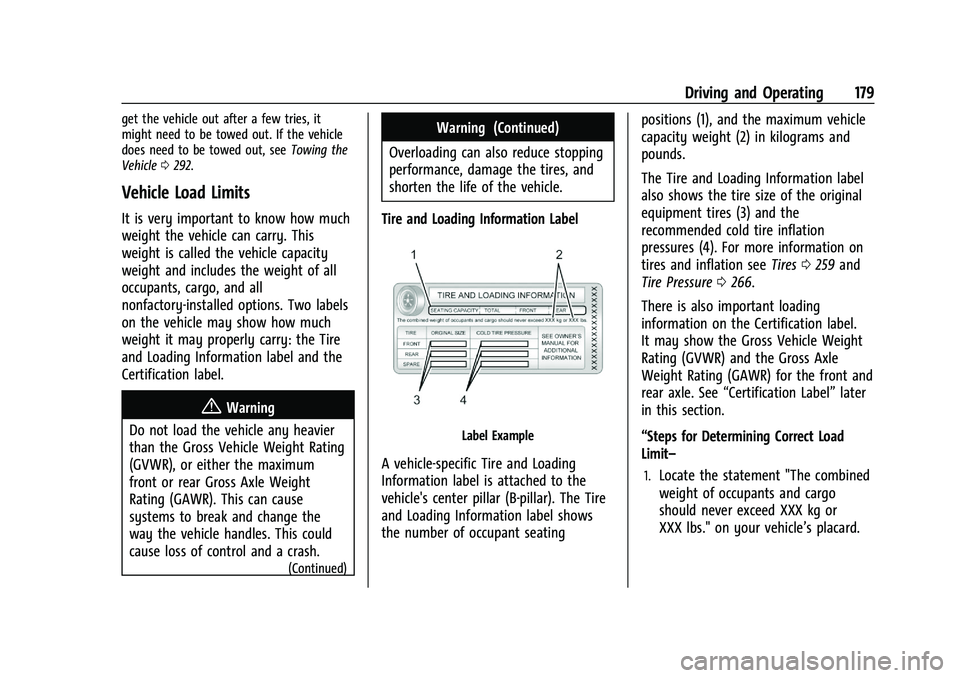
Tire and Loading Information Label
Label Example
A vehicle-specific Tire and Loading
Information label is attached to the
vehicle's center pillar (B-pillar). The Tire
and Loading Information label shows
the number of occupant seating positions (1), and the maximum vehicle
capacity weight (2) in kilograms and
pounds.
The Tire and Loading Information label
also shows the tire size of the original
equipment tires (3) and the
recommended cold tire inflation
pressures (4). For more information on
tires and inflation see
Tires0259 and
Tire Pressure 0266.
There is also important loading
information on the Certification label.
It may show the Gross Vehicle Weight
Rating (GVWR) and the Gross Axle
Weight Rating (GAWR) for the front and
rear axle. See “Certification Label” later
in this section.
“Steps for Determining Correct Load
Limit–1.Locate the statement "The combined
weight of occupants and cargo
should never exceed XXX kg or
XXX lbs." on your vehicle’s placard.
Page 181 of 351
Chevrolet Malibu Owner Manual (GMNA-Localizing-U.S./Canada-
14584249) - 2021 - CRC - 11/9/20
180 Driving and Operating
2.Determine the combined weight of
the driver and passengers that will
be riding in your vehicle.
3.Subtract the combined weight of the
driver and passengers from XXX kg
or XXX lbs.
4.The resulting figure equals the
available amount of cargo and
luggage load capacity. For example,
if the "XXX" amount equals 1400 lbs.
and there will be five 150 lb
passengers in your vehicle, the
amount of available cargo and
luggage load capacity is 650 lbs.
(1400-750 (5 x 150) = 650 lbs.)
5.Determine the combined weight of
luggage and cargo being loaded on
the vehicle. That weight may not
safely exceed the available cargo and
luggage load capacity calculated in
Step 4.
6.If your vehicle will be towing a
trailer, load from your trailer will be
transferred to your vehicle. Consult
this manual to determine how thisreduces the available cargo and
luggage load capacity of your
vehicle.”
See Trailer Towing 0224 for important
information on towing a trailer, towing
safety rules, and trailering tips.
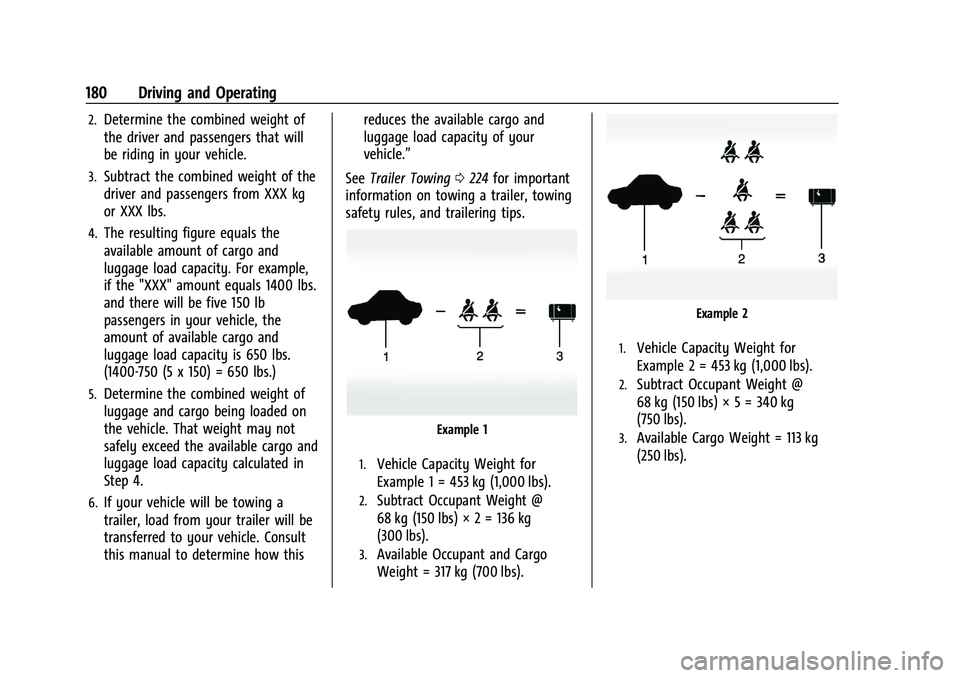
Example 1
1.Vehicle Capacity Weight for
Example 1 = 453 kg (1,000 lbs).
2.Subtract Occupant Weight @
68 kg (150 lbs) × 2 = 136 kg
(300 lbs).
3.Available Occupant and Cargo
Weight = 317 kg (700 lbs).
Example 2
1.Vehicle Capacity Weight for
Example 2 = 453 kg (1,000 lbs).
2.Subtract Occupant Weight @
68 kg (150 lbs) × 5 = 340 kg
(750 lbs).
3.Available Cargo Weight = 113 kg
(250 lbs).
Page 186 of 351
Chevrolet Malibu Owner Manual (GMNA-Localizing-U.S./Canada-
14584249) - 2021 - CRC - 11/9/20
Driving and Operating 185
.The vehicle battery has recently been
disconnected.
.Minimum vehicle speed has not been
reached since the last Auto Stop.
.The accelerator pedal is pressed.
.The engine or transmission is not at the
required operating temperature.
.The outside temperature is not in the
required operating range.
.The vehicle transmission is shifted out of
D (Drive) to any gear other than P (Park).
.Tow/Haul Mode or other driver modes
have been selected.
.The vehicle is on a steep hill or grade.
.The driver door has been opened or driver
seat belt has been unbuckled.
.The hood has been opened.
.The Auto Stop has reached the maximum
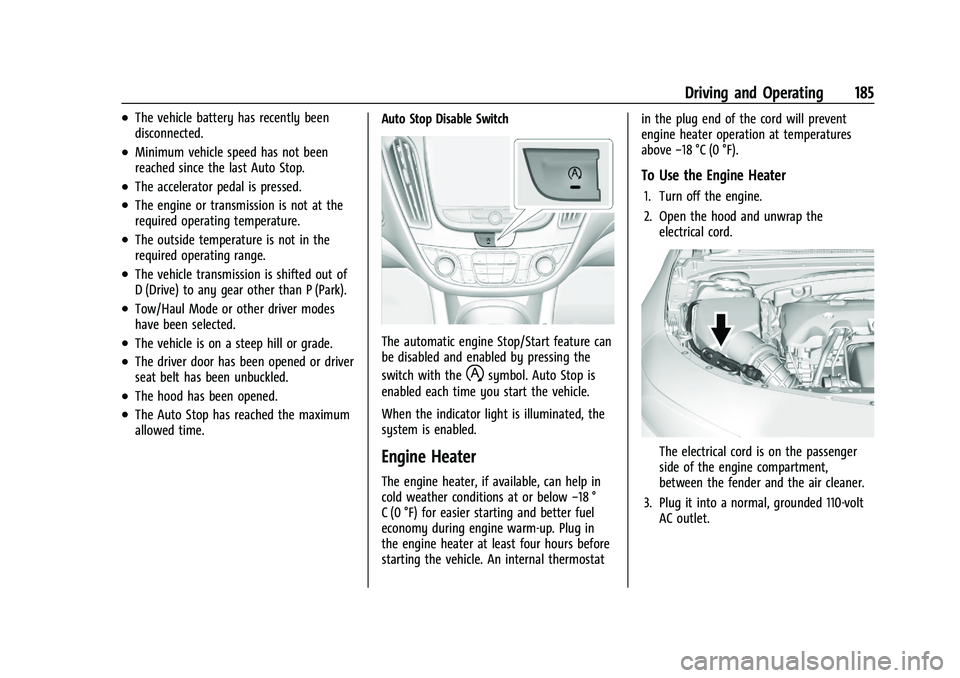
allowed time.Auto Stop Disable Switch
The automatic engine Stop/Start feature can
be disabled and enabled by pressing the
switch with the
hsymbol. Auto Stop is
enabled each time you start the vehicle.
When the indicator light is illuminated, the
system is enabled.
Engine Heater
The engine heater, if available, can help in
cold weather conditions at or below −18 °
C (0 °F) for easier starting and better fuel
economy during engine warm-up. Plug in
the engine heater at least four hours before
starting the vehicle. An internal thermostat in the plug end of the cord will prevent
engine heater operation at temperatures
above
−18 °C (0 °F).
To Use the Engine Heater
1. Turn off the engine.
2. Open the hood and unwrap the
electrical cord.
The electrical cord is on the passenger
side of the engine compartment,
between the fender and the air cleaner.
3. Plug it into a normal, grounded 110-volt AC outlet.