2021 CHEVROLET EQUINOX driver
[x] Cancel search: driverPage 51 of 369

Chevrolet Equinox Owner Manual (GMNA-Localizing-U.S./Canada/Mexico-
14420010) - 2021 - CRC - 11/10/20
50 Seats and Restraints
or rear impacts. A seat-mounted side impact
airbag is designed to inflate on the side of
the vehicle that is struck.
Roof-rail airbags are designed to inflate in
moderate to severe side crashes depending
on the location of the impact. In addition,
these roof-rail airbags are designed to inflate
during a rollover or in a severe frontal
impact. Roof-rail airbags are not designed to
inflate in rear impacts. Both roof-rail airbags
will inflate when either side of the vehicle is
struck or if the sensing system predicts that
the vehicle is about to roll over on its side,
or in a severe frontal impact.
In any particular crash, no one can say
whether an airbag should have inflated
simply because of the vehicle damage or
repair costs.
What Makes an Airbag Inflate?
In a deployment event, the sensing system
sends an electrical signal triggering a release
of gas from the inflator. Gas from the
inflator fills the airbag causing the bag to
break out of the cover. The inflator, the
airbag, and related hardware are all part of
the airbag module.
For airbag locations, seeWhere Are the
Airbags? 048.
How Does an Airbag Restrain?
In moderate to severe frontal or near frontal
collisions, even belted occupants can contact
the steering wheel or the instrument panel.
In moderate to severe side collisions, even
belted occupants can contact the inside of
the vehicle.
Airbags supplement the protection provided
by seat belts by distributing the force of the
impact more evenly over the
occupant's body.
Rollover capable roof-rail airbags are
designed to help contain the head and chest
of occupants in the outboard seating
positions in the first and second rows. The
rollover capable roof-rail airbags are
designed to help reduce the risk of full or
partial ejection in rollover events, although
no system can prevent all such ejections.
But airbags would not help in many types
of collisions, primarily because the
occupant's motion is not toward those
airbags. See When Should an Airbag Inflate?
0 49.
Airbags should never be regarded as
anything more than a supplement to seat
belts.
What Will You See after an
Airbag Inflates?
After frontal and seat-mounted side impact
airbags inflate, they quickly deflate, so
quickly that some people may not even
realize the airbags inflated. Roof-rail airbags
may still be at least partially inflated for
some time after they inflate. Some
components of the airbag module may be
hot for several minutes. For location of the
airbags, see Where Are the Airbags? 048.
The parts of the airbag that come into
contact with you may be warm, but not too
hot to touch. There may be some smoke
and dust coming from the vents in the
deflated airbags. Airbag inflation does not
prevent the driver from seeing out of the
windshield or being able to steer the
vehicle, nor does it prevent people from
leaving the vehicle.
{Warning
When an airbag inflates, there may be
dust in the air. This dust could cause
breathing problems for people with a
history of asthma or other breathing
trouble. To avoid this, everyone in the (Continued)
Page 79 of 369
Chevrolet Equinox Owner Manual (GMNA-Localizing-U.S./Canada/Mexico-
14420010) - 2021 - CRC - 11/12/20
78 Instruments and Controls
Instruments and Controls
Controls
Steering Wheel Adjustment . . . . . . . . . . . . 79
Steering Wheel Controls . . . . . . . . . . . . . . . . 79
Heated Steering Wheel . . . . . . . . . . . . . . . . . 79
Horn . . . . . . . . . . . . . . . . . . . . . . . . . . . . . . . . . . . 79
Windshield Wiper/Washer . . . . . . . . . . . . . . 79
Rear Window Wiper/Washer . . . . . . . . . . . 80
Compass . . . . . . . . . . . . . . . . . . . . . . . . . . . . . . . . 81
Clock . . . . . . . . . . . . . . . . . . . . . . . . . . . . . . . . . . . 81
Power Outlets . . . . . . . . . . . . . . . . . . . . . . . . . . 81
Wireless Charging . . . . . . . . . . . . . . . . . . . . . . 83
Warning Lights, Gauges, and Indicators
Warning Lights, Gauges, andIndicators . . . . . . . . . . . . . . . . . . . . . . . . . . . . . 85
Instrument Cluster (Base and Midlevel) . . . . . . . . . . . . . . . . . . . . . . . . . . . . . 85
Instrument Cluster (Uplevel) . . . . . . . . . . . . 88
Speedometer . . . . . . . . . . . . . . . . . . . . . . . . . . . 90
Odometer . . . . . . . . . . . . . . . . . . . . . . . . . . . . . . 90
Trip Odometer . . . . . . . . . . . . . . . . . . . . . . . . . 90
Tachometer . . . . . . . . . . . . . . . . . . . . . . . . . . . . 90
Fuel Gauge . . . . . . . . . . . . . . . . . . . . . . . . . . . . . 90
Engine Coolant Temperature Gauge . . . . 91 Seat Belt Reminders . . . . . . . . . . . . . . . . . . . . 92
Airbag Readiness Light . . . . . . . . . . . . . . . . . 92
Passenger Airbag Status Indicator . . . . . . 93
Charging System Light . . . . . . . . . . . . . . . . . 93
Malfunction Indicator Lamp (Check
Engine Light) . . . . . . . . . . . . . . . . . . . . . . . . . 94
Brake System Warning Light . . . . . . . . . . . 95
Electric Parking Brake Light . . . . . . . . . . . . . 96
Service Electric Parking Brake Light . . . . . 96
Antilock Brake System (ABS) Warning Light . . . . . . . . . . . . . . . . . . . . . . . . . . . . . . . . . 96
Tow/Haul Mode Light . . . . . . . . . . . . . . . . . . 96
Lane Keep Assist (LKA) Light . . . . . . . . . . . . 97
Vehicle Ahead Indicator . . . . . . . . . . . . . . . . 97
Pedestrian Ahead Indicator . . . . . . . . . . . . . 97
Traction Off Light . . . . . . . . . . . . . . . . . . . . . . 97
StabiliTrak OFF Light . . . . . . . . . . . . . . . . . . . 98
Traction Control System (TCS)/StabiliTrak Light . . . . . . . . . . . . . . . . . . . . . . . . . . . . . . . . . 98
Tire Pressure Light . . . . . . . . . . . . . . . . . . . . . 98
Engine Oil Pressure Light . . . . . . . . . . . . . . . 99
Low Fuel Warning Light . . . . . . . . . . . . . . . . 99
Security Light . . . . . . . . . . . . . . . . . . . . . . . . . . 99
High-Beam On Light . . . . . . . . . . . . . . . . . . . 100
Front Fog Lamp Light . . . . . . . . . . . . . . . . . 100
Lamps On Reminder . . . . . . . . . . . . . . . . . . . 100
Cruise Control Light . . . . . . . . . . . . . . . . . . . 100
Information Displays
Driver Information Center (DIC) (Base and Midlevel) . . . . . . . . . . . . . . . . . . . . . . . . 101
Driver Information Center (DIC) (Uplevel) . . . . . . . . . . . . . . . . . . . . . . . . . . . . . 105
Vehicle Messages
Vehicle Messages . . . . . . . . . . . . . . . . . . . . . . 108
Engine Power Messages . . . . . . . . . . . . . . . 108
Vehicle Speed Messages . . . . . . . . . . . . . . . 108
Vehicle Personalization
Vehicle Personalization . . . . . . . . . . . . . . . . 108
Universal Remote System
Universal Remote System . . . . . . . . . . . . . . 113
Universal Remote SystemProgramming . . . . . . . . . . . . . . . . . . . . . . . . . 113
Universal Remote System Operation . . . 115
Page 81 of 369

Chevrolet Equinox Owner Manual (GMNA-Localizing-U.S./Canada/Mexico-
14420010) - 2021 - CRC - 11/12/20
80 Instruments and Controls
INT :Move the lever up to INT for
intermittent wipes, then turn the band up
for more frequent wipes or down for less
frequent wipes.
OFF : Use to turn the wipers off.
1X : For a single wipe, briefly move the
lever down. For several wipes, hold the
lever down.
{Warning
In freezing weather, do not use the
washer until the windshield is warmed.
Otherwise the washer fluid can form ice
on the windshield, blocking your vision.
{Warning
Before driving the vehicle, always clear
snow and ice from the hood, windshield,
roof, and rear of the vehicle, including all
lamps and windows. Reduced visibility
from snow and ice buildup could lead to
a crash.
Clear snow and ice from the wiper blades
and windshield before using them. If frozen
to the windshield, carefully loosen or thaw
them. Damaged blades should be replaced.
See Wiper Blade Replacement 0267.
Heavy snow or ice can overload the wiper
motor. If the wiper motor overheats, the
windshield wipers will stop until the motor
cools and the wiper control is turned off.
See Electrical System Overload 0272.
Wiper Parking
If the ignition is turned off while the wipers
are on LO, HI, or INT, they will
immediately stop.
If the windshield wiper lever is then moved
to OFF before the driver door is opened or
within 10 minutes, the wipers will restart
and move to the base of the windshield. If the ignition is turned off while the wipers
are performing wipes due to windshield
washing, the wipers continue to run until
they reach the base of the windshield.
Windshield Washer
f:
Pull the windshield wiper lever
toward you to spray windshield washer fluid
and activate the wipers. The wipers will
continue until the lever is released or the
maximum wash time is reached. When the
lever is released, additional wipes may occur
depending on how long the windshield
washer had been activated. See Washer
Fluid 0263 for information on filling the
windshield washer fluid reservoir.
Rear Window Wiper/Washer
The ignition must be on or in the ACC/
ACCESSORY position to operate the rear
window wiper/washer.
Page 82 of 369
Chevrolet Equinox Owner Manual (GMNA-Localizing-U.S./Canada/Mexico-
14420010) - 2021 - CRC - 11/12/20
Instruments and Controls 81
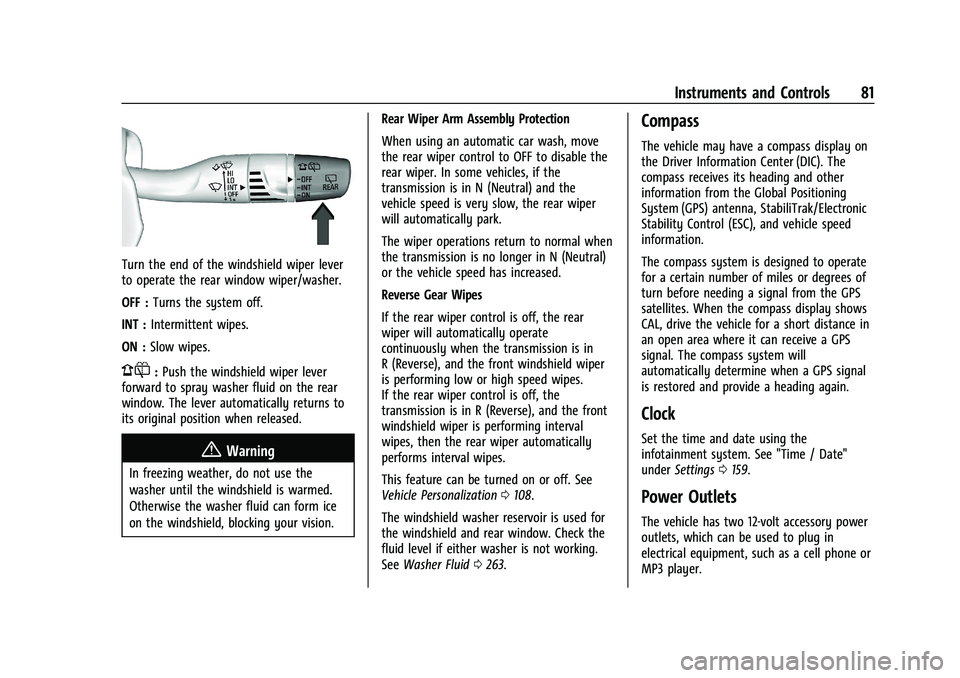
Turn the end of the windshield wiper lever
to operate the rear window wiper/washer.
OFF :Turns the system off.
INT : Intermittent wipes.
ON : Slow wipes.
1:Push the windshield wiper lever
forward to spray washer fluid on the rear
window. The lever automatically returns to
its original position when released.
{Warning
In freezing weather, do not use the
washer until the windshield is warmed.
Otherwise the washer fluid can form ice
on the windshield, blocking your vision. Rear Wiper Arm Assembly Protection
When using an automatic car wash, move
the rear wiper control to OFF to disable the
rear wiper. In some vehicles, if the
transmission is in N (Neutral) and the
vehicle speed is very slow, the rear wiper
will automatically park.
The wiper operations return to normal when
the transmission is no longer in N (Neutral)
or the vehicle speed has increased.
Reverse Gear Wipes
If the rear wiper control is off, the rear
wiper will automatically operate
continuously when the transmission is in
R (Reverse), and the front windshield wiper
is performing low or high speed wipes.
If the rear wiper control is off, the
transmission is in R (Reverse), and the front
windshield wiper is performing interval
wipes, then the rear wiper automatically
performs interval wipes.
This feature can be turned on or off. See
Vehicle Personalization
0108.
The windshield washer reservoir is used for
the windshield and rear window. Check the
fluid level if either washer is not working.
See Washer Fluid 0263.
Compass
The vehicle may have a compass display on
the Driver Information Center (DIC). The
compass receives its heading and other
information from the Global Positioning
System (GPS) antenna, StabiliTrak/Electronic
Stability Control (ESC), and vehicle speed
information.
The compass system is designed to operate
for a certain number of miles or degrees of
turn before needing a signal from the GPS
satellites. When the compass display shows
CAL, drive the vehicle for a short distance in
an open area where it can receive a GPS
signal. The compass system will
automatically determine when a GPS signal
is restored and provide a heading again.
Clock
Set the time and date using the
infotainment system. See "Time / Date"
under Settings 0159.
Power Outlets
The vehicle has two 12-volt accessory power
outlets, which can be used to plug in
electrical equipment, such as a cell phone or
MP3 player.
Page 86 of 369
Chevrolet Equinox Owner Manual (GMNA-Localizing-U.S./Canada/Mexico-
14420010) - 2021 - CRC - 11/12/20
Instruments and Controls 85
OR BUSINESS INTERRUPTION) HOWEVER
CAUSED AND ON ANY THEORY OF LIABILITY,
WHETHER IN CONTRACT, STRICT LIABILITY, OR
TORT (INCLUDING NEGLIGENCE OR
OTHERWISE) ARISING IN ANY WAY OUT OF
THE USE OF THIS SOFTWARE, EVEN IF
ADVISED OF THE POSSIBILITY OF SUCH
DAMAGE.
Warning Lights, Gauges, and
Indicators
Warning lights and gauges can signal that
something is wrong before it becomes
serious enough to cause an expensive repair
or replacement. Paying attention to the
warning lights and gauges could prevent
injury.
Some warning lights come on briefly when
the engine is started to indicate they are
working. When one of the warning lights
comes on and stays on while driving,
or when one of the gauges shows there
may be a problem, check the section that
explains what to do. Waiting to do repairs
can be costly and even dangerous.
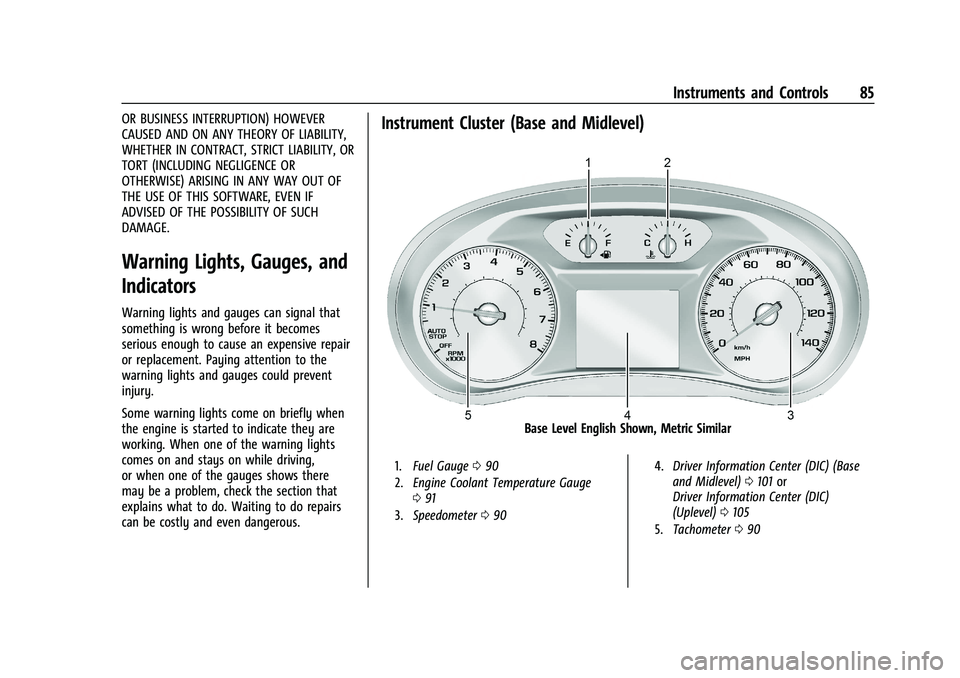
Instrument Cluster (Base and Midlevel)
Base Level English Shown, Metric Similar
1.Fuel Gauge 090
2. Engine Coolant Temperature Gauge
091
3. Speedometer 090 4.
Driver Information Center (DIC) (Base
and Midlevel) 0101 or
Driver Information Center (DIC)
(Uplevel) 0105
5. Tachometer 090
Page 87 of 369
Chevrolet Equinox Owner Manual (GMNA-Localizing-U.S./Canada/Mexico-
14420010) - 2021 - CRC - 11/12/20
86 Instruments and Controls
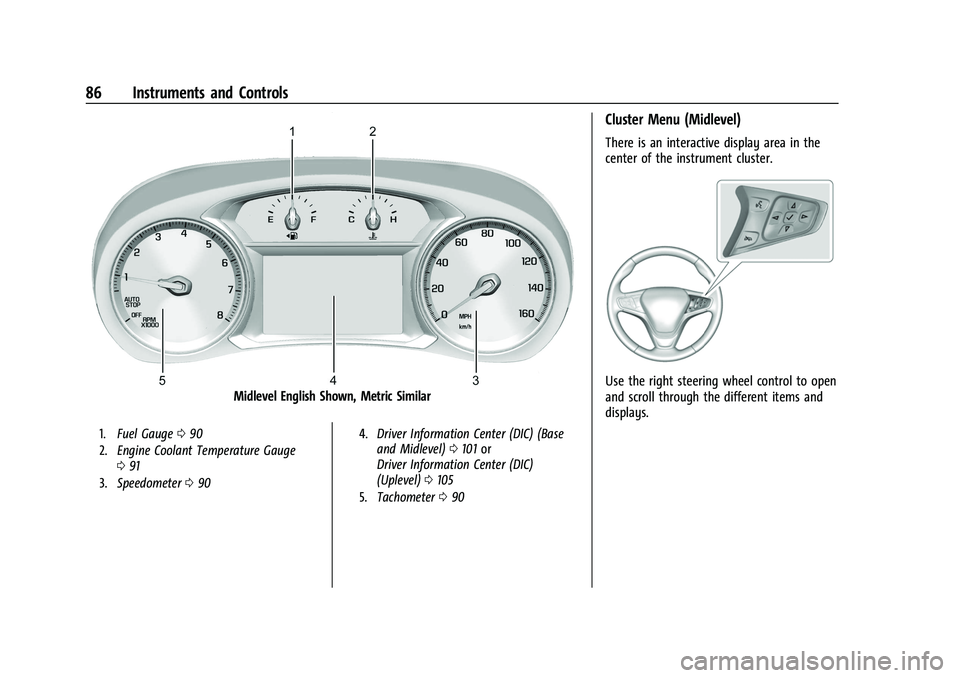
Midlevel English Shown, Metric Similar
1.Fuel Gauge 090
2. Engine Coolant Temperature Gauge
091
3. Speedometer 090 4.
Driver Information Center (DIC) (Base
and Midlevel) 0101 or
Driver Information Center (DIC)
(Uplevel) 0105
5. Tachometer 090
Cluster Menu (Midlevel)
There is an interactive display area in the
center of the instrument cluster.
Use the right steering wheel control to open
and scroll through the different items and
displays.
Page 88 of 369
Chevrolet Equinox Owner Manual (GMNA-Localizing-U.S./Canada/Mexico-
14420010) - 2021 - CRC - 11/12/20
Instruments and Controls 87
Pressoto access the cluster applications.
Use
worxto scroll through the list of
available applications. Not all applications
will be available on all vehicles.
.Info App. This is where the selected Driver
Information Center (DIC) displays can be
viewed. See Driver Information Center
(DIC) (Base and Midlevel) 0101 or
Driver Information Center (DIC) (Uplevel)
0 105.
.Options
Options
Press
Vto select the Options app, then
press
pto enter the Options menu. Usew
orxto scroll through items in the
Options menu. Units :
Press
pwhile Units is displayed to
enter the Units menu. Choose English or
Metric units by pressing
Vwhile the
desired item is highlighted. A checkmark will
be displayed next to the selected item.
Info Pages : Press
pwhile Info Pages is
displayed to enter the Info Pages menu and
select the items to be displayed in the Info
app. See Driver Information Center (DIC)
(Base and Midlevel) 0101 or
Driver Information Center (DIC) (Uplevel)
0 105. Speed Warning :
The Speed Warning display
allows the driver to set a speed that they
do not want to exceed. To set the Speed
Warning press
Vwhen Speed Warning is
displayed. Press
worxto adjust the
value. Press
Vto set the speed.
Once the speed is set, this feature can be
turned off by pressing
Vwhile viewing this
page. If the selected speed limit is exceeded,
a pop-up warning is displayed with a chime.
Traction and Stability : Press
pto enter the
Traction and Stability menu. To turn the
Traction Control System (TCS) on or off,
choose Traction. To turn StabiliTrak/
Electronic Stability Control (ESC) on or off,
choose Stability. See Traction Control/
Electronic Stability Control 0211.
Page 89 of 369
Chevrolet Equinox Owner Manual (GMNA-Localizing-U.S./Canada/Mexico-
14420010) - 2021 - CRC - 11/12/20
88 Instruments and Controls
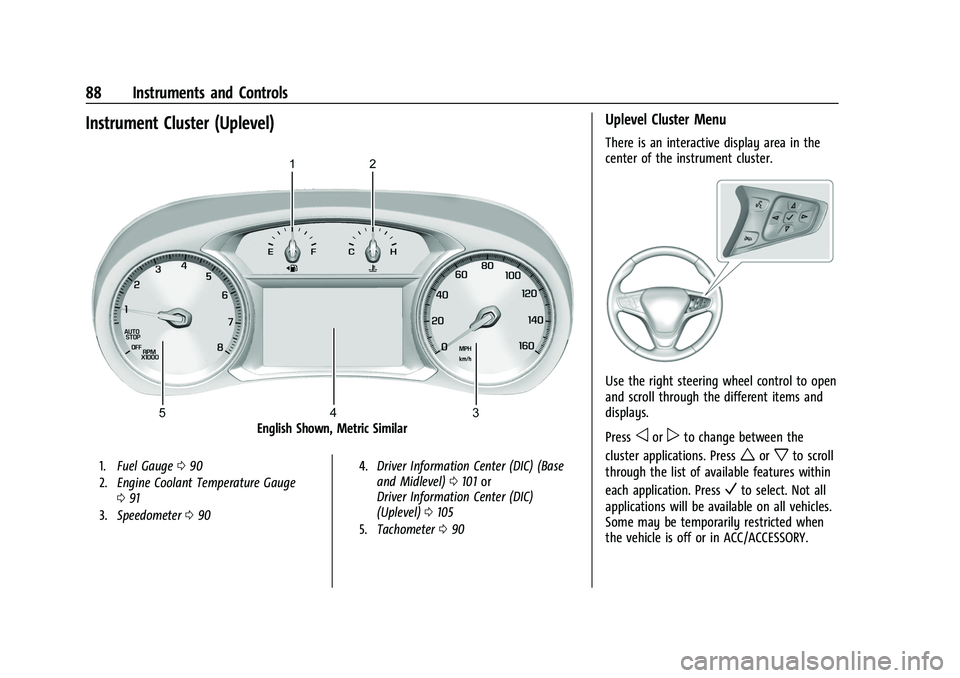
Instrument Cluster (Uplevel)
English Shown, Metric Similar
1.Fuel Gauge 090
2. Engine Coolant Temperature Gauge
091
3. Speedometer 090 4.
Driver Information Center (DIC) (Base
and Midlevel) 0101 or
Driver Information Center (DIC)
(Uplevel) 0105
5. Tachometer 090
Uplevel Cluster Menu
There is an interactive display area in the
center of the instrument cluster.
Use the right steering wheel control to open
and scroll through the different items and
displays.
Press
oorpto change between the
cluster applications. Press
worxto scroll
through the list of available features within
each application. Press
Vto select. Not all
applications will be available on all vehicles.
Some may be temporarily restricted when
the vehicle is off or in ACC/ACCESSORY.