2021 CHEVROLET EQUINOX camera
[x] Cancel search: cameraPage 238 of 369

Chevrolet Equinox Owner Manual (GMNA-Localizing-U.S./Canada/Mexico-
14420010) - 2021 - CRC - 11/12/20
Driving and Operating 237
side of the vehicle do not move further back
when a trailer is towed. Use caution while
changing lanes when towing a trailer. LCA
may alert to objects attached to the vehicle,
such as a trailer, bicycle, or object extending
out to either side of the vehicle. Attached
objects may also interfere with the
detection of vehicles. This is normal system
operation; the vehicle does not need service.
LCA may not always alert the driver to
vehicles in the next lane over, especially in
wet conditions or when driving on sharp
curves. The system does not need to be
serviced. The system may light up due to
guardrails, signs, trees, shrubs, and other
non-moving objects. This is normal system
operation; the vehicle does not need service.
LCA may not operate when the LCA sensors
in the left or right corners of the rear
bumper are covered with mud, dirt, snow,
ice, or slush, or in heavy rainstorms. For
cleaning instructions, see "Washing the
Vehicle" underExterior Care0314. If the DIC
still displays the system unavailable
message after cleaning both sides of the
vehicle toward the rear corners of the
vehicle, see your dealer. If the LCA displays do not light up when
moving vehicles are in the side blind zone or
are rapidly approaching this zone and the
system is clean, the system may need
service. Take the vehicle to your dealer.
Radio Frequency Information
See
Radio Frequency Statement 0346.
Lane Keep Assist (LKA)
If equipped, LKA may help avoid crashes due
to unintentional lane departures. This
system uses a camera to detect lane
markings between 60 km/h (37 mph) and
180 km/h (112 mph). It may assist by gently
turning the steering wheel if the vehicle
approaches a detected lane marking. It may
also provide a Lane Departure Warning
(LDW) alert if the vehicle crosses a detected
lane marking. LKA can be overriden by
turning the steering wheel. This system is
not intended to keep the vehicle centered in
the lane. LKA will not assist and alert if the
turn signal is active in the direction of lane
departure, or if it detects that you are
accelerating, braking or actively steering.
{Warning
The LKA system does not continuously
steer the vehicle. It may not keep the
vehicle in the lane or give a Lane
Departure Warning (LDW) alert, even if a
lane marking is detected.
The LKA and LDW systems may not:
.Provide an alert or enough steering
assist to avoid a lane departure or
crash.
.Detect lane markings under poor
weather or visibility conditions. This
can occur if the windshield or
headlamps are blocked by dirt, snow,
or ice; if they are not in proper
condition; or if the sun shines directly
into the camera.
.Detect road edges.
.Detect lanes on winding or hilly roads.
If LKA only detects lane markings on one
side of the road, it will only assist or
provide an LDW alert when approaching
the lane on the side where it has
detected a lane marking. Even with LKA
and LDW, you must steer the vehicle. (Continued)
Page 239 of 369

Chevrolet Equinox Owner Manual (GMNA-Localizing-U.S./Canada/Mexico-
14420010) - 2021 - CRC - 11/12/20
238 Driving and Operating
Warning (Continued)
Always keep your attention on the road
and maintain proper vehicle position
within the lane, or vehicle damage,
injury, or death could occur. Always keep
the windshield, headlamps, and camera
sensors clean and in good repair. Do not
use LKA in bad weather conditions or on
roads with unclear lane markings, such as
construction zones.
{Warning
Using LKA while towing a trailer or on
slippery roads could cause loss of control
of the vehicle and a crash. Turn the
system off.
How the System Works
LKA uses a camera sensor installed on the
windshield ahead of the rearview mirror to
detect lane markings. It may provide brief
steering assist if it detects an unintended
lane departure. It may further provide an
audible alert or the driver seat may pulse
indicating that a lane marking has been
crossed.To turn LKA on and off, press
Aon the
steering wheel. If equipped, the indicator
light on the button comes on when LKA is
on and turns off when LKA is disabled.
When on,
Ais white, if equipped,
indicating that the system is not ready to
assist.
Ais green if LKA is ready to
assist. LKA may assist by gently turning the
steering wheel if the vehicle approaches a
detected lane marking.
Ais amber when
assisting. It may also provide a Lane
Departure Warning (LDW) alert by flashing
Aamber if the vehicle crosses a
detected lane marking. Additionally, there
may be three beeps, or the driver seat may
pulse three times, on the right or left,
depending on the lane departure direction.
Take Steering
The LKA system does not continuously steer
the vehicle. If LKA does not detect active
driver steering, an alert and chime may be
provided. Steer the vehicle to dismiss. LKA
may become temporarily unavailable after
repeated take steering alerts.
When the System Does Not Seem to
Work Properly
The system performance may be
affected by:
.Close vehicles ahead.
.Sudden lighting changes, such as when
driving through tunnels.
.Banked roads.
.Roads with poor lane markings, such as
two-lane roads.
If the LKA system is not functioning
properly when lane markings are clearly
visible, cleaning the windshield may help.
A camera blocked message may display if
the camera is blocked. Some driver
assistance systems may have reduced
performance or not work at all. An LKA or
LDW unavailable message may display if the
systems are temporarily unavailable. This
message could be due to a blocked camera.
The LKA system does not need service. Clean
the outside of the windshield behind the
rearview mirror.
LKA assistance and/or LDW alerts may occur
due to tar marks, shadows, cracks in the
road, temporary or construction lane
markings, or other road imperfections. This
Page 269 of 369
Chevrolet Equinox Owner Manual (GMNA-Localizing-U.S./Canada/Mexico-
14420010) - 2021 - CRC - 11/10/20
268 Vehicle Care
Front Wiper Blade Replacement
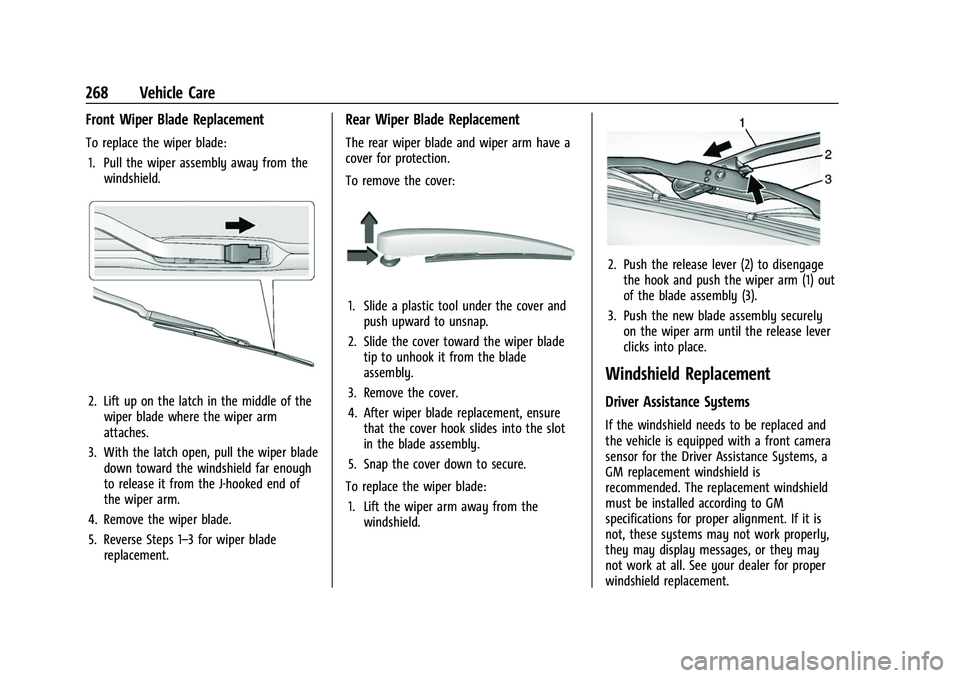
To replace the wiper blade:1. Pull the wiper assembly away from the windshield.
2. Lift up on the latch in the middle of thewiper blade where the wiper arm
attaches.
3. With the latch open, pull the wiper blade down toward the windshield far enough
to release it from the J-hooked end of
the wiper arm.
4. Remove the wiper blade.
5. Reverse Steps 1–3 for wiper blade replacement.
Rear Wiper Blade Replacement
The rear wiper blade and wiper arm have a
cover for protection.
To remove the cover:
1. Slide a plastic tool under the cover andpush upward to unsnap.
2. Slide the cover toward the wiper blade tip to unhook it from the blade
assembly.
3. Remove the cover.
4. After wiper blade replacement, ensure that the cover hook slides into the slot
in the blade assembly.
5. Snap the cover down to secure.
To replace the wiper blade: 1. Lift the wiper arm away from the windshield.
2. Push the release lever (2) to disengagethe hook and push the wiper arm (1) out
of the blade assembly (3).
3. Push the new blade assembly securely on the wiper arm until the release lever
clicks into place.
Windshield Replacement
Driver Assistance Systems
If the windshield needs to be replaced and
the vehicle is equipped with a front camera
sensor for the Driver Assistance Systems, a
GM replacement windshield is
recommended. The replacement windshield
must be installed according to GM
specifications for proper alignment. If it is
not, these systems may not work properly,
they may display messages, or they may
not work at all. See your dealer for proper
windshield replacement.
Page 278 of 369

Chevrolet Equinox Owner Manual (GMNA-Localizing-U.S./Canada/Mexico-
14420010) - 2021 - CRC - 11/10/20
Vehicle Care 277
FusesUsage
F03 Trailer brake
F04 Heating, ventilation, and air conditioning blower
F05 Body control module 2
F06 Central gateway module F07 –
F08 Body control module 3
F09 Amplifier F10 –
F11 –
F12 –
F13 –
F14 –
F15 Transmission control module
F16 Front heated seats F17 Left data link connector
F18 Body control module 7
F19 Exterior mirror
F20 Body control module 1 Fuses
Usage
F21 Body control module 4
F22 Body control module 6
F23 Electric steering column lock
F24 Sensing and diagnostic module
F25 Occupancy sensor
F26 –
F27 Power seats
F28 Rear windows
F29 –
F30 –
F31 Steering wheel controls
F32 Body control module 8
F33 Heating, ventilation, and air conditioning
F34 Passive entry, passive start
F35 Liftgate latch
F36 Wireless charger module/ USB accessory Fuses
Usage
F37 Cigarette lighter
F38 OnStar
F39 Instrument panel USB
F40 Camera module/Liftgate module
F41 Park assist module/Center stack display/Heating,
ventilation and air
conditioner display/
Universal garage door
opener/Overhead control
switchbank
F42 Radio
Relays Usage
K01 –
K02 Retained accessory power
K03 Liftgate
K04 –
K05 Logistics
Page 365 of 369
Chevrolet Equinox Owner Manual (GMNA-Localizing-U.S./Canada/Mexico-
14420010) - 2021 - CRC - 11/10/20
364 Index
Passenger Sensing System . . . . . . . . . . . . . . . . . 51
Pedestrian Ahead Indicator . . . . . . . . . . . . . . . 97
Perchlorate Materials Requirements,California . . . . . . . . . . . . . . . . . . . . . . . . . . . . . . . 251
Personalization Vehicle . . . . . . . . . . . . . . . . . . . . . . . . . . . . . . . . 108
Phone
Apple CarPlay and Android Auto . . . . . . . 158
Bluetooth . . . . . . . . . . . . . . . . . . . . . . . . . . 154, 155
Port USB . . . . . . . . . . . . . . . . . . . . . . . . . . . . . . . . . . . . 132
Positioning Vehicle . . . . . . . . . . . . . . . . . . . . . . . . . . . . . . . . 148
Power Door Locks . . . . . . . . . . . . . . . . . . . . . . . . . . . . . . 16
Mirrors . . . . . . . . . . . . . . . . . . . . . . . . . . . . . . . . . 24
Outlets . . . . . . . . . . . . . . . . . . . . . . . . . . . . . . . . . 81
Protection, Battery . . . . . . . . . . . . . . . . . . . . . 122
Retained Accessory (RAP) . . . . . . . . . . . . . . 204
Seat Adjustment . . . . . . . . . . . . . . . . . . . . . . . . . 31
Windows . . . . . . . . . . . . . . . . . . . . . . . . . . . . . . . 26
Pregnancy, Using Seat Belts . . . . . . . . . . . . . . 45
Privacy Vehicle Data Recording . . . . . . . . . . . . . . . . 347
Problems with Route Guidance . . . . . . . . . . 148
Program
Courtesy Transportation . . . . . . . . . . . . . . . 343
Prohibited Fuels . . . . . . . . . . . . . . . . . . . . . . . . . 239 Proposition 65 Warning,
California . . . . . . . . . . . . . . . . . . . . 251, 266, 308,
Back Cover
Publication Ordering Information . . . . . . . . 345
R
Radio HD Radio Technology . . . . . . . . . . . . . . . . . . 130
Radio Data System (RDS) . . . . . . . . . . . . . . . . . 131
Radio Frequency Statement . . . . . . . . . . . . . . 346
Radio Reception . . . . . . . . . . . . . . . . . . . . . . . . . . 132
Radios AM-FM Radio . . . . . . . . . . . . . . . . . . . . . . . . . . 129
Satellite . . . . . . . . . . . . . . . . . . . . . . . . . . . . . . . . . 131
Reading Lamps . . . . . . . . . . . . . . . . . . . . . . . . . . 120
Rear Compartment/Storage Panel Cover . . . . . . . . . . . . . . . . . . . . . . . . . . . . . . . . . . . .75
Rear Seats . . . . . . . . . . . . . . . . . . . . . . . . . . . . . . . . 36 Heated . . . . . . . . . . . . . . . . . . . . . . . . . . . . . . . . . 38
Rear Vision Camera (RVC) . . . . . . . . . . . . . . . . 227
Rear Window Washer/Wiper . . . . . . . . . . . . . 80
Rearview Mirrors . . . . . . . . . . . . . . . . . . . . . . . . . .25 Automatic Dimming . . . . . . . . . . . . . . . . . . . . 25
Reclining Seatbacks . . . . . . . . . . . . . . . . . . . . . . . .32
Recognition Voice . . . . . . . . . . . . . . . . . . . . . . . . . . . . . . . . . . 149
Recommended Fuel . . . . . . . . . . . . . . . . . . . . . . . . . . . . . . . . . . . . 239 Recommended Fluids and Lubricants . . . . . . 331
Records
Maintenance . . . . . . . . . . . . . . . . . . . . . . . . . . . 333
Recreational Vehicle Towing . . . . . . . . . . . . . . 312
Reimbursement Program, GM Mobility . . . . . . . . . . . . . . . . . . . . . . . . . . . . . . . .341
Remote Keyless Entry (RKE) System . . . . . . . .7
Remote Vehicle Start . . . . . . . . . . . . . . . . . . . . . . 13
Replacement Parts
Airbags . . . . . . . . . . . . . . . . . . . . . . . . . . . . . . . . . 56
Maintenance . . . . . . . . . . . . . . . . . . . . . . . . . . . 332
Replacing Airbag System . . . . . . . . . . . . . . . . . . 56
Replacing LATCH System Parts after a Crash . . . . . . . . . . . . . . . . . . . . . . . . . . . . . . . . . . . 68
Replacing Seat Belt System Parts after a Crash . . . . . . . . . . . . . . . . . . . . . . . . . . . . . . . . . 46
Reporting Safety Defects Canadian Government . . . . . . . . . . . . . . . . . 346
General Motors . . . . . . . . . . . . . . . . . . . . . . . . 347
U.S. Government . . . . . . . . . . . . . . . . . . . . . . . 346
Restraints
Where to Put . . . . . . . . . . . . . . . . . . . . . . . . . . . 61
Retained Accessory Power (RAP) . . . . . . . . . 204
Reverse Tilt Mirrors . . . . . . . . . . . . . . . . . . . . . . . .25
Roads Driving, Wet . . . . . . . . . . . . . . . . . . . . . . . . . . . 192
Roadside Assistance Program . . . . . . . . . . . . .341