2021 CHEVROLET EQUINOX console
[x] Cancel search: consolePage 114 of 369
Chevrolet Equinox Owner Manual (GMNA-Localizing-U.S./Canada/Mexico-
14420010) - 2021 - CRC - 11/12/20
Instruments and Controls 113
Universal Remote System
SeeRadio Frequency Statement 0346.
Universal Remote System
Programming
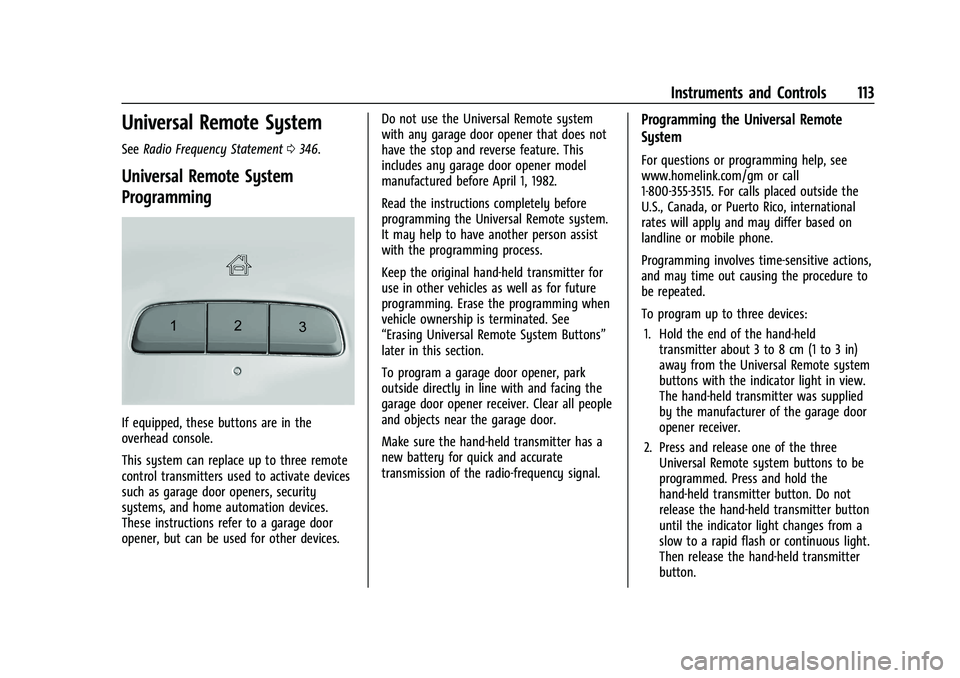
If equipped, these buttons are in the
overhead console.
This system can replace up to three remote
control transmitters used to activate devices
such as garage door openers, security
systems, and home automation devices.
These instructions refer to a garage door
opener, but can be used for other devices. Do not use the Universal Remote system
with any garage door opener that does not
have the stop and reverse feature. This
includes any garage door opener model
manufactured before April 1, 1982.
Read the instructions completely before
programming the Universal Remote system.
It may help to have another person assist
with the programming process.
Keep the original hand-held transmitter for
use in other vehicles as well as for future
programming. Erase the programming when
vehicle ownership is terminated. See
“Erasing Universal Remote System Buttons”
later in this section.
To program a garage door opener, park
outside directly in line with and facing the
garage door opener receiver. Clear all people
and objects near the garage door.
Make sure the hand-held transmitter has a
new battery for quick and accurate
transmission of the radio-frequency signal.
Programming the Universal Remote
System
For questions or programming help, see
www.homelink.com/gm or call
1-800-355-3515. For calls placed outside the
U.S., Canada, or Puerto Rico, international
rates will apply and may differ based on
landline or mobile phone.
Programming involves time-sensitive actions,
and may time out causing the procedure to
be repeated.
To program up to three devices:
1. Hold the end of the hand-held transmitter about 3 to 8 cm (1 to 3 in)
away from the Universal Remote system
buttons with the indicator light in view.
The hand-held transmitter was supplied
by the manufacturer of the garage door
opener receiver.
2. Press and release one of the three Universal Remote system buttons to be
programmed. Press and hold the
hand-held transmitter button. Do not
release the hand-held transmitter button
until the indicator light changes from a
slow to a rapid flash or continuous light.
Then release the hand-held transmitter
button.
Page 121 of 369
Chevrolet Equinox Owner Manual (GMNA-Localizing-U.S./Canada/Mexico-
14420010) - 2021 - CRC - 11/10/20
120 Lighting
Some localities have laws that require the
high beams to be off when the fog lamps
are on.
Interior Lighting
Instrument Panel Illumination
Control
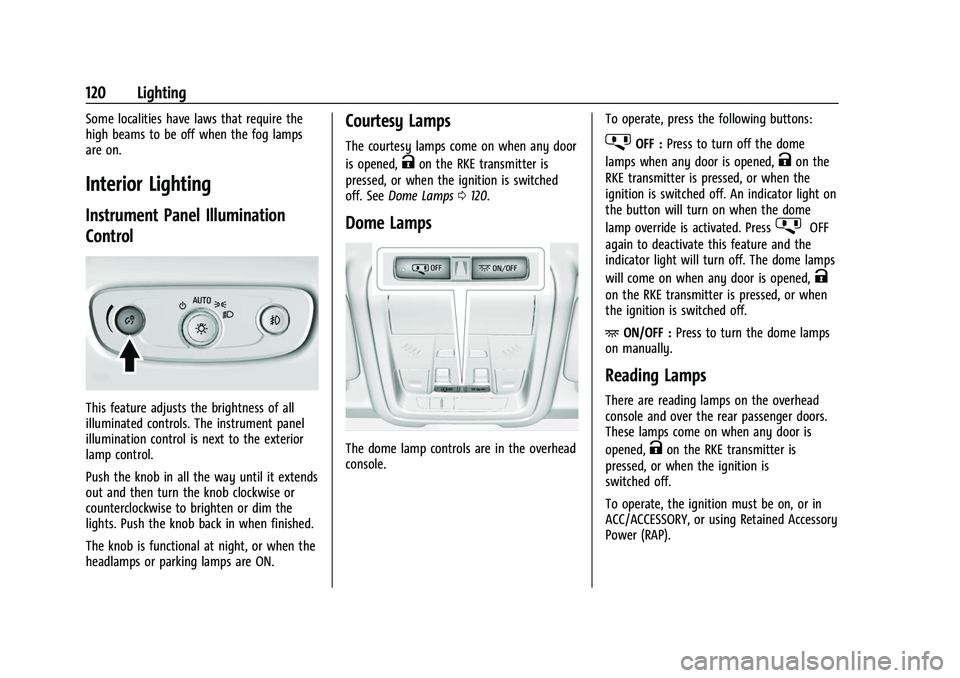
This feature adjusts the brightness of all
illuminated controls. The instrument panel
illumination control is next to the exterior
lamp control.
Push the knob in all the way until it extends
out and then turn the knob clockwise or
counterclockwise to brighten or dim the
lights. Push the knob back in when finished.
The knob is functional at night, or when the
headlamps or parking lamps are ON.
Courtesy Lamps
The courtesy lamps come on when any door
is opened,
Kon the RKE transmitter is
pressed, or when the ignition is switched
off. See Dome Lamps 0120.
Dome Lamps
The dome lamp controls are in the overhead
console. To operate, press the following buttons:
jOFF :
Press to turn off the dome
lamps when any door is opened,
Kon the
RKE transmitter is pressed, or when the
ignition is switched off. An indicator light on
the button will turn on when the dome
lamp override is activated. Press
jOFF
again to deactivate this feature and the
indicator light will turn off. The dome lamps
will come on when any door is opened,
K
on the RKE transmitter is pressed, or when
the ignition is switched off.
+ ON/OFF : Press to turn the dome lamps
on manually.
Reading Lamps
There are reading lamps on the overhead
console and over the rear passenger doors.
These lamps come on when any door is
opened,
Kon the RKE transmitter is
pressed, or when the ignition is
switched off.
To operate, the ignition must be on, or in
ACC/ACCESSORY, or using Retained Accessory
Power (RAP).
Page 122 of 369
Chevrolet Equinox Owner Manual (GMNA-Localizing-U.S./Canada/Mexico-
14420010) - 2021 - CRC - 11/10/20
Lighting 121
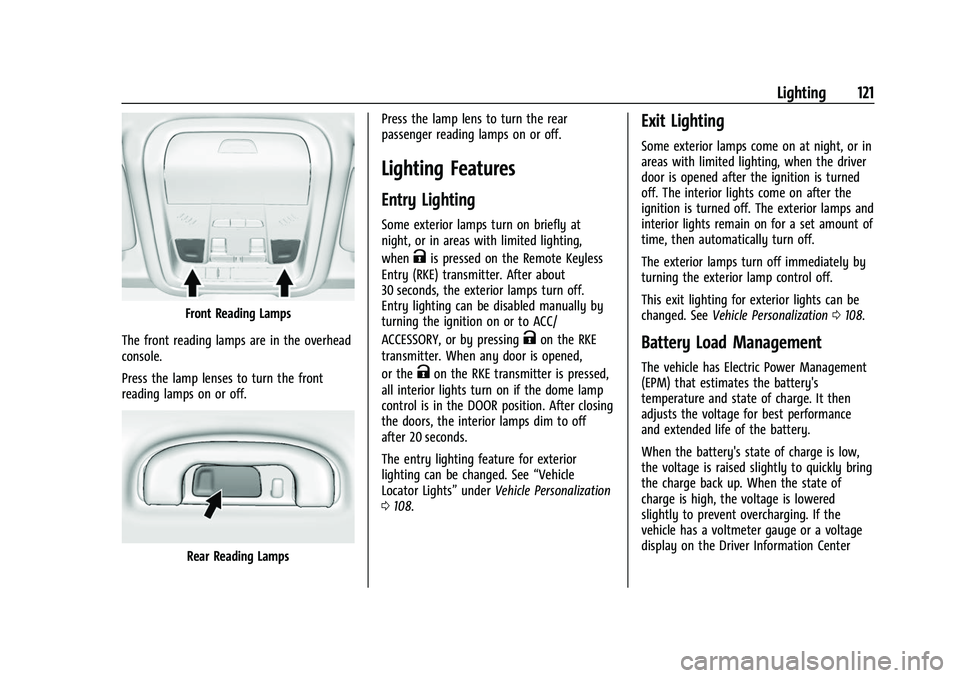
Front Reading Lamps
The front reading lamps are in the overhead
console.
Press the lamp lenses to turn the front
reading lamps on or off.
Rear Reading Lamps Press the lamp lens to turn the rear
passenger reading lamps on or off.
Lighting Features
Entry Lighting
Some exterior lamps turn on briefly at
night, or in areas with limited lighting,
when
Kis pressed on the Remote Keyless
Entry (RKE) transmitter. After about
30 seconds, the exterior lamps turn off.
Entry lighting can be disabled manually by
turning the ignition on or to ACC/
ACCESSORY, or by pressing
Kon the RKE
transmitter. When any door is opened,
or the
Kon the RKE transmitter is pressed,
all interior lights turn on if the dome lamp
control is in the DOOR position. After closing
the doors, the interior lamps dim to off
after 20 seconds.
The entry lighting feature for exterior
lighting can be changed. See “Vehicle
Locator Lights” underVehicle Personalization
0 108.
Exit Lighting
Some exterior lamps come on at night, or in
areas with limited lighting, when the driver
door is opened after the ignition is turned
off. The interior lights come on after the
ignition is turned off. The exterior lamps and
interior lights remain on for a set amount of
time, then automatically turn off.
The exterior lamps turn off immediately by
turning the exterior lamp control off.
This exit lighting for exterior lights can be
changed. See Vehicle Personalization 0108.
Battery Load Management
The vehicle has Electric Power Management
(EPM) that estimates the battery's
temperature and state of charge. It then
adjusts the voltage for best performance
and extended life of the battery.
When the battery's state of charge is low,
the voltage is raised slightly to quickly bring
the charge back up. When the state of
charge is high, the voltage is lowered
slightly to prevent overcharging. If the
vehicle has a voltmeter gauge or a voltage
display on the Driver Information Center
Page 134 of 369
Chevrolet Equinox Owner Manual (GMNA-Localizing-U.S./Canada/Mexico-
14420010) - 2021 - CRC - 11/10/20
Infotainment System 133
The vehicle may be equipped with two USB
ports in the center console and another two
on the center stack. These ports are for data
and charging. There may also be two USB
ports for charging only at the rear of the
center console.
Caution
To avoid vehicle damage, unplug all
accessories and disconnect all accessory
cables from the vehicle when not in use.
Accessory cables left plugged into the
vehicle, unconnected to a device, could be
damaged or cause an electrical short if
the unconnected end comes in contact
with liquids or another power source such
as the accessory power outlet.
Playing from a USB
A USB mass storage device can be connected
to the USB port.
Audio extensions supported by the USB may
include:
.MP3
.AAC
.OGG
.3GPGracenote
When plugging in a USB device, Gracenote
service builds voice tags for music. Voice
tags allow artists, albums with hard to
pronounce names, and nicknames to be used
to play music through voice recognition,
if equipped.
While indexing, infotainment features may
be available.
My Media Library
MyMedia is only available when more than
one indexed device is connected. It allows
access to content from all indexed media
sources. MyMedia will show as an available
source in the Source page.
USB MP3 Player and USB Devices
The USB MP3 players and USB devices
connected must comply with the USB Mass
Storage Class specification (USB MSC).
To play a USB device:
1. Connect the USB.
2. Touch Audio from the Home Page.
3. Touch the More option and then touch the USB device. Use the following when playing an active
USB source:
p:
Touch to play the current media source.
j: Touch to pause playback of the current
media source.
7:
.Touch to seek the beginning of the
current or previous track.
.Touch and hold to reverse quickly
through playback. Release to return to
playing speed. Elapsed time displays.
6:
.Touch to seek the next track.
.Touch and hold to advance quickly
through playback. Release to return to
playing speed. Elapsed time displays.
Shuffle : Touch the shuffle icon to play
music in random order.
USB Sound Menu
See “Infotainment System Sound Menu”
under AM-FM Radio 0129.
USB Browse Menu
When a list of songs, albums, artists,
or other types of media displays, the up and
down arrows and A-Z appear on the left
Page 209 of 369
Chevrolet Equinox Owner Manual (GMNA-Localizing-U.S./Canada/Mexico-
14420010) - 2021 - CRC - 11/12/20
208 Driving and Operating
Manual Mode
Electronic Range Select (ERS) Mode
ERS or manual mode allows for the selection
of the range of gear positions. Use this
mode when driving downhill or towing a
trailer to limit the top gear and vehicle
speed. The shift position indicator within the
Driver Information Center (DIC) will display a
number next to the L indicating the highest
available gear under manual mode and the
driving conditions when manual mode was
selected.
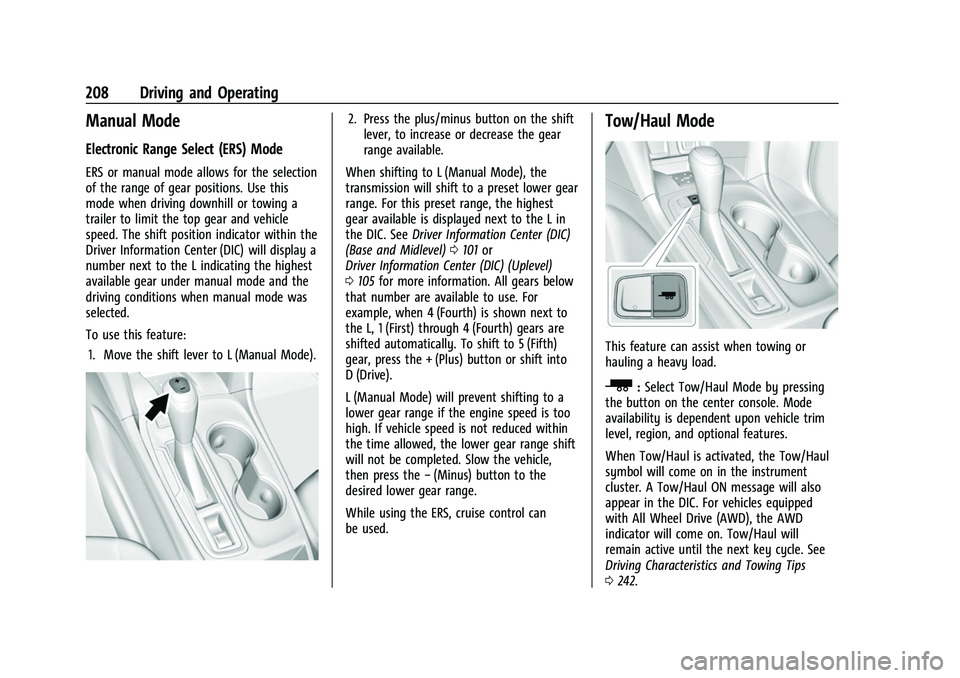
To use this feature:1. Move the shift lever to L (Manual Mode).
2. Press the plus/minus button on the shift lever, to increase or decrease the gear
range available.
When shifting to L (Manual Mode), the
transmission will shift to a preset lower gear
range. For this preset range, the highest
gear available is displayed next to the L in
the DIC. See Driver Information Center (DIC)
(Base and Midlevel) 0101 or
Driver Information Center (DIC) (Uplevel)
0 105 for more information. All gears below
that number are available to use. For
example, when 4 (Fourth) is shown next to
the L, 1 (First) through 4 (Fourth) gears are
shifted automatically. To shift to 5 (Fifth)
gear, press the + (Plus) button or shift into
D (Drive).
L (Manual Mode) will prevent shifting to a
lower gear range if the engine speed is too
high. If vehicle speed is not reduced within
the time allowed, the lower gear range shift
will not be completed. Slow the vehicle,
then press the −(Minus) button to the
desired lower gear range.
While using the ERS, cruise control can
be used.Tow/Haul Mode
This feature can assist when towing or
hauling a heavy load.
_: Select Tow/Haul Mode by pressing
the button on the center console. Mode
availability is dependent upon vehicle trim
level, region, and optional features.
When Tow/Haul is activated, the Tow/Haul
symbol will come on in the instrument
cluster. A Tow/Haul ON message will also
appear in the DIC. For vehicles equipped
with All Wheel Drive (AWD), the AWD
indicator will come on. Tow/Haul will
remain active until the next key cycle. See
Driving Characteristics and Towing Tips
0 242.
Page 210 of 369

Chevrolet Equinox Owner Manual (GMNA-Localizing-U.S./Canada/Mexico-
14420010) - 2021 - CRC - 11/12/20
Driving and Operating 209
Automatic Engine Grade Braking
Automatic Engine Grade Braking assists
when driving downhill. It maintains vehicle
speed by automatically implementing a shift
pattern that uses the engine and the
transmission to slow the vehicle. The system
will automatically command downshifts to
reduce vehicle speed. The normal shift
pattern will return once the vehicle is on a
low grade or when the accelerator pedal is
pressed.
While in the Electronic Range Select (ERS)
mode, grade braking is deactivated, allowing
the driver to select a range and limiting the
highest gear available. Grade braking is
available for normal driving and in Tow/
Haul Mode.
SeeAutomatic Transmission 0206.
Drive Systems
All-Wheel Drive
Vehicles with this feature can operate in
All-Wheel Drive (AWD) Mode.
The AWD system delivers power to all four
wheels and the system adjusts as needed to
improve traction. Press the AWD switch on the center console
to activate the system. The AWD light will
flash briefly while the system is engaging
and stay lit to indicate AWD is active. Press
the switch again to disable the system. The
light will flash briefly while the system
disables and then stay off.
The AWD Mode will stay selected until the
mode is changed.
When operated in two-wheel drive, the
vehicle will deliver power to the front
wheels only and may provide better fuel
economy.
A system off message displays when there
is a temporary condition making the AWD
system unavailable. The vehicle will run in
two-wheel drive.
This could be caused by:
.A compact spare tire on the vehicle.
.AWD system overheat.
.Loss of wheel or vehicle speed.
.Certain other vehicle electrical conditions.
The message turns off when the compact
spare tire is replaced by a full-size tire, the
differential fluid cools, or the above
conditions are no longer present and the
warning message is reset. To reset the warning message manually,
turn the ignition off and then back on again
after 30 seconds. If the message stays on,
see your dealer.
Brakes
Antilock Brake System (ABS)
The Antilock Brake System (ABS) helps
prevent a braking skid and maintain steering
while braking hard.
ABS performs a system check when the
vehicle is first driven. A momentary motor
or clicking noise may be heard while this
test is going on, and the brake pedal may
move slightly. This is normal.
If there is a problem with ABS, this warning
light stays on. See
Antilock Brake System
(ABS) Warning Light 096.
ABS does not change the time needed to
get a foot on the brake pedal and does not
always decrease stopping distance. If you
Page 279 of 369

Chevrolet Equinox Owner Manual (GMNA-Localizing-U.S./Canada/Mexico-
14420010) - 2021 - CRC - 11/10/20
278 Vehicle Care
Circuit Breakers UsageCB1 –
CB2 Auxiliary power outlet console
Rear Compartment Fuse Block
The rear compartment fuse block is behind a
trim panel on the side of the rear
compartment.
Remove the trim plate to access the fuse
block.
The vehicle may not be equipped with all of
the fuses and relays shown.
Fuses Usage
F1 –
F2 Liftgate
Page 359 of 369
Chevrolet Equinox Owner Manual (GMNA-Localizing-U.S./Canada/Mexico-
14420010) - 2021 - CRC - 11/10/20
358 Index
Auto StopStop/Start System . . . . . . . . . . . . . . . . . . . . . 201
Automatic Dimming Mirrors . . . . . . . . . . . . . . . . . . . . . . . 25
Door Locks . . . . . . . . . . . . . . . . . . . . . . . . . . . . . . 16
Emergency Braking (AEB) . . . . . . . . . . . . . . 232
Headlamp System . . . . . . . . . . . . . . . . . . . . . . 118
Transmission . . . . . . . . . . . . . . . . . . . . . . . . . . . 206
Transmission Fluid . . . . . . . . . . . . . . . . . . . . . 258
Automatic Transmission Manual Mode . . . . . . . . . . . . . . . . . . . . . . . . . 208
Shift Lock Control Function Check . . . . . . 267
Avoiding Untrusted Media Devices . . . . . . . . 132
B
Battery Exterior Lighting Battery Saver . . . . . . . . 122
Load Management . . . . . . . . . . . . . . . . . . . . . . 121
Power Protection . . . . . . . . . . . . . . . . . . . . . . 122
Battery - North America . . . . . . . . . . . . 266, 308
Blade Replacement, Wiper . . . . . . . . . . . . . . . 267
Bluetooth Overview . . . . . . . . . . . . . . . . . . . . . . . . . . 154, 155
Bluetooth Audio . . . . . . . . . . . . . . . . . . . . . . . . . . 135
Brake Parking, Electric . . . . . . . . . . . . . . . . . . . . . . . . 210
System Warning Light . . . . . . . . . . . . . . . . . . 95
Brakes . . . . . . . . . . . . . . . . . . . . . . . . . . . . . . . . . . . 264 Brakes (cont'd)
Antilock . . . . . . . . . . . . . . . . . . . . . . . . . . . . . . . . 209
Assist . . . . . . . . . . . . . . . . . . . . . . . . . . . . . . . . . . . 211
Fluid . . . . . . . . . . . . . . . . . . . . . . . . . . . . . . . . . . . 265
Braking . . . . . . . . . . . . . . . . . . . . . . . . . . . . . . . . . . .187 Automatic Emergency (AEB) . . . . . . . . . . . 232
Braking System
Front Pedestrian (FPB) . . . . . . . . . . . . . . . . . 233
Break-In, New Vehicle . . . . . . . . . . . . . . . . . . . . 198
Bulb Replacement Front Turn Signal and Fog Lamps . . . . . . . 271
Halogen Bulbs . . . . . . . . . . . . . . . . . . . . . . . . . 270
Headlamp Aiming . . . . . . . . . . . . . . . . . . . . . . 270
Headlamps . . . . . . . . . . . . . . . . . . . . . . . . . . . . 270
High Intensity Discharge (HID)Lighting . . . . . . . . . . . . . . . . . . . . . . . . . . . . . . 270
License Plate Lamps . . . . . . . . . . . . . . . . . . . 272
Taillamps . . . . . . . . . . . . . . . . . . . . . . . . . . . . . . . 271
Buying New Tires . . . . . . . . . . . . . . . . . . . . . . . . 292
C
Calibration . . . . . . . . . . . . . . . . . . . . . . . . . . . . . . . . .81
California Perchlorate Materials Requirements . . . 251
California Proposition 65 Warning . . . . . . . . . . . . . . . . . . 251, 266, 308,
Back Cover
Canadian Vehicle Owners . . . . . . . . . . . . . . . . . . . 1 Capacities and Specifications . . . . . . . . . . . . . 335
Carbon Monoxide
Engine Exhaust . . . . . . . . . . . . . . . . . . . . . . . . 205
Liftgate . . . . . . . . . . . . . . . . . . . . . . . . . . . . . . . . . 18
Winter Driving . . . . . . . . . . . . . . . . . . . . . . . . . 193
Cargo Cover . . . . . . . . . . . . . . . . . . . . . . . . . . . . . . . . . . . 75
Tie-Downs . . . . . . . . . . . . . . . . . . . . . . . . . . . . . . 76
Caution, Danger, and Warning . . . . . . . . . . . . . .2
Center Console Storage . . . . . . . . . . . . . . . . . . . .75
Chains, Tire . . . . . . . . . . . . . . . . . . . . . . . . . . . . . . 295
Charging Wireless . . . . . . . . . . . . . . . . . . . . . . . . . . . . . . . . 83
Charging System Light . . . . . . . . . . . . . . . . . . . . 93
Check Engine Light (Malfunction Indicator) . . . . 94
Child Restraints Infants and Young Children . . . . . . . . . . . . . 58
Lower Anchors and Tethers forChildren . . . . . . . . . . . . . . . . . . . . . . . . . . . . . . . 62
Older Children . . . . . . . . . . . . . . . . . . . . . . . . . . 56
Securing . . . . . . . . . . . . . . . . . . . . . . . . . . . . 69, 70
Systems . . . . . . . . . . . . . . . . . . . . . . . . . . . . . . . . 60
Circuit Breakers . . . . . . . . . . . . . . . . . . . . . . . . . . 273
Cleaning Exterior Care . . . . . . . . . . . . . . . . . . . . . . . . . . . 314
Interior Care . . . . . . . . . . . . . . . . . . . . . . . . . . . 318
Climate Control Systems . . . . . . . . . . . . . . . . . . 177