2021 CADILLAC XT6 power steering
[x] Cancel search: power steeringPage 148 of 431

Cadillac XT6 Owner Manual (GMNA-Localizing-U.S./Canada-14574701) -
2021 - CRC - 2/8/21
INFOTAINMENT SYSTEM 147
Before driving:
.Become familiar with the operation,
center stack controls, steering wheel
controls, and infotainment display.
.Set up the audio by presetting
favorite stations, setting the tone,
and adjusting the speakers.
.Set up phone numbers in advance
so they can be called easily by
pressing a single control or by using
a single voice command.
See Distracted Driving 0218.
Active Noise Cancellation (ANC)
If equipped, ANC reduces engine noise
in the vehicle’s interior. ANC requires
the factory-installed audio system,
radio, speakers, amplifier (if
equipped), induction system, and
exhaust system to work properly.
Deactivation is required by your dealer
if related aftermarket equipment is
installed.
Overview
Infotainment System
The infotainment system is controlled
by using the infotainment display,
controls on the center console,
steering wheel controls, and voice
recognition.
1.>(Power and Mute)
.When off, press>to turn the
system on.
.Press and hold to turn the
power off.
.Press to mute/unmute the
system when on.
.When the power is on and the
system is not muted, a quick
status pane will display when
>is pressed. Pressing>will
mute the system and trigger
this pane to show a long press
is required to actually power
down the system.
2.W(Near Field Communication)
.See “Near Field
Communication (NFC)” under
Bluetooth (Overview) 0181 or
Bluetooth (Pairing and Using a
Phone) 0182
3.{(Home Page)
.Press to go to the Home Page.
See “Home Page ”later in this
section.
Press to exit Android Auto or
Apple CarPlay. To enter back
into Android Auto or Apple
CarPlay, press and hold. See
Apple CarPlay and Android
Auto 0186.
Page 161 of 431

Cadillac XT6 Owner Manual (GMNA-Localizing-U.S./Canada-14574701) -
2021 - CRC - 2/8/21
160 INFOTAINMENT SYSTEM
Touch one of the following Browse
options to save a favorite:
Playlists :Touch
Hnext to any
playlist to store the playlist as a
favorite. Touch a saved favorite to
recall a favorite playlist. The first song
in the playlist begins to play.
Artists : Touch
Hnext to any artist
to store the artist as a favorite. Touch
a saved favorite to recall a favorite
artist. The first song in the artist list
begins to play.
Songs : Touch
Hnext to any song to
store the song as a favorite. Touch a
saved favorite to recall a favorite song.
Albums : Touch
Hnext to any
album to store the album as a
favorite. Touch a saved favorite to
recall a favorite album. The first song
in the album list begins to play.
Genres : Touch
Hnext to any genre
to store the genre as a favorite. Touch
a saved favorite to recall a favorite
genre. The first song of the genre
begins to play. Podcasts :
Touch
Hnext to any
podcast to store the podcast as a
favorite. Touch a saved favorite to
recall a favorite podcast. The podcast
begins to play.
Audiobooks : Touch
Hnext to any
audiobook to store the audiobook as a
favorite. Touch a saved favorite to
recall a favorite audiobook. The first
chapter in the audiobook begins
to play.
Media Playback and Mute
USB playback will be paused if the
system is muted. If the steering wheel
mute control is pressed again,
playback will resume.
If the source is changed while in
mute, playback resumes and audio
will unmute.
Bluetooth Audio
Music may be played from a paired
Bluetooth device. See Bluetooth
(Overview) 0181 or
Bluetooth (Pairing and Using a Phone)
0 182 for help pairing a device. Volume and song selection may be
controlled by using the infotainment
controls or the mobile device.
If Bluetooth is selected and no volume
is present, check the volume setting
on both your mobile device and the
infotainment system.
Music can be launched by touching
Bluetooth from the recent sources list
on the left of the display or by
touching the More option and then
touching the Bluetooth device.
To play music via Bluetooth:
1. Power on the device, and pair to connect the device.
2. Once paired, touch Audio from the Home Page, then touch Bluetooth
from the recent sources list on the
left of the display.
Bluetooth Sound Menu
See “Infotainment System Sound
Menu ”under AM-FM Radio 0153.
Manage Bluetooth Devices
From the Home Page: 1. Touch Audio.
2. Touch More.
Page 218 of 431

Cadillac XT6 Owner Manual (GMNA-Localizing-U.S./Canada-14574701) -
2021 - CRC - 2/8/21
DRIVING AND OPERATING 217
Driving and
Operating
Driving Information
Driving for Better FuelEconomy . . . . . . . . . . . . . . . . . . . . . . . . 218
Distracted Driving . . . . . . . . . . . . . . . . 218
Defensive Driving . . . . . . . . . . . . . . . . 219
Impaired Driving . . . . . . . . . . . . . . . . . 219
Control of a Vehicle . . . . . . . . . . . . . . 219
Braking . . . . . . . . . . . . . . . . . . . . . . . . . . . . 219
Steering . . . . . . . . . . . . . . . . . . . . . . . . . . . 220
Off-Road Recovery . . . . . . . . . . . . . . . . 221
Loss of Control . . . . . . . . . . . . . . . . . . . 221
Off-Road Driving . . . . . . . . . . . . . . . . . 222
Driving on Wet Roads . . . . . . . . . . . 225
Hill and Mountain Roads . . . . . . . . 226
Winter Driving . . . . . . . . . . . . . . . . . . . . 226
If the Vehicle Is Stuck . . . . . . . . . . . 228
Vehicle Load Limits . . . . . . . . . . . . . . 228
Starting and Operating
New Vehicle Break-In . . . . . . . . . . . . 232
Ignition Positions . . . . . . . . . . . . . . . . 232
Starting the Engine . . . . . . . . . . . . . . 233
Stop/Start System . . . . . . . . . . . . . . . . 234
Engine Heater . . . . . . . . . . . . . . . . . . . . 235
Retained Accessory Power (RAP) . . . . . . . . . . . . . . . . . . . . 237 Shifting Into Park . . . . . . . . . . . . . . . . 237
Shifting out of Park . . . . . . . . . . . . . . 238
Parking over Things
That Burn . . . . . . . . . . . . . . . . . . . . . . . 238
Active Fuel Management . . . . . . . . 238
Extended Parking . . . . . . . . . . . . . . . . . 239
Engine Exhaust
Engine Exhaust . . . . . . . . . . . . . . . . . . . 239
Running the Vehicle While
Parked . . . . . . . . . . . . . . . . . . . . . . . . . . . 239
Automatic Transmission
Automatic Transmission . . . . . . . . . 240
Manual Mode . . . . . . . . . . . . . . . . . . . . . 244
Drive Systems
All-Wheel Drive . . . . . . . . . . . . . . . . . . 245
Brakes
Electric Brake Boost . . . . . . . . . . . . . . 246
Antilock Brake System (ABS) . . . . 246
Electric Parking Brake . . . . . . . . . . . . 246
Brake Assist . . . . . . . . . . . . . . . . . . . . . . . 248
Hill Start Assist (HSA) . . . . . . . . . . . 248
Ride Control Systems
Traction Control/ElectronicStability Control . . . . . . . . . . . . . . . . 248
Driver Mode Control . . . . . . . . . . . . . 250
Cruise Control
Cruise Control . . . . . . . . . . . . . . . . . . . . 251
Adaptive Cruise Control (Advanced) . . . . . . . . . . . . . . . . . . . . . . 254
Driver Assistance Systems
Driver Assistance Systems . . . . . . . 263
Assistance Systems for Parkingor Backing . . . . . . . . . . . . . . . . . . . . . . . 264
Rear Pedestrian Alert . . . . . . . . . . . . 271
Assistance Systems for Driving . . . . . . . . . . . . . . . . . . . . . . . . . . 272
Forward Collision Alert (FCA) System . . . . . . . . . . . . . . . . . . . . . . . . . . 272
Automatic Emergency Braking (AEB) . . . . . . . . . . . . . . . . . . . 275
Front Pedestrian Braking (FPB) System . . . . . . . . . . . . . . . . . . . . . . . . . . 276
Night Vision System . . . . . . . . . . . . . 278
Side Blind Zone Alert (SBZA) . . . . 280
Lane Change Alert (LCA) . . . . . . . . 281
Lane Keep Assist (LKA) . . . . . . . . . . 282
Surround Vision Recorder . . . . . . . 284
Fuel
Top Tier Fuel . . . . . . . . . . . . . . . . . . . . . 286
Recommended Fuel (2.0L L4 Turbo Engine) . . . . . . . . . . . . . . . . . . . 286
Recommended Fuel (3.6L V6 Engine) . . . . . . . . . . . . . . . . . . . . . . 286
Prohibited Fuels . . . . . . . . . . . . . . . . . . 287
Page 221 of 431

Cadillac XT6 Owner Manual (GMNA-Localizing-U.S./Canada-14574701) -
2021 - CRC - 2/8/21
220 DRIVING AND OPERATING
(60 mph) travels 20 m (66 ft), which
could be a lot of distance in an
emergency.
Helpful braking tips to keep in mind
include:
.Keep enough distance between you
and the vehicle in front of you.
.Avoid needless heavy braking.
.Keep pace with traffic.
If the engine ever stops while the
vehicle is being driven, brake normally
but do not pump the brakes. Doing so
could make the pedal harder to push
down. If the engine stops, there will
be some power brake assist but it will
be used when the brake is applied.
Once the power assist is used up, it
can take longer to stop and the brake
pedal will be harder to push.
Steering
Electric Power Steering
Caution
To avoid damage to the steering
system, do not drive over curbs,
parking barriers, or similar objects (Continued)
Caution (Continued)
at speeds greater than 3 km/h
(1 mph). Use care when driving over
other objects such as lane dividers
and speed bumps. Damage caused
by misuse of the vehicle is not
covered by the vehicle warranty.
The vehicle has electric power
steering. It does not have power
steering fluid. Regular maintenance is
not required.
If power steering assist is lost due to a
system malfunction, the vehicle can
be steered, but may require increased
effort. If the steering assist is used for an
extended period of time while the
vehicle is not moving, power assist
may be reduced.
If the steering wheel is turned until it
reaches the end of its travel and is
held against that position for an
extended period of time, power
steering assist may be reduced.
Normal use of the power steering
assist should return when the system
cools down.
See your dealer if there is a problem.
Curve Tips
.Take curves at a reasonable speed.
.Reduce speed before entering a
curve.
.Maintain a reasonable steady speed
through the curve.
.Wait until the vehicle is out of the
curve before accelerating gently into
the straightaway.
Steering in Emergencies
.There are some situations when
steering around a problem may be
more effective than braking.
Page 233 of 431

Cadillac XT6 Owner Manual (GMNA-Localizing-U.S./Canada-14574701) -
2021 - CRC - 2/8/21
232 DRIVING AND OPERATING
Starting and Operating
New Vehicle Break-In
Caution
The vehicle does not need an
elaborate break-in. But it will
perform better in the long run if
you follow these guidelines:
.Do not drive at any one constant
speed, fast or slow, for the first
800 km (500 mi). Do not make
full-throttle starts. Avoid
downshifting to brake or slow the
vehicle.
.Avoid making hard stops for the
first 300 km (200 mi) or so.
During this time the new brake
linings are not yet broken in.
Hard stops with new linings can
mean premature wear and earlier
replacement. Follow this
breaking-in guideline every time
you get new brake linings.
Following break-in, engine speed
and load can be gradually
increased.
Ignition Positions
The vehicle has an electronic keyless
ignition with pushbutton start.
If the pushbutton start is not working,
the vehicle may be near a strong radio
antenna signal causing interference to
the Remote Keyless Entry (RKE)
system. See Remote Keyless Entry
(RKE) System Operation 07.
To shift out of P (Park), the vehicle
must be turned on and the brake
pedal must be applied. Stopping the Engine/OFF (No
Indicator Light) :
When the vehicle is
stopped, press ENGINE START/STOP
once to turn the engine off.
If the vehicle is in P (Park), the
ignition will turn off, and Retained
Accessory Power (RAP) will remain
active. See Retained Accessory Power
(RAP) 0237.
If the vehicle is in R (Reverse), D
(Drive), or M (Manual Mode), the
vehicle will shift into P (Park), the
ignition will turn off, and RAP will
remain active.
If the vehicle is in N (Neutral), the
ignition will return to ACC/
ACCESSORY and display the message
SHIFT TO PARK in the Driver
Information Center (DIC). When the
vehicle is shifted into P (Park), the
ignition will turn off.
{Warning
Turning off the vehicle while
moving may cause loss of power
assist in the brake and steering (Continued)
Page 247 of 431

Cadillac XT6 Owner Manual (GMNA-Localizing-U.S./Canada-14574701) -
2021 - CRC - 2/8/21
246 DRIVING AND OPERATING
If Tour Mode is selected seeDriver
Mode Control 0250.
Brakes
Electric Brake Boost
Vehicles equipped with electric brake
boost have hydraulic brake circuits
that are electronically controlled when
the brake pedal is applied during
normal operation. The system
performs routine tests and turns off
within a few minutes after the vehicle
is turned off. Noise may be heard
during this time. If the brake pedal is
pressed during the tests or when the
electric brake boost system is off, a
noticeable change in pedal force and
travel may be felt. This is normal.
Antilock Brake
System (ABS)
The Antilock Brake System (ABS)
helps prevent a braking skid and
maintain steering while braking hard.
ABS performs a system check when
the vehicle is first driven.
A momentary motor or clicking noise may be heard while this test is going
on, and the brake pedal may move
slightly. This is normal.
If there is a problem with ABS, this
warning light stays on. See
Antilock
Brake System (ABS) Warning Light
0 118.
ABS does not change the time needed
to get a foot on the brake pedal and
does not always decrease stopping
distance. If you get too close to the
vehicle ahead, there will not be
enough time to apply the brakes if
that vehicle suddenly slows or stops.
Always leave enough room ahead to
stop, even with ABS.
Using ABS
Do not pump the brakes. Just hold the
brake pedal down firmly. Hearing or
feeling ABS operate is normal.
Braking in Emergencies
ABS allows steering and braking at the
same time. In many emergencies,
steering can help even more than
braking.
Electric Parking Brake
The Electric Parking Brake (EPB) can
always be applied, even if the vehicle
is off. In case of insufficient electrical
power, the EPB cannot be applied or
released. To prevent draining the
battery, avoid unnecessary repeated
cycles of the EPB.
Page 335 of 431
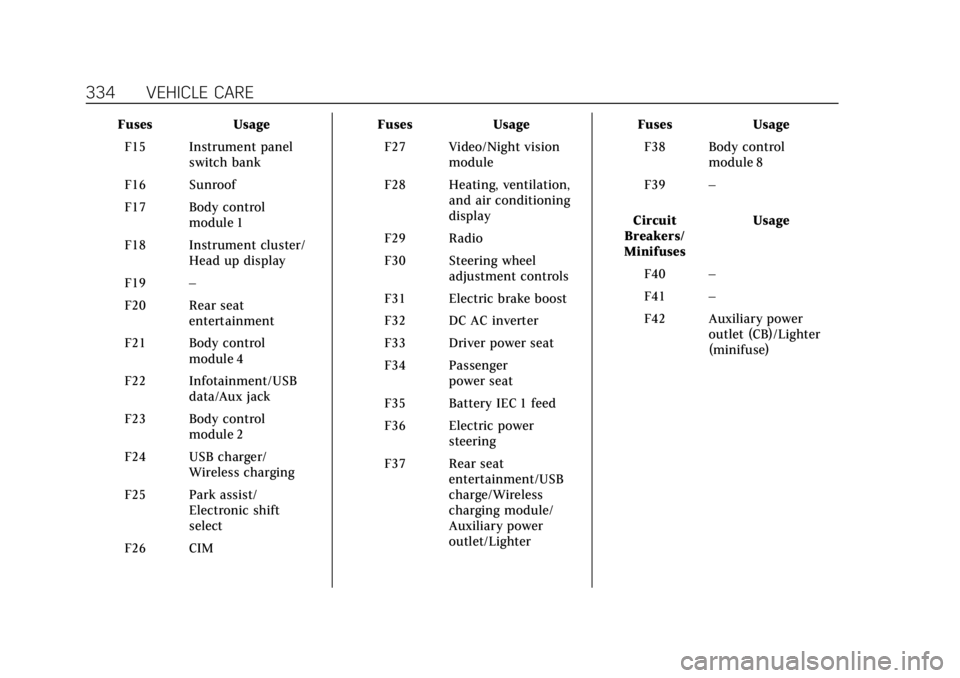
Cadillac XT6 Owner Manual (GMNA-Localizing-U.S./Canada-14574701) -
2021 - CRC - 2/8/21
334 VEHICLE CARE
FusesUsage
F15 Instrument panel switch bank
F16 Sunroof
F17 Body control module 1
F18 Instrument cluster/ Head up display
F19 –
F20 Rear seat entertainment
F21 Body control module 4
F22 Infotainment/USB data/Aux jack
F23 Body control module 2
F24 USB charger/ Wireless charging
F25 Park assist/ Electronic shift
select
F26 CIM Fuses
Usage
F27 Video/Night vision module
F28 Heating, ventilation, and air conditioning
display
F29 Radio
F30 Steering wheel adjustment controls
F31 Electric brake boost
F32 DC AC inverter
F33 Driver power seat
F34 Passenger power seat
F35 Battery IEC 1 feed
F36 Electric power steering
F37 Rear seat entertainment/USB
charge/Wireless
charging module/
Auxiliary power
outlet/Lighter Fuses
Usage
F38 Body control module 8
F39 –
Circuit
Breakers/
Minifuses Usage
F40 –
F41 –
F42 Auxiliary power outlet (CB)/Lighter
(minifuse)
Page 375 of 431

Cadillac XT6 Owner Manual (GMNA-Localizing-U.S./Canada-14574701) -
2021 - CRC - 2/8/21
374 VEHICLE CARE
Inspect power steering for proper
electrical connections, binding, cracks,
chafing, etc.
Visually check constant velocity joint
boots and axle seals for leaks.
Body Component Lubrication
Lubricate all key lock cylinders, door
hinges, hood hinges, liftgate hinges,
and the steel fuel door hinges, unless
the components are plastic. Applying
silicone grease on weatherstrips with a
clean cloth will make them last
longer, seal better, and not stick or
squeak.
Underbody Maintenance
At least twice a year, spring and fall,
use plain water to flush any corrosive
materials from the underbody. Take
care to thoroughly clean any areas
where mud and other debris can
collect.
Do not directly power wash the
transfer case and/or front/rear axle
output seals. High pressure water can
overcome the seals and contaminatethe fluid. Contaminated fluid will
decrease the life of the transfer case
and/or axles and should be replaced.
Sheet Metal Damage
If the vehicle is damaged and requires
sheet metal repair or replacement,
make sure the body repair shop
applies anti-corrosion material to
parts repaired or replaced to restore
corrosion protection.
Original manufacturer replacement
parts will provide the corrosion
protection while maintaining the
vehicle warranty.
Finish Damage
Quickly repair minor chips and
scratches with touch-up materials
available from your dealer to avoid
corrosion. Larger areas of finish
damage can be corrected in your
dealer's body and paint shop.
Chemical Paint Spotting
Airborne pollutants can fall upon and
attack painted vehicle surfaces
causing blotchy, ring-shaped
discolorations, and small, irregulardark spots etched into the paint
surface. See
“Finish Care”previously in
this section.
Interior Care
To prevent dirt particle abrasions,
regularly clean the vehicle's interior.
Immediately remove any soils.
Newspapers or dark garments can
transfer color to the vehicle’s interior.
Use a soft bristle brush to remove
dust from knobs and crevices on the
instrument cluster. Using a mild soap
and water solution, immediately
remove hand lotions, sunscreen, and
insect repellent from all interior
surfaces or permanent damage may
result.
For liquid cleaners, use approximately
20 drops per 3.8 L (1 gal) of water.
A concentrated soap solution will
create streaks and attract dirt.
Use cleaners specifically designed for
the surfaces being cleaned to prevent
permanent damage. Apply all cleaners
directly to the cleaning cloth. Do not
spray cleaners on any switches or
controls. Remove cleaners quickly.