2021 CADILLAC XT4 liftgate
[x] Cancel search: liftgatePage 23 of 408
Cadillac XT4 Owner Manual (GMNA-Localizing-U.S./Canada/Mexico-
14584367) - 2021 - CRC - 10/14/20
22 KEYS, DOORS, AND WINDOWS
manually close the liftgate. This will
allow normal power operation
functions to resume.
If the vehicle is locked while the
liftgate is closing, and an obstacle is
encountered that prevents the liftgate
from completely closing, the horn will
sound as an alert that the liftgate did
not close.
Setting the 3/4 Mode
To change the position the liftgate
stops at when opening:1. Select MAX or 3/4 mode and power open the liftgate.
2. Stop the liftgate movement at the desired height by pressing any
liftgate button. Manually adjust the
liftgate position if needed.
3. Press and hold
lnext to the pull
cup on the bottom of the liftgate
until the turn signals flash and a
beep sounds. This indicates the
setting has been recorded. The liftgate cannot be set below a
minimum programmable height.
If there is no light flash or sound,
then the height adjustment may be
too low.
Manual Operation
Select OFF to manually operate the
liftgate.
Caution
Attempting to move the liftgate too
quickly and with excessive force
may result in damage to the
vehicle.
Operate the liftgate manually with a
smooth motion and moderate speed.
The system includes a feature which
limits the manual closing speed to
protect the components.
Hands-Free Operation
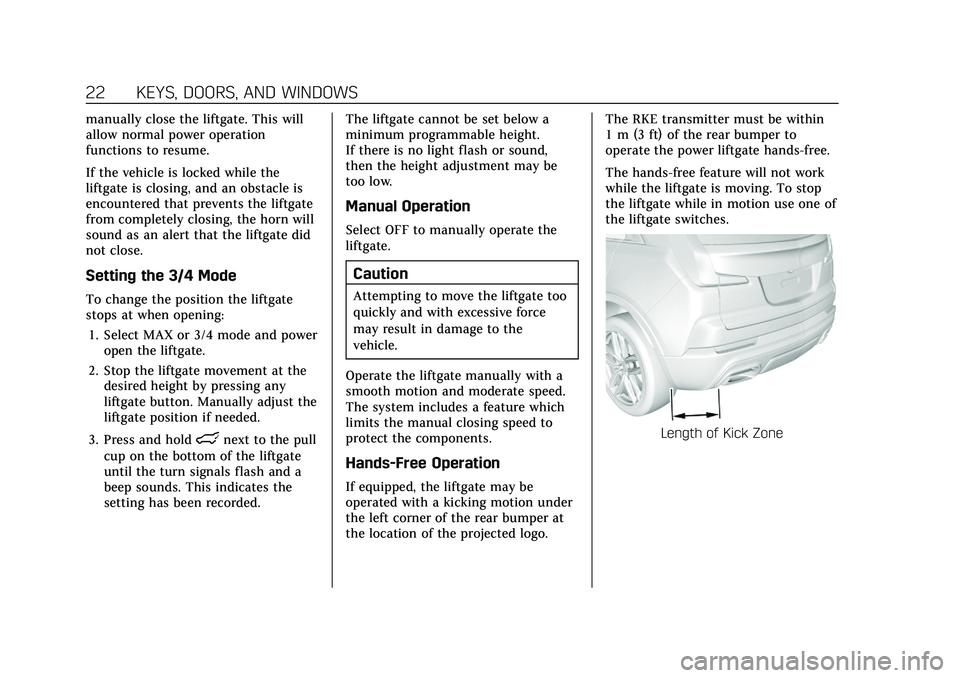
If equipped, the liftgate may be
operated with a kicking motion under
the left corner of the rear bumper at
the location of the projected logo. The RKE transmitter must be within
1 m (3 ft) of the rear bumper to
operate the power liftgate hands-free.
The hands-free feature will not work
while the liftgate is moving. To stop
the liftgate while in motion use one of
the liftgate switches.
Length of Kick Zone
Page 24 of 408

Cadillac XT4 Owner Manual (GMNA-Localizing-U.S./Canada/Mexico-
14584367) - 2021 - CRC - 10/14/20
KEYS, DOORS, AND WINDOWS 23
Kick Zone Direction
To operate, kick your foot straight up
in one swift motion under the left
corner of the rear bumper at the
location of the projected logo, then
pull it back.
Caution
Splashing water may cause the
liftgate to open. Keep the RKE
transmitter away from the rear
bumper detection area or turn the
liftgate mode to OFF when cleaning
or working near the rear bumper to
avoid accidental opening.
.Do not sweep your foot side to side.
.Do not keep your foot under the
bumper; the liftgate will not
activate.
.Do not touch the liftgate until it has
stopped moving.
.This feature may be temporarily
disabled under some conditions.
If the liftgate does not respond to
the kick, open or close the liftgate
by another method or start the
vehicle. The feature will be
re-enabled.
When closing the liftgate using this
feature, there will be a short delay.
The taillamps will flash and a chime
will sound. Step away from the liftgate
before it starts moving.
Projected Logo
If equipped with this feature, a vehicle
logo will be projected for one minute
onto the ground near the rear bumper
when an RKE transmitter is detected
within approximately 2 m (6 ft). The
projected logo may not be visible
under brighter daytime conditions.
1. 1 m (3 ft) Hands-Free Operation Detection Zone
2. 2 m (6 ft) Projected Logo Detection Zone
Page 25 of 408
Cadillac XT4 Owner Manual (GMNA-Localizing-U.S./Canada/Mexico-
14584367) - 2021 - CRC - 10/14/20
24 KEYS, DOORS, AND WINDOWS
The projected logo shows where the
kicking motion is to take place.
The projected logo will only be
available for this RKE transmitter after
it has been out of range for at least
20 seconds.
If an RKE transmitter is again
detected within approximately 2 m
(6 ft) of the liftgate, or another
hands-free operation has been
detected, the one-minute timer will be
reset.
The projected logo will not work
under these conditions:
.The vehicle battery is low.
.The transmission is not in P (Park).
.Hands Free Liftgate Control is set to
Off in vehicle personalization. See
Vehicle Personalization0120.
.The power liftgate is turned off.
.The vehicle remains parked for
72 hours or more, with no RKE
transmitter use or Keyless Access
operation. To re-enable, press any
button on the RKE transmitter or
open and close a vehicle door.
The projected logo will not work for a
single RKE transmitter when a
transmitter:
.Has been left within approximately
5 m (15 ft) of the liftgate for several
minutes.
.Has been left inside the vehicle and
all vehicle doors are closed.
.Has approached the area outside of
the liftgate five times within
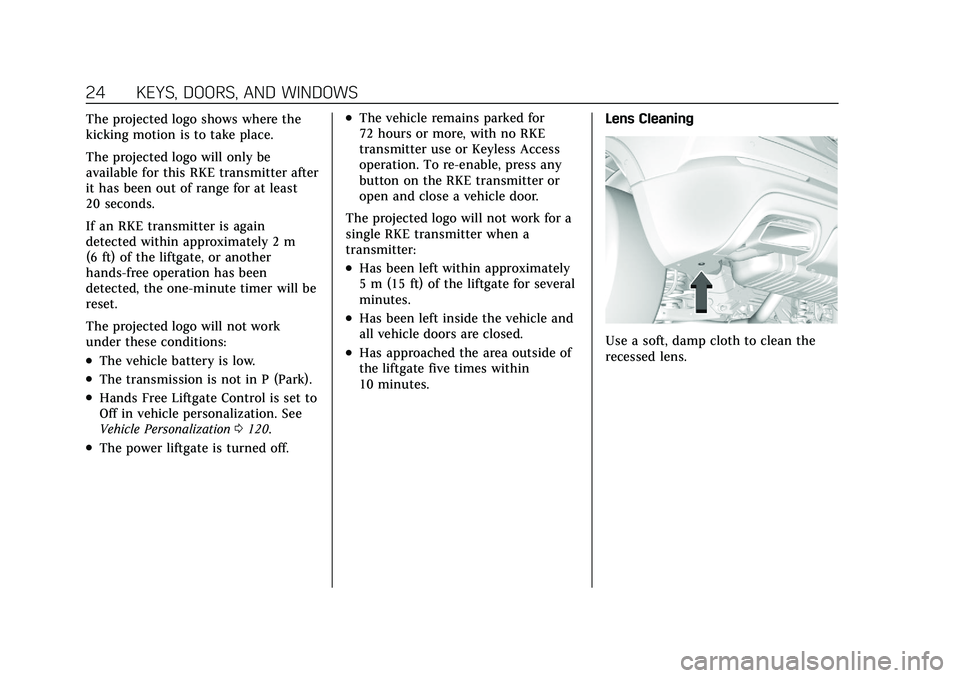
10 minutes. Lens CleaningUse a soft, damp cloth to clean the
recessed lens.
Page 26 of 408

Cadillac XT4 Owner Manual (GMNA-Localizing-U.S./Canada/Mexico-
14584367) - 2021 - CRC - 10/14/20
KEYS, DOORS, AND WINDOWS 25
Hands-Free Liftgate and Projected Logo Availability
ActionHands-Free Liftgate Projected Logo
RKE transmitter entering projected logo
detection zone Operative
On for one minute
RKE transmitter left inside projected
logo detection zone for minimum of
10 minutes Operative
Off until RKE transmitter button press
or a door is opened and closed
RKE transmitter brought in and out of
projected logo detection zone five times
or more within 10 minutes Operative
Off for one hour or until RKE
transmitter button press or a door is
opened and closed
Vehicle remains parked for more than
72 hours Operative
Off until RKE transmitter button press
or a door is opened and closed
Vehicle battery is low Non-operative Off
Transmission is not in P (Park) Non-operative Off
Power liftgate is turned off Non-operative Off
Hands-free liftgate is disabled in
vehicle personalization Non-operative
Off
Vehicle Security
This vehicle has theft-deterrent
features; however, they do not make
the vehicle impossible to steal.
Vehicle Alarm System
This vehicle has an anti-theft alarm
system.
Page 27 of 408

Cadillac XT4 Owner Manual (GMNA-Localizing-U.S./Canada/Mexico-
14584367) - 2021 - CRC - 10/14/20
26 KEYS, DOORS, AND WINDOWS
The indicator light, on the instrument
panel near the windshield, indicates
the status of the system.
Off :Alarm system is disarmed.
On Solid : Vehicle is secured during
the delay to arm the system.
Fast Flash : Vehicle is unsecured.
A door, the hood, or the liftgate
is open.
Slow Flash : Alarm system is armed.
Arming the Alarm System
1. Close the liftgate and the hood.
Turn off the vehicle. 2. Lock the vehicle in one of
three ways:
.Use the RKE transmitter.
.Use the Keyless Access system.
.With a door open, press the
inside
Q.
3. After 30 seconds the alarm system will arm, and the indicator light
will begin to slowly flash indicating
the alarm system is operating.
Pressing
Qon the RKE transmitter
a second time will bypass the
30-second delay and immediately
arm the alarm system.
The vehicle alarm system will not arm
if the doors are locked with the key.
If the driver door is opened without
first unlocking with the RKE
transmitter, the horn will chirp and
the lights will flash to indicate
pre-alarm. If the vehicle is not started,
or the door is not unlocked by
pressing
Kon the RKE transmitter
during the 10-second pre-alarm, the
alarm will be activated.
The alarm will also be activated if a
passenger door, the liftgate, or the
hood is opened without first disarming the system. When the
alarm is activated, the turn signals
flash and the horn sounds for about
30 seconds. The alarm system will
then re-arm to monitor for the next
unauthorized event.
Disarming the Alarm System
To disarm the alarm system or turn
off the alarm if it has been activated:
.PressKon the RKE transmitter.
.Unlock the vehicle using the Keyless
Access system.
.Start the vehicle.
To avoid setting off the alarm by
accident:
.Lock the vehicle after all occupants
have left the vehicle and all doors
are closed.
.Always unlock a door with the RKE
transmitter or use the Keyless
Access system.
Unlocking the driver door with the key
will not disarm the system or turn off
the alarm.
Page 88 of 408

Cadillac XT4 Owner Manual (GMNA-Localizing-U.S./Canada/Mexico-
14584367) - 2021 - CRC - 10/14/20
STORAGE 87
Umbrella Storage
Slide a compact umbrella no larger
than 6 cm (2.36 in) in diameter into
the opening on the driver or
passenger door.
Additional Storage
Features
Cargo Cover
{Warning
An unsecured cargo cover could
strike people in a sudden stop or
turn, or in a crash. Store the cargo
cover securely or remove it from
the vehicle.
{Warning
Do not place objects on the cargo
cover. Sudden stops or turns can
cause objects to be thrown in the
vehicle. You or others could be
injured.
If equipped, the cargo cover can be
used to cover items in the cargo area.
Installing the Cargo Cover1. Slide the cargo cover into the two front corner brackets until it snaps
in place.
2. Attach the cords to the fixed retainers on the liftgate.
Removing the Cargo Cover
To remove, disengage the cords and
pull the cover out of the vehicle.
Page 95 of 408

Cadillac XT4 Owner Manual (GMNA-Localizing-U.S./Canada/Mexico-
14584367) - 2021 - CRC - 10/14/20
94 INSTRUMENTS AND CONTROLS
.Turn the band up for more
sensitivity to moisture.
.Turn the band down for less
sensitivity to moisture.
.Move the windshield wiper lever out
of the AUTO position to deactivate
Rainsense.
To turn the Rainsense feature on or
off, see “Rain Sense Wipers ”under
Vehicle Personalization 0120.
Wiper Arm Assembly Protection
When using an automatic car wash,
move the windshield wiper lever to
OFF. This disables the automatic
Rainsense windshield wipers. With Rainsense, if the transmission is
in N (Neutral) and the vehicle speed is
very slow, the wipers will
automatically stop at the base of the
windshield.
The wiper operations return to normal
when the transmission is no longer in
N (Neutral) or the vehicle speed has
increased.
Rear Window Wiper/
Washer
The rear window wiper/washer
controls are on the end of the
windshield wiper lever.
Turn the controls to adjust the
setting.
OFF :
Turns the wiper off. INT :
Turns on the rear wiper with a
delay between wipes.
ON : Turns on the rear wiper.
1:Push the windshield wiper lever
forward to spray washer fluid on the
rear window and the rear camera lens,
if equipped. See Rear Camera Mirror
0 30. The wipers will clear the rear
window and either stop or return to
your preset speed. For more washer
cycles, push and hold the lever.
The rear window wiper/washer will
not operate if the liftgate is open or
ajar. If the liftgate is opened while the
rear wiper is on, the wiper returns to
the parked position and stops.
Rear Wiper Arm Assembly
Protection
When using an automatic car wash,
move the rear wiper control to OFF to
disable the rear wiper. In some
vehicles, if the transmission is in
N (Neutral) and the vehicle speed is
very slow, the rear wiper will
automatically park under the rear
spoiler.
Page 123 of 408

Cadillac XT4 Owner Manual (GMNA-Localizing-U.S./Canada/Mexico-
14584367) - 2021 - CRC - 10/14/20
122 INSTRUMENTS AND CONTROLS
Alert Type
This setting specifies the type of
vehicle feedback provided, either a
beep or seat vibration, when you are
in danger of colliding with an object.
Touch Beeps or Safety Alert Seat.
Forward Collision System
This setting can alert of a potential
crash with a detected vehicle ahead
and can apply brakes to help reduce a
collision’s severity.
Touch Off, Alert, or Alert and Brake.
Front Pedestrian Detection
This feature may help avoid or reduce
the harm caused by front-end crashes
with nearby pedestrians.
SeeFront Pedestrian Braking (FPB)
System 0261.
Select Off, Alert, or Alert and Brake.
Rear Pedestrian Detection
This setting specifies if alerts will
display when the vehicle detects
pedestrians behind the vehicle, when
in R (Reverse). See Rear Pedestrian
Alert 0256. Touch Off, Alert, or Alert and Brake.
Adaptive Cruise Go Notifier
This setting determines if an alert will
appear when Adaptive Cruise Control
brings the vehicle to a complete stop
and the vehicle ahead of you starts
moving again. See
Adaptive Cruise
Control (Advanced) 0240.
Touch Off or On.
Lane Change Alert
This setting specifies if an alert will
display on the outside mirror to help
you avoid crashing into a vehicle in
your blind spot, or rapidly
approaching your blind spot, during a
lane change maneuver. See Lane
Change Alert (LCA) 0263.
When Lane Change Alert is disabled,
Side Blind Zone Alert is also disabled.
Touch Off or On.
Rear Camera Park Assist Symbols
This setting enables the Rear Camera
Park Assist Symbols. See Assistance
Systems for Parking or Backing 0250.
Touch Off or On. Rear Cross Traffic Alert
This setting specifies if an alert will
display when the vehicle detects
approaching rear cross traffic when in
R (Reverse). See
Assistance Systems for
Parking or Backing 0250.
Touch Off or On.
Comfort and Convenience
Touch and the following may display:
.Chime Volume
.Reverse Tilt Mirror
.Remote Mirror Folding
.Rain Sense Wipers
.Auto Wipe in Reverse Gear
.Hands Free Liftgate Control
Chime Volume
This setting determines the chime
volume level.
Touch the controls on the
infotainment display to adjust the
volume.
Reverse Tilt Mirror
When on, the driver, passenger,
or both driver and passenger outside
mirrors will tilt downward when the