2021 CADILLAC XT4 horn
[x] Cancel search: hornPage 93 of 408
Cadillac XT4 Owner Manual (GMNA-Localizing-U.S./Canada/Mexico-
14584367) - 2021 - CRC - 10/14/20
92 INSTRUMENTS AND CONTROLS
If equipped with auto heated seats,
the heated steering wheel will turn on
when the auto heated seats are
activated. The heated steering wheel
indicator will follow the state of the
steering wheel heat.
SeeHeated and Ventilated Front Seats
0 43 and
Vehicle Personalization 0120.
Horn
Pressaon the steering wheel pad to
sound the horn.
Windshield Wiper/Washer
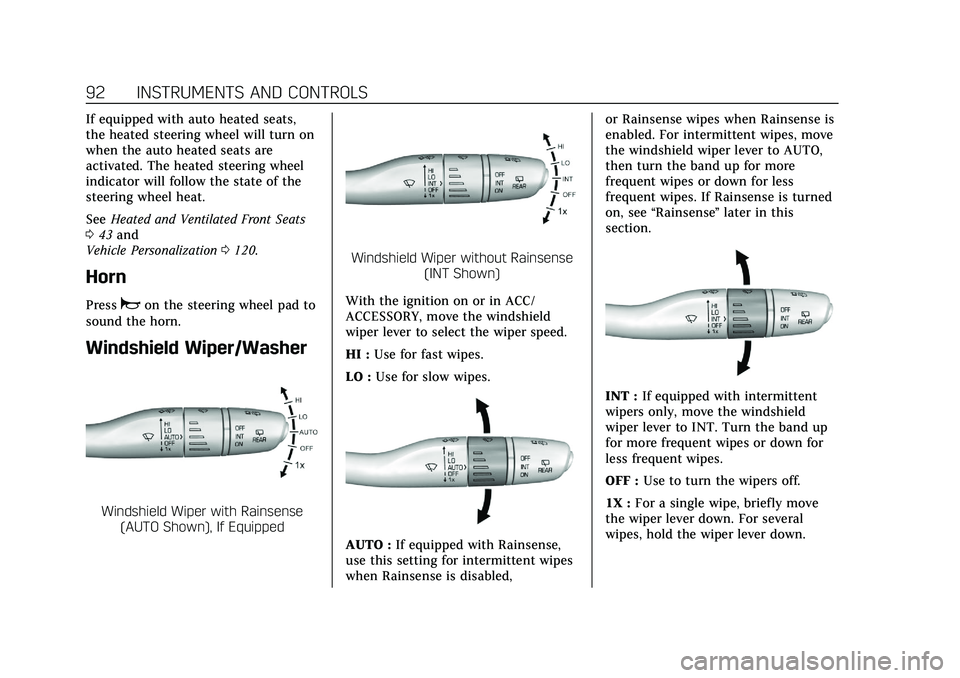
Windshield Wiper with Rainsense (AUTO Shown), If Equipped
Windshield Wiper without Rainsense (INT Shown)
With the ignition on or in ACC/
ACCESSORY, move the windshield
wiper lever to select the wiper speed.
HI : Use for fast wipes.
LO : Use for slow wipes.
AUTO : If equipped with Rainsense,
use this setting for intermittent wipes
when Rainsense is disabled, or Rainsense wipes when Rainsense is
enabled. For intermittent wipes, move
the windshield wiper lever to AUTO,
then turn the band up for more
frequent wipes or down for less
frequent wipes. If Rainsense is turned
on, see
“Rainsense ”later in this
section.
INT : If equipped with intermittent
wipers only, move the windshield
wiper lever to INT. Turn the band up
for more frequent wipes or down for
less frequent wipes.
OFF : Use to turn the wipers off.
1X : For a single wipe, briefly move
the wiper lever down. For several
wipes, hold the wiper lever down.
Page 125 of 408

Cadillac XT4 Owner Manual (GMNA-Localizing-U.S./Canada/Mexico-
14584367) - 2021 - CRC - 10/14/20
124 INSTRUMENTS AND CONTROLS
.Remote Door Unlock
.Remote Start Auto Cool Seats
.Remote Start Auto Heat Seats
.Remote Window Operation
.Passive Door Unlock
.Passive Door Lock
.Remote Left in Vehicle Alert
Remote Unlock Light Feedback
This setting flashes the exterior lamps
when the vehicle is unlocked with the
RKE transmitter.
Touch Off or Flash Lights.
Remote Lock Feedback
This setting specifies how the vehicle
responds when the vehicle is locked
with the RKE transmitter.
Touch Off, Lights and Horn, Lights
Only, or Horn Only.
Remote Door Unlock
This setting specifies whether all
doors, or just the driver door, unlock
when pressing
Kon the RKE
transmitter.
Touch All Doors or Driver Door. Remote Start Auto Cool Seats
This setting automatically turns on
the ventilated seats when using the
remote start function on warm days.
See
Heated and Ventilated Front Seats
0 43 and
Remote Vehicle Start 014.
Touch Off or On.
Remote Start Auto Heat Seats
This setting automatically turns on
the heated seats when using the
remote start function on cold days.
See Heated and Ventilated Front Seats
0 43 and
Remote Vehicle Start 014.
Touch Off or On.
Remote Window Operation
If equipped, this feature enables
remote operation of the windows with
the RKE transmitter. See Remote
Keyless Entry (RKE) System Operation
0 7.
Touch Off or On. Passive Door Unlock
This setting specifies which doors
unlock when using the button on the
driver door handle to unlock the
vehicle.
Touch Off, All Doors, or Driver
Door Only.
Passive Door Lock
This setting specifies if the vehicle will
automatically lock, or lock and
provide an alert after all the doors are
closed, and you walk away from the
vehicle with the RKE transmitter. See
Remote Keyless Entry (RKE) System
Operation
07.
Touch Off, On with Horn Chirp, or On.
Remote Left in Vehicle Alert
This feature sounds an alert when the
RKE transmitter is left in the vehicle.
This menu also enables Remote No
Longer in Vehicle Alert.
Touch Off or On.Seating Position
Touch and the following may display:
.Seat Entry Memory
Page 307 of 408

Cadillac XT4 Owner Manual (GMNA-Localizing-U.S./Canada/Mexico-
14584367) - 2021 - CRC - 10/14/20
306 VEHICLE CARE
FusesUsage
63 –
65 Air conditioning control
67 –
68 –
69 –
70 Trailer park lamp
72 Starter pinion
75 Engine control module main
76 Powertrain off engine
78 Horn
79 Washer pump
81 Transmission control module/Engine control
module/Cooling pump
82 Nitrogen oxide sensor
83 Ignition coil
84 Powertrain on engine
85 Shunt
86 –
87 Diesel fuel heater 1 Fuses
Usage
88 Aeroshutter
89 Selective catalytic reduction module
92 Trailer stop/Turn right
93 Automatic headlamp leveling/Canister vent
solenoid
95 Smart sensors
96 Diesel fuel heater 2
99 –
Relays Usage
4 –
20 Rear defogger
25 Front wiper control
31 Run/Crank
37 Front wiper speed
42 –
64 Starter motor
66 Powertrain
71 Trailer park lamp Relays
Usage
73 Air conditioning control
80 Starter pinion
90 Powertrain sensor
94 Diesel exhaust fuel heater
98 Diesel fuel heater
Instrument Panel Fuse
Block
The instrument panel fuse block is on
the driver side of the instrument
panel, between the steering wheel and
Page 322 of 408
Cadillac XT4 Owner Manual (GMNA-Localizing-U.S./Canada/Mexico-
14584367) - 2021 - CRC - 10/14/20
VEHICLE CARE 321
When the low tire pressure warning
light comes on:1. Park the vehicle in a safe, level place.
2. Set the parking brake firmly.
3. Place the vehicle in P (Park).
4. Add air to the tire that is underinflated. The turn signal lamp
will flash.
When the recommended pressure
is reached, the horn sounds once
and the turn signal lamp will stop
flashing and briefly turn solid.
Repeat these steps for all
underinflated tires that have
illuminated the low tire pressure
warning light.
{Warning
Overinflating a tire could cause the
tire to rupture and you or others
could be injured. Do not exceed the
maximum pressure listed on the
tire sidewall. See Tire Sidewall
Labeling 0310 and
Vehicle Load Limits 0215. If the tire is overinflated by more than
35 kPa (5 psi), the horn will sound
multiple times and the turn signal
lamp will continue to flash for several
seconds after filling stops. To release
and correct the pressure, while the
turn signal lamp is still flashing,
briefly press the center of the valve
stem. When the recommended
pressure is reached, the horn
sounds once.
If the turn signal lamp does not flash
within 15 seconds after starting to
inflate the tire, the tire fill alert has
not been activated or is not working.
If the hazard warning flashers are on,
the tire fill alert visual feedback will
not work properly.
The TPMS will not activate the tire fill
alert properly under the following
conditions:
.There is interference from an
external device or transmitter.
.The air pressure from the inflation
device is not sufficient to inflate
the tire.
.There is a malfunction in the TPMS.
.There is a malfunction in the horn
or turn signal lamps.
.The identification code of the TPMS
sensor is not registered to the
system.
.The battery of the TPMS sensor
is low.
If the tire fill alert does not operate
due to TPMS interference, move the
vehicle about 1 m (3 ft) back or
forward and try again. If the tire fill
alert feature is not working, use a tire
pressure gauge.
TPMS Sensor Matching Process
Each TPMS sensor has a unique
identification code. The identification
code needs to be matched to a new
tire/wheel position after rotating the
vehicle’s tires or replacing one or more
of the TPMS sensors. The TPMS
sensor matching process should also
be performed after replacing a spare
tire with a road tire containing the
TPMS sensor. The malfunction light
and the DIC message should go off at
the next ignition cycle. The sensors
are matched to the tire/wheel
positions, using a TPMS relearn tool,
Page 323 of 408

Cadillac XT4 Owner Manual (GMNA-Localizing-U.S./Canada/Mexico-
14584367) - 2021 - CRC - 10/14/20
322 VEHICLE CARE
in the following order: driver side
front tire, passenger side front tire,
passenger side rear tire, and driver
side rear. See your dealer for service or
to purchase a relearn tool. A TPMS
relearn tool can also be purchased.
See Tire Pressure Monitor Sensor
Activation Tool at
www.gmtoolsandequipment.com or
call 1-800-GM TOOLS
(1-800-468-6657).
There are two minutes to match the
first tire/wheel position, and
five minutes overall to match all four
tire/wheel positions. If it takes longer,
the matching process stops and must
be restarted.
The TPMS sensor matching process is:1. Set the parking brake.
2. Place the vehicle in Service Mode. See Ignition Positions 0219.
3. Make sure the Tire Pressure info display option is turned on. The
info displays on the DIC can be
turned on and off through the
Options menu. See Driver
Information Center (DIC) 0114. 4. Use the five-way DIC control on the
right side of the steering wheel to
scroll to the Tire Pressure screen
under the DIC info page. See Driver
Information Center (DIC) 0114.
5. Press and hold SEL in the center of the five-way DIC control.
The horn sounds twice to signal
the receiver is in relearn mode and
the TIRE LEARNING ACTIVE
message displays on the DIC
screen.
6. Start with the driver side front tire.
7. Place the relearn tool against the tire sidewall, near the valve stem.
Then press the button to activate
the TPMS sensor. A horn chirp
confirms that the sensor
identification code has been
matched to this tire and wheel
position.
8. Proceed to the passenger side front tire, and repeat Step 7.
9. Proceed to the passenger side rear tire, and repeat Step 7.
10. Proceed to the driver side rear tire, and repeat Step 7. The horn sounds
two times to indicate the sensor identification code has been
matched to the driver side rear tire,
and the TPMS sensor matching
process is no longer active. The
TIRE LEARNING ACTIVE message
on the DIC display screen goes off.
11. Turn the vehicle off.
12. Set all four tires to the recommended air pressure level as
indicated on the Tire and Loading
Information label.
Tire Inspection
We recommend that the tires,
including the spare tire, if the
vehicle has one, be inspected for
signs of wear or damage at least
once a month.
Replace the tire if:
.The indicators at three or more
places around the tire can
be seen.
.There is cord or fabric showing
through the tire's rubber.
.The tread or sidewall is cracked,
cut, or snagged deep enough to
show cord or fabric.
Page 395 of 408

Cadillac XT4 Owner Manual (GMNA-Localizing-U.S./Canada/Mexico-
14584367) - 2021 - CRC - 10/14/20
394 CONNECTED SERVICES
MyCadillac Mobile App (If Available)
Download the myCadillac mobile app
to compatible Apple and Android
smartphones. Cadillac users can
access the following services from a
smartphone:
.Remotely start/stop the vehicle,
if factory-equipped.
.Lock/unlock doors, if equipped with
automatic locks.
.Activate the horn and lamps.
.Check the vehicle’s fuel level, oil
life, or tire pressure,
if factory-equipped with the Tire
Pressure Monitor System.
.Send destinations to the vehicle.
.Locate the vehicle on a map (U.S.
market only).
.Turn the vehicle's Wi-Fi hotspot on/
off, manage settings, and monitor
data consumption, if equipped.
.Locate a dealer and schedule
service.
.Request Roadside Service.
.Set a parking reminder with pin
drop, take a photo, make a note,
and set a timer.
.Connect with Cadillac on social
media.
Features are subject to change. For
myCadillac mobile app information
and compatibility, see my.cadillac.com.
An active OnStar or connected service
plan may be required. A compatible
device, factory-installed remote start,
and power locks are required. Data
rates apply. See www.onstar.com for
details and system limitations.
Remote Services
Contact an OnStar Advisor to unlock
the doors or sound the horn and flash
the lamps.
Marketplace
OnStar Advisors can provide offers
from restaurants and retailers on your
route, help locate hotels, or book a
room. These services vary by market.
Diagnostics
By monitoring and reporting on the
vehicle’s key systems, OnStar
Advanced Diagnostics, if equipped,
provides a way to keep up on
maintenance. Capabilities vary by model. See www.onstar.com for details
and system limitations. Features are
subject to change. For updates on
feature capabilities, see
my.cadillac.com. Message and data
rates may apply.
Page 401 of 408

Cadillac XT4 Owner Manual (GMNA-Localizing-U.S./Canada/Mexico-
14584367) - 2021 - CRC - 10/14/20
400 INDEX
High-Speed Operation . . . . . . . . . . . . . . 317
Hill and Mountain Roads . . . . . . . . . . 213
Hill Start Assist (HSA) . . . . . . . . . . . . . 234
Hood . . . . . . . . . . . . . . . . . . . . . . . . . . . . . . . . . 284
Horn . . . . . . . . . . . . . . . . . . . . . . . . . . . . . . . . . . 92
How to Wear Seat Belts Properly . . . 48
HVAC . . . . . . . . . . . . . . . . . . . . . . . . . . . . . . . . 197
I
If the System Needs Service . . . . . . . 164
Ignition Positions . . . . . . . . . . . . . . . . . . . 219
Immobilizer . . . . . . . . . . . . . . . . . . . . . . . . . . 27
IndicatorPedestrian Ahead . . . . . . . . . . . . . . . . . 110
Vehicle Ahead . . . . . . . . . . . . . . . . . . . . . 109
Infants and Young Children, Restraints . . . . . . . . . . . . . . . . . . . . . . . . . . . 67
Information Publication Ordering . . . . . . . . . . . . . 383
Infotainment System . . . . . . . . . . . . . . . 386
Instrument Cluster . . . . . . . . . . . . . . . . . . 99
Instrument Panel Overview . . . . . . . . . . . 4
Interior Rearview Mirrors . . . . . . . . . . . 30
Introduction . . . . . . . . . . . . . . . . . . . . . . 1, 136
J
Jump Starting - North America . . . . 342
K
Keyless Entry Remote (RKE) System . . . . . . . . . . . . . . . 7
Keys . . . . . . . . . . . . . . . . . . . . . . . . . . . . . . . . . . . . 6
L
Labeling, Tire Sidewall . . . . . . . . . . . . . 310
Lamps Cornering . . . . . . . . . . . . . . . . . . . . . . . . . . 133
Courtesy . . . . . . . . . . . . . . . . . . . . . . . . . . . 133
Daytime Running (DRL) . . . . . . . . . . 131
Dome . . . . . . . . . . . . . . . . . . . . . . . . . . . . . . 133
Exterior Controls . . . . . . . . . . . . . . . . . . 129
Exterior Lamps Off Reminder . . . . 131
Exterior Lighting BatterySaver . . . . . . . . . . . . . . . . . . . . . . . . . . . . . 135
Malfunction Indicator (Check Engine) . . . . . . . . . . . . . . . . . . . . . . . . . . 105
On Reminder . . . . . . . . . . . . . . . . . . . . . . 113
Reading . . . . . . . . . . . . . . . . . . . . . . . . . . . . 134
Lane Change Alert (LCA) . . . . . . . . . . . 263
Lane Keep Assist (LKA) . . . . . . . . . . . . 265
Lane Keep Assist Light . . . . . . . . . . . . . 109
Lap-Shoulder Belt . . . . . . . . . . . . . . . . . . . . 50
LATCH System Replacing Parts after a Crash . . . . . 79
LATCH, Lower Anchors and Tethers for Children . . . . . . . . . . . . . . . 72 LED Lighting . . . . . . . . . . . . . . . . . . . . . . . . 301
Liftgate . . . . . . . . . . . . . . . . . . . . . . . . . . . . . . . 19
Light
Performance Shifting . . . . . . . . . . . . . 109
Lighting Entry . . . . . . . . . . . . . . . . . . . . . . . . . . . . . . 134
Exit . . . . . . . . . . . . . . . . . . . . . . . . . . . . . . . . 134
Illumination Control . . . . . . . . . . . . . . 133
LED . . . . . . . . . . . . . . . . . . . . . . . . . . . . . . . . 301
Lights Airbag Readiness . . . . . . . . . . . . . . . . . 104
All-Wheel Drive . . . . . . . . . . . . . . . . . . . 109
Antilock Brake System (ABS)
Warning . . . . . . . . . . . . . . . . . . . . . . . . . 108
Brake System Warning . . . . . . . . . . . 107
Charging System . . . . . . . . . . . . . . . . . . 105
Check Engine (Malfunction Indicator) . . . . . . . . . . . . . . . . . . . . . . . . 105
Cruise Control . . . . . . . . . . . . . . . . . . . . . 113
Door Ajar . . . . . . . . . . . . . . . . . . . . . . . . . . 114
Driver Mode Control . . . . . . . . . . . . . . 111
Electric Parking Brake . . . . . . . . . . . . 107
Engine Coolant Temperature Warning . . . . . . . . . . . . . . . . . . . . . . . . . 111
Engine Oil Pressure . . . . . . . . . . . . . . . 112
Flash-to-Pass . . . . . . . . . . . . . . . . . . . . . . 131
Gear Shifting . . . . . . . . . . . . . . . . . . . . . . 108
High-Beam On . . . . . . . . . . . . . . . . . . . . 113