2021 CADILLAC CT5 passenger door
[x] Cancel search: passenger doorPage 10 of 435

Cadillac CT5 Owner Manual (GMNA-Localizing-U.S./Canada-14584312) -
2021 - CRC - 11/23/20
KEYS, DOORS, AND WINDOWS 9
If equipped with memory seats,
remote keys 1 and 2 are linked to
seating positions of memory 1 or 2.
SeeMemory Seats 039.
Keyless Unlocking/Locking from the
Driver Door
Driver Door Lock Button Shown, Passenger Similar
When the doors are locked and the
remote key is within 1 m (3 ft) of the
door handle, touching the driver door
handle inside sensor will unlock the
driver door. Touching the driver door
outside handle sensor will lock the
doors.
Driver Door Lock Sensor Shown, Passenger Similar
If equipped with remote folding
mirror, touching the driver door
handle sensor may fold and unfold the
mirrors. See Folding Mirrors 027.
Keyless Unlocking/Locking from the
Passenger Doors
When the doors are locked and the
remote key is within 1 m (3 ft) of the
door handle, touching the inside door
handle sensor of the passenger door
will unlock all doors. Touching the
sensor on the outside of the door
handle will lock the doors. Disable/Enable Keyless Unlocking of
Exterior Door Handles and Trunk
If equipped, keyless unlocking of the
exterior door handles and trunk can
be disabled and enabled.
Disabling Keyless Unlocking:
With the vehicle off, press and hold
Q
andKon the remote key at the same
time for approximately four seconds.
The turn signal lamps will flash four
times quickly to indicate access is
disabled. Using any exterior handle to
unlock the doors or open the trunk
will cause the turn signal lamps to
flash four times quickly, indicating
access is disabled. If disabled, disarm
the alarm system before starting the
vehicle.
Disabling Keyless Unlocking may also
be configured under Vehicle
Personalization. See Vehicle
Personalization 0123.
Page 12 of 435

Cadillac CT5 Owner Manual (GMNA-Localizing-U.S./Canada-14584312) -
2021 - CRC - 11/23/20
KEYS, DOORS, AND WINDOWS 11
your dealer. The vehicle can be
reprogrammed so that lost or stolen
remote keys no longer work. Each
vehicle can have up to eight remote
keys matched to it.
Programming with Recognized
Remote Keys
A new key can be programmed to the
vehicle when there are two
recognized keys.
To program, the vehicle must be in
RUN and all remote keys, both
currently recognized and new, must
be with you.1. Place the two recognized remote keys on the passenger seat.
2. Scroll to the DIC menu to "Remote Key Learn" menu and select.
The DIC displays READY FOR
REMOTE #3, 4, 5, ETC.
3. Place the new remote key into therear cupholder.
4. Press ENGINE START/STOP. When the remote key is learned, the DIC
display will show that the remote
key has been programmed.
5. Remove the remote key from the rear cupholder and press
KorQ
on the remote key.
To program additional remote keys,
repeat Steps 3–5.
When all additional remote keys
are programmed, press and hold
ENGINE START/STOP for
approximately 12 seconds to exit
programming mode. Programming without Recognized
Remote Keys
If two currently recognized remote
keys are not available, see your dealer
to program new remote keys.
Starting the Vehicle with a Low
Remote Key Battery
For improved vehicle security, the
remote key is equipped with a motion
sensor. When starting the vehicle,
if the remote key has been idle for a
while, the DIC may display KEY IN
SLEEP MODE, MOVE KEY, THEN
START. Move the remote key slightly
and try starting the vehicle. When
starting the vehicle, if the remote key
battery is depleted or there is signal
interference, the DIC may display NO
KEY FOUND, REPLACE BATTERY IN
KEY or NO REMOTE KEY WAS
DETECTED PLACE KEY IN KEY
POCKET THEN START YOUR
VEHICLE, follow the steps shown
below:
Page 16 of 435

Cadillac CT5 Owner Manual (GMNA-Localizing-U.S./Canada-14584312) -
2021 - CRC - 11/23/20
KEYS, DOORS, AND WINDOWS 15
.The hazard warning flashers are on.
.There is an emission control system
malfunction.
.The engine coolant temperature is
too high.
.The oil pressure is low.
.The 30 minutes of engine run time
have been used.
.The vehicle is not in P (Park).
Door Locks
{Warning
Unlocked doors can be dangerous.
.Passengers, especially children,
can easily open the doors and
fall out of a moving vehicle. The
doors can be unlocked and
opened while the vehicle is
moving. The chance of being
thrown out of the vehicle in a
crash is increased if the doors are
not locked. So, all passengers
should wear seat belts properly
and the doors should be locked
whenever the vehicle is driven.(Continued)
Warning (Continued)
.Young children who get into
unlocked vehicles may be unable
to get out. A child can be
overcome by extreme heat and
can suffer permanent injuries or
even death from heat stroke.
Always lock the vehicle whenever
leaving it.
.Outsiders can easily enter
through an unlocked door when
you slow down or stop the
vehicle. Locking the doors can
help prevent this from
happening.
Always take your remote key with you
when exiting the vehicle to prevent
being locked out. To lock or unlock
the doors from outside the vehicle:
.PressQorKon the remote key.
See Remote Keyless Entry (RKE)
System Operation 07.
.Use the mechanical key in the
driver door. The key lock cylinder is
covered with a cap. See
“Driver Door Key Lock Cylinder
Access (In Case of Dead Battery)”
later in this section.
To lock or unlock the doors from
inside the vehicle:
.PressQorKon the power door
lock switch.
.Pull the front door handle once to
open the door. Pull the rear door
handle once to unlock and once
more to open the door.
Keyless Access
The remote key must be within 1 m
(3 ft) of the trunk or door being
opened or locked. To unlock and
unlatch any door, press the release
Page 25 of 435

Cadillac CT5 Owner Manual (GMNA-Localizing-U.S./Canada-14584312) -
2021 - CRC - 11/23/20
24 KEYS, DOORS, AND WINDOWS
vehicle is not started, or the door is
not unlocked by pressing
Kon the
remote key during the 10-second
pre-alarm, the alarm will be activated.
The alarm will also be activated if a
passenger door, the trunk, or the hood
is opened without first disarming the
system. When the alarm is activated,
the turn signals flash and the horn
sounds for about 30 seconds. The
alarm system will then re-arm to
monitor the next unauthorized event.
Disarming the Alarm System
To disarm the alarm system or turn
off the alarm if it has been activated:
.PressKon the remote key.
.Unlock the vehicle using the Keyless
Access system.
.Start the vehicle.
To avoid setting off the alarm by
accident:
.Lock the vehicle after all occupants
have left the vehicle and all doors
are closed.
.Always unlock a door with the
remote key or use the Keyless
Access system. Unlatching the driver door with the
mechanical key will not disarm the
system or turn off the alarm.
How to Detect a Tamper
Condition
IfKis pressed on the remote key and
the horn chirps and the lights flash
three times, a previous alarm occurred
while the system was armed.
If the alarm has been activated, a
message will appear on the DIC.
Power Sounder, Inclination
Sensor, and Intrusion Sensor
In addition to the standard
theft-deterrent system features, this
system may also have a power
sounder, inclination sensor, and
intrusion sensor.
The power sounder provides an
audible alarm which is distinct from
the vehicle’s horn. It has its own
power source, and can sound an alarm
if the vehicle’s battery is
compromised. The inclination sensor can set off the
alarm if it senses movement of the
vehicle, such as when a tire is
removed. Make sure the vehicle's
alarm is not armed prior to any
jacking.
The intrusion sensor monitors the
vehicle interior, and can activate the
alarm if it senses unauthorized entry
into the vehicle's interior. Do not allow
passengers or pets to remain in the
vehicle when the intrusion sensor is
activated.
Before arming the theft-deterrent
system and activating the intrusion
sensor:.Make sure all doors and windows
are completely closed.
.Secure any loose items such as sun
glasses.
.Make sure there are no obstructions
blocking the sensors in the front
overhead console.
.Close DVD screens before leaving
the vehicle.
Page 27 of 435

Cadillac CT5 Owner Manual (GMNA-Localizing-U.S./Canada-14584312) -
2021 - CRC - 11/23/20
26 KEYS, DOORS, AND WINDOWS
The system does not have to be
manually armed or disarmed.
The vehicle is automatically
immobilized when the vehicle is
turned off.
The immobilization system is
disarmed when the ignition is turned
on or to ACC/ACCESSORY and a valid
remote key is present in the vehicle.
The security light, in the instrument
cluster, comes on if there is a problem
with arming or disarming the
theft-deterrent system.
The system has one or more remote
keys matched to an immobilizer
control unit in the vehicle. Only a
correctly matched remote key will
start the vehicle. If the remote key is
ever damaged, you may not be able to
start your vehicle.
When trying to start the vehicle, the
security light may come on briefly.If the engine does not start and the
security light stays on, there is a
problem with the system. Turn the
ignition off and try again.
If the vehicle will not change ignition
modes (ACC/ACCESSORY, on, off), and
the remote key appears to be
undamaged, try another remote key.
Or, you may try placing the remote
key in the backup location. See
Remote Keyless Entry (RKE) System
Operation
07.
If the ignition modes will not change
with the other remote key or in the
backup location, the vehicle needs
service. If the ignition does change
modes, the first remote key may be
faulty. See your dealer.
It is possible for the immobilizer
system to learn new or replacement
remote keys. Up to eight remote keys
can be programmed for the vehicle. To
program additional remote keys, see
“Programming Remote Keys to the
Vehicle ”under Remote Keyless Entry
(RKE) System Operation 07.
Do not leave the remote key or device
that disarms or deactivates the
theft-deterrent system in the vehicle.
Exterior Mirrors
Convex Mirrors
{Warning
A convex mirror can make things,
like other vehicles, look farther
away than they really are. If you cut
too sharply into the right lane, you
could hit a vehicle on the right.
Check the inside mirror or glance
over your shoulder before changing
lanes.
The passenger side mirror is convex
shaped. A convex mirror's surface is
curved so more can be seen from the
driver seat.
Page 28 of 435
Cadillac CT5 Owner Manual (GMNA-Localizing-U.S./Canada-14584312) -
2021 - CRC - 11/23/20
KEYS, DOORS, AND WINDOWS 27
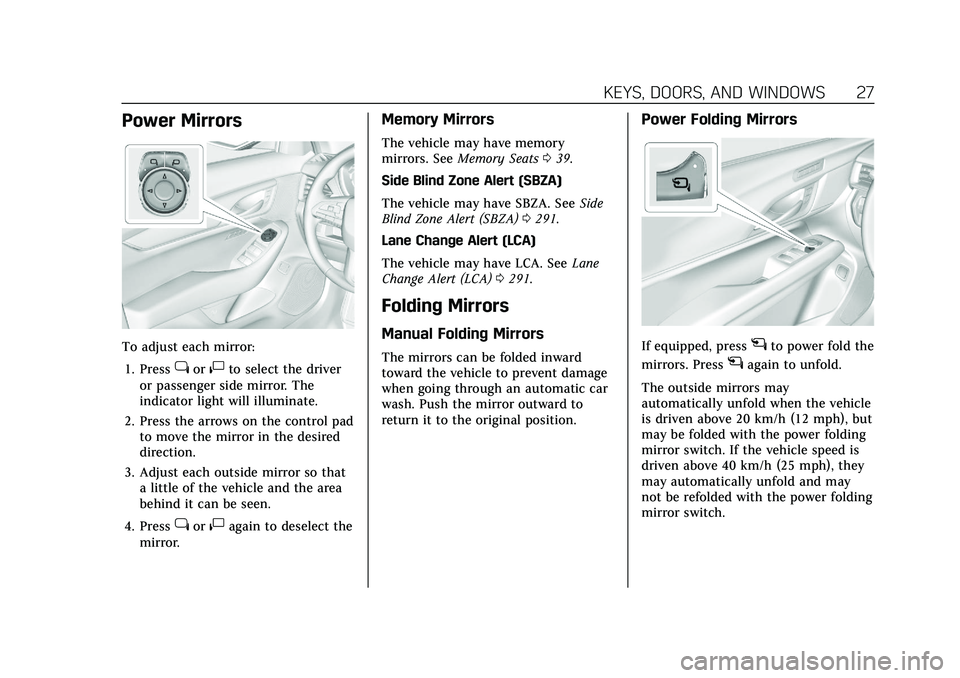
Power Mirrors
To adjust each mirror:1. Press
jor|to select the driver
or passenger side mirror. The
indicator light will illuminate.
2. Press the arrows on the control pad to move the mirror in the desired
direction.
3. Adjust each outside mirror so that a little of the vehicle and the area
behind it can be seen.
4. Press
jor|again to deselect the
mirror.
Memory Mirrors
The vehicle may have memory
mirrors. See Memory Seats 039.
Side Blind Zone Alert (SBZA)
The vehicle may have SBZA. See Side
Blind Zone Alert (SBZA) 0291.
Lane Change Alert (LCA)
The vehicle may have LCA. See Lane
Change Alert (LCA) 0291.
Folding Mirrors
Manual Folding Mirrors
The mirrors can be folded inward
toward the vehicle to prevent damage
when going through an automatic car
wash. Push the mirror outward to
return it to the original position.
Power Folding Mirrors
If equipped, pressgto power fold the
mirrors. Press
gagain to unfold.
The outside mirrors may
automatically unfold when the vehicle
is driven above 20 km/h (12 mph), but
may be folded with the power folding
mirror switch. If the vehicle speed is
driven above 40 km/h (25 mph), they
may automatically unfold and may
not be refolded with the power folding
mirror switch.
Page 29 of 435

Cadillac CT5 Owner Manual (GMNA-Localizing-U.S./Canada-14584312) -
2021 - CRC - 11/23/20
28 KEYS, DOORS, AND WINDOWS
Resetting the Power Folding
Mirrors
Reset the power folding mirrors if:
.The mirrors are accidentally
obstructed while folding.
.They are accidentally manually
folded/unfolded.
.The mirrors do not stay in the
unfolded position.
.The mirrors vibrate at normal
driving speeds.
Fold and unfold the mirrors one time
using the mirror controls to reset
them to their normal position. A noise
may be heard during the resetting of
the power folding mirrors. This sound
is normal after a manual folding
operation.
Remote Mirror Folding
If equipped with power folding
mirrors, and the mirrors have been
folded with the power folding mirror
switch, they may not be automatically
unfolded by the Remote Mirror
Folding feature. If equipped with power folding
mirrors, and the mirrors have not
been folded with the power folding
mirror switch and the vehicle is in
P (Park), they may be automatically
folded/unfolded as follows:
1. If doors are locked by pressing
H
on the remote key, the mirrors will
fold. If doors are unlocked by
pressing
Ion the remote key, the
mirrors will unfold. See Remote
Keyless Entry (RKE) System
Operation 07.
2. If doors are locked by pressing the door handle button, the mirrors
will fold. If doors are unlocked by
pressing the door handle button,
the mirrors will unfold. See
“Keyless Unlocking/Locking from
the Driver Door” inRemote Keyless
Entry (RKE) System Operation 07.
3. If passive locking is enabled and doors are locked by that feature,
the mirrors will fold. See “Passive
Locking” inRemote Keyless Entry
(RKE) System Operation 07.
Heated Mirrors
If equipped with heated mirrors:
K:The rear window defogger also
heats the outside mirrors.
See Dual Automatic Climate Control
System 0202.
Automatic Dimming Mirror
If the vehicle has the automatic
dimming mirror, the driver outside
mirror automatically adjusts for the
glare of headlamps behind you.
Reverse Tilt Mirrors
If equipped with reverse tilt mirrors
and memory seats, the passenger and/
or driver mirror tilts to a preselected
position when the vehicle is in
R (Reverse). This allows the curb to be
seen when parallel parking. The
mirror(s) may move from their tilted
position when:
.The vehicle is shifted out of
R (Reverse), or remains in
R (Reverse) for about 30 seconds.
.The ignition is turned off.
Page 33 of 435

Cadillac CT5 Owner Manual (GMNA-Localizing-U.S./Canada-14584312) -
2021 - CRC - 11/23/20
32 KEYS, DOORS, AND WINDOWS
Power windows work when the
ignition is on, in ACC/ACCESSORY,
or when Retained Accessory Power
(RAP) is active. SeeRetained Accessory
Power (RAP) 0229.
Using the window switch, press to
open or pull to close the window.
The windows may be temporarily
disabled if they are used repeatedly
within a short time.
Window Lockout
With Folding Mirrors, Without Folding Mirrors Similar
This feature stops the rear passenger
window switches from working.
.Press2to engage the rear window
lockout feature. The indicator light
is on when engaged.
.Press2again to disengage.
Window Express Movement
All windows can be opened without
holding the window switch. Press the
switch down fully and quickly release
to express open the window. If equipped, pull the window switch
up fully and quickly release to express
close the window. Briefly press or pull
the window switch in the same
direction to stop that window’s
express movement.
Window Automatic Reversal
System
The express-close feature will reverse
window movement if it comes in
contact with an object. Extreme cold
or ice could cause the window to
auto-reverse. The window will operate
normally after the object or condition
is removed.
Automatic Reversal System
Override
{Warning
If automatic reversal system
override is active, the window will
not reverse automatically. You or
others could be injured and the
window could be damaged. Before
using automatic reversal system
(Continued)