2021 AUDI Q2 ABS
[x] Cancel search: ABSPage 147 of 364

Intelligent technology
CO
< o rN
iv
rN
t-H
o < 00
Intelligent technology
Electronic stabilisation
control (ESC)
Description
The electronic stabilisation control (ESC) increa
ses the car's stability. It reduces the tendency to
skid and improves the stability and roadholding
of the vehicle. The ESC detects critical handling
situations, such as understeer, oversteer and
wheelspin
on the driven wheels. It stabilises the
vehicle by braking individual wheels or by reduc
ing the engine torque. The indicator
lamp^
in
the instrument cluster starts flashing as soon as
the ESC intervenes.
The following systems are integrated in the ESC:
Anti-lock brake system (ABS)
ABS prevents the wheels from locking up under
braking until the vehicle has reached a virtual
standstill.
You can continue to steer the vehicle
even when the brakes are on
full.
Keep your foot
on the brake pedal and do not pump the brakes.
You will feel the brake pedal puLsate while the
anti-lock brake system is working.
Brake assist system
The brake assist system can shorten the braking
distance. The braking force is automatically boos
ted if
you
press the brake pedal quickly in an
emergency. You must keep pressing the brake
pedal until the danger has passed. On
vehides
with adaptive cruise control*, the response of the
brake assist system will be more sensitive if you
are too close to the vehicLe in front.
Traction control system (ASR)
In the event of
wheelspin,
the traction control
system reduces the engine torque to match the
amount of grip available. This helps the car to
start moving, accelerate or climb a gradient.
Electronic differential lock (EDL)
When the EDL detects wheelspin, it brakes the
spinning wheel and directs the power to the
oth
er driven wheel (or wheels on quattro* versions).
This function is not available at high speeds.
To prevent the disc brake of the braked wheel
from overheating, the EDL cuts out automatically
if subjected to excessive loads. The vehicLe can
still be driven. The EDL will switch on again auto
matically when the brake has cooled down.
Steering recommendation
The ESC helps to stabilise the vehicle by changing
the steering wheel torque.
Trailer stabilisation system
Applies to: vehicles with trailer stabilisation system
Trailers have a tendency to sway. If the
ESC
de
tects that the trailer is swaying and this is affect
ing the towing vehicLe, it will automatically brake
the vehicle in order to stabilise the trailer
^>page
97.
Selective wheel torque control
Selective wheel torque control intervenes when
cornering by braking the wheel(s) on the inside of
the bend individually as required. This enables
precision cornering.
Multicollision brake assist system
The "multicollision brake assist system" can help
to reduce the risk of skidding and further
colli
sions during an accident. If the airbag control
unit detects that
a
collision has taken place up
wards of
a
certain speed, the vehicle is braked by
the
ESC.
The vehicle will not be braked automatically if:
- the driver presses the accelerator,
- or the
ESC,
the brake system or the vehicle's
electrical system are not fully functional.
WARNING
- The grip provided by the ESC and the inte
grated systems is still subject to the physi
cal limits of adhesion. Always bear this in
mind,
especially on wet or sLippery roads. If
you notice the systems cutting in, you
should reduce your speed immediately to
suit the road and traffic conditions. Do not
let
the extra safety provided tempt you into
taking any risks when driving - this can
cause accidents.
145
Page 148 of 364

Intelligent technology
Remember that the accident risk always in
creases
if
you
drive fast, especially
in
cor
ners
or
on a wet
or
slippery
road,
or if
you
follow too close behind the vehicle in front
of
you.
Please bear
in
mind that even
the
ESC
and
the
integrated systems cannot
compensate
for
the increased accident risk.
When accelerating
on
a uniformly slippery
surface
(for
instance
all
four wheels on
ice
or snow), press the accelerator gradually
and carefully. The driven wheels may other
wise start
to
spin
(in
spite
of
the integrated
control systems), which would impair the
car's stability and could lead
to
an accident.
© Note
The ABS and ASR systems can only work
properly
if
a 11
four tyres have a similar de
gree
of
wear. Any differences
in the
rolling
radius
of
the tyres can cause the system
to
reduce engine power when this
is not
de
sired.
The systems can make noises when they in
tervene.
Switching on/off
The ESC
is switched on automatically when
the
engine is started.
^OFF
1
y
CO
5
3
CO
Fig.
139 Centre console (top): ESC button
The ESC operates
in
several levels. Depending
on
which Level
is
selected,
the
stabilising function
of
the ESC
is
restricted
or
switched
off,
and the ve
hicLe
is
stabilised
to
a greater
or
Lesser degree.
In the following special situations,
it
may be ad
visable
to
switch on off-road mode
to
allow a cer
tain amount
of
wheelspin:
- Rocking
the car
backwards and forwards
to
free
it
- Driving
in
deep snow
or
on Loose surfaces
- Driving with snow chains
- Driving
on
rough terrain when much
of
the car's
weight
is
lifted
off
the wheels (axle articula
tion)
- Braking
on
unsurfaced tracks when driving
downhill
For
your own safety you should switch
off
the
off-
road mode
in
time.
Characteris
tics
Operation
Indicator
lamps
Driver mes
sages*
Off-road mode
on
The stabilising function
of
the ESC and traction controL
system (ASR)
is
restricted
Press the
&m
button brief
ly-
1*1
Lights
up.
Stabilisation control (ESC):
offroad.
Warning! Restric
ted stability
ESC/ASR
off
The stabilisation function
is
no Longer available
•=>
A-
ESC
and traction controL
system (ASR) are switched
off.
Press
the
&m
button
for
longer than
3
seconds.
•M and
IWHUrt*
liant UP.
Stabilisation control (ESC):
off. Warning! Restricted
stability
Off-road mode
off
or
ESC/ASR on
The stabilising function
of
the ESC and traction control
system (ASR) is fully availa
ble again.
Press the
#*
button again.
|*|goes
out,
or^and
të&Éid*
go
out.
Stabilisation control (ESC):
on
146
Page 245 of 364

Media
CO
< o rN
IV
rN
•-H
•H
00
Applies to: vehicles with Audi music interface
- Audi music interface: See
^>page
241.
Applies to: vehicles with AUX input/USB charging socket
- AUX input/USB charging socket: See
•=>
page 242.
© CAUTION
Please handle the USB adapters with care.
Make sure the cable does not become pinched
or trapped.
Audi music interface
Applies to: vehicles with Audi music interface
You
can connect your mobile devices via the Audi
music interface in order to charge the battery
and operate the devices via the MMI.
Fig.
197 Connecting mobile devices
The Audi music interface consists of
a
USB
con
nection,
an AUX input in the centre console under
the
armrest (f|) ^>page
10, Fig. 2 and another
USB connection in the centre console
©
<=>page
10, Fig. 2.
- To connect a mobile device using a USB adapt
er: Connect the corresponding USB adapter©
^>Fig.
197 to an Audi music interface connec
tion
©^F/'g.
197 or @ •=>page
10, Fig. 2 and
then connect it to the mobile device ® (e.g.
iPod).
- To charge a mobile device using a USB adapt
er: When you connect
a
mobile device to an
Audi music interface connection @
^>Fig.
197
or ©o
page 10, Fig. 2 using an appropriate
USB adapter ©
•=>
Fig.
197 the device's battery
is charged automatically.
- To disconnect a mobile device from the Audi
music interface: Detach the USB adapter©
^>Fig.
197
from
the Audi music interface.
-
To
disconnect mobile devices with Apple dock
connector: With the release tabs ©
^>page
240, Fig. 196 pressed, detach the Apple
dock connector from the Apple device.
Depending on the device you are using, the me
dia are started and operated using the mobile de
vice or the MMI
^page
243.
To connect two mobile devices: If two mobile
devices (e.g. an iPod and a smartphone) are
con
nected at the same time, both devices can be
used as a pLayback source.
You can connect mobile devices via the analogue
AUX interface:
-
To
connect a mobile device to the AUX input:
Connect the cable ©
^Fig.
197 to the AUX in
put © on the Audi music interface before
con
necting the mobile device
©
(e.g. MP3 player,
smartphone).
- To disconnect the mobile device from the AUX
input: Detach the cable©
^Fig.
197
from
the
AUX input©
^Fig.
197.
- Operation: Select and confirm the source Ex
ternal audio player ©
Opage
243, Fig. 199.
Media are started and operated using the mo
bile device©
^F/'g.
197.
A WARNING
Today's driving conditions require your full at
tention.
As the driver, you have full responsi
bility for the safety of the vehicle and other
road users. Never operate mobile devices
while the vehicle is moving - risk of accident!
©
!)
CAUTION
-To avoid damaging the connection, please
take care when detaching the connector
from the Audi music interface.
- Use a USB extension cable to connect
devi
ces with an integrated USB connector (e.g.
USB sticks). This will heLp to avoid damage
to your USB device and the Audi music inter
face.
- Very high or very Low temperatures (a com
mon occurrence in a car's interior) can cause
damage to mobile devices and/or impair
their performance. Please do not leave your •
241
Page 247 of 364

Media
CO
<
o
rN
IV
rN
i—i
o
<
•H
00
- To charge a mobile device using
a
USB adapt
er: Connect your mobile device®
^>Fig.
198
to
the charging socket® using
the
appropriate
USB adapter©.
- To disconnect
the
USB adapter from
the
charging socket: Detach
the
USB adapter©
^Fig.
198
from
the
USB charging socket.
- To disconnect mobile devices with Apple dock
connector: With
the
release tabs
©
^>page
240,
Fig.
196
pressed, detach
the
Apple
dock connector from
the
Apple device.
A WARNING
Today's driving conditions require your full
at
tention.
As
the
driver, you have full responsi
bility
for
the
safety
of
the vehicle
and
other
road users. Never use mobile devices while
the vehicle
is
moving
-
risk
of
accident!
!
)
CAUTION
-To avoid damaging
the
connection
on the
Audi music interface, please take care when
unplugging
the
connector from
the
AUX
in
put
or the
USB charging socket.
- Very high
or
very
low
temperatures
(a
com
mon occurrence
in a
car's interior)
can
cause
damage
to
mobile devices and/or impair
their performance. Please
do not
leave your
mobile devices
in the
vehicle when
the
tem
perature
is
very high
or
very
low.
© Note
- When you switch
off
the ignition,
the
USB
ports will continue
to be
supplied with pow
er as Long as
the
energy management sys
tem does
not
intervene.
- USB charging sockets marked
ICHARGEONLYI
cannot transfer data
and
are intended
for
charging only.
-
Do not
use
any
additional USB extension
ca
bles
or
adapters when connecting mobile
devices which must
be
connected
to the USB
charging
socket
©^F/g.
198
via
a USB
adapter
(^>page
240);
this could cause per
formance issues.
- The AUX adapter cable
is
available from
Audi dealers
or
specialist retailers.
- USB hubs
are not
supported.
- Please refer
to the
operating instructions
of
your mobile device
for
important informa
tion
on its
operation.
-
It
cannot
be
guaranteed that
all
mobile
de
vices will function without
any
problems.
- Using
a
mobile device with
the
engine
switched
off
will drain
the
vehicle's battery.
- Audi recommends setting
the
volume
of
a
mobile device connected
to the
AUX input
to
about
70 % of
maximum.
Playing media
Calling
up
media
You
can start
and
operate various types
of
media
via
the MMI
control console.
| Jukebox
I
Q
DVD
Audi
music interface
Xux
^external
audio player
Fig.
199
Illustration:
Possible sources
in the
media menu
3H
BT
audio
playe
Ç"
WI-FI
audio player
• Online media
Fig.
200
Illustration:
Possible sources
in the
media menu
Important:
A
media source must contain audio/
video*
files
^>page
235.
*•
Press
the
I
MEDIA|
button. Press
the
left control
button repeatedly until
the
source overview
is
displayed.
•
Select and confirm
the
desired source.
Or:
Press
the|MEDIA|
button repeatedly until
the
desired source
is
selected.
You
can
select
the
following sources
in the
Media
menu,
depending
on the
vehicle equipment:
•
243
Page 279 of 364

Seat belts
CO
< o rN
iv
rN
t-H
o < 00
Seat belts
Why is it so important to
use seat belts?
Seat belts provide effective protection
The common belief that passengers can brace
their weight with their hands in a minor collision
is false.
Fig.
215 Driver with correctly positioned seat belt - good
protection if the brakes are applied suddenly
It is an established fact that seat belts provide
good protection in accidents. Therefore wearing
a seat belt is required by law in most countries.
When worn correctly, seat belts hold the occu
pants in the best position for maximum protec
tion
^>Fig.
215. The seat belts are capable of ab
sorbing much of the kinetic energy which is
gen
erated in a collision. They also help to prevent
uncontrolled movements which could Lead to se
vere injuries
^>page
275, Important safety
notes when using seat belts.
If they wear the seat belts correctly, the passen
gers benefit greatly from the ability of the belts
to reduce the kinetic energy gradually. The front
crumple zones and other passive safety features
(such as the airbag system) are also designed to
absorb the kinetic energy generated in a
colli
sion.
Taken together, all these features reduce
the forces acting on the occupants and conse
quently the risk of injury.
Although these examples are based on a frontal
collision,
the physical principles involved are the
same in other types of accidents. This is why it is
so important to put on the seat belts before ev
ery trip - even when "just driving around the cor
ner". Ensure that your passengers wear their seat
belts as well
^A-
Seat belts worn correctly have been shown to be
an effective means of reducing the potential for
injury and improving the chances of survival in a
serious accident
^>page
276, Forces acting in a
collision.
For information on how children can travel safely
in the car refer to
^>page
267, Child seats.
A WARNING
- Seat belts must be put on before every trip -
even when driving in town. This also applies
to the rear passengers - risk of injury!
- During pregnancy, women should always
ensure they wear a seat belt. The best way
to protect the unborn child is to protect the
mother
^>page
278, Wearing and adjust
ing the seat belts during pregnancy.
Important safety notes when using seat
belts
There are a number of safety points concerning
the seat belts which you should remember. This
will help to reduce the risk of injury in an
acci
dent.
A WARNING
- The seat belts can only provide maximum
protection if the seats are adjusted properly
^>page
58, Front seats.
- To ensure proper protection, it is important
to wear the seat belts in the correct position
^>page
277, How to wear seat belts prop
erly.
Ensure that the seat belts are worn ex
actly as recommended in this chapter. Belts
which are
not
worn properly can increase
the risk of injury in accidents considerably.
- Do not allow the seat belt to become twis
ted or jammed, or to rub on any sharp
edges.
- Never allow two passengers (even children)
to share the same seat belt. It is especially
dangerous to place a seat belt over a child
sitting on your lap.
275
Page 280 of 364

Seat belts
- Do not wear the belt over hard or fragile ob
jects (such as glasses or pens, etc.) because
this can cause injuries.
- Loose, bulky clothing (such as an overcoat
over
a
jacket) impairs the proper fit and
function of the belts.
- The belts must be kept clean, otherwise the
retractors may not work properly
•=>
tab. Cleaning the interior on page 314.
- The slot in the seat belt buckle must not be
blocked with paper or other objects, as this
can prevent the latch plate from engaging
properly.
-The latch plate of the belt must always be
engaged in the correct buckle for that seat,
otherwise the belt will not be fully effective.
- Check the condition of the seat beLts at
reg
ular intervals. If
you
notice that the belt
webbing,
fittings, retractor mechanism or
buckle of any of the belts is damaged, the
belt must be replaced by a qualified work
shop.
- The seat belts must not be removed or
modified in any way. Do not attempt to re
pair
a
damaged belt yourself.
- Seat belts which have been worn in an
acci
dent and stretched must be replaced by a
qualified workshop. The belt anchorages
should also be checked.
Forces acting in a
collision
The physical principles involved in a frontal
impact
Very
large forces are generated during a
colli
sion; these forces have to be absorbed.
Fig.
216 Passengers of
a
vehicle which is headed for a
brick
wall.
They are not using seat belts.
Fig.
217 The vehicle crashes into the wall
The physical principles involved in a frontal
colli
sion are relatively simple:
Both the moving vehicle and the passengers pos
sess energy, which is known as "kinetic energy"
^>Fig.
216. The amount of "kinetic energy" de
pends on the speed of the vehicle and the weight
of the vehicle and passengers. The higher the
speed and the greater the weight, the more ener
gy there is to be absorbed in an accident.
The most significant factor, however,
is
the
speed of the vehicle. If the speed doubles from
25 km/h to 50 km/h, for example, the kinetic en
ergy increases by
a
factor of four. Because these
passengers are not restrained by seat belts, the
entire amount of kinetic energy has to be absor
bed
at
the point of impact
^>Fig.
217. This would
result in serious or potentially fatal injury.
276
Page 287 of 364
Airbag system
Description of front airbags How the
front
airbags work
CO
â
rN
IV
rN
•-i
§
•H
00
The
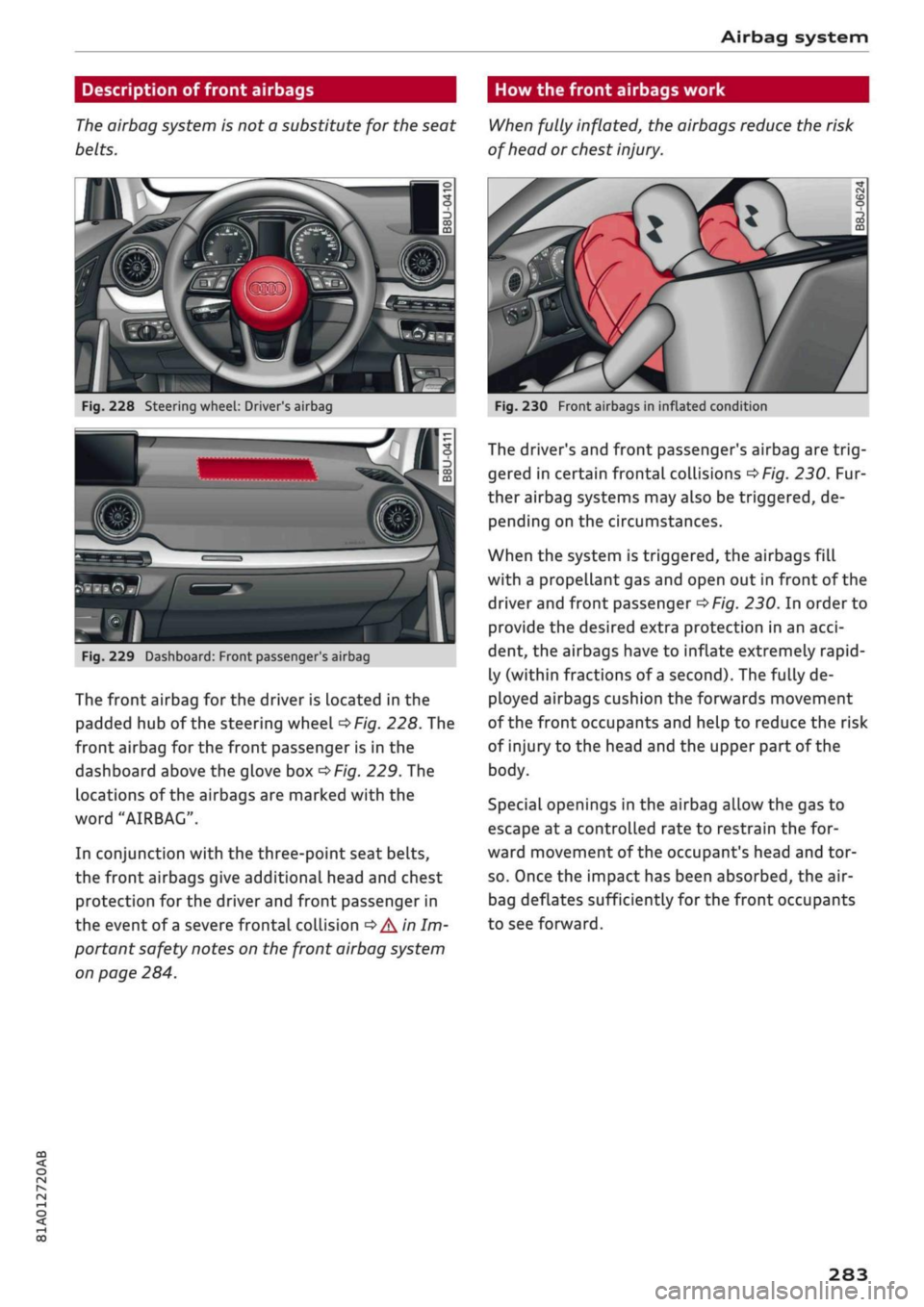
airbag system is not a substitute for the seat
belts.
When fully inflated, the airbags reduce the risk
of head or chest
injury.
Fig.
228 Steering wheel: Driver's airbag
SiMlP
Fig.
229 Dashboard: Front passenger
s
airbag
The front airbag for the driver is Located in the
padded hub of the steering wheel
^Fig.
228. The
front airbag for the front passenger is in the
dashboard above the glove box
^Fig.
229. The
locations of the airbags are marked with the
word "AIRBAG".
In conjunction with the three-point seat belts,
the front airbags give additional head and chest
protection for the driver and front passenger in
the event of
a
severe frontal collision
•=>
A'n
Im
portant safety notes on the front airbag system
on page 284.
Fig.
230 Front airbags in inflated condition
The driver's and front passenger's airbag are
trig
gered in certain frontal collisions
^>Fig.
230. Fur
ther airbag systems may also be triggered, de
pending on the circumstances.
When the system is triggered, the airbags fill
with a propellant gas and open out in front of the
driver and front passenger
^>Fig.
230. In order to
provide the desired extra protection in an
acci
dent, the airbags have to inflate extremely rapid
ly (within fractions of
a
second). The fully de
ployed airbags cushion the forwards movement
of the front occupants and help to reduce the risk
of injury to the head and the upper part of the
body.
Special openings in the airbag allow the gas to
escape at
a
controlled rate to restrain the for
ward movement of the occupant's head and tor
so.
Once the impact has been absorbed, the air-
bag deflates sufficiently for the front occupants
to see forward.
283
Page 295 of 364

Checking and topping up fluids
CO
<
O
rN
IV
rN
t-H
o <
- Make sure you never spill fuel in the
vehi
cle or in the luggage compartment. Fuel
vapour is explosive - danger to life!
© Note
(7) CAUTION
- If any fuel is spilt onto the vehicle, it should
be removed immediately as it could other
wise damage the paintwork.
- Never run the tank completely dry. If there
is an irregular fuel supply, misfiring can oc
cur. As a result unburnt fuel can enter the
exhaust system and cause damage to the
catalytic converter(s).
- Applies to vehicles with diesel engine: When
filling the fuel tank after having run it com
pletely dry, the ignition must be switched
on for at least 30 seconds before the engine
is started. When you then start the engine it
may take longer than normal (up to one mi
nute) for the engine to start firing. This is
because air needs to be bled from the fuel
system while starting.
® For the sake of the envir
Do not try to put in more fuel after the auto
matic filler nozzle has switched off; this may
cause the fuel to overflow if it becomes warm.
(T)
Note
Applies to: vehicles with diesel engine
Diesel vehicles are equipped with an incorrect
fuelling protection
system1).
This system en
sures that the tank can only be fuelled from a
diesel filler nozzle.
- If the filler nozzle is old, damaged or too
small,
it may not be able to open the pro
tection mechanism on the fuel tank. In this
case,
try turning the filler nozzle before in
serting it in the fuel filler neck, use a differ
ent filling pump or seek professional assis
tance.
- The protection mechanism will not open if
you try to add fuel from a spare fuel canis
ter. You can get round this simply by adding
the diesel fuel slowly.
1)
May vary in different countries
The tank flap is not locked when you lock the
vehicle from the inside.
Releasing the tank flap manually
The
tank flap can be released manually if the
central locking system should fail to operate.
Fig.
240 Luggage compartment (rear right): Manual re
lease under luggage compartment floor
The manual release mechanism is located under
the floor panel in the side trim on the right of the
luggage compartment.
•
Lift up the floor panel until it is fixed in position
behind the retaining tabs on the two side sec
tions
•=>
page 319.
• Take the screwdriver out of the vehicle tooL kit
^>page
319. Use the flat-blade side of the re
versible insert.
•
Use the screwdriver to prise off the cover
(l)
and remove
it(|).
• Release the ring from its holder and carefully
pull the ring
(S)
-arrow-
•=>([)•
The tank flap is
then released.
•
Press the left side of the tank flap to open it
•=>
page 290, Fig. 238.
© CAUTION
Stop pulling the ring when you feel resistance
at the ring/cover (the release mechanism is
not audible). Otherwise, you could damage
the manual release mechanism.
291