2021 AUDI A5 interior lights
[x] Cancel search: interior lightsPage 4 of 318

Table of contents
About this Owner's Manual......
SUMIMAry: < = exe : eens: Seen cs sens
QutckeaeCe ssh: «i esis se ois a eaves @
Cockpit. ...... 0... eee eee eee eee
Indicator lights overview...........4..
Display and operation...........
Instrument cluster...............
Instrument cluster overview...........
Operating. ecccuse w+ were oo wens oo ayes 9 ¥
Adjusting the display.................
Coolant temperature display...........
Tachometer’ series i ewe so snes ¥ & ome
Odometer.............. cee eee eee ee
Outside temperature display...........
Engine oil temperature indicator.......
Boost indicator...............0--000.
Shift light indicator..................
Sportidisplaystens « scwne x » eum os vomew «02
Vehicle functions ..............00000.
TOUCH AISPLAY ' sevece: 3 seisas 6 sessen 6 6 ws
General touch display operation........
Multi Media Interface................
Head-up display..................
Description............0.. ee cee eee
Voice recognition system........
General information..............00.
DESGriptiOns « = seen ¢ = seme xs eee st eee
External voice operation..............
Global functions.................
Additional function buttons...........
Starting and driving.............
Personalization..................
Opening and closing.............
Central locking) sani x x swasien © x sponae 2 aaaonor
Keys... eee
Luggage compartment lid.............
Childisafety lock seis 2 « sere ¥ © were 3 ¢ overs
Power windows............000eeeeee
Panorartiic glass roof 0... ieee s ieee es
12 12 12
13
13
14 14
15
15
15
16
16
16
16 18
18
20 26 26 27 27 27
28
30
30
311.
Bi
3,
34
34
38
Al 45 45
47
Valetiparking = s ssse «x cscs ov crue a ¥ oe 47
Garage door opener..........--.00 eee 48
POWOEPRtOP lies. 5 6 sisi. ae sic ao oie & wae 51
Automatic power top................. 51
Wind deflect6r « cccs ss pees sv eeea sv ees 54
Power top emergency operation........ 55
Lights and Vision................. 58
Exteriorlighting « css < «sees < ¢ caew soars 58
Interior lightinGpenis « « sen 0 mew © 2 amore 62
VISION. 2... eee ee eee eee 63
Windshield wipers..................- 65
Digital. compass’. « . ceria ss caw s cei es 67
Sitting correctly and safely...... 69
Correct passenger seating position...... 69
Front seats ....... 0c eee 69
Steering Wheel sows » s wou sg wane x x see 73
Head restraintsti:. «ose a a nase ao oan ae 73
Safety belts. .............0...00000. 75
Memory function..............ee sees 78
‘Airbag SYSteM eviscie co soaae es werae oo eee 79
Child
safety seats... ...... 00... eee eee 84
Storage and convenience........ 91
POWEPISQUIGES vases + arouse « 6 eomaime « + eects 91
Cup holders............. eee eee eee 91
Storage and compartments............ 92
Luggage compartment............... 92
Roof rack... 2.0.2... 2c eee eee eee 96
Warmandicoled ioc. es isco & 6 anes 9 5 ae 98
Climate control system............... 98
3-zone deluxe automatic climate control. 99
Steering wheel heating............... 102
Fluids in the A/C system.............. 102
DYPIVITVE: « eens ¢ & cars ¢ & seme 4 2 HasEE Ee 103
Starting the vehicle.................. 103
When driving.............00eeee eens 104
Drive SYStE Misses ¢ = sawe + « mee se eee sb 110
Start/Stopisystei « sso so aceon 4 @ suena a 111
Brakes... . 2.2.2.0... 2c eee ee eee eee 112
Electromechanical parking brake....... 114
Special driving situations.............. 116
Page 29 of 318

8W7012721BB
Voice recognition system
Voice recognition system
General information
Applies to: vehicles with voice recognition system
You can operate many functions in the vehicle
easily using voice commands.
Using the voice recognition system optimally
> Speak clearly and distinctly at a normal volume.
Speak louder when driving faster.
» Emphasize the words in the commands evenly
and do not leave long pauses.
> Close the doors, the windows, and the sunroof*
to reduce background noise. Make sure that
passengers are not speaking when you are giv-
ing a voice command.
> Do not direct the vents toward the hands-free
microphone, which is in the roof headliner near
the front interior lights.
> Only the driver should speak to the system, be-
cause the handsfree microphone is aimed to-
ward this seating position.
ZA\ WARNING
— Direct your full attention to driving. As the
driver, you have complete responsibility for
safety in traffic. Only use the functions in
such a way that you always maintain com-
plete control over your vehicle in all traffic
situations.
— Do not use the voice recognition system in
emergencies because your voice may change
in stressful situations. The system may take
longer to dial the number or may not be
able to dial it at all. Dial the emergency
number manually.
G) Tips
There are no voice guidance* prompts when a
dialog is active.
Description
eye aU mame ees eR
Applies to: vehicles with voice recognition system
Se
Drive me to
Where is a a
Connect
Pre)
Play
Eg
Maes
coy
Fig. 20 Center display: voice recognition system
Requirement: the ignition and the MMI must be
switched on. A system language supported by
the voice recognition system must be set. There
must be no phone calls in progress and the park-
ing aid must not be active.
Operating by button «£
> Briefly press the «€ button on the multifunction
steering wheel, or depending on the context,
press we in the center display.
> Say the desired command after the signal tone.
> To switch the voice recognition system off,
press and hold the «€ button on the multifunc-
tion steering wheel, or say or press Cancel (@)
> fig. 20.
Operating with voice commands
> Applies to: MMI: To operate the voice recogni-
tion system using voice commands, select on
the home screen: SETTINGS > General >
(Speech dialog system) > Activate the speech
dialog system with "Hey Audi".
> Say the activation phrase Hey Audi together
with the desired command.
> To switch the voice recognition system off, say
Cancel or press and hold the «£ button on the
multifunction steering wheel, or press @)
> fig. 20.
Commands and assistance
In the voice recognition system menu, possible
commands or help settings are displayed for the
current dialog @).
> To receive additional help for the current dia-
log, say or press Help (2).
27
Page 50 of 318

Opening and closing
You can switch the valet parking function on, for
example when someone else is parking your vehi-
cle ). The vehicle can be driven, locked, and un-
locked using the vehicle key, but access to the
luggage compartment is blocked.
> Remove the mechanical key > page 38.
> Press the [VALET] button in the glove compart-
ment. The LED in the button turns on if the
function is switched on.
> Lock the glove compartment with the mechani-
cal key.
>» Applies to: vehicles with lockable pass-through
and lockable rear seat backrests: To secure the
luggage compartment from the vehicle interior,
lock the pass-through and the rear seat backr-
ests using the mechanical key > page 95,
=> page 94.
> Give your vehicle key to the service personnel
who are parking your vehicle and keep the me-
chanical key.
The following buttons are deactivated when the
valet parking function is switched on:
— <3 Button in the driver's door
— &s Button on the vehicle key
— Handle in the luggage compartment lid
If the valet parking function is switched on, a
message will appear every time the ignition is
switched on.
@ Tips
Please note that the luggage compartment
can still be accessed from the vehicle interior
in vehicles with fixed rear seat backrests or
ones that cannot be locked, even when the
valet parking function is switched on.
Garage door opener
Applies to: vehicles with garage door opener
With the garage door opener, you can activate
systems such as the garage doors, security sys-
D_ This function is not available in all countries.
2) The possible number of hand-held transmitters depends
on the equipment.
48
tems or house lights from inside your vehicle.
These functions are operated in the MMI. Multi-
ple receivers can be programmed, which can con-
trol the functions of up to eight2) hand-held
transmitters.
ZA WARNING
— When operating or programming the garage
door opener, make sure that no people or
objects are in the area immediately sur-
rounding the equipment. People can be in-
jured or property can be damaged if struck
when closing.
— Do not allow yourself to be distracted from
traffic by the viewing and operating the dis-
plays.
Gi) Tips
— Ifyou sell your vehicle, reset all settings to
the factory default settings > page 222.
— The system complies with United States FCC
regulations and ISED regulations
=> page 297.
(i) Tips
Before you program your system to the ga-
rage door opener, first check the compatibili-
ty:
— Ask an authorized Audi dealer or authorized
Audi Service Facility or check at www.
homelink.com. You can also find more infor-
mation about HomeLink there.
— You can display information about Home-
Link (compatibility level/status/country
code/HomeLink generation) in the MMI:
— Select on the home screen: VEHICLE > Set-
tings & Service > Garage door opener > @.
Applies to: vehicles with garage door opener
Requirements: the remote control transmitter
must be programmed > page 49, the vehicle >
Page 64 of 318

Lights and Vision
— your vehicle is being towed or if you are tow-
ing another vehicle
WEE Tel
If the Ea indicator light turns on, a bulb has
failed. The displayed message indicates the cause
and possible solutions. If one of the messages re-
mains on, drive immediately to an authorized
Audi dealer or authorized Audi Service Facility to
have the malfunction repaired.
By Audi adaptive light: malfunction! See own-
er's manual
Adaptive light* is not working. The headlights
still function. Drive immediately to an authorized
Audi dealer or authorized Audi Service Facility to
have the malfunction repaired.
By Headlight range control: malfunction! See
owner's manual
There is a malfunction in the headlight range
control system, which may cause glare for other
drivers. Drive to an authorized Audi dealer or au-
thorized Audi Service Facility immediately to have
the malfunction corrected.
High beam assistant: malfunction! See own-
er's manual
You can still switch the high beams on or off
manually. Drive immediately to an authorized
Audi dealer or authorized Audi Service Facility to
have the malfunction repaired.
High beam assistant: currently unavailable.
Camera view limited due to environmental con-
ditions
This message appears if the camera's visual field
is blocked. The system will switch itself off. Try
switching the systems on later.
a Automatic headlights: malfunction! See
owner's manual
The light/rain sensor is malfunctioning. In the
AUTO light switch position, the low beams re-
main switched on at all times for safety reasons.
Drive immediately to an authorized Audi dealer
or authorized Audi Service Facility to have the
malfunction repaired.
62
Interior lighting
Front interior lighting
Fig. 55 Headliner: front interior lighting
Interior lighting buttons
axs* - Interior lighting on/off
4 - Door contact switch on/off. The interior light-
ing is controlled automatically.
Touch-sensitive reading lights
> To turn a reading light on or off, touch the sur-
face @ briefly.
> To activate the manual dimming function,
touch the surface @ when the light is switched
off and keep touching it until the desired
brightness is reached.
Rear interior lighting
3 2
NI
Fig. 56 Headliner: rear reading lights
Reading lights
> To switch the reading lamp on or off, press the
~¥ button @.
> To activate the manual dimming function*,
touch the surface while the light is switched off
“~¥@ and keep touching it until the desired
brightness is reached.
Page 65 of 318

8W7012721BB
Lights and Vision
Interior lighting
Applies to: vehicles with interior lighting
The ambient lighting turns on when the ignition
is switched on. The O light switch position deacti-
vates the interior lighting.
You can adjust the interior lighting individually.
The settings depend on the vehicle equipment.
>» Applies to MMI: Select on the home screen: VE-
HICLE > Light & Visibility > Interior lighting.
You can choose from various color profiles, such
as Maritime.
Additional settings and profiles:
— Brightness: you can adjust the brightness for
all of the interior lighting.
— Individual: you can adjust the brightness and
color of the interior lighting separately, divided
into contour and surface lighting.
— Audi drive select: the contour and surface
lighting color changes depending on the select-
ed drive select* mode.
@ Tips
Depending on vehicle equipment, when the
drive select function is activated, the color of
the contour and surface lighting may briefly
change to red or blue when the interior tem-
perature is manually increased or decreased.
Display brightness
You can adjust the instrument and display illumi-
nation separately. The settings depend on the ve-
hicle equipment.
> Applies to MMI: select on the home screen:
SETTINGS > Display & brightness.
Possible settings in the MMI:
— Cockpit dimming
— Head-up display
—MMI
— Audi virtual cockpit
Pitt aaa ce aria eda)
Fig. 57 Light switch: instrument illumination
%, - You can adjust the background brightness of
the instruments and display illumination.
> Press the knob (@) to release it.
> Turn the knob toward "-" or "+"
crease the brightness.
> Press the knob again to return it to its original
Position.
@) Tips
Depending on vehicle equipment, the instru-
ment illumination (needles and gauges) may
turn on when the lights are off and the igni-
tion is switched on. The illumination for the
gauges reduces automatically and eventually
turns off as brightness outside increases. This
function reminds the driver to turn the low
beams on at the appropriate time.
to reduce or in-
Vision
Adjusting exterior mirrors
RAZ-0150
©
Fig. 58 Driver's door: knob for the exterior mirrors
©
> Turn the knob in the driver's door to the desired
position:
63
>
Page 66 of 318

Lights and Vision
0 - Deactivates all adjustment functions.
Q/ #- Selects the left or right exterior mirror.
To adjust the mirror glass in a mirror, press the
knob in the desired direction.
GA - Heats the mirror glass depending on the
outside temperature.
©) - Folds the exterior mirrors*. To fold the mir-
rors out, turn the knob to one of the other posi-
tions. In the MMI, you can select if the mirrors
fold in automatically when you lock the vehicle
=> page 35.
Front passenger's exterior mirror tilt
function*
Requirement: the knob must be in the position
for the front passenger’s exterior mirror.
The mirror surfaces tilt slightly when reverse
gear is selected to provide a better view, for ex-
ample of the edge of the curb.
You can adjust the mirror surface by turning the
knob in the desired direction.
The mirror moves from the reversing position
back to the original position:
— When you switch the ignition off
— When you drive forward at speeds faster than 9
mph (15 km/h).
— When the knob is no longer in the position for
the front passenger exterior mirror
Z\ WARNING
Curved mirror surfaces (for example convex)
enlarge the field of vision. However, they
make objects in the mirror appear smaller and
farther away. When using these mirrors to es-
timate your distance to vehicles behind you
when changing lanes, you could estimate in-
correctly, which increases the risk of an acci-
dent.
@) Note
— Applies to: vehicles with power folding exte-
rior mirrors: If the mirror housing was
moved by outside forces (such as an impact
when maneuvering), you must use the pow-
er folding function to fold the mirror all the
64
way out. The mirrors will make a loud noise
when they latch into place. The mirror hous-
ing must not be moved back into place by
hand because this could impair the function
of the mirror mechanism.
— Applies to: vehicles without power folding
exterior mirrors: If the mirror housing was
moved by outside forces (such as an impact
when maneuvering), you must move it back
in place by hand.
— If you wash the vehicle in an automatic car
wash, you must fold the exterior mirrors in
to reduce the risk of damage to the mirrors.
Never fold power folding exterior mirrors*
by hand. Only fold them in and out using
the power controls.
@) Tips
If the power adjusting function malfunctions,
the glass in both mirrors can be adjusted by
pressing on the edge of it by hand.
Dimming the mirrors
Manual dimming rearview mirror
> Pull the lever on the bottom of the mirror back.
Automatic dimming rearview mirror
Applies to: vehicles with automatic dimming mirrors
> The interior and exterior mirrors dim automati-
cally when light shines on them, for example
from headlights on a vehicle behind you.
ZA WARNING
Applies to: vehicles with automatic dimming mirrors
— Electrolyte fluid can leak out from broken
mirror glass. This liquid can irritate the skin,
eyes and respiratory system. If there is con-
tact with the fluid, flush immediately with
plenty of water. Consult a physician if neces-
sary.
— Repeated or long-term exposure to electro-
lyte fluid can lead to irritation of the air-
ways, especially in people with asthma or
other respiratory conditions. Take deep
breaths immediately after leaving the vehi-
cle or, if this is not possible, open all of the
doors and windows as wide as possible.
Page 67 of 318

8W7012721BB
Lights and Vision
— If electrolyte fluid comes into contact with
the eyes, flush them thoroughly with plenty
of clean water for at least 15 minutes and
then seek medical attention.
— If electrolyte fluid comes into contact with
the skin, flush the affected area with clean
water for at least 15 minutes, and then
clean with soap and water and seek medical
attention. Clean affected clothing and shoes
thoroughly before wearing again.
— If the fluid was swallowed and the person is
conscious, flush the mouth with water for at
least 15 minutes. Do not induce vomiting
unless this is recommended by medical pro-
fessionals. Seek medical attention immedi-
ately.
@) Note
Applies to: vehicles with automatic dimming mirrors
Electrolyte fluid can leak out from broken mir-
ror glass. This liquid damages plastic surfaces
and paint. Clean this liquid as quickly as possi-
ble, for example with a wet sponge.
@ Tips
Applies to: vehicles with automatic dimming mirrors
— If the light reaching the rearview mirror is
obstructed, the automatic dimming mirror
will not function correctly,
— The automatic dimming mirrors do not dim
when the interior lighting is turned on or
the reverse gear is selected.
Fig. 59 Roof headliner: sun visor
Sun visor
The sun visors can be moved out of their brackets
and turned toward the doors (@).
They can also be moved back and forth length-
wise in this position.
Vanity mirror
The mirror light switches on when the cover over
the
vanity mirror @) opens.
Windshield wipers
Switching the windshield wipers on
Fig. 60 Lever: windshield wipers
> Move the windshield wiper lever 7 to the cor-
responding position:
@ Windshield wipers off
@ Rain sensor/intermittent mode. The wind-
shield wipers switch on once the vehicle speed
exceeds approximately 2 mph (4 km/h) and it is
raining. The higher the sensitivity of the rain sen-
sor that is set (switch © to the right), the earlier
the windshield wipers react to moisture on the
windshield. You can deactivate the rain sensor
mode, which switches the interval mode on. In
intermittent mode, you can adjust the interval
time using the switch ©.
> Applies to: MMI: Select on the home screen:
VEHICLE > Light & Visibility > Rain sensor.
@ Slow wiping
@ Fast wiping
@ Single wipe. If you hold the lever in this posi-
tion longer, the wipers switch from slow wiping
to fast wiping. >
65
Page 70 of 318
Lights and Vision
The digital compass only works when the ignition Om
is turned on. The directions are indicated with ab-
breviations: N (north), NE (northeast), E (east), To prevent inaccurate compass readings, do
SE (southeast), S (south), SW (southwest), W not bring any remote controls, electrical devi-
(west), NW (northwest). ces or metallic objects near the mirror.
Applies to: vehicles with digital compass
B42-0405
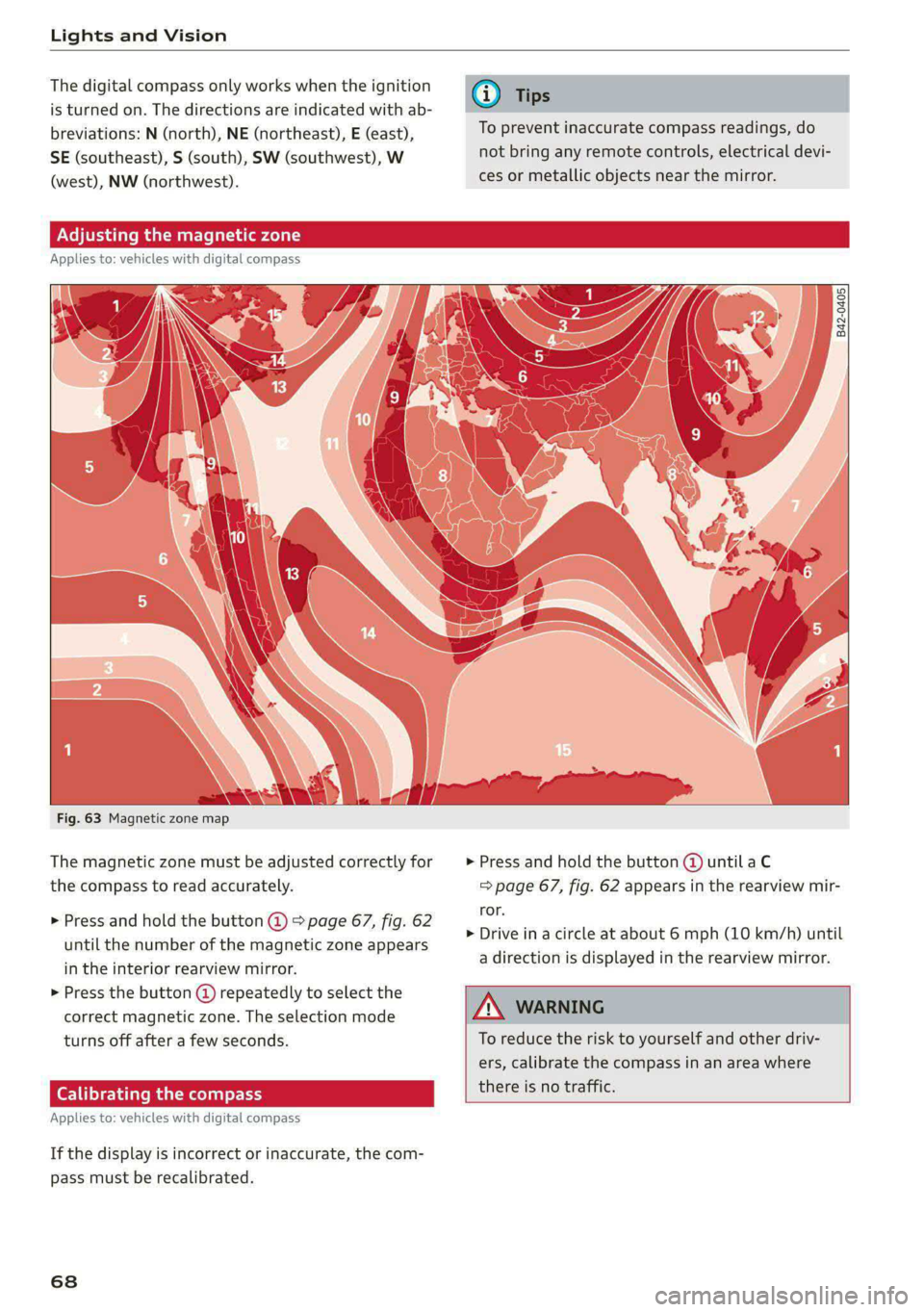
Fig. 63 Magnetic zone map
The magnetic zone must be adjusted correctly for > Press and hold the button @ untilaC
the compass to read accurately. => page 67, fig. 62 appears in the rearview mir-
ror.
> Drive in a circle at about 6 mph (10 km/h) until
a direction is displayed in the rearview mirror.
> Press and hold the button @ > page 67, fig. 62
until the number of the magnetic zone appears
in the interior rearview mirror.
> Press the button () repeatedly to select the
correct magnetic zone. The selection mode
turns off after a few seconds. To reduce the risk to yourself and other driv-
ers, calibrate the compass in an area where
there is no traffic.
Applies t
: vehicles with digital compass
If the display is incorrect or inaccurate, the com-
pass must be recalibrated.
68