2021 AUDI A5 instrument cluster
[x] Cancel search: instrument clusterPage 264 of 318

Wheels
tests, and does not include acceleration, cor-
nering, hydroplaning or peak traction charac-
teristics.
ZX WARNING
The temperature grade for this tire is estab-
lished for a tire that is properly inflated and
not overloaded. Excessive speed, underinfla-
tion, or excessive loading, either separately or
in combination, can cause heat buildup and
possible tire failure.
ZX WARNING
Temperature grades apply to tires that are
properly inflated and not over or underinflat-
ed.
Tire pressure monitoring
system
(1) General notes
Each tire, including the spare (if provided),
should be checked monthly when cold and inflat-
ed to the inflation pressure recommended by the
vehicle manufacturer on the vehicle placard or
tire
inflation pressure label. (If your vehicle has
tires of a different size than the size indicated on
the vehicle placard or tire inflation pressure la-
bel, you should determine the proper tire infla-
tion pressure for those tires).
As an added safety feature, your vehicle has been
equipped with a tire pressure monitoring system
(TPMS) that illuminates a low tire pressure tell-
tale when one or more of your tires is significant-
ly under-inflated. Accordingly, when the low tire
pressure telltale illuminates, you should stop and
check your tires as soon as possible, and inflate
them to the proper pressure. Driving on a signifi-
cantly under-inflated tire causes the tire to over-
heat and can lead to tire failure. Under-inflation
also reduces fuel efficiency and tire tread life,
and may affect the vehicle's handling and stop-
ping
ability.
Please note that the TPMS is not a substitute for
proper tire maintenance, and it is the driver's re-
sponsibility to maintain correct tire pressure,
262
even if under-inflation has not reached the level
to trigger illumination of the TPMS low tire pres-
sure telltale.
Your vehicle has also been equipped with a TPMS
malfunction indicator to indicate when the sys-
tem is not operating properly. The TPMS mal-
function indicator is combined with the low tire
pressure telltale. When the system detects a
malfunction, the telltale will flash for approxi-
mately one minute and then remain continuously
illuminated. This sequence will continue upon
subsequent vehicle start-ups as long as the mal-
function exists.
When the malfunction indicator is illuminated,
the system may not be able to detect or signal
low
tire pressure as intended. TPMS malfunctions
may occur for a variety of reasons, including the
installation of replacement or alternate tires or
wheels on the vehicle that prevent the TPMS
from functioning properly. Always check the
TPMS malfunction telltale after replacing one or
more tires or wheels on your vehicle to ensure
that the replacement or alternate tires and
wheels allow the TPMS to continue to function
properly.
If the tire pressure monitoring indicator
appears
Applies to: vehicles with Tire Pressure Monitoring System in-
dicator
The tire pressure indicator in the instrument
cluster informs you if the tire pressure is too low
or if there is a system malfunction.
Using the ABS sensors, the tire pressure monitor-
ing system compares the tire tread circumference
and vibration characteristics of the individual
tires. If the pressure changes in one or more
tires, this is indicated in the instrument cluster
display with an indicator light @ and a message.
If only one tire is affected, the location of that
tire will be indicated.
The tire pressures must be stored again each
time you change the pressures (switching be-
tween partial and full load pressure) or after
changing or replacing a tire on your vehicle
=> page 263. The tire pressure monitoring system >
Page 272 of 318
Care and cleaning
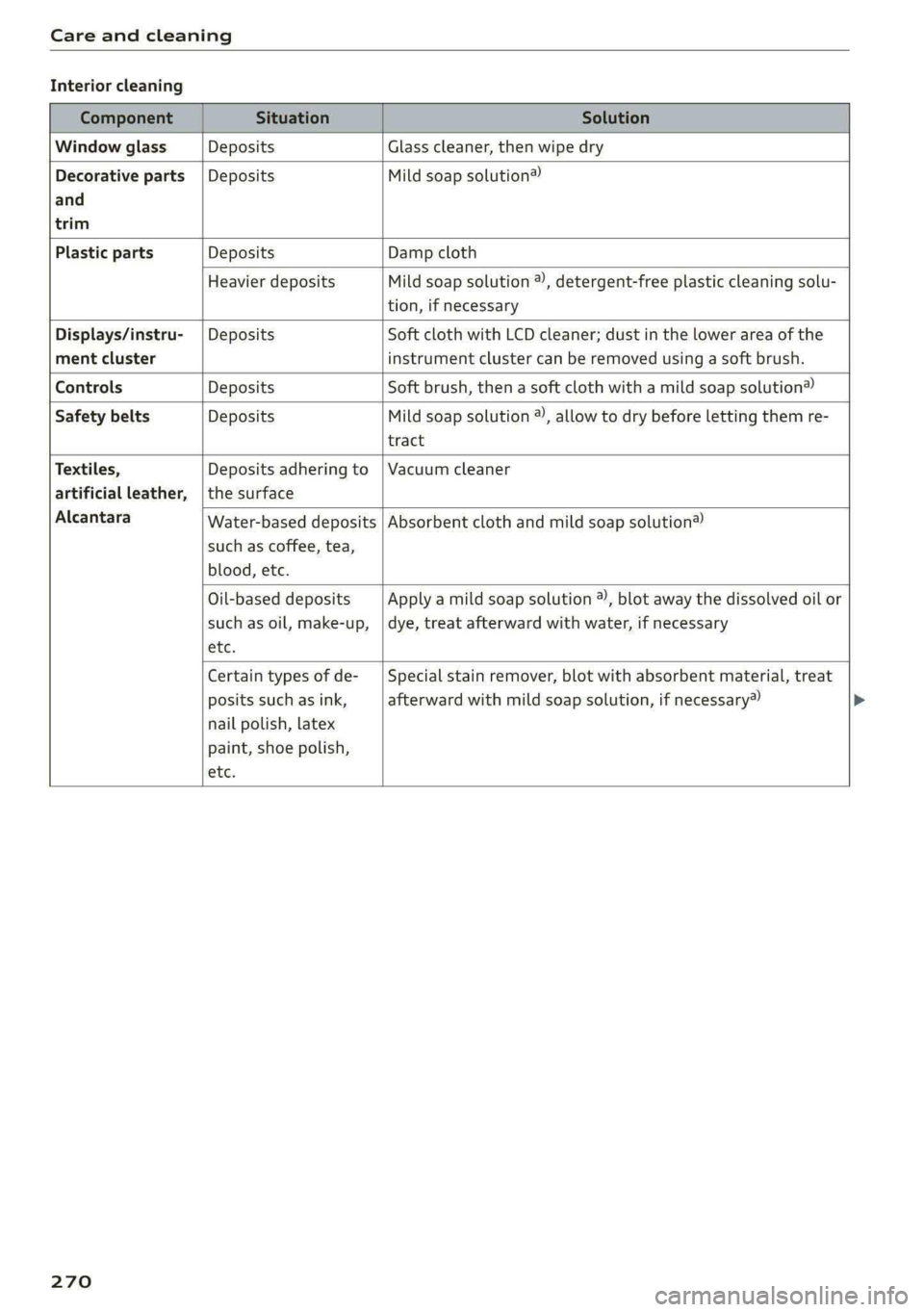
Interior cleaning
Component Situation Solution
Window glass Deposits Glass cleaner, then wipe dry
Decorative parts {Deposits Mild soap solution®
and
trim
Plastic parts Deposits Damp cloth
Heavier deposits Mild soap solution ®), detergent-free plastic cleaning solu-
tion, if necessary
Displays/instru- | Deposits Soft cloth with LCD cleaner; dust in the lower area of the
ment cluster instrument cluster can be removed using a soft brush.
Controls Deposits Soft brush, then a soft cloth with a mild soap solution®
Safety belts Deposits Mild soap solution ®), allow to dry before letting them re-
tract
Textiles, Deposits adhering to | Vacuum cleaner
artificial leather, | the surface
Alcantara
Water-based deposits
such as coffee, tea,
blood, etc.
Absorbent cloth and mild soap solution®
Oil-based deposits
such as oil, make-up,
etc.
Apply a mild soap solution ®), blot away the dissolved oil or
dye, treat afterward with water, if necessary
Certain types of de-
posits such as ink,
nail polish, latex
paint, shoe polish,
etc.
Special stain remover, blot with absorbent material, treat
afterward with mild soap solution, if necessary»
270
Page 274 of 318
Care and cleaning
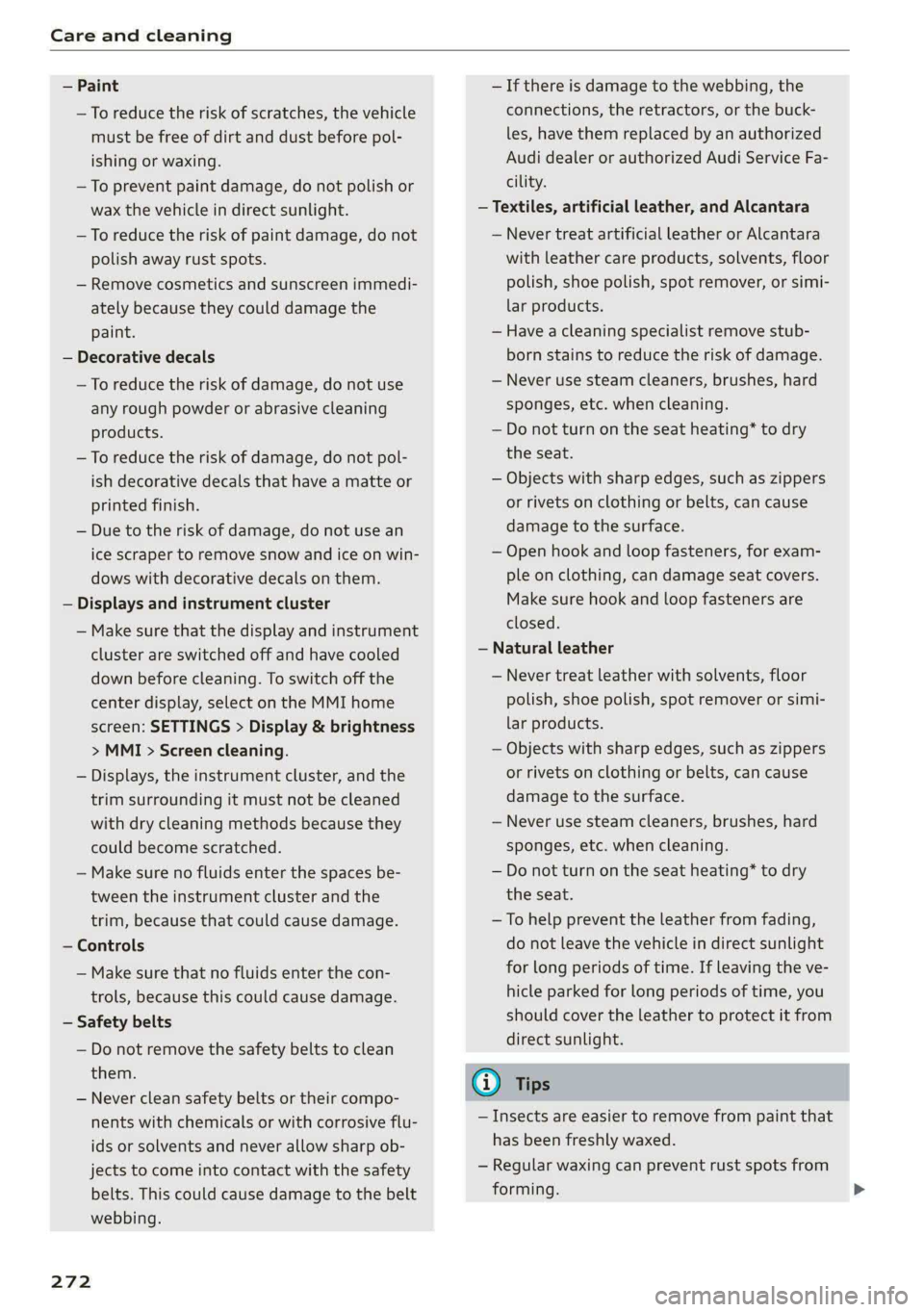
— Paint
—To reduce the risk of scratches, the vehicle
must be free of dirt and dust before pol-
ishing or waxing.
—To prevent paint damage, do not polish or
wax the vehicle in direct sunlight.
—To reduce the risk of paint damage, do not
polish away rust spots.
— Remove cosmetics and sunscreen immedi-
ately because they could damage the
paint.
— Decorative decals
—To reduce the risk of damage, do not use
any rough powder or abrasive cleaning
products.
—To reduce the risk of damage, do not pol-
ish decorative decals that have a matte or
printed finish.
— Due to the risk of damage, do not use an
ice scraper to remove snow and ice on win-
dows with decorative decals on them.
— Displays and instrument cluster
— Make sure that the display and instrument
cluster are switched off and have cooled
down before cleaning. To switch off the
center display, select on the MMI home
screen: SETTINGS > Display & brightness
> MMI > Screen cleaning.
— Displays, the instrument cluster, and the
trim surrounding it must not be cleaned
with dry cleaning methods because they
could become scratched.
— Make sure no fluids enter the spaces be-
tween the instrument cluster and the
trim, because that could cause damage.
— Controls
— Make sure that no fluids enter the con-
trols, because this could cause damage.
— Safety belts
— Do not remove the safety belts to clean
them.
— Never clean safety belts or their compo-
nents with chemicals or with corrosive flu-
ids or solvents and never allow sharp ob-
jects to come into contact with the safety
belts. This could cause damage to the belt
webbing.
272
— If there is damage to the webbing, the
connections, the retractors, or the buck-
les, have them replaced by an authorized
Audi dealer or authorized Audi Service Fa-
cility.
— Textiles, artificial leather, and Alcantara
— Never treat artificial leather or Alcantara
with leather care products, solvents, floor
polish, shoe polish, spot remover, or simi-
lar products.
— Have a cleaning specialist remove stub-
born stains to reduce the risk of damage.
— Never use steam cleaners, brushes, hard
sponges, etc. when cleaning.
— Do not turn on the seat heating* to dry
the seat.
— Objects with sharp edges, such as zippers
or rivets on clothing or belts, can cause
damage to the surface.
— Open hook and loop fasteners, for exam-
ple on clothing, can damage seat covers.
Make sure hook and loop fasteners are
closed.
— Natural leather
— Never treat leather with solvents, floor
polish, shoe polish, spot remover or simi-
lar products.
— Objects with sharp edges, such as zippers
or rivets on clothing or belts, can cause
damage to the surface.
— Never use steam cleaners, brushes, hard
sponges, etc. when cleaning.
— Do not turn on the seat heating* to dry
the seat.
—To help prevent the leather from fading,
do not leave the vehicle in direct sunlight
for long periods of time. If leaving the ve-
hicle parked for long periods of time, you
should cover the leather to protect it from
direct sunlight.
G) Tips
— Insects are easier to remove from paint that
has been freshly waxed.
— Regular waxing can prevent rust spots from
forming.
Page 290 of 318

Fuses and bulbs
Fuse assignment - Driver's side of the
(ole 4) g
Fig. 195 Driver side cockpit: fuse panel with plastic bracket
Fuse assignment - Left side of the luggage
compartment
—
Fuse panel
No. | Equipment
1 Convenience access and start authoriza-
tion control module
2. | Audi phone box, USB input
4 |Head-up display
5S |Audi music interface, USB input
6 | Front climate control system control panel cian othe luggage comparimen’: fuse pane!
7 |Steering column lock
8 | Center display Fuse panel (@) (black)
9 |Instrument cluster No. | Equipment
10 | Volume control 2 |Windshield defroster
11 | Light switch, switch module 3 | Windshield defroster
12 | Steering column electronics 5 |Suspension control
14 | Infotainment system 6 |Automatic transmission
16 Steering column electronics, steering 7 |Rear window defogger
wheel heating 8 |Rear seat heating
9 | Left tail lights
288
10 Airbag control module
a
Luggage compartment lid lock, fuel filler
door lock, convenience system control
module
12 Luggage compartment lid
Fuse panel @) (red)
No. Equipment
Electric compressor
Fuse panel © (brown)
No. Equipment
Exterior antenna
Page 303 of 318

8W7012721BB
Index
Numbers and
Symbols
3-zone deluxe automatic climate control.... 99
A
AIC cooling MOde:. « « vesiare «sas © wrens 6 avers 99
A/C system refrigerant oil............005 300
Acceleration measurement.............. 134
Accelerator pedal....... 0... cece eee eee ee 107
also refer to Accelerator pedal.......... 107
AGCOSSONICS © iiss 2s weer «wai + wave «6 o5a08 296
Active lane assist
refer to Audi active lane assist.......... 150
Adaptive cruise control................. 139
Adaptive dampers............000 ee eee 119
Adjusting air distribution (automatic climate
control system) ............-. ce eee eee 100
Adjusting the brightness................. 63
Adjusting the sound.................00- 221
Adjusting the temperature (automatic climate
control system) ........ cee eee eee 100
Adjusting the volume..............2.-005 30
Adjusting the volume (announcements).... 221
Adjusting the welcome sound............ 221
Aitbag’syStem « « sams s seen + wees os reese es 79
Alarm system
refer to Anti-theft alarm system.......... 37
Alignment pin (changing the wheel)....... 274
All-weather lights...............-..20--- 58
Allseason tires..........2.220202200005 260
All wheel drive
refer tOQUAtEOmms: 5 = yews « w eam eo ewe 120
Amazon Alexa integration
Media playback’. « oii. eons 6 6 cris 6 0 ow 211
Operating...............0..0 000.0000. 28
AMI
refer to Audi music interface........... 211
Android Auto
refer to Audi smartphone interface...... 219
Anti-lock braking system............0005 121
Anti-Slip Regulation. ................405 121
Anti-theft alarm system ..............000. 37
Apple CarPlay
refer to Audi smartphone interface...... 219
ASR
refer to Anti-Slip Regulation........
Audi active lane assist..............
Cleaning the camera area..........
Audi adaptive cruise control
Cleaning the sensors..............
Predictive control................
Traffic jam assist..........-..00-.
Audi adaptive light.................
Audi connect
FefEr LO CONNECE ss = « awe + e wane seas
Audi drive selects: 2 : ssa as xeaas x een
Audi music interface...............
Audio files...............002--000-
Safety measures ....... 0c. ee eens
Audi side assist
refer to Side assist................
Audi smartphone interface..........
Legalinformation................
Audi virtual cockpit
refer to Instrument cluster.........
AUTO
Automatic climate control system...
Automatic headlights.............
Auto Lock (central locking) ..........
Automatic climate control system....
Automatic luggage compartment lid....
Automatic transmission............
Automatic wipe/wash system........
Average consumption..............
Average speed............0.- 0000
B
Bag hooks............--6- eee sees
Band
refer to Frequency band...........
301
Page 305 of 318

8W7012721BB
Index
Closing
Automatic luggage compartment lid...... 42
Convenience closing..........0...e5e0% 46
HOO « sisson sa cnamee ov atteoe a como eo ae vo 2331,
Luggage compartment lid............... 42
Luggage compartment lid with foot motion . 43
Panoramic glass:r00ficc:. «sien as nani we 6 cas 47
Power top......... 00.0 e eee eee eee eee 51
SUrishiade:((60f)': = ween 5 2 same 3 2 eae & te 47
WINdOWS « wsaics 2 ssomee x 2 voscu vo sane eo voce 45
Cockpit diMMiNG « = sess « ¢ ess + ¢ wees se ews 63
Cockpit (OVErview) « « eiea ss wewa s eawwa 2 newer 6
ColOricOdGlss « « waes so sae,p < Asem 2 3 eae EB 299
Compact spare tire................0-00. 280
Compartments............ 00 cee eee eee 92
Compass inthe mirror............-00 eee 67
Compliance ..... 2.0.0... eee 297
Conferenceicalbeains << wma «0 icra vw wmncs va a 177
Configuration wizard.................04. 20
CONNEC: ss saws s + eewe so eee so eee soe 182
Datta plamsrs s onesene « s sesusm « o vaeeove « seanous w = o 186
Data Privacy..............0-00 cee aee 292
EMme@rgenieyCalll swcsc « s sews 2 9 ewe + eee o 187
Infotainment: ss savsse 6 aacsun a 0 asso a nuns 182
Infotainment services...............-. 183
Online roadside assistance............. 188
Vehicle control services.............005 184
Connected devices
Device overvieW............ 0.0. e eee 223
Connections
refer to Media..............0000- 210, 212
Consumer information.................5 294
Consumption
Reducing........... eee eee eee eee ee 110
Consumption (fuel) .................000. 17
Contacts
TMPOrtitiGwas : « wees 5 » wee sy Sees Foe 179
Updating inthe MMI...............068 79
also refer to Directory................. 176
Convenience key...........-00 eee eee 34
Convenience closing................00 46
also refer to Vehicle key..............-. 38
Convenience opening and closing
Windows or panoramic glass roof........ 46
Coolant temperature display.............. 14
Cooling system
Adding
coolant................220005 237
Checking the coolant level............. 237
COOlANE esis oe cere x wma cw aneees w w oO 236
Gornering
lights: + «seme 2 seem 2 o eee oo ee 58
Cruise control system...............005 136
CUP HOIdErS ces ¢ « seen 3 2 heen se een ce eee = 91
Current consumption ..............0.0005 17
D
Data module
Serial’number(IMED) « ssw + 2 caer 2 ¢ sous 2 179
Data plans sce « « sees x v eeeu oo are 2 e oes 186
Data PriVaty’: s cas ¢ 5 seas 7 ¢ cees ts ees ee 292
1) 17
Sting’: weow « » wees so wees go ewe oo 22.1;
Daytime running lights.................. 58
Declaration of compliance............... 297
DEF (instrument cluster)................. 12
Demo mode
refer to Presentation mode............. 200
Destination onthe map................. 193
Details... 6.0... ccc eee eee 193
Determining correct load limit........... 259
Digital compass.............0 eee ee eee ee 67
DIMENSIONS! 3 & sncwne « sanizene » a sussnne » w sesoane w 299
Dimming the exterior mirrors............. 64
Dimming the rearview mirror............. 64
Difect@ lye: s : eaves = » seeps & 2 seeps x ees cE 176
Businessicardiescia so acevo & oceans 6 sranans «4 ie 177
Settings............. 0.02.22 c eee 179
Display
ClEQNiNG’s s = aan sy same xo ewe Fy ewe £ 270
Displaying tooltips.................000. 20
Disposal......... 0... c eee eee eee 294
Distance .... 0.6... eee eee 17
Distance warning cxsces « « saves « + concen o + soar 149
Doors
Child safety lock. .... 0.0... cee eee eee eee 45
DOOF COMPACTSWITCH s z ayeay s a says 9 4 amar og 62
Mechanically unlocking and locking....... 37
Driver information system................ 13
Drives
refer to Media.............000005 210, 212
303
Page 308 of 318

Index
Heated steering wheel................-. 102
Oat bases. 4s sxesaas @ 2 ieee 5 ees so ese oe a 98
HFP
refer to Hands Free Profile............. 171
High beams
High beam assistant................... 59
Highway lights...... 2.6.0... e eee ee 58
Hill descemticomtrol. « secve + « canise «a mmo © & 116
Hill Holdsassist « cco es sense w eranene ve mee 2 105
Home
refer to Home address.............04. 196
Hommesaddnessi, = sieves + nmawos «+ wines x 2 eens 196
HomeLink
refer to Garage door opener............. 48
Home screen... ... ee eee eee ee eee 19
FHORM « « sonst 6 o arate © oi come © a ane © senor 6
Hotspot
refer to Wi-Fi...........0 0.0 c eee eee 185
I
Idle
refer to Gears..... 2... eee eee eee 105
Ignition
Switching Onvand Off : s owes + + news «cares 103
Imbalance (wheels) ..........-...2--055 253
Immobilizer
refer to Electronic immobilizer........... 38
Indicator lights = sews = « segs o 7 wows « ReURS a ae 7
Inspection intervals : woes s x wows sp eee oo 242
Instrument cluster.............0--.00005 12
Adjusting the layout.................0. 13
Cleaning........ 0... eee eee eee 270
Engine code... ... ec cece eee eee eee 224
Failt@’ss s secs s een 2 s waren & ¥ wees 5 Few 12
Onzboardcomputen acesese ao vances 0 emesis #0 vrs LL?
Operating............... 0.020. e eee 13
Service interval display................ 242
Software information..............005 224
Switching tabs..........0..0......200. 13
Switching the view..........00.e eee e ee 13
Vehicle functions « eaien x 2 sees oo enesene xo orev 16
Version information................-. 224
Instruments
Adjusting illumination.................. 63
Integrated Toll Module................. 135
306
Intelligent search
Navigation ........ 0... e eee e eee eee 191
Interior lighting...............-.000- 62, 63
InterioriMonitorings. . + ween « 6 women << ence a © 37
Intermittent mode (windshield wipers) ..... 65
International travel..................-. 186
Internet
refer toconnect..............0e eee eee 182
Internet radio
refer to Online radio.............. 206, 207
iPhone
refer to Audi music interface........... 211
J
Jump starting ....... 6c eee e eee eee eee 280
K
Key... eee 34, 38
Convenience opening and closing......... 46
Key:replacementiic. + vcs ee eeu es mee ee 38
Mechanical key... .. 0... cece eee eee eee 38
PANIG Button » ses < = ses ¢ = seen ¢ = sees ge 39
Replacing the battery.................. 40
Unlocking and locking............-...-- 39
VEHICLE COdG « secs s ¢ sews = 2 ees ye ee 5 38
Key user... ee eee 32
Kick-down.. 0.2... cee eee eee eee 107
L
Lane assist
refer to Audi active lane assist.......... 150
Lane departure warning
refer to Audi active lane assist.......... 150
Lap tMer's = = sans ¢ = sews x © Hawes ¢ o awe ee 133
Evaluating’: « 2 cccvaic < ences o sevens eo ences © ¥ 134
Starting........... 6.0. c cece eee eee 133
Laser lighting....................00 008s 60
LATCH (securing child safety seats)......... 87
Launch: Controle 2 2 ccesee v seseron 2 vsciens 3 = a0 107
Leather care and cleaning............... 271
Legal information
License subscriptions...............0. 224
Software information...............0- 224
Software licenses...........--000 ee eee 224
Version information................5. 224
Page 310 of 318

MUTI Gis 5 x secvess © v comers ov cumaees @ a sanawes ow 8 omens 30
MYAUGL 5 & swceis & o seesein 2 8 mime @ remenew © wee 31, 183
myAudi navigation................. 190, 193
MYAUGI USERS « seus < & eee & = Hees ee Hew eee 31
N
Natural leather care and cleaning......... 271
Navigation.....................0.000. 190
Betterroute cic: s nies se eeew s wae ss wen 199
Calling... 2... ee eee eee eee 193
Changing the scale................... 193
also referto Map : seas: ceea ss tees ee es 194
Navigation database
Version information................6.4 224
Navigation (instrument cluster) .......... 196
Neck heating =< =. gecs seve s seve s bene 101
NHTSA « seme: « 9 szae 2 2 see © 2 see 2 2 ee 296
Notification center.............0ceeeeuee 23
Oo
Octane rating (gasoline)................ 226
Odometer... ... ee cee eee eee eee ee 15
RESCUUING bac: « ewes & 2 EmeG Fy ReGE s x eeeH 8 15
Office address
refer to Business address.............. 196
OFFADUttON)| + sy 5 < ame + 7 aauee & o wee 2 ge 99
Oil
refer tO EMgine Gib. 2. cwee 2 vse s wean es 233:
On-board computer...........0...0000ee 17
On Board Diagnostic System (OBD)... 229, 290
Online map
refer to Satellite map................. 197
QALIMNG AIO « wrasse & & wees 5 & eeens « B Howe y oe 206
also refer to Online radio.......... 206, 207
Online roadside assistance.............. 188
Online services
refertoconnect.......-....-.ee ee eee 182
Online system update.................. 222
Online traffic information............... 199
Openings « = wen ss asssna se eam ae een 2 wee 34
Automatic luggage compartment lid...... 42
Convenience opening............-.0e00- 46
Fueltillerdoor's 2 = swiss a 2 sanew wo ance <2 ae 227
FOO « «scones» m vssnce i oi sean ow somes «0: omexeite 231
Luggage compartment lid............... 42
308
Luggage compartment lid with foot motion . 43
Panoramic glass roof.............00e ee 47
POWEP tO Pivess + manu 5 & mei x ¢ BOE & E emE 6 Ee 51
Sunshade (nO) wor « « scsces ww wom x 8 swswace wa 47
Windows ...... 0.0.0 cece cece ee eee eee 45
Opening and closing
refer to Unlocking and locking........ 34, 39
Operating
Head-up display..............-002eeeee 26
ANStruMeNt CLUSTER « ssevers ¢ wcuscsin aresnce a ¥ ae 13
Multifunction steering wheel............ 13
Multi Media Interface « oy... ee se oe 18; 21
TOXIN PU Bis & 2 sscnaon & snawene ae veces ao peewee oo 24
Touch display......... 0.0.0 eee eee eee 18
Voice recognition system............... 27
Optional equipment number............. 299
Options
Médidiwis = « ees se cow g s wawe & o Heme os eer 216
RadiO wiswscs i 0 isivane wo aueuens a a woenire a 8 asmnoed oo 207
Overview (COCKpIt) ws: ss save ¥ 0 onesie oo wane ava 6
P
Paint COd Gis < o wens so ners oe eee oe Hoe a 299
Paint damage swe « = sews +s eee te eee ee ee 269
PANIG@ BUttOMias s ¢ sure ae em zo ete eae 38, 39
PANIC function .............0. 0c eee eee 38
Panoramic glass roof................200. 47
Convenience opening and closing......... 46
Emergency closing wr: «scien cman ae cere 47
Interior airflow................000 eee 47
QuICK OPENING wwe ss wows s i sews + bees oe: 47
Park@SsiSt wan sx sane 5 ¢ HOINR s 3 eres oD eR 168
Parking ..... 60. c cece eee eee ee 104
Parking aid... 1... eee eee 159
Adjusting the volume..............0.. 160
Automatic activation.................. 159.
Cleaning the sensors/camera........... 269
Park ASSiSt’: = x came: 5 2 wean 5 x eH ss eee GE 168
Parkingraid Plus: = « sss x 6 were 26 wens 3 0 159
Parking space search.................. 166
Peripheral cameras...............004- 161
Rearview came sviies so osea es eee ee een 161
Parking and maneuvering..............- 159
Parking brake
refer to Electromechanical parking brake. 114
Parking lightsiess 2 + aces sa aera se nee se eee 58