2021 AUDI A5 warning lights
[x] Cancel search: warning lightsPage 187 of 318

8W7012721BB
Audi connect
Information about the services and the corre-
sponding app was accurate at the time this man-
ual was printed. The scope of services depends
on the country and equipment. There may be
changes over the service life of the vehicle.
ZA WARNING
— Always follow the information found in > AA
in General information on page 182.
— Driver messages, text messages, and illumi-
nated warning and indicator lights in the ve-
hicle always take priority over information
from the Audi connect services. The infor-
mation displayed by the Audi connect serv-
ices should not cause you to take safety
risks. This can result in the vehicle breaking
down in traffic and to serious injuries or ac-
cidents.
G) Tips
— Accessing specific data or controlling func-
tions remotely depends on the charge level
of the vehicle battery. Therefore, these
functions only have limited availability after
switching off the ignition.
— An eSIM card establishes the Internet con-
nection for Audi connect vehicle control
services. The costs for this are included in
the price of Audi connect vehicle control
services. The cell phone network, for exam-
ple, must be available to use these services.
Applies to: vehicles with Audi connect vehicle control
Create a myAudi account by registering in the
myAudi app or at my.audi.com, depending on
your country.
>» Set the key user > page 31.
> Install the myAudi app on your mobile device
and log in with your access information.
@ Tips
Some services require you to enter a 4-digit
PIN that you set up during registration.
Settings
Applies to: vehicles with Wi-Fi hotspot
Requirement: the ignition must be switched on.
> Applies to: MMI: Select on the home screen:
SETTINGS > Connection settings > Wi-Fi
Depending on the country and the vehicle equip-
ment, the following functions may be available:
Wi-Fi
When the function is switched on, the MMI's Wi-
Fi hotspot is active and Wi-Fi devices can be con-
nected to the hotspot.
Wi-Fi hotspot settings
The Wi-Fi connection between the MMI and your
Wi-Fi device is encrypted. You can change the fol-
lowing information if needed.
— Access point (SSID): name of the Wi-Fi hot-
spot.
— Password: an initial password was set at the
factory in the MMI. Audi recommends changing
the initial password. Only use secure passwords
that conform to the general guidelines for se-
cure passwords. For more information, refer to
reputable and current sources on password se-
curity.
Allow data connection through Wi-Fi
When the function is switched on, mobile devices
can use the Internet connection through the Wi-
Fi hotspot. A data plan is needed to do this.
Z\ WARNING
Always follow the information found in > AV
in General information on page 182.
@) Note
Always follow the information found in >@ in
General information on page 182.
185
Page 265 of 318

8W7012721BB
Wheels
only monitors the tire pressure you have stored.
Refer to the tire pressure label for the recom-
mended tire pressure for your vehicle
=> page 254, fig. 176.
Tire tread circumference and vibration character-
istics can change and cause a tire pressure warn-
ing if:
— The tire pressure in one or more tires is too low
— The tires have structural damage
— The tire was replaced or the tire pressure was
changed and it was not stored > page 263
— Tires that are only partially used are replaced
with new tires
Indicator lights
If the @ indicator light turns on, there is a loss
of pressure in at least one tire .> A\ Check the
tires and replace or repair if necessary. Check and
correct the pressures of all four tires and store
the pressure again > page 263.
ia Tire pressure: malfunction! See owner's
manual
If fs appears after switching the ignition on or
while driving and the @ indicator light in the in-
strument cluster blinks for approximately one
minute and then stays on, there is system mal-
function. Try to store the correct tire pressures
=> page 263. In some cases, you must drive for
several minutes after storing the pressures until
the indicator light turns off. If the indicator light
does turn off or turns on again after a short peri-
od of time, drive to an authorized Audi dealer or
authorized Audi Service Facility immediately to
have the malfunction corrected.
Z\ WARNING
— If the tire pressure indicator appears in the
display, reduce your speed immediately and
avoid any hard steering or braking maneu-
vers. Stop as soon as possible and check the
tires and their pressure.
— The driver is responsible for maintaining the
correct tire pressure. You must check the
tire pressure regularly.
— Under certain conditions (such as a sporty
driving style, winter conditions, or unpaved
roads), the tire pressure monitoring system
indicator may be delayed.
(i) Tips
—The tire pressure monitoring system can al-
so stop working when there is an ESC mal-
function.
— Using snow chains may result in a system
malfunction.
— The tire pressure monitoring system in your
Audi was calibrated with “Audi Original
Tires” > page 251. Audi recommends using
these tires.
Storing tire pressures
Applies to: vehicles with Tire Pressure Monitoring System in-
dicator
If the tire pressure changes or a tire is replaced,
it must be confirmed in the system.
> Before storing the tire pressures, make sure the
tire pressures in all four tires meet the speci-
fied values and are adapted to the load
=> page 254.
>» Switch the ignition on.
> Applies to MMI: Select on the home screen: VE-
HICLE > Settings & Service > Tire pressure
monitoring > Store tire pressure > Yes, store
now.
@ Tips
Do not store the tire pressures if snow chains
are installed.
Tire pressure monitoring
system
General notes
Each tire, including the spare (if provided),
should be checked monthly when cold and inflat-
ed to the inflation pressure recommended by the
vehicle manufacturer on the vehicle placard or
tire inflation pressure label. (If your vehicle has
tires of a different size than the size indicated on
the vehicle placard or tire inflation pressure la-
bel, you should determine the proper tire infla-
tion pressure for those tires).
263
Page 270 of 318

Care and cleaning
ZA\ WARNING
—To reduce the risk of accidents, only wash
the vehicle when the ignition is off and fol-
low the instructions from the car wash oper-
ator.
—To reduce the risk of cuts, protect yourself
from sharp metal components when wash-
ing the underbody or the inside of the wheel
housings.
— After washing the vehicle, the braking effect
may be delayed due to moisture on the
brake rotors or ice in the winter. This in-
creases the risk of an accident. The brakes
must be dried with a few careful brake appli-
cations.
@) Note
— If you wash the vehicle in an automatic car
wash, you must fold the exterior mirrors in
to reduce the risk of damage to the mirrors.
Power folding exterior mirrors* must only
be folded in and out using the power folding
function.
—To reduce the risk of damage to the rims
and tires, compare the width between the
wheels on your vehicle with the distance be-
tween the guide rails in the car wash.
—To reduce the risk of damage, compare the
height and width of your vehicle with the
height and width of the inside of the car
wash.
—To reduce the risk of paint damage, do not
wash the vehicle in direct sunlight.
—To reduce the risk of damage, do not wash
decorative decals* with a pressure washer.
—To reduce the risk of damage, the power
top* and the trim molding with the high-
mounted brake lights must not be cleaned
with a pressure washer
—To reduce the risk of damage to the surface,
do not use insect removing sponges, kitchen
sponges, or similar items.
— When washing matte finish painted vehicle
components:
— To reduce the risk of damage to the sur-
face, do not use polishing agents or hard
wax.
— Never use protective wax. It can destroy
the matte finish effect.
— Do not place any stickers or magnetic
signs on vehicle components painted with
matte finish paint. The paint could be
damaged when the stickers or magnets
are removed.
@) For the sake of the environment
Only wash the vehicle in facilities specially de-
signed for that purpose. This will reduce the
risk of dirty water contaminated with oil from
entering the sewer system.
Cleaning and care information
When cleaning and caring for individual vehicle
components, refer to the following tables. The
information contained there is simply recommen-
dations. For questions or for components that
Exterior cleaning
are not listed, consult an authorized Audi dealer
or authorized Audi Service Facility. Also follow
the information found in > A.
Component Situation Solution
Windshield wiper | Deposits Soft cloth with glass cleaner, > page 67
blades
Headlights/ Deposits Soft sponge with a mild soap solution® >
tail lights
268
Page 273 of 318

8W7012721BB
Care and cleaning
Component Situation Solution
Natural leather Fresh stains Cotton cloth with a mild soap solution®
Water-based deposits
such as coffee, tea,
blood, etc.
Fresh stains: absorbent cloth
dried stains: stain remover suitable for leather
Oil-based deposits
such as oil, make-up,
etc.
Fresh stains: absorbent cloth and stain remover suitable
for leather
dried stains: oil cleaning spray
Certain types of de-
posits such as ink,
nail polish, latex
paint, shoe polish,
etc.
Spot remover suitable for leather
nents
Care Regularly apply conditioning cream that protects from
light and penetrates into the material. Use special colored
conditioning cream, if necessary.
Carbon compo- Deposits Clean the same way as plastic components
a) Mild soap solution: maximum two tablespoons of neutral soap in 1 quart (1 liter) of water
Z\ WARNING
The windshield must not be treated with wa-
ter-repelling windshield coating agents. Un-
der unfavorable conditions, such as wetness,
— Never use warm or hot water to remove
snow or ice from the camera lens. This
could cause the lens to crack.
— Never use abrasive cleaning materials or
alcohol to clean the camera lens. This
darkness, and when the sun is low, these coat-
ings can cause increased glare, which increas-
es the risk of an accident. They can also cause
wiper blade chatter.
() Note
— Headlights and tail lights
— Never clean the headlights or tail lights
with a dry cloth or sponge because the
lights could be damaged.
— Do not use any cleaning products that con-
tain alcohol, because they could cause
cracks to form.
— Wheels
— Never use any paint polish or other abra-
sive materials.
— Damage to the protective layer on the
rims, such as stone chips or scratches,
must be repaired immediately.
— Camera lenses
could cause scratches and cracks.
— Power top
— Remove bird droppings immediately.
— Never use gasoline, spot remover, ben-
zene, paint thinner or other solvents to re-
move.
— Door windows
— Remove snow and ice on windows and ex-
terior mirrors with a plastic scraper. To re-
duce the risk of scratches, move the scra-
per only in one direction and not back and
forth.
— Never remove snow or ice from door win-
dows and mirrors using warm or hot water
because this could cause cracks to form.
—To reduce the risk of damage to the rear
window defogger, do not apply any stick-
ers on the heating wires on the inside of
the window.
— Decorative parts and trim
— Never use chrome care or cleaning prod-
ucts.
271
Page 283 of 318
8W7012721BB
Emergency assistance
ZA WARNING
— A drained battery can freeze at tempera-
tures around 32 °F (0 °C). If the vehicle bat-
tery is frozen, it must be thawed before con-
necting the jump start cables. If it is not,
the risk of an explosion and chemical burns
increases. After jump starting the vehicle,
drive to an authorized Audi dealer or author-
ized Audi Service Facility immediately to
have the vehicle battery checked.
— Read the warnings when working in the en-
gine compartment > page 230.
— Handling the jump start cables incorrectly
may cause the vehicle battery to explode
and lead to serious injuries.
() Note
Jump start cables can cause considerable
damage to the vehicle electrical system if
they are connected incorrectly.
@ Tips
— There must be no contact between the
vehicles, or else voltage could flow when
connecting the positive terminal and drain
the vehicle battery of the vehicle providing
the jump start.
— The drained vehicle battery must be con-
nected correctly to the electrical system.
— Switch off electrical equipment that is not
needed.
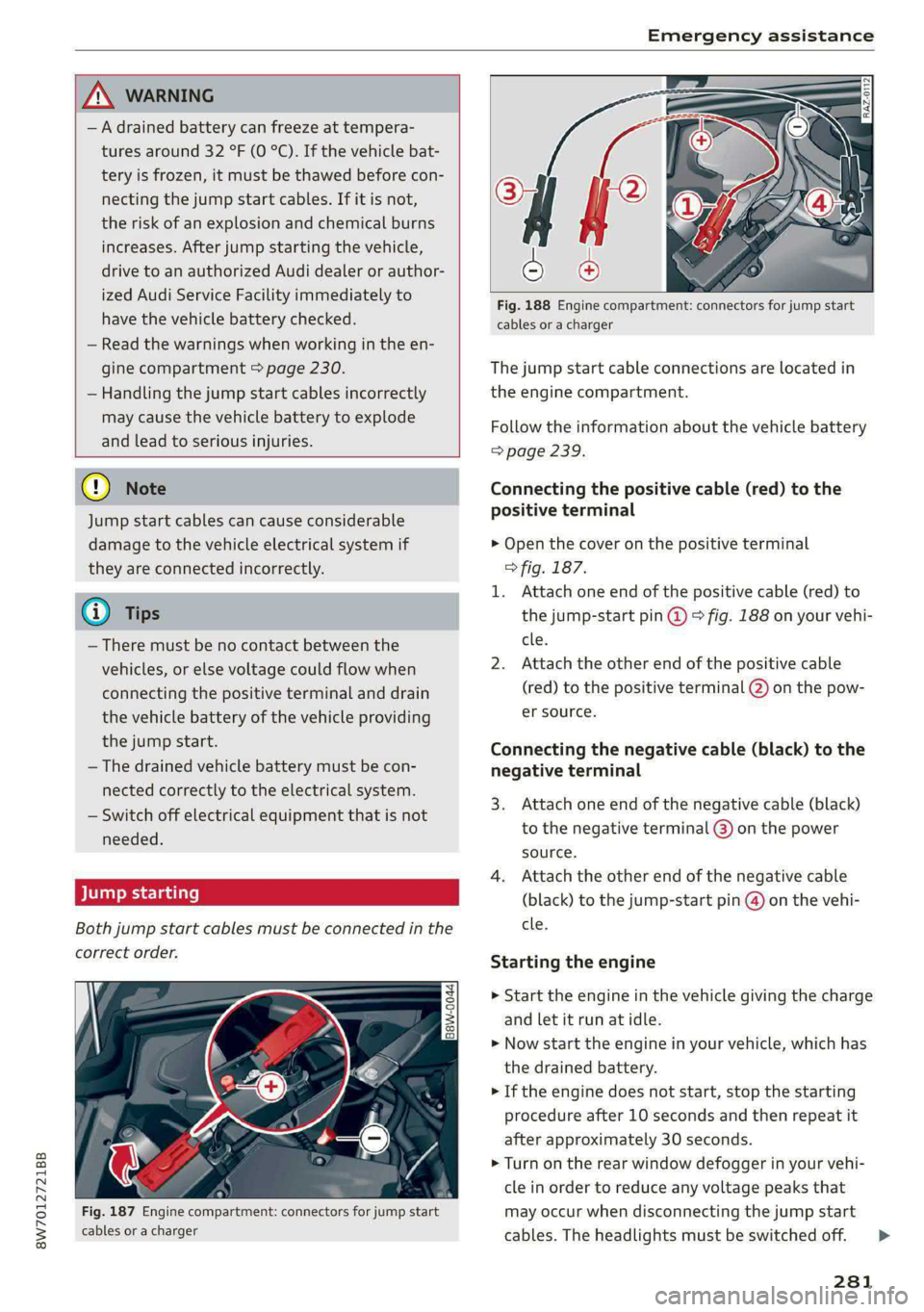
Both jump start cables must be connected in the
correct order.
Fig. 187 Engine compartment: connectors for jump start
cables or a charger
Fig. 188 Engine compartment: connectors for jump start
cables or a charger
The jump start cable connections are located in
the engine compartment.
Follow the information about the vehicle battery
=> page 239.
Connecting the positive cable (red) to the
positive terminal
> Open the cover on the positive terminal
> fig. 187.
1. Attach one end of the positive cable (red) to
the jump-start pin @ © fig. 188 on your vehi-
cle.
2. Attach the other end of the positive cable
(red) to the positive terminal @) on the pow-
er source.
Connecting the negative cable (black) to the
negative terminal
3. Attach one end of the negative cable (black)
to the negative terminal @) on the power
source.
4. Attach the other end of the negative cable
(black) to the jump-start pin @ on the vehi-
cle.
Starting the engine
> Start the engine in the vehicle giving the charge
and let it run at idle.
> Now start the engine in your vehicle, which has
the
drained battery.
> If the engine does not start, stop the starting
procedure after 10 seconds and then repeat it
after approximately 30 seconds.
> Turn on the rear window defogger in your vehi-
cle in order to reduce any voltage peaks that
may occur when disconnecting the jump start
cables. The headlights must be switched off. = >
281
Page 291 of 318

8W7012721BB
Fuses and bulbs
Fuse panel © (brown)
2 | Audi phone box, safety belt microphone
Right front seat electronics, lumbar sup-
3 port, massaging seat
4 |Side assist
6 Interior monitoring, anti-theft alarm sys-
tem, tire pressure monitoring system
7 Convenience access and start authoriza-
tion control module
8 | Auxiliary heating, tank module
9 | Power top control module
Your vehicle is equipped with maintenance-free
headlights and tail lights. However, if a light bulb
needs to be replaced, please contact an author-
ized Audi dealer or authorized Audi Service Facili-
ty.
ZX WARNING
If you still would like to try replacing the
bulbs in your vehicle yourself, read the warn-
ings regarding working in the engine compart-
ment > A\ in General information on
page 230.
TV tuner, data exchange and telematics
a control module
11 | Auxiliary battery control module
12 | Garage door opener
13 | Rearview camera, peripheral cameras
14 | Right tail lights
16 | Airbag control module
Fuse panel (£) (red)
No. | Equipment
Right neck heating
Exhaust treatment
Power top control module
Right trailer hitch light
Trailer hitch
Left trailer hitch light
Trailer hitch socket
WOlLOIN
MW)
R]
W]e
All wheel drive control module, sport dif-
10
ferential
11 | Exhaust treatment
Bulbs
Replacing bulbs
Audi recommends having a bulb replaced by an
authorized Audi dealer or authorized Audi Service
Facility in cases of doubt. These facilities have
the correct tools and replacement parts as well
as the required technical knowledge.
LED lights*
@) Note
Make sure the covers are fitted correctly on
the headlight and tail light so that no water
will leak in from the outside and the light
function will not be impaired.
289
Page 305 of 318

8W7012721BB
Index
Closing
Automatic luggage compartment lid...... 42
Convenience closing..........0...e5e0% 46
HOO « sisson sa cnamee ov atteoe a como eo ae vo 2331,
Luggage compartment lid............... 42
Luggage compartment lid with foot motion . 43
Panoramic glass:r00ficc:. «sien as nani we 6 cas 47
Power top......... 00.0 e eee eee eee eee 51
SUrishiade:((60f)': = ween 5 2 same 3 2 eae & te 47
WINdOWS « wsaics 2 ssomee x 2 voscu vo sane eo voce 45
Cockpit diMMiNG « = sess « ¢ ess + ¢ wees se ews 63
Cockpit (OVErview) « « eiea ss wewa s eawwa 2 newer 6
ColOricOdGlss « « waes so sae,p < Asem 2 3 eae EB 299
Compact spare tire................0-00. 280
Compartments............ 00 cee eee eee 92
Compass inthe mirror............-00 eee 67
Compliance ..... 2.0.0... eee 297
Conferenceicalbeains << wma «0 icra vw wmncs va a 177
Configuration wizard.................04. 20
CONNEC: ss saws s + eewe so eee so eee soe 182
Datta plamsrs s onesene « s sesusm « o vaeeove « seanous w = o 186
Data Privacy..............0-00 cee aee 292
EMme@rgenieyCalll swcsc « s sews 2 9 ewe + eee o 187
Infotainment: ss savsse 6 aacsun a 0 asso a nuns 182
Infotainment services...............-. 183
Online roadside assistance............. 188
Vehicle control services.............005 184
Connected devices
Device overvieW............ 0.0. e eee 223
Connections
refer to Media..............0000- 210, 212
Consumer information.................5 294
Consumption
Reducing........... eee eee eee eee ee 110
Consumption (fuel) .................000. 17
Contacts
TMPOrtitiGwas : « wees 5 » wee sy Sees Foe 179
Updating inthe MMI...............068 79
also refer to Directory................. 176
Convenience key...........-00 eee eee 34
Convenience closing................00 46
also refer to Vehicle key..............-. 38
Convenience opening and closing
Windows or panoramic glass roof........ 46
Coolant temperature display.............. 14
Cooling system
Adding
coolant................220005 237
Checking the coolant level............. 237
COOlANE esis oe cere x wma cw aneees w w oO 236
Gornering
lights: + «seme 2 seem 2 o eee oo ee 58
Cruise control system...............005 136
CUP HOIdErS ces ¢ « seen 3 2 heen se een ce eee = 91
Current consumption ..............0.0005 17
D
Data module
Serial’number(IMED) « ssw + 2 caer 2 ¢ sous 2 179
Data plans sce « « sees x v eeeu oo are 2 e oes 186
Data PriVaty’: s cas ¢ 5 seas 7 ¢ cees ts ees ee 292
1) 17
Sting’: weow « » wees so wees go ewe oo 22.1;
Daytime running lights.................. 58
Declaration of compliance............... 297
DEF (instrument cluster)................. 12
Demo mode
refer to Presentation mode............. 200
Destination onthe map................. 193
Details... 6.0... ccc eee eee 193
Determining correct load limit........... 259
Digital compass.............0 eee ee eee ee 67
DIMENSIONS! 3 & sncwne « sanizene » a sussnne » w sesoane w 299
Dimming the exterior mirrors............. 64
Dimming the rearview mirror............. 64
Difect@ lye: s : eaves = » seeps & 2 seeps x ees cE 176
Businessicardiescia so acevo & oceans 6 sranans «4 ie 177
Settings............. 0.02.22 c eee 179
Display
ClEQNiNG’s s = aan sy same xo ewe Fy ewe £ 270
Displaying tooltips.................000. 20
Disposal......... 0... c eee eee eee 294
Distance .... 0.6... eee eee 17
Distance warning cxsces « « saves « + concen o + soar 149
Doors
Child safety lock. .... 0.0... cee eee eee eee 45
DOOF COMPACTSWITCH s z ayeay s a says 9 4 amar og 62
Mechanically unlocking and locking....... 37
Driver information system................ 13
Drives
refer to Media.............000005 210, 212
303
Page 308 of 318

Index
Heated steering wheel................-. 102
Oat bases. 4s sxesaas @ 2 ieee 5 ees so ese oe a 98
HFP
refer to Hands Free Profile............. 171
High beams
High beam assistant................... 59
Highway lights...... 2.6.0... e eee ee 58
Hill descemticomtrol. « secve + « canise «a mmo © & 116
Hill Holdsassist « cco es sense w eranene ve mee 2 105
Home
refer to Home address.............04. 196
Hommesaddnessi, = sieves + nmawos «+ wines x 2 eens 196
HomeLink
refer to Garage door opener............. 48
Home screen... ... ee eee eee ee eee 19
FHORM « « sonst 6 o arate © oi come © a ane © senor 6
Hotspot
refer to Wi-Fi...........0 0.0 c eee eee 185
I
Idle
refer to Gears..... 2... eee eee eee 105
Ignition
Switching Onvand Off : s owes + + news «cares 103
Imbalance (wheels) ..........-...2--055 253
Immobilizer
refer to Electronic immobilizer........... 38
Indicator lights = sews = « segs o 7 wows « ReURS a ae 7
Inspection intervals : woes s x wows sp eee oo 242
Instrument cluster.............0--.00005 12
Adjusting the layout.................0. 13
Cleaning........ 0... eee eee eee 270
Engine code... ... ec cece eee eee eee 224
Failt@’ss s secs s een 2 s waren & ¥ wees 5 Few 12
Onzboardcomputen acesese ao vances 0 emesis #0 vrs LL?
Operating............... 0.020. e eee 13
Service interval display................ 242
Software information..............005 224
Switching tabs..........0..0......200. 13
Switching the view..........00.e eee e ee 13
Vehicle functions « eaien x 2 sees oo enesene xo orev 16
Version information................-. 224
Instruments
Adjusting illumination.................. 63
Integrated Toll Module................. 135
306
Intelligent search
Navigation ........ 0... e eee e eee eee 191
Interior lighting...............-.000- 62, 63
InterioriMonitorings. . + ween « 6 women << ence a © 37
Intermittent mode (windshield wipers) ..... 65
International travel..................-. 186
Internet
refer toconnect..............0e eee eee 182
Internet radio
refer to Online radio.............. 206, 207
iPhone
refer to Audi music interface........... 211
J
Jump starting ....... 6c eee e eee eee eee 280
K
Key... eee 34, 38
Convenience opening and closing......... 46
Key:replacementiic. + vcs ee eeu es mee ee 38
Mechanical key... .. 0... cece eee eee eee 38
PANIG Button » ses < = ses ¢ = seen ¢ = sees ge 39
Replacing the battery.................. 40
Unlocking and locking............-...-- 39
VEHICLE COdG « secs s ¢ sews = 2 ees ye ee 5 38
Key user... ee eee 32
Kick-down.. 0.2... cee eee eee eee 107
L
Lane assist
refer to Audi active lane assist.......... 150
Lane departure warning
refer to Audi active lane assist.......... 150
Lap tMer's = = sans ¢ = sews x © Hawes ¢ o awe ee 133
Evaluating’: « 2 cccvaic < ences o sevens eo ences © ¥ 134
Starting........... 6.0. c cece eee eee 133
Laser lighting....................00 008s 60
LATCH (securing child safety seats)......... 87
Launch: Controle 2 2 ccesee v seseron 2 vsciens 3 = a0 107
Leather care and cleaning............... 271
Legal information
License subscriptions...............0. 224
Software information...............0- 224
Software licenses...........--000 ee eee 224
Version information................5. 224