2021 AUDI A5 service
[x] Cancel search: servicePage 47 of 318

8W7012721BB
Opening and closing
Child safety lock
Applies to: vehicles with child safety locks
The child safety lock prevents the rear doors
from being opened from the inside and the rear
power windows from being operated.
RAZ-0826
B8W-0085
Applies to: vehicles with manual child safety locks
Fig. 36 Rear door: manual child safety lock
Vehicles with button
Applies to: vehicles with power child safety locks
> To activate and deactivate the child safety lock
(door handle and power window switch) for the
a rear door, press the left or right @ button in
the driver's door @) that corresponds to that
rear door > fig. 35. The indicator light in the
button turns on/blinks.
> Make sure the child safety lock is working by
checking the function on the rear power win-
dow switch and door handle.
Vehicles with 4 button
Applies to: vehicles with manual child safety lock
> To activate or deactivate the child safety lock
for the power window switch in the rear doors,
press the 4 button in the driver's door @)
> fig. 35. The indicator light in the button turns
on/blinks.
> To activate or deactivate the manual child safe-
ty lock for the rear door handle, open the re-
spective rear door and turn the key switch with
the mechanical key in the direction of the arrow
or opposite the direction of the arrow > fig. 36.
This will disable the function of the rear door
handle.
> Make sure the child safety lock is working by
checking the function on the rear power win-
dow switch and door handle.
Applies to: vehicles with power child safety locks:
It is not possible to operate the rear climate con-
trol system* when the child safety lock is activat-
ed. The SET REAR function allows you to adjust
all settings in the rear using the climate control
system controls in the cockpit.
Message in the instrument cluster display
@/ Child safety lock: malfunction! Please
contact Service
There is a malfunction in the child safety lock.
Press the @/ G4 button again.
If the message stays on, drive immediately to an
authorized Audi dealer or authorized Audi Service
Facility to have the malfunction repaired.
Z\ WARNING
— Observe the safety precautions > page 34.
—A malfunction in the child safety lock could
allow
the rear doors to be opened from the
inside, which increases the risk of an acci-
dent.
Power windows
Opening and closing the windows
re q 2.
2 2
r} a
Fig. 37 Driver's door: power window switch*
4s
Page 50 of 318

Opening and closing
You can switch the valet parking function on, for
example when someone else is parking your vehi-
cle ). The vehicle can be driven, locked, and un-
locked using the vehicle key, but access to the
luggage compartment is blocked.
> Remove the mechanical key > page 38.
> Press the [VALET] button in the glove compart-
ment. The LED in the button turns on if the
function is switched on.
> Lock the glove compartment with the mechani-
cal key.
>» Applies to: vehicles with lockable pass-through
and lockable rear seat backrests: To secure the
luggage compartment from the vehicle interior,
lock the pass-through and the rear seat backr-
ests using the mechanical key > page 95,
=> page 94.
> Give your vehicle key to the service personnel
who are parking your vehicle and keep the me-
chanical key.
The following buttons are deactivated when the
valet parking function is switched on:
— <3 Button in the driver's door
— &s Button on the vehicle key
— Handle in the luggage compartment lid
If the valet parking function is switched on, a
message will appear every time the ignition is
switched on.
@ Tips
Please note that the luggage compartment
can still be accessed from the vehicle interior
in vehicles with fixed rear seat backrests or
ones that cannot be locked, even when the
valet parking function is switched on.
Garage door opener
Applies to: vehicles with garage door opener
With the garage door opener, you can activate
systems such as the garage doors, security sys-
D_ This function is not available in all countries.
2) The possible number of hand-held transmitters depends
on the equipment.
48
tems or house lights from inside your vehicle.
These functions are operated in the MMI. Multi-
ple receivers can be programmed, which can con-
trol the functions of up to eight2) hand-held
transmitters.
ZA WARNING
— When operating or programming the garage
door opener, make sure that no people or
objects are in the area immediately sur-
rounding the equipment. People can be in-
jured or property can be damaged if struck
when closing.
— Do not allow yourself to be distracted from
traffic by the viewing and operating the dis-
plays.
Gi) Tips
— Ifyou sell your vehicle, reset all settings to
the factory default settings > page 222.
— The system complies with United States FCC
regulations and ISED regulations
=> page 297.
(i) Tips
Before you program your system to the ga-
rage door opener, first check the compatibili-
ty:
— Ask an authorized Audi dealer or authorized
Audi Service Facility or check at www.
homelink.com. You can also find more infor-
mation about HomeLink there.
— You can display information about Home-
Link (compatibility level/status/country
code/HomeLink generation) in the MMI:
— Select on the home screen: VEHICLE > Set-
tings & Service > Garage door opener > @.
Applies to: vehicles with garage door opener
Requirements: the remote control transmitter
must be programmed > page 49, the vehicle >
Page 51 of 318

8W7012721BB
Opening and closing
must be within range of the system, and the igni-
tion must be switched on.
There are multiple options to open or close the
system (such as the garage door).
> If you have only programmed one remote con-
trol transmitter, press the rs button on the
display. Or
> If you have programmed multiple remote con-
trol transmitters, press the 2 button on the
display and then press the respective system
button. Or
> Applies to: vehicles with programmable steer-
ing wheel button: If you have configured the
programmable steering wheel button, press
the *K button > page 30 and then press the re-
spective button for the system. Or
> Applies to: vehicles with location pairing: If you
have programmed Location pairing, press the
button for this in the display (notification cen-
ter > page 23). As you approach the system,
the button is displayed on the MMI.
If transmission was successful, the message:
Send to: XXX will appear.
Applies to: vehicles with garage door opener
You can program both fixed code and rolling code
systems in the MMI using the procedure that is
described.
Requirement: the ignition must be switched on.
Programming the system
Applies to: MMI
Requirement: the hand transmitter must be
present and the vehicle must be within range of
the system (such as the garage door) that you
would like to program.
> If you are programming the garage door opener
for the first time, press the - button on the
display. Follow the instructions in the MMI. Or
> If you would like to program other systems, se-
lect on the home screen: VEHICLE > Settings &
Service > Garage door opener. Select the de-
2) Only applies to rolling code systems
sired button: @). Follow the instructions in the
MMI.
> If you would like to reprogram systems that are
already programmed, select on the home
screen: VEHICLE > Settings & Service > Garage
door opener. Press the Z button and select 7
for the system to be reprogrammed. Select:
Program. Follow the instructions in the MMI.
With some systems, the garage door opener will
be immediately available after programming.
With other systems, the garage door opener
must also be synchronized.
Synchronizing!)
Requirement: the hand transmitter must already
be programmed and the vehicle must be within
range of the system (such as the garage door).
If the system synchronization is performed di-
rectly after the programming procedure, follow
the instructions on the MMI.
If you would like to sync at a later time:
> Applies to: MMI: Select on the home screen:
VEHICLE > Settings & Service > Garage door
opener.
> Press the button for the system that you would
like to synchronize.
> Follow the instructions in the MMI.
Renaming programmed systems
You can rename the programmed systems indi-
vidually (names may have a maximum of 10 char-
acters).
>» Applies to: MMI: Select on the home screen:
VEHICLE > Settings & Service > Garage door
opener.
> Press the Z button.
> Press the 7 button for the system that you
would like to rename.
> Select: Rename. If necessary, delete the preset
name, such as Garage door opener 1.
> Follow the instructions in the MMI.
49
Page 52 of 318

Opening and closing
Location pairing
Applies to: vehicles with location pairing
For easier operation, you can program your sys-
tem's location.
Requirements: the respective hand transmitter
must be programmed > page 49 and the vehicle
must be located in front of the system.
» Applies to: MMI: Select on the home screen:
VEHICLE > Settings & Service > Garage door
opener.
> Press the Z button.
> Press the 7 button for the system your vehicle
is facing.
> Select: Location pairing.
> Follow the instructions in the MMI.
Only a maximum of three systems can be dis-
played in the notification center > page 23. If
you would like to have all systems displayed,
press aa.
Deleting programmed systems
The programmed systems can be deleted individ-
ually or all at once.
» Applies to: MMI: Select on the home screen:
VEHICLE > Settings & Service > Garage door
opener.
> Press the Z button.
> To delete an individual system, press the L]
button for the desired system. If the checkmark
¥ is set, select: Delete.
> To delete all systems, select: All > Delete.
@ Tips
— Make sure the batteries in the hand trans-
mitter are charged before starting the pro-
gramming process.
— The programming process may take up to
30 seconds. It may be necessary for the
hand transmitter to be pressed again in the
meantime.
— The garage door opener may need to be
synchronized with the system after pro-
gramming. Follow the manufacturer's in-
structions for doing this.
sO
G) Tips
In some cases, the system may need to be
programmed in a different mode (“D mode”).
— Switch the ignition on.
— Applies to: MMI: Select on the home screen:
VEHICLE > Settings & Service > Garage
door opener.
— Press and hold the desired button @).
— Select Yes, in D mode and follow the in-
structions on the MMI.
Page 54 of 318

Power top
factors and that it does not interfere with
other drivers.
— Visibility to the rear is limited when operat-
ing the power top. Avoid operating the top
while driving in reverse.
— Never drive with the power top unlocked.
The wind from driving could cause the pow-
er top to open. This can result in injuries and
damage to the vehicle.
— Make sure no one will be injured by the pow-
er top supports or other moving compo-
nents when opening and closing the top.
— The headroom in the rear is reduced when
opening and closing the power top. Make
sure the rear passengers keep enough dis-
tance from the power top to reduce the risk
of injury.
@) Note
To prevent damage to the power top:
— do not store any objects in the power top
storage compartment.
— make sure there is enough space above the
vehicle when opening or closing the power
top.
@) Tips
— To avoid draining the vehicle battery unnec-
essarily, do not open and close the power
top repeatedly when the engine is switched
off.
— The power top can also be operated manual-
ly temporarily if there is a malfunction
=> page 55, Power top emergency opera-
tion. Have the problem corrected as soon as
possible by an authorized Audi dealer or au-
thorized Audi Service Facility.
— If the vehicle is parked with the power top
open, the vehicle interior is not protected
from
damaging weather or unauthorized ac-
cess. Lock any items you leave behind in the
luggage compartment. Close the power top
before leaving the vehicle.
— The side windows automatically lower
slightly when opening or closing the power
top.
52
Power top convenience opening and closing
Applies to: vehicles with power top
“Ss
paw-0149
Fig. 40 Driver's door: turning the key to open and close
Convenience opening with the driver door
lock
> To unlock the vehicle, press the & button on the
vehicle control key.
> Remove the mechanical key > page 38.
> Turn the mechanical key in the driver door lock
to the opening position one time @).
> Turn the mechanical key to the opening posi-
tion a second time within two seconds and
hold it there until the power top opens com-
pletely.
Convenience closing with the driver door lock
> Remove the mechanical key > page 38.
> Turn the mechanical key in the driver door lock
to the closing position one time ®).
> Turn the mechanical key to the closing position
a second time within two seconds and hold it
there until the power top is completely closed.
Convenience opening with the convenience
key*
> Press and hold the & button on the vehicle key
until the power top is completely open.
Convenience closing with the convenience
key*
> Press the f& button on the vehicle key to lock
the vehicle.
> Press the f button a second time within two
seconds and hold it until the power top is com-
pletely closed, or
> Touch the sensor* > page 39, fig. 27 on the
door handle long enough until the power top is >
Page 55 of 318

8W7012721BB
Power top
completely closed. Do not place your hand in
the door handle when doing this.
The opening or closing process will stop immedi-
ately if you release the key or stop touching the
button or sensor*. Opening and closing with the
convenience key* is possible from up to 13 feet
(4 m) away.
ZX WARNING
Read and follow the important safety precau-
tions > A\ in Opening and closing the power
top on page 51.
Power top storage compartment
Applies to: vehicles with power top
B8W-0251
Fig. 41 Luggage compartment: power top storage com-
partment and button
Raising/lowering the power top storage
compartment
> To raise/lower the power top storage compart-
ment, pull the button in the luggage compart-
ment.
The power top storage compartment can be
raised when the power top is closed. This pro-
vides more cargo space in the luggage compart-
ment.
The open power top is stored and protected in
the power top storage compartment. The power
top storage compartment cannot be raised when
the power top is open. Because of this, the cargo
area in the luggage compartment is smaller
when the power top is open than when it is
closed.
® Note
To reduce the risk of damage, make sure there
are no sensitive objects in the power top stor-
age compartment's range of motion.
Messages
Applies to: vehicles with power top
B Power top: malfunction! You may continue
driving (limited functionality). See owner's
manual
This message appears if there is a malfunction in
the system. Try to open/close the power top
again. If the message still appears, have an au-
thorized Audi dealer or authorized Audi Service
Facility correct the malfunction. Do not drive
faster than 30 mph (50 km/h) until it is correct-
ed.
Power top: rear seats occupied. Cannot run
automatically. See owner's manual
This message appears if passengers or objects
are detected on the rear seat while the power top
is operating. Make sure that passengers or ob-
jects on the rear seat have enough distance be-
tween them and the power top.
Power top: operation currently not possible
If the power top is operated continually for a
long period of time, the overload protection acti-
vates for approximately 15 to 30 minutes. You
can open or close the power top again after that.
Power top: malfunction! Unable to operate
This message appears when there is a malfunc-
tion. The power top can be operated manually
=> page 55.
Z\ WARNING
Never drive with the power top unlocked. The
wind from driving could cause the power top
to open. This can result in injuries and dam-
age to the vehicle.
53
Page 59 of 318

8W7012721BB
Power top
> Insert the emergency release handle into the
opening in the rear panel and turn it in the di-
rection of the arrow until it locks into place
> fig. 50.
> Mount the cover again > page 55, fig. 45.
> Put the removed vehicle tool kit back in place.
— Drive a maximum of 44 mph (70 km/h) and
have the malfunction corrected immediately
by an authorized Audi dealer or authorized
Audi Service Facility.
— Avoid touching the support rods and other
moving parts when opening or closing the
power top storage compartment lid. If you
do make contact, your hands could be
pinched.
— After the power top has been lowered, it
must not be pressed down entirely on the
molding or it could result in damage.
— Drive immediately to an authorized Audi
dealer or authorized Audi Service Facility to
have the malfunction repaired.
Make sure the locking mechanisms are locked
securely.
57
Page 60 of 318
Lights and Vision
Lights and Vision
Exterior lighting
Switching the lights on and off
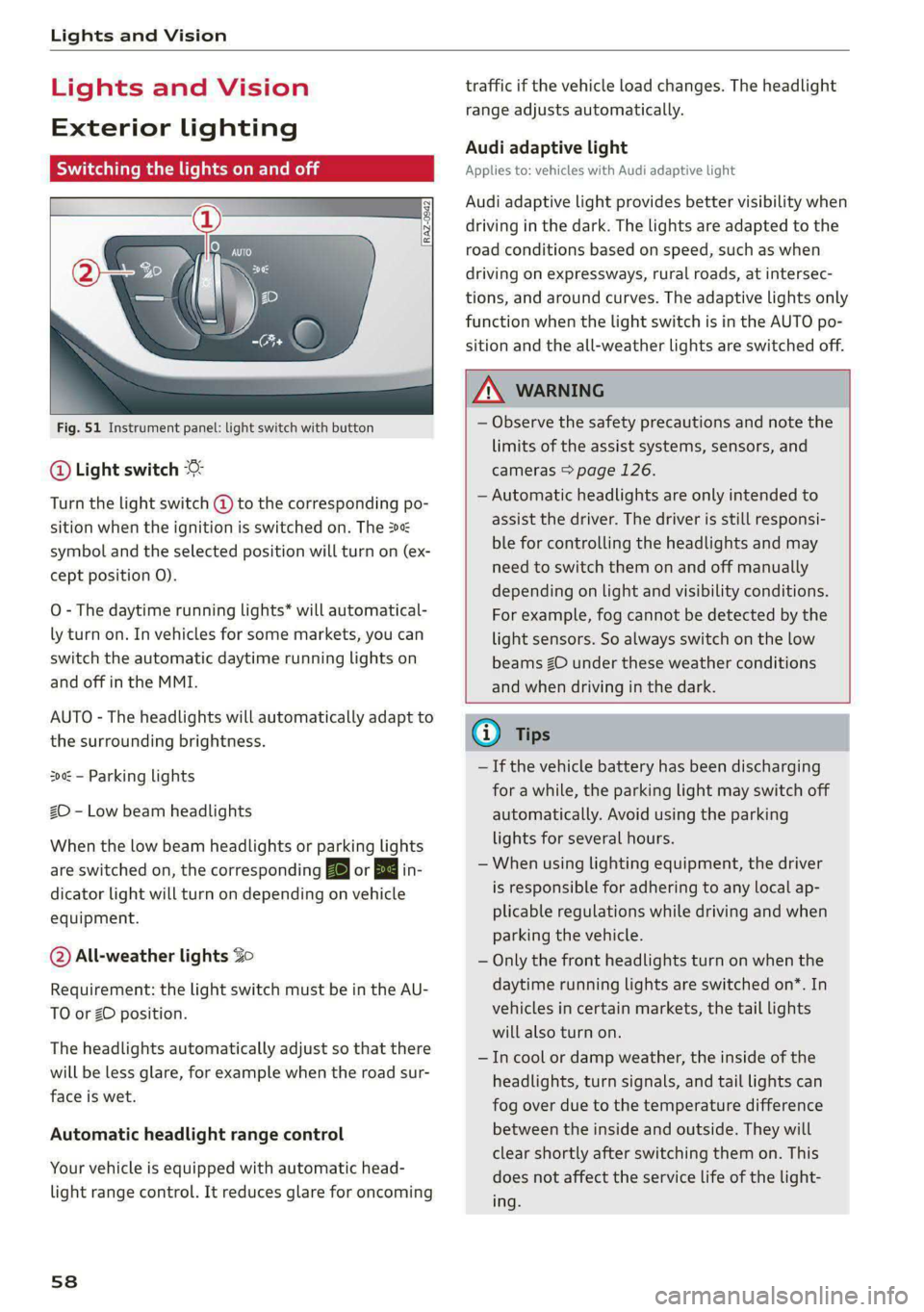
Fig. 51 Instrument panel: light switch with button
@ Light switch &
Turn the light switch @ to the corresponding po-
sition when the ignition is switched on. The 2
symbol and the selected position will turn on (ex-
cept position 0).
O - The daytime running lights* will automatical-
ly turn on. In vehicles for some markets, you can
switch the automatic daytime running lights on
and off in the MMI.
AUTO - The headlights will automatically adapt to
the surrounding brightness.
300: — Parking lights
2D - Low beam headlights
When the low beam headlights or parking lights
are switched on, the corresponding BB or 200 in-
dicator light will turn on depending on vehicle
equipment.
@ All-weather lights Zo
Requirement: the light switch must be in the AU-
TO or ZO position.
The headlights automatically adjust so that there
will be less glare, for example when the road sur-
face is wet.
Automatic headlight range control
Your vehicle is equipped with automatic head-
light range control. It reduces glare for oncoming
58
traffic if the vehicle load changes. The headlight
range adjusts automatically.
Audi adaptive light
Applies to: vehicles with Audi adaptive light
Audi adaptive light provides better visibility when
driving in the dark. The lights are adapted to the
road conditions based on speed, such as when
driving on expressways, rural roads, at intersec-
tions, and around curves. The adaptive lights only
function when the light switch is in the AUTO po-
sition and the all-weather lights are switched off.
ZA WARNING
— Observe the safety precautions and note the
limits of the assist systems, sensors, and
cameras > page 126.
— Automatic headlights are only intended to
assist the driver. The driver is still responsi-
ble for controlling the headlights and may
need to switch them on and off manually
depending on light and visibility conditions.
For example, fog cannot be detected by the
light sensors. So always switch on the low
beams ZO under these weather conditions
and when driving in the dark.
(i) Tips
— If the vehicle battery has been discharging
for a while, the parking light may switch off
automatically. Avoid using the parking
lights for several hours.
— When using lighting equipment, the driver
is responsible for adhering to any local ap-
plicable regulations while driving and when
parking the vehicle.
— Only the front headlights turn on when the
daytime running lights are switched on*. In
vehicles in certain markets, the tail lights
will also turn on.
—Incool or damp weather, the inside of the
headlights, turn signals, and tail lights can
fog
over due to the temperature difference
between the inside and outside. They will
clear shortly after switching them on. This
does not affect the service life of the light-
ing.