2021 ALFA ROMEO GIULIA ESP
[x] Cancel search: ESPPage 172 of 284

SAFETY
170
Side Impacts
The Side Air Bags are designed to activate in
certain side impacts. The Occupant Restraint
Controller (ORC) determines whether the
deployment of the Side Air Bags in a particular
impact event is appropriate, based on the
severity and type of collision. The side impact
sensors aid the ORC in determining the appro-
priate response to impact events. The system
is calibrated to deploy the Side Air Bags on the
impact side of the vehicle during impacts that
require Side Air Bag occupant protection. In
side impacts, the Side Air Bags deploy inde -
pendently; a left side impact deploys the left
Side Air Bags only and a right-side impact
deploys the right Side Air Bags only. Vehicle
damage by itself is not a good indicator of
whether or not Side Air Bags should have
deployed. The Side Air Bags will not deploy in all side
collisions, including some collisions at certain
angles, or some side collisions that do not
impact the area of the passenger compart
-
ment. The Side Air Bags may deploy during
angled or offset frontal collisions where the
front air bags deploy.
Side Air Bags are a supplement to the seat belt
restraint system. Side Air Bags deploy in less
time than it takes to blink your eyes.
NOTE:
Air bag covers may not be obvious in the inte-
rior trim, but they will open during air bag
deployment.
Rollover Events
Side Air Bags and seat belt pretensioners are
designed to activate in certain rollover events.
The Occupant Restraint Controller (ORC)
determines whether deployment in a partic -
ular rollover event is appropriate, based on the
severity and type of collision. Vehicle damage
by itself is not a good indicator of whether or
not Side Air Bags and seat belt pretensioners
should have deployed.
In order for the SABICs to work as
intended, do not install any accessory
items in your vehicle which could alter the
roof. Do not add an aftermarket sunroof to
your vehicle. Do not add roof racks that
require permanent attachments (bolts or
screws) for installation on the vehicle roof.
Do not drill into the roof of the vehicle for
any reason.
WARNING! (Continued)
WARNING!
Occupants, including children, who are up
against or very close to Side Air Bags can
be seriously injured or killed. Occupants,
including children, should never lean on or
sleep against the door, side windows, or
area where the side air bags inflate, even
if they are in an infant or child restraint.
Seat belts (and child restraints where appro -
priate) are necessary for your protection in
all collisions. They also help keep you in
position, away from an inflating Side Air Bag.
To get the best protection from the Side Air
Bags, occupants must wear their seat belts
properly and sit upright with their backs
against the seats. Children must be properly
restrained in a child restraint or booster seat
that is appropriate for the size of the child.
WARNING!
Side Air Bags need room to inflate. Do not
lean against the door or window. Sit
upright in the center of the seat.
Being too close to the Side Air Bags during
deployment could cause you to be
severely injured or killed.
Relying on the Side Air Bags alone could
lead to more severe injuries in a collision.
The Side Air Bags work with your seat belt
to restrain you properly. In some colli -
sions, Side Air Bags won’t deploy at all.
Always wear your seat belt even though
you have Side Air Bags.
21_GA_OM_EN_USC_t.book Page 170
Page 174 of 284

SAFETY
172
Enhanced Accident Response System
In the event of an impact, if the communica-
tion network remains intact, and the power
remains intact, depending on the nature of the
event, the Occupant Restraint Controller (ORC)
will determine whether to have the Enhanced
Accident Response System perform the
following functions:
Cut off fuel to the engine (if equipped)
Cut off battery power to the electric motor (if
equipped)
Flash hazard lights as long as the battery
has power
Turn on the interior lights, which remain on
as long as the battery has power or for
15 minutes from the intervention of the
Enhanced Accident Response System
Unlock the power door locks
Your vehicle may also be designed to perform
any of these other functions in response to the
Enhanced Accident Response System:
Turn off the Fuel Filter Heater, Turn off the
HVAC Blower Motor, Close the HVAC Circula -
tion Door
Cut off battery power to the:
• Engine
• Electric Motor (if equipped)
• Electric power steering
• Brake booster
• Electric park brake
• Automatic transmission gear selector
• Horn
• Front wiper
• Headlamp washer pump
NOTE:
After an accident, remember to cycle the ignition
to the OFF position and remove the key from the
ignition switch to avoid draining the battery.
Carefully check the vehicle for fuel leaks in the
engine compartment and on the ground near the
engine compartment and fuel tank before reset -
ting the system and starting the engine. If there
are no fuel leaks or damage to the vehicle elec -
trical devices (e.g. headlights) after an accident,
reset the system by following the procedure
described below. If you have any doubt, contact
an authorized dealer.
Enhanced Accident Response System
Reset Procedure
After the event occurs, when the system is active,
a message regarding fuel cutoff is displayed.
Turn the ignition switch from ignition ACC or ON/
RUN to ignition OFF. Carefully check the vehicle
for fuel leaks in the engine compartment and on
the ground near the engine compartment and
fuel tank before resetting the system and
starting the engine.
Depending on the nature of the event the left
and right turn signal lights, located in the
instrument panel, may both be blinking and
will continue to blink. In order to move your
vehicle to the side of the road, you must follow
the system reset procedure.
21_GA_OM_EN_USC_t.book Page 172
Page 193 of 284
191
Only a public safety operator can remotely end
the SOS - Emergency Call and, if necessary,
call the vehicle back through the Emergency
Call system. Once the call has ended, you can
still call the emergency service operator to
indicate additional information by pushing the
button again.
To Use SOS - Emergency Call
Push and hold the SOS - Emergency Call
button for a few seconds. The LED, located
next to the SOS button, will blink once and
then stay on indicating a call has been placed.
NOTE:
If the SOS - Emergency Call button is acciden-
tally pushed, there is a 10 second delay before
the call is placed. The system will issue a
verbal alert that a call is about to be made. To
cancel the call connection, push the SOS -
Emergency Call button again.
Once a connection between the vehicle and an
emergency service operator is made, the SOS -
Emergency Call system will transmit the
following important vehicle information to the
operator:
Indication that the occupant placed an SOS -
Emergency Call.
The Vehicle Identification Number (VIN).
The last known GPS coordinates of the
vehicle.
You will then be able to speak with the emer -
gency service operator to determine if addi -
tional help is needed.
The SOS - Emergency Call has priority over
other audio sources, which will be muted. If
you have a phone connected via Bluetooth, it
is disconnected and reconnected at the end of
the SOS - Emergency Call. Voice prompts will
guide you during the SOS - Emergency Call. If a
connection is made between an emergency
service operator and your vehicle, emergency
service operators may record conversations
and sounds within your vehicle once a connec -
tion is made, and by using the service you
consent to having this information shared.
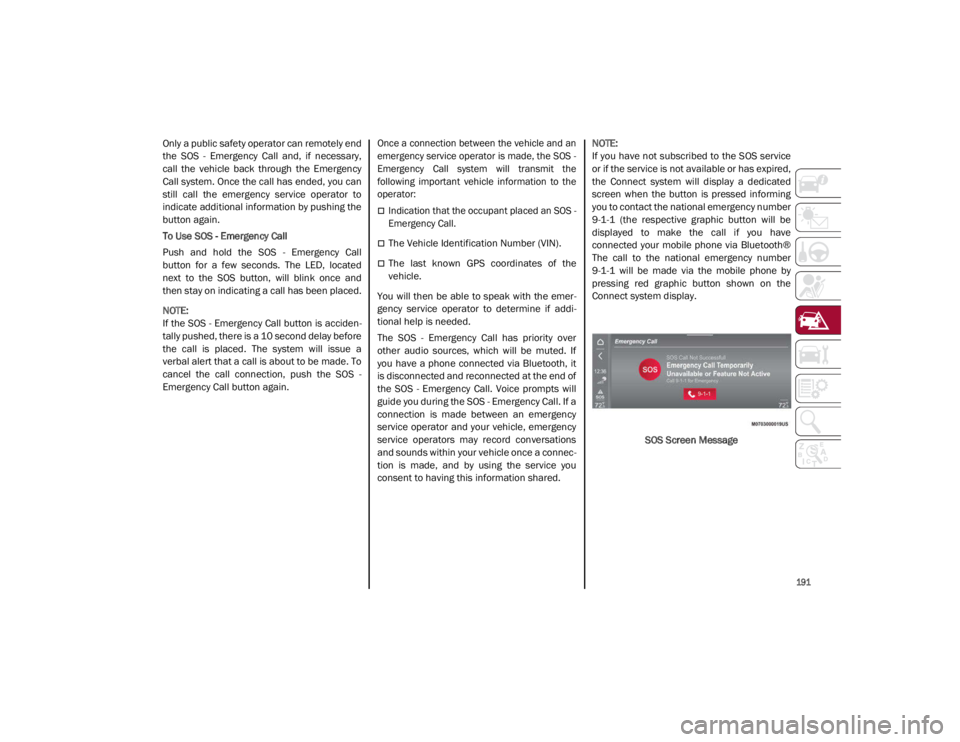
NOTE:
If you have not subscribed to the SOS service
or if the service is not available or has expired,
the Connect system will display a dedicated
screen when the button is pressed informing
you to contact the national emergency number
9-1-1 (the respective graphic button will be
displayed to make the call if you have
connected your mobile phone via Bluetooth®
The call to the national emergency number
9-1-1 will be made via the mobile phone by
pressing red graphic button shown on the
Connect system display.
SOS Screen Message
21_GA_OM_EN_USC_t.book Page 191
Page 197 of 284
195
(Continued)
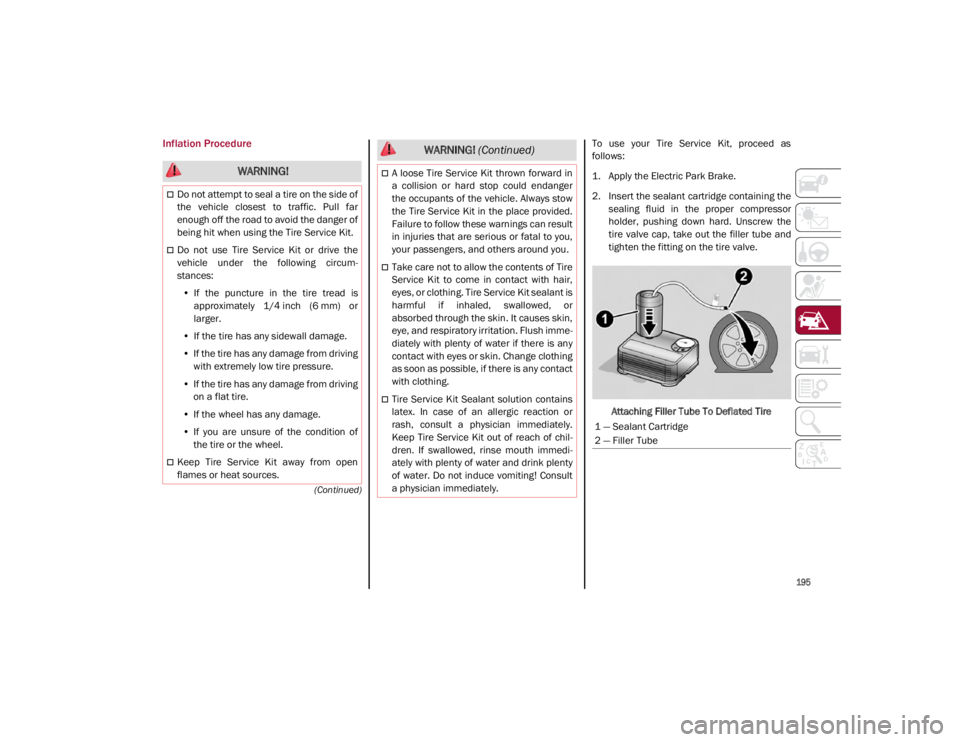
Inflation ProcedureTo use your Tire Service Kit, proceed as
follows:
1. Apply the Electric Park Brake.
2. Insert the sealant cartridge containing thesealing fluid in the proper compressor
holder, pushing down hard. Unscrew the
tire valve cap, take out the filler tube and
tighten the fitting on the tire valve.
Attaching Filler Tube To Deflated Tire
WARNING!
Do not attempt to seal a tire on the side of
the vehicle closest to traffic. Pull far
enough off the road to avoid the danger of
being hit when using the Tire Service Kit.
Do not use Tire Service Kit or drive the
vehicle under the following circum -
stances:
• If the puncture in the tire tread is
approximately 1/4 inch (6 mm) or
larger.
• If the tire has any sidewall damage.
• If the tire has any damage from driving
with extremely low tire pressure.
• If the tire has any damage from driving
on a flat tire.
• If the wheel has any damage.
• If you are unsure of the condition of
the tire or the wheel.
Keep Tire Service Kit away from open
flames or heat sources.
A loose Tire Service Kit thrown forward in
a collision or hard stop could endanger
the occupants of the vehicle. Always stow
the Tire Service Kit in the place provided.
Failure to follow these warnings can result
in injuries that are serious or fatal to you,
your passengers, and others around you.
Take care not to allow the contents of Tire
Service Kit to come in contact with hair,
eyes, or clothing. Tire Service Kit sealant is
harmful if inhaled, swallowed, or
absorbed through the skin. It causes skin,
eye, and respiratory irritation. Flush imme -
diately with plenty of water if there is any
contact with eyes or skin. Change clothing
as soon as possible, if there is any contact
with clothing.
Tire Service Kit Sealant solution contains
latex. In case of an allergic reaction or
rash, consult a physician immediately.
Keep Tire Service Kit out of reach of chil -
dren. If swallowed, rinse mouth immedi -
ately with plenty of water and drink plenty
of water. Do not induce vomiting! Consult
a physician immediately.
WARNING! (Continued)
1 — Sealant Cartridge
2 — Filler Tube
21_GA_OM_EN_USC_t.book Page 195
Page 205 of 284

203
(Continued)
2. Remove the tow eye from its housing in thetrunk and carefully clean the threaded
housing on the vehicle before using it.
3. Tighten the vehicle's tow eye in place (about 11 turns).
NOTE:
The largest work angle of a tow cable to fix on
the tow hook must not exceed 15°.
Work Angle Of Tow CableENHANCED ACCIDENT
RESPONSE SYSTEM (EARS)
This vehicle is equipped with an Enhanced
Accident Response System.
This feature is a communication network that
takes effect in the event of an impact
Ú
page 172.
EVENT DATA RECORDER (EDR)
This vehicle is equipped with an Event Data
Recorder. The main purpose of an EDR is to
record data that will assist in understanding
how a vehicle’s systems performed under
certain crash or near crash-like situations,
such as an air bag deployment or hitting a road
obstacle
Ú
page 174.
WARNING!
Stand clear of vehicles when pulling with
tow eyes.
Do not use a chain with a tow eye. Chains
may break, causing serious injury or
death.
Do not use a tow strap with a tow eye. Tow
straps may break or become disengaged,
causing serious injury or death.
Failure to follow proper tow eye usage may
cause components to break resulting in
serious injury or death.
CAUTION!
The tow eye must be used exclusively for
roadside assistance operations. Only use
the tow eye with an appropriate device in
accordance with the highway code (a rigid
bar or rope) to flat tow the vehicle for a short
distance to the nearest service location.
Tow eyes MUST NOT be used to tow
vehicles off the road or where there are
obstacles.
In compliance with the above conditions,
towing with a tow eye must take place with
two vehicles (one towing, the other towed)
aligned as much as possible along the
same center line. Damage to your vehicle
may occur if these guidelines are not
followed.
When towing, only use a facility that can
tow vehicles with low ground clearances
as extensive damage can result by using a
standard tow truck platform.
WARNING! (Continued)
21_GA_OM_EN_USC_t.book Page 203
Page 209 of 284

207
(o) Recommended operations
(●) Mandatory operationsReplace cabin air filter
4
o●o●o●o●o●o●o●o Spark plug replacement
6
●● 1.
The SOS back up battery must be replaced every five years, regardless of mileage.
2. If oil degradation ratio (data collectible from diagnostic device) is more than 80% (oil quality less than 20%) engine oil and filter replacement is recommended.
3. The actual interval for changing engine oil and replacing the engine oil filter depends on the vehicle usage conditions and is signaled by the warning light or message in
the instrument panel. In all cases, never exceed 1 year/10,000 miles (16,000 km).
4. If the vehicle is used in dusty areas, this cleaner must be replaced every 10,000 miles (16,000 km).
5. The brake fluid replacement has to be done every two years, irrespective of the mileage.
6. The spark plug change interval is mileage-based only. Yearly intervals do not apply.
Thousands of miles102030405060708090100110120130140150
Years123456789101112131415
Thousands of kilometers163248648096112128144160176192208224240
WARNING!
You can be badly injured working on or around a motor vehicle. Do only service work for which you have the knowledge and the right equipment.
If you have any doubt about your ability to perform a service job, take your vehicle to a competent mechanic.
Failure to properly inspect and maintain your vehicle could result in a component malfunction and affect vehicle handling and performance.
This could cause an accident.
21_GA_OM_EN_USC_t.book Page 207
Page 212 of 284

SERVICING AND MAINTENANCE
210
(o) Recommended operations
(●) Mandatory operations
Change the brake fluid.5Replace cabin air filter.
4
o●o●o●o●o●o●o●o Spark plug replacement.
6
●●●●● 1.
The SOS back up battery must be replaced every five years, regardless of mileage.
2. The actual interval for changing the brake pads and the carbon ceramic brake discs depends on the vehicle usage conditions and is signaled by the warning light or message
on the instrument panel. After each discs replacement, reset the warning light using the diagnostic socket.
3. Areas that are not dusty: recommended maximum mileage 36,000 miles (60,00 km). Regardless of the mileage, the belt must be replaced every
four years. Dusty areas and/or demanding use of the vehicle (cold climates, town use, long periods of idling): advised maximum mileage 18,000 miles (30,000 km). Regardless
of the mileage, the belt must be replaced every two years.
4. If the vehicle is used in dusty areas, this cleaner must be replaced every 10,000 miles (16,000 km).
5. The brake fluid replacement has to be done every two years, irrespective of the mileage.
6. The spark plug change interval is mileage-based only. Yearly intervals do not apply.
Thousands of miles102030405060708090100110120130140150
Years123456789101112131415
Thousands of kilometers163248648096112128144160176192208224240
WARNING!
You can be badly injured working on or around a motor vehicle. Do only service work for which you have the knowledge and the right equipment.
If you have any doubt about your ability to perform a service job, take your vehicle to a competent mechanic.
Failure to properly inspect and maintain your vehicle could result in a component malfunction and affect vehicle handling and performance.
This could cause an accident.
21_GA_OM_EN_USC_t.book Page 210
Page 215 of 284

213
Engine Oil
The engine oil level can be seen on the instru-
ment cluster display every time the engine is
started, or on the Information and Entertain -
ment system display by activating on the main
menu (MENU button) the following functions in
sequence: “Apps”; “My Car” and “Oil Level”.
Check on the display using the 6 notches that
the oil level is between the MIN and MAX level:
1 notch MIN level, 6 notches MAX level.
If the oil level is close to or below the MIN
mark, add oil gradually through the filler, (refer
to “Top-Up And Oil Level Indication Update On
Display” in this section) considering that each
notch shown on the display corresponds to
approximately 8.8 fl oz (250 ml).
The oil level can also be checked manually on
2.9L Engine.
NOTE:
Always reinstall the oil cap and tighten to
proper torque whenever it is removed to add
oil to engine. Never run the engine with cap
removed as this could cause oil to leak from
engine.
Manual Oil Level Checking Procedure — 2.9L
Engine
Check that the oil level is between the MIN and
MAX marks on dipstick, clean it with a lint-free
cloth and reinsert it. Extract the dipstick again
and check that the level is between the MIN
and MAX marks.
Top-Up And Oil Level Indication Update On
Display — 2.9L Engine
If an engine oil top-off is needed, in order to
ensure the correct indication of the oil level on
the display, proceed with the process below:
Leave the car on flat ground with the engine
running for approximately five minutes
(temperature higher than 198°F (90°C)
and shut the engine off.
Wait for five minutes, turn the ignition to the
ON mode without starting the engine and
wait for a few seconds.
NOTE:
If the level indication is not updated after the
previously described procedure, repeat the
engine adjustment, shut the engine off and
wait another five minutes before starting it
again. If the indication is not updated after the
second start, contact an authorized dealer.
Top-Up And Oil Level Indication Update On
Display — 2.0L Engine
If an engine oil top-off is needed, in order to
ensure the correct indication of the oil level on
the display, proceed with the process below:
Leave the car on flat ground with the engine
running for approximately five minutes
(temperature higher than 176°F (80°C)
and shut the engine off.
Start the engine again and idle it for about
two minutes.
NOTE:
If you have added the specified amount of oil
and the indicator is not reading “Full”, please
contact an authorized dealer. CAUTION!
Make sure not to add too much oil when
topping off the engine. Engine oil in excess
may damage the engine. Have the vehicle
checked. Never exceed the MAX level when
topping off engine oil. It is advisable to
check the oil level in intermediate steps
using the oil dipstick (2.9L Engine Only).
CAUTION!
The oil level is not refreshed immediately on
the display after topping off. Consequently,
wait for the oil level to be refreshed on the
display and follow the procedure below.
21_GA_OM_EN_USC_t.book Page 213