2021 ACURA NSX homelink
[x] Cancel search: homelinkPage 6 of 494

Contents
This owner’s manual should be considered a permanent part of the
vehicle and should remain with the vehicle when it is sold.
The Navigation Manual is available online at owners.acura.com
(U.S.) or acura.ca (Canada). If you are the firs t registered owner
of your vehicle, you may request a complimentary printed
copy of the Navigation Manual within the first six months of
vehicle purchase. To request a copy, visit owners.acura.com. In
Canada, please request a copy from your Acura dealer.
This owner’s manual covers all models of your vehicle. You may find
descriptions of equipment and features that are not on your
particular model.
Images throughout this owner’s manu al (including the front cover)
represent features and equipment that are available on some, but
not all, models. Your particular mo del may not have some of these
features.
This owner’s manual is for vehicles sold in the United States and
Canada.
The information and specifications in cluded in this publication were
in effect at the time of approval for printing. Honda Motor Co., Ltd.
reserves the right, however, to discontinue or change specifications
or design at any time without notice and without incurring any
obligation.2 Safe Driving P. 33
For Safe Driving P. 34 Seat Belts P. 38 Airbags P. 45
2Instrument Panel P. 73
Indicators P. 74 Gauges and Displays P. 99
2Controls P. 107
Clock P. 108 Locking and Unlocking the Doors P. 109
Operating the Switches Ar ound the Steering Wheel P. 131
Climate Control System P. 159
2 Features P. 165
Audio System P. 166 Audio System Basic Operation P. 170
Customized Features P. 248 HomeLink® Universal Transceiver P. 271
2 Driving P. 313
Before Driving P. 314 Towing a Trailer P. 324
Multi-View Rear Camera P. 373
2Maintenance P. 379
Before Performing Maintenance P. 380 Maintenance MinderTM P. 383
Checking and Maintaining Wiper Blades P. 408
Climate Control System Maintenance P. 423
2Handling the Unexpected P. 435
Tools P. 436 If a Tire Goes Flat P. 437
Overheating P. 454 Indicator, Coming On/Blinking P. 456
If You Cannot Open the Hatch P. 468 Refueling P. 469
2Information P. 471
Specifications P. 472 Identification Numbers P. 474
Emissions Testing P. 477 Warranty Coverages P. 479
21 ACURA NSX PMC-31T6N6400.book 4 ページ 2020年10月8日 木曜日 午後3時7分
Page 167 of 494

165
Features
This chapter describes how to operate technology features.
Audio System
About Your Audio System ................ 166
USB Ports ......................................... 167
Audio System Theft Protection ......... 168
Audio Remote Controls .................... 169
Audio System Basic Operation ........ 170
Audio/Information Screen ................ 171
Adjusting the Sound ........................ 185
Display Setup ................................... 186
Voice Control Operation .................. 188
Playing FM Radio ............................. 192
Playing SiriusXM ® Radio
*................. 196
Playing an iPod ................................ 203 Song By Voice
TM (SBV) ...................... 206
Playing Pandora ®*1........................... 210
Playing a USB Flash Drive ................. 212
Playing Bluetooth ® Audio................. 215
Wi-Fi Connection ............................. 217
Siri ® Eyes Free .................................. 219
Apple CarPlay
TM............................... 220
Android AutoTM................................ 223
Audio Error Messages iPod/USB Flash Drive ........................ 227
Pandora ®
*1....................................... 228
Android/Apps .................................. 229
General Information on the Audio SystemSiriusXM ® Radio Service*................. 230 Compatible iPod, iP
hone, and USB Flash
Drives ............................................ 231
Honda App License Agreement........ 232
Legal Information on Apple CarPlay/
Android Auto................................. 244
About Open Source Licenses............ 246
License Information ......................... 247
Customized Features ........................ 248
Defaulting All the Settings ............... 270
HomeLink ® Universal Transceiver ... 271
Bluetooth ® HandsFreeLink®
Using HFL ........................................ 274
HFL Menus ...................................... 277
AcuraLink®
*....................................... 308
*1: Available only on U.S. models.
* Not available on all models
21 ACURA NSX PMC-31T6N6400.book 165 ページ 2020年10月8日 木曜日 午後3時7分
Page 273 of 494
271
Features
HomeLink® Universal Transceiver
The HomeLink ® Universal Transceiver can be programmed to operate up to three
remote controlled devices around your home, such as garage doors, lighting, or
home security systems.
Refer to the safety information that came wi th your garage door opener to test that
the safety features are functioning prope rly. If you do not have the safety
information, contact the manufacturer.
Before programming HomeLink, make sure that people and objects are out of the
way of the garage or gate to prevent potential injury or damage.
When programming a garage door opener, pa rk just outside the garage door’s path.
■Important Safety Precautions
1HomeLink ® Universal Transceiver
Before programming HomeLi nk to operate a garage
door opener, confirm that the opener has an external
entrapment protection system , such as an “electronic
eye,” or other safety and re verse stop features. If it
does not, HomeLink may not be able to operate it.
21 ACURA NSX PMC-31T6N6400.book 271 ページ 2020年10月8日 木曜日 午後3時7分
Page 274 of 494
272
uuHomeLink ® Universal Transceiver uTraining HomeLink
Features
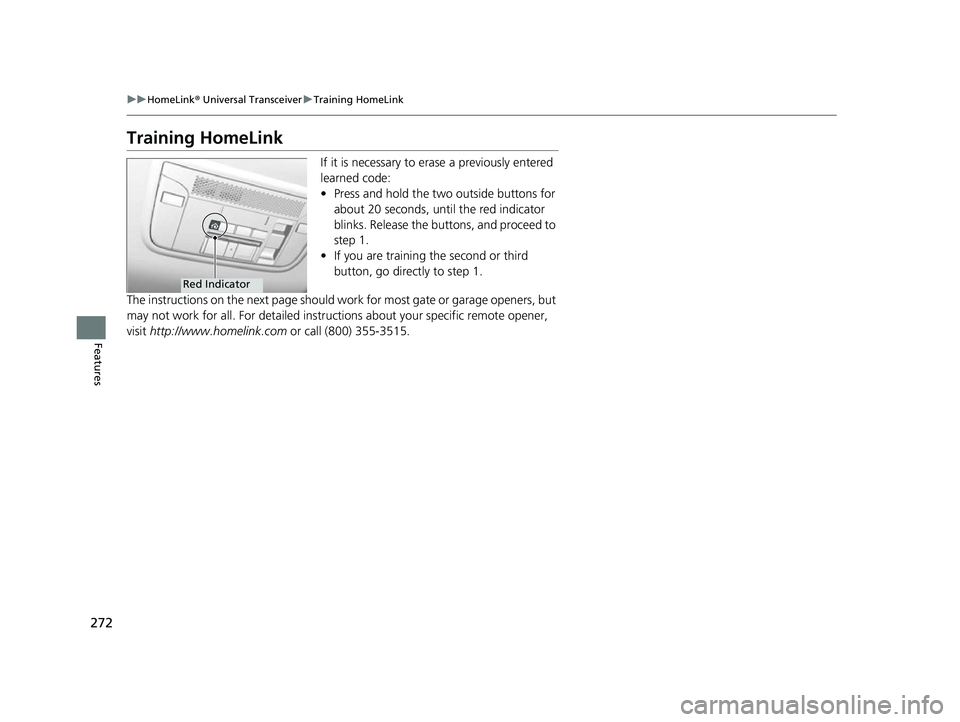
Training HomeLink
If it is necessary to erase a previously entered
learned code:
• Press and hold the two outside buttons for
about 20 seconds, until the red indicator
blinks. Release the bu ttons, and proceed to
step 1.
• If you are training the second or third
button, go directly to step 1.
The instructions on the next page should work for most gate or garage openers, but
may not work for all. For detailed instruct ions about your specific remote opener,
visit http://www.homelink.com or call (800) 355-3515.
Red Indicator
21 ACURA NSX PMC-31T6N6400.book 272 ページ 2020年10月8日 木曜日 午後3時7分
Page 275 of 494
273
uuHomeLink ® Universal Transceiver uTraining HomeLink
Features
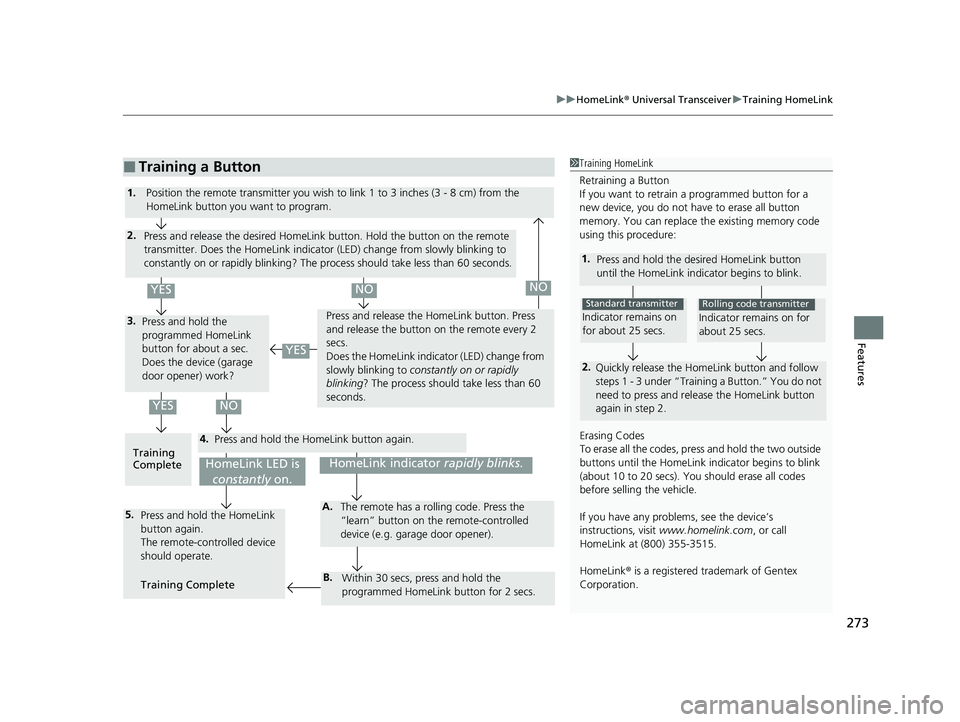
■Training a Button1Training HomeLink
Retraining a Button
If you want to retrain a programmed button for a
new device, you do not ha ve to erase all button
memory. You can replace the existing memory code
using this procedure:
1. Press and hold the desi red HomeLink button
until the HomeLink indi cator begins to blink.
2.
Quickly release the Home Link button and follow
steps 1 - 3 under “Training a Button.” You do not
need to press and rele ase the HomeLink button
again in step 2.
Indicator remains on
for about 25 secs.
Standard transmitter
Indicator remains on for
about 25 secs.
Rolling code transmitter
Erasing Codes
To erase all the codes, press and hold the two outside
buttons until the HomeLink i ndicator begins to blink
(about 10 to 20 secs). You should erase all codes
before selling the vehicle.
If you have any problems, see the device’s
instructions, visit www.homelink.com , or call
HomeLink at (800) 355-3515.
HomeLink® is a registered tra demark of Gentex
Corporation.4.
3.
2.
5.A.
B.
1. Position the remote transmitter you wish to link 1 to 3 inches (3 - 8 cm) from the
HomeLink button you want to program.
Press and release the desi red HomeLink button. Hold the button on the remote
transmitter. Does the HomeLink indicato r (LED) change from slowly blinking to
constantly on or rapidly blinking? The pr ocess should take less than 60 seconds.
Press and hold the
programmed HomeLink
button for about a sec.
Does the device (garage
door opener) work? Press and release the Ho
meLink button. Press
and release the button on the remote every 2
secs.
Does the HomeLink indicator (LED) change from
slowly blinking to constantly on or rapidly
blinking ? The process should take less than 60
seconds.
Training
Complete Press and hold the HomeLink button again.
Press and hold the HomeLink
button again.
The remote-controlled device
should operate.
Training Complete The remote has a ro
lling code. Press the
“learn” button on the remote-controlled
device (e.g. garage door opener).
Within 30 secs, press and hold the
programmed HomeLink button for 2 secs.
HomeLink indicator rapidly blinks.HomeLink LED is
constantly on.
YESNO
YES
YESNONO
21 ACURA NSX PMC-31T6N6400.book 273 ページ 2020年10月8日 木曜日 午後3時7分
Page 489 of 494

487
Index
Fuel Economy........................................... 377
Fuel Fill Door ...................................... 27, 376
Fuses ......................................................... 461
Inspecting and Changing ........................ 465
Locations ................................ 461, 463, 464
G
Gasoline (Fuel) Economy................................................. 377
Gauge ...................................................... 99
Information............................................. 375
Instant Fuel Economy .............................. 105
Low Fuel Indicator..................................... 81
Refueling ................................................ 375
Gauges ........................................................ 99
Gear Position Indicator ...................... 80, 332
Gear Shift Positions
Dual Clutch Transmission ........................ 330
Glass (care) ....................................... 424, 428
Glove Box ................................................. 155
H
Handling of the Jack ................................ 448
Handling the Unexpected ....................... 435
HandsFreeLink ® (HFL) .............................. 274
Automatic Import of Cellular Phonebook and Call History ........................................... 287
Displaying Messages ............................... 303 HFL Buttons ............................................. 274
HFL Menus .............................................. 277
HFL Status Display ................................... 276
Limitations for Manua
l Operation ............ 276
Making a Call .......................................... 296
Options During a Call .............................. 300
Phone Setup ............................................ 282
Phonebook Phonetic M odification ........... 291
Receiving a Call ....................................... 300
Receiving a Text/E-mail Message .............. 301
Ring Tone ................................................ 286
Roadside Assistance ................................. 307
Selecting a Mail Account ......................... 302
Speed Dial ............................................... 288
To Set Up Text/E-mail Message Options ... 285
Hatch ......................................................... 123
Unable to Open ....................................... 468
Hazard Warning Button ............................... 6
Headlights ................................................. 135
Aiming .................................................... 405
Automatic Operation (automatic lighting control).................................................. 136
Dimming ......................................... 135, 138
Operating ................................................ 135
Heaters (Seat) ........................................... 158
HFL (HandsFreeLink ®)............................... 274
High Beam Indicator .................................. 85
High Voltage Battery ............................... 360
High-Performance Driving ....................... 319
Hill Start Assist System ............................. 327 HomeLink
® Universal Transceiver ............ 271
Honda App License Agreement .............. 232
Hybrid Vehicle SPORT HYBRID Super Handling All-Wheel-
Drive
TM (SPORT HYBRID SH-AWD ®).......... 11
I
Identification Numbers
Engine, Motor, and Transmission............. 474
Vehicle Identification ............................... 474
If the 12-Volt Battery Is Dead .................. 452
Immobilizer System .................................. 126
Indicator.................................................... 85
Indicators .................................................... 74
12-Volt Battery Charging System ....... 79, 456
Active Damper System............................... 78
Anti-lock Brake System (ABS)..................... 82
Automatic Brake Hold ....................... 76, 364
Automatic Brake Hold System ........... 76, 364
Brake System (Amber) ............................... 77
Brake System (Red) ............................ 74, 457
Brake Wear ............................................... 78
CRUISE CONTROL ............................. 86, 348
CRUISE MAIN .................................... 86, 347
Door and Trunk (Hatch) Open ................... 37
Electric Parking Brake ................................ 75
Electric Parking Brake System ............ 75, 458
Electric Power Steering (EPS) System ............................................ 82, 457
21 ACURA NSX PMC-31T6N6400.book 487 ページ 2020年10月8日 木曜日 午後3時7分