Page 133 of 494

131Continued
Controls
Operating the Switches Around the Steering Wheel
ENGINE START/STOP Button
■Changing the Power Mode1ENGINE START/STOP Button
ENGINE START/STOP Button Operating Range
You can start the power system when the keyless
access remote is inside the vehicle.
The power system may also start if the keyless access
remote is close to the door or window, even if it is
outside the vehicle.
If the battery of the keyless access remote is getting
low, the power system may not start when you push
the ENGINE START/STOP button. If the power
system does not start, refer to the following link. 2 If the Keyless Access Remote Battery is
Weak P. 450
Do not leave the power mode in ACCESSORY or ON
when you get out.
Operating RangeVEHICLE OFF (LOCK)
The button is off.
The power to all electrical components is turned off.
Press the button. Without pressing
the brake pedal ACCESSORY
The button blinks (in red).
Operate the audio system and other accessories in
this position.
ON
The button blinks (in red).
All electrical components can be used.
21 ACURA NSX PMC-31T6N6400.book 131 ページ 2020年10月8日 木曜日 午後3時7分
Page 134 of 494
132
uuOperating the Switches Around the Steering Wheel uENGINE START/STOP Button
Controls
If you leave the vehicle for more than 30 minutes with the transmission in (P and
the power mode in ACCESSORY, the vehicle will automatically go into VEHICLE OFF
(LOCK) mode to prevent dr aining the 12-volt battery.
If you open the driver’s door when the powe r mode is set to ACCESSORY, a warning
buzzer will sounds.
■Automatic Power Off
■Power Mode Reminder
21 ACURA NSX PMC-31T6N6400.book 132 ページ 2020年10月8日 木曜日 午後3時7分
Page 138 of 494
uuOperating the Switches Around the Steering Wheel uLight Switches
136
Controls
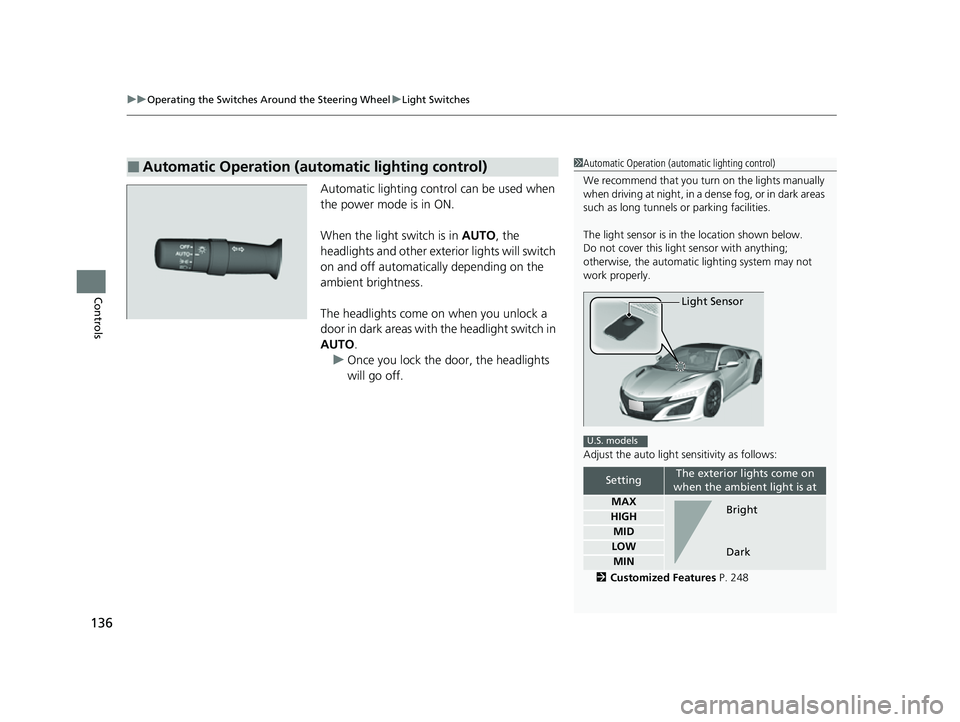
Automatic lighting control can be used when
the power mode is in ON.
When the light switch is in AUTO, the
headlights and other exterior lights will switch
on and off automatica lly depending on the
ambient brightness.
The headlights come on when you unlock a
door in dark areas with the headlight switch in
AUTO .
u Once you lock the door, the headlights
will go off.
■Automatic Operation (automatic lighting control)1Automatic Operation (aut omatic lighting control)
We recommend that you tu rn on the lights manually
when driving at night, in a de nse fog, or in dark areas
such as long tunnels or parking facilities.
The light sensor is in the location shown below.
Do not cover this light sensor with anything;
otherwise, the automatic lighting system may not
work properly.
Adjust the auto light sensitivity as follows:
2 Customized Features P. 248
SettingThe exterior lights come on
when the ambient light is at
MAX
HIGH
MID
LOW
MIN
Light Sensor
U.S. models
Bright
Dark
21 ACURA NSX PMC-31T6N6400.book 136 ページ 2020年10月8日 木曜日 午後3時7分
Page 139 of 494
137
uuOperating the Switches Around the Steering Wheel uLight Switches
Controls
The headlights automatically come on when the wipers are used several times within
a certain interval with the headlight switch in AUTO.
The headlights automatically go off a few minutes later if the wipers are stopped.
The headlights, all other exterior lights, a nd the instrument panel lights turn off 15
seconds after you set the power mode to VEHICLE OFF, take the remote with you,
and close the driver’s door.
If you set the power mode to VEHICLE OFF with the headli ght switch on, but do not
open the door, the lights turn off after 10 minu tes (3 minutes, if the switch is in the
AUTO position).
The lights turn on again when you unlock or open the driver’s door. If you unlock
the door, but do not open it within 15 seconds, the lights go off. If you open the
driver’s door, you will hear a reminder chime alerting you that the lights are on.
■Headlight Integration with Wipers
■Automatic Lighting Off Feature
1Headlight Integration with Wipers
This feature activates when the headlights are off in
AUTO .
The instrument panel br ightness does not change
when the headlights come on.
At dark ambient light levels, the automatic lighting
control feature turns on the headlights, regardless of
the number of wiper sweeps.
You can turn the headlight integration with wipers
function on and off.
2 Customized Features P. 248
1Automatic Lighting Off Feature
You can change the headli ght auto off timer setting.
2 Customized Features P. 248
21 ACURA NSX PMC-31T6N6400.book 137 ページ 2020年10月8日 木曜日 午後3時7分
Page 144 of 494

142
uuOperating the Switches Around the Steering Wheel uDriving Position Memory System*
Controls
Driving Position Memory System*
You can store two driver’s seat (except for power lumbar) and outside door mirrors
position with the driving position memory system.
When you unlock and open th e driver’s door with a remote transmitter, or keyless
access system, door mirrors adjust to one of the two preset positions and the seat
adjusts to retracted positions of one of the two preset positions automatically.
The seat will move to th e stored position when you set the power mode to
ACCESSORY.
When you enter the vehicle, the driver in formation interface briefly shows you which
remote transmitter you used to unlock the vehicle.
• DRIVER 1 transmitter is linked to memory button 1.
• DRIVER 2 transmitter is linked to memory button 2.
The driver’s seat moves rearward depending
on the set seating position once you
•Stop the vehicle.
• Put the transmission in
(P.
• Set the power mode to VEHICLE OFF.
• Then open the driver’s door.
Once the power mode is in the ACCESSORY
position, the driver’s seat moves to the
DRIVER 1 or 2 preset position.
1Driving Position Memory System*
Using the audio/informati on screen, you can disable
the automatic seat and d oor mirrors adjustment
function. 2 Customized Features P. 248
The driver’s seat easy exit feature:
•Will tilt slightly forward and then move rearward to
allow you to more easily exit the vehicle.
•Can be turned ON/OFF. 2Customized Features P. 248
System Operation
The system will not operate if:
•The vehicle speed is above 3 mph (5 km/h).
•Either memory position button is pressed while the
seat or the outside mirror is in motion.
•The seat or the outside mi rror position is adjusted
while in operation.
•The memory 1 or 2 position is set fully to the rear.
DRIVER 1 DRIVER 2
* Not available on all models
21 ACURA NSX PMC-31T6N6400.book 142 ページ 2020年10月8日 木曜日 午後3時7分
Page 155 of 494
153Continued
Controls
Interior Convenience Items
Interior Lights
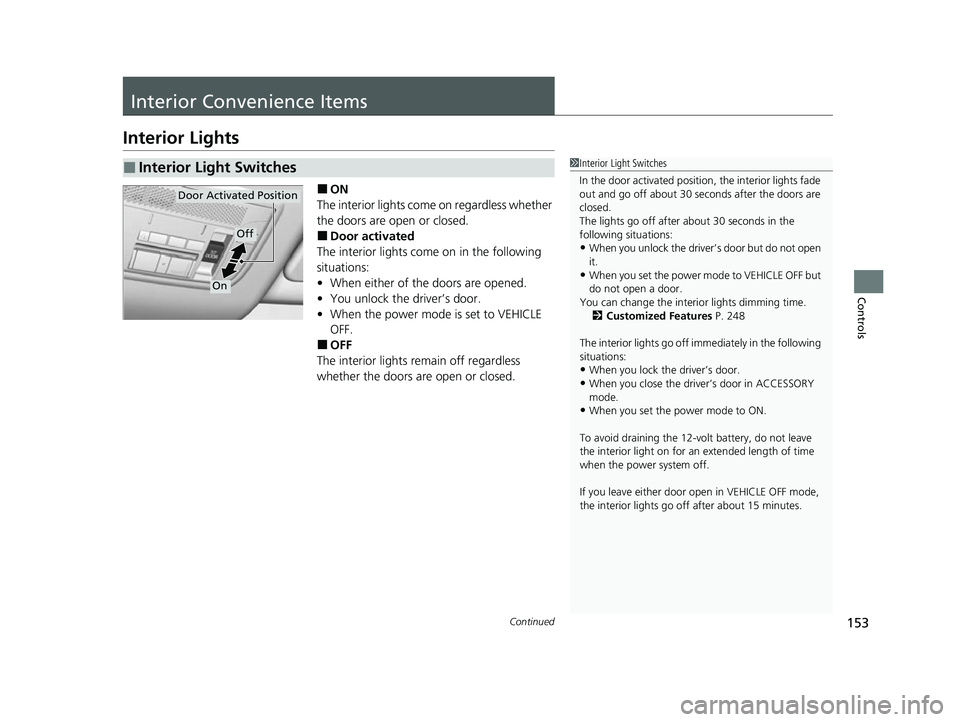
■ON
The interior lights come on regardless whether
the doors are open or closed.
■Door activated
The interior lights come on in the following
situations:
• When either of the doors are opened.
• You unlock the driver’s door.
• When the power mode is set to VEHICLE
OFF.
■OFF
The interior lights remain off regardless
whether the doors are open or closed.
■Interior Light Switches1 Interior Light Switches
In the door activated position, the interior lights fade
out and go off about 30 se conds after the doors are
closed.
The lights go off after about 30 seconds in the
following situations:
•When you unlock the driver’s door but do not open
it.
•When you set the power mode to VEHICLE OFF but
do not open a door.
You can change the interi or lights dimming time.
2 Customized Features P. 248
The interior lights go off im mediately in the following
situations:
•When you lock the driver’s door.
•When you close the driver’s door in ACCESSORY
mode.
•When you set the power mode to ON.
To avoid draining the 12-vo lt battery, do not leave
the interior light on for an extended length of time
when the power system off.
If you leave either door open in VEHICLE OFF mode,
the interior lights go of f after about 15 minutes.
Door Activated Position
Off
On
21 ACURA NSX PMC-31T6N6400.book 153 ページ 2020年10月8日 木曜日 午後3時7分
Page 257 of 494
255
uuCustomized Features u
Continued
Features
Lighting SetupInterior Light Dimming Time
Headlight Auto Off Timer
Auto Light Sensitivity*
Auto Interior Illumination Sensitivity
Auto Door Lock
Key and Remote Unlock Mode
Door Setup
Apple CarPlay
Android Auto
Auto Headlight On with Wiper On
Keyless Lock Answer Back
Security Relock Timer
Keyless Access SetupDoor Unlock Mode
Keyless Access Light Flash
Keyless Access Beep
Smartphone
Auto Door Unlock
Maintenance Info
Default
Default
Reset
Dynamic Mode SetupScheduler
* Not available on all models
21 ACURA NSX PMC-31T6N6400.book 255 ページ 2020年10月8日 木曜日 午後3時7分
Page 269 of 494

267
uuCustomized Features u
Continued
Features
*1:Default SettingSetup
Group Customizable Features Desc
ription Selectable Settings
Vehicle
Driving
Position
Setup
*
Easy Entry/Exit
Moves the seat rearward when you get in/get out
of the vehicle. Changes the setting for this
feature.
On*1/Off
Memory Position LinkTurns the driving position memory system on and
off.On*1/ Off
Keyless
Access
Setup
Door Unlock ModeChanges which doors unlock when you grab the
driver’s door handle.Driver Door Only*1/
All Doors
Keyless Access Light FlashCauses some exterior li ghts to flash when you
unlock/lock the doors.On*1/ Off
Keyless Access BeepCauses the beeper to sound when you unlock/
lock the doors.On*1/Off
Lighting
Setup
Interior Light Dimming
TimeChanges the length of time the interior lights stay
on after you close the doors.60 sec /30 sec*1/15 sec
Headlight Auto Off TimerChanges the length of time the exterior lights
stay on after you clos e the driver’s door.60 sec/30 sec/15
sec*1/ 0 sec
Auto Interior Illumination
SensitivityChanges the sensitivity of the brightness of the
instrument panel when the headlight switch is in
the AUTO position.Min/Low/ Mid*1/High /
Max
* Not available on all models
21 ACURA NSX PMC-31T6N6400.book 267 ページ 2020年10月8日 木曜日 午後3時7分

