2020 YAMAHA TRICITY 300 fuel
[x] Cancel search: fuelPage 8 of 114

Table of contentsSafety information ............................ 1-1
Further safe-riding points ............... 1-5
Description ....................................... 2-1
Left view ......................................... 2-1
Right view ....................................... 2-2
Controls and instruments ............... 2-3
Smart key system ........................... 3-1
Smart key system ........................... 3-1
Operating range of the smart key system......................................... 3-2
Handling of the smart key and mechanical keys ......................... 3-3
Smart key ....................................... 3-4
Replacing the smart key battery..... 3-6
Main switch .................................... 3-7
Stan din g assist ................................. 4-1
Standing assist ............................... 4-1
Instrument an d control functions ... 5-1
Indicator lights and warning
lights............................................ 5-1
Multi-function meter unit ................ 5-3
Handlebar switches ........................ 5-8
Front brake lever .......................... 5-10
Brake pedal .................................. 5-10
Rear brake lever ........................... 5-11
Parking brake lever ....................... 5-12
ABS .............................................. 5-12 Traction control system ................ 5-13
Fuel tank cap ................................ 5-15
Fuel ............................................... 5-16
Fuel tank overflow hose ................ 5-18
Catalytic converter ........................ 5-18
Storage compartment ................... 5-18
Adjusting the shock absorber
assemblies ................................. 5-20
Auxiliary DC jack ........................... 5-20
Sidestand ...................................... 5-21
Ignition circuit cut-off system ....... 5-22
For your safety – pre-operation
checks ............................................... 6-1
Operation an d important ri din g
points ................................................. 7-1
Engine break-in ............................... 7-1
Starting the engine .......................... 7-2
Starting off ...................................... 7-3
Acceleration and deceleration ........ 7-3
Braking ............................................ 7-3
Tips for reducing fuel consumption ................................ 7-4
Parking ............................................ 7-4
Perio dic maintenance an d
a d justment ........................................ 8-1
Tool kit ............................................ 8-2
Periodic maintenance charts .......... 8-3 Periodic maintenance chart for the
emission control system ............. 8-3
General maintenance and lubrication chart .......................... 8-4
Removing and installing the
panel............................................ 8-9
Checking the spark plug............... 8-10
Canister ........................................ 8-11
Engine oil and oil filter element..... 8-12
Why Yamalube.............................. 8-14
Final transmission oil .................... 8-14
Coolant ......................................... 8-15
Air filter and V-belt case air filter elements .................................... 8-17
Checking the throttle grip free play ............................................ 8-21
Valve clearance............................. 8-21
Tires .............................................. 8-22
Cast wheels .................................. 8-23
Checking the front brake lever
free play..................................... 8-24
Checking the rear brake lever free play..................................... 8-24
Checking the parking brake ......... 8-25
Checking the front and rear brake pads ................................ 8-25
Checking the brake fluid level ...... 8-26
Changing the brake fluid .............. 8-27
Checking the V-belt ...................... 8-27
Checking and lubricating the cables ........................................ 8-28UBX9E0E0.book Page 1 Monday, January 20, 2020 10:54 AM
Page 17 of 114
Description
2-2
2
EAU10421
Right view
1
2
3
4
5
6
7
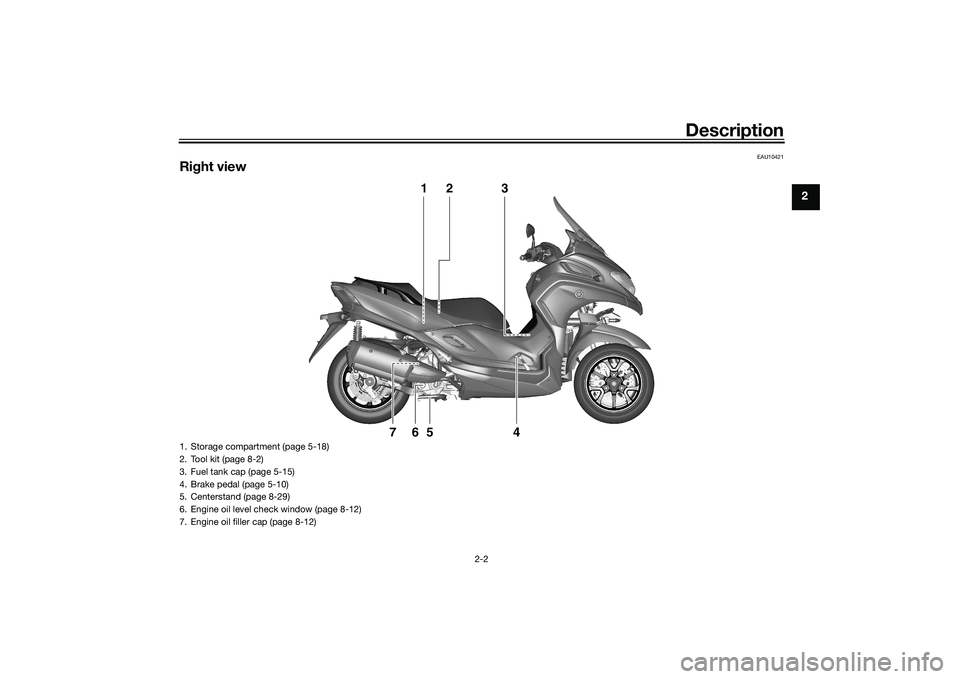
1. Storage compartment (page 5-18)
2. Tool kit (page 8-2)
3. Fuel tank cap (page 5-15)
4. Brake pedal (page 5-10)
5. Centerstand (page 8-29)
6. Engine oil level check window (page 8-12)
7. Engine oil filler cap (page 8-12)
UBX9E0E0.book Page 2 Monday, January 20, 2020 10:54 AM
Page 22 of 114

Smart key system
3-4
3
Keep the smart key away from
stron g ma gnetic fiel ds an d
ma gnetic o bjects such as key
hol ders, TVs, an d computers.
Keep the smart key away from
electric me dical equipment.
Do not allow oils, polishin g
a g ents, fuel, or any stron g
chemicals to come in contact
with the smart key. The smart
key body may become discol-
ore d or cracked .
TIPThe smart key battery life is ap-
proximately two years, but this
may vary according to operating
conditions.
Replace the smart key battery
when the smart key system indi-
cator light flashes for 20 seconds
when the vehicle is turned on, or
when the smart key indicator light
does not come on when the smart
key button is pushed. (See page
3-6.) After changing the smart key
battery, if the smart key system still does not operate, check the
vehicle battery and then have a
Yamaha dealer check the vehicle.
If the smart key continually re-
ceives radio waves, the smart key
battery will discharge quickly. (For
example, when placed in the vicin-
ity of electrical products such as
televisions, radios, or computers.)
You can register up to six smart
keys for the same vehicle. See a
Yamaha dealer regarding spare
smart keys.
If a smart key is lost, contact a
Yamaha dealer immediately to
prevent the vehicle from being
stolen.
EAU89110
Smart key
WARNING
EWA17952
The smart key shoul d b e carrie d
with you. Do not store it on the
vehicle.
When the smart key is within
operatin g ran ge, exercise due
care because other people not
carryin g the smart key can start
the en gine an d operate the vehi-
cle.1. Smart key indicator light
2. Smart key button
1
2
UBX9E0E0.book Page 4 Monday, January 20, 2020 10:54 AM
Page 25 of 114
Smart key system
3-7
3
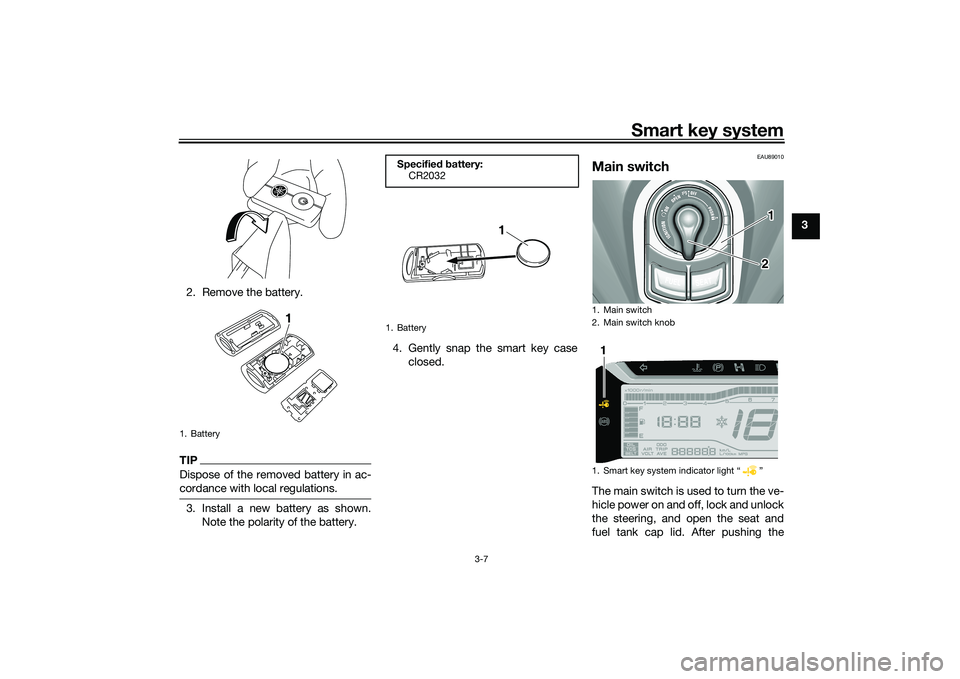
2. Remove the battery.
TIPDispose of the removed battery in ac-
cordance with local regulations.3. Install a new battery as shown. Note the polarity of the battery. 4. Gently snap the smart key case
closed.
EAU89010
Main switchThe main switch is used to turn the ve-
hicle power on and off, lock and unlock
the steering, and open the seat and
fuel tank cap lid. After pushing the
1. Battery
1
Specified b attery:
CR2032
1. Battery
1
1. Main switch
2. Main switch knob
1. Smart key system indicator light “ ”
12
1
UBX9E0E0.book Page 7 Monday, January 20, 2020 10:54 AM
Page 27 of 114
Smart key system
3-9
3
To turn the vehicle power off
1. With the smart key turned on and
within operating range, turn the
main switch to “OFF”.
2. The turn signal lights flash once and the vehicle power turns off.TIPWhen the main switch is turned to
“OFF” but the smart key cannot be
confirmed (the smart key is either out-
side operation range or has been
turned off), the beeper will sound for 3
seconds and the smart key system in-
dicator light will flash for 30 seconds. During this 30 seconds, the main
switch can be freely operated.
After 30 seconds, the vehicle
power will turn off automatically.
To turn the vehicle power off im-
mediately, push the main switch
knob four times within 2 seconds.
EAU89021
OPEN (open)
Power is supplied to the main switch.
The seat and fuel tank cap lid can be
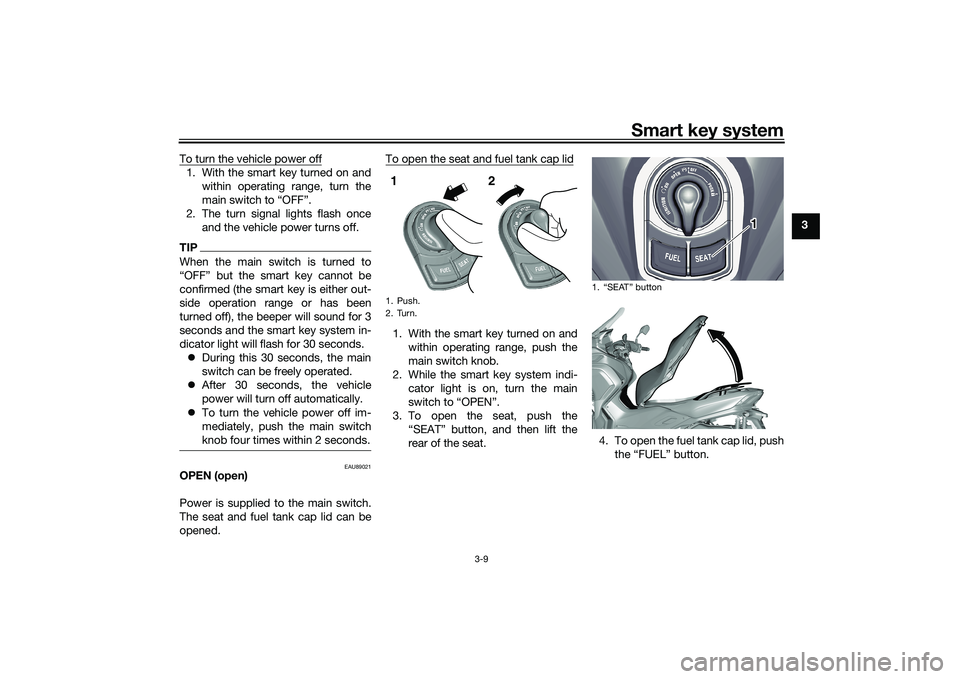
opened. To open the seat and fuel tank cap lid
1. With the smart key turned on and
within operating range, push the
main switch knob.
2. While the smart key system indi- cator light is on, turn the main
switch to “OPEN”.
3. To open the seat, push the “SEAT” button, and then lift the
rear of the seat. 4. To open the fuel tank cap lid, push
the “FUEL” button.1. Push.
2. Turn.1 2
1. “SEAT” button
1
UBX9E0E0.book Page 9 Monday, January 20, 2020 10:54 AM
Page 28 of 114
Smart key system
3-10
3
TIPMake sure that the seat and fuel tank
cap lid are securely closed before
starting off.
Open position reminder
To prevent you from accidentally leav-
ing the vehicle unlocked by walking
away with the main switch still in the
“OPEN” position, the smart key system
beeper will sound under the following
conditions. When the main switch has been in
the “OPEN” position for 3 minutes
If the smart key is turned off while
the main switch is in the “OPEN”
position
If you walk out of range of the
smart key system with the main
switch in the “OPEN” position
If the beeper sounds after 3 minutes,
turn the main switch to “OFF” or “ ”.
If the beeper sounds because the
smart key was turned off or moved out
of range, turn the smart key on and
walk back into range.TIP The beeper will turn off after 1 mi-
nute.
The seat can also be opened with
the mechanical key. (See page
5-18.)
EAU76521
“” (lock)
The steering is locked and all electrical
systems are off.
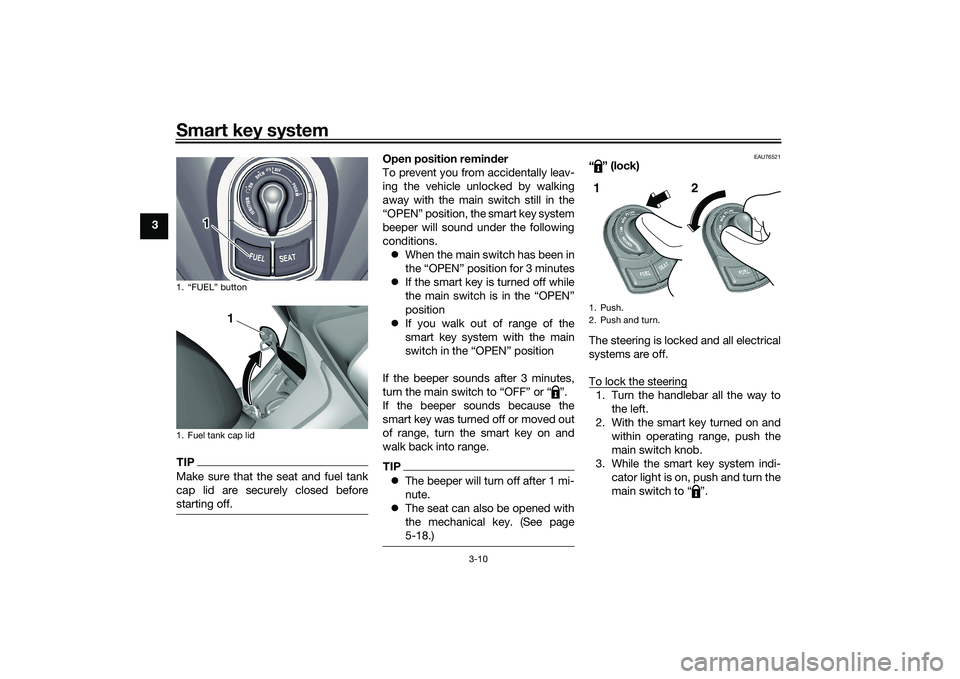
To lock the steering1. Turn the handlebar all the way to
the left.
2. With the smart key turned on and within operating range, push the
main switch knob.
3. While the smart key system indi- cator light is on, push and turn the
main switch to “ ”.
1. “FUEL” button
1. Fuel tank cap lid
1
1
1. Push.
2. Push and turn.1 2
UBX9E0E0.book Page 10 Monday, January 20, 2020 10:54 AM
Page 34 of 114

Instrument and control functions
5-3
5
TIPWhen the vehicle is turned on, the light
should come on for a few seconds and
then go off. If the light does not come
on, or if the light remains on, have a
Yamaha dealer check the vehicle.
EAU86811
Multi-function meter unit
WARNING
EWA12423
Be sure to stop the vehicle before
makin g any settin g chan ges to the
multi-function meter unit. Chan gin g
settin gs while ri din g can distract the
operator an d increase the risk of an
acci dent.
EAU89230
Switchin g the d isplay units
The display units can be switched be-
tween kilometers and miles.
To switch the display units1. Turn the vehicle off.
2. While pushing the “SEL” switch, turn the vehicle on.
3. Continue to push the “SEL” switch for at least 5 seconds.
EAU86831
Speed ometer
The speedometer shows the vehicle’s
traveling speed.
1. Fuel meter
2. Clock
3. Icy road warning indicator “ ”
4. Tachometer
5. Speedometer
6. Multi-function display
1. “SEL/RES” switch1
2
3
4
5
6
1
UBX9E0E0.book Page 3 Monday, January 20, 2020 10:54 AM
Page 35 of 114
Instrument and control functions
5-4
5
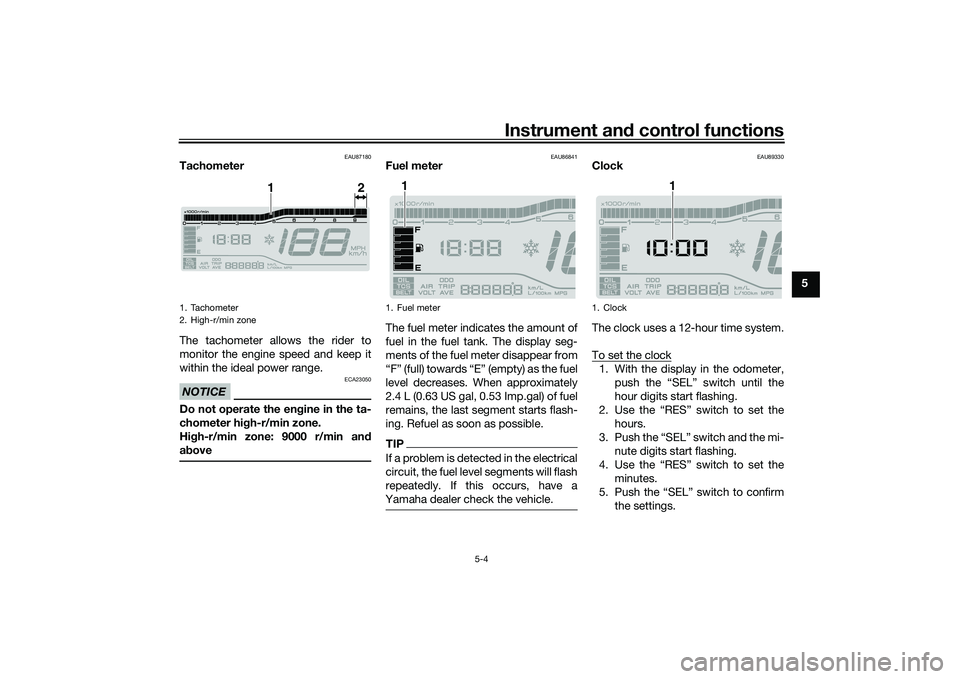
EAU87180
Tachometer
The tachometer allows the rider to
monitor the engine speed and keep it
within the ideal power range.NOTICE
ECA23050
Do not operate the en gine in the ta-
chometer hi gh-r/min zone.
Hi gh-r/min zone: 9000 r/min an d
a b ove
EAU86841
Fuel meter
The fuel meter indicates the amount of
fuel in the fuel tank. The display seg-
ments of the fuel meter disappear from
“F” (full) towards “E” (empty) as the fuel
level decreases. When approximately
2.4 L (0.63 US gal, 0.53 Imp.gal) of fuel
remains, the last segment starts flash-
ing. Refuel as soon as possible.TIPIf a problem is detected in the electrical
circuit, the fuel level segments will flash
repeatedly. If this occurs, have a
Yamaha dealer check the vehicle.
EAU89330
Clock
The clock uses a 12-hour time system.
To set the clock1. With the display in the odometer,
push the “SEL” switch until the
hour digits start flashing.
2. Use the “RES” switch to set the hours.
3. Push the “SEL” switch and the mi- nute digits start flashing.
4. Use the “RES” switch to set the minutes.
5. Push the “SEL” switch to confirm the settings.
1. Tachometer
2. High-r/min zone
1
2
1. Fuel meter
1
1. Clock
1
UBX9E0E0.book Page 4 Monday, January 20, 2020 10:54 AM