2020 YAMAHA TRICITY 300 100
[x] Cancel search: 100Page 30 of 114

Standin g assist
4-1
4
EAU89244
Stan din g assistThe standing assist helps the rider to
keep the vehicle upright when
stopped, or when parking. When you
press the standing assist switch, the
assist will be engaged to help you to
keep the vehicle at its current tilt angle.
WARNING
EWA20982
When you push the vehicle, b e
sure to turn the vehicle power
off. Otherwise uninten ded d is-
en gag in g of the stan din g assist
coul d result.
Always disen gag e the stan din g
assist un der the followin g situa-
tions. Otherwise uninten ded
loss of balance coul d result an d
lea d to vehicle overturn.
When pass the roa ds with o b-
stacles (e. g. roa d humps,
si dewalk)
When the vehicle is on un- pave d or rou gh groun d.
When the vehicle is on a slope.
Gettin g on an d off
When getting on the vehicle, make
sure the vehicle power is off, and apply
the front or rear brake.
When getting off the vehicle, apply the
parking brake and turn the vehicle
power off.
WARNING
EWA20992
When the vehicle is stoppe d with the
stan din g assist en gag ed , never step
on one si de of footrests, nor load the
lu gga ge unevenly on the vehicle. Otherwise uninten
ded loss of b alan-
ce may result, which coul d lea d to
vehicle overturn.
Stan din g assist operation
WARNING
EWA21002
The stan din g assist can b e operated
even the vehicle is leanin g. There-
fore, keep the followin g in min d:
Never en gag e the stan din g as-
sist while movin g. Otherwise
the vehicle will be hel d at an un-
inten ded leanin g an gle, which
may result in loss of control.
Be sure to disen gag e the stan d-
in g assist b efore startin g off.
Otherwise the stan din g assist
will uninten ded ly disen gag e,
an d may cause loss of b alance.Engaging the standing assist1. Stop the vehicle and close the
throttle completely. The standing
assist indicator light starts flash-
ing.
2. Press the standing assist switch once.
1. Standing assist indicator light “ ”
1
UBX9E0E0.book Page 1 Monday, January 20, 2020 10:54 AM
Page 32 of 114

Instrument and control functions
5-1
5
EAU4939M
In dicator li ghts an d warnin g
li g hts
EAU88900
Turn si gnal in dicator li ghts “ ”
an d“”
Each indicator light will flash when its
corresponding turn signal lights are
flashing.
EAU88910
Hi gh beam in dicator li ght “ ”
This indicator light comes on when the
high beam of the headlight is switched
on.
EAU89121
Parkin g b rake in dicator li ght “ ”
This indicator light comes on when the
parking brake is applied.
EAU88880
Coolant temperature warnin g
li g ht “ ”
This warning light comes on when the
engine is overheating. If this occurs,
stop the engine immediately and allow
the engine to cool. (See page 8-39.)
For vehicles with a radiator fan, the ra-
diator fan(s) automatically switch on or
off according to the coolant tempera-
ture.
TIPWhen the vehicle is turned on, the light
will come on for a few seconds, and
then go off. If the light does not come
on, or if the light remains on, have a
Yamaha dealer check the vehicle.NOTICE
ECA10022
Do not continue to operate the en-
g ine if it is overheatin g.
EAU88920
En gine trou ble warnin g lig ht “ ”
This warning light comes on if a prob-
lem is detected in the engine or other
vehicle control system. If this occurs,
have a Yamaha dealer check the on-
board diagnostic system.TIPWhen the vehicle is turned on, this light
should come on for a few seconds and
then go off. Otherwise, have a Yamaha
dealer check vehicle.
1. ABS warning light “ ”
2. Smart key system indicator light “ ”
3. Left turn signal indicator light “ ”
4. Coolant temperature warning light “ ”
5. Parking brake indicator light “ ”
6. Standing assist indicator light “ ”
7. High beam indicator light “ ”
8. Standing assist warning light “ ”
9. Right turn signal indicator light “ ”
10.Traction control system indicator light “ ”
11.Engine trouble warning light “ ”1
11
2
3
4
5
6
7
8
9
10
UBX9E0E0.book Page 1 Monday, January 20, 2020 10:54 AM
Page 36 of 114

Instrument and control functions
5-5
5
EAU89130
Multi-function display
The multi-function display is equipped
with the following: an odometer (ODO)
two tripmeters (TRIP 1 and TRIP 2)
a fuel reserve tripmeter (TRIP F)
an oil change tripmeter (OIL TRIP)
an oil change indicator
a V-belt replacement tripmeter
(BELT TRIP)
a V-belt replacement indicator
an instantaneous fuel consump-
tion display (km/L, L/100 km, or
MPG)
an average fuel consumption dis-
play (AVE_ _._ km/L, AVE_ _._
L/100 km, or AVE_ _ _._ MPG)
a traction control system display
(TCS)
an air temperature display (AIR)
a battery voltage display (VOLT)
Push the “RES” switch to change the
display in the following order:
ODO → TRIP 1 → TRIP 2 → TRIP F →
km/L, L/100 km or MPG → AVE_ _._
km/L, AVE_ _._ L/100 km or AVE_ _ _._
MPG → AIR → VOLT → TCS → OIL
TRIP → BELT TRIP → ODO
TIP The fuel reserve tripmeter appears
only when you are low on fuel.
Push the “SEL” switch to change
the display in the reverse order.
EAU86890
Odometer
The odometer shows the total distance
traveled by the vehicle.TIPThe odometer will lock at 999999 and
cannot be reset.
EAU89140
Tripmeters
The tripmeters show the distance trav-
eled since they were last reset.
To reset a tripmeter, change the dis-
play to the tripmeter you want to reset,
and then push the “RES” switch until it
is reset.TIPThe tripmeters will reset and continue
counting after 9999.9 is reached.
EAU89150
Fuel reserve tripmeter
If the last segment of the fuel meter
starts flashing, the display automati-
cally changes to the fuel reserve trip-
meter “TRIP F” and starts counting the
distance traveled from that point.
To reset the fuel reserve tripmeter,
push the “RES” switch until it is reset.TIPIf you do not reset the fuel reserve trip-
meter manually, it will reset automati-
cally and disappear from the display
after refueling and traveling 5 km (3 mi).
1. Multi-function display
1
UBX9E0E0.book Page 5 Monday, January 20, 2020 10:54 AM
Page 37 of 114
Instrument and control functions
5-6
5
EAU89161
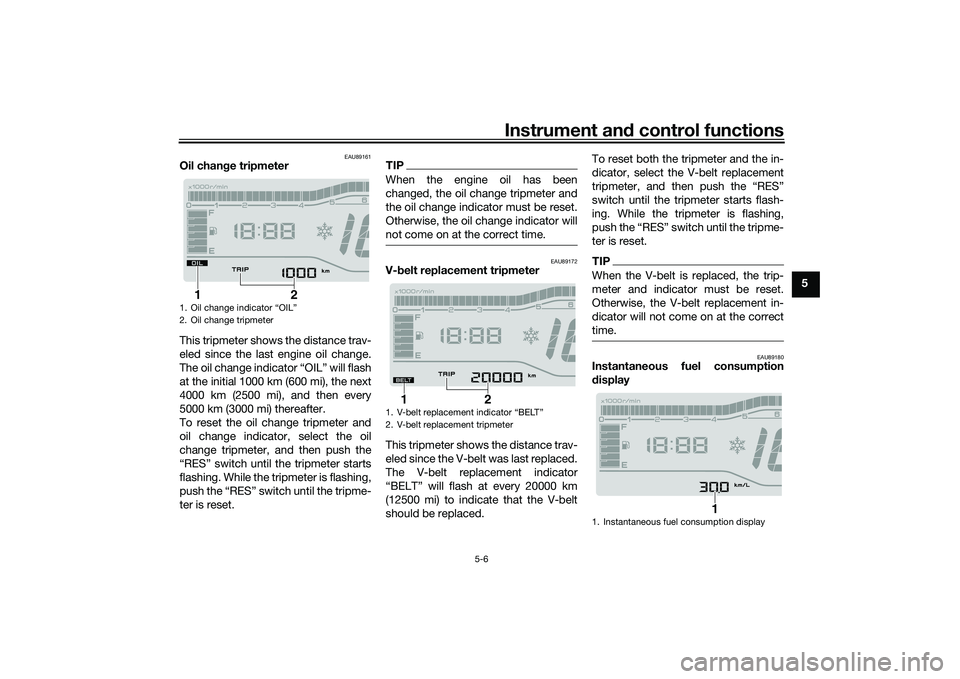
Oil chan ge tripmeter
This tripmeter shows the distance trav-
eled since the last engine oil change.
The oil change indicator “OIL” will flash
at the initial 1000 km (600 mi), the next
4000 km (2500 mi), and then every
5000 km (3000 mi) thereafter.
To reset the oil change tripmeter and
oil change indicator, select the oil
change tripmeter, and then push the
“RES” switch until the tripmeter starts
flashing. While the tripmeter is flashing,
push the “RES” switch until the tripme-
ter is reset.
TIPWhen the engine oil has been
changed, the oil change tripmeter and
the oil change indicator must be reset.
Otherwise, the oil change indicator will
not come on at the correct time.
EAU89172
V- belt replacement tripmeter
This tripmeter shows the distance trav-
eled since the V-belt was last replaced.
The V-belt replacement indicator
“BELT” will flash at every 20000 km
(12500 mi) to indicate that the V-belt
should be replaced. To reset both the tripmeter and the in-
dicator, select the V-belt replacement
tripmeter, and then push the “RES”
switch until the tripmeter starts flash-
ing. While the tripmeter is flashing,
push the “RES” switch until the tripme-
ter is reset.
TIPWhen the V-belt is replaced, the trip-
meter and indicator must be reset.
Otherwise, the V-belt replacement in-
dicator will not come on at the correct
time.
EAU89180
Instantaneous fuel consumption
d
isplay
1. Oil change indicator “OIL”
2. Oil change tripmeter
2
1
1. V-belt replacement indicator “BELT”
2. V-belt replacement tripmeter
2
1
1. Instantaneous fuel consumption display
1
UBX9E0E0.book Page 6 Monday, January 20, 2020 10:54 AM
Page 38 of 114
Instrument and control functions
5-7
5 This display shows the fuel consump-
tion under the current riding condi-
tions. It can be set to either “km/L” or
“L/100 km”, or “MPG” when using
miles. To switch the fuel consumption
measurement units, push the “SEL”
switch until the measurement units
change.
“km/L”: the distance that can be
traveled on 1.0 L of fuel.
“L/100 km”: the amount of fuel
necessary to travel 100 km.
“MPG”: the distance that can be
traveled on 1.0 Imp.gal of fuel.
TIPWhen traveling under 10 km/h (6 mi/h),
“_ _._” is displayed.
EAU87790
TIPThe instantaneous fuel consumption
function should be used for general
reference only. Do not use this figure to
estimate the distance that can be trav-
eled on the current tank of fuel.
EAU89190
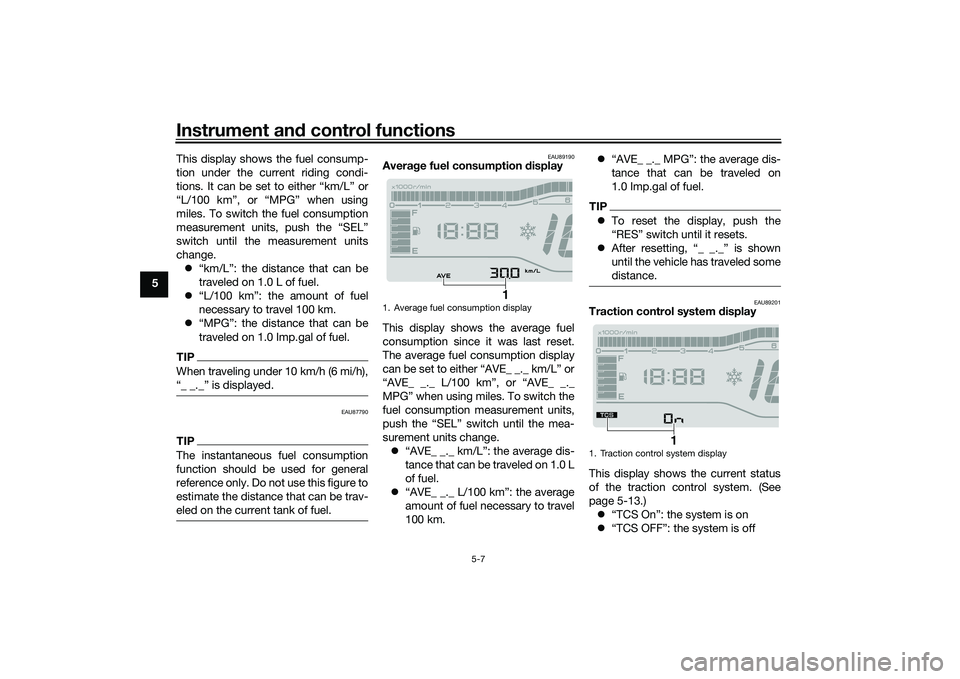
Averag e fuel consumption display
This display shows the average fuel
consumption since it was last reset.
The average fuel consumption display
can be set to either “AVE_ _._ km/L” or
“AVE_ _._ L/100 km”, or “AVE_ _._
MPG” when using miles. To switch the
fuel consumption measurement units,
push the “SEL” switch until the mea-
surement units change. “AVE_ _._ km/L”: the average dis-
tance that can be traveled on 1.0 L
of fuel.
“AVE_ _._ L/100 km”: the average
amount of fuel necessary to travel
100 km.
“AVE_ _._ MPG”: the average dis-
tance that can be traveled on
1.0 Imp.gal of fuel.
TIPTo reset the display, push the
“RES” switch until it resets.
After resetting, “_ _._” is shown
until the vehicle has traveled some
distance.
EAU89201
Traction control system display
This display shows the current status
of the traction control system. (See
page 5-13.) “TCS On”: the system is on
“TCS OFF”: the system is off
1. Average fuel consumption display
1
1. Traction control system display
1
UBX9E0E0.book Page 7 Monday, January 20, 2020 10:54 AM
Page 40 of 114

Instrument and control functions
5-9
5 Ri
ght
EAU89310
Dimmer/Pass switch “ / /PASS”
Set this switch to “ ” for the high
beam and to “ ” for the low beam.
To flash the high beam, press the
switch down to “PASS” while the
headlights are on low beam.TIPWhen the switch is set to low beam,
the outer two headlights come on.
When the switch is set to high beam, all
four headlights come on.
EAU12461
Turn si gnal switch “ / ”
To signal a right-hand turn, push this
switch to “ ”. To signal a left-hand
turn, push this switch to “ ”. When
released, the switch returns to the cen-
ter position. To cancel the turn signal
lights, push the switch in after it has re-
turned to the center position.
EAU12501
Horn switch “ ”
Press this switch to sound the horn.
EAU89273
Stan din g assist switch “ ”
To engage the standing assist, press
the switch once when the standing as-
sist indicator light is flashing.
To disengage the standing assist,
press the switch twice.
EAU54213
Stop/Run/Start switch “ / / ”
To crank the engine with the starter,
set this switch to “ ”, and then push
the switch down towards “ ”. See
page 7-2 for starting instructions prior
to starting the engine. Set this switch to “ ” to stop the en-
gine in case of an emergency, such as
when the vehicle overturns or when the
throttle cable is stuck.
EAU79500
Hazar
d switch “ ”
With the main switch in the “ON” posi-
tion, use this switch to turn on the haz-
ard lights (simultaneous flashing of all
turn signal lights).
The hazard lights are used in case of an
emergency or to warn other drivers
when your vehicle is stopped where it
might be a traffic hazard.NOTICE
ECA10062
Do not use the hazard lights for an
exten ded len gth of time with the en-
g ine not runnin g, otherwise the bat-
tery may dischar ge.
EAU88941
“SEL/RES” switch
This switch is used to make setting and
display changes in the multi-function
meter unit. See page 5-3 for more in-
formation.
1. Stop/Run/Start switch “ / / ”
2. Hazard switch “ ”
3. “SEL/RES” switch
12
3
UBX9E0E0.book Page 9 Monday, January 20, 2020 10:54 AM
Page 44 of 114

Instrument and control functions
5-13
5
The ABS performs a self-check
when you first start off. During this
time a clicking noise from the hy-
draulic unit may be audible, and if
the brake lever or brake pedal is
applied a vibration can be felt, but
this is not a malfunction.
The brake system will revert to a
conventional brake system in case
of ABS malfunction.
NOTICE
ECA20100
Be careful not to damag e the wheel
sensor or wheel sensor rotor; other-
wise, improper performance of the
ABS will result.
EAU89320
Traction control systemThe traction control system (TCS)
helps maintain traction when acceler-
ating on slippery surfaces, such as un-
paved or wet roads. If sensors detect
that the rear wheel is starting to slip
(uncontrolled spinning), the traction
control system assists by regulating
engine power until traction is restored.
When traction control has engaged,
the “ ” indicator light will flash. You
may notice changes in engine re-
sponse or exhaust sound.
WARNING
EWA18860
The traction control system is not a
su bstitute for rid ing appropriately
for the con ditions. Traction control
cannot prevent loss of traction due
to excessive speed when entering
turns, when acceleratin g har d at a
sharp lean an gle, or while brakin g,
an d cannot prevent front wheel slip-
pin g. As with any vehicle, approach
surfaces that may be slippery with
caution an d avoi d especially slip-
pery surfaces.
1. Front wheel sensor rotor
2. Front wheel sensor
1
2
1. Rear wheel sensor
2. Rear wheel sensor rotor
1 2
2 2
UBX9E0E0.book Page 13 Monday, January 20, 2020 10:54 AM
Page 47 of 114
Instrument and control functions
5-16
5
WARNING
EWA11092
Make sure that the fuel tank cap is
properly closed after filling fuel.
Leakin g fuel is a fire hazar d.
EAU13213
FuelMake sure there is sufficient gasoline in
the tank.
WARNING
EWA10882
Gasoline an d gasoline vapors are
extremely flammab le. To avoid fires
an d explosions an d to re duce the
risk of injury when refueling , follow
these instructions.1. Before refueling, turn off the en- gine and be sure that no one is sit-
ting on the vehicle. Never refuel
while smoking, or while in the vi-
cinity of sparks, open flames, or
other sources of ignition such as
the pilot lights of water heaters
and clothes dryers.
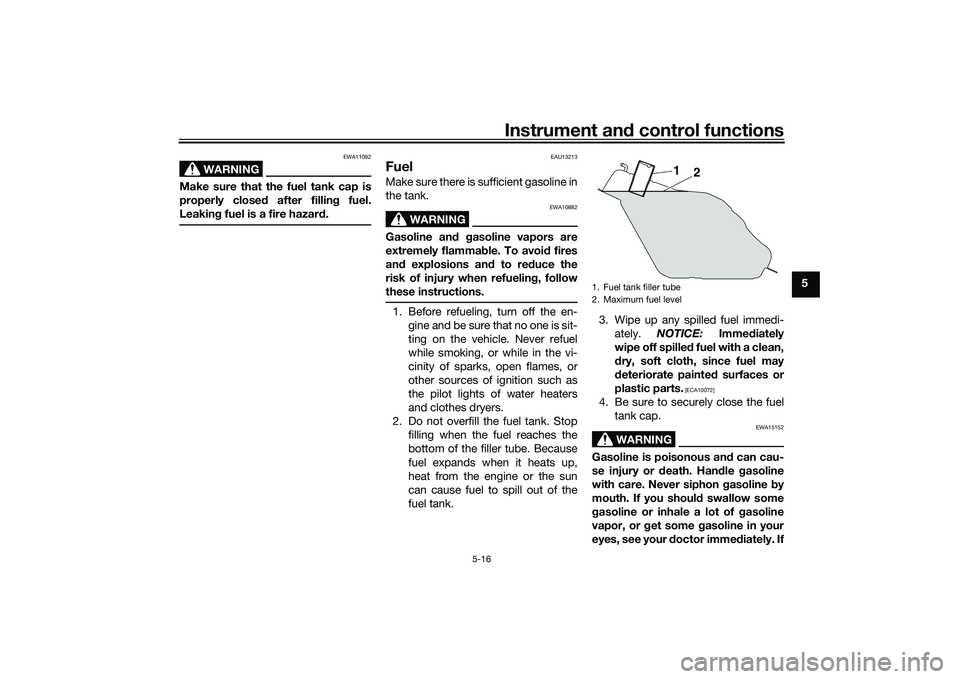
2. Do not overfill the fuel tank. Stop filling when the fuel reaches the
bottom of the filler tube. Because
fuel expands when it heats up,
heat from the engine or the sun
can cause fuel to spill out of the
fuel tank. 3. Wipe up any spilled fuel immedi-
ately. NOTICE: Immediately
wipe off spille d fuel with a clean,
d ry, soft cloth, since fuel may
d eteriorate painte d surfaces or
plastic parts.
[ECA10072]
4. Be sure to securely close the fuel tank cap.
WARNING
EWA15152
Gasoline is poisonous an d can cau-
se injury or death. Han dle gasoline
with care. Never siphon gasoline by
mouth. If you shoul d swallow some
g asoline or inhale a lot of gasoline
vapor, or g et some gasoline in your
eyes, see your d octor immediately. If1. Fuel tank filler tube
2. Maximum fuel level
1
2
UBX9E0E0.book Page 16 Monday, January 20, 2020 10:54 AM