2020 VOLVO XC60 TWIN ENGINE ECU
[x] Cancel search: ECUPage 268 of 687

||
KEY, LOCKS AND ALARM
* Option/accessory.
266
Kicking motion within the sensor's activation area.
Related information
Keyless and touch-sensitive surfaces
*
(p. 253)
Opening and closing the power tailgate
*
(p. 261)
Remote key range (p. 242)
Private Locking The tailgate can be locked using the private locking function to prevent it from beingopened, e.g. when the vehicle is left at aworkshop or with a valet.
The function button for pri- vate locking is located in thecenter display's Functionview. Depending on the cur-rent status of the lock,
Private Locking Unlockedor Private Locking Lockedwill be displayed.
Related information
Activating and deactivating private locking (p. 266)
Activating and deactivating private locking
Private locking is activated using the function button in the center display and a PIN code.
NOTE
For the valet lock function to be activated the car must be in at least ignition mode I.
Two codes are used for private locking:
A security code, which is created the first time the function is used.
A PIN code, which is changed each timethe function is activated.
Entering security code before initial
use
The first time the function is used, a securitycode must be selected. This code can then beused to deactivate private locking if theselected PIN code has been forgotten or lost.The security code functions as a PUK (secur-ity) code for all PIN codes used for privatelocking. Save the security code in a safe place.
Page 269 of 687

KEY, LOCKS AND ALARM
267
To create a security code:
1. Tap the button for private locking in Func-
tion view.
> A pop-up window will appear.
2. Enter the desired security code and press
Confirm.
> The security code is saved. The private locking function is now ready for activa- tion.
Activating private locking1. Tap the button for private locking in Func- tion view.
> A pop-up window will appear.
2. Enter the code you would like to use to unlock the tailgate and tap
Confirm.
> The tailgate will lock. A green indicator light will illuminate next to the button in Function view to confirm locked status.
Deactivating private locking1. Tap the button for private locking in Func- tion view.
> A pop-up window will appear.
2. Enter the code used for locking and tap
Confirm.
> The tailgate will unlock. The green indi- cator light next to the button in Func- tion view will go out to confirmunlocked status.
Forgotten PIN codeIf you have forgotten your PIN code or enteredit incorrectly more than three times, the secur-ity code can be used to deactivate privatelocking. If the vehicle is unlocked using Volvo On Call or the Volvo On Call app, private locking willbe automatically deactivated.
Forgotten security code
If you have forgotten your security code, con- tact an authorized Volvo retailer for assistancedeactivating private locking.
Related information
Private Locking (p. 266)
Page 293 of 687

DRIVER SUPPORT
}}
* Option/accessory.291
Pilot Assist*38
Pilot Assist can help the driver keep the vehi- cle in the current traffic lane by providingsteering assistance and maintaining an evenspeed and a set time interval to the vehicleahead.
How Pilot Assist worksThe Pilot Assist function is primarily intended for use on highways and other major roadswhere it can help provide a more comfortableand relaxing driving experience.
The camera/radar sensor monitors the distance to the vehicle ahead and detects lane markings.
Camera and radar sensor
Distance monitor
Lane marker line monitors The driver sets the desired speed and distance to the vehicle ahead. Pilot Assist monitors thedistance to the vehicle ahead and the trafficlane's side markers using the camera andradar sensor. The system maintains the settime interval to the vehicle ahead by automati-cally adjusting your vehicle's speed and keepsyour vehicle in its lane by providing steeringassistance. If the Curve Speed Assist (CSA)
* function is
activated, it may also affect the vehicle's speed. Pilot Assist's steering assistance is based on monitoring the direction of the vehicle aheadand the traffic lane's side marker lines. Thedriver can override Pilot Assist's steering rec-ommendations at any time and steer inanother direction, e.g. to change lanes or avoidobstacles on the road. If the camera/radar sensor cannot detect the lane's side marker lines or if Pilot Assist isunable for some other reason to clearly inter-pret the lane, Pilot Assist will temporarilydeactivate steering assistance until it can onceagain interpret the lane markings. However,the speed and distance warnings will remainactive. The driver will be alerted by slightvibrations in the steering wheel that the func-tion has been temporarily deactivated.
WARNING
Pilot Assist is deactivated automatically and resumes working without prior notice.
The color of the steering wheel symbol indicates thecurrent status of steeringassistance: • GREEN indicates that steering assistance is active
• GRAY (as shown in illustration) indicates thatsteering assistance is deactivated.
38 Depending on market, this function can be either standard or optional.
Page 351 of 687

DRIVER SUPPORT
}}
349
Lane Keeping Aid alerts the driver using vibrations in the steering wheel.
Depending on the settings used, Lane Keep- ing Aid functions in different ways:
Assist enabled: When the vehicle
approaches a lane marker line, the func- tion will actively steer the vehicle back intothe lane using light pressure on the steer-ing wheel.
Warning enabled: If the vehicle is about
to move over a lane marker line, the driver will be alerted by vibrations in the steeringwheel.
There is also an option for activating steeringassistance and alerts at the same time.
NOTE
When the direction indicators/turn signals are activated, the Lane Keeping Aid doesnot provide any warning or intervene withsteering.
WARNING
The function is supplementary driver support intended to facilitate drivingand help make it safer – it cannot han-dle all situations in all traffic, weatherand road conditions.
The driver is advised to read all sec-tions in the Owner's Manual about thisfunction to learn of its limitations,which the driver must be aware ofbefore using the function.
Driver support functions are not a sub-stitute for the driver's attention andjudgment. The driver is always respon-sible for ensuring the vehicle is drivenin a safe manner, at the appropriatespeed, with an appropriate distance toother vehicles, and in accordance withcurrent traffic rules and regulations.
Lane Keeping Aid does not intervene
Lane Keeping Aid does not intervene in sharp inside curves.
In certain cases, such as when a turn signal is used or when "straightening out" an insidecurve, Lane Keeping Aid will not provide steer-ing assistance or alerts.
Hands on the steering wheelSteering assistance with Lane Keeping Aidonly functions if the driver's hands are on thesteering wheel, which the system continu-ously monitors.
If the driver's hands are noton the steering wheel, anaudible signal will be givenand a message will instructthe driver to actively steer thevehicle:
Lane Keeping Aid – Apply steering
Page 394 of 687

||
HYBRID INFORMATION
3922. The charging cable handle will lock into
place and charging will begin within
5 seconds. When charging starts, thegreen LED light in the charging socket willbegin to flash. The approximate remainingcharging time or the charging status willbe displayed in the instrument panel. Charging may be temporarily interrupted if the vehicle is unlocked:
and a door is open
‒ charging will
restart within a few minutes.
if no door is opened
‒ the vehicle will
automatically relock. Charging willresume after 1 minute.
CAUTION
Never detach the charging cable from the 120/240 V outlet (AC, alternating current)while charging is in progress – the120/240 V outlet could be damaged insuch circumstances. Always interruptcharging first and then disconnect thecharging cable – first from the vehicle'scharging socket and then from the120/240 V outlet.
During charging, condensation from the air conditioning may form under the vehicle. Thisis normal and is caused by the hybrid batterycooling.
Related information
Charging the hybrid battery (p. 385)
Opening and closing the charging socketcover (p. 390)
Charging status in the vehicle's chargingsocket (p. 392)
Charging status in the instrument panel(p. 394)
Charging status in the charging cable's charging module (p. 393)
Stopping hybrid battery charging (p. 396)
Charging status in the vehicle's charging socket
The charging status is indicated by an LED light in the charging socket.
Location of the LED indicator light in the vehicle's charging socket.
The LED indicator light shows the current charge status during charging. If the LED indi-cator light is not illuminated, check to makesure the cable is securely connected in thewall outlet and in the outlet in the vehicle. Awhite, red or yellow light illuminates when thepassenger compartment lighting is activatedand will remain illuminated for a short timeafter the passenger compartment lighting hasgone out.
Page 404 of 687
STARTING AND DRIVING
* Option/accessory.
402
Starting the vehicle
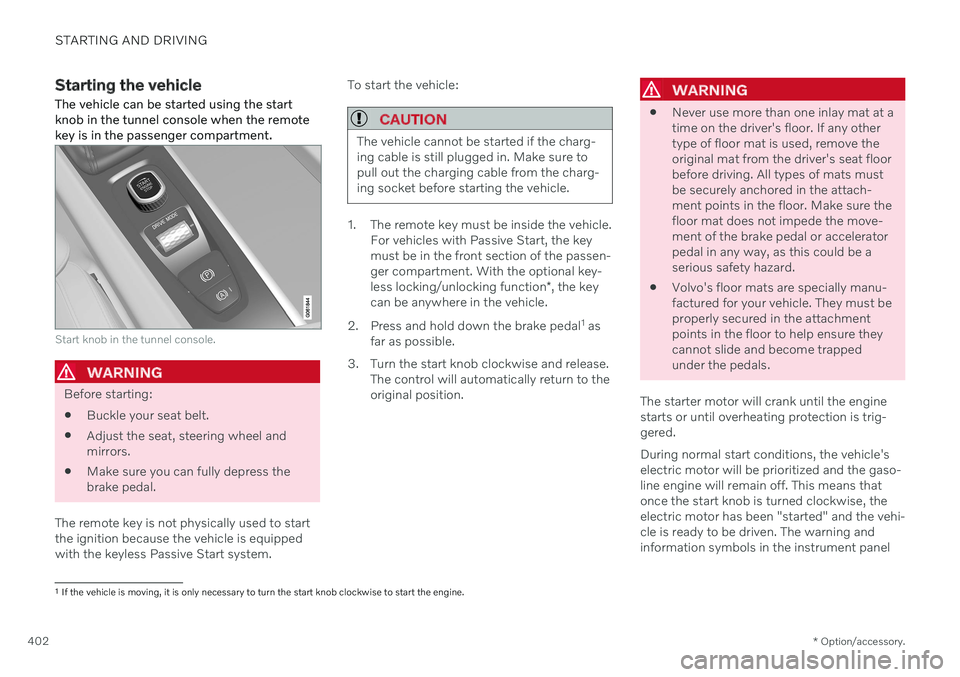
The vehicle can be started using the start knob in the tunnel console when the remotekey is in the passenger compartment.
Start knob in the tunnel console.
WARNING
Before starting:
Buckle your seat belt.
Adjust the seat, steering wheel and mirrors.
Make sure you can fully depress thebrake pedal.
The remote key is not physically used to startthe ignition because the vehicle is equippedwith the keyless Passive Start system. To start the vehicle:
CAUTION
The vehicle cannot be started if the charg- ing cable is still plugged in. Make sure topull out the charging cable from the charg-ing socket before starting the vehicle.
1. The remote key must be inside the vehicle.
For vehicles with Passive Start, the key must be in the front section of the passen-ger compartment. With the optional key- less locking/unlocking function *, the key
can be anywhere in the vehicle.
2. Press and hold down the brake pedal 1
as
far as possible.
3. Turn the start knob clockwise and release. The control will automatically return to the original position.
WARNING
Never use more than one inlay mat at a time on the driver's floor. If any othertype of floor mat is used, remove theoriginal mat from the driver's seat floorbefore driving. All types of mats mustbe securely anchored in the attach-ment points in the floor. Make sure thefloor mat does not impede the move-ment of the brake pedal or acceleratorpedal in any way, as this could be aserious safety hazard.
Volvo's floor mats are specially manu-factured for your vehicle. They must beproperly secured in the attachmentpoints in the floor to help ensure theycannot slide and become trappedunder the pedals.
The starter motor will crank until the enginestarts or until overheating protection is trig-gered. During normal start conditions, the vehicle's electric motor will be prioritized and the gaso-line engine will remain off. This means thatonce the start knob is turned clockwise, theelectric motor has been "started" and the vehi-cle is ready to be driven. The warning andinformation symbols in the instrument panel
1 If the vehicle is moving, it is only necessary to turn the start knob clockwise to start the engine.
Page 432 of 687

STARTING AND DRIVING
* Option/accessory.
430
Leveling control * and suspension
The vehicle's leveling control system adjusts the suspension and shock absorbers auto-matically to help optimize comfort and con-trol while driving. Leveling can also be con-trolled manually to facilitate loading or get-ting in and out of the vehicle.
Manually adjustable shock absorbers *The suspension on Polestar Engineered* vehi-
cles can be manually adjusted. There are three recommended modes: Performance,engineered and Comfort.
Performance mode
In Performance mode, the vehicle's suspen- sion feels stiffer.
Engineered, factory setting
Engineered is designed for daily driving.
Comfort mode
In Comfort mode, the vehicle's suspension feels softer.
Pneumatic suspension and shock
absorbers
The system is adapted to the selected drivemode and vehicle speed. The pneumatic sus- pension reduces the vehicle's ground clear-ance at higher speeds to reduce air resistanceand increase stability. The shock absorbers arenormally set to help optimize comfort and areadjusted continuously according to the roadsurface and the vehicle's acceleration, brakingand cornering.
The instrument panel indi-cates when the suspensionlevel is being adjusted.
The following apply if a door or the tailgate is opened: If a door is opened, the level can only be adjusted upwards.
If the tailgate is open, the level can only beadjusted downwards.
ParkingWhen parking, make sure that there is ade-quate space above and below the vehiclesince ground clearance may vary dependingon e.g. ambient temperature, how the vehicle is loaded, if loading mode is used, which drivemode is selected after the engine is started,etc. The level may also be adjusted a period after the vehicle is parked. This is to compensatefor any height changes that may occur due totemperature changes in the air springs whenthe vehicle cools.
TransportingWhen transporting the vehicle on a ferry, trainor truck, only secure (lash) the vehicle aroundthe tires, not using any other parts of the chas-sis. Changes in the pneumatic suspensionmay occur during transport, which couldadversely affect the lashing and result in dam-age.
Page 454 of 687

||
STARTING AND DRIVING
4521. Put the ignition in mode
0.
2. Make sure the auxiliary battery (the bat- tery used to jump start the discharged battery) has a voltage of 12 volts.
3. If the auxiliary battery is in another vehicle, turn off that vehicle's engine and makesure that the vehicles are not touchingeach other.
4. Clamp the red jumper cable onto the auxil- iary battery's positive (+) terminal (1).
CAUTION
Connect the jump cable carefully to pre- vent short circuits with other componentsin the engine compartment.
5. Fold back the cover over your vehicle's positive (+) jump start terminal (2).
6. Clamp the other end of the red jumper cable to your vehicle's positive (+) jump start terminal (2).
7. Clamp the black jumper cable onto the auxiliary battery's negative (-) terminal (3).
8. Clamp the other end of the black jumper cable to your vehicle's negative (-) groundpoint (4). 9. Make sure the jumper cables are securely
attached to help prevent sparks whilejump starting.
10. Start the engine of the assisting vehicle and let it run for a few minutes at a higheridling speed than normal, about1500 rpm.
11. Start your vehicle's engine. If the engine does not start, allow an additional 10minutes of charging time and then try tostart the engine again.
NOTE
When the engine is started under normal conditions, the vehicle's electrical drivemotor is prioritized – the gasoline engineremains off. This means that after the startknob has been turned clockwise, the elec-tric motor has "started" and the vehicle isready to be driven. Start of the electricmotor is indicated by the indicator lights onthe instrument panel going out and its pre-selected theme illuminating.
CAUTION
Do not touch the connections between the cable and the vehicle during the startattempt. Risk of sparking.
12. Remove the jumper cables in the reverseorder ‒ first the black cables and then the
red cables. Make sure that none of the clamps of the black jumper cables come into contactwith either vehicle's positive (+) jump startterminals or either of the red jumpercable's connected clamps.
WARNING
PROPOSITION 65 WARNING! Battery
posts, terminals, and related accessories contain lead and lead compounds, chemi-cals known to the state of California tocause cancer and reproductive harm. Washhands after handling.
WARNING
Batteries generate hydrogen gas, which is flammable and explosive.
Do not connect the jumper cable toany part of the fuel system or to anymoving parts. Avoid touching hotmanifolds.
Battery fluid contains sulfuric acid. Donot allow battery fluid to contact eyes,skin, fabrics or painted surfaces.
If contact occurs, flush the affectedarea immediately with water. Obtain