2020 VOLVO S90 TWIN ENGINE sport mode
[x] Cancel search: sport modePage 427 of 655

STARTING AND DRIVING
}}
* Option/accessory.425
Leveling control * and suspension
Self-leveling and suspension functions are controlled automatically.
Rear leveling control keeps the rear section of the vehicle at the same height regardless ofload. Leveling control may also remain activewhen the vehicle is parked.
Shock absorbers (Four-C)On vehicles equipped with Four-C, the shockabsorbers are adapted to the selected drive mode and the current vehicle speed. Theshock absorbers are normally set to help opti-mize comfort and are adjusted continuouslyaccording to the road surface and the vehicle'sacceleration, braking and cornering.
TransportingWhen transporting the vehicle on a ferry, trainor truck, only secure (lash) the vehicle aroundthe tires, not using any other parts of the chas-sis. Changes in the pneumatic suspension
may occur during transport, which couldadversely affect the lashing and result in dam-age.
Symbols and messages in driver display
Symbol Message Meaning
Suspension Deactivated by userActive chassis has been switched off manually by the user.
Suspension Temporarily reduced performanceActive chassis performance has been temporarily reduced due to extensive system use. If this message appears frequently (e.g. several times in one week) contact a workshop
A
.
Page 445 of 655

STARTING AND DRIVING
}}
443
Towing using a towline
This section refers to one vehicle being towed behind another using a towline.
Never attempt to tow a Twin Engine vehicle behind another vehicle as this could damagethe electric motor. The vehicle must instead belifted onto a tow truck and transported with allfour wheels on the bed or lifting platform ofthe truck (no wheels may touch the road).
Towing another vehicleTowing another vehicle requires a lot of power - use the Constant AWD drive mode. This
helps charge the hybrid battery and improve the vehicle's driving and roadholding characte-ristics. Before towing another vehicle, check applica- ble speed limit regulations.
Jump startingNever attempt to tow the vehicle to start theengine, as this could damage the electricmotor. Use an auxiliary battery if the start bat-tery's charge level is so low that the enginecannot be started.
CAUTION
Attempts to tow-start the vehicle could cause damage to the electrical drive motorand three-way catalytic converter.
Related information
Attaching and removing the towing eyelet (p. 443)
Hazard warning flashers (p. 158)
Recovery (p. 444)
Jump starting using another battery(p. 441)
Selecting ignition mode (p. 402)
Transmission (p. 412)
Attaching and removing the towing eyelet
Use the towing eyelet to tow another vehicle. Screw the towing eyelet securely into placein the threaded outlet behind the cover on theright-hand side of the rear bumper.
Attaching the towing eyelet
Take out the towing eyelet, which is stored in a foam block under the floor in the cargo compartment 11
.
11 The design and location of the foam block may vary depending on vehicle model.
Page 466 of 655

AUDIO, MEDIA AND INTERNET
* Option/accessory.
464
SiriusXM ®
Satellite radio *
The SiriusXM ®
Satellite system broadcasts
from of a number of high elevation satellites in geosynchronous orbit.
Listening to satellite radioThe digital signals from the satellites are line- of-sight, which means that physical obstruc-tions such as bridges, tunnels, etc, may tem-porarily interfere with signal reception. Avoid any obstructions, such as metallic objects transported on roof racks or in a skibox, or other antennas that may impede sig- nals from the SiriusXM ®
satellites.
Selecting SiriusXM ®
Satellite radio
mode
1. From the center display's Home view, swipe from right to left to come to App view.
2.Tap the SiriusXM ®
Satellite radio icon.
Home view with SiriusXM ®
Satellite radio activated
If there is no subscription activated, tap chan- nel 1, where you will be prompted on the screen to phone SiriusXM ®
.
If a cell phone is paired and connected to the vehicle, you can also subscribe by:
1. From Home view, pull down the Settings menu. 2.
Open the settings menu for SiriusXM ®
Satellite radio.
3. Tap
Unsubscribed Services.
4. To call SiriusXM ®
, enter the phone num-
ber. They will activate the subscription of your choice. This may take severalminutes.
When the subscription has been activated, tap the SiriusXM ®
Satellite radio icon to start the
function and display the channel list included in your subscription.
Related information
Radio (p. 456)
Using SiriusXM ®
Satellite radio * (p. 465)
Settings for SiriusXM ®
Satellite radio *
(p. 466)
SiriusXM Travel Link ®
* (p. 468)
Page 471 of 655

AUDIO, MEDIA AND INTERNET
}}
* Option/accessory.469
Related information
SiriusXM ®
Satellite radio * (p. 464)
SiriusXM Travel Link ®
* - Fuel (p. 471)
SiriusXM Travel Link ®
* - Sports (p. 472)
SiriusXM Travel Link ®
* - Weather (p. 469)
SiriusXM Travel Link ®
* - Notifications
(p. 470)SiriusXM Travel Link ®
* - Weather
This SiriusXM Travel Link service provides weather-related information near the vehicle,at a local ski resort, etc.
From the SiriusXM Travel Link home screen, to display weather-related information:
–Tap the Weather button to display this
screen.
At the top of the screen, the following catego- ries will be displayed:
Search (the magnifying glass icon)
Local
Ski condition
Areas
Favorites
Tap the category of your choice.
SearchTap the magnifying glass icon. If the function is supported in the current context, a keyboardwill appear on the screen. Enter the text of your choice and tap
Search for detailed infor-
mation from the SiriusXM Travel Link data- base.
Local 4Information from the closest weather stationwill be displayed and the following alternativesare available:
Map view
Today
5 days
Map view
Tap the map to display it in full-screen mode. Tap Back to return to the original map view.
Tap
Map options to display the following
alternatives.
Weather radar
Storm attributes
Surface features
Tropical storm tracks
Winds
Tap the relevant box to the right of the option to select/deselect it. Tap Done to confirm and
return to the previous screen or Cancel.
Today
Tap to see the current temperature, or the temperature in 3/6 hours. Tap
Back to return to the Local screen orClose to return to the SiriusXM Travel Link
home screen.
4 This is the weather default unless another alternative has been selected.
Page 523 of 655

WHEELS AND TIRES
}}
521
Tires are perishable goods. After a few years, they will begin to harden and their frictionproperties will gradually deteriorate. Alwaysreplace tires with the freshest tires possible.This is particularly important for snow tires. Aseries of numbers is imprinted on the sidewallof the tire. The last four digits in the series isthe Department of Transportation (DOT)stamp and indicates the week and year thetire was manufactured. The tire in the illustra-tion has 0717 as the last four digits, whichmeans it was manufactured week 7 of 2017.
Tire ageTires degrade over time, even when they arenot being used. It is recommended that tiresgenerally be replaced after 6 years of normalservice. Heat caused by hot climates, frequenthigh loading conditions or Ultra Violet (U.V.)exposure can accelerate the aging process. The temporary spare
2
should also be replaced
at 6-year intervals, even if it has never been used. A tire with e.g., visible cracks or discol-oration should be replaced immediately.
Tire economy
Maintain correct tire pressure.
Avoid fast starts, hard braking and tirescreeching.
Tire wear increases with speed.
Correct front wheel alignment is veryimportant.
Unbalanced wheels impair tire economyand driving comfort.
Tires must maintain the same direction ofrotation throughout their lifetime.
When replacing tires, the tires with themost tread should be mounted on the rearwheels to reduce the chance of oversteerduring hard braking.
Hitting curbs or potholes can damage thetires and/or wheels permanently.
Tire rotationYour vehicle has no required tire rotation. Driv-ing style, tire pressure, climate and road con-ditions affect how quickly the tires age andexhibit signs of wear. Maintaining the correcttire pressure helps keep tread wear evenly dis-tributed. To help prevent differences in tread depth and wear patterns forming on the tires, the frontand rear wheels should be rotated, i.e. thefront tires moved to the rear and the rear tiresmoved to the front. Ideally, tire rotation shouldbe done the first time after approximately5000 km (ca 3100 miles) and thereafter at10,000 km (approx. 6200 miles) intervals. If you have any questions regarding tread depth, Volvo recommends consulting an authorized Volvo workshop. If significant dif-ferences in wear (> 1 mm difference in treaddepth) between the tires have already occur-red, the least worn tires should always bemounted on the rear wheels. A front-wheelskid (understeer) is usually easier to controlthan a rear-wheel skid (oversteer). If the frontwheels skid, the vehicle will continue in astraight line instead of the rear wheels skid-ding to the side, which could cause you tocompletely lose control of the vehicle. It istherefore important that the rear wheels neverlose grip before the front wheels.
Storing wheels and tiresWhen storing complete wheels (tires mountedon rims), they should be suspended off thefloor or placed on their sides on the floor. Tires not mounted on rims should be stored on their sides or standing upright, but should notbe suspended.
CAUTION
Tires should preferably be stored in a cool, dry, dark place, and should never be storedin close proximity to solvents, gasoline,oils, etc.
2
Not available on all models.
Page 562 of 655
LOADING, STORAGE AND PASSENGER COMPARTMENT
* Option/accessory.
560
Grocery bag holders Grocery bag holders (hooks) help keep shop- ping bags in place and prevent them fromfalling over and spilling their contents in thecargo compartment.
On the sides of the cargo compartment
There is a grocery bag holder in the side panel on each side of the cargo compartment.
CAUTION
The grocery bag holders are only intended to hold weights up to 5 kg (11 lbs).
Related information
Loading recommendations (p. 558)
Using the glove compartment (p. 555)
Load anchoring eyelets The load anchoring eyelets in the cargo com- partment can be used to secure objects withstraps, a net, etc.
WARNING
Hard, sharp and/or heavy objects in or pro- truding from the vehicle can cause injury inthe event of hard braking. Always secure large and heavy objects with a seat belt or cargo retaining straps.
Related information
Loading recommendations (p. 558)
Weights (p. 629)
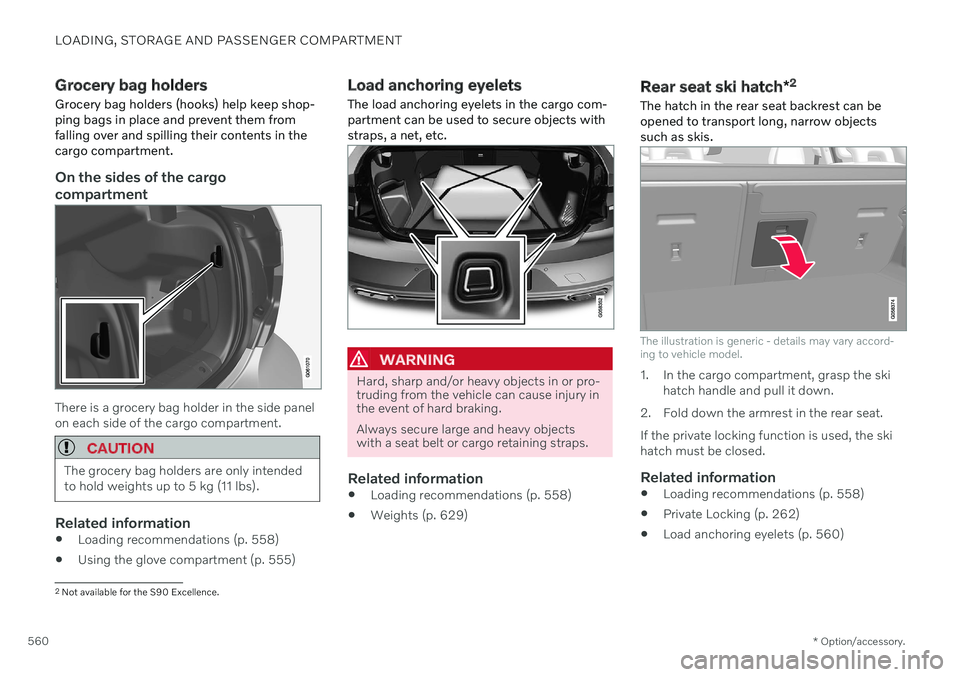
Rear seat ski hatch
*2
The hatch in the rear seat backrest can be
opened to transport long, narrow objects such as skis.
The illustration is generic - details may vary accord- ing to vehicle model.
1. In the cargo compartment, grasp the ski hatch handle and pull it down.
2. Fold down the armrest in the rear seat. If the private locking function is used, the ski hatch must be closed.
Related information
Loading recommendations (p. 558)
Private Locking (p. 262)
Load anchoring eyelets (p. 560)
2
Not available for the S90 Excellence.
Page 628 of 655

||
SPECIFICATIONS
626
Federal Motor Vehicle Safety Standards
(FMVSS) specifications (USA) and Ministry of Transport (CMVSS) standards (Canada).Your Volvo is designed to meet all applicablesafety standards, as evidenced by the certifi-cation label on the driver's side B-pillar (thestructural member at the side of the vehicle, atthe rear of the driver's door opening). Thislabel also includes codes for paint color, etc.For further information regarding these regula-tions, please consult your Volvo retailer. U.S.models have the upper decal; Canadian mod-els have the lower one. Engine oil. This label contains the recom-
mended engine oil specifications.
Decal A/C. Refrigerant R134a.
NOTE
The decals shown in the Owner's Manual do not claim to be exact reproductions ofthose found in the vehicle. The purpose isto show approximately how they look andabout where they are located on the vehi-cle. The information that applies for yourvehicle in particular is found on the decalon the vehicle.
Related information
Air conditioning specifications (p. 633)
Page 641 of 655

INDEX
639
Driver profile 133
edit 134, 135, 137
select 134
Driver support system 268 Drive mode 301
Drive systems 418 Driving cooling system 439
Driving economy 428
Driving through standing water 433
E
Economical driving 428
Electrical outlet 554 use 554
Electrical system 579 Electric drive motor specifications 630
electric motor 418 Range 429
Electric parking brake 406
Electronic immobilizer 248
emergency brake lights 158
Emission inspection readiness 562
Energy distribution using map data 424
Engine automatic start and stop of combus-
tion engine 419
overheating 439
start 398
turn off 400
Engine braking 403, 413 Engine compartment coolant 576
engine oil 574
overview 573
Engine drag control 269
Engine oil 574 filling 575
filter 574
grade and volume 631
Engine shutdown 400
Engine specifications 630Engine temperature high 439
Environment 28 Ethanol content max. 10% by volume 436
Exterior dimensions 627
Extra heater (Auxiliary heater) 231F
Federal Clean Air Act 562
Ferry transport 425
Flooded road 433
Fluids, volumes 621, 633
Fluids and oils 632, 633Fog lights rear 157
Four-C 425Front seat blower 219
climate 209
heating 211
temperature 221
ventilation 213
Front seat manual 184
Front seats, power 185 adjusting passenger seat from driv-
er's seat 193
adjusting seat 185
Lumbar support 191
massage 188, 189, 190
multifunction control 188, 189, 190, 191
Side bolsters 191
store position 186, 187
Fuel 436 Travel Link service 471