2020 VAUXHALL VIVARO C preset
[x] Cancel search: presetPage 19 of 117
Basic operation19Setting time and date
By default the displayed time and date is automatically adjusted by the
system.
To manually adjust the displayed time
and date:
Select the Time tab.
Set Synchronization with GPS (UTC)
to OFF and then select the Time field
to set the desired time.
Select the Date tab and then select
the Date: field to set the desired date.
Adjusting the screen
Select Screen configuration .
Text scroll function
Select the Animation tab.
If long texts on the screen should be scrolled automatically, activate
Automatic scrolling .
If Automatic scrolling is deactivated,
long texts are truncated.
Adjusting the brightness
Select Brightness and set the
brightness of the screen to the
desired level.Storing your personal settings
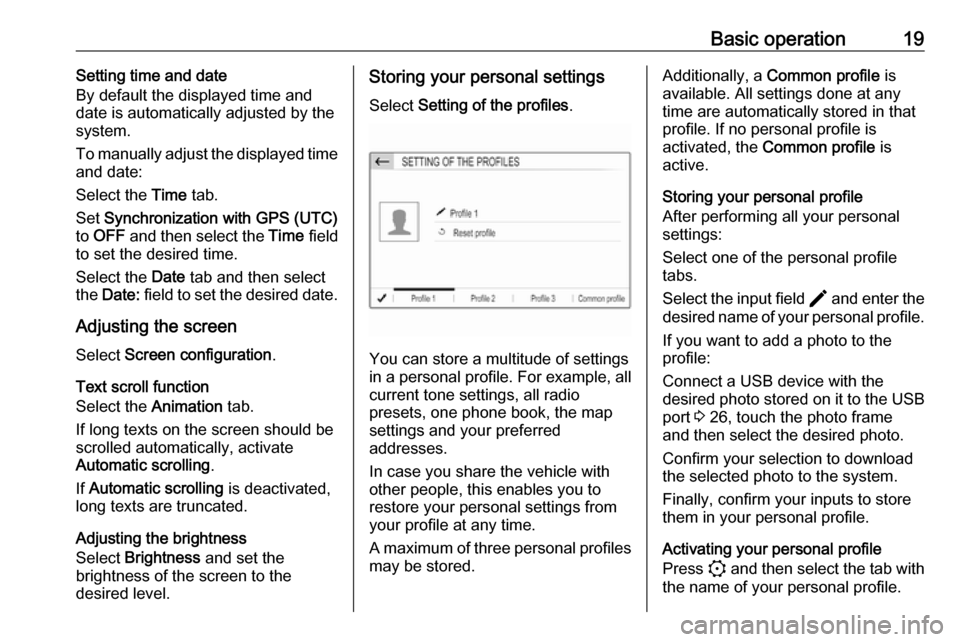
Select Setting of the profiles .
You can store a multitude of settings
in a personal profile. For example, all
current tone settings, all radio
presets, one phone book, the map
settings and your preferred
addresses.
In case you share the vehicle with
other people, this enables you to
restore your personal settings from
your profile at any time.
A maximum of three personal profiles may be stored.
Additionally, a Common profile is
available. All settings done at any
time are automatically stored in that
profile. If no personal profile is
activated, the Common profile is
active.
Storing your personal profile
After performing all your personal
settings:
Select one of the personal profile
tabs.
Select the input field > and enter the
desired name of your personal profile.
If you want to add a photo to the
profile:
Connect a USB device with the
desired photo stored on it to the USB
port 3 26, touch the photo frame
and then select the desired photo.
Confirm your selection to download
the selected photo to the system.
Finally, confirm your inputs to store
them in your personal profile.
Activating your personal profile
Press : and then select the tab with
the name of your personal profile.
Page 22 of 117

22RadioStation lists
In the station lists, all receivable radio
stations within the current reception
area are available for selection.
To display the station list of the
waveband currently active, select
List .
Select the desired station.Update station lists
If the stations stored in the waveband-
specific station list can no longer be
received, the AM and the DAB station lists must be updated. The FM station list is updated automatically.
Select OPTIONS , select Radio
stations and then select the desired
waveband.
To start an update for the selected
waveband, select U.
Storing favourite stations
Up to 15 radio stations of all
wavebands can be stored as
favourites in the Presets list.
Select Presets to display the preset
buttons.
Storing the currently active station
Touch and hold the desired button for a few seconds. The respective
frequency or station name is
displayed on the button.
If a station is already stored on a
preset button, that station will be
overwritten by the new one.
Storing a station from a station list
Select OPTIONS , select Radio
stations and then select the desired
waveband.Briefly touch the button next to the
desired station. Alternatively, select
7 to switch to the tiled view. Then
briefly touch a on the tile of the
desired station.
Select Add to favourites and then
touch and hold for a few seconds on the list row where you want to store
the station.
If a station is already stored on a list
row, that station will be overwritten by
the new one.
Retrieving stations
In the radio main menu select
Presets and then briefly touch the
preset button of the desired station.
Page 43 of 117

Speech recognition43E.g., if the display is currently set to
English and you want to enter the
name of a city located in France, you
need to change the display language
to French.
For changing the display language,
see "Language" in chapter "System
settings" 3 18.Input order for destination addresses
The order in which the parts of an
address need to be entered using the speech recognition system is
dependent on the country where the
destination is located.
If the speech recognition system
rejects your address entry, repeat the
command with a different order of the
address parts.
Voice pass-thru application
The voice pass-thru application of the Infotainment system allows access tothe speech recognition commands on
your smartphone.
Voice pass-through is available via
the phone projection applications
Apple CarPlay and Android Auto
3 29.
Usage
Embedded speech recognition Activating speech recognition Notice
Speech recognition is not available
during an active phone call.Activation via the Y button on the
steering wheel
Press Y on the steering wheel.
The audio system mutes, a voice
output message prompts you to say a command, and help menus with the
most important commands currently
available are shown on the display.
The speech recognition is ready for
voice input, after a beep has been given.
You can now say a voice command to
initiate a system function (e.g. playing
a preset radio station).Adjusting the volume of voice
prompts
Press volume button on the steering wheel upwards (increase volume)
Y or downwards (decrease volume)
Z .
Interrupting a voice prompt
As an experienced user, you can
interrupt a voice prompt by briefly
pressing Y on the steering wheel.
Alternatively you can say "Set dialogue mode as expert".
A beep is heard immediately, and a
command can be stated without
having to wait.
Cancelling a dialogue sequence
To cancel a dialogue sequence and
to deactivate the speech recognition,
press a on the steering wheel.
If you do not say any command for a
certain period of time, or if you say
commands that are not recognised by the system, a dialogue sequence is
automatically cancelled.
Page 53 of 117

53GGeneral information ....26, 30, 42, 45
Bluetooth ................................... 26
DAB ........................................... 23
Infotainment system ....................6
Navigation ................................. 30
Phone ........................................ 45
Smartphone applications ..........26
USB ........................................... 26
Guidance ..................................... 39
I
Infotainment control panel ..............8
M
Maps ............................................. 31
Menu operation............................. 14
Mobile phones and CB radio equipment ................................ 50
Mute.............................................. 11
N Navigation Contacts .................................... 35
Current location ......................... 31
Destination input .......................35
Map display ............................... 31
Map manipulation ......................31
Map update ............................... 30
Recent destinations ..................35
Route guidance ......................... 39TMC stations....................... 30, 39
Traffic incidents ......................... 39
Turn list ..................................... 39
Waypoint trip ............................. 35
O
Operation ...................................... 47
External devices ........................26
Menu ......................................... 14
Navigation system .....................31
Phone ........................................ 47
Radio ......................................... 21
P Pairing .......................................... 46
Personal settings ..........................18
Phone Bluetooth ................................... 45
Bluetooth connection ................46
Call history ................................ 47
Contacts .................................... 47
Entering a number ....................47
Functions during a call ..............47
General information................... 45
Incoming call ............................. 47
Phone book ............................... 47
Phone main menu .....................47
Phone book .................................. 47
Phone projection .......................... 29
Picture files ................................... 26
Playing audio ................................ 27POIs.............................................. 35
Presets Retrieving stations..................... 21
Storing stations ......................... 21
Profile settings .............................. 18
R Radio Activating................................... 21Configuring DAB .......................23
Configuring RDS .......................23
DAB announcements ................23
Digital audio broadcasting
(DAB) ........................................ 23
Presets ...................................... 21
Radio data system (RDS) .........23
Regional .................................... 23
Regionalisation ......................... 23
Retrieving stations..................... 21
Selecting the waveband ............21
Station search ........................... 21
Station tuning ............................ 21
Storing stations ......................... 21
Usage ........................................ 21
Radio data system .......................23
RDS .............................................. 23
Regional ....................................... 23
Regionalisation ............................. 23
Retrieving stations ........................21
Page 67 of 117
Basic operation67Adjusting the screenSelect Screen configuration .
Text scroll function
Select the Animation tab.
If long texts on the screen should be
scrolled automatically, activate
Automatic scrolling .
If Automatic scrolling is deactivated,
long texts are truncated.
Adjusting the brightness
Select Brightness and set the
brightness of the screen to the
desired level.
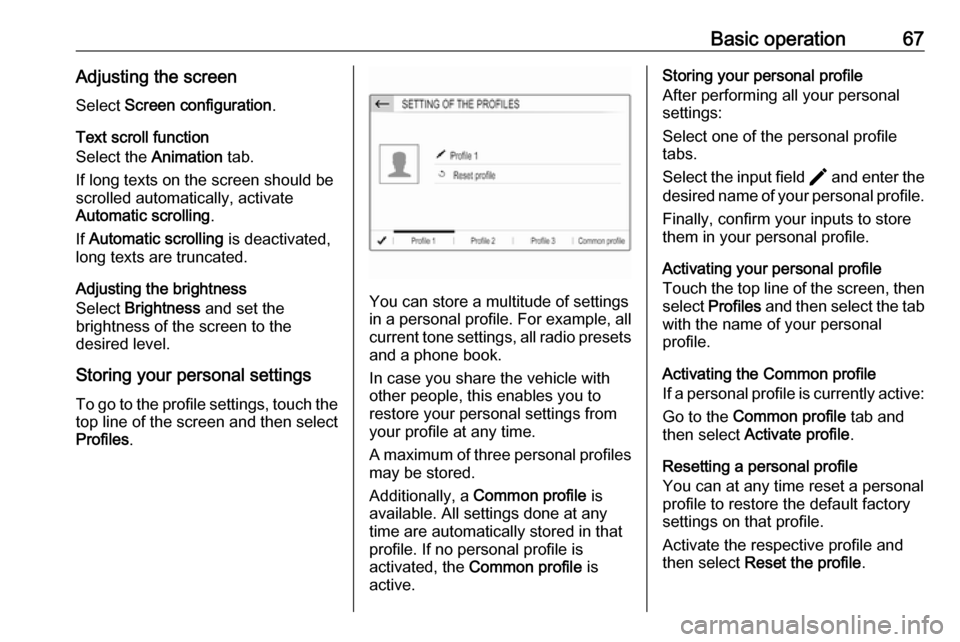
Storing your personal settings
To go to the profile settings, touch the top line of the screen and then select
Profiles .
You can store a multitude of settings
in a personal profile. For example, all
current tone settings, all radio presets
and a phone book.
In case you share the vehicle with
other people, this enables you to
restore your personal settings from
your profile at any time.
A maximum of three personal profiles may be stored.
Additionally, a Common profile is
available. All settings done at any
time are automatically stored in that
profile. If no personal profile is
activated, the Common profile is
active.
Storing your personal profile
After performing all your personal
settings:
Select one of the personal profile
tabs.
Select the input field > and enter the
desired name of your personal profile.
Finally, confirm your inputs to store
them in your personal profile.
Activating your personal profile
Touch the top line of the screen, then select Profiles and then select the tab
with the name of your personal
profile.
Activating the Common profile
If a personal profile is currently active:
Go to the Common profile tab and
then select Activate profile .
Resetting a personal profile
You can at any time reset a personal
profile to restore the default factory
settings on that profile.
Activate the respective profile and
then select Reset the profile .
Page 70 of 117

70RadioStoring favourite stations
Up to 24 radio stations of all
wavebands can be stored as
favourites in the Presets list.
Select Presets to display the preset
buttons.
Storing the currently active station
Touch and hold the desired button in
the Presets list for a few seconds. The
respective frequency or station name is displayed on the button.
If a station is already stored on a
preset button, that station will be
overwritten by the new one.
Alternatively, touch ; Mem in the
radio main menu to store the currently
active station.
Storing a station from a station list
Select OPTIONS and then select the
desired waveband.
To store a station from the station list, briefly touch ; next to the desired
station. The station is stored and the
number of the preset button will be
displayed. To delete a station,
touch ; again.
Alternatively, touch and hold the name of the station until it is stored.To delete the station, touch and hold
the name of the station again until a corresponding message is displayed.
Retrieving stations
In the radio main menu select
Presets and then briefly touch the
preset button of the desired station.
Radio data system
Radio data system (RDS) is a service of FM stations that considerably
facilitates the finding of the desired
station and its fault-free reception.Advantages of RDS
● On the display, the programme name of the station appears
instead of its frequency.
● During a station search, the Infotainment system tunes in to
RDS stations only.
● The Infotainment system always tunes into the best receivable
broadcasting frequency of the set station by means of AF
(alternative frequency).
● Depending on the station that is received, the Infotainment
system displays radio text that
can contain e.g. information on
the current programme.
Activating RDS In the radio main menu, select
OPTIONS and activate RDS.
If RDS is activated, RDS is displayed
in the bottom line of the radio main
menu.
Page 78 of 117

78Speech recognitionVoice pass-through is available via
the phone projection applications
Apple CarPlay and Android Auto
3 75.
Usage
Embedded speech recognition
Activating speech recognition Notice
Speech recognition is not available
during an active phone call.Activation via the Y button on the
steering wheel
Press Y on the steering wheel.
The audio system mutes, a voice
output message prompts you to say a command, and help menus with the
most important commands currently
available are shown on the display.
The speech recognition is ready for
voice input, after a beep has been given.
You can now say a voice command to initiate a system function (e.g. playing
a preset radio station).Adjusting the volume of voice
prompts
Press volume button on the steering wheel upwards (increase volume)
Y or downwards (decrease volume)
Z .
Interrupting a voice prompt
As an experienced user, you can
interrupt a voice prompt by briefly
pressing Y on the steering wheel.
Alternatively you can say "Set dialogue mode as expert".
A beep is heard immediately, and a
command can be stated without
having to wait.
Cancelling a dialogue sequence
To cancel a dialogue sequence and
to deactivate the speech recognition,
press w on the steering wheel.
If you do not say any command for a certain period of time, or if you say
commands that are not recognised by the system, a dialogue sequence is
automatically cancelled.Operation via speech commands
Follow the instructions given by voice output and shown on the display.
For best results: ● Listen for the voice prompt and wait for the beep before saying a
command or replying.
● Read the example commands on
the display.
● The voice prompt can be interrupted by pressing Y again.
● Wait for the beep and then speak
the command naturally, not toofast, not too slow.
Usually commands can be spoken in
a single command.
Voice pass-thru application
Activating speech recognition
Press and hold Y on the steering
wheel until a speech recognition
session is started.
Page 87 of 117

87DAB........................................... 71
Infotainment system ..................56
Phone ........................................ 80
Smartphone applications ..........73
USB ........................................... 73
I
Infotainment control panel ............58
M
Menu operation............................. 63
Mobile phones and CB radio equipment ................................ 84
Mute.............................................. 61
O
Operation ...................................... 82
External devices ........................73
Menu ......................................... 63
Phone ........................................ 82
Radio ......................................... 69
P Pairing .......................................... 81
Personal settings ..........................66
Phone Bluetooth ................................... 80
Bluetooth connection ................81
Call history ................................ 82
Contacts .................................... 82
Entering a number ....................82Functions during a call ..............82
General information................... 80
Incoming call ............................. 82
Phone book ............................... 82
Phone main menu .....................82
Phone book .................................. 82
Phone projection .......................... 75
Picture files ................................... 73
Playing audio ................................ 74
Presets Retrieving stations..................... 69
Storing stations ......................... 69
Profile settings .............................. 66
R Radio Activating................................... 69
Configuring DAB .......................71
Configuring RDS .......................70
DAB announcements ................71
Digital audio broadcasting
(DAB) ........................................ 71
Presets ...................................... 69
Radio data system (RDS) .........70
Regional .................................... 70
Regionalisation ......................... 70
Retrieving stations..................... 69
Selecting the waveband ............69
Station search ........................... 69
Station tuning ............................ 69Storing stations......................... 69
Usage ........................................ 69
Radio data system .......................70
RDS .............................................. 70
Regional ....................................... 70
Regionalisation ............................. 70
Retrieving stations ........................69
Ring tone ...................................... 82
Ring tone volume ......................65
S Smartphone .................................. 73
Phone projection .......................75
Speech output volume ..................65
Speech recognition .......................77
Storing stations ............................. 69
Switching the Infotainment system on .................................. 61
System settings ............................ 66
T
Theft-deterrent feature ................. 57
Time adjust......................................... 66
Tone settings ................................ 65
Touch beep volume ......................65
U Update software ........................... 66
Usage ............................... 61, 69, 78
Bluetooth ................................... 73