2020 VAUXHALL GRANDLAND X Regen
[x] Cancel search: RegenPage 104 of 283

102Instruments and controlsDisplay of average consumption. Themeasurement can be reset at any
time and starts with a default value.
Distance travelled
Displays the current distance for trip
1 since the reset.
The values of trip 1 page can be reset
by pressing SET / CLR for a few
seconds.
Trip 2 page:
Average speed
Display of average speed. The
measurement can be reset at any
time.
Average fuel consumption
Display of average consumption. The measurement can be reset at any
time and starts with a default value.
Distance travelled
Displays the current distance for trip
2 since a certain reset.
The values of trip 2 page can be reset
by pressing SET / CLR for a few
seconds.Digital speed page
Digital display of the instantaneous
speed.
Autostop time counter
A time counter calculates the time
spent in Autostop during a journey. It
resets to zero every time the ignition
is switched on.
Compass page
Displays the geographic direction of
driving.
Blank page
No trip / fuel information is displayed.
AdBlue Press CHECK repeatedly until the
AdBlue menu is shown.
AdBlue range
Indicates an estimate of the AdBlue
level. A message indicates whether
the level is sufficient or low.
3 142.Powerflow
Displays the current powerflow in the
hybrid system, e.g., when the vehicle
is operating in electric mode or when
energy is regenerated.
Range autonomyDisplays the selected drive mode, the
range of the high voltage battery and
the combined range, i.e., the range of
the high voltage battery and the fuel
tank.
Info Display The Info Display is located in the
instrument panel near the instrument
cluster.
Depending on the vehicle
configuration the vehicle has a
● Graphic Info Display
or
● 7'' Colour Info Display with
touchscreen functionality
or
● 8'' Colour Info Display with
touchscreen functionality
Page 106 of 283
104Instruments and controlsFor further information, see
Infotainment manual.
Vehicle personalisation 3 107.
8'' Colour Info Display Selecting menus and settings
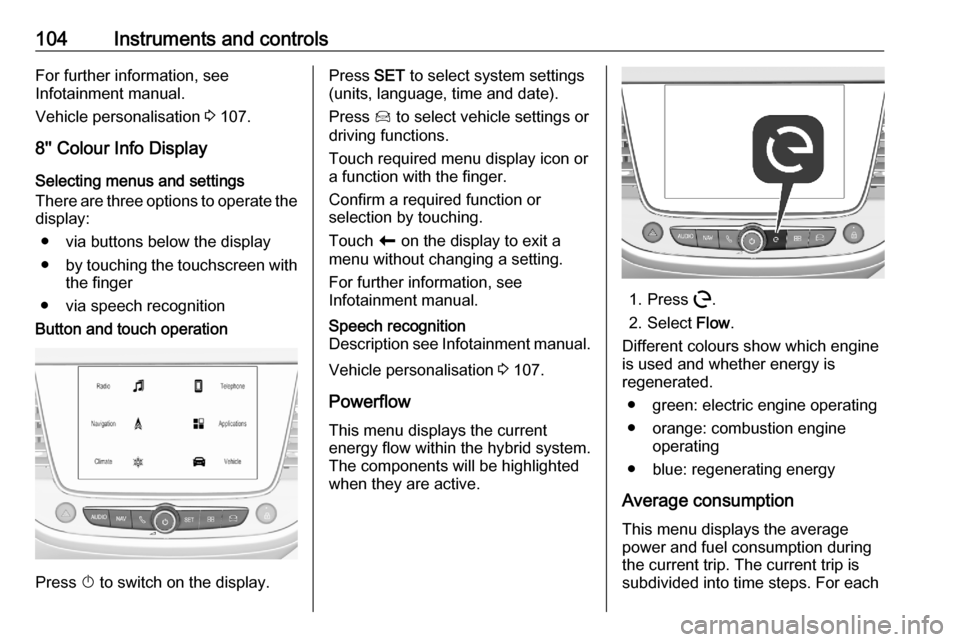
There are three options to operate the
display:
● via buttons below the display
● by touching the touchscreen with
the finger
● via speech recognitionButton and touch operation
Press X to switch on the display.
Press SET to select system settings
(units, language, time and date).
Press Í to select vehicle settings or
driving functions.
Touch required menu display icon or
a function with the finger.
Confirm a required function or
selection by touching.
Touch r on the display to exit a
menu without changing a setting.
For further information, see
Infotainment manual.Speech recognition
Description see Infotainment manual.
Vehicle personalisation 3 107.
Powerflow This menu displays the current
energy flow within the hybrid system.
The components will be highlighted
when they are active.
1. Press m.
2. Select Flow.
Different colours show which engine
is used and whether energy is
regenerated.
● green: electric engine operating
● orange: combustion engine operating
● blue: regenerating energy
Average consumption This menu displays the average
power and fuel consumption during
the current trip. The current trip is
subdivided into time steps. For each
Page 135 of 283

Driving and operating133Driving and
operatingDriving hints ............................... 134
Control of the vehicle ...............134
Steering ................................... 134
Starting and operating ...............134
New vehicle running-in ............134
Ignition switch positions ...........134
Power button ........................... 135
Starting the engine ..................136
Overrun cut-off ........................ 138
Stop-start system ....................138
Parking .................................... 140
Engine exhaust .......................... 141
Exhaust filter ............................ 141
Catalytic converter ...................142
AdBlue ..................................... 142
Automatic transmission electri‐
fied ............................................. 146
Automatic transmission ..............147
Transmission display ...............147
Gear selection ......................... 147
Manual mode ........................... 148
Electronic driving programmes 149Fault ........................................ 149
Interruption of power supply ....149
Manual transmission ..................150
Drive systems ............................ 151
Drive modes ............................ 151
All-wheel drive ......................... 151
Brakes ........................................ 152
Antilock brake system .............152
Parking brake .......................... 153
Brake assist ............................. 155
Hill start assist ......................... 155
Regenerative braking ..............155
Ride control systems .................156
Electronic Stability Control and Traction Control system .........156
Selective ride control ...............157
Sport mode .............................. 158
Driver assistance systems .........159
Cruise control .......................... 159
Speed limiter ........................... 162
Adaptive cruise control ............164
Forward collision alert .............170
Active emergency braking .......172
Front pedestrian protection .....175
Parking assist .......................... 176
Advanced parking assist .........179
Side blind spot alert .................184
Panoramic view system ...........185
Rear view camera ...................188Lane departure warning ..........190
Lane keep assist .....................191
Driver alert ............................... 193
Charging .................................... 194
Programmable charging ..........197
Charging status .......................198
Charge cord ............................. 198
Fuel ............................................ 201
Fuel for petrol engines .............201
Fuel for diesel engines ............202
Refuelling ................................ 203
Trailer hitch ................................ 205
General information .................205
Driving characteristics and towing tips .............................. 205
Trailer towing ........................... 205
Towing equipment ...................206
Trailer stability assist ...............208
Page 144 of 283

142Driving and operatingAs soon as the traffic conditions
permit, regenerate the filter by driving at a vehicle speed of at least 40 mph
until the control indicator
extinguishes.
Notice
On a new vehicle, the first exhaust
filter regeneration operations may
be accompanied by a burning smell,
which is normal. Following
prolonged operation of the vehicle at
very low speed or at idle, water
vapour can be emitted at the
exhaust on acceleration. This does
not affect the behaviour of the
vehicle or the environment.
Cleaning process not possible
If % or C stays on, accompanied
by an audible signal and a message,
this indicates that the exhaust filter
additive level is too low.
The reservoir must be topped-up
without delay. Seek the assistance of
a workshop.Catalytic converter
The catalytic converter reduces the
amount of harmful substances in the
exhaust gases.Caution
Fuel grades other than those listed on pages 3 201, 3 260 could
damage the catalytic converter or
electronic components.
Unburnt petrol will overheat and
damage the catalytic converter.
Therefore avoid excessive use of the starter, running the fuel tank
dry and starting the engine by
pushing or towing.
In the event of misfiring, uneven
engine running, a reduction in engine performance or other unusual
problems, have the cause of the fault
rectified by a workshop as soon as
possible. In an emergency, driving
can be continued for a short period,
keeping vehicle speed and engine
speed low.
AdBlue
General information
The selective catalytic reduction
(BlueInjection) is a method to
substantially reduce the nitrogen
oxides in the exhaust emission. This
is achieved by injecting a Diesel
Exhaust Fluid (DEF) into the exhaust
system. The ammonia released by
the fluid reacts with nitrous gases
(NO x) from the exhaust and turns it
into nitrogen and water.
The designation of this fluid is
AdBlue ®
. It is a non-toxic, non-
flammable, colourless and odourless
fluid which consists of 32% urea and
68% water.9 Warning
Avoid contact of your eyes or skin
with AdBlue.
In case of eye or skin contact,
rinse off with water.
Page 149 of 283

Driving and operating147To shift into B:
1. Shift into D.
2. Push the selector backwards without passing the point of
resistance.
To shift from B to D, push the selector
backwards without passing the point
of resistance.
One-pedal driving
With one-pedal driving, the
accelerator pedal can be used to
control the deceleration of the vehicle
down to a complete stop.
Quick releasing of the accelerator
pedal will result in aggressive
deceleration. Slow releasing of the
accelerator pedal will allow the
deceleration of the vehicle to be
adjusted as desired.
To use one-pedal driving, shift into B.
B is only selectable when the vehicle
is in D. Press the accelerator pedal to
achieve the desired speed. The
deceleration provided by one-pedal
driving provides full regenerative
braking by charging the high voltage
battery.Automatic transmission
The automatic transmission permits
automatic gearshifting (automatic
mode) or manual gearshifting
(manual mode).
Manual shifting is possible in manual
mode by tapping the selector lever to
+ or - 3 148.
Transmission display
The mode or selected gear is shown
in the Driver Information Centre.
In automatic mode, the driving
programme is indicated by D.
In manual mode, M and the number
of the selected gear is indicated.
R indicates reverse gear.
N indicates neutral position.
P indicates park position.
Gear selection
Move the selector lever in the shifting
gate as shown in the illustration
above.
Page 157 of 283

Driving and operating155Functionality check
When the vehicle is not moving, the
electric parking brake might be
applied automatically. This is done to
check the system.
Fault
Failure mode of electric parking brake
is indicated by a control indicator j
and by a vehicle message which is
displayed in the Driver Information Centre.
Vehicle messages 3 106.
Control indicator j flashes: electric
parking brake is not fully applied or
released. When continuously
flashing, release electric parking
brake and retry applying.
Brake assist If brake pedal is depressed quickly
and forcefully, maximum brake force
is automatically applied.
Operation of brake assist might
become apparent by a pulse in the
brake pedal and a greater resistance
when depressing the brake pedal.Maintain steady pressure on the
brake pedal as long as full braking is
required. Maximum brake force is
automatically reduced when brake
pedal is released.
Hill start assist The system helps prevent unintended
movement when driving away on
inclines.
When releasing the brake pedal after
stopping on an incline, brakes remain on for further 2 seconds. The brakes
release automatically as soon as the
vehicle begins to accelerate.
Regenerative braking
Regenerative braking generates
electrical energy resulting from
braking to charge the high voltage
battery. Regenerative power may be
limited when the high voltage battery
is fully charged.
If the selector lever is in D, energy is
recuperated when the brake pedal is
depressed.If the selector lever is in B, energy is
recuperated when the accelerator pedal is lifted.
Automatic transmission electrified 3 146
Page 212 of 283

210Vehicle careVehicle careGeneral Information...................210
Accessories and vehicle modifications .......................... 210
Vehicle storage ........................212
End-of-life vehicle recovery .....212
Vehicle checks ........................... 213
Performing work ......................213
Bonnet ..................................... 213
Engine oil ................................. 214
Engine coolant ......................... 215
Washer fluid ............................ 215
Brakes ..................................... 216
Brake fluid ............................... 216
Vehicle battery ......................... 216
Diesel fuel system bleeding .....218
Wiper blade replacement ........218
Bulb replacement .......................219
Halogen headlights ..................219
LED headlights ........................ 221
Front fog lights ......................... 221
Tail lights ................................. 221
Side turn lights ......................... 224
Number plate light ...................225
Interior lights ............................ 225Electrical system........................225
Fuses ....................................... 225
Engine compartment fuse box . 226
Instrument panel fuse box .......227
Vehicle tools .............................. 229
Tools ........................................ 229
Wheels and tyres .......................230
Winter tyres ............................. 230
Tyre designations ....................230
Tyre pressure .......................... 231
Tyre deflation detection system .................................... 232
Tread depth ............................. 233
Changing tyre and wheel size . 233
Wheel covers ........................... 234
Tyre chains .............................. 234
Tyre repair kit .......................... 234
Wheel changing .......................237
Spare wheel ............................ 239
Jump starting ............................. 242
Towing ....................................... 244
Towing the vehicle ...................244
Towing another vehicle ...........245
Appearance care .......................246
Exterior care ............................ 246
Interior care ............................. 248
Floor mats ............................... 248General Information
Accessories and vehicle modifications
We recommend the use of genuine parts and accessories and factory
approved parts specific for your
vehicle type. We cannot assess or
guarantee reliability of other products - even if they have a regulatory or
otherwise granted approval.
Any modification, conversion or other
changes made to standard vehicle
specifications (including, without
limitation, software modifications,
modifications of the electronic control units) may invalidate the warranty
offered by Vauxhall. Furthermore,
such changes may affect driver
assistance systems, may impact fuel
consumption, CO 2 emissions and
other emissions of the vehicle and
cause the vehicle to no longer
conform to the operating permit,
impacting the validity of your vehicle
registration.
Page 281 of 283

279Outside temperature ....................83
Overrun cut-off ........................... 138
P Panoramic view system ..............185
Parking ................................ 19, 140
Parking assist ............................ 176
Parking brake ............................ 153
Parking heater ............................ 130
Parking lights ............................. 119
Particulate filter ........................... 141
Pedestrian safety alert ..................80
Performance .............................. 263
Performing work ........................213
Power button .............................. 135
Power indicator gauge ..................90
Power outlets ............................... 84
Power seat adjustment ................48
Power windows ............................ 39
Preheating ................................... 97
Programmable charging .............197
Puncture ..................................... 239
Q
Quickheat ................................... 130
R Radio Frequency Identification (RFID) ..................................... 274
Radio remote control ...................21
Rain sensor .................................. 99REACH....................................... 270
Reading lights ............................ 120
Rear floor storage cover ..............72
Rear fog light ...............99, 118, 221
Rear seats .................................... 51
Rear view camera ...................... 188
Rear window wiper and washer ..82
Recommended fluids and lubricants ........................ 254, 258
Refuelling ................................... 203
Regenerative braking .................155
Registered trademarks ...............270
Reversing lights .........................119
Ride control systems ..................156
Roadside assistance ..................110
Roller blinds ................................. 42
Roof .............................................. 42
Roof load ...................................... 76
Roof rack ..................................... 75
S Safety net .................................... 73
Seat adjustment ............................. 7
Seat belt ........................................ 8
Seat belt reminder .......................93
Seat belts ..................................... 51
Seat heating ................................. 50
Seat heating, rear .....................51
Seat position ................................ 45
Selective catalytic reduction .......142Selective ride control ..................157
Selector lever.............................. 147
Service ............................... 132, 250
Service display ............................ 91
Service information ....................250
Service vehicle soon .................... 94
Side airbag system ......................58
Side blind spot alert ..............99, 184
Sidelights .................................... 112
Side turn lights ........................... 224
Software update ......................... 270
SOS ............................................ 110
Spare wheel ............................... 239
Speed limiter....................... 100, 162
Speedometer ............................... 89
Sport mode ................................ 158
Starting and operating ................134
Starting off ................................... 17
Starting the engine ....................136
Steering ...................................... 134
Steering wheel adjustment ......9, 79
Steering wheel controls ...............79
Stop engine .................................. 94
Stop-start system........................ 138
Storage ......................................... 68
Storage compartments .................68
Sunvisor lights ........................... 120
Sun visors .................................... 42
Symbols ......................................... 4
System check ............................... 95