2020 VAUXHALL ASTRA K blocked
[x] Cancel search: blockedPage 77 of 303

Storage75
The backrests are properly
engaged when the red mark near the lever is no longer visible.
9 Warning
When folding up, ensure that
backrests are securely locked in
position before driving. Failure to
do so may result in personal injury or damage to the load or vehicle in the event of hard braking or a
collision.
The seat belt of the centre seat could
be blocked when the backrest is
folded up too quickly. To unlock the
retractor, push in the seat belt or pull
it out by approx. 20 mm then release.
Load compartment extension
(three-part rear seat backrest), 5-
door Hatchback
● Fold up the rear armrest.● Pull the loop and fold down the backrest of the centre seat.
● Pull the lever on one or both outer
sides and fold down the
backrests onto the seat cushion.
9 Warning
Take care when folding down the
right outer seat backrest if the
centre seat backrest is already
folded down. Risk of injury due to bolt protruding from the inner side
of the backrest.
Page 78 of 303
76Storage
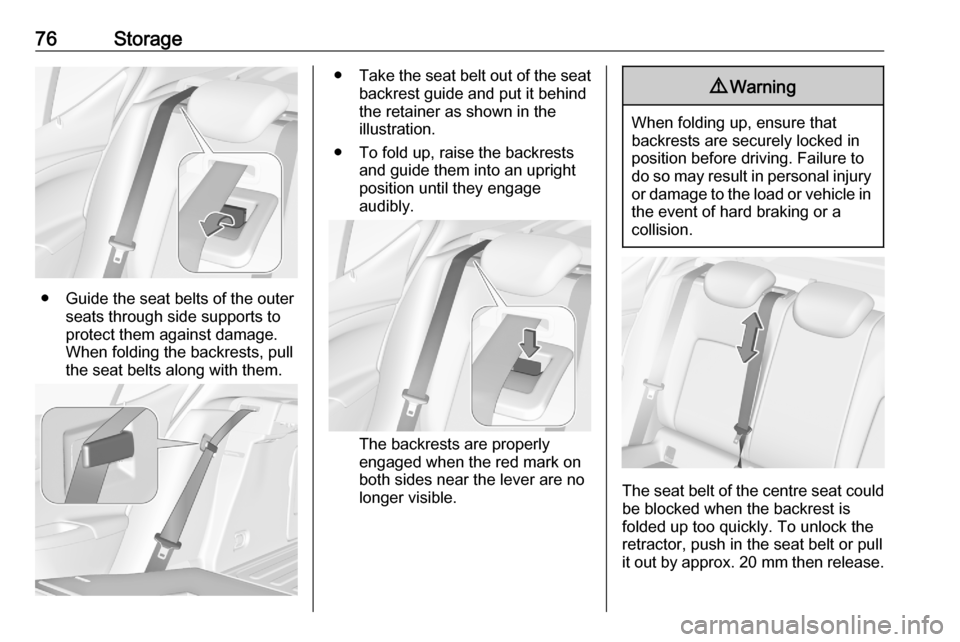
● Guide the seat belts of the outerseats through side supports to
protect them against damage.
When folding the backrests, pull
the seat belts along with them.
● Take the seat belt out of the seat
backrest guide and put it behind
the retainer as shown in the
illustration.
● To fold up, raise the backrests and guide them into an upright
position until they engage
audibly.
The backrests are properly
engaged when the red mark on
both sides near the lever are no
longer visible.
9 Warning
When folding up, ensure that
backrests are securely locked in
position before driving. Failure to
do so may result in personal injury or damage to the load or vehicle in the event of hard braking or a
collision.
The seat belt of the centre seat could
be blocked when the backrest is
folded up too quickly. To unlock the
retractor, push in the seat belt or pull
it out by approx. 20 mm then release.
Page 80 of 303

78Storage
The seat belt of the centre seat couldbe blocked when the backrest is
folded up too quickly. To unlock the
retractor, push in the seat belt or pull
it out by approx. 20 mm then release.
Load compartment extension
(three-part rear seat backrest),
Sports Tourer
● Fold up the rear centre armrest.● Pull the loop and fold down the backrest of the centre seat.
● Insert latch plates of the outer seat belts into side holder to
protect the belts against damage, see illustration.
● Pull the lever on one or both outer
sides and fold down the
backrests onto the seat cushion.
9 Warning
Take care when folding down the
right outer seat backrest if the
centre seat backrest is already
folded down. Risk of injury due to bolt protruding from the inner sideof the backrest.
Page 81 of 303

Storage79
● Alternatively fold seat backrestsfrom the load compartment: pullswitch on left or right sidewall of
the load compartment to fold the
corresponding part of the rear
seat backrest.
9 Warning
Take care when operating the rear
backrests from the load
compartment. The backrest is
folded with considerable power.
Risk of injury, particularly to
children.
Ensure that nothing is attached to
the rear seats or located on the
seat cushion.
● To fold up, raise the backrests and guide them into an upright
position until they engage
audibly.
The backrests are properly
engaged when the red mark on
the levers on both sides are no longer visible.
9 Warning
When folding up, ensure that
backrests are securely locked in
position before driving. Failure to
do so may result in personal injury or damage to the load or vehicle in the event of hard braking or a
collision.
The seat belt of the centre seat could
be blocked when the backrest is
folded up too quickly. To unlock the
retractor, push in the seat belt or pull
it out by approx. 20 mm then release.
Page 184 of 303
182Driving and operatingExample: If setting 3 (far) is selected,
then the driver is warned sooner
before a possible collision, also if
adaptive cruise control is inactive or
switched off.9 Warning
The Driver accepts full
responsibility to drive with the
appropriate following distance
based on traffic, weather, visibility
and regional regulation. Followingdistance must be adjusted or the
system switched off when required by the prevailing conditions.
Detecting the vehicle ahead
The green illuminated vehicle ahead
control indicator A is displayed when
the system detects a vehicle in the
driving path. The range of the sensors
is between 25 and 150 m depending
on vehicle speed.
Forward collision alert 3 186.
If this symbol does not display, or
displays briefly, adaptive cruise
control will not respond to vehicles
ahead.
Deactivation of the functionality
Adaptive cruise control is deactivated by the driver when:
● y is pressed.
● Brake pedal is applied.
● Clutch pedal is depressed for more than four seconds.
● Selector lever of automatic transmission is moved to N.
The system is also automatically
deactivated when:
● Vehicle speed accelerates above
120 mph or slows down below
15 mph. Vehicles with automatic
transmission slows down to a stop without deactivating within
5 minutes.● The Traction Control system is deactivated or operating.
● The Electronic Stability Control is
deactivated or operating.
● There is no traffic and nothing detected on the road sides for
approx. 1 minute. In this case
there are no radar echoes and
the sensor may report that it is
blocked.
● The active emergency braking system is applying the brakes.
● Driving on steep inclines.
● The radar sensor is blocked by an ice or water film.
● A fault is detected in the radar, camera, engine or brake system.
● The brakes need to cool down.
Additionally, the system is
automatically deactivated on vehicles with automatic transmission (full
speed range adaptive cruise control)
when:
● The incline uphill or downhill is greater than 20%.
● The electric parking brake is applied.
Page 190 of 303

188Driving and operatingThe complete attention of the
driver is always required while
driving. The driver must always be ready to take action and apply the
brakes.
System limitations
Forward collision alert is designed to
warn on vehicles only, but may react
also to other objects.
In the following cases, forward
collision alert may not detect a vehicle
ahead or sensor performance is
limited:
● driving on winding or hilly roads● during nighttime driving
● weather limits visibility, such as fog, rain, or snow
● the sensor in the windscreen is blocked by snow, ice, slush, mud,dirt, windscreen damage or
affected by foreign items, e.g.
stickers
Following distance
indication
The following distance indication
displays the distance to a preceding
moving vehicle. The front camera in
the windscreen and the Radar sensor
are used to detect the distance of a
vehicle directly ahead in the vehicle's path. It is active at speeds above
25 mph.
When a preceding vehicle is detected
ahead, the distance is indicated in
seconds, displayed on a page in the
Driver Information Centre.
On Midlevel display, choose Info
Menu ? via MENU on the indicator
lever and turn the adjuster wheel to
choose following distance indication
page 3 114
On Uplevel display, select Info menu
via steering wheel buttons and press
o to select following distance
indication 3 114.
The minimum indicated distance is 0.5 seconds.
If there is no vehicle ahead or the vehicle ahead is out of range, two
dashes will be displayed: -.- sec.
Page 194 of 303

192Driving and operatingIn the following cases, Active
emergency braking performance is limited:
● Driving on winding or hilly roads.
● Detecting all vehicles, especially vehicles with a trailer, tractors,
muddy vehicles, etc.
● Detecting a vehicle when weather limits visibility, such as in
fog, rain, or snow.
● During nighttime driving.
● Weather limits visibility, such as fog, rain, or snow.
● The sensor in the windscreen is blocked by snow, ice, slush, mud,dirt, windscreen damage or
stickered.
To avoid malfunction keep the areas
of the camera sensor in the
windscreen and the radar sensor in
the radiator grille always clean from
dirt, dust, ice and snow.
Complete attention is always required while driving, and you should be
ready to take action and apply the
brakes and / or steer the vehicle to
avoid crashes.Fault
In case the system requires a service, a message is displayed in the Driver
Information Centre.
If the system does not work as it
should do, vehicle messages are
displayed in the Driver Information
Centre.
Vehicle messages 3 121.
Front pedestrian protection
Front pedestrian protection may help
to avoid or reduce the harm caused by front-end crashes with nearby
pedestrians when driving in a forward gear.
The system uses the front camera in the windscreen to detect a pedestrian
directly ahead, in your path.
Front pedestrian protection can
detect and alert to pedestrians in a
forward gear at speeds between
5 mph and 50 mph. Additionally Front
pedestrian protection can provide a
boost to braking or automatically
brake the vehicle.During daytime driving, the system
detects pedestrians up to a distance
of approx. 40 m. During nighttime
driving, system performance is
limited.
Front pedestrian protection can be
set to Off, Alert , or Alert & Brake in
vehicle personalisation 3 123.9 Danger
Front pedestrian braking does not
provide an alert or automatically
brake the vehicle, unless it detects
a pedestrian.
The system may not detect
pedestrians, including children,
when the pedestrian is not directly ahead, not fully visible, not
standing upright, or when part of a
group.
Front pedestrian protection includes:
● detecting front pedestrian ahead● front pedestrian alert
● automatic braking
Page 196 of 303

194Driving and operating9Warning
Using the Front pedestrian braking
system while towing a trailer couldcause loss of vehicle control and
crash. Turn the system to Alert or
Off in the vehicle personalisation
when towing a trailer.
Vehicle personalisation 3 123.
System limitations
In the following cases, front
pedestrian protection may not detect
a pedestrian ahead or sensor
performance is limited:
● Vehicle speed is out of range from 5 mph to 50 mph in forward
gear.
● The distance to an pedestrian ahead is more than 40 m.
● Driving on winding or hilly roads.
● During nighttime driving.
● Weather limits visibility, such as fog, rain, or snow.
● The sensor in the windscreen is blocked by snow, ice, slush, mud,dirt, windscreen damage or
affected by foreign items, e.g.
stickers.
Parking assist General information
When the trailer hitch is attached,
change the configuration settings in
the vehicle personalisation menu in
the Info Display.
Vehicle personalisation 3 123.
When attaching a trailer or bike
carrier to the trailer hitch, the parking
assist is deactivated.
Rear parking assist9 Warning
It is the driver who bears full
responsibility for the parking
manoeuvre.
Always check the surrounding
area while reversing and using the rear parking assist system.
The rear parking assist makes
parking easier by measuring the
distance between the vehicle and
rear obstacles. It informs and warns
the driver by giving acoustic signals
and display indication.
The system has four ultrasonic
parking sensors in the rear bumper.
Activation
After ignition is switched on, the rear
parking assist is activated.