Page 28 of 418

28
For more information on the Lighting control stalk, refer to the corresponding section.
Warning / indicator lampStateCauseAction / Observations
Front foglampsfixed.The front foglamps are switched on using the ring on the lighting control stalk.
Turn the ring on the lighting control stalk rear ward once to switch off the front foglamps.
Sidelampsfixed.The lighting stalk is in the "Sidelamps" position.
Left-hand direction indicator
flashing with buzzer.The lighting stalk has been pushed down.
Right-hand direction indicator
flashing with buzzer.The lighting stalk has been pushed up.
Dipped beam headlampsfixed.The lighting stalk is in the "Dipped beam headlamps" position.
Main beam headlampsfixed.The lighting stalk has been pulled towards you.Pull the stalk to return to dipped beam headlamps.
Lane Depar ture Alertfixed.The Lane Departure Alert has been activated.The Lane Departure Alert is on.For more information on the Lane Departure Alert, refer to the corresponding section.
Instruments
Page 32 of 418
32
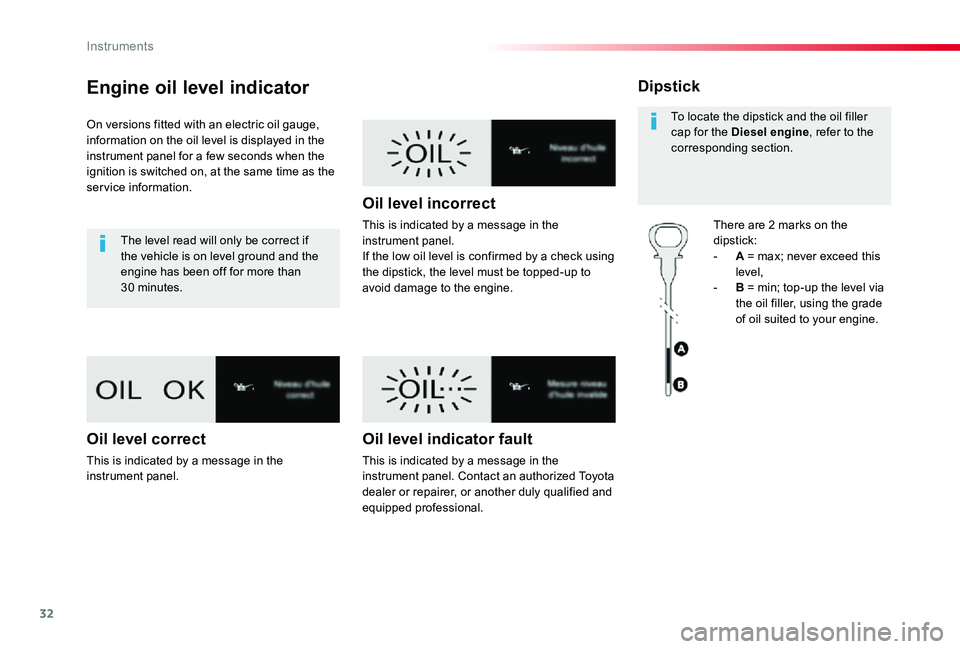
Engine oil level indicator
On versions fitted with an electric oil gauge, information on the oil level is displayed in the instrument panel for a few seconds when the ignition is switched on, at the same time as the service information.
The level read will only be correct if the vehicle is on level ground and the engine has been off for more than 30 minutes.
Oil level correct
This is indicated by a message in the instrument panel.
Oil level incorrect
This is indicated by a message in the instrument panel.If the low oil level is confirmed by a check using the dipstick, the level must be topped-up to avoid damage to the engine.
Oil level indicator fault
This is indicated by a message in the instrument panel. Contact an authorized Toyota dealer or repairer, or another duly qualified and equipped professional.
Dipstick
There are 2 marks on the dipstick:- A = max; never exceed this level,- B = min; top-up the level via the oil filler, using the grade of oil suited to your engine.
To locate the dipstick and the oil filler cap for the Diesel engine, refer to the corresponding section.
Instruments
Page 33 of 418
33
AdBlue® fluid range
indicators
Once the AdBlue® tank is on reser ve or after detection of a fault with the SCR emissions control system, when the ignition is switched on, an indicator displays an estimate of the distance that can be covered, the range, before engine starting is prevented.In the event of simultaneous system fault and low AdBlue® level, the shortest range figure is the one displayed.
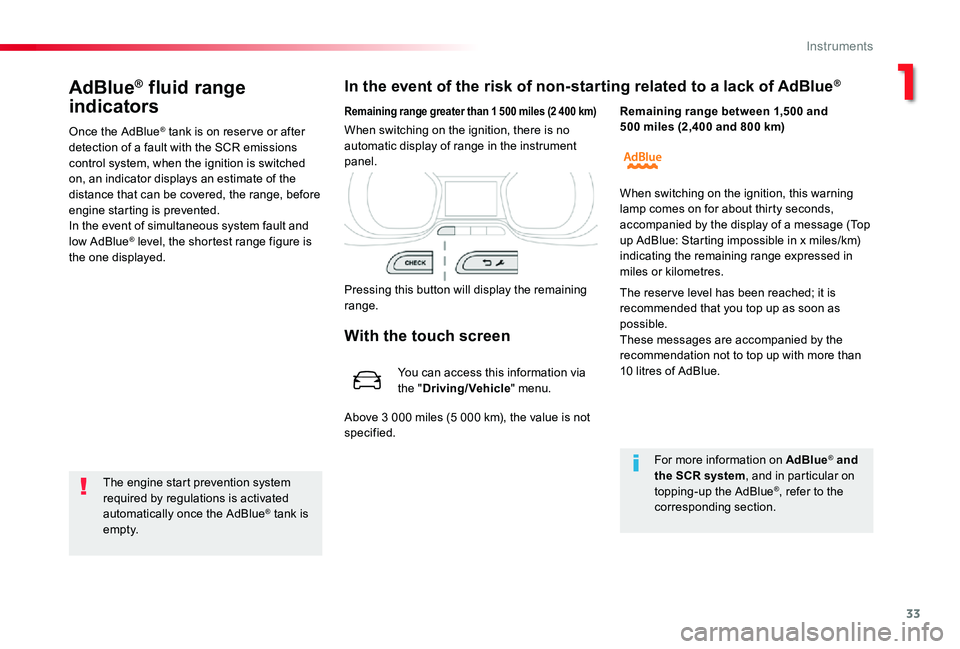
In the event of the risk of non-starting related to a lack of AdBlue®
The engine start prevention system required by regulations is activated automatically once the AdBlue® tank is e m pt y.
Remaining range greater than 1 500 miles (2 400 km)
Pressing this button will display the remaining range.
When switching on the ignition, there is no automatic display of range in the instrument panel.
Remaining range between 1,500 and 500 miles (2,400 and 800 km)
For more information on AdBlue® and the SCR system, and in particular on topping-up the AdBlue®, refer to the corresponding section.
When switching on the ignition, this warning lamp comes on for about thirty seconds, accompanied by the display of a message (Top up AdBlue: Starting impossible in x miles/km)
indicating the remaining range expressed in miles or kilometres.
The reser ve level has been reached; it is recommended that you top up as soon as possible.These messages are accompanied by the recommendation not to top up with more than 10 litres of AdBlue.
With the touch screen
You can access this information via the "Driving/Vehicle" menu.
Above 3 000 miles (5 000 km), the value is not specified.
1
Instruments
Page 34 of 418
34
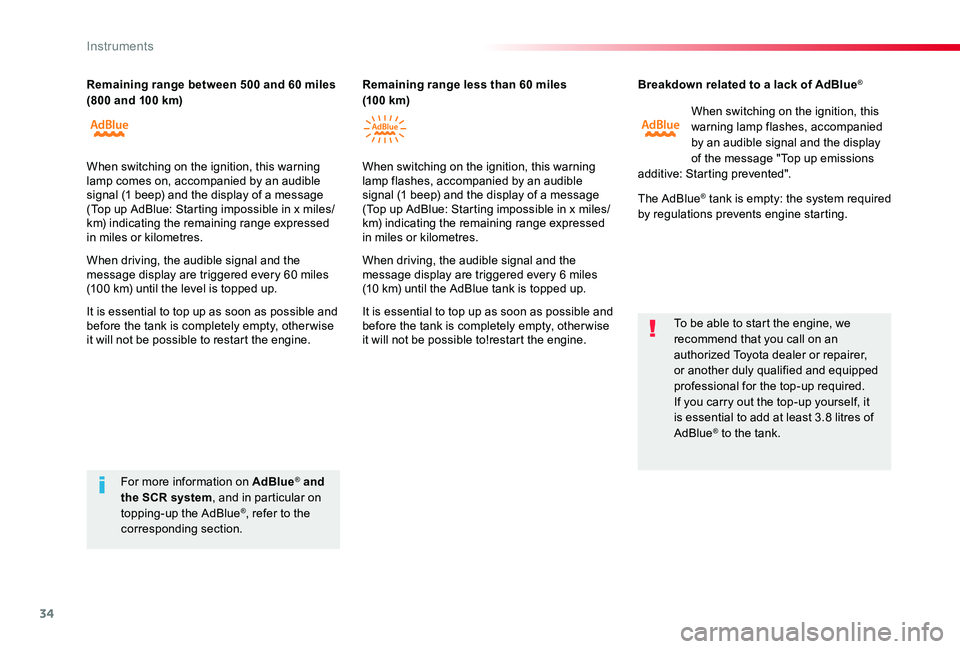
Breakdown related to a lack of AdBlue®
When switching on the ignition, this warning lamp flashes, accompanied by an audible signal and the display of the message "Top up emissions additive: Starting prevented".
The AdBlue® tank is empty: the system required by regulations prevents engine starting.
To be able to start the engine, we recommend that you call on an authorized Toyota dealer or repairer, or another duly qualified and equipped professional for the top-up required.If you carry out the top-up yourself, it is essential to add at least 3.8 litres of AdBlue® to the tank.
For more information on AdBlue® and the SCR system, and in particular on topping-up the AdBlue®, refer to the corresponding section.
Remaining range between 500 and 60 miles (800 and 100 km)Remaining range less than 60 miles (10 0 km)
When switching on the ignition, this warning lamp comes on, accompanied by an audible signal (1 beep) and the display of a message (Top up AdBlue: Starting impossible in x miles/km) indicating the remaining range expressed in miles or kilometres.
When driving, the audible signal and the message display are triggered every 60 miles (100 km) until the level is topped up.
It is essential to top up as soon as possible and before the tank is completely empty, other wise it will not be possible to restart the engine.
When switching on the ignition, this warning lamp flashes, accompanied by an audible signal (1 beep) and the display of a message (Top up AdBlue: Starting impossible in x miles/ km) indicating the remaining range expressed in miles or kilometres.
When driving, the audible signal and the message display are triggered every 6 miles (10 km) until the AdBlue tank is topped up.
It is essential to top up as soon as possible and before the tank is completely empty, other wise it will not be possible to!restart the engine.
Instruments
Page 50 of 418
50
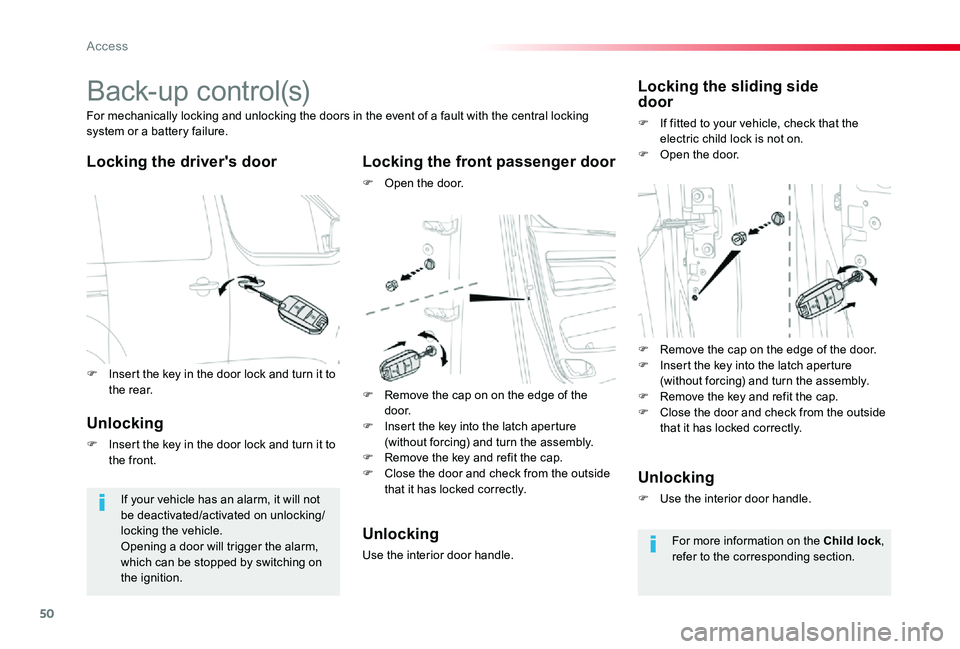
Back-up control(s)
Locking the driver's doorLocking the front passenger door
F Open the door.
For mechanically locking and unlocking the doors in the event of a fault with the central locking system or a battery failure.
If your vehicle has an alarm, it will not be deactivated/activated on unlocking/locking the vehicle.Opening a door will trigger the alarm, which can be stopped by switching on the ignition.
Locking the sliding side door
F If fitted to your vehicle, check that the electric child lock is not on.F Open the door.
Unlocking
F Insert the key in the door lock and turn it to the front.
Unlocking
Use the interior door handle.
Unlocking
F Use the interior door handle.
For more information on the Child lock, refer to the corresponding section.
F Remove the cap on the edge of the door.F Insert the key into the latch aperture (without forcing) and turn the assembly.F Remove the key and refit the cap.F Close the door and check from the outside that it has locked correctly.
F Remove the cap on on the edge of the d o o r.F Insert the key into the latch aperture (without forcing) and turn the assembly.F Remove the key and refit the cap.F Close the door and check from the outside that it has locked correctly.
F Insert the key in the door lock and turn it to the rear.
Access
Page 54 of 418

54
The unlocking, locking or power door locking does not take place:- if the ignition is on,- if one of the doors or the boot is still open,- if the key for the Smart Entry & Start System has been left inside the vehicle.When the vehicle is locked (with the remote control or Smart Entry & Start System), if it is unlocked inadvertently, it will lock itself again automatically after about thirty seconds unless a door has been opened.And if your vehicle has an alarm, this will be reactivated (with volumetric monitoring, even if this had been deactivated).
"Smart Entry & Start
System" on your person
This allows the unlocking, locking and starting the vehicle while keeping the remote control on your person.
As a safety measure (children on board), never leave the vehicle without taking your Smart Entry & Start System remote control, even for a short period.Guard against theft when the Smart Entry & Start System remote control is in the recognition zone with the vehicle unlocked.In order to preser ve the charge of the cell battery in the remote control, the "hands-free" functions go into extended stand-by after 21 days of non-use.To restore these functions, press one of the remote control buttons or start the engine with the remote control at the reader.
The folding and unfolding of the door mirrors by the remote control can be deactivated by an authorized Toyota dealer or repairer, or another duly qualified and equipped professional.
In the ignition on (accessories) position, with the "START/STOP" button, the hands-free function is deactivated.For more information on "Smar t Entr y & Star t System" and in particular the "ignition on" position, refer to the corresponding section.
Access
Page 55 of 418
55
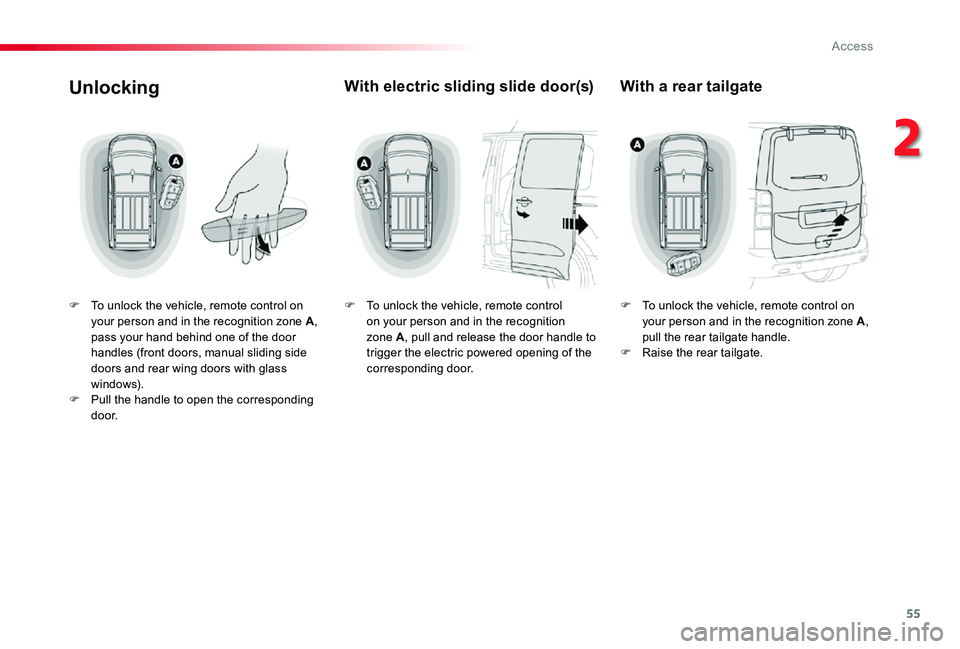
Unlocking
F To unlock the vehicle, remote control on your person and in the recognition zone A, pass your hand behind one of the door handles (front doors, manual sliding side doors and rear wing doors with glass windows).F Pull the handle to open the corresponding d o o r.
With electric sliding slide door(s)
F To unlock the vehicle, remote control on your person and in the recognition zone A, pull and release the door handle to trigger the electric powered opening of the corresponding door.
With a rear tailgate
F To unlock the vehicle, remote control on your person and in the recognition zone A, pull the rear tailgate handle.F Raise the rear tailgate.
2
Access
Page 61 of 418
61
For more information on the child lock, refer to the corresponding section.
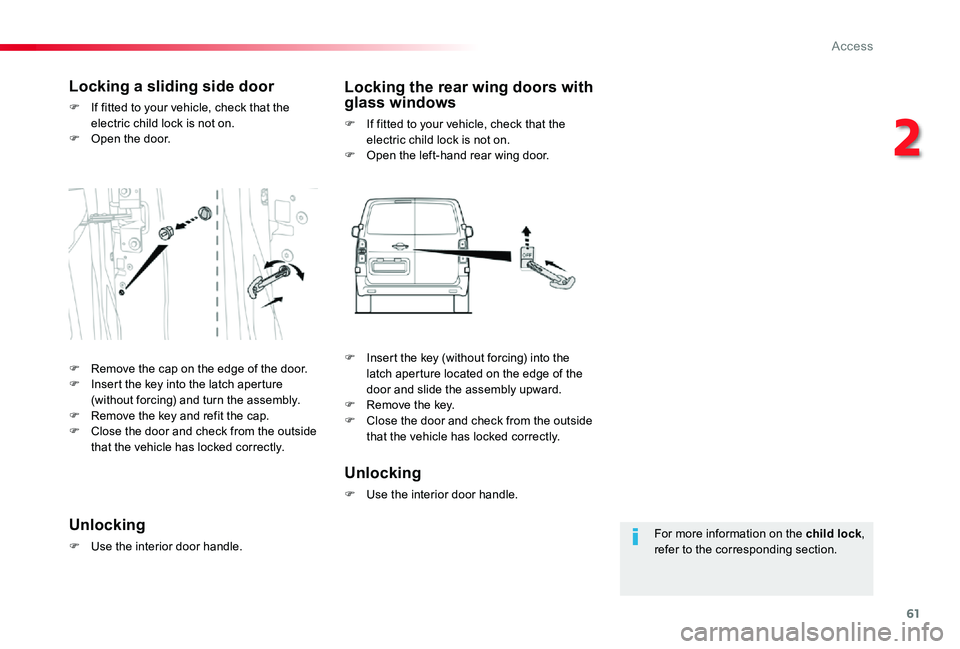
Locking a sliding side door
F If fitted to your vehicle, check that the electric child lock is not on.F Open the door.
Locking the rear wing doors with glass windows
F If fitted to your vehicle, check that the electric child lock is not on.F Open the left-hand rear wing door.
Unlocking
F Use the interior door handle.
Unlocking
F Use the interior door handle.
F Remove the cap on the edge of the door.F Insert the key into the latch aperture (without forcing) and turn the assembly.F Remove the key and refit the cap.F Close the door and check from the outside that the vehicle has locked correctly.
F Insert the key (without forcing) into the latch aperture located on the edge of the door and slide the assembly upward.F Remove the key.F Close the door and check from the outside that the vehicle has locked correctly.
2
Access