2020 Ram 1500 steering wheel
[x] Cancel search: steering wheelPage 251 of 674

SAFETY 249
(Continued)
This vehicle may be equipped with a driver and/or front
passenger seat belt buckle switch that detects whether the
driver or front passenger seat belt is buckled. The seat belt
buckle switch may adjust the inflation rate of the Advanced
Front Air Bags.
This vehicle may be equipped with driver and/or front
passenger seat track position sensors that may adjust the
inflation rate of the Advanced Front Air Bags based upon
seat position.
This vehicle is equipped with a right front passenger Occu-
pant Classification System (“OCS”) that is designed to
provide Passenger Advanced Front Air Bag output appro-
priate to the occupant’s seated weight input, as determined
by the OCS. Front Air Bag Operation
Front Air Bags are designed to provide additional protection
by supplementing the seat belts. Front air bags are not
expected to reduce the risk of injury in rear, side, or rollover
collisions. The front air bags will not deploy in all frontal
collisions, including some that may produce substantial
vehicle damage — for example, some pole collisions, truck
underrides, and angle offset collisions.
WARNING!
• No objects should be placed over or near the air bag on the instrument panel or steering wheel because any
such objects could cause harm if the vehicle is in a colli -
sion severe enough to cause the air bag to inflate.
• Do not put anything on or around the air bag covers or attempt to open them manually. You may damage the
air bags and you could be injured because the air bags
may no longer be functional. The protective covers for
the air bag cushions are designed to open only when
the air bags are inflating.
• Relying on the air bags alone could lead to more severe injuries in a collision. The air bags work with your seat
belt to restrain you properly. In some collisions, air
bags won’t deploy at all. Always wear your seat belts
even though you have air bags.
WARNING! (Continued)
4
2020_DT_1500_OM_US.book Page 249
Page 252 of 674

250 SAFETY
On the other hand, depending on the type and location of
impact, front air bags may deploy in crashes with little
vehicle front-end damage but that produce a severe initial
deceleration.
Because air bag sensors measure vehicle deceleration over
time, vehicle speed and damage by themselves are not good
indicators of whether or not an air bag should have
deployed.
Seat belts are necessary for your protection in all collisions,
and also are needed to help keep you in position, away from
an inflating air bag.
When the ORC detects a collision requiring the front air bags,
it signals the inflator units. A large quantity of non-toxic gas
is generated to inflate the front air bags.
The steering wheel hub trim cover and the upper passenger
side of the instrument panel separate and fold out of the way
as the air bags inflate to their full size. The front air bags fully
inflate in less time than it takes to blink your eyes. The front
air bags then quickly deflate while helping to restrain the
driver and front passenger.Occupant Classification System (OCS) — Front
Passenger Seat
The OCS is part of a Federally regulated safety system for
this vehicle. It is designed to provide Passenger Advanced
Front Air Bag output appropriate to the occupant’s seated
weight, as determined by the OCS.
The Occupant Classification System (OCS) consists of the
following:
• Occupant Restraint Controller (ORC)
• Occupant Classification Module (OCM) and Sensor
located in the front passenger seat
• Air Bag Warning Light
Occupant Classification Module (OCM) And Sensor
The Occupant Classification Module (OCM) is located
underneath the front passenger seat. The Sensor is located
beneath the passenger seat cushion foam. Any weight on the
seat will be sensed by the Sensor. The OCM uses input from
the Sensor to determine the front passenger’s most probable
classification. The OCM communicates this information to
the ORC. The ORC may reduce the inflation rate of the
Passenger Advanced Front Air Bag deployment based on
2020_DT_1500_OM_US.book Page 250
Page 263 of 674

SAFETY 261
The Side Air Bags and seat belt pretensioners will not deploy
in all rollover events. The rollover sensing system deter-
mines if a rollover event may be in progress and whether
deployment is appropriate. In the event the vehicle experi -
ences a rollover or near rollover event, and deployment is
appropriate, the rollover sensing system will deploy the side
air bags and seat belt pretensioners on both sides of the
vehicle.
The SABICs may help reduce the risk of partial or complete
ejection of vehicle occupants through side windows in
certain rollover or side impact events.
Air Bag System Components
NOTE:
The Occupant Restraint Controller (ORC) monitors the
internal circuits and interconnecting wiring associated with
electrical Air Bag System Components listed below:
• Occupant Restraint Controller (ORC)
• Air Bag Warning Light
• Steering Wheel and Column
• Instrument Panel
• Knee Impact Bolsters
• Driver and Front Passenger Air Bags • Seat Belt Buckle Switch
• Supplemental Side Air Bags
• Front and Side Impact Sensors
• Seat Belt Pretensioners
• Seat Track Position Sensors
• Occupant Classification System
If A Deployment Occurs
The front air bags are designed to deflate immediately after
deployment.
NOTE:
Front and/or side air bags will not deploy in all collisions.
This does not mean something is wrong with the air bag
system.
If you do have a collision which deploys the air bags, any or
all of the following may occur:
• The air bag material may sometimes cause abrasions and/
or skin reddening to the occupants as the air bags deploy
and unfold. The abrasions are similar to friction rope burns
or those you might get sliding along a carpet or gymna -
sium floor. They are not caused by contact with chemicals.
They are not permanent and normally heal quickly.
4
2020_DT_1500_OM_US.book Page 261
Page 265 of 674

SAFETY 263
(Continued)
Your vehicle may also be designed to perform any of these
other functions in response to the Enhanced Accident
Response System:
• Turn off the Fuel Filter Heater, Turn off the HVAC BlowerMotor, Close the HVAC Circulation Door
• Cut off battery power to the: • Engine
• Electric Motor (if equipped)
• Electric power steering
• Brake booster
• Electric park brake
• Automatic transmission gear selector
• Horn
• Front wiper
• Headlamp washer pump
NOTE:
After an accident, remember to cycle the ignition to the STOP
(OFF/LOCK) position and remove the key from the ignition
switch to avoid draining the battery. Carefully check the
vehicle for fuel leaks in the engine compartment and on the
ground near the engine compartment and fuel tank before
resetting the system and starting the engine. If there are no
fuel leaks or damage to the vehicle electrical devices (e.g. headlights) after an accident, reset the system by following
the procedure described below. If you have any doubt,
contact an authorized dealer.
Enhanced Accident Response System Reset Procedure
In order to reset the Enhanced Accident Response System
functions after an event, the ignition switch must be changed
from ignition START or ON/RUN to ignition OFF. Carefully
check the vehicle for fuel leaks in the engine compartment
and on the ground near the engine compartment and fuel
tank before resetting the system and starting the engine.
Maintaining Your Air Bag System
WARNING!
• Modifications to any part of the air bag system could cause it to fail when you need it. You could be injured
if the air bag system is not there to protect you. Do not
modify the components or wiring, including adding
any kind of badges or stickers to the steering wheel hub
trim cover or the upper passenger side of the instru -
ment panel. Do not modify the front bumper, vehicle
body structure, or add aftermarket side steps or
running boards.
4
2020_DT_1500_OM_US.book Page 263
Page 300 of 674
298 STARTING AND OPERATING
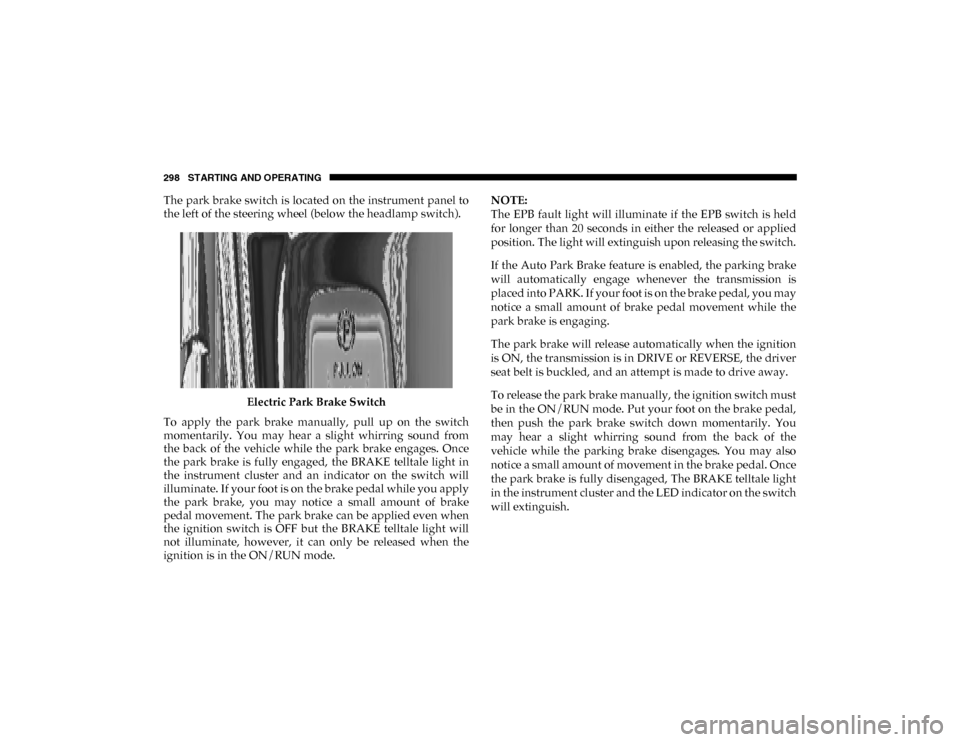
The park brake switch is located on the instrument panel to
the left of the steering wheel (below the headlamp switch).Electric Park Brake Switch
To apply the park brake manually, pull up on the switch
momentarily. You may hear a slight whirring sound from
the back of the vehicle while the park brake engages. Once
the park brake is fully engaged, the BRAKE telltale light in
the instrument cluster and an indicator on the switch will
illuminate. If your foot is on the brake pedal while you apply
the park brake, you may notice a small amount of brake
pedal movement. The park brake can be applied even when
the ignition switch is OFF but the BRAKE telltale light will
not illuminate, however, it can only be released when the
ignition is in the ON/RUN mode. NOTE:
The EPB fault light will illuminate if the EPB switch is held
for longer than 20 seconds in either the released or applied
position. The light will extinguish upon releasing the switch.
If the Auto Park Brake feature is enabled, the parking brake
will automatically engage whenever the transmission is
placed into PARK. If your foot is on the brake pedal, you may
notice a small amount of brake pedal movement while the
park brake is engaging.
The park brake will release automatically when the ignition
is ON, the transmission is in DRIVE or REVERSE, the driver
seat belt is buckled, and an attempt is made to drive away.
To release the park brake manually, the ignition switch must
be in the ON/RUN mode. Put your foot on the brake pedal,
then push the park brake switch down momentarily. You
may hear a slight whirring sound from the back of the
vehicle while the parking brake disengages. You may also
notice a small amount of movement in the brake pedal. Once
the park brake is fully disengaged, The BRAKE telltale light
in the instrument cluster and the LED indicator on the switch
will extinguish.
2020_DT_1500_OM_US.book Page 298
Page 306 of 674

304 STARTING AND OPERATING
Brake/Transmission Shift Interlock System
This vehicle is equipped with a Brake Transmission Shift
Interlock System (BTSI) that holds the transmission gear
selector in PARK unless the brakes are applied. To shift the
transmission out of PARK, the engine must be running and
the brake pedal must be pressed.
The brake pedal must also be pressed to shift from
NEUTRAL into DRIVE or REVERSE when the vehicle is
stopped or moving at low speeds.
Eight-Speed Automatic Transmission
The transmission is controlled using a rotary electronic gear
selector located on the instrument panel. The transmission
gear range (PRND) is displayed both above the gear selector
and in the instrument cluster. To select a gear range, simply
rotate the gear selector. You must press the brake pedal to
shift the transmission out of PARK (or NEUTRAL, when the
vehicle is stopped or moving at low speeds). To shift past
multiple gear ranges at once (such as PARK to DRIVE),
simply rotate the gear selector to the appropriate detent.
Select the DRIVE range for normal driving.NOTE:
In the event of a mismatch between the gear selector position
and the actual transmission gear (for example, driver selects
PARK while driving), the position indicator will blink
continuously until the selector is returned to the proper posi
-
tion, or the requested shift can be completed.
The electronically-controlled transmission adapts its shift
schedule based on driver inputs, along with environmental
and road conditions. The transmission electronics are
self-calibrating; therefore, the first few shifts on a new
vehicle may be somewhat abrupt. This is a normal condition,
and precision shifts will develop within a few hundred miles
(kilometers).
Only shift from DRIVE to PARK or REVERSE when the
accelerator pedal is released and the vehicle is stopped. Be
sure to keep your foot on the brake pedal when shifting
between these gears.
The transmission gear selector has only PARK, REVERSE,
NEUTRAL, and DRIVE positions. Manual downshifts can be
made using the Electronic Range Select (ERS) shift control.
Pressing the GEAR-/GEAR+ switches (on the steering
wheel) while in the DRIVE position will select the highest
available transmission gear, and will display that gear limit
2020_DT_1500_OM_US.book Page 304
Page 311 of 674

STARTING AND OPERATING 309
NOTE:
Even if the transmission can be reset, we recommend that
you visit an authorized dealer at your earliest possible
convenience. An authorized dealer has diagnostic equip-
ment to assess the condition of your transmission.
If the transmission cannot be reset, an authorized dealer
service is required.
Electronic Range Select (ERS) Operation — Eight-Speed
Transmission
The Electronic Range Select (ERS) shift control allows the
driver to limit the highest available gear when the transmis -
sion is in DRIVE. For example, if you set the transmission
gear limit to 4 (fourth gear), the transmission will not shift
above fourth gear (except to prevent engine overspeed), but
will shift through the lower gears normally.
You can switch between DRIVE and ERS mode at any
vehicle speed. When the transmission gear selector is in
DRIVE, the transmission will operate automatically, shifting
between all available gears. Tapping the GEAR- switch (on
the steering wheel) will activate ERS mode, display the
current gear in the instrument cluster, and set that gear as the
top available gear. Once in ERS mode, tapping the GEAR- or
GEAR+ switch will change the top available gear. Electronic Range Select (ERS)
To exit ERS mode, simply push and hold the GEAR+ switch
until the gear limit display disappears from the instrument
cluster.
1 — GEAR + Switch
2 — GEAR – Switch
WARNING!
Do not downshift for additional engine braking on a
slippery surface. The drive wheels could lose their grip
and the vehicle could skid, causing a collision or
personal injury.
5
2020_DT_1500_OM_US.book Page 309
Page 334 of 674

332 STARTING AND OPERATING
Operating the locker in 2WD, 4WD AUTO, and 4WD
LOCK/HIGH the locker can be engaged up to 20 mph
(32 km/h). While driving with the locker engaged, if speed
exceeds 25 mph (40 km/h), the locker will automatically
disengage, but will automatically reengage at 20 mph
(32 km/h).
NOTE:
Left to right wheel speed difference may be necessary to
allow the rear axle to fully lock. If the indicator light is
flashing after selecting the rear axle lock mode, drive the
vehicle in a turn or on loose gravel to expedite the locking
action.
The axle locker could become torque locked due to side to
side loads on the rear axle. Driving slowly while turning the
steering wheel from a left hand turn to a right hand turn or
driving in REVERSE for a short distance may be required to
release the torque lock and unlock the axles.
To unlock the rear axle; push the AXLE LOCK button. The
AXLE LOCK indicator light will go out when the rear axle is
unlocked.
LIMITED-SLIP DIFFERENTIAL — IF EQUIPPED
The limited-slip differential provides additional traction on
snow, ice, mud, sand and gravel, particularly when there is a difference between the traction characteristics of the
surface under the right and left rear wheels. During normal
driving and cornering, the limited-slip unit performs simi
-
larly to a conventional differential. On slippery surfaces,
however, the differential delivers more of the driving effort
to the rear wheel having the better traction.
The limited-slip differential is especially helpful during slip -
pery driving conditions. With both rear wheels on a slippery
surface, a slight application of the accelerator will supply
maximum traction. When starting with only one rear wheel
on an excessively slippery surface, slight momentary appli -
cation of the parking brake may be necessary to gain
maximum traction.
Care should be taken to avoid sudden accelerations when
both rear wheels are on a slippery surface. This could cause
both rear wheels to spin, and allow the vehicle to slide side -
ways on the crowned surface of a road or in a turn.
WARNING!
When servicing vehicles equipped with a limited-slip or
locking differential never run the engine with one rear
wheel off the ground since the vehicle may drive
through the rear wheel remaining on the ground and
result in unintended movement.
2020_DT_1500_OM_US.book Page 332