2020 Peugeot Partner Screen
[x] Cancel search: ScreenPage 18 of 260
16
Instruments
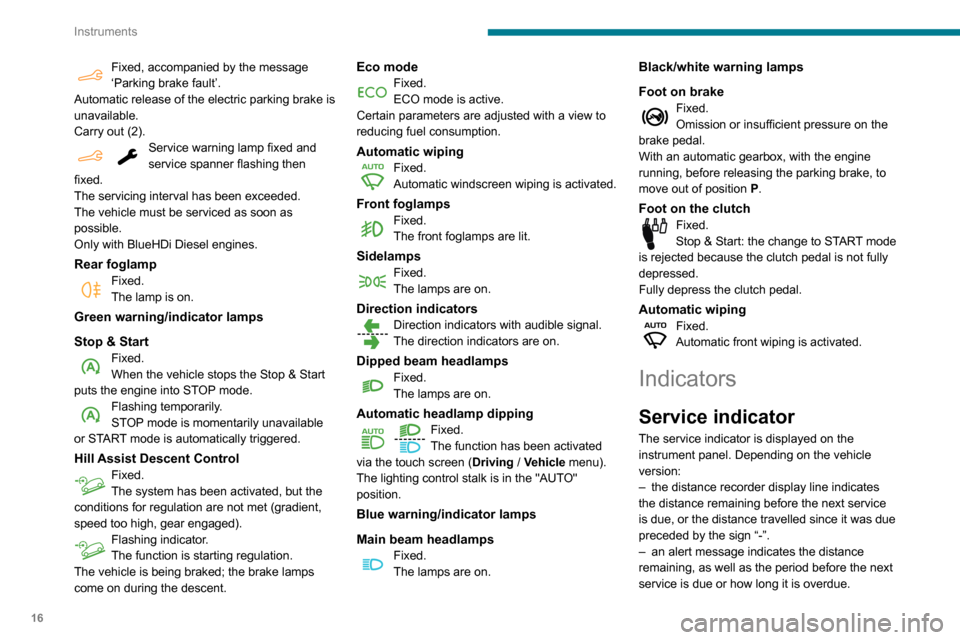
Fixed, accompanied by the message
‘Parking brake fault’.
Automatic release of the electric parking brake is
unavailable.
Carry out (2).
Service warning lamp fixed and
service spanner flashing then
fixed.
The servicing interval has been exceeded.
The vehicle must be serviced as soon as
possible.
Only with BlueHDi Diesel engines.
Rear foglampFixed.
The lamp is on.
Green warning/indicator lamps
Stop & Start
Fixed.
When the vehicle stops the Stop & Start
puts the engine into STOP mode.
Flashing temporarily.
STOP mode is momentarily unavailable
or START mode is automatically triggered.
Hill Assist Descent ControlFixed.
The system has been activated, but the
conditions for regulation are not met (gradient,
speed too high, gear engaged).
Flashing indicator.
The function is starting regulation.
The vehicle is being braked; the brake lamps
come on during the descent.
Eco modeFixed.
ECO mode is active.
Certain parameters are adjusted with a view to
reducing fuel consumption.
Automatic wipingFixed.
Automatic windscreen wiping is activated.
Front foglampsFixed.
The front foglamps are lit.
SidelampsFixed.
The lamps are on.
Direction indicatorsDirection indicators with audible signal.
The direction indicators are on.
Dipped beam headlampsFixed.
The lamps are on.
Automatic headlamp dipping
Fixed.
The function has been activated
via the touch screen (Driving
/ Vehicle menu).
The lighting control stalk is in the "AUTO"
position.
Blue warning/indicator lamps
Main beam headlamps
Fixed.
The lamps are on.
Black/white warning lamps
Foot on brake
Fixed.
Omission or insufficient pressure on the
brake pedal.
With an automatic gearbox, with the engine
running, before releasing the parking brake, to
move out of position P.
Foot on the clutchFixed.
Stop & Start: the change to START mode
is rejected because the clutch pedal is not fully
depressed.
Fully depress the clutch pedal.
Automatic wipingFixed.
Automatic front wiping is activated.
Indicators
Service indicator
The service indicator is displayed on the
instrument panel. Depending on the vehicle
version:
–
the distance recorder display line indicates
the distance remaining before the next service
is due, or the distance travelled since it was due
preceded by the sign “-”.
–
an alert message indicates the distance
remaining, as well as the period before the next
service is due or how long it is overdue.
Page 19 of 260

17
Instruments
1Service spannerLights up temporarily when the ignition is
switched on.
Between 1,800 miles (3,000 km) and 600 miles
(1,000 km) remain before the next service is due.
Fixed, when the ignition is switched on.
The service is due in less than 600 miles
(1,000 km).
Have your vehicle serviced very soon.
Service spanner flashingFlashing then fixed, when the
ignition is switched on.
(With BlueHDi Diesel engines, combined with the
Service warning lamp.)
The servicing interval has been exceeded.
Have your vehicle serviced as soon as possible.
The distance indicated (in miles or kilometres) is calculated according to the
distance covered and the time elapsed since
the last service.
The alert may be triggered close to a due
date.
Resetting the service indicator
The service indicator must be reset after each
service.
►
Switch off the ignition.
► Press and hold this button.
► Switch on the ignition; the distance recorder
display begins a countdown.
►
Release the button when =0
is displayed; the
spanner disappears.
If you have to disconnect the battery
following this operation, lock the vehicle
and wait at least 5 minutes for the reset to be
registered.
Service reminder
You can access service information at any time.
► Press this button.
The service information is displayed for a few
seconds, then disappears.
Instrument panel display screen
With the vehicle stationary, use the left-hand
thumbwheel on the steering wheel or the " SET"
button on the instrument panel to move through
the menus to configure certain vehicle settings.
Thumbwheel operation:
–
Press: open the
Main menu; confirm the
selection.
–
Rotate (other than in a menu): scroll through
the list of available active functions.
–
Rotate (in a menu): move up or down in the
menu.
Page 23 of 260

21
Instruments
1While driving, the message is displayed every 30
seconds. The alert is repeated when switching
on the ignition.
You can continue driving for up to 685 miles
(1,100 km) before the engine immobiliser
system is triggered.
Have the system checked by a
PEUGEOT dealer or a qualified
workshop as soon as possible.
Starting prevented
Whenever the ignition is switched on, the
"Emissions fault: Starting prevented" or "NO
START IN" message is displayed.
To be able to restart the engine, contact a PEUGEOT dealer or a qualified
workshop.
Lighting dimmer
This control lets you manually adjust the
brightness of the instrument panel according to
the exterior light level.
With the lamps on (not in the AUTO position) ,
press button A to increase the brightness of the
lighting, or button B to decrease it.
Release the button when the desired brightness
is reached.
Touch screen lighting
dimmer
► In the Settings menu, select "Brightness".
Or select "OPTIONS ", "Screen configuration "
then "Brightness".
► Adjust the brightness by pressing the arrows
or moving the slider .
The brightness can be set differently for day mode and night mode.
Trip computer
Information displayed about the current journey
(range, fuel consumption, average speed, etc.).
Information display
Details are displayed successively.
– T rip mileage.
–
Range.
–
Current fuel consumption.
–
A
verage speed.
–
Stop & Start time counter
.
–
Information from the speed limit recognition
system.
► Press the button located on the end of the
wiper control stalk .
Page 28 of 260

26
Access
Accumulations (water, dust, grime, salt, etc.) on the inner surface of the door
handle may affect detection.
If cleaning the inner surface of the door
handle using a cloth does not restore
detection, contact a PEUGEOT dealer or a
qualified workshop.
A sudden splash of water (stream of water,
high pressure jet washer, etc.) may be
identified by the system as the desire to open
the vehicle.
Total or selective unlocking
Complete unlocking unlocks all the vehicle’s
doors (front, side and rear).
Selective unlocking unlocks either the cabin
doors, or the doors of the loading area (side
and rear).
The separation of the cabin and loading area unlocking is a security measure.
It is used to lock out access to the part of the
vehicle in which you are not present.
Activation/Deactivation
Without audio system
► To activateselective unlocking between
the cab and the loading area or to deactivate
selective unlocking and return to total unlocking
mode, switch on the ignition and press this
button for more than two seconds.
An audible signal and, depending on equipment,
the display of a message, confirms that the
request has been acknowledged.
With audio system or touch screen
Activation or deactivation of the selectivity between the
driver's door, the other doors and the boot is
done via the vehicle configuration menu.
Complete unlocking
With the key
► To completely unlock the vehicle, insert the
key in the lock then turn it towards the front of
the vehicle.
►
Then pull the handle to open the door
.
If fitted to your vehicle, the alarm is not
deactivated. Opening a door will trigger the
alarm, which can be stopped by switching the
ignition on.
Using the remote control
► Press one of these buttons to
unlock the vehicle.
Unlocking is confirmed by rapid flashing
of the direction indicators for around 2
seconds.
At the same time, depending on your version,
the door mirrors unfold.
Page 34 of 260

32
Access
Changing the battery
If the battery is discharged, this warning
lamp comes on, accompanied by an
audible signal and an onscreen message.
Without Keyless Entry and Starting ‒
Battery type: CR2032 / 3 volts.
With Keyless Entry and Starting ‒ Battery
type: CR2032 / 3 volts.
► Unclip the cover by inserting a small
screwdriver in the slot and raise the cover .
►
Remove the discharged battery from its
housing.
►
Insert the new battery
, observing the polarity,
and clip the cover onto the housing.
►
Reinitialise the remote control.
For more information on Reinitialising the
remote control
, refer to the corresponding
section.
Do not throw used remote control batteries
away, as they contain metals that are harmful
to the environment. Take them to an approved
disposal point.
Reinitialising the remote
control
Following replacement of the battery or in
the event of a fault, it may be necessary to
reinitialise the remote control.
Without Keyless Entry and Starting
► Switch off the ignition.
► T urn the key to position 2 (Ignition on) .
►
Immediately press the closed padlock button
for a few seconds.
►
Switch off the ignition and remove the key
from the ignition switch.
The remote control is now fully operational
again.
Page 37 of 260

35
Access
2Opening to approximately 180°
If fitted to your vehicle, a check strap system
allows the doors to be opened from about 90° to
about 180°.
►
Pull the yellow control when the door is open.
The check strap will engage again automatically
on closing.
General
recommendations for the
sliding side doors
Doors must only be operated when the
vehicle is stationary.
For your safety and that of your passengers,
as well as for correct operation of the doors,
you are strongly advised not to drive with a
door open.
Always check that it is safe to operate the
door and in particular, be sure not to leave
children or animals near the door controls
without supervision.
An audible warning, "door open” warning
lamp and onscreen message are there to
remind you. Contact a PEUGEOT dealer or a
qualified workshop if you want to deactivate
this warning.
Lock the vehicle when you use an automatic
car wash.
Before opening or closing and while
moving doors, ensure that no person,
animal or object is in the door frame or any
other position that would block the desired
movement, inside or outside the vehicle.
If this advice is not followed, injuries or
damage may occur if a person or an object is
trapped or caught.
Take care not to block the guide space on the floor, to allow the door to slide
correctly.
For safety and functional reasons, do not
drive with the sliding side door open.
To hold the sliding side door in the open position, open the door fully to engage
the latch (located at the bottom of the door).
Doors and door clearances
When open, a door projects beyond the body.
Allow adequate clearance when parking
alongside walls, lamp-posts, high pavements,
etc.
When open, a door never projects
beyond the rear bumper.
Page 45 of 260

43
Ease of use and comfort
3► Adjust the height and reach.
► Lower the control lever to lock the steering
wheel.
As a safety precaution, these operations must only be carried out while the vehicle
is stationary.
Mirrors
Door mirrors
Adjustment
► Move control A or turn control C (depending
on the version you have) to the right or to the left
to select the corresponding mirror.
►
Move control
B or C (depending on the
version you have) in any of the four directions to
adjust.
► Return control A or C (depending on the
version you have) to its centre position.
As a safety measure, the mirrors should be adjusted to reduce the blind spots.
The objects observed are, in reality, closer
than they appear.
Take this into account when assessing the
distance of vehicles approaching from behind.
Manual folding
You can manually fold the mirrors (parking
obstruction, narrow garage, etc.)
►
T
urn the mirror towards the vehicle.
Electric folding
If the vehicle is so equipped, the mirrors can
be folded electrically from the inside, with the
vehicle parked and the ignition on:
► Place control A in the centre
position.
►
Pull control A
back.
►
Lock the vehicle from the outside.
Electric unfolding
The electric unfolding of the mirrors is via the
remote control or the key when unlocking the
vehicle. Unless folding was selected with control
A, pull the control back again to the central
position.
The folding / unfolding on locking / unlocking can be deactivated. Contact a
PEUGEOT dealer or a qualified workshop.
If necessary, it is possible to fold the mirrors
manually.
Heated mirrors
► Press this button.
For more information on Rear screen
demisting/defrosting , refer to the
corresponding section.
Interior rear view mirror
Equipped with an anti-dazzle system, which
darkens the mirror glass and reduces the
nuisance to the driver caused by the sun,
headlamps of other vehicles, etc.
Manual model
Day/night position
Page 49 of 260

47
Ease of use and comfort
3Never drive with passengers seated at
the rear when the head restraints are
removed or not in the high position; the head
restraints must be in place and in the high
position.
For more information on the Seat belts,
refer to the corresponding section.
Interior fittings
Mats
Fitting
When fitting the mat for the first time, on the
driver's side use only the fasteners supplied in
the enclosed sachet.
The other mats are simply laid over the carpet.
Removing/refitting
► To remove it on the driver's side, move the
seat backwards and unclip the fasteners.
►
T
o refit it, position the mat and secure it by
pressing.
►
Check that the mat is secured correctly
.
To avoid any risk of jamming the pedals:– Only use mats which are suitable for
the fasteners already present in the vehicle;
these fasteners must be used.
–
Never fit one mat on top of another
.
The use of mats not approved by PEUGEOT
may interfere with access to the pedals and
hinder the operation of the cruise control/
speed limiter.
The approved mats have two fasteners
located underneath the seat.
Overhead storage unit
This compartment, located above the sun visors,
can be used to store various objects.
12 V accessory socket(s)
► Plug in a 12 V accessory (with a maximum
rated power of 120 W) using a suitable adapter.
Observe the maximum power rating to
avoid damaging your accessory.
The connection of an electrical device not approved by PEUGEOT, such as a
USB charger, may adversely affect the
operation of vehicle electrical systems,
causing faults such as poor radio reception or
interference with displays in the screens.