2020 OPEL MOVANO_B remote control
[x] Cancel search: remote controlPage 32 of 353

30Keys, doors and windowsDoors
Sliding door
Unlock the sliding side door with the remote control or key (if equipped).
Open the door by pulling the handle
and sliding the door towards the rear.
Open and close the sliding side door
only when the vehicle is at a standstill with the parking brake applied (on
certain models, a warning chime will
sound when the sliding side door is
open and the parking brake is
released).The sliding side door can be locked
from inside the vehicle with the
interior lock switch.
Ensure the side door is fully closed
and secure before driving the vehicle.9 Warning
Take care when operating the
sliding side door. Risk of injury.
Ensure that nothing becomes
trapped during operation and no-
one is standing within the moving
area.
If the vehicle is parked on a slope,
open sliding doors may move
accidentally on account of their
weight.
Close the sliding doors before
driving off.
9 Danger
Do not drive with the sliding side
door open or ajar, e.g. when
transporting bulky objects, since
toxic exhaust gases, which cannot
be seen or smelled, could enter
the vehicle. This can cause
unconsciousness and even death.
Central locking system 3 24.
Power sliding door
Opening
With vehicle at a standstill and the
parking brake applied, press switch
on instrument panel to open the
power sliding door automatically. The
LED in the switch flashes during
operation.
Page 35 of 353
Keys, doors and windows33
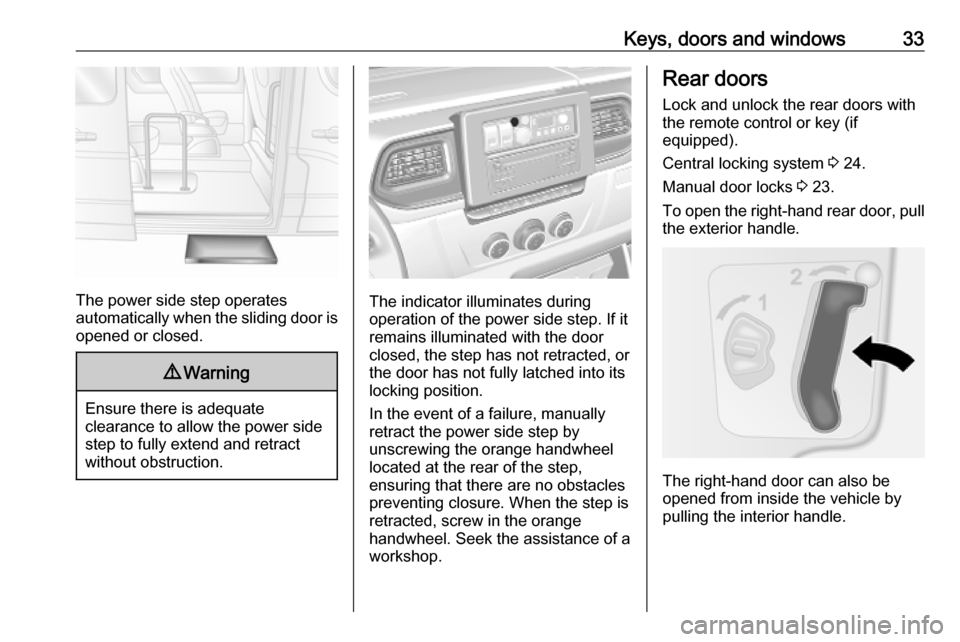
The power side step operates
automatically when the sliding door is opened or closed.
9 Warning
Ensure there is adequate
clearance to allow the power side
step to fully extend and retract
without obstruction.
The indicator illuminates during
operation of the power side step. If it
remains illuminated with the door
closed, the step has not retracted, or
the door has not fully latched into its
locking position.
In the event of a failure, manually retract the power side step by
unscrewing the orange handwheel
located at the rear of the step,
ensuring that there are no obstacles
preventing closure. When the step is
retracted, screw in the orange
handwheel. Seek the assistance of a
workshop.
Rear doors
Lock and unlock the rear doors with
the remote control or key (if
equipped).
Central locking system 3 24.
Manual door locks 3 23.
To open the right-hand rear door, pull
the exterior handle.
The right-hand door can also be
opened from inside the vehicle by
pulling the interior handle.
Page 37 of 353

Keys, doors and windows35The rear doors can be locked from
inside the vehicle with the interior lock
switch on the inside of the right-hand
door.
Always close the left-hand door
before the right-hand door.
Combi, Bus In left-hand drive vehicles, the rear
doors are opened from inside the
vehicle by pulling the interior handle.
In right-hand drive vehicles, from
inside the vehicle pull the interior
handle on the right-hand door and
open, then release the left-hand door by lowering the lever and open.
Always close the left-hand door
before the right-hand door.9 Danger
Do not drive with the rear doors
open or ajar, e.g. when
transporting bulky objects, since
toxic exhaust gases, which cannot
be seen or smelled, could enter
the vehicle. This can cause
unconsciousness and even death.
Vehicle security
Anti-theft locking system9 Warning
Do not use the system if there are
people in the vehicle! The doorscannot be unlocked from the
inside.
The system deadlocks the doors. All
doors must be closed or the system
cannot be activated.
Note
The anti-theft locking system cannot be activated when the hazard
warning lights or sidelights are
switched on.
Activation and deactivation are not
possible with the central locking
switch.
2-button and 3-button remote
control operation
Activation
Press e twice within 3 seconds.
Hazard warning lights flash
five times as confirmation.
Deactivation
Unlock the doors by pressing c on the
remote control.
Electronic key system operation Operation is confirmed by the hazard warning flashers.
Page 39 of 353

Keys, doors and windows37Electronic key
For hands-free operation, the
electronic key must be outside the
vehicle, within a range of approx.
1 m of the front doors or load
compartment.
Press the button on any exterior door
handle.
Electronic key system 3 22.
Deactivation
Unlocking the vehicle or switching on the ignition deactivates the anti-theft
alarm system. Hazard warning lights
flash once to confirm deactivation.
Note
If the alarm has been triggered,
unlocking the vehicle with the key
will not stop the alarm siren. To stop the siren, switch on the ignition. The
hazard warning lights will not flash
upon deactivation if the alarm has
been triggered.
Activation without monitoring of
passenger compartment
Switch off monitoring of the
passenger compartment when
people or animals are being left in the
vehicle, or if the auxiliary heater
3 216 is set for a timed or remote
controlled start.Depending on vehicle configuration:
● press and hold e, or
● switch ignition on and off twice quickly, then close doors and
activate the anti-theft alarm
system
An audible signal will sound as
confirmation.
The status will remain until the doors
are unlocked.
Alarm When triggered, the alarm sounds via a separate battery-backed power
sounder, and the hazard warning
lights flash simultaneously. The
number and duration of alarm signals
are stipulated by legislation.
If the vehicle battery is disconnected
or its power supply is interrupted, the
alarm siren will be triggered. First
deactivate the anti-theft alarm system if the vehicle battery must be
disconnected.
To silence the alarm siren (if
triggered) and therefore deactivate
the anti-theft alarm system, reconnect
Page 40 of 353

38Keys, doors and windowsvehicle battery and unlock vehicle
with remote control button c (or
switch on the ignition).
Immobiliser
The system is part of the ignition
switch and checks whether the
vehicle is allowed to be started with
the key being used.
The immobiliser is activated
automatically after the key has been
removed from the ignition switch and
also if the key is left in the ignition
switch when the engine is turned off.
If the engine cannot be started, switch off the ignition and remove key, wait
approx. 2 seconds and then repeat
the start attempt. If start attempt is
unsuccessful, attempt to start the
engine using the spare key and seek
the assistance of a workshop.
Note
Radio Frequency Identification
(RFID) tags may cause interference
with the key. Do not have it placed near the key when starting the
vehicle.Note
The immobiliser does not lock the doors. Always lock the vehicle after
leaving it 3 24 and switch on the anti-
theft alarm system 3 36.Exterior mirrors
Convex shape The convex exterior mirror contains
an aspherical area and reduces blind spots. The shape of the mirror makes
objects appear smaller, which will
affect the ability to estimate
distances.
Manual adjustment
Adjust mirrors by swivelling in
required direction.
The lower mirrors are not adjustable.
Page 116 of 353

114LightingFront fog lights operate with engine
running and headlights switched on.
Rear fog light
Turn inner switch to position ø
and
release.
Rear fog light operates with engine
running and headlights switched on.
Reversing lights
The reversing lights come on when
the ignition is on and reverse gear is
selected.
Misted light covers
The inside of the light covers may mist up briefly in poor, wet and cold
weather conditions, in heavy rain or
after washing. The mist disappears
quickly by itself. To help, switch on the
headlights.Interior lighting
Interior lights
Courtesy lights illuminate when the vehicle is unlocked with the remote
control or the front doors are opened.
When the doors are closed, the
courtesy light extinguishes after a
delay or immediately after the ignition
is switched on.
Front courtesy lightcentral posi‐
tion:automatic switching
on and offpress c:onpress 0:off
Page 158 of 353

156Infotainment systemDisconnecting from USB socketPlayback is stopped immediately
when the audio device is withdrawn
from the USB socket.Bluetooth music
General information
Bluetooth-enabled auxiliary audio sources (e.g. music mobile phones,
MP3 players etc.) can be connected
wirelessly to the Infotainment system.
Important information ● The Infotainment system only connects to Bluetooth devices
that support A2DP (Advanced
Audio Distribution Profile).
Connection issues may arise with early versions.
● The Bluetooth device must support AVRCP (Audio VideoRemote Control Profile)
version 1.0 or higher. If the
device does not support AVRCP, only the volume can be controlled via the Infotainment system.
● Before connecting the Bluetooth device to the Infotainment
system, become acquainted with
its operating instructions for
Bluetooth functions.Operation
Prerequisites The following prerequisites must be
met, in order to control a Bluetooth-
enabled audio device via the
Infotainment system:
● The Bluetooth function of the Infotainment system must be
activated.
Refer to "Bluetooth connection"
in the "Phone" section 3 197.
● The Bluetooth function of the Bluetooth-enabled auxiliary
audio source must be activated
(see audio device operating
instructions).
● Dependent upon the audio source, it may be required to set
that device to "visible" (see audio
device operating instructions).
● The audio source must be paired
and connected to the
Infotainment system.
Page 218 of 353

216Climate controlCombi
Additional air conditioning is supplied to the rear passenger compartment
via the air vents located above the
driver and front passenger
compartment.
With the front passenger
compartment air conditioning system
switched on, adjust the air flow to
select the desired speed.
Ensure the air vents are open when in use, to prevent ice forming in the
system due to lack of air movement.
Auxiliary heater Coolant heater
The engine-independent, fuel-
powered coolant heater provides rapid heating of the engine coolant to
enable heating of the vehicle interior
without the engine running.
Note
Depending on version, an additional
coolant heater may be switched on
automatically to speed up heating
when the ignition is on and the
outside temperature is below 5 ℃.9 Warning
Do not operate the system when
refuelling, when dust or
combustible vapours are present
or in enclosed spaces (e.g.
garage).
Before starting or programming the
system to start, turn the vehicle's
climate control system to heat, set the
air distribution to V and turn the fan
on.
Switch off when not required. Heating stops automatically after the
programmed runtime. It will also
cease to operate if the vehicle fuel
level drops too low.
During operation, power from the
vehicle battery is used. The driving
time should therefore be at least as
long as the heating time. For short
journey times, check the vehicle
battery regularly and recharge if
necessary.
To ensure efficient performance,
briefly operate the auxiliary heater
once a month.
Control units
The timer or remote control unit turns the system on and off, and is used to
programme specific departure times.
Timer (Type A)1 Display:Displays preset, current
time or preset time,
temperature, Y, Ö and x2 l:Adjusts values up3 7:Long press: switch
heater on, short press:
turns display on or
confirms selection