2020 OPEL ASTRA K remote
[x] Cancel search: remotePage 31 of 305

Keys, doors and windows29Operation with the key in case of
a central locking system fault
In case of a fault, e.g. vehicle battery
or remote control / electronic key
battery is discharged, the driver's
door can be locked or unlocked with
the mechanical key.
The lock cylinder in the driver's door
is covered by a cap.
Remote control: to remove the cap,
insert the key into the recess at the
bottom of the cap and swivel the key
upward.
Keys 3 21.
Electronic key: to remove the cap,
press button at the back and extract
the key blade from the housing. Insert
the key into the recess at the bottom
of the cap and swivel the key upward.
Electronic key system 3 23.
Manual unlocking
Manually unlock the driver's door by
inserting and turning the key in the
lock cylinder.
The other doors can be opened by
pulling the interior handle twice or by
pressing c in the driver's door panel.
The load compartment and fuel filler
flap will possibly not be unlocked.
By switching on the ignition, the anti-
theft locking system is deactivated.
Page 32 of 305

30Keys, doors and windowsManual locking
Push inside locking knob of all doors
except driver's door or press e in the
driver's door panel. Then close the driver's door and lock it from the
outside by turning the key in the lock
cylinder. The fuel filler flap and
tailgate are possibly not locked.
After locking, cover the lock cylinder
with the cap: insert the cap with the
lower side in the recesses, swivel and
push the cap until it engages at the
upper side.
Automatic lockingAutomatic locking after driving off
This security feature can be
configured to automatically lock all
doors, load compartment and fuel
filler flap after driving off and
exceeding a certain speed.
When at a standstill after driving, the
vehicle will be unlocked automatically
as soon as the key is removed from
the ignition switch, or with electronic
key system when the ignition is
switched off.
Activation or deactivation of
automatic locking can be set in the
menu Settings I Vehicle in the Info
Display.
Info Display 3 121.
Vehicle personalisation 3 124.
The setting can be saved for the remote control or electronic key being used 3 25.
Automatic relock after unlocking This feature can be configured to
automatically lock all doors, load
compartment and fuel filler flap a
short time after unlocking with the
remote control or electronic key,
provided no door has been opened.
Activation or deactivation of
automatic relock can be set in the
menu Settings I Vehicle in the Info
Display.
Info Display 3 121.
Page 33 of 305

Keys, doors and windows31Vehicle personalisation 3 124.
The setting can be saved for the
remote control or electronic key being
used 3 25.
Passive locking
On vehicles with electronic key
system, this feature locks the vehicle
automatically after several seconds if an electronic key has been
recognised previously inside the
vehicle, all doors have then been
closed and the electronic key does
not remain within the vehicle.
If the electronic key remains in the
vehicle or the ignition is not off,
passive locking will not be permitted.
If there have been two or more
electronic keys in the vehicle and the
ignition was on once, the feature
locks the vehicle if just one electronic
key is taken out of the vehicle.
To prevent passive locking of the
vehicle e.g. when refuelling or if
passengers remain in the vehicle, the
system must be disabled.To disable the system, press the
central locking button c for a few
seconds while one door is open. An
acoustic signal sounds three times to confirm deactivation. The functionremains disabled until the central
locking button e is pressed or the
ignition is switched on.
Activation or deactivation of passive
locking can be set in the menu
Settings I Vehicle in the Info Display.
Info Display 3 121.
Vehicle personalisation 3 124.
The setting can be saved for the
electronic key being used 3 25.Child locks9 Warning
Use the child locks whenever
children are occupying the rear
seats.
Move the pin in the rear door to the front. The door cannot be openedfrom the inside.
To deactivate, move the pin to the
rear position.
Page 39 of 305
Keys, doors and windows37the tailgate. Always check the
moving area above and behind the
tailgate.
Note
The installation of certain heavy
accessories onto the tailgate may
affect its ability to remain open.
Note
The operation of the power tailgate
is disabled under low vehicle battery
conditions. In this case, the tailgate
may not even by manually operable.
Note
With the power tailgate disabled and all doors unlocked, the tailgate can
only be operated manually. In this
event, manually closing the tailgate
requires significantly greater force.
Note
At low outside temperatures the
tailgate may not open fully by itself.
In this event, lift the tailgate manually
to its normal end position.
Vehicle security
Anti-theft locking system9 Warning
Do not use the system if there are
people in the vehicle! The doorscannot be unlocked from the
inside.
The system deadlocks all the doors. All doors must be closed otherwise
the system cannot be activated.
Unlocking the vehicle disables the
mechanical anti-theft locking system.
This is not possible with the central
locking button.
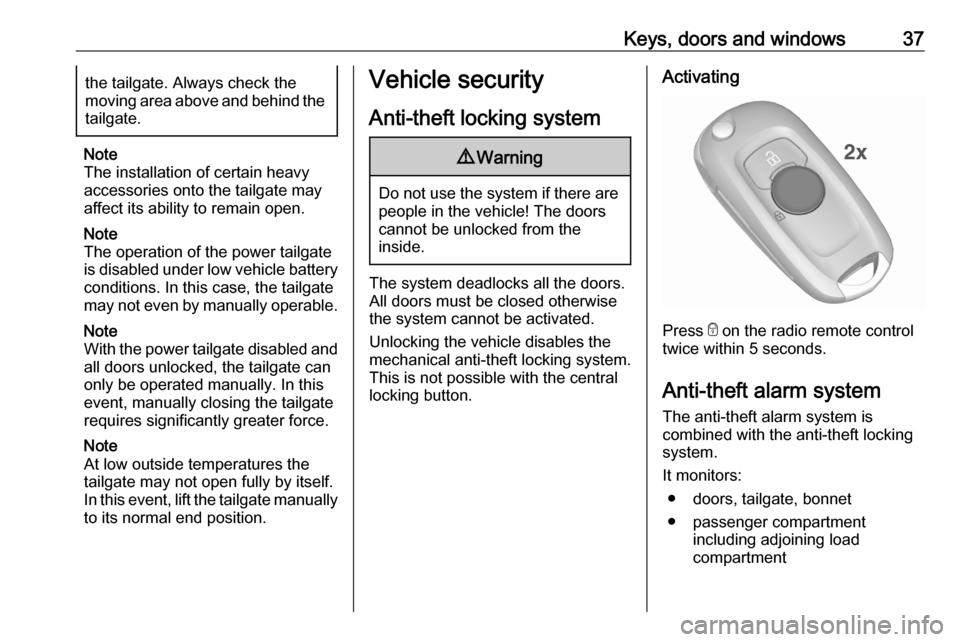
Activating
Press e on the radio remote control
twice within 5 seconds.
Anti-theft alarm system
The anti-theft alarm system is
combined with the anti-theft locking
system.
It monitors: ● doors, tailgate, bonnet
● passenger compartment including adjoining load
compartment
Page 40 of 305

38Keys, doors and windows● vehicle inclination, e.g. if it israised
● ignition
Activation All doors must be closed and the
electronic key of the electronic key
system must not remain in the
vehicle. Otherwise the system cannot
be activated.
● Radio remote control: activated 30 seconds after locking the
vehicle by pressing e once.
● Electronic key system: activated 30 seconds after locking the
vehicle by pressing the button on any exterior door handle.
● Radio remote control or electronic key: directly by
pressing e twice within
5 seconds.
● Electronic key system with passive locking enabled: briefly
activated after passive locking
occurs.
Note
Changes to the vehicle interior such
as the use of seat covers, and open
windows or sunroof, could impair the
function of passenger compartment
monitoring.
Activation without monitoring of
passenger compartment and
vehicle inclination
Switch off the monitoring of
passenger compartment and vehicle
inclination when animals are being
left in the vehicle, because of high
volume ultrasonic signals or
movements triggering the alarm. Also switch off when the vehicle is on a
ferry or train.
1. Close tailgate, bonnet, windows and sunroof.
2. Press o. LED in the button o
illuminates for a maximum of
10 minutes.
Page 41 of 305

Keys, doors and windows393. Close doors.
4. Activate the anti-theft alarm system.
Status message is displayed in the
Driver Information Centre.
Status LED
Status LED is integrated in the sensor
on top of the instrument panel.
Status during the first 30 seconds of
anti-theft alarm system activation:
LED illuminates:test, arming delayLED flashes
quickly:doors, tailgate or
bonnet not
completely closed,
or system faultStatus after system is armed:LED flashes
slowly:system is armed
Seek the assistance of a workshop in
the event of faults.
Deactivation
Radio remote control: Unlocking the
vehicle by pressing c deactivates the
anti-theft alarm system.
Electronic key system: Unlocking the
vehicle by pressing the button on any
exterior door handle deactivates the
anti-theft alarm system.
The electronic key must be outside
the vehicle, within a range of approx. 1 m of the relevant door side.
The system is not deactivated by
unlocking the driver's door with the
key or with the central locking button
in the passenger compartment.
Alarm When triggered, the alarm horn
sounds and the hazard warning lights flash simultaneously. The number
and duration of alarm signals are
stipulated by legislation.
The anti-theft alarm system can be
deactivated by pressing c, by
pressing the switch on the door
handle with electronic key system or
switching on the ignition.
A triggered alarm, which has not been
interrupted by the driver, will be
indicated by the hazard warning
lights. They will flash quickly three
times the next time the vehicle is
unlocked with the radio remote
control. Additionally a warning
message is displayed in the Driver
Information Centre after switching on
the ignition.
Page 46 of 305

44Keys, doors and windowsChild safety system for rear
windows
Press z to deactivate rear door
power windows; the LED illuminates.
To activate, press z again.
Operating windows from outside
The windows can be operated
remotely from outside the vehicle.
Press and hold c to open windows.
Press and hold e to close windows.
Release button to stop window
movement.
If the windows are fully opened or
closed, the hazard warning lights will
flash twice.
Overload
If the windows are repeatedly
operated within short intervals, the
window operation is disabled for
some time.
Initialising the power windows
If the windows cannot be closed
automatically (e.g. after
disconnecting the vehicle battery), a
warning message is displayed in the
Driver Information Centre.
Vehicle messages 3 122.
Activate the window electronics as
follows:
1. Close doors.
2. Switch on ignition.
3. Pull switch until the window is closed and keep pulling for
additional two seconds.
4. Push switch until the window is completely open and keep
pushing for additional
two seconds.
5. Repeat for each window.
Page 48 of 305

46Keys, doors and windowsRoof
Sunroof9 Warning
Take care when operating the
sunroof. Risk of injury, particularly to children.
Keep a close watch on the
movable parts when operating
them. Ensure that nothing
becomes trapped in them as they
move.
Switch on ignition to operate the sunroof.
Open or close
Press p or r gently to the first
detent: sunroof is opened or closed as long as the switch is operated.
Press p or r firmly to the second
detent then release: the sunroof is
opened or closed automatically.
During closing the safety function is
enabled. To stop movement, operate
the switch once more.
Raise or close Press q or r : sunroof is raised or
closed automatically. During closing
the safety function is enabled.
Sunblind
The sunblind is manually operated.
Close or open the sunblind by sliding. When the sunroof is open, the
sunblind is always open.General hints
Safety function
If the sunroof encounters resistance
during automatic closing, it is
immediately stopped and opened
again.
Override safety function
In the event of closing difficulties, e.g. due to frost, hold the switch r
pressed to the second detent. The
sunroof closes with safety function
disabled. To stop movement, release
the switch.
Closing sunroof from outside
The sunroof can be closed remotely
from outside the vehicle.