Page 86 of 305
84StorageSports Tourer
Front and rear lashing eyes are
located at the sidewalls. Fold up the
lashing eyes to use and fold down
when not required.
Cargo management system The FlexOrganizer is a flexible
system for dividing up the load
compartment.
The system consists of: ● adapters
● mesh pockets
● hooks
● service box
● strap set
The components are fitted in rails on
both side panels using adapters and hooks.
Installation of adapters in the rails
Fold open the handle plate, insert the adapter into the upper and lower
groove of the rail and move to the
required position. Turn the handle
plate upwards to lock the adapter. To
remove, turn the handle plate down
and move out of the rail.
Variable partition net
Insert adapters into the required
position in the rails. Stick together the
halves of the net rods.
To install, push rods together a little
and insert into the relevant openings
in the adapters.
To remove, press the net rods
together and remove from the
adapters.
Page 88 of 305

86StorageAlternatively install both hooks in the
lower rail. Plug in the lower brackets
of the box from above into the lower
hooks.
Strap set
Insert the adapters of the strap set in
a rail. Make sure that the belt is not
twisted.
The strap set has two locks to open. The belt can be tightened.
Safety net
The safety net is available on the
Sports Tourer and can be installed
behind the rear seats or, if the rear
seat backrests are folded, behind the
front seats.
Passengers must not be transported
behind the safety net.
Installation
Behind the rear seats
● There are installation openings on both sides in the roof frame
above the rear seats: suspend
and engage rod of net at one side, compress rod and suspendand engage at the other side.
● Attach the hooks of safety net straps in loops underneath the
rear floor cover behind the rear
seats. To get access to the loops, open the perforated parts in the
floor cover on both sides by using
the screwdriver and fold up the
loops. Attach the hooks to the
loops.
● Tension both straps by pulling at the loose end.
● Rear seat backrests must be raised up.
Page 90 of 305
88StorageWarning triangle
5-door hatchback
Stow the warning triangle in the
recess at the rear of the load
compartment.
Sports Tourer
Stow the warning triangle in the
recess under the rear floor cover on
the right or left side.
First aid kit Stow the first aid kit in the
compartment in the left side wall.
Illustration shows 5-door Hatchback.
To open the compartment, disengage cover and open.
Illustration shows Sports Tourer.
Page 91 of 305
Storage89To open the cover turn knob.Roof rack systemRoof rack
For safety reasons and to avoid
damage to the roof, the vehicle
approved roof rack system is
recommended. For further
information contact your workshop.
Mounting roof rack
5-door Hatchback, Sports Tourer
Open all doors.
Mounting points are located in each
door frame of the vehicle body.
Fasten the roof rack according to the installation instructions delivered with the roof rack.
Remove the roof rack when not in use.9 Warning
Sports Tourer
Roof railings are a styling element only and not designed to carry any load. Installation of roof racks or
other accessory is not permitted.
Use the designated mounting
points in the door frames
exclusively.
Page 92 of 305

90StorageLoading information
● Heavy objects in the loadcompartment should be placed
against the seat backrests. Make
sure that the backrests are
securely engaged, i.e. no longer
showing the red markings behind
the release levers. If objects can
be stacked, heavier objects
should be placed at the bottom.
● Prevent sliding of loose objects by securing them with straps
attached to the lashing eyes
3 83.
● Do not allow the load to protrude
above the upper edge of the
backrests.
● Sports Tourer: install safety net when transporting objects in the
load compartment.
● Do not place any objects on the load compartment cover or theinstrument panel, and do not
cover the sensor on top of the instrument panel.
● The load must not obstruct the operation of the pedals, parking
brake and gear selector lever, or
hinder the freedom of movement of the driver. Do not place any
unsecured objects in the interior.
● Do not drive with an open load compartment.9Warning
Always make sure that the load in
the vehicle is securely stowed.
Otherwise objects can be thrown
around inside the vehicle and
cause personal injury or damage
to the load or car.
● The payload is the difference between the permitted gross
vehicle weight (see identification
plate 3 276) and the EC kerb
weight.
To calculate the payload, enter
the data for your vehicle in the
weights table at the front of this
manual.
The EC kerb weight includes
weights for the driver (68 kg),
luggage (7 kg) and all fluids (fuel
tank 90% full).
Optional equipment and
accessories increase the kerb
weight.
● Driving with a roof load increases
the sensitivity of the vehicle to
cross-winds and has a
detrimental effect on vehicle
handling due to the vehicle's
higher centre of gravity.
Distribute the load evenly and secure it properly with retaining
straps. Adjust the tyre pressure
and vehicle speed according to
the load conditions. Check and
retighten the straps frequently.
Page 103 of 305
Instruments and controls101If 0 is not displayed, remove mobile
device from the slot. Turn mobile
device 180 degrees and wait three
seconds before inserting mobile
device again.
PMA, Qi and A4WP compatible
mobile devices can be charged
inductively.
On some mobile devices, a back
cover with an integrated coil or a
jacket may be required to use
inductive charging.
The mobile device must be smaller
than 8 cm in width and 15 cm in length
to fit into the charging device.
Protective cover for the mobile device
could have impact on the inductive
charging.
AshtraysCaution
To be used only for ash and not forcombustible rubbish.
A portable ashtray can be placed in
the cupholders.
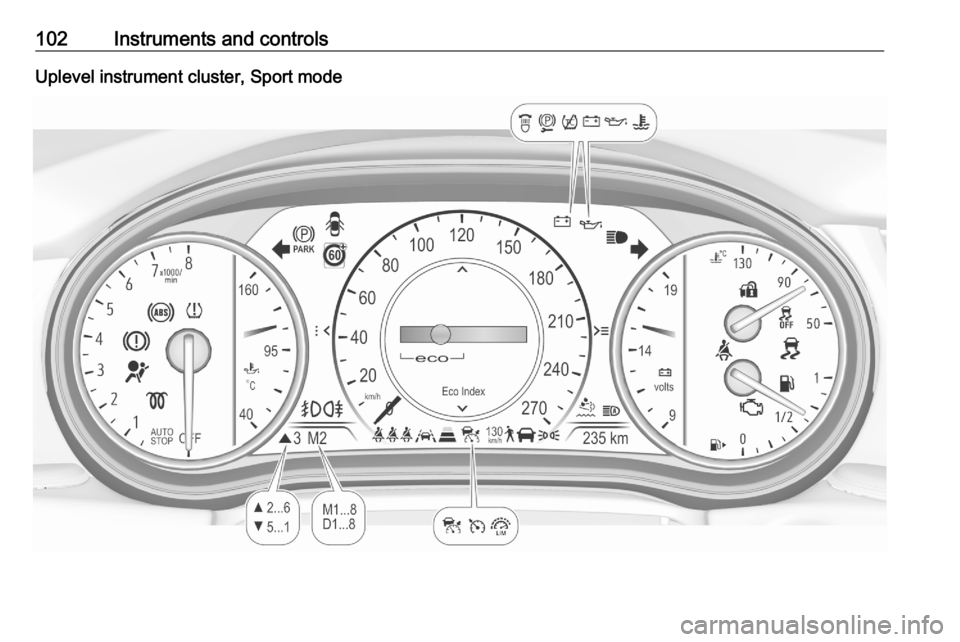
Warning lights, gauges
and indicators
Instrument cluster
Depending on the version, two
instrument clusters are available:
● Baselevel
● Uplevel
Uplevel instrument cluster can be
displayed as Sport mode or Tour
mode.
Baselevel instrument cluster
Page 104 of 305
102Instruments and controlsUplevel instrument cluster, Sport mode
Page 119 of 305

Instruments and controls117Vehicle and service messages are
popped-up in the Driver Information Centre if required. Confirm messages
by pressing Å.
Vehicle messages 3 122.
Main menu
Main menus are:
● Trip / fuel information, displayed by Info .
● Audio information, displayed by Audio .
● Navigation information, displayed by Navigation.
● Phone information, displayed by Phone .
● Vehicle information, displayed by
Options .
Some of the displayed functions differ when the vehicle is being driven or at
a standstill and some functions are
only active when the vehicle is being
driven.
Uplevel instrument cluster can be
displayed as Sport mode or Tour
mode. See Options menu, Display.Info Menu, ; or "
The following list contains all possible Info Menu pages. Some may not be
available for your particular vehicle.
Depending on the display some
functions are symbolised.
● Speed
● Trip 1 / Trip A , containing:
Distance
Fuel Economy / Average Fuel
Economy
Average Speed
● Trip 2 / Trip B , containing:
Distance
Fuel Economy / Average Fuel
Economy
Average Speed
● Fuel / Fuel Information ,
containing:
Fuel Range
Instant Fuel Economy
● Oil Life
● Tyre Pressure
● Timer
● Traffic Sign Memory●Following Distance
● Driver Assistance
● Top Consumers
● Economy Trend
● ECO Index
● AdBlue Level
On Baselevel display, the pages Oil
Life , Tyre Pressure , Following
Distance , Traffic Sign Memory ,
AdBlue Level , Tyre Load and Speed
Warning are displayed in the Vehicle
information menu, select ?.
Speed
Digital display of the instantaneous
speed.
Trip 1/A or 2/B
Two independent pages 1/A and 2/B
display the current distance, average
fuel consumption and average speed
since a certain reset.
The distance indicator counts up to a
distance of 9,999 km then restarts at
0.
To reset on Baselevel, press Å and
confirm reset. On Uplevel display,
press é and confirm with Å. This