2020 NISSAN SENTRA fuel pressure
[x] Cancel search: fuel pressurePage 102 of 528

•If the light illuminates while driving,
avoid sudden steering maneuvers or
abrupt braking, reduce vehicle
speed, pull off the road to a safe loca-
tion and stop the vehicle as soon as
possible. Driving with under-inflated
tires may permanently damage the
tires and increase the likelihood of
tire failure. Serious vehicle damage
could occur and may lead to an acci-
dent and could result in serious per-
sonal injury or death. Check the tire
pressure for all four tires. Adjust the
tire pressure to the recommended
COLD tire pressure show on the Tire
and Loading Information label lo-
cated in the driver’s door opening to
turn the low tire pressure warning
light off. If the light still illuminates
while driving af ter adjusting the tire
pressure, a tire may be flat or the
TPMS may be malfunctioning. If you
have a flat tire, replace it with a spare
tire as soon as possible. If no tire is
flat and all tires are properly inflated,
have the vehicle checked. It is recom-
mended that you visit a NISSAN
dealer for this service. •
When replacing a wheel without the
TPMS such as the spare tire, the TPMS
will not function and the low tire
pressure warning light will flash for
approximately 1 minute. The light will
remain on af ter 1 minute. Have your
tires replaced and/or TPMS system
reset as soon as possible. It is recom-
mended that you visit a NISSAN
dealer for these services.
• Replacing tires with those not origi-
nally specified by NISSAN could af-
fect the proper operation of the
TPMS.
CAUTION
• The TPMS is not a substitute for the
regular tire pressure check. Be sure
to check the tire pressure regularly.
• If the vehicle is being driven at
speeds of less than 16 mph (25 km/h),
the TPMS may not operate correctly.
• Be sure to install the specified size of
tires to the four wheels correctly.
Master warning light
When the ignition switch is in the ON posi-
tion, the master warning light illuminates if
any of the following are displayed on the
vehicle information display:
• No key warning
• Low washer fluid warning
• Parking brake release warning
• Door open warning
• Loose fuel cap warning
• Low tire pressure warning
• Emergency brake warning
• Lock warning
• I-Key system warning
• Headlight system warning
• Driving aids warning
• Shipping mode warning
• Low oil pressure warning
For additional information, refer to “Vehicle
information display” in this section.
2-12Instruments and controls
Page 114 of 528
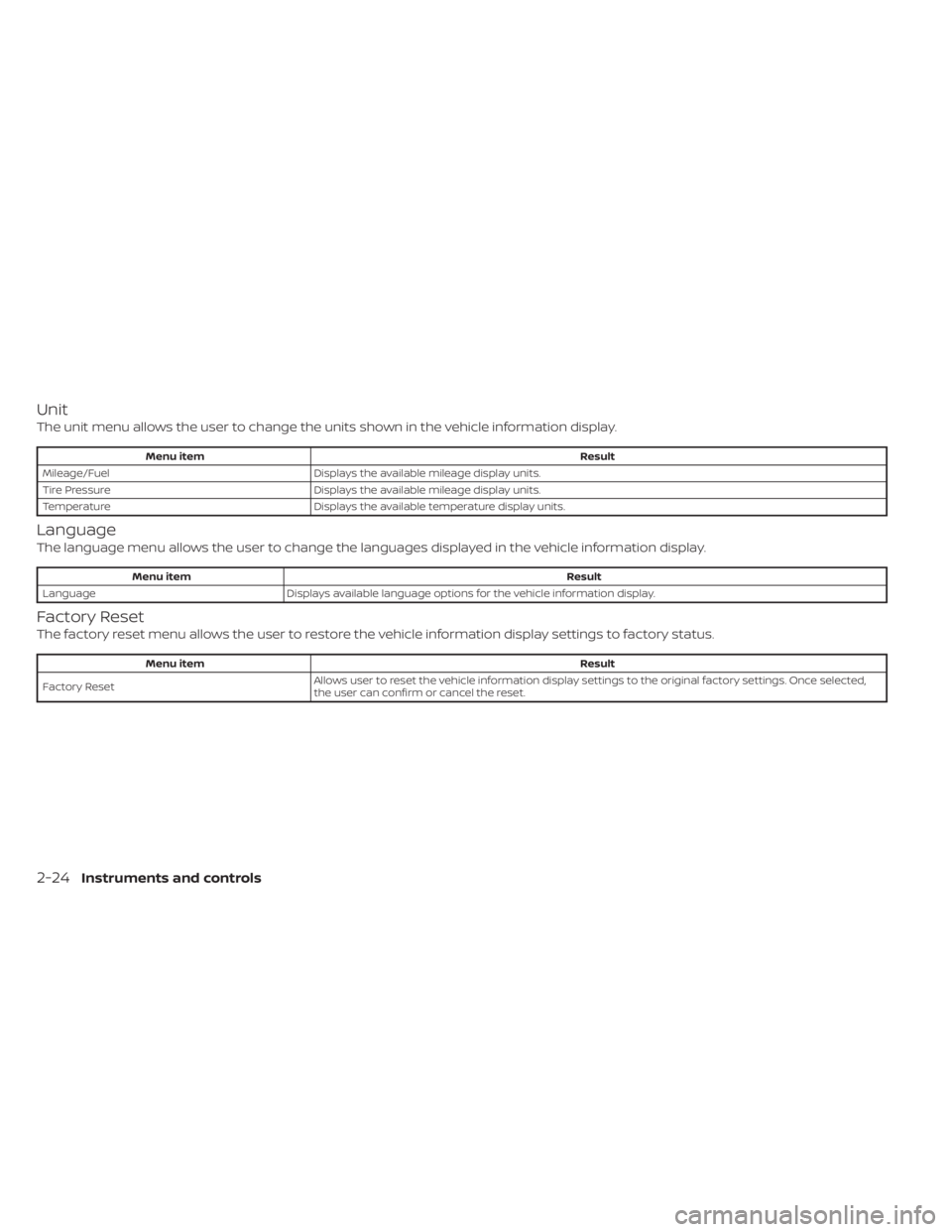
Unit
The unit menu allows the user to change the units shown in the vehicle information display.
Menu itemResult
Mileage/Fuel Displays the available mileage display units.
Tire Pressure Displays the available mileage display units.
Temperature Displays the available temperature display units.
Language
The language menu allows the user to change the languages displayed in the vehicle information display.
Menu item Result
Language Displays available language options for the vehicle information display.
Factory Reset
The factory reset menu allows the user to restore the vehicle information display settings to factory status.
Menu item Result
Factory Reset Allows user to reset the vehicle information display setti
ngs to the original factory settings. Once selected,
the user can confirm or cancel the reset.
2-24Instruments and controls
Page 118 of 528

8. Engine start operation for Intelligent Keysystem (if I-Key battery level is low)
9. Release Parking Brake
10. Low Fuel
11. Loose Fuel Cap
12. Low Oil Pressure: See Owner’s Manual
13. Low Washer Fluid
14. Tire Pressure Low — Add Air
15. TPMS Error: See Owner’s Manual
16. Door/Trunk Open
17. Power will turn off to save the battery
18. Power turned off to save the battery
19. Reminder: Turn OFF Headlights
20. Headlight System Error: See Owner’s Manual (if so equipped)
21. Engine Oil Service due in---km
22. BSW/RCTA System Malfunction: See Owner’s Manual
23. Side Radar Obstruction
24. Check Rear Seat for All Articles
25. Rear Door Alert is activated
26. Shipping Mode On Push Storage Fuse 27. Not Available Poor Road Conditions (if
so equipped)
28. CVT Malfunction Service now
29. Illumination indicator
30. Outside Temperature Display
31. Low Outside Temperature (if so equipped)
32. Unavailable: Front Radar Obstruction
33. ECO mode indicator
34. Parking Sensor Error-See Owner’s Manual
35. Not Available System Malfunction (if so equipped)
36. Unavailable High Cabin Temperature
37. Currently not available (if so equipped)
38. Rear seat belt reminder
39. Rotate Steering Wheel and Push Start Switch
40. No Key Press and hold to Stop Engine
41. Speed Limit Sign (if so equipped)
42. Driver Attention Alert —Take a Break?
43. Driver Attention Alert MalfunctionNo Key Detected
This warning appears when the Intelligent
Key is lef t outside the vehicle with the igni-
tion switch in the ON position. Make sure
the Intelligent Key is inside the vehicle.
For additional information, refer to “NISSAN
Intelligent Key®” in the “Pre-driving checks
and adjustments” section of this manual.
Key ID Incorrect
This warning appears when the ignition
switch is placed from the OFF position and
the Intelligent Key is not recognized by the
system. You cannot start the engine with
an unregistered key.
For additional information, refer to “NISSAN
Intelligent Key®” in the “Pre-driving checks
and adjustments” section of this manual.
Key Battery Low
This indicator illuminates when the Intelli-
gent Key battery is running out of power.
If this indicator illuminates, replace the bat-
tery with a new one. For additional infor-
mation, refer to “Battery replacement” in
the “Do-it-yourself ” section of this manual.
2-28Instruments and controls
Page 125 of 528

The OK,andbuttons also
control audio and control panel functions
in some conditions. Most screens and
menus offer instruction prompts of the
steering switch buttons to indicate how to
control the vehicle information display.
Dots on the right side of the vehicle infor-
mation display may appear if there is more
than one page of menu items or warning
messages, depending on the type of me-
ter. The OK button changes the audio
source and the
buttons also con-
trol voice recognition manual mode. The
OK button can be used to change the au-
dio source when the audio screen is dis-
played. The
buttons can be used
when controlling voice recognition
prompts manually. For additional informa-
tion, refer to the separate NissanConnect®
Owner’s Manual.
STARTUP DISPLAY
When the vehicle in placed in the ON posi-
tion the vehicle information display may
display the following screens (if so
equipped):
• Home
• Drive Computer — Speed, Fuel Economy, Trip Distance & Time
• Convenience • Digital speed and average speed
• Instant fuel economy/ average fuel
economy
• Tire Pressure
• Audio/telephone
• Intelligent Cruise Control (ICC)
• Driving Aids
• Settings
• Warnings*
*Warnings will only display if there are any
present. For additional information, refer to
“Vehicle information display warnings and
indicators” in this section.
To control what items display in the vehicle
information display, refer to “How to use the
vehicle information display” in this section.
RESETTING THE DRIVE COMPUTER
The drive computer is divided across three
screens:
• Average Speed
• Average Fuel Economy
• Trip Distance & Time
1. Press the
buttons
until you reach the desired drive com-
puter mode. 2. Press and hold the OK button for ap-
proximately 1 second to reset the infor-
mation on the currently displayed
screen.
NOTE:
If you wish to reset all drive computer
values at once, press and hold the OK
button for approximately 3 seconds until
a reset menu appears; and follow the
instructions.
SETTINGS
The setting mode allows you to change the
information displayed in the vehicle infor-
mation display. It also allows you to change
vehicle functions:
• VDC Setting
• ECO Mode Setting
• Driver Assistance
• TPMS Settings
• Clock
• Vehicle Settings
• Maintenance
• Customize Display
• Unit/Language
• Factory Reset
Instruments and controls2-35
Page 132 of 528
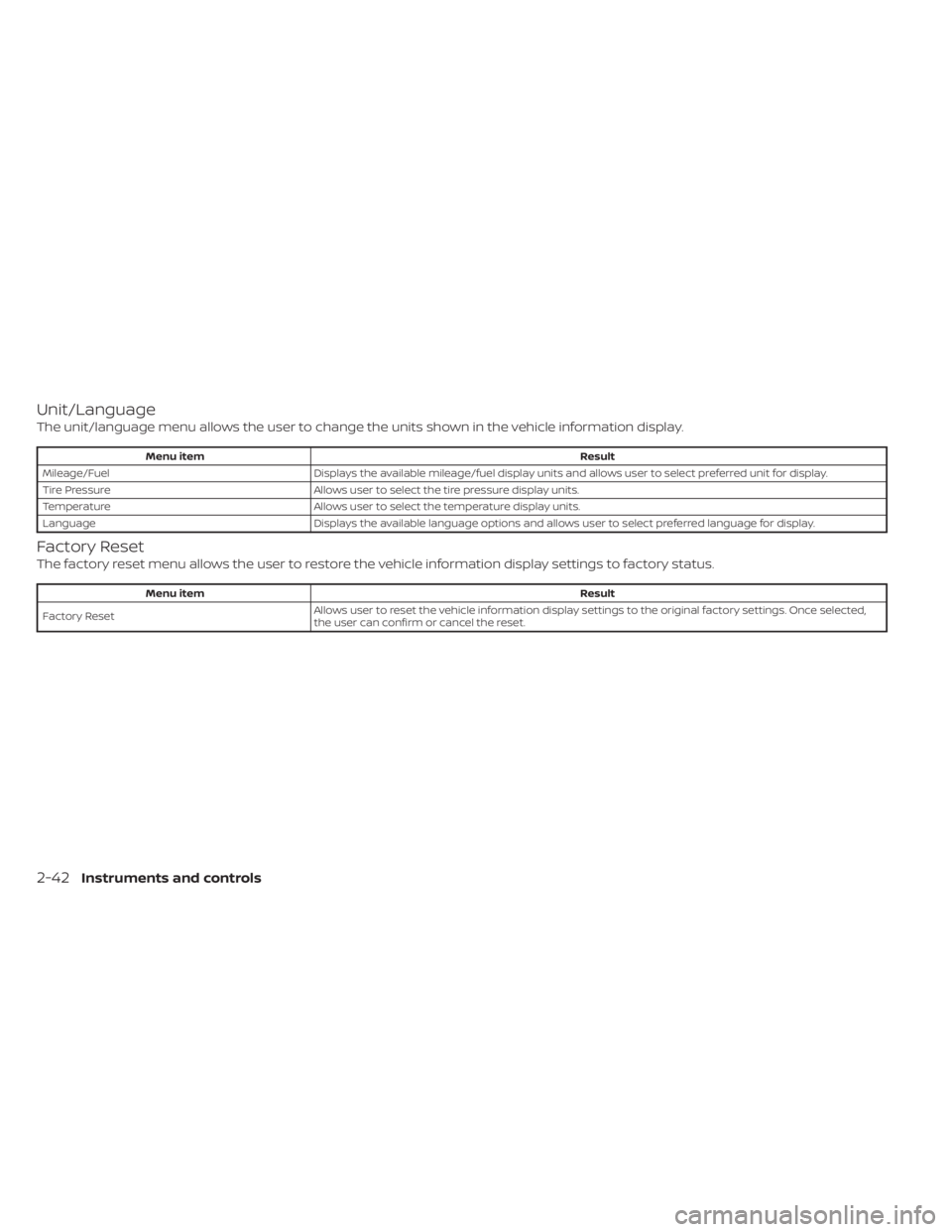
Unit/Language
The unit/language menu allows the user to change the units shown in the vehicle information display.
Menu itemResult
Mileage/Fuel Displays the available mileage/fuel display units and allows user to select preferred unit for display.
Tire Pressure Allows user to select the tire pressure display units.
Temperature Allows user to select the temperature display units.
Language Displays the available language options and allows user to select preferred language for display.
Factory Reset
The factory reset menu allows the user to restore the vehicle information display settings to factory status.
Menu item Result
Factory Reset Allows user to reset the vehicle information display setti
ngs to the original factory settings. Once selected,
the user can confirm or cancel the reset.
2-42Instruments and controls
Page 135 of 528
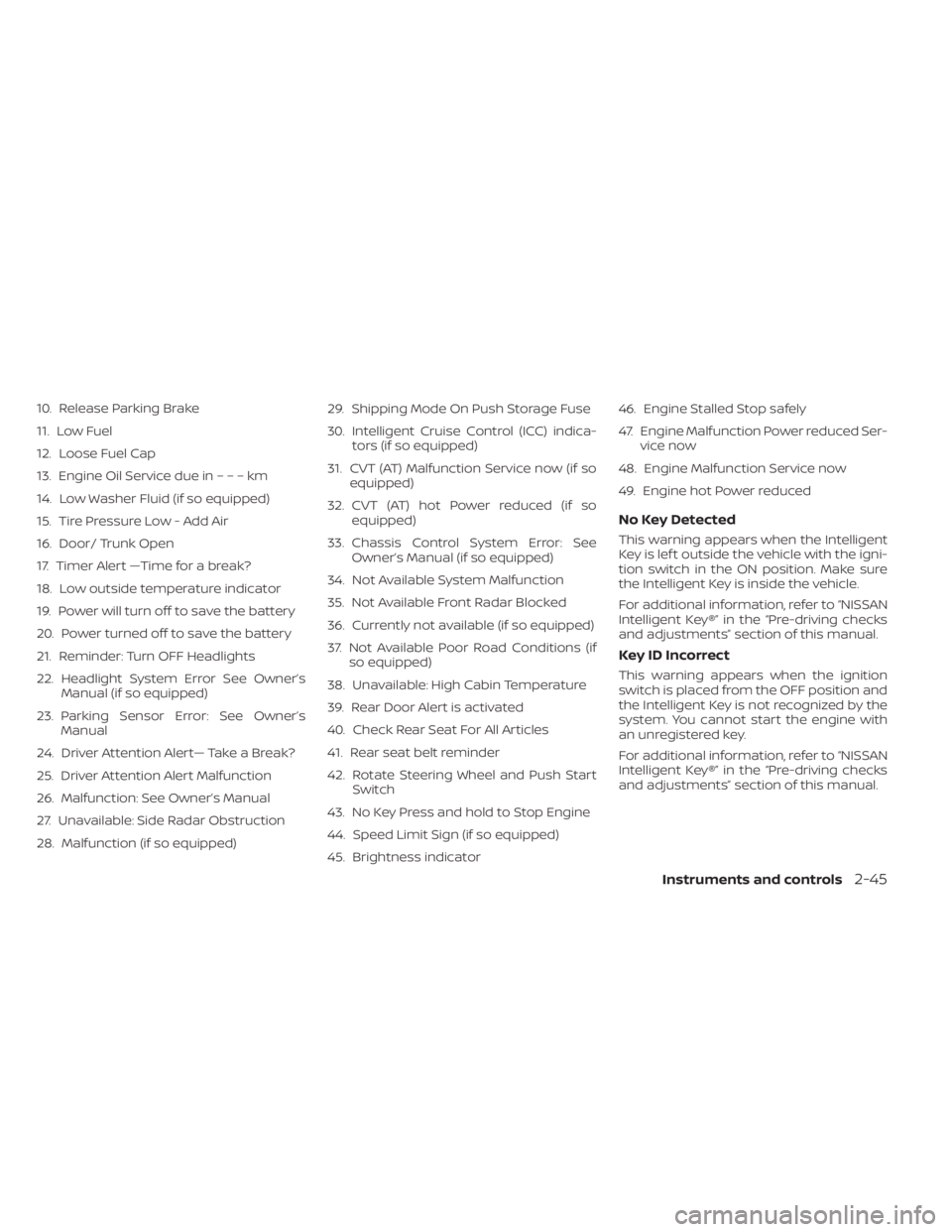
10. Release Parking Brake
11. Low Fuel
12. Loose Fuel Cap
13. Engine Oil Service due in–––km
14. Low Washer Fluid (if so equipped)
15. Tire Pressure Low - Add Air
16. Door/ Trunk Open
17. Timer Alert —Time for a break?
18. Low outside temperature indicator
19. Power will turn off to save the battery
20. Power turned off to save the battery
21. Reminder: Turn OFF Headlights
22. Headlight System Error See Owner’sManual (if so equipped)
23. Parking Sensor Error: See Owner’s Manual
24. Driver Attention Alert— Take a Break?
25. Driver Attention Alert Malfunction
26. Malfunction: See Owner’s Manual
27. Unavailable: Side Radar Obstruction
28. Malfunction (if so equipped) 29. Shipping Mode On Push Storage Fuse
30. Intelligent Cruise Control (ICC) indica-
tors (if so equipped)
31. CVT (AT) Malfunction Service now (if so equipped)
32. CVT (AT) hot Power reduced (if so equipped)
33. Chassis Control System Error: See Owner’s Manual (if so equipped)
34. Not Available System Malfunction
35. Not Available Front Radar Blocked
36. Currently not available (if so equipped)
37. Not Available Poor Road Conditions (if so equipped)
38. Unavailable: High Cabin Temperature
39. Rear Door Alert is activated
40. Check Rear Seat For All Articles
41. Rear seat belt reminder
42. Rotate Steering Wheel and Push Start Switch
43. No Key Press and hold to Stop Engine
44. Speed Limit Sign (if so equipped)
45. Brightness indicator 46. Engine Stalled Stop safely
47. Engine Malfunction Power reduced Ser-
vice now
48. Engine Malfunction Service now
49. Engine hot Power reduced
No Key Detected
This warning appears when the Intelligent
Key is lef t outside the vehicle with the igni-
tion switch in the ON position. Make sure
the Intelligent Key is inside the vehicle.
For additional information, refer to “NISSAN
Intelligent Key®” in the “Pre-driving checks
and adjustments” section of this manual.
Key ID Incorrect
This warning appears when the ignition
switch is placed from the OFF position and
the Intelligent Key is not recognized by the
system. You cannot start the engine with
an unregistered key.
For additional information, refer to “NISSAN
Intelligent Key®” in the “Pre-driving checks
and adjustments” section of this manual.
Instruments and controls2-45
Page 137 of 528

will be a small reserve of fuel in the tank
when the fuel gauge needle reaches 0
(Empty).
Loose Fuel Cap
This warning appears when the fuel-filler
cap is not tightened correctly af ter the ve-
hicle has been refueled. For additional in-
formation, refer to “Fuel-filler cap” in the
“Pre-driving checks and adjustments” sec-
tion of this manual.
EngineOilServiceduein–––km
This distance to oil change is displayed if
the distance to oil change is less than 100
km (62 miles).
Low Washer Fluid (if so equipped)
This warning illuminates when the
windshield-washer fluid is at a low level.
Add windshield-washer fluid as necessary.
For additional information, refer to
“Windshield-washer fluid” in the “Do-it-
yourself ” section of this manual.
Tire Pressure Low - Add Air
This warning appears when the low tire
pressure warning light in the meter illumi-
nates and low tire pressure is detected. The
warning appears each time the ignition
switch is placed in the ON position as long
as the low tire pressure warning light re-mains illuminated. If this warning appears,
stop the vehicle and adjust the tire pres-
sures of all four tires to the recommended
COLD tire pressure shown on the Tire and
Loading Information label. For additional
information, refer to “Low tire pressure
warning light” in this section and “Tire Pres-
sure Monitoring System (TPMS)” in the
“Starting and driving” section of this
manual.
Door/Trunk Open
This warning illuminates when a door or
the trunk has been opened.
Timer Alert — Time for a break?
This indicator appears when the set time is
reached. The time can be set up to six
hours. For additional information, refer to
“Settings” in this section.
Low outside temperature indicator
This indicator appears if the outside tem-
perature is below 3°C (37°F). The tempera-
ture can be changed to display in Celsius or
Fahrenheit. For additional information, re-
fer to “Settings” in this section.
Power will turn off to save the battery
This message appears in the vehicle infor-
mation display af ter a period of time if the
ignition switch is in the AUTO ACC or the ON
position and if the vehicle is in P (Park). For
additional information, refer to “Push-
button ignition switch positions” in the
“Starting and driving” section of this
manual.
Power turned off to save the battery
This message appears af ter the ignition
switch is automatically turned off. For addi-
tional information, refer to “Push-button ig-
nition switch positions” in the “Starting and
driving” section of this manual.
Reminder: Turn OFF Headlights
This warning appears when the headlights
are lef t in the ON position when exiting the
vehicle. Place the headlight switch in the
OFF or AUTO position. For additional infor-
mation, refer to “Headlight and turn signal
switch” in this section.
Headlight System Error See Owner’s
Manual (if so equipped)
This warning illuminates when there is an
error with the system. For additional infor-
mation, refer to “Headlight and turn signal
switch” in this section.
Instruments and controls2-47
Page 291 of 528

•Do not stop or park the vehicle over
flammable materials such as dry
grass, waste paper or rags. They may
ignite and cause a fire.
CAUTION
• Do not use leaded gasoline. Deposits
from leaded gasoline will seriously
reduce the three-way catalyst's abil-
ity to help reduce exhaust pollutants.
• Keep your engine tuned up. Malfunc-
tions in the ignition, fuel injection, or
electrical systems can cause overrich
fuel flow into the three-way catalyst,
causing it to overheat. Do not keep
driving if the engine misfires, or if no-
ticeable loss of performance or other
unusual operating conditions are de-
tected. Have the vehicle inspected
promptly. It is recommended that
you visit a NISSAN dealer for this
service.
• Avoid driving with an extremely low
fuel level. Running out of fuel could
cause the engine to misfire, damag-
ing the three-way catalyst.
• Do not race the engine while warm-
ing it up. •
Do not push or tow your vehicle to
start the engine.
TIRE PRESSURE MONITORING
SYSTEM (TPMS)
Each tire, including the spare (if provided),
should be checked monthly when cold and
inflated to the inflation pressure recom-
mended by the vehicle manufacturer on
the vehicle placard or tire inflation pressure
label. (If your vehicle has tires of a different
size than the size indicated on the vehicle
placard or tire inflation pressure label, you
should determine the proper tire inflation
pressure for those tires.)
As an added safety feature, your vehicle
has been equipped with a Tire Pressure
Monitoring System (TPMS) that illuminates
a low tire pressure telltale when one or
more of your tires is significantly under-
inflated. Accordingly, when the low tire
pressure telltale illuminates, you should
stop and check your tires as soon as pos-
sible, and inflate them to the proper pres-
sure. Driving on a significantly under-
inflated tire causes the tire to overheat and
can lead to tire failure. Under-inflation also
reduces fuel efficiency and tire tread life,
and may affect the vehicle’s handling and
stopping ability. Please note that the TPMS is not a substi-
tute for proper tire maintenance, and it is
the driver’s responsibility to maintain cor-
rect tire pressure, even if under-inflation
has not reached the level to trigger illumi-
nation of the TPMS low tire pressure telltale.
Your vehicle has also been equipped with a
TPMS malfunction indicator to indicate
when the system is not operating properly.
The TPMS malfunction indicator is com-
bined with the low tire pressure telltale.
When the system detects a malfunction,
the telltale will flash for approximately one
minute and then remain continuously illu-
minated. This sequence will continue upon
subsequent vehicle start-ups as long as
the malfunction exists. When the malfunc-
tion indicator is illuminated, the system
may not be able to detect or signal low tire
pressure as intended. TPMS malfunctions
may occur for a variety of reasons, includ-
ing the installation of replacement or alter-
nate tires or wheels on the vehicle that
prevent the TPMS from functioning prop-
erly. Always check the TPMS malfunction
telltale af ter replacing one or more tires or
wheels on your vehicle to ensure that the
replacement or alternate tires and wheels
allow the TPMS to continue to function
properly.
Starting and driving5-5