2020 NISSAN SENTRA key battery
[x] Cancel search: key batteryPage 184 of 528

HOW TO USE THE REMOTE
KEYLESS ENTRY FUNCTION
The remote keyless entry function can op-
erate all door locks using the remote key-
less function of the Intelligent Key. The re-
mote keyless function can operate at a
distance of 33 f t (10 m) away from the ve-
hicle. The operating distance depends
upon the conditions around the vehicle.
The remote keyless entry function will not
function under the following conditions:
• The Intelligent Key is not within the opera-tional range.
• The doors or the trunk are open or not closed securely.
• The Intelligent Key battery is discharged.
CAUTION
When locking the doors using the Intel-
ligent Key, be sure not to leave the key
in the vehicle.
Type A (if so equipped)
1.(lock) button
2.
(unlock) button
3.
(trunk) button
4.
(panic) button
Type B (if so equipped)
1.(remote engine start) button
2.
(lock) button
3.
(unlock) button
4.
(trunk) button
5.
(panic) button
LPD3601LPD3603
3-14Pre-driving checks and adjustments
Page 187 of 528

Audible reminder and warning
when locking the doors (if so
equipped)
When the chime or buzzer sounds from
inside and outside the vehicle, check for
the following:
• The ignition switch is placed in the LOCKposition.
• The Intelligent Key is not lef t inside the vehicle.
• The shif t lever is in the P (Park) position.
Audible reminder and warning
when the engine stops (if so
equipped)
When the Shif t P (Park) warning ()
shows in the vehicle information display:
• Make sure the shif t lever is in the P (Park) position.
When the chime sounds intermittently:
• Make sure the shif t lever is in the P (Park) position and the ignition switch is placed
in the LOCK position. If the chime sounds continuously when the
driver’s door is opened, check the following:
• The shif t lever is placed in the P (Park)
position and the ignition switch is placed
in the LOCK position.
• The warning chime may stop when one of the following is performed:
Returning the ignition switch to the LOCK
position.
Closing the doors.
Alarm and warning when the
engine starts
When the Intelligent Key system warning () shows and the outside buzzer
sounds, make sure the Intelligent Key is in-
side the vehicle.
Warning for low battery power
When the Intelligent Key battery is low, the
Intelligent Key system warning () will
show in the vehicle information display af-
ter the ignition switch is placed in the ON
position. This warning is to let you know
that the battery of the Intelligent Key will
run down soon. Replace it with a new one.
For additional information, refer to “Battery
replacement” in the “Do-it-yourself ” section
of this manual. It is recommended that you visit a NISSAN
dealer for battery replacement.
Preventing the Intelligent Key
from being lef t in the vehicle
If you lock all doors using the power door
lock switch with the Intelligent Key in the
vehicle, all of the doors unlock immediately
and the buzzer will warn you when the door
is closed.
Pre-driving checks and adjustments3-17
Page 189 of 528

TROUBLESHOOTING GUIDE (Manual Transmission only)
SymptomPossible CauseRemedy
When the parking brake is fully applied The inside warning chime sounds con-
tinuously. The ignition switch is in the ACC or ON
position.Place the ignition switch in the OFF
position.
When opening the driver's door A warning chime sounds continuously. The ignition switch is in the ON posi-
tion.Place the ignition switch in the OFF
position.
When pushing the door handle re-
quest switch (if so equipped) to lock
the door The outside chime sounds for a few
seconds.
The Intelligent Key is inside the vehicle
or the trunk.Be sure to carry the Intelligent Key with
you.
When closing the doors The key warning light in the instrument
panel illuminates, the outside chime
sounds three times and the inside
warning chime sounds for approxi-
mately 3 seconds.
The ignition switch is in the ACC posi-
tion.
Place the ignition switch in the OFF
position.
The outside chime sounds for approxi-
mately 3 seconds and all doors unlock. The Intelligent Key is in the vehicle or
trunk.Be sure to carry the Intelligent Key with
you.
When pushing the ignition switch to
start the engine The key warning shows in the vehicle
information display.
The battery charge is low.Replace the battery with a new one.
For additional information, refer to
“Battery replacement” in the “Do-it-
yourself ” section of this manual.
Pre-driving checks and adjustments3-19
Page 190 of 528

Thebutton will be on the NISSAN
Intelligent Key® if the vehicle has Remote
Engine Start. This feature allows the engine
to start from outside the vehicle.
The following features may be affected
when the Remote Engine Start feature is
used:
• Vehicles with a manual climate control system (if so equipped) will default to the
last used heating or cooling mode. • Vehicles with an automatic climate con-
trol system (if so equipped) will default to
either heating or cooling mode. For addi-
tional information, refer to “Remote En-
gine Start with Intelligent Climate Control”
in the “Monitor, climate, audio, phone and
voice recognition systems” section of this
manual.
Laws in some local communities may re-
strict the use of remote starters. For ex-
ample, some laws require a person using
Remote Engine Start to have the vehicle in
view. Check local regulations for any re-
quirements.
Other conditions may affect the function of
the Remote Engine Start feature. For addi-
tional information, refer to “Conditions the
Remote Engine Start will not work” in this
section.
Other conditions can affect the perfor-
mance of the Intelligent Key transmitter.
For additional information, refer to “NISSAN
Intelligent Key®” in this section.
REMOTE ENGINE START
OPERATING RANGE
WARNING
To help avoid risk of injury or death
through unintended operation of the
vehicle and/or its systems, including
entrapment in windows or inadvertent
door lock activation, do not leave chil-
dren, people who require the assis-
tance of others or pets unattended in
your vehicle. Additionally, the tempera-
ture inside a closed vehicle on a warm
day can quickly become high enough
to cause a significant risk of injury or
death to people and pets.
CAUTION
When the Intelligent Key battery is dis-
charged or other strong radio wave
sources are present near the operating
location, the Intelligent Key operating
range becomes narrower, and the Intel-
ligent Key may not function properly.
The Remote Engine Start function can only
be used when the Intelligent Key is within
the specified operating range from the ve-
hicle.
LPD2995
REMOTE ENGINE START (if so
equipped)
3-20Pre-driving checks and adjustments
Page 205 of 528
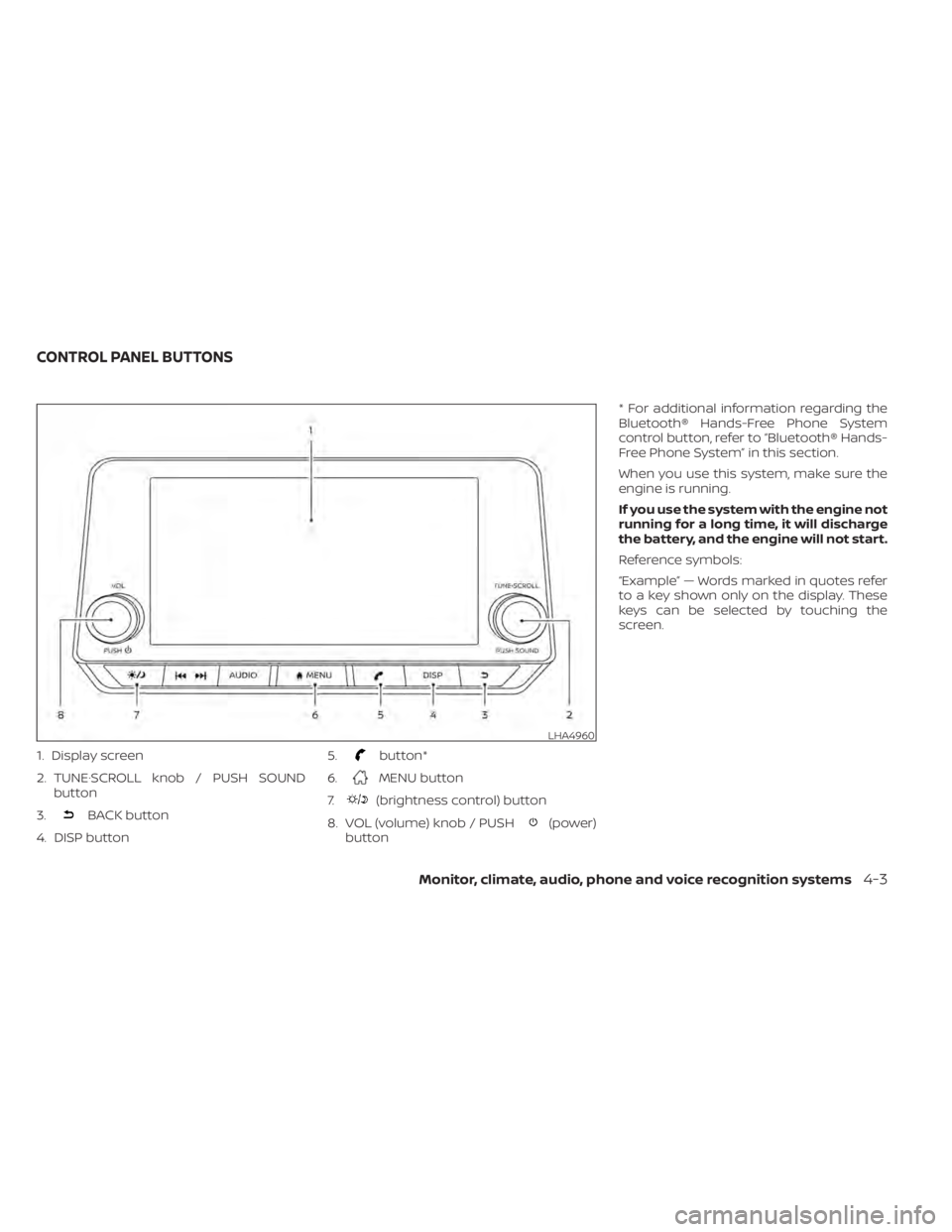
1. Display screen
2. TUNE·SCROLL knob / PUSH SOUNDbutton
3.
BACK button
4. DISP button 5.
button*
6.
MENU button
7.
(brightness control) button
8. VOL (volume) knob / PUSH
(power)
button * For additional information regarding the
Bluetooth® Hands-Free Phone System
control button, refer to “Bluetooth® Hands-
Free Phone System” in this section.
When you use this system, make sure the
engine is running.
If you use the system with the engine not
running for a long time, it will discharge
the battery, and the engine will not start.
Reference symbols:
“Example” — Words marked in quotes refer
to a key shown only on the display. These
keys can be selected by touching the
screen.
LHA4960
CONTROL PANEL BUTTONS
Monitor, climate, audio, phone and voice recognition systems4-3
Page 287 of 528
5 Starting and driving
Precautions when starting and driving..........5-4
Exhaust gas (carbon monoxide) ..............5-4
Three-way catalyst ...........................5-4
Tire Pressure Monitoring System
(TPMS) .......................................5-5
Avoiding collision and rollover ................5-9
Off-roadrecovery ............................5-9
Rapid air pressure loss .......................5-9
Drinking alcohol/drugs and driving ..........5-10
Push-button ignition switch .....................5-11
Operating range ............................ 5-12
Push-button ignition switch positions .......5-12
Emergency engine shut off ..................5-13
NISSAN Intelligent Key® battery
discharge ................................... 5-13
NISSAN Vehicle Immobilizer System .........5-14
Before starting the engine .....................5-14
Starting the engine ............................. 5-14
Remote Engine Start (if so equipped) ........5-15
Driving the vehicle .............................. 5-16
Continuously Variable Transmission
(CVT) (if so equipped) ........................ 5-16
Manual transmission (if so equipped) ........5-21
Parking brake .................................. 5-23Pedal type
...................................... 5-24
ECO mode switch .............................. 5-25
Shif t lever indicator (MRA8DE engine
Manual Transmission models only) ..........5-25
Traffic Sign Recognition (TSR) (if so equipped) . . . 5-26 System operation ........................... 5-27
Turning the Traffic Sign Recognition
(TSR) system on and off .....................5-28
System temporarily unavailable .............5-28
System malfunction ......................... 5-29
System maintenance .......................5-29
Lane Departure Warning (LDW) .................5-29
LDW system operation ......................5-30
How to enable/disable the LDW system .....5-32
LDW system limitations .....................5-32
System temporarily unavailable .............5-34
System malfunction ......................... 5-34
System maintenance .......................5-35
Blind Spot Warning (BSW) .......................5-35
BSW system operation ......................5-37
How
to enable/disable the BSW system .....5-39
BSW system limitations .....................5-40
BSW driving situations ....................... 5-41
System temporarily unavailable .............5-45
Page 298 of 528
OPERATING RANGE
The Intelligent Key functions can only be
used when the Intelligent Key is within the
specified operating range.
When the Intelligent Key battery is almost
discharged or strong radio waves are pres-
ent near the operating location, the Intelli-
gent Key system’s operating range be-
comes narrower and may not function
properly.If the Intelligent Key is within the operating
range, it is possible for anyone, even some-
one who does not carry the Intelligent Key,
to push the ignition switch to start the en-
gine.
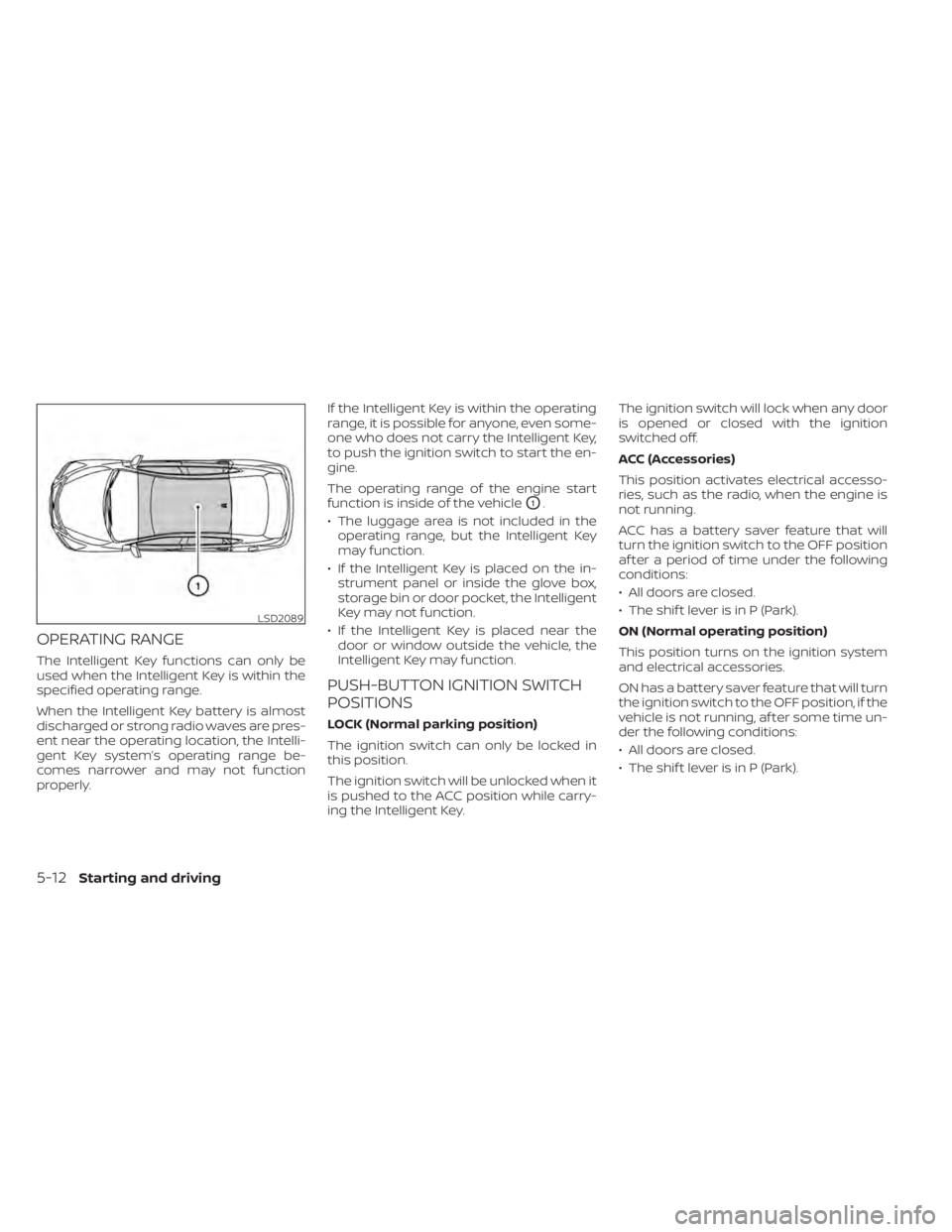
The operating range of the engine start
function is inside of the vehicle
O1.
• The luggage area is not included in the operating range, but the Intelligent Key
may function.
• If the Intelligent Key is placed on the in- strument panel or inside the glove box,
storage bin or door pocket, the Intelligent
Key may not function.
• If the Intelligent Key is placed near the door or window outside the vehicle, the
Intelligent Key may function.
PUSH-BUTTON IGNITION SWITCH
POSITIONS
LOCK (Normal parking position)
The ignition switch can only be locked in
this position.
The ignition switch will be unlocked when it
is pushed to the ACC position while carry-
ing the Intelligent Key. The ignition switch will lock when any door
is opened or closed with the ignition
switched off.
ACC (Accessories)
This position activates electrical accesso-
ries, such as the radio, when the engine is
not running.
ACC has a battery saver feature that will
turn the ignition switch to the OFF position
af ter a period of time under the following
conditions:
• All doors are closed.
• The shif t lever is in P (Park).
ON (Normal operating position)
This position turns on the ignition system
and electrical accessories.
ON has a battery saver feature that will turn
the ignition switch to the OFF position, if the
vehicle is not running, af ter some time un-
der the following conditions:
• All doors are closed.
• The shif t lever is in P (Park).
LSD2089
5-12Starting and driving
Page 299 of 528
The battery saver feature will be canceled if
any of the following occur:
• Any door is opened.
• The shif t lever is moved out of the P (Park)position.
• The ignition switch changes position.
CAUTION
Do not leave the vehicle with the igni-
tion switch in the ACC or ON position
when the engine is not running for an
extended period. This can discharge
the battery.
OFF
The ignition switch is in the OFF position
when the engine is turned off using the
ignition switch. No lights will illuminate on
the ignition switch.
EMERGENCY ENGINE SHUT OFF
To shut off the engine in an emergency
situation while driving, perform the follow-
ing procedure:
• Rapidly push the ignition switch three consecutive times in less than 1.5 sec-
onds, or
• Push and hold the ignition switch for more than 2 seconds.
NISSAN INTELLIGENT KEY®
BATTERY DISCHARGE
If the battery of the NISSAN Intelligent Key®
is discharged or environmental conditions
interfere with the Intelligent Key operation,
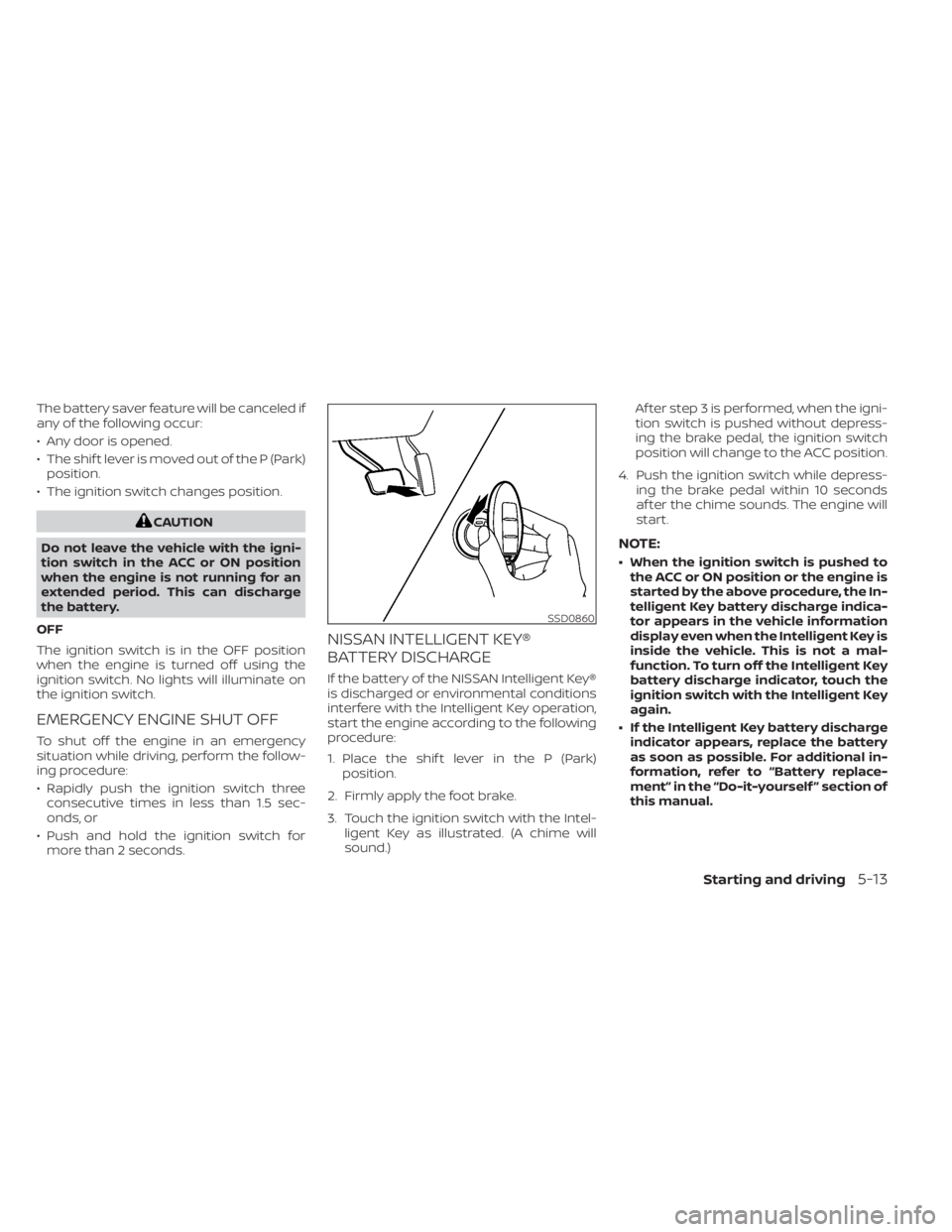
start the engine according to the following
procedure:
1. Place the shif t lever in the P (Park) position.
2. Firmly apply the foot brake.
3. Touch the ignition switch with the Intel- ligent Key as illustrated. (A chime will
sound.) Af ter step 3 is performed, when the igni-
tion switch is pushed without depress-
ing the brake pedal, the ignition switch
position will change to the ACC position.
4. Push the ignition switch while depress- ing the brake pedal within 10 seconds
af ter the chime sounds. The engine will
start.
NOTE:
• When the ignition switch is pushed tothe ACC or ON position or the engine is
started by the above procedure, the In-
telligent Key battery discharge indica-
tor appears in the vehicle information
display even when the Intelligent Key is
inside the vehicle. This is not a mal-
function. To turn off the Intelligent Key
battery discharge indicator, touch the
ignition switch with the Intelligent Key
again.
• If the Intelligent Key battery discharge indicator appears, replace the battery
as soon as possible. For additional in-
formation, refer to “Battery replace-
ment” in the “Do-it-yourself ” section of
this manual.
SSD0860
Starting and driving5-13