Page 292 of 482
WARNING
Failure to follow the warnings and in-
structions for proper use of the BSW
system could result in serious injury or
death.
∙ The BSW system is not a replacementfor proper driving procedures and is
not designed to prevent contact with
vehicles or objects. When changing
lanes, always use the side and rear
mirrors and turn and look in the direc-
tion your vehicle will move to ensure it
is safe to change lanes. Never rely
solely on the BSW system.
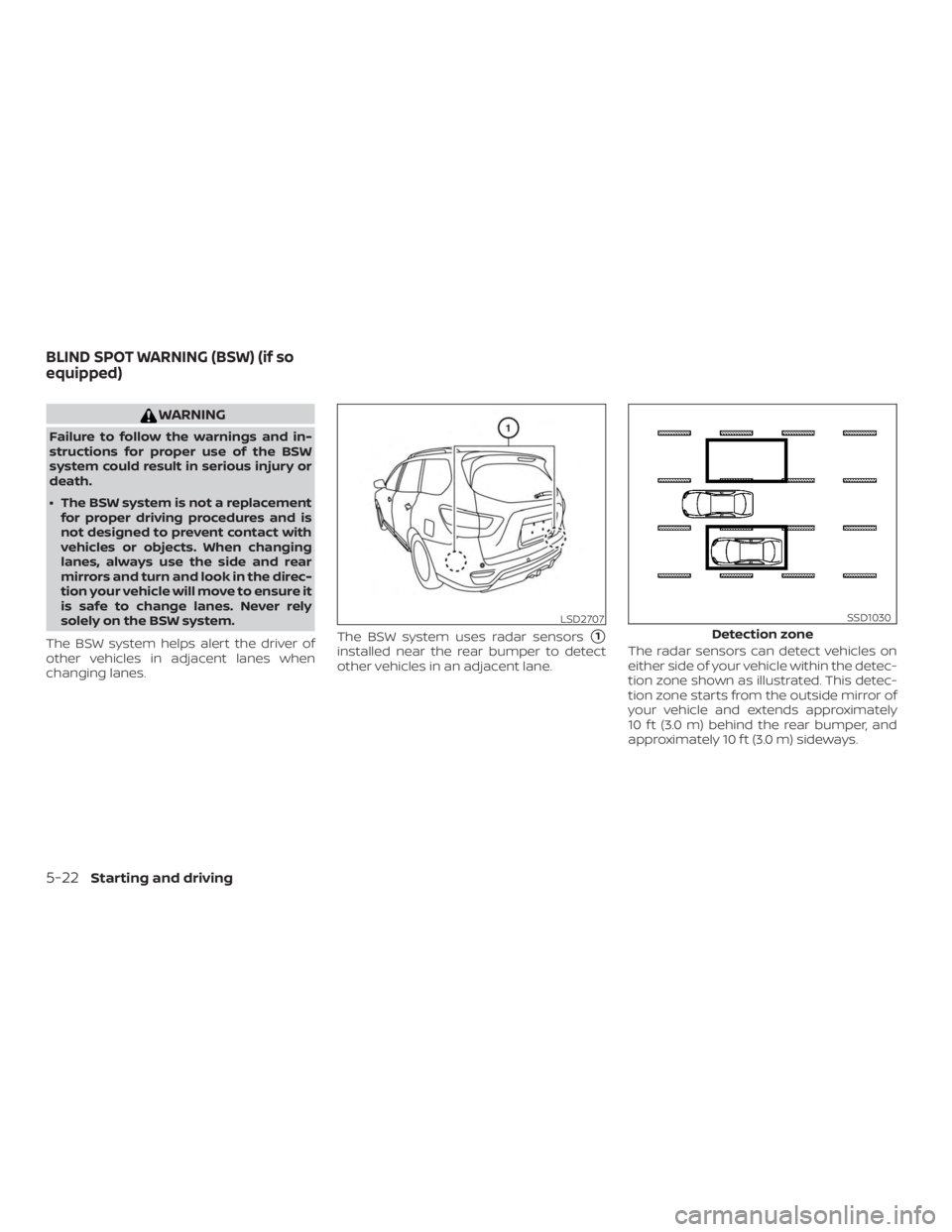
The BSW system helps alert the driver of
other vehicles in adjacent lanes when
changing lanes. The BSW system uses radar sensors
�1
installed near the rear bumper to detect
other vehicles in an adjacent lane.
The radar sensors can detect vehicles on
either side of your vehicle within the detec-
tion zone shown as illustrated. This detec-
tion zone starts from the outside mirror of
your vehicle and extends approximately
10 f t (3.0 m) behind the rear bumper, and
approximately 10 f t (3.0 m) sideways.
LSD2707
Detection zone
SSD1030
BLIND SPOT WARNING (BSW) (if so
equipped)
5-22Starting and driving
Page 295 of 482

HOW TO ENABLE/DISABLE THE
BSW SYSTEM
When the BSW system is enabled in the
vehicle information display, the system can
be turned off by pushing the warning sys-
tems switch. For additional information, re-
fer to “Warning systems switch” in the “In-
struments and controls” section of this
manual.
Perform the following steps to enable or
disable the BSW system.1. Press the
button until “Settings”
displays in the vehicle information dis-
play. Use the
button to select
“Driver Assistance.” Then press the EN-
TER button.
2. Select “Driving Aids” and press the EN- TER button.
3. Select “Blind Spot” and press the ENTER button.
4. Use the ENTER button to turn the sys- tem on or off.
NOTE: ∙ When enabling/disabling the system,
the system will retain current set-
tings even if the engine is restarted. ∙
The RCTA system (if so equipped) is
integrated into the BSW system.
There is not a separate selection in
the vehicle information display for
the RCTA system. When the BSW is
disabled, the RCTA system is also dis-
abled.
∙ When the BSW system is turned on,
the BSW/RCTA indicator (white) in the
vehicle information display illumi-
nates.
BSW SYSTEM LIMITATIONS
WARNING
Listed below are the system limitations
for the BSW system. Failure to operate
the vehicle in accordance with these
system limitations could result in seri-
ous injury or death.
∙ The BSW system cannot detect all ve- hicles under all conditions.
∙ The radar sensors may not be able to detect and activate BSW when certain
objects are present such as:
– Pedestrian, bicycles, animals. – Vehicles such as motorcycles, low
height vehicles, or high ground
clearance vehicles.
– Oncoming vehicles.
– Vehicles remaining in the detec- tion zone when you accelerate
from a stop.
– A vehicle merging into an adjacent lane at a speed approximately the
same as your vehicle.
– A vehicle approaching rapidly from behind.
– A vehicle which your vehicle over- takes rapidly.
– A vehicle that passes through the detection zone quickly.
– When overtaking several vehicles in a row, the vehicles af ter the first
vehicle may not be detected if they
are traveling close together.
Starting and driving5-25
Page 305 of 482
HOW TO ENABLE/DISABLE THE
RCTA SYSTEM
When the RCTA system is enabled in the
vehicle information display, the system can
be turned off by pushing the warning sys-
tems switch. For additional information, re-
fer to “Warning systems switch” in the “In-
struments and controls” section of this
manual.
Perform the following steps to enable or
disable the RCTA system.1. Press the
button until “Settings”
displays in the vehicle information dis-
play. Use the
button to select
“Driver Assistance.” Then press the EN-
TER button.
2. Select “Driving Aids” and press the EN- TER button.
3. Select “Blind Spot” and press the ENTER button.
4. Use the ENTER button to turn the sys- tem on or off.
When the RCTA system is turned on, the
BSW/RCTA indicator (white) in the vehicle
information display illuminates.
LSD2764
Starting and driving5-35
Page 467 of 482

11 Index
2nd row bench seat adjustment......1-9
A
Air bag (See supplemental restraint
system) .................... .1-53
Air bag system Front (See supplemental front impact air
bagsystem)............... .1-61
Air bag warning labels ............1-72
Airbagwarninglight..........1-73, 2-16
Air bag warning light,
supplemental ..............1-73, 2-16
Air cleaner ...................8-17
Air cleaner housing filter ...........8-17
Air conditioner Air conditioner operation ........4-34
Air conditioner specification label . .10-12
Air conditioner system refrigerant and oil
recommendations ............10-7
Heater and air conditioner
controls ..................4-34
Servicing air conditioner ........4-41
Alarm system
(See vehicle security system) .......2-34
Anchor point locations ...........1-35
Antenna ....................4-42
Antifreeze ...................5-80
Anti-lock brake warning light ........2-12
Anti-lock Braking System (ABS) ......5-73
Armrests................... .1-10
Audible reminders ..............2-19 Autolightswitch................2-41
Automatic
Automatic drive positioner ....3-39,3-41
Automatic power window switch. . .2-68
Automatic anti-glare inside mirror . . . .3-36
Automatic door locks .............3-7
Automatic drive positioner ......3-39,3-41
Automatic Emergency Braking
(AEB) ...................2-12,5-58
B
Battery..................5-80,8-14 Charge warning light ...........2-13
Battery replacement ............8-23
Keyfob...................8-23
NISSAN Intelligent Key® .........8-23
Before starting the engine .........5-15
Belt(Seedrivebelt)..............8-16
Blind Spot Warning (BSW) ..........5-22
Booster seats .................1-49
Brake Anti-lock Braking System (ABS) ....5-73
Brakefluid.................8-12
Brakelight(Seestoplight).......8-26
Brakesystem...............5-73
Brakewarninglight............2-12
Brakewearindicators.......2-19,8-20
Parking brake operation .........5-21
Self-adjustingbrakes..........8-20
Brake Assist ..................5-74
Brakefluid...................8-12 Brakes.....................8-20
Brakesystem................
.5-73
Break-in schedule ..............5-65
Brightness control Instrument panel .............2-43
Bulb check/instrument panel .......2-11
Bulb replacement .............. 8-26
C
Capacities and recommended fuel/
lubricants....................10-2
Cargoareastoragebin...........2-64
Cargolight...................2-74
Cargo
(See vehicle loading information) .....10-13
Car phone or CB radio ...........
4-42
Check tire pressure ..............2-31
Childrestraints.......1-27, 1-28, 1-30, 1-32 LATCH (Lower Anchors and Tethers for
CHildren)System.............1-32
Precautions on child
restraints.........1-30, 1-37, 1-43, 1-49
Top tether strap anchor point
locations................. .1-35
Child restraint with top tether strap . . .1-34
Child safety rear door lock ..........3-7
Chimes, audible reminders .........2-19
Cleaningexteriorandinterior .....7-2,7-4
Climate-controlled seat switches .....2-45
C.M.V.S.S. certification label .........10-11
Coldweatherdriving ............5-80
