2020 NISSAN 370Z reset
[x] Cancel search: resetPage 25 of 455

FRONT SEATS
Front power seat adjustment
Operating tips:
.The power seat motor has an auto-
reset overload protection circuit. If the
motor stops during operation, wait 30
seconds, then reactivate the switch.
. Do not operate the power seat switch
for a long period of time when the
engine is off. This will discharge the
battery.
SSS0928
Forward and backward (if so equipped):
Moving the switch
forward or back-
ward will slide the seat forward or back-
ward to the desired position.
Reclining (if so equipped):
Move the recline switch
backward until
the desired angle is obtained. To bring the
seatback forward again, move the switch
forward.
The reclining feature allows adjustment
of the seatback for occupants of different
sizes for added comfort and to help
obtain proper seat belt fit. (See “Precau-
tions on seat belt usage” (P.1-10).) The
seatback may also be reclined to allow occupants to rest when the vehicle is
stopped and the transmission is in the P
(Park) position or N (Neutral) position with
the parking brake fully applied.
Safety — Seats, seat belts and supplemental restraint system1-3
Page 74 of 455

2-6Instruments and controls
.Do not spray any liquid such as
water on the meter lens. Spraying
liquid may cause the system to
malfunction.
SIC3973
SPEEDOMETER AND ODOMETER
Speedometer
The speedometer indicates vehicle speed
in miles per hour (MPH) and kilometers
per hour (km/h).
Odometer/twin trip odometer
The odometerand twin trip odometerare displayed when the ignition switch
is in the ON position.
The odometer records the total distance
the vehicle has been driven.
The twin trip odometer records the dis-
tance of individual trips.
Changing the display:
Pushing the TRIP A/B RESET knob
changes the display as follows:
TRIP A ?TRIP B ?TRIP A
Resetting the trip odometer:
Pushing the TRIP A/B RESET knob
for
more than 1 second resets the trip
odometer to zero.
Page 82 of 455

2-14Instruments and controls
If you have a flat tire, replace it
with a spare tire (if so equipped)
or repair it with the tire puncture
repair kit (if so equipped) as soon
as possible. If no tire is flat and all
tires are properly inflated, it is
recommended you consult a
NISSAN dealer.
. Since the spare tire is not
equipped with the TPMS, when a
spare tire is mounted or a wheel
is replaced, the TPMS will not
function and the low tire pressure
warning light will flash for ap-
proximately 1 minute. The light
will remain on after the 1 minute.
Have your tires replaced and/or
TPMS system reset as soon as
possible. It is recommended you
visit a NISSAN dealer for these
services.
. Replacing tires with those not
originally specified by NISSAN
could affect the proper operation
of the TPMS.
CAUTION
.The TPMS is not a substitute for
the regular tire pressure check. Be sure to check the tire pressure
regularly.
. If the vehicle is being driven at
speeds of less than 16 MPH (25
km/h), the TPMS may not operate
correctly.
. Be sure to install the specified
size of tires to the four wheels
correctly.
Master warning light
When the ignition switch is in the ON
position, the master warning light illumi-
nates if any of the following are displayed
on the vehicle information display:
.No key warning
. Low fuel warning
. Low washer fluid warning
. Parking brake release warning
. Door/rear hatch/trunk open warning
. Loose fuel cap warning
. Check tire pressure warning
. Extended storage fuse warning
See “Vehicle information display” (P.2-19).
Seat belt warning light and
chime
The light and chime remind you to fasten
the driver and front passenger seat belts.
The light illuminates whenever the igni-
tion switch is placed in the ON position,
and will remain illuminated until the front
seat belts are fastened.
When the vehicle speed exceeds 10 MPH
(15 km/h), the light will blink unless the
front seat belts are securely fastened.
When the ignition switch is placed in the
ON position, the chime will sound for
about 6 seconds unless the driver’s seat
belt is securely fastened.
When the vehicle speed exceeds 10 MPH
(15 km/h), the chime will sound unless the
front seat belts are securely fastened. The
chime will continue to sound for about 90
seconds until the front seat belts are
fastened.
For additional information, refer to “Seat
belt warning light and chime” (P.1-12).
Page 92 of 455

2-24Instruments and controls
SIC4237
MAINTENANCE INDICATORS
1. Engine oil replacement indicator
This indicator appears when the set time
comes for changing the engine oil. You
can set or reset the distance for changing
the engine oil. (See “Trip computer” (P.2-
25).)
2. Oil filter replacement indicator
This indicator appears when the set time
comes for replacing the oil filter. You can
set or reset the distance for replacing the
oil filter. (See “Trip computer” (P.2-25).)
3. Tire replacement indicator
This indicator appears when the set time
comes for replacing tires. You can set or
reset the distance for replacing tires. (See
“Trip computer” (P.2-25).)
WARNING
The tire replacement indicator is not
a substitute for regular tire checks,
including tire pressure checks. See
“Changing wheels and tires” (P.8-34).
Many factors including tire inflation,
alignment, driving habits and road
conditions affect tire wear and when
tires should be replaced. Setting the
tire replacement indicator for a cer-tain driving distance does not mean
your tires will last that long. Use the
tire replacement indicator as a guide
only and always perform regular tire
checks. Failure to perform regular
tire checks, including tire pressure
checks could result in tire failure.
Serious vehicle damage could occur
and may lead to a collision, which
could result in serious personal in-
jury or death.
4. “OTHER” indicator
This indicator appears when the set time
comes for replacing items other than the
engine oil, oil filter and tires. You can set
or reset the distance for replacing the
items. (See “Trip computer” (P.2-25).)
Models with navigation system:
More maintenance reminders are also
available on the center display. (See
“How to use INFO button” (P.4-8).)
Page 94 of 455
2-26Instruments and controls
SIC3674
WAC0051X
ENTER switch
NEXT switch
Average fuel consumption (MPG or l
(liter)/100 km) and speed (MPH or
km/h)
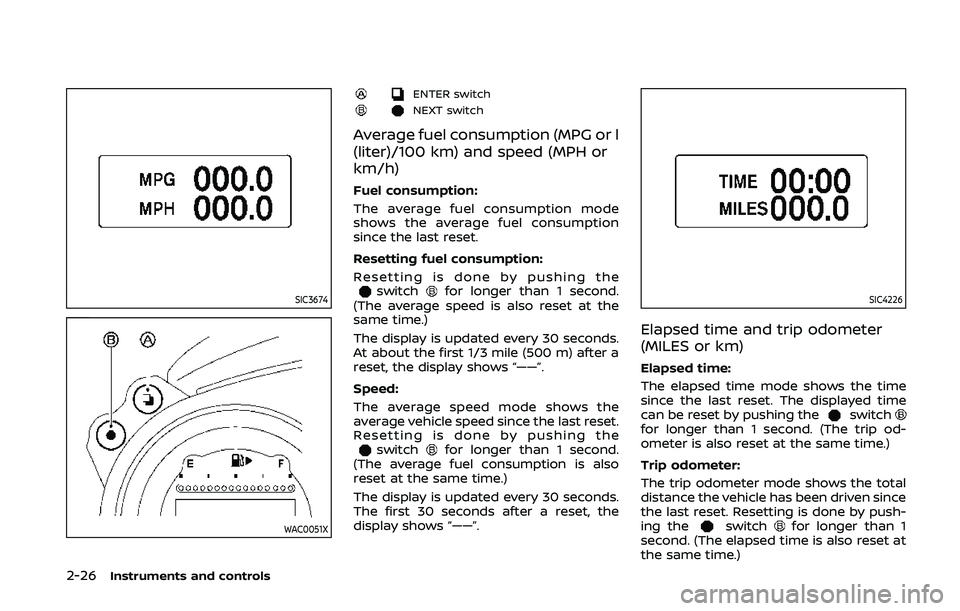
Fuel consumption:
The average fuel consumption mode
shows the average fuel consumption
since the last reset.
Resetting fuel consumption:
Resetting is done by pushing the
switchfor longer than 1 second.
(The average speed is also reset at the
same time.)
The display is updated every 30 seconds.
At about the first 1/3 mile (500 m) after a
reset, the display shows “——”.
Speed:
The average speed mode shows the
average vehicle speed since the last reset.
Resetting is done by pushing the
switchfor longer than 1 second.
(The average fuel consumption is also
reset at the same time.)
The display is updated every 30 seconds.
The first 30 seconds after a reset, the
display shows “——”.
SIC4226
Elapsed time and trip odometer
(MILES or km)
Elapsed time:
The elapsed time mode shows the time
since the last reset. The displayed time
can be reset by pushing the
switchfor longer than 1 second. (The trip od-
ometer is also reset at the same time.)
Trip odometer:
The trip odometer mode shows the total
distance the vehicle has been driven since
the last reset. Resetting is done by push-
ing the
switchfor longer than 1
second. (The elapsed time is also reset at
the same time.)
Page 96 of 455

2-28Instruments and controls
billboards.
JVI1447X
Clock
Clock can be adjusted in this mode.
Adjusting the time:
To adjust the time, perform the following
procedure.
1. Push the
switchfor a short time.
The hours display will start to flash.
Keep pushing the
switchto
adjust the hours.
2. Push the
switchfor a short time.
The minutes display will start to flash.
Keep pushing the
switchto
adjust the minutes. 3. Push the
switchfor a short time
to complete the clock adjustment.
Resetting the time:
Push the
switchfor more than 1
second to reset the time.
Page 97 of 455

JVI1452X
Setting
Setting cannot be made while driving. A
message “Setting can only be operated
when stopped” is also displayed on the
vehicle information display.
The
switchandswitchare
used in the setting mode to select and
decide a menu.
SKIP:
Push the
switchto move to the
warning check mode.
Push the
switchto select other
menus. ALERT:
Alert menu can be set to notify the
following items.
.
UPSHIFT
Select this submenu to set the engine
speed (RPM) of the upshift indicator.
See “Upshift indicator” (P.5-20) (MT
models) or “Manual shift mode” (P.5-
14) (AT models).
. TIMER
Select this submenu to specify when
the “TIMER” indicator activates.
. ICY
Select this submenu to display the low
outside temperature warning.
To return to the top page of the setting
mode, select “BACK”.
MAINTENANCE:
The maintenance intervals of the follow-
ing items can be set or reset for the
reminders.
. OIL
Select this submenu to set or reset the
distance for changing the engine oil.
. FILTER
Select this submenu to set or reset the
distance for replacing the oil filter.
. TIRE
Select this submenu to set or reset the
distance for replacing tires. .
OTHER
Select this submenu and set or reset
the distance for replacing items other
than the engine oil, oil filter and tires.
To return to the top page of the setting
mode, select “BACK”.
OPTIONS:
The 3 option menus can be set to your
preference.
. LANGUAGE
Select this submenu to choose English
or French for display.
. UNIT
Select this submenu to choose the
unit from US or METRIC.
. EFFECTS
Select this menu to set the dial effects
described below to on or off.
— The indicator needles sweep in the
meters when the engine is started.
To return to the top page of the setting
mode, select “BACK”.
Instruments and controls2-29
Page 177 of 455
position, the “Navigation Version” key is
displayed after selecting the “Others” key.
SAA2479
SAA2480
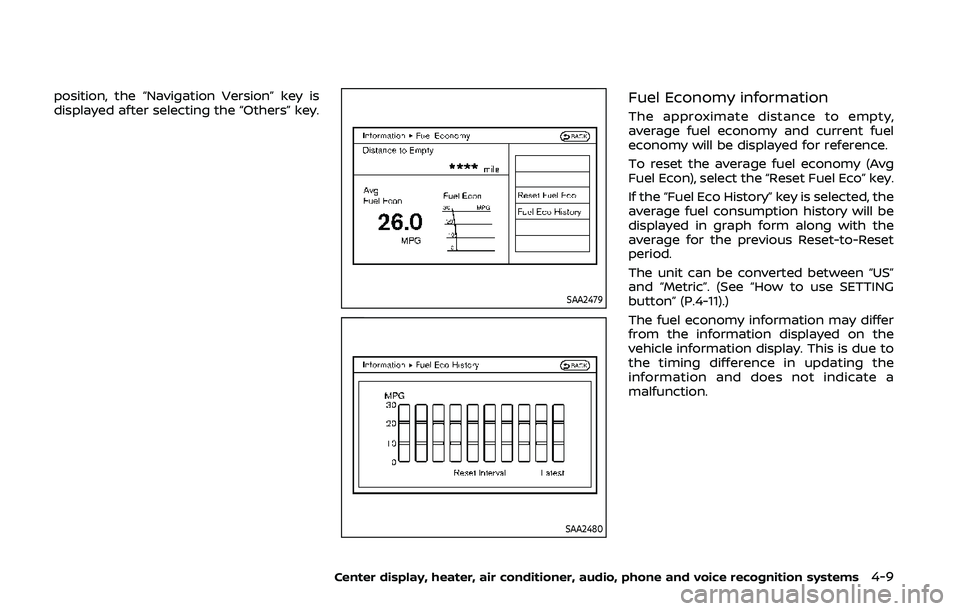
Fuel Economy information
The approximate distance to empty,
average fuel economy and current fuel
economy will be displayed for reference.
To reset the average fuel economy (Avg
Fuel Econ), select the “Reset Fuel Eco” key.
If the “Fuel Eco History” key is selected, the
average fuel consumption history will be
displayed in graph form along with the
average for the previous Reset-to-Reset
period.
The unit can be converted between “US”
and “Metric”. (See “How to use SETTING
button” (P.4-11).)
The fuel economy information may differ
from the information displayed on the
vehicle information display. This is due to
the timing difference in updating the
information and does not indicate a
malfunction.
Center display, heater, air conditioner, audio, phone and voice recognition systems4-9