2020 MITSUBISHI OUTLANDER battery
[x] Cancel search: batteryPage 202 of 443

Forward Collision Mitigation System (FCM) (if so equipped)
Features and controls 5-121
5
• When a vehicle ahead is not completely in your path.• When your vehicle changed lanes, and your vehicle approac
hed immediately
behind the vehicle ahead.• When a vehicle ahead
is towing a trailer.
• When a vehicle ahea
d is a truck loaded
with freight that protrudes rearward from the cargo bed.• When the height of a vehicle ahead isextremely low or its road clearance isextremely high.• When a vehicle ahead is extremely dirty.• When a vehicle ahea
d is covered with
snow.• When a vehicle ahea
d has a large glass
surface.• When a vehicle ahead does not havereflectors (light refl
ector) or the position
of the reflector is low.• When a vehicle ahead is a car carrier ora similar shaped vehicle.• When accelerating and deceleratingquickly.• When driving on a sl
ippery road covered
by rain water, snow, ice, etc.• When driving on a r
oad with alternating
up and down steep slopes.• When driving on a curve.• When driving on a bumpy or rough road.• When driving in dark areas, such as in a tunnel or at night.WA R N I N G
• When the system recognizes driver’s steering, accelerati
ng, braking or gear
shifting actions as evasive actions toavoid collision.• When the rear of you
r vehicle is weighed
down with the weight of passengers and luggage.• Up to several seconds after starting driv-ing.• In adverse weather
conditions, such as
rain, snow, fog or sand-storm.• When the windshield of the sensor por-tion is covered with
dirt, water droplets,
snow and ice, etc.• When a vehicle ahea
d or an oncoming
vehicle is splashing wa
ter, snow or dirt.
• When using a windshield washer.• If windshield wipers are not Mitsubishi Motors Genuine parts or equivalent. • When the sensor becomes extremely hotor cold.• If the battery becomes weak or runsdown.• When the sensor is affected by stronglight, such as direct
sunlight or the head-
lights of an oncoming vehicle.
The FCM may not detect a pedestrian in certain situations. Some of these include:• If the pedestrian is
shorter than approxi-
mately 3.2 feet (1 m) or taller thanapproximately 6.5 feet (2 m).WA R N I N G
• If the pedestrian is
wearing loose-fitting
clothes.• If part of a pedestrian’s body is hidden, such as when holding an umbrella, large bag, etc.• If a pedestrian bends forward, sits or lieson the road.• When a pedestrian is pushing/pullingsomething, such as a stroller, bicycle orwheelchair.• When pedestrians gather in a group.• When a pedestrian clothing appears tobe nearly the same color or brightness asits surroundings.• When a pedestrian is very close to anobject, such
as a vehicle.
• When a pedestrian is in a dark area, such as at night or in a tunnel.• When a pedestrian is walking fast orrunning.• When a pedestrian suddenly rushes infront of the vehicle.• When the position of a pedestrian is closeto the edge of the vehicle.
When the system recognizes driver’s steering or accelerating
actions as evasive
actions to avoid a collision, FCM control and alarm functions
may be canceled.
In certain situations,
though there is little
or no risk of a collision, the FCM mayactivate. Examples include: • When overtaking a vehicle.WA R N I N G
BK0278200US.book 121 ページ 2019年4月10日 水曜日 午前10時59分
Page 224 of 443

Tire pressure monitoring system
Features and controls 5-143
5
allow the TPMS to continue to function prop- erly.
N00532801595
1. If the tire pressure monitoring systemwarning light illumi
nates, avoiding hard
braking, sharp steering maneuvers and high speeds. You should stop and adjust the tires to the proper inflation pressure as soon as possible. Adjust the spare tire atthe same time. Refer to “Tires” on page 9-16.
2. If the tire pressure monitoring system warning light remains illuminated afteryou have been driving for approximately 20 minutes after you adjust the tire infla- tion pressure, one or more of the tires mayhave a puncture. Inspect the tire and if it has a puncture, have it repaired by an authorized Mitsubishi Motors dealer assoon as possible.
The tire pressure monitoring system may not work normally in the following circum- stances: A wireless facility or device using the same frequency is near the vehicle. Snow or ice is stuck inside the fenders and/or on the wheels. The tire inflation pres
sure sensor’s battery
is dead. Wheels other than Mitsubishi genuine wheels are being used. Wheels that are not fitted with tire infla- tion pressure sensors are being used.
If the warning light / display illuminates while driving
NOTE
In addition, the warni
ng display is displayed
on the information screen in the multi-infor- mation display. When inspecting or adjusting the tire pres- sure, do not apply excessive force to the valve stem to avoid breakage. After inspecting or adju
sting the tire pres-
sure, always reinstall the valve cap on thevalve stem. Without the valve cap, dirt or moisture could get into the valve, resulting in damage to thetire inflation pressure sensor. Do not use metal valve caps, which may cause a metal reaction, resulting in corrosion and damage of the tire inflation pressure sen- sors.
Once adjustments have
been made, the warn-
ing light will go off after a few minutes ofdriving.WA R N I N G If the warning light / display illuminates while you are driving,
avoid hard braking,
sharp steering maneuvers and high speeds.Driving with an under-inflated tire adversely affects vehicle performance and can result in an accident.CAUTION If a tire has a puncture,
replace that tire with
the spare tire. Driving on a punctured tirecould lead to an accident. The warning light / di
splay may not illumi-
nate immediately in the
event of a tire blow-
out or rapid leak.NOTE
NOTE
To avoid the risk of da
mage to the tire infla-
tion pressure sensors, have any puncturedtire repaired by an authorized MitsubishiMotors dealer. If the tir
e repair is not done by
an authorized Mitsubishi Motors dealer, it is not covered by your warranty. Do not use an aerosol puncture-repair spray on any tire.Such a spray could damage the tire inflation pressure sensors. Have any puncture repaired by an authorizedMitsubishi Motors dealer. Using the tire repair kit may damage the tire inflation pressure sensor. The vehicle must promptly be inspected and repaired by an authorized Mitsubishi Motors dealer afterusing the tire repair kit.
BK0278200US.book 143 ページ 2019年4月10日 水曜日 午前10時59分
Page 246 of 443

Multi Information display
Features and controls 5-165
5
To return the display to 0, hold down the multi information display switch for about 2 seconds or more. Only the currently dis- played value wi
ll be reset.
Example If trip odometer is displayed, only tripodometer will be reset. Both trip odometers and can count up to 9999.9 miles/kilometers.When a trip odometer goes past 9999.9 miles/kilometers, it returns to 0.0 miles/ kilometers. When disconnecting th
e battery terminal,
the memories of trip odometer displays
and are cleared, and their displays
return to “0.0 miles/kilometers”.
N00556701237
Displays the approximate time until the next recommended periodic
inspection. “---” is
displayed when the inspection time hasarrived. 1. Shows the time until
the next periodic
inspection.
2. This informs you that a periodic inspec- tion is due. Contact
an authorized Mit-
subishi Motors dealer or a repair facilityof your choice to have the system checked. At that time, when the ignition switch is switched from the “OFF” or “LOCK” position to the “ON” position or the oper-ation mode is changed from OFF to ON, the warning display is displayed for a few seconds on the information screen. 3. After your vehicle
is inspected at an
authorized Mitsubishi Motors dealer, it displays the time unt
il the next periodic
inspection.
The “---” display can be
reset while the igni-
tion switch or the operation mode is in OFF.
Usage examples for trip odometer , trip odometer
It is possible to
measure two currently
traveled distances, from home using trip odometer and from a particular point on the way using trip odometer
.
To reset the trip odometer
Service reminder
NOTE
The service reminder time can be modified by an authorized Mitsubishi Motors dealer,to adjust for severe usage, etc. Refer to “Severe maintenance sc
hedule” in your vehi-
cle’s Warranty and Ma
intenance Manual. For
further information,
please contact your
authorized Mitsubishi Motors dealer.
NOTE
Shows the distance in units of 100 miles (100 km) and the time in units of 1 month.
To reset
BK0278200US.book 165 ページ 2019年4月10日 水曜日 午前10時59分
Page 251 of 443

Multi Information display 5-170 Features and controls
5
Refer to “Changing the time until “REST REMINDER” is displayed” on page 5-174.Refer to “Changing the turn signal sound” on page 5-174. Refer to “Changing the momentary fuelconsumption display” on page 5-174. Refer to “Tire ID set change” on page 5-144.Refer to “Returning to the factory set- tings” on page 5-174.
N00557001240
You can change the mode condition for theaverage fuel consumption and average speed display to “Auto reset”
or “Manual reset.”
1. Press and hold the mu
lti information dis-
play switch (for about 2 seconds or more)to switch from the setting mode screen to the menu screen. Refer to “Changing th
e function settings”
on page 5-169. 2. Lightly press the multi information dis- play switch to select “AVG” (average fuelconsumption and average speed setting). 3. Press and hold the mu
lti information dis-
play switch (for about 2 seconds or more)to switch in sequence from A or 1 (Auto reset)
M, 2 or P (Manual reset)
A or
1 (Auto reset).The setting is changed to the selected reset condition.
If you press and hold the multi informa- tion meter switch when the average fuelconsumption and average speed are dis- played, these calculati
ons will be reset to
zero. When the following operation is per- formed, the mode setting changes auto- matically from manual to auto. [Except for vehicles
equipped with the
F. A . S . T. - k e y ] Turn the ignition switch to the “ON” posi-tion from the “ACC”, “LOCK” or “OFF” position. [For vehicles equipped
with the F.A.S.T.-
key]Change the operation mode to ON from ACC or OFF. When the average fuel consumption and average speed are being displayed, if youhold down the multi in
formation display
switch, these calculations will be reset to zero.
NOTE
If the battery is disc
onnected, these function
settings are reset from
memory and is auto-
matically to the factory settings (except thetire ID set). You cannot select an it
em that is displayed
dimly on the menu.
Changing the reset mode for aver- age fuel consumption and average speed
Manual reset mode Auto reset mode
BK0278200US.book 170 ページ 2019年4月10日 水曜日 午前10時59分
Page 252 of 443
Multi Information display
Features and controls 5-171
5
When the engine switch or the operation mode is in the following conditions, theaverage fuel consumption display and the average speed display will automatically reset. [Except for vehicles equipped with the F. A . S . T. - k e y ] The ignition switch has been set to the “ACC”, “LOCK” or
“OFF” position for
about 4 hours or more. [For vehicles equipped with the F.A.S.T.- key]The operation mode has been in ACC or OFF for about 4 hours or more.
N00557101166
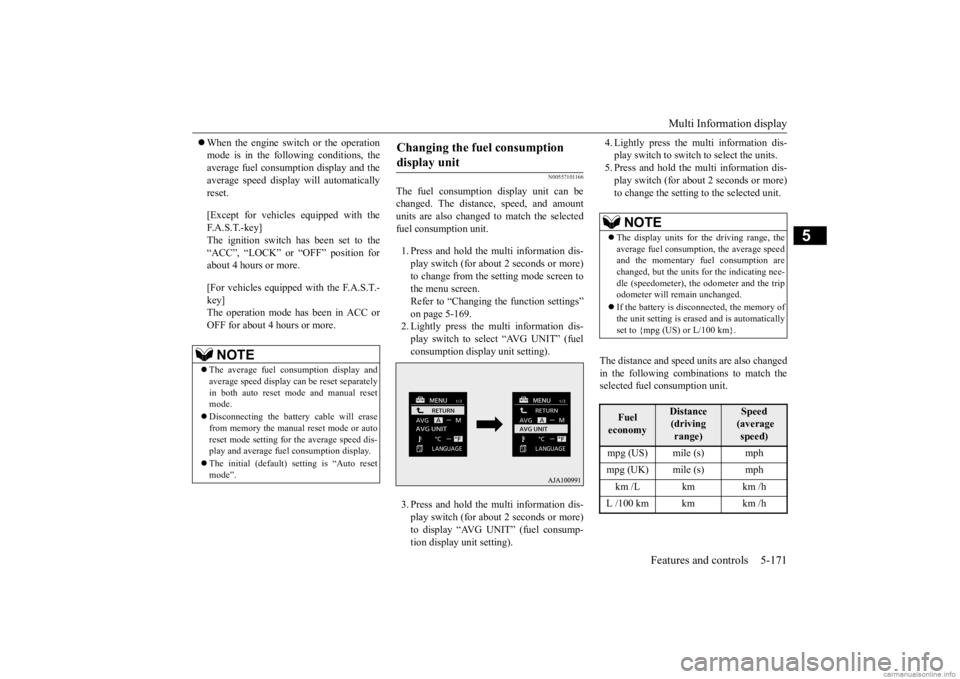
The fuel consumption display unit can be changed. The distan
ce, speed, and amount
units are also changed to match the selected fuel consumption unit. 1. Press and hold the multi information dis- play switch (for about 2 seconds or more) to change from the setting mode screen to the menu screen. Refer to “Changing the function settings” on page 5-169.2. Lightly press the multi information dis- play switch to select “AVG UNIT” (fuel consumption display unit setting). 3. Press and hold the multi information dis- play switch (for about 2 seconds or more) to display “AVG UNIT” (fuel consump- tion display unit setting).
4. Lightly press the multi information dis- play switch to switch to select the units.5. Press and hold the multi information dis- play switch (for about 2 seconds or more) to change the setting to the selected unit.
The distance and speed units are also changed in the following combinations to match theselected fuel consumption unit.
NOTE
The average fuel consumption display and average speed display ca
n be reset separately
in both auto reset mode and manual reset mode. Disconnecting the batter
y cable wi
ll erase
from memory the manual reset mode or auto reset mode setting for
the average speed dis-
play and average fuel consumption display. The initial (default) setting is “Auto reset mode”.
Changing the fuel consumption display unit
NOTE
The display units for the driving range, the average fuel consumption, the average speed and the momentary fuel consumption are changed, but the units
for the indicating nee-
dle (speedometer), the odometer and the trip odometer will remain unchanged. If the battery is disconnected, the memory of the unit setting is erased and is automatically set to {mpg (US) or L/100 km}.Fuel economy
Distance (driving range)
Speed (average speed)
mpg (US) mile (s) mph mpg (UK) mile (s) mph km /L km km /h L /100 km km km /h
BK0278200US.book 171 ページ 2019年4月10日 水曜日 午前10時59分
Page 253 of 443

Multi Information display 5-172 Features and controls
5
N00557201284
The temperature display unit can be switched. 1. Press and hold the multi information dis- play switch (for about 2 seconds or more) to switch from the setting mode screen tothe menu screen. Refer to “Changing the function settings” on page 5-169.2. Lightly press the multi information dis- play switch to select “ ” (temperature unit setting). 3. Press and hold the multi information dis- play switch (for about 2 seconds or more)to switch in from °C to °F, or from °F to °C. The setting is changed to the selected tem-perature unit.
N00557301184
The language of the multi information displaycan be changed. 1. Press and hold the mu
lti information dis-
play switch (for about 2 seconds or more) to change from the setting mode screen to the menu screen.Refer to “Changing th
e function settings”
on page 5-169. 2. Lightly press the multi information dis-play switch to se
lect “LANGUAGE” (lan-
guage setting).
3. Press and hold the multi information dis- play switch (for about 2 seconds or more)to display “LANGUAGE” (language set- ting). 4. Lightly press the multi information dis-play switch to select
the desired language.
5. Press and hold the multi information dis- play switch (for about 2 seconds or more)to change the setting to the selected lan- guage.
Changing the temperature unit
NOTE
The temperature value on air conditioner panel is switched in
conjunction with outside
temperature display unit of the multi infor-mation display. However, “°F” or “°C” are not shown to tem- perature display of
an air conditioner.
On vehicles equipped with the Smartphone- link Display Audio (SDA
), the temperature
value shown on the air
conditioner screen of
audio system is switc
hed in conjunction with
outside temperature display unit of the multi information display. If the battery is disconnected, the memory of the unit setting is erased and is automaticallyset to °F (°C).
Changing the display language
NOTE
NOTE
If the battery is disconnected, the memory of the language setting is erased and is automat- ically set to ENGLISH. If “---” is selected in the language setting, a warning message is not displayed when there is a warning display or interrupt display.
BK0278200US.book 172 ページ 2019年4月10日 水曜日 午前10時59分
Page 254 of 443

Multi Information display
Features and controls 5-173
5
N00529801331
The language used in Multi Around Monitor (if so equipped) can be
changed automatically
to the same language as
that shown in the
multi information display. 1. Press and hold the mu
lti information dis-
play switch (for about 2 seconds or more) to switch from the setting mode screen to the menu screen. Refer to “Changing thefunction settings” on page 5-169. 2. Lightly press the multi information dis- play switch to select “ ” (language cooperative control).
3. Press and hold the multi information dis- play switch to swit
ch from A/1 (language
cooperation: enabled)
to M/2/P (language
cooperation: disabled
), or from M/2/P to
A/1. The setting is changed to the selectedcondition.
N00557401156
You can turn off the operation sounds of the multi information displa
y switch and rheostat
illumination button. 1. Press and hold the multi information dis- play switch (for about 2 seconds or more) to switch from the setting mode screen to the menu screen.Refer to “Changing th
e function settings”
on page 5-169. 2. Lightly press the multi information dis- play switch to select “ ” (operation sound setting). 3. Press and hold the multi information dis- play switch (for about 2 seconds or more) to switch from ON (operation sound on)to OFF (operation sound off), or from OFF to ON. The setting is changed to the selected con-dition.
Changing the language on other system to match the multi infor-mation display
NOTE
If the battery is disconnected, the language cooperative control is
automatically set to
“A or 1” (language
cooperation: enabled).
The language coopera
tion setting can be
switched in the following manner. • When “A or 1” (l
anguage cooperation:
enabled) has been selected, the language for Multi Around Monitor (if so equipped) is automatically cha
nged to the language
selected for the multi information display. However, this changing function may not work depending on the language selectedfor the multi information display. • When “M, 2 or P”
(language cooperation:
disabled) has been
selected, the language
for Multi Around Monitor (if so equipped) is not automatically changed to match thelanguage selected for the multi information display.
The language on the audio system’s display does not automatically change when you select A or 1 (l
anguage cooperation:
enabled) in the langua
ge cooperation control.
Operation sound setting
NOTE
If the battery is disconnected, the memory of the operation sound setting is erased and is automatically
set to “ON” (operation sound
on).
BK0278200US.book 173 ページ 2019年4月10日 水曜日 午前10時59分
Page 255 of 443

Multi Information display 5-174 Features and controls
5
N00557501160
The time until the di
splay appears can be
changed. 1. Press and hold the multi information dis- play switch (for about 2 seconds or more) to switch from the setting mode screen tothe menu screen. Refer to “Changing the function settings” on page 5-169.2. Lightly press the multi information dis- play switch to select “ALARM” (rest time setting).3. Press and hold the multi information dis- play switch (for about 2 seconds or more) to display “ALARM” (rest time setting).4. Lightly press the multi information dis- play switch to select the time until the dis- play appears.5. Press and hold the multi information dis- play switch (for about 2 seconds or more) to change the setting to the selected time.
N00563501080
It is possible to cha
nge the turn signal sound.
1. Press and hold the mu
lti information dis-
play switch (for about 2 seconds or more) to switch from the setting mode screen to the menu screen.Refer to “Changing th
e function settings”
on page 5-169. 2. Lightly press the multi information dis- play switch to select . (changing the turn signal sound) 3. Press and hold the mu
lti information dis-
play switch (for about 2 seconds or more)to switch from 1 (turn-signal sound 1) to 2 (turn-signal sound 2), or from 2 to 1. The setting changes to the selected turnsignal sound.
N00563601049
It is possible to change the bar graph settingof the momentary fuel consumption display. 1. Press and hold the multi information dis- play switch (for about 2 seconds or more) to switch from the setting mode screen tothe menu screen. Refer to “Changing the function settings” on page 5-169. 2. Lightly press the multi information dis- play switch to
select . (changing
the momentary fuel consumption display) 3. Press and hold the multi information dis- play switch (for about 2 seconds or more)to switch from ON (with the green bar graph) to OFF (without the green bar graph), or from OFF to ON.The setting changes to the selected bar graph setting.
N00557601217
Many of the function settings can be returnedto their factory settings.
The operation sound sett
ing only deactivates
the operation sound of the multi informationdisplay switch and rheostat illumination but-ton. The warning di
splay and other sounds
cannot be deactivated.
Changing the time until “REST REMINDER” is displayed
NOTE
NOTE
If the battery is disconnected, the memory of the unit setting is erased and is automaticallyset to the “OFF”. The drive time is reset when the ignition switch is in the “LOCK” or “OFF” positionor the operation mode is in OFF.
Changing the turn signal sound
Changing the momentary fuel con- sumption display Returning to the factory settings
BK0278200US.book 174 ページ 2019年4月10日 水曜日 午前10時59分