Page 167 of 546
#
Keep theve hicle keyout ofreac hof
ch ildr en. *
NO
TEDama getotheve hicle duetoit
ro lling away #
Alw ayssecur eth eve hicle agains tro ll‐
ing away. #
Bring theve hicle toast ands tillby appl ying
th ebr ak epedal. #
Onuphill ordownhill gradients, turnth efront
wheels sothat theve hicle rolls towa rdsth e
curb ifit star ts mo ving. #
App lytheelectr icpar king brak e. #
Engage trans missi on positio n005D inast atio n‐
ar yve hicle withth ebr ak epedal applied
(/ page15 8). #
Swi tchof fth eengine andtheignition by
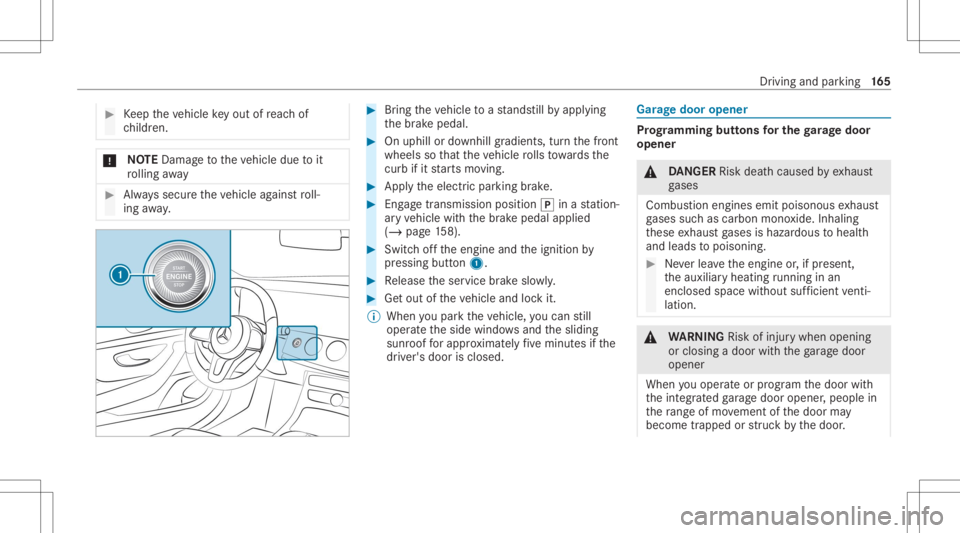
pr essing button1. #
Release theser vice brak eslo wly. #
Getout oftheve hicle andlockit.
% When youpar kth eve hicle, youcan still
opera tetheside windo wsand thesliding
sunr oofforapp roxima tely five minut esifth e
dr iver's door isclosed. Gar
agedoor opener Pr
og rammin gbutt onsfo rthe garage doo r
ope ner &
DANG ER Risk deathcause dby exhaus t
ga ses
Combus tionengines emitpoisonous exhaus t
ga ses suchas carbon monoxide.Inhaling
th ese exhaus tga ses ishazar dous tohealt h
and leads topoisonin g. #
Neverlea vetheengine or,if pr esent ,
th eauxiliar yheating running inan
encl osedspa cewithout sufficie ntventi‐
la tio n. &
WARNIN GRisk ofinju rywhen opening
or clos ingadoor withth ega rage door
opener
When youoper ateor program thedoor with
th eint egr ated garage door opener ,people in
th era ng eof mo vement ofthedoor may
become trapped orstru ck bythedoor . Dr
iving andparking 16
5
Page 168 of 546
#
When usingtheint egr ated garage door
opener ,alw aysmak esur eth at nobody
is wit hin thera ng eof mo vement ofthe
door . Onl
yoper ateth efo llo wing doorsusing the
ga rage door opener :
R Door swit hasaf etyst op and reve rsing fea‐
tur e.
R Doorswhic hcon form tothecur rent U.S.
sa fety standar ds.
Re quirement s:
R The vehicle hasbeen parkedoutside the
ga rage oroutside thera ng eof mo vement of
th edoor .
R The engine isswitc hedoff.
R The ignition isswitc hedon.
% The garage door opener function isalw ays
av ailable whentheignition isswitc hedon. #
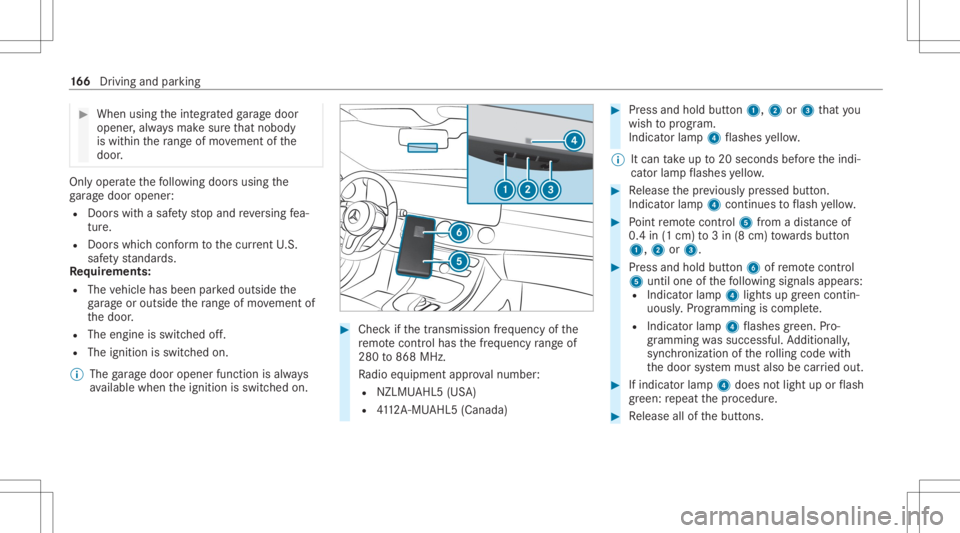
Chec kif th etra nsmiss ionfreq uency ofthe
re mo tecontr olha sth efreq uency rang eof
280 to868 MHz.
Ra dio equipment approval num ber:
R NZLM UAHL5 (USA)
R 4112 A-MU AHL5 (Canada ) #
Press and hold button1, 2or3 that you
wish toprog ram.
Indicat orlam p4 flashes yello w.
% Itcan take up to20 seconds beforeth eindi‐
cat orlam pflashes yello w. #
Release thepr ev iousl ypr essed button.
Ind icat orlam p4 con tinues toflash yello w. #
Point remo tecontr ol5 from adi st anc eof
0. 4in (1 cm )to 3in (8 cm) towa rdsbutt on
1, 2or3. #
Press and hold button6 ofremo tecontr ol
5 unti lone ofthefo llo wing signalsappear s:
R Indicat orlam p4 light sup green contin‐
uousl y.Progr amming iscom plete.
R Indicat orlam p4 flashes green .Pr o‐
gr ammi ngwassuccessful. Addition ally,
sync hronization ofthero lling code with
th edoor system mus talso becar ried out. #
Ifindicat orlam p4 does notlight uporflash
gr ee n: repeat thepr ocedur e. #
Release allofthebutt ons. 16
6
Driving and parking
Page 185 of 546
R
Ifth esensor sar edir ty,fo gg ed up, damag ed
or covered.
R Ifth esensor sar eim pair eddue tointerfer‐
ence from other radar sour ces, e.g.stro ng
ra dar reflect ions inpar king garage s.
R Ifaloss oftirepr essur eor afa ulty tirehas
been detected and displ ayed.
R Incom plextraf fic situ ations whereobject s
cann otalw aysbe clear lyidentif ied.
R Ifpedes trians orvehicles movequickl yint o
th esensor detection rang e.
R Ifpe destrians arehidde nby other object s.
R Ifth etypical outline ofapedes trian cann ot
be distinguished from thebac kground.
R Ifapedes trian isno tde tected assuch ,e.g.
due tospecial clothing orother object s.
R Onbends withatight radius.
% The ActiveBr ak eAssi stsensor sadjus taut o‐
matically whileacer tain dis tance isbe ing
dr iven afte rth eve hicle hasbeen delivered.
Ac tiveBr ak eAssi stisuna vailable oronl y
par tiall yav ailable during this teac h-in per iod. Se
tting Activ eBr ak eAs sist Multimedia
system:
4 Vehicle 5
k Assist ance
5 Act ive Brak eAssist
Ve hicl eswithout Drivin gAss istanc ePa ck‐
ag e:The settings canbemade afte rst ar tin gth e
ve hicle.
Ve hicl eswith Drivin gAss istanc ePa ckag e:
The settings canbemade whenth eignition is
switc hedon.
The follo wing settings areav ailable:
R Early
R Medium
R Late #
Select ase tting .
% Your sele ction isretained when theve hicle is
ne xt star ted.
Deactiv atingActiv eBr ak eAs sist
% Itis recomme ndedthat youalw ayslea ve
Ac tiveBr ak eAssi stact ivat ed. #
Select Off.
The distance warning func tion andtheaut on‐
omous braking function aredeactiv ated.
Ve hicl eswithout Drivin gAss istanc ePa ck‐
ag e:When theve hicle isne xt star ted, the
mediu msetting isau tomatical lysele cted.
Ve hicl eswith Drivin gAss istanc ePa ck‐
ag e:Evasi ve Steer ing Assis tis no tav ailable.
When theignition isne xt star ted, the
mediu msetting issele cted automatical lyand
Ev asiv eSt eer ing Assis tis available.
% IfAc tiveBr ak eAssi stisdeact ivat ed, the
00D4 symbol appearsinthest atus barofthe
multifu nctiondisplay. Speed
controlcruise contr ol Fu
nction ofcruise contr ol
Cr uise controlre gulat esthespeed totheva lue
selec tedby thedr iver .
If yo uacc elerat eto ove rtak e, forex am ple, the
st or ed speed isno tdele ted. Ifyo ure mo veyour
fo ot from theacceler ator pedal afte rove rtakin g, Dr
ivin gand parking18
3
Page 296 of 546
R
Incom pletedigit almap data
No teson GPS recep tion
The correct functi onofthena vig ation system
depends amongstot her things onGPS recep‐
tion. Incer tain situat ionsGPS recep tion canbe
im paired, defectiv eor eve nno tpo ssi ble, e.g .in
tunne lsor inpa rking garage s.
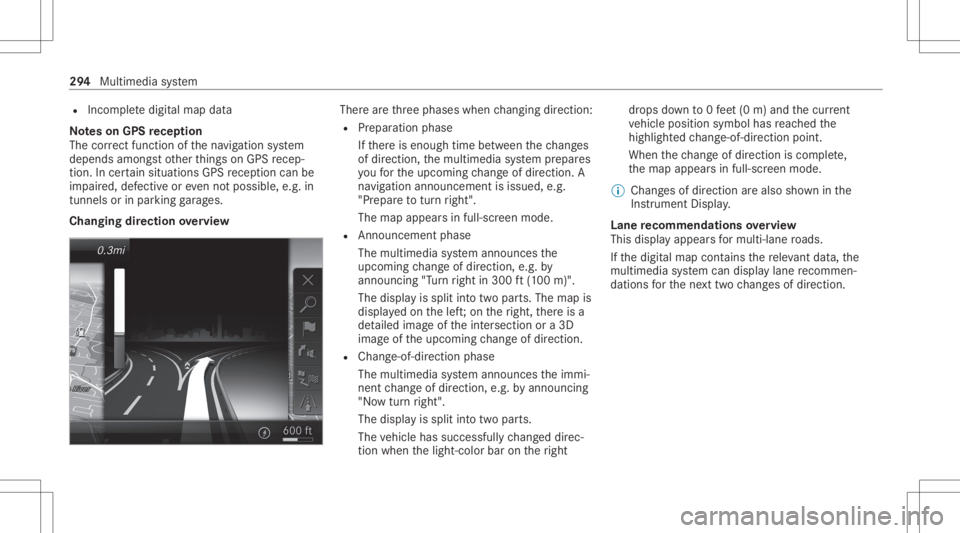
Changing direction overview Ther
ear eth re ephases whenchang ingdirect ion:
R Preparation phase
If th er eis enough timebetween thech ang es
of dir ect ion,th emultimedia system prepar es
yo ufo rth eupcoming chang eof dir ect ion.A
na vig atio nann oun cem entisissue d,e.g .
"Pr epar eto tur nright".
The map appear sin full-scr eenmode.
R Ann ouncemen tphase
The multimedia system announ cesthe
upco mingch ang eof dir ect ion,e.g .by
ann oun cing"T ur nright in300 ft(100 m)".
The displa yis split intotw opar ts.The map is
displa yedon thelef t;on theright, ther eis a
de tailed imag eof theint ersect ionora3D
imag eof theupcoming chang eof dir ect ion.
R Chan ge-of-d irecti onpha se
The multimed iasystem announ cestheimmi‐
nen tch ang eof dir ect ion,e.g .by ann oun cing
"No wtur nright".
The displa yis split intotw opar ts.
The vehicle hassuccessfull ych ang eddirec‐
tio nwhen thelight- color barontheright dr
ops down to0feet (0 m) and thecur rent
ve hicle position symbolhasreac hed the
highlight edchang e-of-dir ect ion poin t.
When thech ang eof dir ect ion iscom plete,
th emap appear sin full-scr eenmode.
% Chang esofdir ect ion arealso showninthe
Ins trument Display.
Lane recomm endationsov ervie w
This displa yappear sfo rmulti -lane roads.
If th edigit almap contains there leva nt data,th e
multime diasystem can displa ylane recomme n‐
da tions forth ene xt twoch ang esofdir ect ion. 29
4
Mult imed iasystem