2020 MERCEDES-BENZ AMG GT R-ROADSTER change wheel
[x] Cancel search: change wheelPage 6 of 441
Driving and pa
rking ................................. 104
Driving ........................................................ 104
Ra cetrack opera tion .................................... 11 3
DY NA MIC SELECT switch ............................1 17
Au tomatic transmission .............................. 11 9
Re fuelling .................................................... 12 3
Pa rking ...................................................... .125
Driving and driving saf ety sy stems .............. 131
Ve hicle towing instructions ........................ .161 Instrument display and on-board
compu
ter.................................................. 16 2
No tes on the instrument display and on-
board computer .......................................... 16 2
Instrument display overview ...................... .163
Overview of the buttons on thesteering
wheel ..........................................................1 64
Operating the on-board computer .............. 16 4
Overview of what is shown on the multi‐
function display .......................................... 16 5
Ad justing the instrument lighting ................1 65LING
UATRONIC ......................................... 16 6
No tes on operating saf ety ...........................1 66Operation ...................................................
16 6
Using LINGU ATRO NIC ef fectively ................ 16 8
Essential voice commands .......................... 16 8 Multimedia sy
stem .................................. 18 0
Overview and operation .............................. 180
Sy stem settings .......................................... 189
AMG TR ACKPA CE ...................................... .199
Na vigation .................................................. 204
Te lephone .................................................. .230
Online and Internet functions ..................... 257
Media ........................................................ .264
Ra dio .......................................................... 276
TV ............................................................... 279
Sound ......................................................... 286 Main
tenance and care ............................. 289
ASS YST PLUS service inter val display ........ 289
Engine compartment .................................. 290
Cleaning and care ...................................... .296 Breakdown assi
stance ............................ 302
Emergency ................................................. .302 Flat tyre ...................................................... 304
Battery (vehicle) ..........................................
310
To w- starting or towing away ....................... 315
Electrical fuses ............................................ 319 Wheels and tyres
..................................... 321
No tes on noise or unusual handling char‐
acteristics .................................................. .321
No tes on regular lyinspecting wheels and
tyres .......................................................... .321
No tes on snow chains ................................ .321
Ty re pressure .............................................. 322
Wheel change ............................................ .325
Emer gency spa rewheel .............................. 335 Te
ch nical data .......................................... 338
No tes on tech nical da ta.............................. 338
On-board electronics .................................. 338
Ra dio equipment appr ovals forth eve hi‐
cle components .......................................... 338
Ve hicle identification plate, VIN and
engine number overview ............................ 338
Operating fluids .......................................... 340
Ve hicle data ................................................ 345 Contents
3
Page 31 of 441

In
general, this information documents thest ate
of a component part, a module, a sy stem or the
sur roundings such as:
R operating status of sy stem components (e.g.
fi ll le vels, battery status, tyre pressure)
R status messages concerning theve hicle or
its individual components (e.g. number of
wheel revo lutions/speed, longitudinal accel‐
eration, lateral acceleration, display of fas‐
te ned seat belts)
R malfunctions or faults in impor tant sy stem
components (e.g. lights, brakes)
R information on events leading tovehicle
damage
R system reactions in special driving situations
(e.g. airbag deployment, inter vention of sta‐
bility control sy stems)
R ambient conditions (e.g. temp erature, rain
sensor)
In addition toprov iding the actual control unit
function, this data assists the manufacturer in
de tecting and rectifying faults and optimising
ve hicle functions. The majority of this data is te
mp orary and is only processed in theve hicle
itself. Only a small portion of the data is stored
in theeve nt or fault memor y.
When your vehicle is serviced, tech nical da ta
from theve hicle can be read out byservice net‐
wo rkemplo yees (e.g. workshops, manufactur‐
ers) or third parties (e.g. breakdown services).
Services include, forex ample, repair services,
maintenance processes, warranty claims and
qu ality assurance measures. The read out is per‐
fo rm ed via the legally prescribed port forthe
diagnostics connection in theve hicle. The
re spective service network locations or third
parties collect, process and use the data. They
document tech nical statuses of theve hicle,
assist in finding faults and impr oving quality and
are transmitted tothe manufacturer, if neces‐
sar y.Fu rthermore, the manufacturer is subject
to product liability. Forth is, the manufacturer
requ irestech nical da tafrom vehicles.
Fa ult memories in theve hicle can be reset by a
service outlet as part of repair or maintenance
wo rk. Depending on
the selected equipment, you can
import data into vehicle con venience and info‐
ta inment functions yourself.
This includes, forex ample:
R multimedia data such as music, films or pho‐
to sfo r playback in an integrated multimedia
sy stem
R address book data for use in connection with
an integrated hands-free sy stem or an inte‐
grated navigation sy stem
R entered navigation destinations
R data about the use of internet services
This data can be sa ved locally in theve hicle or it
is located on a device which you ha veconnected
to theve hicle (e.g. a smartphone, USB flash
drive or MP3 pla yer). If this data is stored in the
ve hicle, you can dele teit at any time. This data
is sent tothird parties only at your requ est, par‐
ticular lywhen you use online services in accord‐
ance with the settings that you ha veselected.
Yo u can store or change con venience settings/
individualisations in theve hicle at any time. 28
General no tes
Page 32 of 441
Depending on
the equipment, this includes, for
ex ample:
R settings forth e seat and steering wheel posi‐
tions
R suspension and climate control settings
R customisations such as interior lighting
If yo ur vehicle is accordingly equipped, you can
connect your smartphone or ano ther mobile end
device totheve hicle. You can cont rolth is by
means of the control elements integrated in the
ve hicle. Images and audio from the smartphone
can be output via the multimedia sy stem. Cer‐
tai n information is simultaneously trans ferred to
yo ur smartphone.
Depending on the type of integration, this can
include:
R general vehicle data
R position data
This allo wsyouto use selected apps on your
smartphone, such as navigation or music play‐
bac k.There is no fur ther interaction between the
smartphone and theve hicle; in particular, vehi‐
cle data is not directly accessible. Which type of fur
ther data processing occurs is de term ined by
th e pr ovider of the specific app used. Which set‐
tings you can make, if an y,depends on the spe‐
cific app and the operating sy stem of your
smartphone. Online services
Wire
less network connection
If yo ur vehicle has a wireless network connec‐
tion, it enables data tobe exc hanged between
yo ur vehicle and additional sy stems. The wire‐
less network connection is enabled via theve hi‐
cle's transmission and reception unit or via con‐
nected mobile end devices (e.g. sma rtphones).
Online functions can be used via the wireless
network connection. This includes online serv‐
ices and applications/apps pr ovided bythe man‐
ufacturer or other pr oviders.
Manu factu rer's se rvices
Re garding online services of the manufacturer,
th e individual functions are described bythe
manufacturer in a suita ble place (e.g. Owner's
Manual, website of the manufacturer) along with
th ere leva nt da taprotection information. Per‐ sonal data may be used
forth e pr ovision of
online services. Data is exchanged via a secure
connection, e.g. the manufacturer's designated
IT sy stems. Personal data is collected, pro‐
cessed and used via the pr ovision of services
exc lusively on the basis of legal permissions or
with prior consent.
The services and functions (sometimes subject
to afe e) can usually be activated or deactivated.
In some cases, this also applies tothe entire
ve hicle's data connection. This excludes, in par‐
ticular, legally prescribed functions and services.
Third part y services
If it is possible touse online services from other
pr ov iders, these services are there sponsibility
of the pr ovider in question and subject tothat
pr ov ider's data pr otection conditions and terms
of use. The manufacturer has no influence on
th e conte ntexc hanged.
Fo rth is reason, please ask the service pr ovider
fo r information about the type, extent and pur‐
pose of the collection and use of personal data
when services are pr ovided bythird parties. General no
tes29
Page 118 of 441

When driving on a
racetrac k,make sure that the
brake fluid is not more than 12 months old.
Brake callipers, brake hoses and brake lines
Check thefo llowing for dama geeach time
before driving theve hicle on a racetrack:
R The du stboots on the brake callipers
R The brake hoses and brake lines
Re place them if necessar y.
Brake cooling
Special air deflectors and channels are fitted to
th e front and rear axles so that the brakes are
cooled suf ficiently. They supply the brake disks
with cooling air. Check that they are in per fect
condition and cor rectly fitted ea chtime be fore
driving theve hicle on a racetrac k.Excessi ve
we ar can be caused bydriving overke rbs, for
ins tance. Forth is reason, regularly check they
are all comple teand fitted securely.
In addition, check that the air guide plates are
seated securely and clean before and af ter driv‐
ing theve hicle on a racetrac k. Obser
vethe information on the cooling of com‐
ponents which are subject tostra in in when driv‐
ing on a racetrack (/ page 113). Wheels and tyres
Note
s on wheels
* NO
TERestrictions relating tosuspension
settings and driving characteristics Driving with wheels with dif
fering dimensions
of thefo llowing features could lead torestric‐
tions relating tothe suspension settings and
driving characteristics of theve hicle:
R diame ter
R wheel of fset #
Only use the wheels pr ovided by
Mercedes-AMG for use on a racetrac k. #
Only use wheels with appr ovedge ome‐
tr y. Do not use slick tyres. Suspension and body
components may
otherwise be subjected to
exc essively high loads. Obser
vethefo llowing no tes on changing a
wheel:
R change the wheels af ter15 ,000 km on a
ra cetrack at the latest.
R toensure concent ricity and la tera l trueness,
ch eck the wheel conta ct surfacefor dama ge
when changing a wheel. These should also
be measured in theeve nt of imbalance.
The wheel bolts are subjected tohigh wear when
used on a racetrac k.To ensure the wheels are
bolted securely on a permanent basis, replace
th e wheel bolts in thefo llowing situations:
R afte r appro ximately 1,000 km on a racetrac k.
R afte rte n bolting procedu res at the latest.
Note s on tyres &
WARNING Risk of injury duetodamaged
tyres
Damaged tyres can cause tyre pressure loss. #
Check the tyres regularly for signs of
dama geand replace any damaged tyres
immediatel y. Driving and pa
rking 11 5
Page 119 of 441
Check
the tyres for dama geand the cor rect tyre
tread dep thboth before and af ter use on a race‐
trac k.Only then is it safe todrive on a racetrack
and on public roads.
As a result of the driving style and at high ambi‐
ent temp eratures, when driving on a racetrack it
may be necessary tocompensate forthe
inc rease in pressure in warm tyres byreleasing
air. Even forwa rm tyres, the specified tyre pres‐
sure may only be exceeded bymax. 0.5 bar.
Af terth e tyres ha vecooled down again, you
must readjust the tyre pressure in accordance
with the specifications in order todrive on public
ro ads. Suspension
Suspension settings
The
factory setting pr ovides a good compromise
fo r driving on public roads and on a racetrac k.
Ve hicle measurements
Even small changes tothe suspension settings
alter the driving characteristics of theve hicle. To
ensure optimal driving characteristics, the speci‐ fi
ed values and tolerances of the individual sus‐
pension settings must be complied with. The
driving characteristics of theve hicle may other‐
wise be undesirable.
Ve hicle measurements are requ ired in thefo llow‐
ing situations:
R theve hicle height has changed in relation to
th e optimised setting.
R theve hicle is frequently subjected tovery
high loads, e.g. when driving over kerbs.
Therefore, check theve hicle height at regular
inter vals and, if necessar y,per form vehicle
measurements.
Note s on suspension components
Despite regular checks, and rega rdless of
whe ther there leva nt suspension components
are in good condition, thefo llowing components
must be replaced af ter a cer tain amount of use
on thera cetrack:
R Wheel bolts (/ page 115)
R Wheel hubs in cludingthe wheel bearings Ae
rodynamic co mponents Ac
tive aerodynamics profile &
WARNING Risk of becoming trapped
when you manually retract the active aer‐
odynamics profile
Pa rts of the body could become trapped. #
Ensure that there is no one in the
sweep of the active aerodynamics pro‐
fi le when youre tract the active aerody‐
namics profile. #
If someone does become trapped when
youre tract it, press the display switch
again immediately.
The active aerodynamics profile will
th en extend once more. The acti
veaerodynamics profile influences the
po we r output at the front axle. The component is
programmed in such a wayth at it alw ays mo ves
into the ideal position forth e speed and driving
situation. Do not make any manual inter ven‐
tions. 11 6
Driving and pa rking
Page 121 of 441
-
theve hicle exhibits driving characteristics
suited forth era cetrac k.
- allvehicle sy stems are set for maximum
sportiness.
- the automatic transmission shifts up
later.
- the suspension exhibits particular lyfirm
springing and damping settings.
- glide mode is not available.
- the sporty sound characteristic of the
ex haust sy stem is activated.
% You can call up vehicle characteristics via
th ePe rformance menu in the on-board com‐
puter .
% You can adjust the agility functions of AMG
Dynamics using the AMG steering-wheel but‐
to ns.
Yo u can also change thefo llowing vehicle char‐
acteristics using the buttons in the cent recon‐
sole:
R position of theex haust gasflaps
R Suspension Selecting
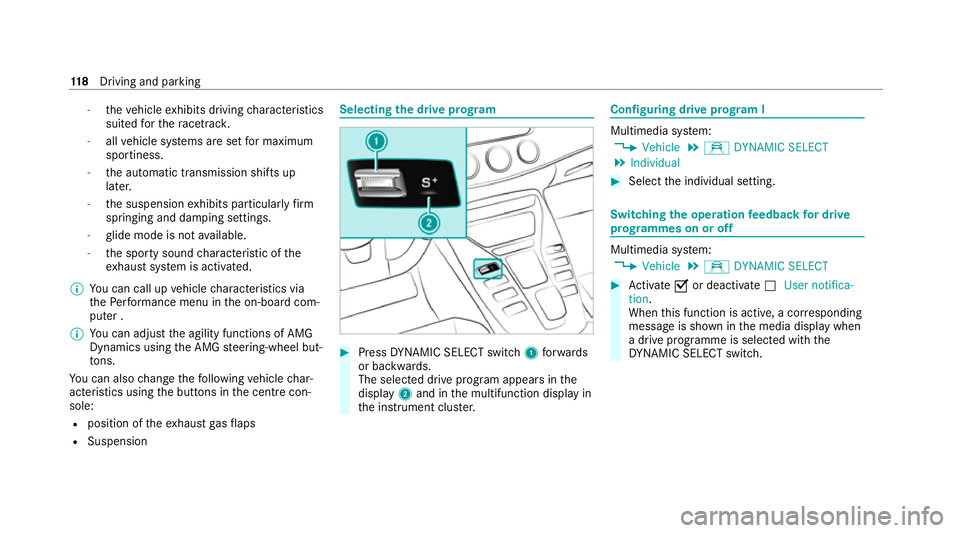
the drive prog ram #
Press DYNA MIC SELECT switch 1forw ards
or backwards.
The selec ted drive program appears in the
display 2and in the multifunction display in
th e instrument clus ter. Configuring drive prog
ram I Multimedia sy
stem:
4 Vehicle 5
e DYNAMIC SELECT
5 Individual #
Select the individual setting. Switching
the operation feedba ckfor drive
prog rammes on or off Multimedia sy
stem:
4 Vehicle 5
e DYNAMIC SELECT #
Activate Oor deacti vate ª User notifica-
tion.
When this function is active, a cor responding
message is shown in the media display when
a drive prog ramme is selected with the
DY NA MIC SELECT switch. 11 8
Driving and pa rking
Page 125 of 441
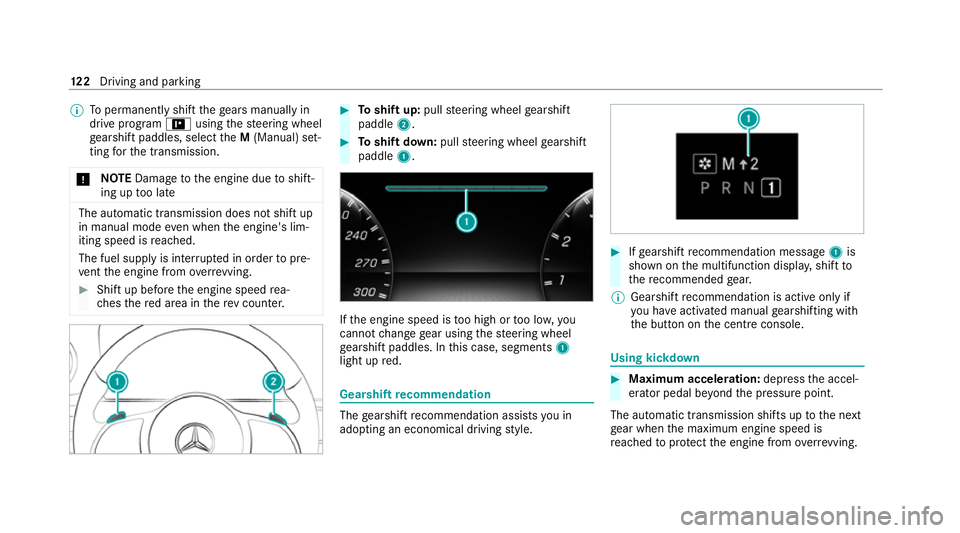
%
Topermanently shift thege ars manually in
drive prog ram = using thesteering wheel
ge arshift paddles, select theM (Manual) set‐
ting forth e transmission.
* NO
TEDama getothe engine due toshift‐
ing up too late The automatic transmission does not shift up
in manual mode
even when the engine's lim‐
iting speed is reached.
The fuel supply is inter rupte d in order topre‐
ve nt the engine from overrev ving. #
Shift up before the engine speed rea‐
ch es there d area in there v counter. #
Toshift up: pullsteering wheel gearshift
paddle 2. #
Toshift down: pullsteering wheel gearshift
paddle 1. If
th e engine speed is too high or too lo w,you
cannot change gear using thesteering wheel
ge arshift paddles. In this case, segments 1
light up red. Gearshift
recommendation The
gearshift recommendation assists you in
adopting an economical driving style. #
Ifge arshift recommendation message 1is
shown on the multifunction displa y,shift to
th ere commended gear.
% Gearshift recommendation is acti veonly if
yo u ha veactivated manual gearshifting with
th e button on the cent reconsole. Using kickdown
#
Maximum acceleration: depress the accel‐
erator pedal be yond the pressure point.
The automatic transmission shifts up tothe next
ge ar when the maximum engine speed is
re ached toprotect the engine from overrev ving. 12 2
Driving and pa rking
Page 129 of 441
#
In particula r,do not park on dry grass‐
land or har vested grain fields. &
WARNING Risk of accident and inju ry
due tochildren left unat tended in the
ve hicle
If ch ildren are left unsupervised in theve hi‐
cle, they could, in part icular:
R open doors, thereby endangering other
persons or road users.
R get out and be stru ck byoncoming traf‐
fi c.
R ope rate ve hicle equipment and become
trapped, forex ample.
In addition, thech ildren could also set the
ve hicle in motion, forex ample by:
R releasing the parking brake.
R change the transmission position.
R start theve hicle. #
Never lea vechildren unat tended in the
ve hicle. #
When leaving theve hicle, alw aysta ke
th eke y with you and lock theve hicle. #
Keep theke y out of reach of children. *
NO
TEDama getotheve hicle due toit
ro lling away #
Alw ays secure theve hicle against roll‐
ing away. #
Bring theve hicle toast andstill byapplying
th e brake pedal. #
On gradients, turn the front wheels so that
th eve hicle will rollto wa rdsth eke rb if it
st arts moving. #
App lythe electric parking brake. #
Enga getransmission position jin a station‐
ary vehicle with the brake pedal applied
(/ page 120). #
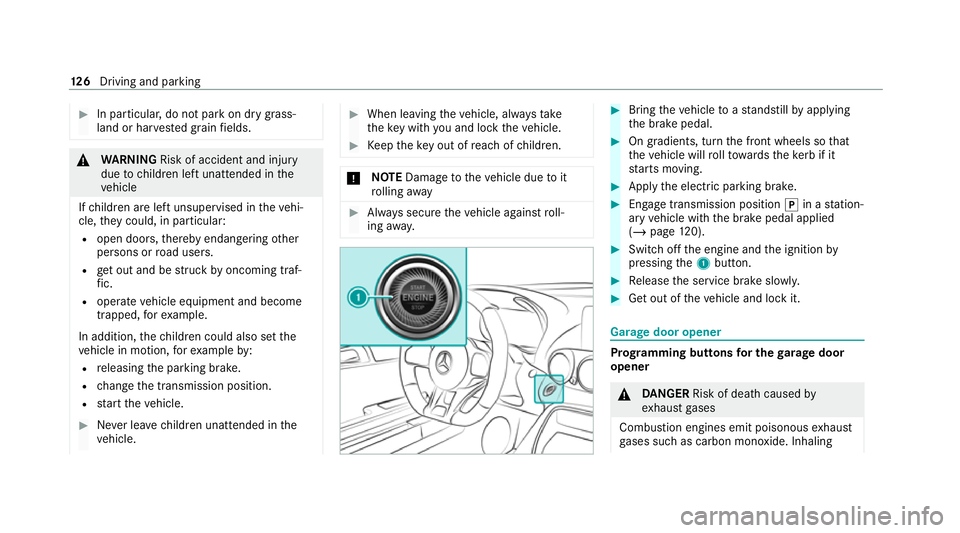
Switch off the engine and the ignition by
pressing the1 button. #
Release the service brake slowl y. #
Get out of theve hicle and lock it. Garage door opener
Prog
ramming buttons for the garage door
opener &
DANG ER Risk of death caused by
ex haust gases
Combustion engines emit poisonous exhaust
ga ses such as carbon monoxide. Inhaling 12 6
Driving and pa rking