2020 MERCEDES-BENZ AMG GT COUPE battery
[x] Cancel search: batteryPage 6 of 433

Driving and pa
rking ................................. 100
Driving ........................................................ 100
Ra cetrack opera tion ................................... 109
DY NA MIC SELECT switch ............................1 12
Au tomatic transmission .............................. 11 4
Re fuelling .................................................... 11 8
Pa rking ........................................................ 121
Driving and driving sa fety sy stems .............1 26
Ve hicle towing instructions ........................ .154 Instrument display and on-board
compu
ter.................................................. 15 6
No tes on the instrument display and on-
board computer .......................................... 15 6
Instrument display overview ...................... .157
Overview of the buttons on thesteering
wheel ..........................................................1 58
Operating the on-board computer .............. 15 8
Overview of what is shown on the multi‐
function display .......................................... 15 9
Ad justing the instrument lighting ................1 59LING
UATRONIC ......................................... 16 0
No tes on operating saf ety ...........................1 60Operation ...................................................
16 0
Using LINGU ATRO NIC ef fectively ................ 16 2
Essential voice commands .......................... 16 2 Multimedia sy
stem ................................... 174
Overview and operation .............................. 174
Sy stem settings .......................................... 183
AMG TR ACKPA CE ...................................... .193
Na vigation .................................................. 19 8
Te lephone .................................................. .224
Online and Internet functions ..................... 251
Media ......................................................... 258
Ra dio .......................................................... 270
TV ............................................................... 273
Sound ......................................................... 280 Main
tenance and care ............................. 283
ASS YST PLUS service inter val display ........ 283
Engine compartment .................................. 284
Cleaning and care ...................................... .290 Breakdown assi
stance ............................ 296
Emergency ................................................. .296 Flat tyre ...................................................... 298
Battery (vehicle) ......................................... 304
To
w- starting or towing away ....................... 309
Electrical fuses ............................................ 313 Wheels and tyres
...................................... 315
No tes on noise or unusual handling char‐
acteristics .................................................. .315
No tes on regular lyinspecting wheels and
tyres ............................................................ 315
No tes on snow chains ................................ .315
Ty re pressure .............................................. 316
Wheel change ............................................ .319
Emergency spare wheel .............................. 329 Te
ch nical data .......................................... 332
No tes on tech nical da ta.............................. 332
On-board electronics .................................. 332
Ra dio equipment appr ovals forth eve hi‐
cle components .......................................... 332
Ve hicle identification plate, VIN and
engine number overview ............................ 332
Operating fluids .......................................... 334
Ve hicle data ................................................ 339 Contents
3
Page 28 of 433
&
WARNING Risk of accident due tocon‐
necting devices tothe diagnostics con‐
nection
If yo u connect the devices tothe diagnostics
connection of theve hicle, the function of the
ve hicle sy stems and operating saf ety may be
impaired. #
Onlyconnect devices tothe diagnostics
connection of theve hicle that ha ve
been tested for suita bility and are safe. &
WARNING Risk of accident due to
objects in the driver's foot we ll
Objects in the driver's foot we ll may impede
pedal tr avel or block a depressed pedal.
This jeopardises the operating and road
saf ety of theve hicle. #
Stow all objects in theve hicle securely
so that they cannot getinto the driver's
fo ot we ll. #
Alw aysfit th efloor mats securely and
as prescribed in order toensure that th
ere is alw ays suf ficient room forthe
pedals. #
Do not use loose floor mats and do not
place floor mats on top of one ano ther. *
NO
TEBattery discharging from using
devices connected tothe diagnostics
connection Using devices at
the diagnostics connection
drains the batter y. #
Check thech arge leve l of the batter y. #
Ifth ech arge leve l is lo w,charge the
batter y,e.g. bydriving a considerable
dis tance. Connecting equipment
tothe diagnostics con‐
nection can lead toemissions monitoring infor‐
mation being reset, forex ample. This may lead
to theve hicle failing tomeet therequ irements of
th e next emissions inspection during the main
inspection. Qualified specialist
workshop
A qu alified specialist workshop has the neces‐
sary special skills, tools and qualifications to
cor rectly car ryout any necessary workon your
ve hicle. This particularly applies tosaf ety-re le‐
va nt wo rks.
Alw ays ha vethefo llowing workcar ried out on
yo ur vehicle at a qualified specialist workshop:
R safety-re leva nt wo rks
R service and maintenance work
R repair work
R modifications as well as ins tallations and
con versions
R workon electronic components
Mercedes‑AMG recommends a Mercedes‑Benz
service centre. Ve
hicle registration
Mercedes-Benz may ask its service centres to
car ryout tech nical inspections on cer tain vehi‐
cles. The quality or saf ety of theve hicle is
impr oved as a result of the inspection. General no
tes25
Page 31 of 433
In
general, this information documents thest ate
of a component part, a module, a sy stem or the
sur roundings such as:
R operating status of sy stem components (e.g.
fi ll le vels, battery status, tyre pressure)
R status messages concerning theve hicle or
its individual components (e.g. number of
wheel revo lutions/speed, longitudinal accel‐
eration, lateral acceleration, display of fas‐
te ned seat belts)
R malfunctions or faults in impor tant sy stem
components (e.g. lights, brakes)
R information on events leading tovehicle
damage
R system reactions in special driving situations
(e.g. airbag deployment, inter vention of sta‐
bility control sy stems)
R ambient conditions (e.g. temp erature, rain
sensor)
In addition toprov iding the actual control unit
function, this data assists the manufacturer in
de tecting and rectifying faults and optimising
ve hicle functions. The majority of this data is te
mp orary and is only processed in theve hicle
itself. Only a small portion of the data is stored
in theeve nt or fault memor y.
When your vehicle is serviced, tech nical da ta
from theve hicle can be read out byservice net‐
wo rkemplo yees (e.g. workshops, manufactur‐
ers) or third parties (e.g. breakdown services).
Services include, forex ample, repair services,
maintenance processes, warranty claims and
qu ality assurance measures. The read out is per‐
fo rm ed via the legally prescribed port forthe
diagnostics connection in theve hicle. The
re spective service network locations or third
parties collect, process and use the data. They
document tech nical statuses of theve hicle,
assist in finding faults and impr oving quality and
are transmitted tothe manufacturer, if neces‐
sar y.Fu rthermore, the manufacturer is subject
to product liability. Forth is, the manufacturer
requ irestech nical da tafrom vehicles.
Fa ult memories in theve hicle can be reset by a
service outlet as part of repair or maintenance
wo rk. Depending on
the selected equipment, you can
import data into vehicle con venience and info‐
ta inment functions yourself.
This includes, forex ample:
R multimedia data such as music, films or pho‐
to sfo r playback in an integrated multimedia
sy stem
R address book data for use in connection with
an integrated hands-free sy stem or an inte‐
grated navigation sy stem
R entered navigation destinations
R data about the use of internet services
This data can be sa ved locally in theve hicle or it
is located on a device which you ha veconnected
to theve hicle (e.g. a smartphone, USB flash
drive or MP3 pla yer). If this data is stored in the
ve hicle, you can dele teit at any time. This data
is sent tothird parties only at your requ est, par‐
ticular lywhen you use online services in accord‐
ance with the settings that you ha veselected.
Yo u can store or change con venience settings/
individualisations in theve hicle at any time. 28
General no tes
Page 59 of 433
pull emer
gency key2 comp lete ly out of the
key. #
Toinser t:push emer gency key2 fully into
th eke y until it en gage s.
Re lease cat ch1 must then be back in the
basic position. Re
placing the key battery &
DANG ER Serious damage tohealth
caused byswallowing batteries
Batteries contain toxic and cor rosive sub‐
st ances. Swallowing bat teries may cause
serious damage tohealth.
There is a risk of fata l injur y. #
Keep batteries out of there ach of chil‐
dren. #
If batteries are swallo wed, seek medical
attention immediately. +
ENVIRONMEN
TALNO TEEnvironmental
dama gedue toimproper disposal of bat‐
te ries Batteries conta
in pollutants. It is
illegal todispose of them with the household
ru bbish. #
Dispose of batteries of in an
environmen tally responsible manner.
Ta ke dischar ged batteries toaqu alified
specialist workshop or toa collection
point for used batteries. Re
quirements:
R Yourequ ire a CR2025 3 V cell batter y.
Mercedes-Benz recommends that you ha vethe
battery replaced at a qualified specialist work‐
shop. #
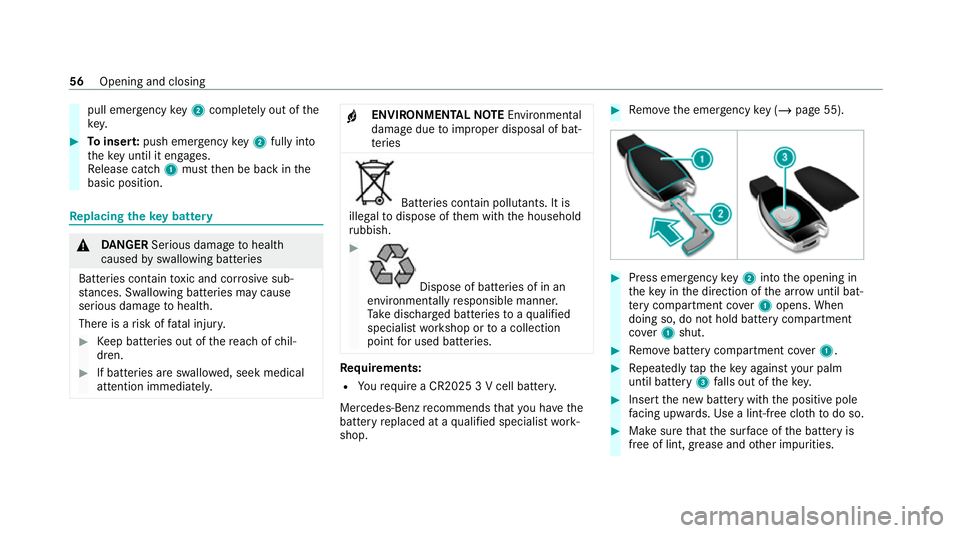
Remo vethe emer gency key ( / page 55). #
Press eme rgency key2 into the opening in
th eke y in the direction of the ar row until bat‐
te ry compa rtment co ver1 opens. When
doing so, do not hold battery compartment
co ver1 shut. #
Remo vebattery compartment co ver1. #
Repeatedly taptheke y again styour palm
until bat tery 3 falls out of thekey. #
Insert the new battery with the positive pole
fa cing up wards. Use a lint-free clo thtodo so. #
Make sure that the sur face of the battery is
free of lint, grease and other impurities. 56
Opening and closing
Page 60 of 433

#
Insert the front tabs of battery compartment
co ver1 into the housing and then press to
close it. #
Insert emergency key2 into thekey. Problems with
thekey Yo
u can no lon ger lo ckor unlock theve hicle
Po ssible causes:
R The key bat tery iswe ak or dischar ged.
R The key is faulty. #
Check the battery using the indicator lamp
and replace if necessary (/ page 56).#
Use the emer gency keyto lock or unlock
(/ page 55). #
Have theke ych ecked at a qualified specialist
wo rkshop.
There is inter fere nce from a po werful radio
signal source
The key function is impaired by,fo rex ample:
R high voltage po wer lines
R mobile phones R
electronic devices (No tebooks, Tablets)
R shielding due tome tal objects or induction
loops for electrical gatesystems or auto‐
matic bar riers #
Make sure that there is a suf ficient dist ance
between theke y and the po tential sou rce of
inter fere nce.
Yo u ha velost a key #
Have theke y deactiva ted at a qualified spe‐
cialist workshop. #
If necessar y,ha ve the mechanical lock
re placed as well. Doors
Note
s onthe additional door lock The additional door lock is only
available for
ve hicles forth eUni ted Kingdom. &
WARNING Risk of injury topersons
inside theve hicle when the additional
door lock is activated
If th e additional door lock is activated, the
doors can no longer be opened from the
inside. #
Never lea vepersons, in particular chil‐
dren, unat tended in theve hicle. #
Ifth ere are persons in theve hicle, do
not activate the additional door loc k. The additional door lock is automatically activa‐
te
d in thefo llowing situations:
R The vehicle is loc ked using thekey.
R The vehicle is loc ked using KEYLESS-GO.
If th eve hicle has been loc ked via Mercedes me
connect, the additional door lock is not activa‐
te d.
If th e additional door lock is activated, the doors
cann otbe opened from the inside.
% After locking you can issue a signal with the
horn. Opening and closing
57
Page 62 of 433
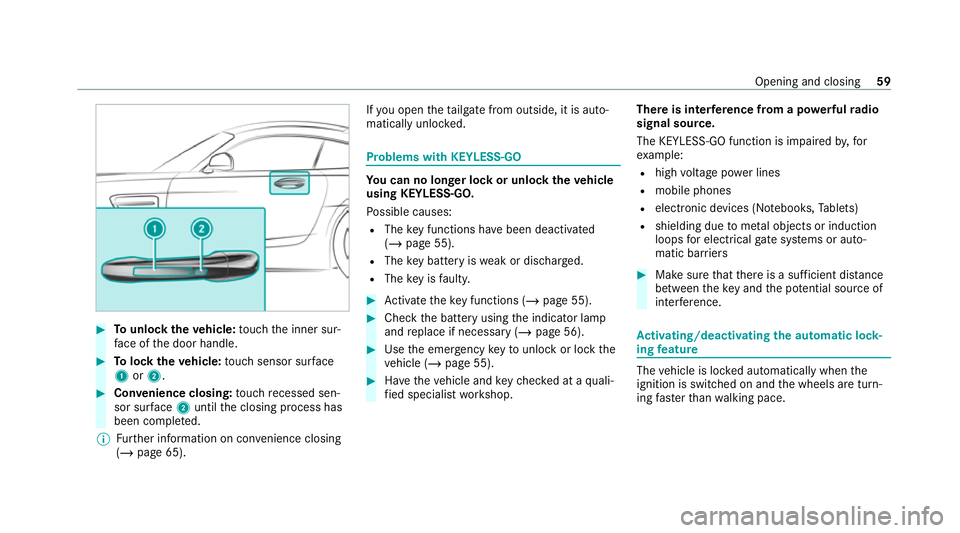
#
Tounlo cktheve hicle: touch the inner sur‐
fa ce of the door handle. #
Tolock theve hicle: touch sensor sur face
1 or2. #
Convenience closing: touch recessed sen‐
sor su rface 2until the closing process has
been comple ted.
% Further information on con venience closing
(/ page 65). If
yo u open theta ilgate from outside, it is auto‐
matically unloc ked. Problems with KEYLESS-GO
Yo
u can no lon ger lo ckor unlock theve hicle
using KEYLESS-GO.
Po ssible causes:
R The key functions ha vebeen deactivated
(/ page 55).
R The key bat tery iswe ak or dischar ged.
R The key is faulty. #
Activate theke y functions (/ page 55). #
Check the battery using the indicator lamp
and replace if necessary (/ page 56). #
Use the emer gency keyto unlo ckor lock the
ve hicle (/ page 55). #
Have theve hicle and keych ecked at a quali‐
fi ed specialist workshop. There is inter
fere nce from a po werful radio
signal source.
The KEYLESS-GO function is impaired by,for
ex ample:
R high voltage po wer lines
R mobile phones
R electronic devices (No tebooks, Tablets)
R shielding due tome tal objects or induction
loops for electrical gate systems or auto‐
matic bar riers #
Make sure that there is a suf ficient dist ance
between theke y and the po tential sou rce of
inter fere nce. Ac
tivating/deactivating the automatic lo ck‐
ing feature The
vehicle is loc ked automatically when the
ignition is switched on and the wheels are turn‐
ing fast erthan walking pace. Opening and closing
59
Page 69 of 433
#
When the con venience closing feature
is operating, monitor the entire closing
process and make sure that no body
parts are in the closing area. #
Press and hold theß button on thekey.
The following functions are per form ed:
R The vehicle is loc ked.
R The side windo wsare closed. #
Tointer rupt convenience closing: release
th eß button.
% Con venience closing can also be operated
wi th KEYLESS-GO (/ page 58).Problems with
the side windo ws &
WARNING Risk of becoming trapped or
fa tal ly inju red if reve rsing pr otection is
not activated
If yo u close a side wind owagain immediately
af te r it has been bloc ked, the side window
will close with increased or maximum forc e. The
reve rsing function is then not active and
body parts may become trapped. #
Make sure that no parts of the body are
in the closing area. #
Tostop the closing process, release the
button or press the button again to
re open the side windo w. A side wind
owcann otbe closed and you can‐
not see the cause. #
Check tosee whe ther any objects are in the
window guide. #
Adjust the side windo ws.
Ad justing the side windo ws
If a side window is obstructed during closing and
re opens again immediately: #
Immediately af terth is, pull the cor respond‐
ing button again until the side window has
closed and hold the button for at least one
more second (re-adjustment).
The side window will be closed without the
automatic reve rsing function. If
th e side window is obstructed again and
re opens again immediately: #
Immediately af terth is, pull the cor respond‐
ing button again until the side window has
closed and hold the button for at least one
more second (follo w-up adjustment).
The side wind owwill be closed without the
automatic reve rsing function.
The side windo wscann otbe opened or
closed using the con venience opening fea‐
ture.
R The key bat tery iswe ak or dischar ged. #
Check the battery using the indicator lamp
and replace if necessary (/ page 56).66
Opening and closing
Page 90 of 433

Exterior lighting
Note
s onchanging the lights when driving
abroad It is not necessary
toadjust the headlamps. The
legal requirements are also met in countries in
which traf fic drives on theot her side of thero ad. Information about lighting sy
stems and your
re sponsibility The
various lighting sy stems of theve hicle are
only aids. The driver of theve hicle is responsible
fo r cor rect vehicle illumination in accordance
with the pr evailing light and visibility conditions,
legal requirements and traf fic situation. Light switch
Ope
rating the light switch 1
W Left-hand pa rking lights
2 X Right-hand parking lights
3 T Standing lights and licence plate light‐
ing
4 Ã Automatic driving lights (prefer red light
switch position) 5
L Low beam/high beam
6 R Switches there ar fog light on/off
When low beam is activated, the indicator lamp
fo rth est anding lights Twill be deactivated
and replaced bythe lo w-beam indicator lamp
L. #
Alw ays park your vehicle safely using suf fi‐
cient lighting, in acco rdance with there le‐
va nt le galst ipulations.
* NO
TEBattery discharging byoperating
th est anding lights Operating
thest anding lights over a period of
hours puts a stra in on the batter y. #
Where possible, switch on the
ri ght X or left Wparking light. In
theeve nt of se vere battery discharging, the
st anding lights or parking lights will be swit ched
off automatically tofacilitate the next engine
st art. Light and sight
87